Excel2013: Model Logistic MLE 1Y1X Sept 2015 V1A V1A V1A - - PDF document

excel2013 model logistic mle 1y1x sept 2015 v1a
SMART_READER_LITE
LIVE PREVIEW

Excel2013: Model Logistic MLE 1Y1X Sept 2015 V1A V1A V1A - - PDF document

Excel2013: Model Logistic MLE 1Y1X Sept 2015 V1A V1A V1A Excel2013 Model Logistic MLE 1Y1X Slides 1 Excel2013 Model Logistic MLE 1Y1X Slides 2 Model Logistic Regression Background & Goals MLE 1Y1X in Excel 2013 Modelling a binary


slide-1
SLIDE 1

Excel2013: Model Logistic MLE 1Y1X Sept 2015 V1A Excel2013-Model-Logistic-MLE-1Y1X-Slides.pdf 1

Excel2013 Model Logistic MLE 1Y1X Slides

V1A 1

by Milo Schield Member: International Statistical Institute US Rep: International Statistical Literacy Project Director, W. M. Keck Statistical Literacy Project

Slides and data at: www.StatLit.org/ pdf/Excel2013-Model-Logistic-MLE-1Y1X-Slides.pdf xls/Excel2013-Model-Logistic-MLE-1Y1X-Data.xlsx

Model Logistic Regression MLE 1Y1X in Excel 2013

Excel2013 Model Logistic MLE 1Y1X Slides

V1A 2

Background & Goals

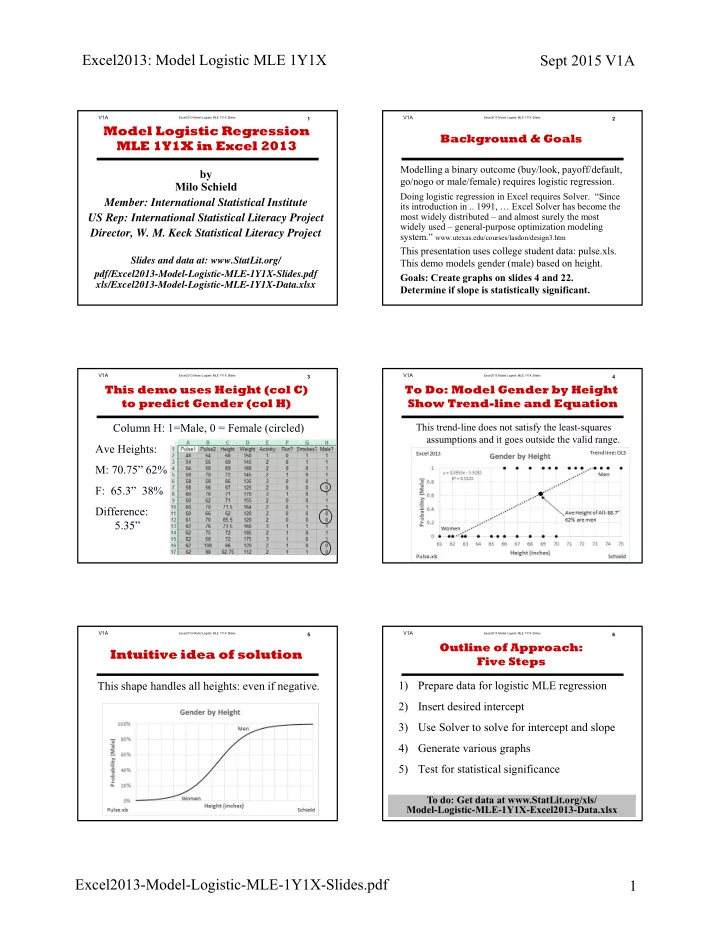
Modelling a binary outcome (buy/look, payoff/default, go/nogo or male/female) requires logistic regression.

Doing logistic regression in Excel requires Solver. “Since its introduction in .. 1991, … Excel Solver has become the most widely distributed – and almost surely the most widely used – general-purpose optimization modeling system.” www.utexas.edu/courses/lasdon/design3.htm

This presentation uses college student data: pulse.xls. This demo models gender (male) based on height. Goals: Create graphs on slides 4 and 22. Determine if slope is statistically significant.

Excel2013 Model Logistic MLE 1Y1X Slides

V1A

Column H: 1=Male, 0 = Female (circled) Ave Heights: M: 70.75” 62% F: 65.3” 38% Difference: 5.35”

3

This demo uses Height (col C) to predict Gender (col H)

Excel2013 Model Logistic MLE 1Y1X Slides

V1A 4

To Do: Model Gender by Height Show Trend-line and Equation

This trend-line does not satisfy the least-squares assumptions and it goes outside the valid range. but it does pass through the joint mean.

Excel2013 Model Logistic MLE 1Y1X Slides

V1A 5

Intuitive idea of solution

This shape handles all heights: even if negative.

Excel2013 Model Logistic MLE 1Y1X Slides

V1A

1) Prepare data for logistic MLE regression 2) Insert desired intercept 3) Use Solver to solve for intercept and slope 4) Generate various graphs 5) Test for statistical significance

6

Outline of Approach: Five Steps

To do: Get data at www.StatLit.org/xls/ Model-Logistic-MLE-1Y1X-Excel2013-Data.xlsx

slide-2
SLIDE 2

Excel2013: Model Logistic MLE 1Y1X Sept 2015 V1A Excel2013-Model-Logistic-MLE-1Y1X-Slides.pdf 2

Excel2013 Model Logistic MLE 1Y1X Slides

V1A 7

1a) Load Data; Hide columns; Enter formula Hide columns A-B and D-G. Let I2=1; J2=0 Enter formula in M2-Q2 and J4

Excel2013 Model Logistic MLE 1Y1X Slides

V1A 8

1b) Select M2:Q2. Pull ↓ to 93 Copy/Paste Value of J4 onto J5

Odds = Prob(Y=1)/[1-Prob(Y=1)] Range: 0 to infinity Logit = LN(Odds). Range: -infinity to +infinity. Logistic regress: Logit = Intercept + Slope*Height

Excel2013 Model Logistic MLE 1Y1X Slides

V1A 9

1c) Review/Analyze Intercept of 1 gives P(Y = 1 = male) = 73%. But 62% of these students are male. Step 2: Adjust intercept so P(Y=1) = 62%.

Excel2013 Model Logistic MLE 1Y1X Slides

V1A 10

2a) Calculate Intercept2 Paste Value into I2 .

Excel2013 Model Logistic MLE 1Y1X Slides

V1A 11

2b) Results are as expected: Probability of Male = 62%

If we must select a single value to predict the outcome, it would be the percentage of students who are men.

Excel2013 Model Logistic MLE 1Y1X Slides

V1A

Copy “Sum LnLk” from J4 to clipboard. Paste-Special Value in J6

12

2c) Copy sum of Ln-Lk-OK Copy J4; Paste value into J6

Now solve for the slope in logistic regression

slide-3
SLIDE 3

Excel2013: Model Logistic MLE 1Y1X Sept 2015 V1A Excel2013-Model-Logistic-MLE-1Y1X-Slides.pdf 3

Excel2013 Model Logistic MLE 1Y1X Slides

V1A

.

13

3a) Solve for Slope and Intercept From Data menu, select Solver

Excel2013 Model Logistic MLE 1Y1X Slides

V1A 14

3b) Set Solver Parameters

Select Intercept and slope (I2:J2) in “Changing Variable Cells”.

Excel2013 Model Logistic MLE 1Y1X Slides

V1A 15

3c) Results: All constraints and conditions are satisfied .

Excel2013 Model Logistic MLE 1Y1X Slides

V1A

Misclassified

16

3d) Error in row 6: short guy. Classified gals in 7, 11 & 12 OK

Excel2013 Model Logistic MLE 1Y1X Slides

V1A 17

3e) Prepare to test slope for statistical significance From J4, copy “Sum LnLk” to clipboard. Paste-Special Value onto J7.

Excel2013 Model Logistic MLE 1Y1X Slides

V1A 18

4a) Prepare data for Graphs

Start Ht-Graph at minimum of height in S2 Enter formulas for Logit, Odds and Prob(Y=1).

slide-4
SLIDE 4

Excel2013: Model Logistic MLE 1Y1X Sept 2015 V1A Excel2013-Model-Logistic-MLE-1Y1X-Slides.pdf 4

Excel2013 Model Logistic MLE 1Y1X Slides

V1A

Select T2:V2. Drag down 1 row Select S2:V3. Drag to bottom Select columns S & V for logistic graph.

19

4b) Prepare X and Y data. X is Height. Y is Prob (Y=1)

Excel2013 Model Logistic MLE 1Y1X Slides

V1A

Original data: Col C & H; Logistic data: Col S & V

20

4c) Graph Logistic Regression

  • f Gender by Height.

Logistic data Marker No; Line Yes Marker Yes; Line No Original data

Excel2013 Model Logistic MLE 1Y1X Slides

V1A

Calculate difference with ‘full’; multiply by -2.

Conduct a right-tail Chi2 test with 1 degree freedom.

Slope is statistically significant: P-value < 0.05

21

5) Hypothesis test: Is non-zero slope statistically significant?

Excel2013 Model Logistic MLE 1Y1X Slides

V1A

ACKNOWLEDGMENT:

This presentation closely follows the Carlberg (2012) presentation in Chapter 2: pages 21-52. These slides present the how – step by step –

  • f logistic regression for a single case.

Carlberg (2012) discusses the how and the why. Schield introduced the shortcut on slide 10.

REFERENCE: Carlberg, Conrad (2012). Decision Analytics: Microsoft Excel. Que Publishing.

22

Acknowledgment and Reference

slide-5
SLIDE 5

Excel2013 Model Logistic MLE 1Y1X Slides

V1A

by Milo Schield Member: International Statistical Institute US Rep: International Statistical Literacy Project Director, W. M. Keck Statistical Literacy Project

Slides and data at: www.StatLit.org/ pdf/Excel2013-Model-Logistic-MLE-1Y1X-Slides.pdf xls/Excel2013-Model-Logistic-MLE-1Y1X-Data.xlsx

Model Logistic Regression MLE 1Y1X in Excel 2013

1

slide-6
SLIDE 6

Excel2013 Model Logistic MLE 1Y1X Slides

V1A 2

Background & Goals

Modelling a binary outcome (buy/look, payoff/default, go/nogo or male/female) requires logistic regression.

Doing logistic regression in Excel requires Solver. “Since its introduction in .. 1991, … Excel Solver has become the most widely distributed – and almost surely the most widely used – general-purpose optimization modeling system.” www.utexas.edu/courses/lasdon/design3.htm

This presentation uses college student data: pulse.xls. This demo models gender (male) based on height. Goals: Create graphs on slides 4 and 22. Determine if slope is statistically significant.

slide-7
SLIDE 7

Excel2013 Model Logistic MLE 1Y1X Slides

V1A

Column H: 1=Male, 0 = Female (circled) Ave Heights: M: 70.75” 62% F: 65.3” 38% Difference: 5.35”

3

This demo uses Height (col C) to predict Gender (col H)

slide-8
SLIDE 8

Excel2013 Model Logistic MLE 1Y1X Slides

V1A 4

To Do: Model Gender by Height Show Trend-line and Equation

This trend-line does not satisfy the least-squares assumptions and it goes outside the valid range. but it does pass through the joint mean.

slide-9
SLIDE 9

Excel2013 Model Logistic MLE 1Y1X Slides

V1A 5

Intuitive idea of solution

This shape handles all heights: even if negative.

slide-10
SLIDE 10

Excel2013 Model Logistic MLE 1Y1X Slides

V1A

1) Prepare data for logistic MLE regression 2) Insert desired intercept 3) Use Solver to solve for intercept and slope 4) Generate various graphs 5) Test for statistical significance

6

Outline of Approach: Five Steps

To do: Get data at www.StatLit.org/xls/ Model-Logistic-MLE-1Y1X-Excel2013-Data.xlsx

slide-11
SLIDE 11

Excel2013 Model Logistic MLE 1Y1X Slides

V1A 7

1a) Load Data; Hide columns; Enter formula Hide columns A-B and D-G. Let I2=1; J2=0 Enter formula in M2-Q2 and J4

slide-12
SLIDE 12

Excel2013 Model Logistic MLE 1Y1X Slides

V1A 8

1b) Select M2:Q2. Pull ↓ to 93 Copy/Paste Value of J4 onto J5

Odds = Prob(Y=1)/[1-Prob(Y=1)] Range: 0 to infinity Logit = LN(Odds). Range: -infinity to +infinity. Logistic regress: Logit = Intercept + Slope*Height

slide-13
SLIDE 13

Excel2013 Model Logistic MLE 1Y1X Slides

V1A 9

1c) Review/Analyze Intercept of 1 gives P(Y = 1 = male) = 73%. But 62% of these students are male. Step 2: Adjust intercept so P(Y=1) = 62%.

slide-14
SLIDE 14

Excel2013 Model Logistic MLE 1Y1X Slides

V1A 10

2a) Calculate Intercept2 Paste Value into I2 .

slide-15
SLIDE 15

Excel2013 Model Logistic MLE 1Y1X Slides

V1A 11

2b) Results are as expected: Probability of Male = 62%

If we must select a single value to predict the outcome, it would be the percentage of students who are men.

slide-16
SLIDE 16

Excel2013 Model Logistic MLE 1Y1X Slides

V1A

Copy “Sum LnLk” from J4 to clipboard. Paste-Special Value in J6

12

2c) Copy sum of Ln-Lk-OK Copy J4; Paste value into J6

Now solve for the slope in logistic regression

slide-17
SLIDE 17

Excel2013 Model Logistic MLE 1Y1X Slides

V1A

.

13

3a) Solve for Slope and Intercept From Data menu, select Solver

slide-18
SLIDE 18

Excel2013 Model Logistic MLE 1Y1X Slides

V1A 14

3b) Set Solver Parameters

Select Intercept and slope (I2:J2) in “Changing Variable Cells”.

slide-19
SLIDE 19

Excel2013 Model Logistic MLE 1Y1X Slides

V1A 15

3c) Results: All constraints and conditions are satisfied .

slide-20
SLIDE 20

Excel2013 Model Logistic MLE 1Y1X Slides

V1A

Misclassified

16

3d) Error in row 6: short guy. Classified gals in 7, 11 & 12 OK

slide-21
SLIDE 21

Excel2013 Model Logistic MLE 1Y1X Slides

V1A 17

3e) Prepare to test slope for statistical significance From J4, copy “Sum LnLk” to clipboard. Paste-Special Value onto J7.

slide-22
SLIDE 22

Excel2013 Model Logistic MLE 1Y1X Slides

V1A 18

4a) Prepare data for Graphs

Start Ht-Graph at minimum of height in S2 Enter formulas for Logit, Odds and Prob(Y=1).

slide-23
SLIDE 23

Excel2013 Model Logistic MLE 1Y1X Slides

V1A

Select T2:V2. Drag down 1 row Select S2:V3. Drag to bottom Select columns S & V for logistic graph.

19

4b) Prepare X and Y data. X is Height. Y is Prob (Y=1)

slide-24
SLIDE 24

Excel2013 Model Logistic MLE 1Y1X Slides

V1A

Original data: Col C & H; Logistic data: Col S & V

20

4c) Graph Logistic Regression

  • f Gender by Height.

Logistic data Marker No; Line Yes Marker Yes; Line No Original data

slide-25
SLIDE 25

Excel2013 Model Logistic MLE 1Y1X Slides

V1A

Calculate difference with ‘full’; multiply by -2.

Conduct a right-tail Chi2 test with 1 degree freedom.

Slope is statistically significant: P-value < 0.05

21

5) Hypothesis test: Is non-zero slope statistically significant?

slide-26
SLIDE 26

Excel2013 Model Logistic MLE 1Y1X Slides

V1A

ACKNOWLEDGMENT:

This presentation closely follows the Carlberg (2012) presentation in Chapter 2: pages 21-52. These slides present the how – step by step –

  • f logistic regression for a single case.

Carlberg (2012) discusses the how and the why. Schield introduced the shortcut on slide 10.

REFERENCE: Carlberg, Conrad (2012). Decision Analytics: Microsoft Excel. Que Publishing.

22

Acknowledgment and Reference