
XL4B: Logistic Regression using OLS1B in Excel 2013 25 Feb 2018 V0C-2x 2017-Schield-Logistic-OLS1B-Excel2013-Slides.pdf 1
2015 Schield Logistic Regression using OLS1B in Excel2013 XL4B: V0C-2x 1by Milo Schield Member: International Statistical Institute US Rep: International Statistical Literacy Project Director, W. M. Keck Statistical Literacy Project
Slides, output and data at: www.StatLit.org/ pdf/2017-Schield-Logistic-OLS1B-Excel2013-Slides.pdf pdf/2017-Schield-Logistic-OLS1B-Excel2013-Demo.pdf Excel/2017-Schield-Logistic-OLS1B-Excel2013-Data.xlsx
Logistic Model using OLS1: Gender vs. Height & Smoker
2015 Schield Logistic Regression using OLS1B in Excel2013 XL4B: V0C-2x 2Background & Goals
Modelling a binary outcome (loan vs. no-loan) uses a logistic curve/model to avoid meaningless predictions. Doing an exact logistic regression in Excel requires Solver and involves many steps. For details, see
www.statlit.org/pdf/Excel2013-Schield-Logistic-MLE1A-Slides.pdf
This approach uses a nudge approximation: OLS1. By adjusting the binary outcomes and using a logistic model, OLS regression generates a fairly good fit. Assignment: Create the logistic model (slide 9) and the logistic graph (slide 12).
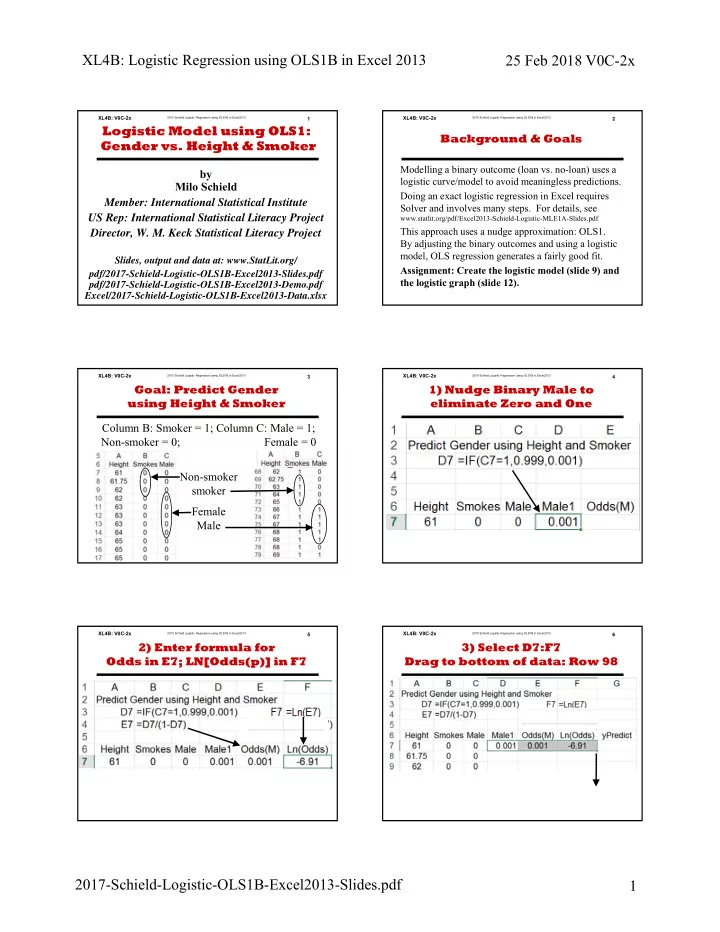
2015 Schield Logistic Regression using OLS1B in Excel2013 XL4B: V0C-2xColumn B: Smoker = 1; Column C: Male = 1; Non-smoker = 0; Female = 0 Non-smoker smoker Female Male
3Goal: Predict Gender using Height & Smoker
2015 Schield Logistic Regression using OLS1B in Excel2013 XL4B: V0C-2x.
41) Nudge Binary Male to eliminate Zero and One
2015 Schield Logistic Regression using OLS1B in Excel2013 XL4B: V0C-2x.
52) Enter formula for Odds in E7; LN[Odds(p)] in F7
2015 Schield Logistic Regression using OLS1B in Excel2013 XL4B: V0C-2x 63) Select D7:F7 Drag to bottom of data: Row 98
.