XL4A: Logistic Model using OLS1A in Excel 2013 1 Mar 2017 V0E 2x - - PDF document

xl4a logistic model using ols1a in excel 2013 1 mar 2017
SMART_READER_LITE
LIVE PREVIEW

XL4A: Logistic Model using OLS1A in Excel 2013 1 Mar 2017 V0E 2x - - PDF document

XL4A: Logistic Model using OLS1A in Excel 2013 1 Mar 2017 V0E 2x XL4A: V0E2x XL4A: V0E2x 2015 Schield Logistic Regression using OLS1A in Excel2013 1 2015 Schield Logistic Regression using OLS1A in Excel2013 2 Logistic Regression Background


slide-1
SLIDE 1

XL4A: Logistic Model using OLS1A in Excel 2013 1 Mar 2017 V0E 2x 2015-Schield-Logistic-OLS1A-Excel2013-Slides.pdf 1

2015 Schield Logistic Regression using OLS1A in Excel2013

XL4A: V0E2x 1

by Milo Schield Member: International Statistical Institute US Rep: International Statistical Literacy Project Director, W. M. Keck Statistical Literacy Project

Slides, output and data at: www.StatLit.org/ pdf/2015-Schield-Logistic-OLS1A-Excel2013-Slides.pdf pdf/2015-Schield-Logistic-OLS1A-Excel2013-Demo.pdf Excel/2015-Schield-Logistic-OLS1A-Excel2013-Data.xlsx

Logistic Regression using OLS1A in Excel 2013

2015 Schield Logistic Regression using OLS1A in Excel2013

XL4A: V0E2x 2

Background & Goals

Modelling a binary outcome (loan vs. no-loan) requires logistic regression to avoid meaningless predictions. Doing an exact logistic regression in Excel requires Solver and involves many steps. For details, see

www.statlit.org/pdf/Excel2013-Schield-Logistic-MLE1A-Slides.pdf

This presentation uses an approximation: OLS1. By slightly adjusting the binary outcomes, one can use OLS regression to solve for a good logistic model. Assignment: Create the logistic model (slide 9) and the logistic graph (slide 12).

2015 Schield Logistic Regression using OLS1A in Excel2013

XL4A: V0E2x

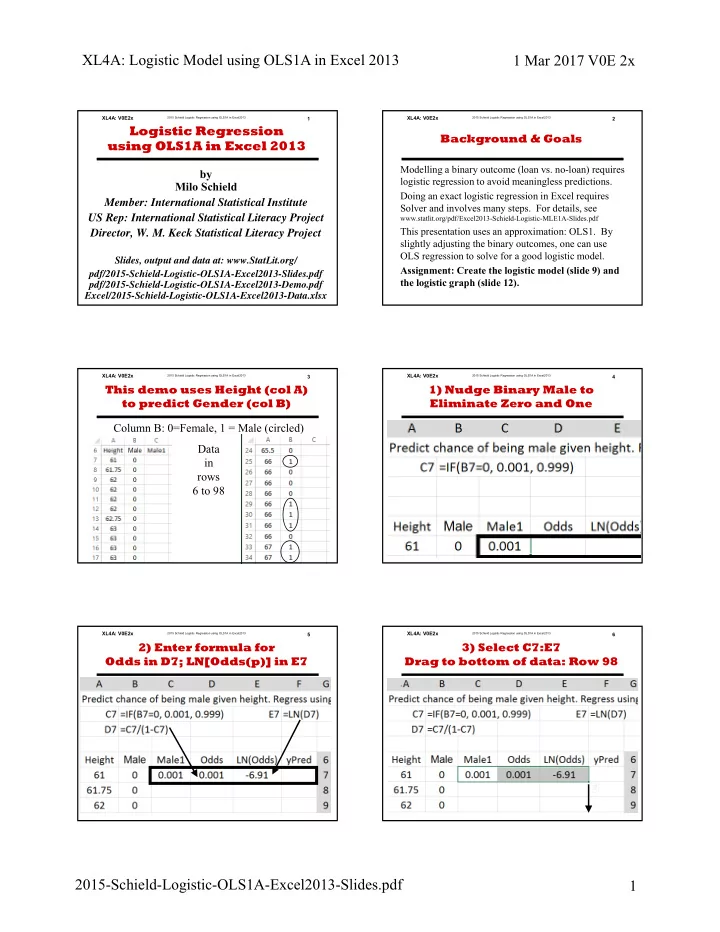
Column B: 0=Female, 1 = Male (circled) Data in rows 6 to 98

3

This demo uses Height (col A) to predict Gender (col B)

2015 Schield Logistic Regression using OLS1A in Excel2013

XL4A: V0E2x

.

4

1) Nudge Binary Male to Eliminate Zero and One

2015 Schield Logistic Regression using OLS1A in Excel2013

XL4A: V0E2x

.

5

2) Enter formula for Odds in D7; LN[Odds(p)] in E7

2015 Schield Logistic Regression using OLS1A in Excel2013

XL4A: V0E2x 6

3) Select C7:E7 Drag to bottom of data: Row 98

.

slide-2
SLIDE 2

XL4A: Logistic Model using OLS1A in Excel 2013 1 Mar 2017 V0E 2x 2015-Schield-Logistic-OLS1A-Excel2013-Slides.pdf 2

2015 Schield Logistic Regression using OLS1A in Excel2013

XL4A: V0E2x 7

A) From Data Bar, Select Data Analysis; Regression

.

2015 Schield Logistic Regression using OLS1A in Excel2013

XL4A: V0E2x 8

B) Select Data, Labels, Output Range. Press OK

.

If typing ranges gives errors, select ranges manually.

2015 Schield Logistic Regression using OLS1A in Excel2013

XL4A: V0E2x 9

C) Logistic Regression: Results Using OLS1A

Check to see that you get the same results in the boxes. Formatting is optional

2015 Schield Logistic Regression using OLS1A in Excel2013

XL4A: V0E2x

.

10

D) Generate F7: Pull F7 down to F98

2015 Schield Logistic Regression using OLS1A in Excel2013

XL4A: V0E2x 11

.

E) Insert XY Plot. Add Two Series. Male vs Height | yPred vs Height A7:A98, B7:B98 | A7:A98, F7:F98

2015 Schield Logistic Regression using OLS1A in Excel2013

XL4A: V0E2x 12

E) Insert Titles & Textboxes. Format yPred with Solid Line

.

Insert the information in two textboxes

slide-3
SLIDE 3

2015 Schield Logistic Regression using OLS1A in Excel2013

XL4A: V0E2x 1

by Milo Schield Member: International Statistical Institute US Rep: International Statistical Literacy Project Director, W. M. Keck Statistical Literacy Project

Slides, output and data at: www.StatLit.org/ pdf/2015-Schield-Logistic-OLS1A-Excel2013-Slides.pdf pdf/2015-Schield-Logistic-OLS1A-Excel2013-Demo.pdf Excel/2015-Schield-Logistic-OLS1A-Excel2013-Data.xlsx

Logistic Regression using OLS1A in Excel 2013

slide-4
SLIDE 4

2015 Schield Logistic Regression using OLS1A in Excel2013

XL4A: V0E2x 2

Background & Goals

Modelling a binary outcome (loan vs. no-loan) requires logistic regression to avoid meaningless predictions. Doing an exact logistic regression in Excel requires Solver and involves many steps. For details, see

www.statlit.org/pdf/Excel2013-Schield-Logistic-MLE1A-Slides.pdf

This presentation uses an approximation: OLS1. By slightly adjusting the binary outcomes, one can use OLS regression to solve for a good logistic model. Assignment: Create the logistic model (slide 9) and the logistic graph (slide 12).

slide-5
SLIDE 5

2015 Schield Logistic Regression using OLS1A in Excel2013

XL4A: V0E2x

Column B: 0=Female, 1 = Male (circled) Data in rows 6 to 98

3

This demo uses Height (col A) to predict Gender (col B)

slide-6
SLIDE 6

2015 Schield Logistic Regression using OLS1A in Excel2013

XL4A: V0E2x

.

4

1) Nudge Binary Male to Eliminate Zero and One

slide-7
SLIDE 7

2015 Schield Logistic Regression using OLS1A in Excel2013

XL4A: V0E2x

.

5

2) Enter formula for Odds in D7; LN[Odds(p)] in E7

slide-8
SLIDE 8

2015 Schield Logistic Regression using OLS1A in Excel2013

XL4A: V0E2x 6

3) Select C7:E7 Drag to bottom of data: Row 98

.

slide-9
SLIDE 9

2015 Schield Logistic Regression using OLS1A in Excel2013

XL4A: V0E2x 7

A) From Data Bar, Select Data Analysis; Regression

.

slide-10
SLIDE 10

2015 Schield Logistic Regression using OLS1A in Excel2013

XL4A: V0E2x 8

B) Select Data, Labels, Output Range. Press OK

.

If typing ranges gives errors, select ranges manually.

slide-11
SLIDE 11

2015 Schield Logistic Regression using OLS1A in Excel2013

XL4A: V0E2x 9

C) Logistic Regression: Results Using OLS1A

Check to see that you get the same results in the boxes. Formatting is optional

slide-12
SLIDE 12

2015 Schield Logistic Regression using OLS1A in Excel2013

XL4A: V0E2x

.

10

D) Generate F7: Pull F7 down to F98

slide-13
SLIDE 13

2015 Schield Logistic Regression using OLS1A in Excel2013

XL4A: V0E2x 11

.

E) Insert XY Plot. Add Two Series. Male vs Height | yPred vs Height A7:A98, B7:B98 | A7:A98, F7:F98

slide-14
SLIDE 14

2015 Schield Logistic Regression using OLS1A in Excel2013

XL4A: V0E2x 12

E) Insert Titles & Textboxes. Format yPred with Solid Line

.

Insert the information in two textboxes