15-441/641: Cellular Networks How different from WiFi? and Mobility - - PowerPoint PPT Presentation

15 441 641 cellular networks
SMART_READER_LITE
LIVE PREVIEW

15-441/641: Cellular Networks How different from WiFi? and Mobility - - PowerPoint PPT Presentation

11/20/2019 Overview Cellular networks 15-441/641: Cellular Networks How different from WiFi? and Mobility Overview of technologies Mobility 15-441 Fall 2019 Profs Peter Steenkiste & Justine Sherry The Internet


slide-1
SLIDE 1

11/20/2019 1

15-441/641: Cellular Networks and Mobility

15-441 Fall 2019 Profs Peter Steenkiste & Justine Sherry Fall 2019 https://computer-networks.github.io/fa19/

2

Overview

  • Cellular networks
  • How different from WiFi?
  • Overview of technologies
  • Mobility
  • The Internet
  • Cellular

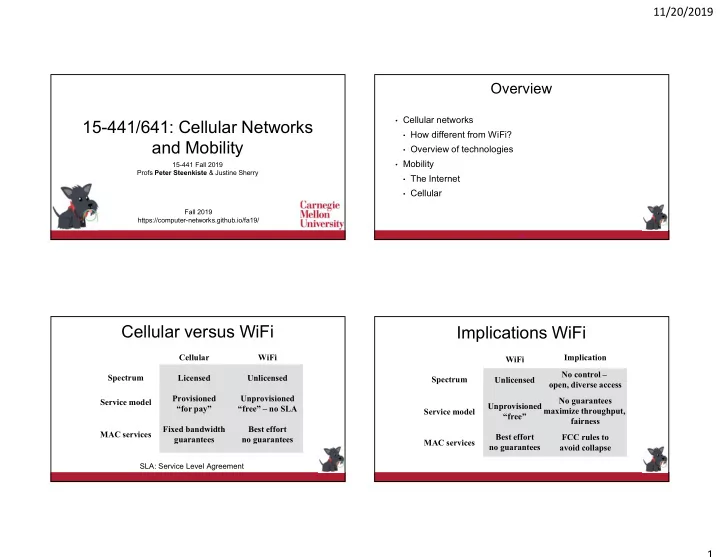
Cellular versus WiFi

Spectrum Service model MAC services Cellular Licensed Provisioned “for pay” Fixed bandwidth guarantees WiFi Unlicensed Unprovisioned “free” – no SLA Best effort no guarantees

SLA: Service Level Agreement

Implication No control –

  • pen, diverse access

No guarantees maximize throughput, fairness FCC rules to avoid collapse

Implications WiFi

Spectrum Service model MAC services WiFi Unlicensed Unprovisioned “free” Best effort no guarantees

slide-2
SLIDE 2

11/20/2019 2

Implications Cellular

Spectrum Service model MAC services Cellular Licensed Provisioned “for pay” Fixed bandwidth SLAs Implication Provider has control

  • ver interference

Can and must charge + make commitments TDMA, FDMA, CDMA; access control

But There are Many Similarities

  • Cellular and WiFi face the same fundamental physical layer

challenges

  • Interference, attenuation, multi-path, …
  • Spatial frequency reuse based on “cells”
  • Adjacent cells use different frequencies
  • Over time, they use similar modulation schemes
  • Each generation uses the best technology available at that time
  • Rapid improvements in throughputs
  • Better modulation and coding, increasingly aggressive MIMO, …

6

The Cellular Idea

  • In December 1947 Donald H. Ring outlined the idea in a Bell labs

memo

  • Split an area into cells, each with their own low power towers
  • Each cell would use its own frequency
  • Did not take off due to “extreme-at-the-time” processing needs
  • Handoff for thousands of users
  • Rapid switching infeasible – maintain call while changing

frequency

  • Technology not ready

The MTS network

http://www.privateline.com/PCS/images/SaintLouis2.gif

slide-3
SLIDE 3

11/20/2019 3

… the Remaining Components

  • In December 1947 the transistor was invented by William

Shockley, John Bardeen, and Walter Brattain

  • Why no portable phones at that time?
  • A mobile phone needs to send a signal – not just receive and

amplify

  • The energy required for a mobile phone transmission still too high

for the high power/high tower approach – could only be done with a car battery

… and the Regulatory Bodies

The FCC commissioner Robert E. Lee said that mobile phones were a status symbol and worried that every family might someday believe that its car had to have one. Lee called this a case of people “frivolously using spectrum” simply because they could afford to. From The Cell-Phone Revolution, AmericanHeritage.com

DynaTAC8000X: the First Cell Phone

The “brick”:

  • weighed 2 pounds,
  • offered 30 mins of talk time for

every recharging and

  • sold for $3,995!

It took 10 years to develop (1973- 1983) and cost $100 million! (delay due to infrastructure) Size primarily determined by the size

  • f batteries, antennas, keypads, etc.

Today size determined by the UI!

  • Dr. Martin Cooper of Motorola, made the first US

analogue mobile phone call on a larger prototype model in 1973

Early Cellular Standards

  • 1G systems: analog voice
  • Not unlike a wired voice line (without the wire)
  • Pure FDMA: each voice channel gets two frequencies (up, down)
  • 2G systems: digital voice
  • Big step forward!
  • Allows for: Error correction, compression, encryption
  • 2G example: GSM, most widely deployed, 200 countries, a billion people
  • Uses a combination of TDMA and FDMA
  • Version 2.5 also supported data using General Packet Radio Service

(GPRS)
slide-4
SLIDE 4

11/20/2019 4

1 2 4 3 5 6 7 1 2 3 4 1 2 4 3 5 6 7 1 2 3 4 1 2 4 3 5 6 7 1 2 3 4 1 2 4 3 5 6 7 1 2 3 4

Uplink Downlink

User1 Voice User2 Voice User3 GPRS User4 GPRS User5 GPRS

F1 F2 F3 F4 F1 F2 F3 F4

Time Slot Carrier frequency

GPRS Radio Interface

Slots centrally scheduled by cell tower - Control slots

Next Generation Cellular Standards

  • 3G: voice (circuit-switched) and data (packet-switched)
  • Several standards
  • Most use Code Division Multiple Access (CDMA)
  • 4G: 10 Mbps and up, seamless mobility between different

cellular technologies

  • LTE the dominating technology
  • Completely packet switched, voice sent as packets
  • Uses Orthogonal Frequency Division Multiplexing (OFDM) for

increased robustness wrt. frequency selective fading and mobility

High Level Features LTE

  • Provides an IP-based data network
  • No longer supports circuit-based voice support
  • Voice layers on top of data backbone using “Voice of LTE”
  • Still uses FDMA/TDMA based resource allocation - guarantees

LTE Architecture

  • Separates Radio Access Network from Core

Network – can evolve independently

  • Core uses OFDM instead of CDMA
  • evolved NodeB (eNodeB)
  • Most devices connect into the network

through the eNodeB

  • Has its own control functionality
  • Dropped the Radio Network Controller
  • eNodeB supports radio resource control,

admission control, and mobility management (handover)

  • Was originally the responsibility of the RNC

Radio Access Network Core Network

slide-5
SLIDE 5

11/20/2019 5

How to Increase Capacity?

  • Adding new channels
  • More spectrum – spectrum auctions
  • Frequency borrowing
  • More flexible sharing of channels across cells
  • Sectoring antennas
  • Split cell into smaller cells using directional

antennas – 3-6 per cell

  • Microcells, picocells, …
  • Antennas on top of buildings, lamp posts
  • Form micro cells with reduced power
  • Good for city streets, roads and inside buildings

5G Vision ITU IMT International Mobile Telecommunications

https://www.itu.int/dms_pubrec/itu-r/rec/m/R-REC-M.2083-0-201509-I!!PDF-E.pdf

Faster 4G Growing application domains

Performance Goals ITU 5G technology

  • Goal is 10+ fold increase in bandwidth over 4G
  • Combination of more spectrum and more aggressive use of 4G

technologies

  • Very aggressive use of MIMO
  • Tens to hundred antennas
  • Very fine grain beamforming and MU-MIMO
  • More spectrum: use of millimeter bands
  • Challenging but a lot of spectrum available
  • Bands between 26 and 60 GHz
  • Beamforming extends range
  • Also new lower frequency bands
  • Low-band and mid-band 5G: 600 MHz to 6 GHz
slide-6
SLIDE 6

11/20/2019 6

21

Overview

  • Cellular networks
  • How different from WiFi?
  • Overview of technologies
  • Mobility
  • The Internet
  • Cellular

22

How about Link Layer Mobility?

  • Link layer mobility is easier
  • Learning bridges can handle mobility  this is how it is handled at

CMU

  • Wireless LAN (802.11) also provides some help to reduce impact of

handoff

  • The two access points coordinate to reduce latency, packet loss
  • Problem is with inter-network mobility, i.e. Changing IP addresses
  • Want host to always have the same IP address

23

Network Mobility: Two Simple Solutions

  • Routing: mobile nodes keep “home” IP address and

advertise route to mobile address as /32 in BGP

  • Leverages LPM semantics - should work!!
  • Bad idea: scalability
  • DNS: mobile nodes get “local” IP address and update

name-address binding in DNS

  • DNS allows updates of the address – should work!!
  • Bad idea: results in a lot of write traffic to DNS
  • DNS is not designed for this and reduces caching benefit

24

More Practical Way to Support Mobility

  • Host gets new IP address in new “foreign” network
  • Simple: use Dynamic Host Configuration (DHCP)
  • No impact on Internet routing
  • Raises two challenges:

1.

Maintaining a TCP connection while mobile: Transport connections are tied to src/dest IP addresses  What happens to active connections when a host moves?

2.

Finding the host: Host does not have constant address  how do other devices contact the host?

slide-7
SLIDE 7

11/20/2019 7

25

How to Handle Transport Connections for Mobile Nodes?

  • Hosts use a 4 tuple to identify a TCP connection
  • <Src Addr, Src port, Dst addr, Dst port>
  • Change your IP address breaks the connection – hard to fix
  • Best approach: add a level of indirection using two IP addresses
  • A “identifier” IP address that identifies the connection on end-points
  • A “locator” IP address that is used in the packets and can change
  • Host does a mapping
  • Security issue: Can someone easily hijack connection?
  • Difficult to deploy  both ends must support mobility
  • Even better approach: keep the same IP address!

Finding Mobile Hosts: Mobile IP

  • Communicate with mobile hosts using their “home” IP address
  • Target is “nomadic” devices: do not move while communicating, i.e., laptop, not

cellphone

  • Allows any host to contact mobile host using its “usual” IP address, as if it where in

its “normal” location

  • Mobility should be transparent to applications and higher level

protocols

  • No need to modify the software
  • Minimize changes to host and router software
  • No changes to communicating host
  • Security should not get worse

Finding Mobile Hosts: Mobile IP

  • Any host can contact mobile host using its usual “home” IP address
  • Target is “nomadic” devices: do not move while communicating, i.e., laptop
  • Home network has a home agent that is responsible for intercepting

packets and forwarding them to the mobile host.

  • E.g., router at the edge of the home network
  • Forwarding is done using tunneling
  • Remote network has a foreign agent that manages communication with

mobile host.

  • Module that runs on mobile and the point of contact for the mobile host
  • Binding ties home IP address of mobile host to a “care of” address in

the foreign network.

  • binding = (home IP address, foreign IP addess)

Mobile IP Operation

  • Registration process: mobile host registers with

home agent.

  • Home agents needs to know that it should intercept

packet and forward them

  • In foreign network, foreign agent gets local “care
  • f” address and notifies home agent
  • Home agent knows where to forward packets
  • Tunneling
  • Home agent forward packets to foreign agent
  • Return packets are tunneled in the reverse direction
  • Supporting mobility
  • Update binding in home and foreign agents.

Source Home Agent Foreign Agent 1 Foreign Agent 2

slide-8
SLIDE 8

11/20/2019 8

Tunneling IP-in-IP Encapsulation

Original IP Header Original IP Payload Original IP Header Original IP Payload Outer IP header

Other Optional Headers

Traffic CH ↔ Home Agent Home Agent/IP ↔ Foreign Agent/care of IP

Registration via Foreign Agent

HA FA Home Agent Foreign Agent Mobile Host MH (1) (2) (3) (4) (5)

  • 1. FA advertizes service
  • 2. MH requests service
  • 3. FA relays request to HA
  • 4. HA accepts (or denies) request and replies
  • 5. FA relays reply to MH

Authentication

HA FA Home Agent Foreign Agent Mobile Host MH (1) (2) (3) (4) (5) Darth Vader will receive all the traffic destined to the mobile host

Solution: Registration messages between a mobile host and its home agent must be authenticated

Discussion

  • Obvious optimization: mobile host send return packet directly to

communicating host – not through home agent

  • Problem: may look like spoofed traffic to the foreign network
  • Mobile IP not used in practice
  • Mobile devices are typically clients, not servers, i.e., they initiate

connections

  • The problem Mobile IP solves rare in practice
  • Mobile IP is not designed for truly mobile users
  • Designed for nomadic users, e.g. visitors to a remote site
  • IETF defined several solutions that are more efficient
  • Also more heavy weight: creates overlay with tunnels and special “routers”
  • All solutions are similar: need a “relay” that knows location of the device
slide-9
SLIDE 9

11/20/2019 9

33

Overview

  • Cellular networks
  • How different from WiFi?
  • Overview of technologies
  • Mobility
  • The Internet
  • Cellular

34

GSM Core Architecture

Home Location Registry Visitor Location Registry Local Area

35

List of Acronyms

  • Mobile Station – MS
  • A device connecting to the cellular network
  • Base Station Controller - BSC
  • In charge of a group of cells
  • Sometimes called a Location Area (LA)
  • Mobile Switching center – MSC
  • In charge of several clusters of cells
  • SMSC: Short Message Switching Center (SMS)
  • Gateway Mobile Switching center – GMSC
  • Connects to the wired telephone networks
  • Location registries
  • Home Location Registry (HLR)
  • Visitor Location Registry (VLR)

Supports Mobility

Home Location Register

  • One per separately managed network
  • E.g., Pittsburgh region for operator X
  • Contains entries for every subscriber and every mobile ISDN

number that is homed in that network

  • Permanent subscriber data and relevant temporary information
  • All administrative activities of the subscriber happen here!
  • Includes the current location of the mobile station
  • Either in this network, or in a remote network (e.g., Chicago)
slide-10
SLIDE 10

11/20/2019 10

Visitor Location Register

  • Stores data on all mobile stations that are currently in the

administrative area of the MSC

  • Roughly a large region, e.g., Pittsburgh region
  • A MS is registered in the VLR of its home network when local
  • It is registered with VLR of the foreign network when roaming
  • Its location is also passed on to its home network
  • Home network stored this in its HLR
  • MS registers upon entering a Local Area. The MSC passes the

identities of the MS and Local Area to VLR

GSM Address Lookup (“registers”)

  • Hard state: Current MSC/VLR, LAI
  • (Necessary to page phone, updated whenever mobile moves)
  • Soft-ish state:
  • MSRN, cell ID, TMSI
  • Not all that different from mobile IP!
  • HLR and VLR roughty map to home and foreign agent