MOBILE COMPUTING CSE 40814/60814 Fall 2015 Public Switched - - PDF document

mobile computing
SMART_READER_LITE
LIVE PREVIEW

MOBILE COMPUTING CSE 40814/60814 Fall 2015 Public Switched - - PDF document

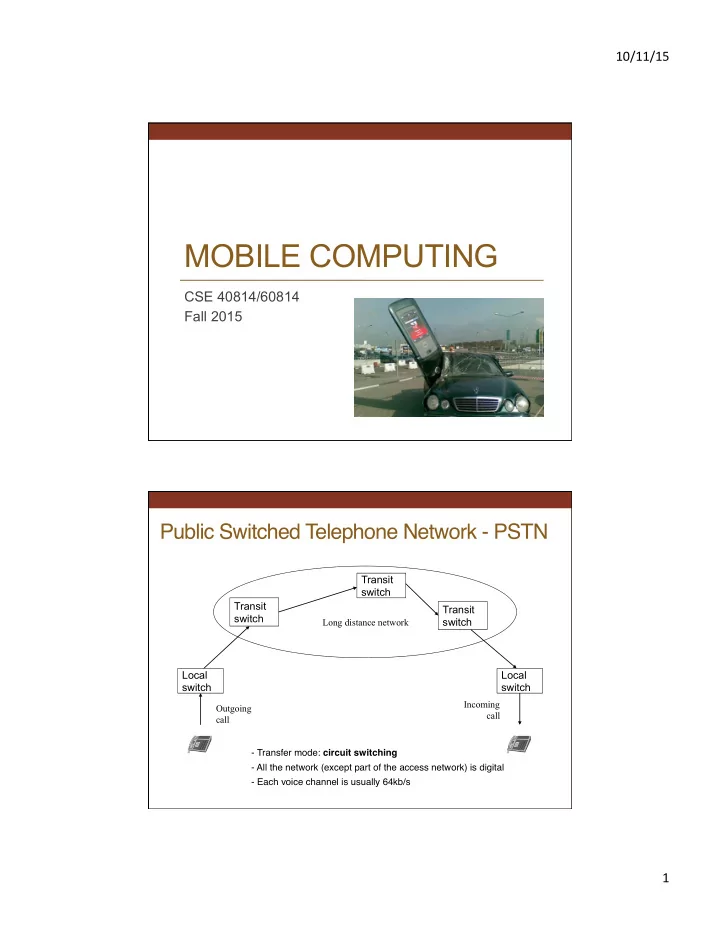
10/11/15 MOBILE COMPUTING CSE 40814/60814 Fall 2015 Public Switched Telephone Network - PSTN Transit switch Transit Transit switch switch Long distance network Local Local switch switch Incoming Outgoing call call - Transfer mode:


slide-1
SLIDE 1

10/11/15 1

MOBILE COMPUTING

CSE 40814/60814 Fall 2015

Public Switched Telephone Network - PSTN

Local switch Local switch Transit switch

Outgoing call Incoming call

Transit switch Transit switch

Long distance network

  • Transfer mode: circuit switching
  • All the network (except part of the access network) is digital
  • Each voice channel is usually 64kb/s
slide-2
SLIDE 2

10/11/15 2

Basic Call

Calling terminal Network Called terminal Off-hook Dial tone Dialing Ring indication Alert signal Off hook Remove ring indication Bi-directional channel On hook Billing On hook signal Resource allocation Translation + routing Conversation

Cellular Network Basics

  • Cellular network/telephony is a radio-based technology; radio waves

are electromagneAc waves that antennas propagate

  • Most signals are in the 850 MHz, 900 MHz, 1800 MHz, and 1900 MHz

frequency bands

Cell phones operate in this frequency range (note the logarithmic scale)

slide-3
SLIDE 3

10/11/15 3

Cellular Network

  • Base sta'ons transmit to and receive from mobile devices at

the assigned spectrum

  • MulAple base staAons use the same spectrum (spectral reuse)
  • The service area of each base staAon is called a cell
  • Each mobile terminal is typically served by the ‘closest’ base

staAons

  • Handoff when terminals move

Architecture of Cellular Networks

External Network

Cellular Network Mobile Station Base Station Mobile Switching Center Server (e.g., Home Location Register)

slide-4
SLIDE 4

10/11/15 4

7

Registration

Tune on the strongest signal Nr: 079/4154678

slide-5
SLIDE 5

10/11/15 5

Service Request

079/4154678 079/8132627 079/4154678 079/8132627

Paging Broadcast

079/8132627? 079/8132627? 079/8132627? 079/8132627?

Note: paging makes sense only over a small area

slide-6
SLIDE 6

10/11/15 6

Response

079/8132627 079/8132627

Channel Assignment

Channel 47 Channel 47 Channel 68 Channel 68

slide-7
SLIDE 7

10/11/15 7

Conversation Handoff (or Handover)

slide-8
SLIDE 8

10/11/15 8

Message Sequence Chart

Caller Base Station Switch Base Station Callee Periodic registration Periodic registration Service request Service request Ring indication Ring indication Page request Page request Paging broadcast Paging broadcast Paging response Paging response Assign Ch. 47 Tune to Ch.47 Assign Ch. 68 Tune to Ch. 68 Alert tone User response User response Stop ring indication Stop ring indication

Cellular Network GeneraAons

  • It is useful to think of a cellular network in terms of

genera&ons:

  • 0G: Briefcase-size mobile radio telephones
  • 1G: Analog cellular telephony
  • 2G: Digital cellular telephony
  • 3G: High-speed digital cellular telephony (including video

telephony)

  • 4G: IP-based “anyAme, anywhere” voice, data, and

mulAmedia telephony at faster data rates than 3G (being deployed now)

slide-9
SLIDE 9

10/11/15 9

EvoluAon of Cellular Networks

1G 2G 3G 4G 2.5G

The MulAple Access Problem

  • The base staAons need to serve many mobile terminals at the

same Ame (both downlink and uplink)

  • All mobiles in the cell need to transmit to the base staAon
  • Interference among different senders and receivers
  • So we need mul'ple access scheme
slide-10
SLIDE 10

10/11/15 10

MulAple Access Schemes

  • Frequency Division MulAple Access (FDMA)
  • Time Division MulAple Access (TDMA)
  • Code Division MulAple Access (CDMA)

3 orthogonal schemes:

Frequency Division MulAple Access

  • Each mobile is assigned a separate frequency channel for the

dura'on of the call

  • Sufficient guard band is required to prevent adjacent channel

interference

  • Usually, mobile terminals will have one downlink frequency

band and one uplink frequency band

  • Different cellular network protocols use different frequencies
  • Frequency is a precious and scarce resource
  • CogniAve radio research

frequency

slide-11
SLIDE 11

10/11/15 11

Time Division MulAple Access

  • Time is divided into slots and only one mobile terminal

transmits during each slot

  • Each user is given a specific slot. No competition in

cellular network

– Unlike Carrier Sensing Multiple Access (CSMA) in Wi-Fi Guard Ame – signals transmided by mobile terminals at different locaAons do not arrive at the base staAon at the same Ame

FDMA (1G)

slide-12
SLIDE 12

10/11/15 12

TDMA F/TDMA (2G)

slide-13
SLIDE 13

10/11/15 13

CDMA

Uses the whole band!

CDMA (sometimes shown like this:)

slide-14
SLIDE 14

10/11/15 14

CDMA (3G) (or this:) Code Division MulAple Access

  • Use of orthogonal codes to separate different transmissions
  • Each symbol of bit is transmided as a larger number of bits

using a user-specific code – spreading

  • Bandwidth occupied by the signal is much larger than the informaAon

transmission rate

  • But all users use the same frequency band together

Orthogonal among users

slide-15
SLIDE 15

10/11/15 15

Basics: Some Math

1 x 1 = 1 1 x

  • 1

=

  • 1
  • 1

x 1 =

  • 1
  • 1

x

  • 1

= 1

CDMA Example

Low-Bandwidth Signal: High-Bandwidth Spreading Code: ...repeated...

slide-16
SLIDE 16

10/11/15 16

CDMA Example

Low-Bandwidth Signal: High-Bandwidth Spreading Code: Mix is a simple multiplication … and then transmit.

CDMA Example

To Decode / Receive, take the signal: Multiply by the same Spreading Code: … to get ...

slide-17
SLIDE 17

10/11/15 17

What If We Use Wrong Code?

Take the same signal: Multiply by the wrong Spreading Code: … you get ...

… which clearly hasn't recovered the original signal. Using wrong code is like being off-frequency.

CDMA

  • Requires right code AND accurate timing!
slide-18
SLIDE 18

10/11/15 18

Another Example

Data

1

  • 1

x

x x x x x x x x x x x x x x x x

Spreading Code

1

  • 1

1

  • 1
  • 1

1

  • 1

1 1

  • 1

1

  • 1
  • 1

1

  • 1

1

=

= = = = = = = = = = = = = = = =

CDMA

Another Example

Data

1

  • 1

x

x x x x x x x x x x x x x x x x

Spreading Code

1

  • 1

1

  • 1
  • 1

1

  • 1

1 1

  • 1

1

  • 1
  • 1

1

  • 1

1

=

= = = = = = = = = = = = = = = =

CDMA

1

slide-19
SLIDE 19

10/11/15 19

Another Example

Data

1

  • 1

x

x x x x x x x x x x x x x x x x

Spreading Code

1

  • 1

1

  • 1
  • 1

1

  • 1

1 1

  • 1

1

  • 1
  • 1

1

  • 1

1

=

= = = = = = = = = = = = = = = =

CDMA

1

  • 1

Another Example

Data

1

  • 1

x

x x x x x x x x x x x x x x x x

Spreading Code

1

  • 1

1

  • 1
  • 1

1

  • 1

1 1

  • 1

1

  • 1
  • 1

1

  • 1

1

=

= = = = = = = = = = = = = = = =

CDMA

1

  • 1

1

  • 1
  • 1

1

  • 1

1

slide-20
SLIDE 20

10/11/15 20

Another Example

Data

1

  • 1

x

x x x x x x x x x x x x x x x x

Spreading Code

1

  • 1

1

  • 1
  • 1

1

  • 1

1 1

  • 1

1

  • 1
  • 1

1

  • 1

1

=

= = = = = = = = = = = = = = = =

CDMA

1

  • 1

1

  • 1
  • 1

1

  • 1

1

  • 1

Another Example

Data

1

  • 1

x

x x x x x x x x x x x x x x x x

Spreading Code

1

  • 1

1

  • 1
  • 1

1

  • 1

1 1

  • 1

1

  • 1
  • 1

1

  • 1

1

=

= = = = = = = = = = = = = = = =

CDMA

1

  • 1

1

  • 1
  • 1

1

  • 1

1

  • 1
slide-21
SLIDE 21

10/11/15 21

Another Example

Data

1

  • 1

x

x x x x x x x x x x x x x x x x

Spreading Code

1

  • 1

1

  • 1
  • 1

1

  • 1

1 1

  • 1

1

  • 1
  • 1

1

  • 1

1

=

= = = = = = = = = = = = = = = =

CDMA

1

  • 1

1

  • 1
  • 1

1

  • 1

1

  • 1

1

Another Example

Data

1

  • 1

x

x x x x x x x x x x x x x x x x

Spreading Code A

1

  • 1

1

  • 1
  • 1

1

  • 1

1 1

  • 1

1

  • 1
  • 1

1

  • 1

1

=

= = = = = = = = = = = = = = = =

CDMA

1

  • 1

1

  • 1
  • 1

1

  • 1

1

  • 1

1

  • 1

1 1

  • 1

1

  • 1
slide-22
SLIDE 22

10/11/15 22

Another Example

Data

1

  • 1

x

x x x x x x x x x x x x x x x x

Spreading Code B

1

  • 1
  • 1

1

  • 1

1 1

  • 1

1

  • 1
  • 1

1

  • 1

1 1

  • 1

=

= = = = = = = = = = = = = = = =

CDMA

1

  • 1
  • 1

1

  • 1

1 1

  • 1
  • 1

1 1

  • 1

1

  • 1
  • 1

1

Another Example

CDMA A

1

  • 1

1

  • 1
  • 1

1

  • 1

1

  • 1

1

  • 1

1 1

  • 1

1

  • 1

+

+ + + + + + + + + + + + + + + +

CMDA B

1

  • 1 -1 1
  • 1 1

1

  • 1
  • 1

1 1

  • 1

1

  • 1
  • 1

1

+

+ + + + + + + + + + + + + + + +

NOISE

3 2 3 2 5 5 3 2 5 4 5 4 2 4 5 5

=

= = = = = = = = = = = = = = = =

BAND

slide-23
SLIDE 23

10/11/15 23

Another Example

CDMA A

1

  • 1

1

  • 1
  • 1

1

  • 1

1

  • 1

1

  • 1

1 1

  • 1

1

  • 1

+

+ + + + + + + + + + + + + + + +

CMDA B

1

  • 1 -1 1
  • 1 1

1

  • 1
  • 1

1 1

  • 1

1

  • 1
  • 1

1

+

+ + + + + + + + + + + + + + + +

NOISE

3 2 3 2 5 5 3 2 5 4 5 4 2 4 5 5

=

= = = = = = = = = = = = = = = =

BAND

5 3 2 3 7 3 2 3 6 5 4 4 2 5 5

Another Example

BAND

5 3 2 3 7 3 2 3 6 5 4 4 2 5 5

x

x x x x x x x x x x x x x x x x

Spreading Code A

1

  • 1

1

  • 1
  • 1

1

  • 1

1 1

  • 1

1

  • 1
  • 1

1

  • 1

1

=

= = = = = = = = = = = = = = = =

Demod

5

Add these

└───────┬───────┘ + └───────┬───────┘ +

Total 1 or -1?

slide-24
SLIDE 24

10/11/15 24

Another Example

BAND

5 3 2 3 7 3 2 3 6 5 4 4 2 5 5

x

x x x x x x x x x x x x x x x x

Spreading Code

1

  • 1

1

  • 1
  • 1

1

  • 1

1 1

  • 1

1

  • 1
  • 1

1

  • 1

1

=

= = = = = = = = = = = = = = = =

Demod

5 3

  • 2
  • 3

7

  • 3

2 3

  • 6

5

  • 4
  • 4

3

  • 5

5

Add these

└───────┬───────┘ + └───────┬───────┘ +

Total 1 or -1?

Another Example

BAND

5 3 2 3 7 3 2 3 6 5 4 4 2 5 5

x

x x x x x x x x x x x x x x x x

Spreading Code

1

  • 1

1

  • 1
  • 1

1

  • 1

1 1

  • 1

1

  • 1
  • 1

1

  • 1

1

=

= = = = = = = = = = = = = = = =

Demod

5 3

  • 2
  • 3

7

  • 3

2 3

  • 6

5

  • 4
  • 4

3

  • 5

5

Add these

└───────┬───────┘ + └───────┬───────┘ +

Total

9

  • 3

1 or -1?

slide-25
SLIDE 25

10/11/15 25

Another Example

BAND

5 3 2 3 7 3 2 3 6 5 4 4 2 5 5

x

x x x x x x x x x x x x x x x x

Spreading Code

1

  • 1

1

  • 1
  • 1

1

  • 1

1 1

  • 1

1

  • 1
  • 1

1

  • 1

1

=

= = = = = = = = = = = = = = = =

Demod

5 3

  • 2
  • 3

7

  • 3

2 3

  • 6

5

  • 4
  • 4

3

  • 5

5

Add these

└───────┬───────┘ + └───────┬───────┘ +

Total

9

  • 3

1 or -1?

1

  • 1

GSM (2G)

  • AbbreviaAon for Global System for Mobile CommunicaAons
  • Concurrent development in USA and Europe in the 1980s
  • The European system was called GSM and deployed in the

early 1990s

slide-26
SLIDE 26

10/11/15 26

GSM Services

  • Voice, 3.1 kHz
  • Short Message Service (SMS)
  • 1985 GSM standard that allows messages of at most 160 chars. (incl.

spaces) to be sent between handsets and other staAons

  • MulA-billion $ industry
  • General Packet Radio Service (GPRS)
  • GSM upgrade that provides IP-based packet data transmission up to 114

kbps

  • Users can “simultaneously” make calls and send data
  • GPRS provides “always on” Internet access and the MulAmedia

Messaging Service (MMS) whereby users can send rich text, audio, video messages to each other

  • Performance degrades as number of users increase
  • GPRS is an example of 2.5G telephony – 2G service similar to 3G

GSM Channels

  • Physical Channel: Each Ameslot on a carrier is referred to as a physical

channel

  • Logical Channel: Variety of informaAon is transmided between the MS and
  • BTS. Different types of logical channels:
  • Traffic channel
  • Control Channel

Downlink Uplink

Channels

slide-27
SLIDE 27

10/11/15 27

GSM Frequencies

  • Originally designed on 900MHz range, now also

available on 800MHz, 1800MHz and 1900 MHz ranges.

  • Separate uplink and downlink frequencies
  • One example channel on the 1800 MHz frequency band,

where RF carriers are spaced every 200 kHz

1710 MHz 1880 MHz 1805 MHz 1785 MHz

UPLINK FREQUENCIES DOWNLINK FREQUENCIES UPLINK AND DOWNLINK FREQUENCY SEPARATED BY 95MHZ

GSM Architecture

slide-28
SLIDE 28

10/11/15 28

Mobile StaAon (MS)

  • MS is the user’s handset and has two parts
  • Mobile Equipment
  • Radio equipment
  • User interface
  • Processing capability and memory required for various

tasks

  • Call signalling
  • EncrypAon
  • SMS
  • Equipment IMEI (Intl. Mobile Equipment IdenAty)

number (like serial number)

  • Subscriber IdenAty Module (SIM)

Subscriber IdenAty Module

  • A small smart card
  • EncrypAon codes needed to idenAfy the subscriber
  • Subscriber IMSI (Intl. Mobile Subscriber IdenAty) number
  • 64 bit number; includes:
  • MCC (Mobile Country Code): 3 decimal places, intl. standardized
  • MNC (Mobile Network Code): 2 decimal places, network within country
  • MSIN (Mobile Subscriber IdenAficaAon Number): max. 10 decimal places
  • Subscriber’s own informaAon (telephone directory)
  • Third party applicaAons (banking, etc.)
  • Can also be used in other systems besides GSM, e.g., some

WLAN access points accept SIM based user authenAcaAon

slide-29
SLIDE 29

10/11/15 29

Base StaAon Subsystem

  • Transcoding Rate and Adaptation Unit (TRAU)

– Performs coding between the 64kbps PCM coding used in the

backbone network and the 13kbps coding used for the Mobile Station (MS)

  • Base Station Controller (BSC)

– Controls the channel (time slot) allocation implemented by the

BTSes

– Manages the handovers within BSS area – Knows which mobile stations are within the cell and informs the

MSC/VLR about this

  • Base Transceiver System (BTS)

– Controls several transmitters – Each transmitter has 8 time slots, some used for signaling, on a

specific frequency

Network and Switching Subsystem

  • The backbone of a GSM network is a telephone network with

addiAonal cellular network capabiliAes

  • Mobile Switching Center (MSC)
  • A typical telephony exchange (ISDN exchange) which supports mobile

communicaAons

  • Visitor Loca'on Register (VLR)
  • A database, part of the MSC
  • Contains the locaAon of the acAve Mobile StaAons
  • Gateway Mobile Switching Center (GMSC)
  • Links the system to PSTN and other operators
  • Home Loca'on Register (HLR)
  • Contain subscriber informaAon, including authenAcaAon informaAon in

AuthenAcaAon Center (AuC)

  • Equipment IdenAty Register (EIR)
  • InternaAonal Mobile StaAon Equipment IdenAty (IMEI) codes for e.g.,

blacklisAng stolen phones

slide-30
SLIDE 30

10/11/15 30

Home LocaAon Register

  • One database per operator
  • Contains all the permanent subscriber informaAon
  • MSISDN (Mobile Subscriber ISDN number) is the telephone

number of the subscriber

  • InternaAonal Mobile Subscriber IdenAty (IMSI) is a 15 digit code

used to idenAfy the subscriber

  • IMSI code is used to link the MSISDN number to the subscriber’s

SIM (Subscriber IdenAty Module)

  • Charging informaAon
  • Services available to the customer
  • Also the subscriber’s present LocaAon Area Code, which

refers to the MSC, which can connect to the MS.

Other Systems

  • OperaAons Support System
  • The management network for the whole GSM network
  • Usually vendor dependent
  • Very loosely specified in the GSM standards
  • Value added services
  • Voice mail
  • Call forwarding
  • Group calls
  • Short Message Service Center
  • Stores and forwards the SMS messages
  • Like an E-mail server
  • Required to operate the SMS services
slide-31
SLIDE 31

10/11/15 31

LocaAon Updates

  • The cells overlap and usually a mobile staAon can ‘see’ several

transceivers (BTSes)

  • The MS monitors the idenAfier for the BSC controlling the cells
  • When the mobile staAon reaches a new BSC’s area, it requests

a locaAon update

  • The update is forwarded to the MSC, entered into the VLR, the
  • ld BSC is noAfied and an acknowledgement is passed back

Handoff (Handover)

  • When a call is in process, the changes in locaAon

need special processing

  • Within a BSS, the BSC, which knows the current

radio link configuraAon (including feedbacks from the MS), prepares an available channel in the new BTS

  • The MS is told to switch over to the new BTS
  • This is called a hard handoff
  • In a so` handoff, the MS is connected to two BTSes

simultaneously

slide-32
SLIDE 32

10/11/15 32

4 types of handover

MSC MSC BSC BSC BSC BTS BTS BTS BTS MS MS MS MS 1 2 3 4

Handover decision

receive level BTSold receive level BTSold MS MS HO_MARGIN BTSold BTSnew

slide-33
SLIDE 33

10/11/15 33

Handover procedure

HO access

BTSold BSCnew measurement result BSCold Link establishment MSC MS measurement report HO decision HO required BTSnew HO request resource allocation

  • ch. activation
  • ch. activation ack

HO request ack HO command HO command HO command HO complete HO complete clear command clear command clear complete clear complete

Roaming

  • When a MS enters another operators network, it

can be allowed to use the services of this operator

  • Operator to operator agreements and contracts
  • Higher billing
  • The MS is idenAfied by the informaAon in the SIM

card and the idenAficaAon request is forwarded to the home operator

  • The home HLR is updated to reflect the MS’s current

locaAon

slide-34
SLIDE 34

10/11/15 34

UMTS

  • Universal Mobile TelecommunicaAons System

(UMTS)

  • UMTS is an upgrade from GSM via GPRS or EDGE
  • The standardizaAon work for UMTS is carried out

by Third GeneraAon Partnership Project (3GPP)

  • Data rates of UMTS are:
  • 144 kbps for rural
  • 384 kbps for urban outdoor
  • 2048 kbps for indoor and low range outdoor
  • Virtual Home Environment (VHE)

UMTS Frequency Spectrum

  • UMTS Band
  • 1900-2025 MHz and 2110-2200 MHz for 3G transmission
  • In the US, 1710–1755 MHz and 2110–2155 MHz will be used

instead, as the 1900 MHz band was already used.

slide-35
SLIDE 35

10/11/15 35

UMTS Architecture

SD

Mobile Station MSC/ VLR Base Station Subsystem GMSC Network Subsystem AUC EIR HLR Other Networks

Note: Interfaces have been omitted for clarity purposes.

GGSN SGSN BTS BSC Node B RNC

RNS

UTRAN

SIM ME USIM ME

+

PSTN PLMN Internet

UMTS Network Architecture

  • UMTS network architecture consists of three domains
  • Core Network (CN): Provide switching, routing and transit for user

traffic

  • UMTS Terrestrial Radio Access Network (UTRAN): Provides the air

interface access method for user equipment.

  • User Equipment (UE): Terminals work as air interface counterpart

for base stations. The various identities are: IMSI, TMSI, P-TMSI, TLLI, MSISDN, IMEI, IMEISV

slide-36
SLIDE 36

10/11/15 36

UTRAN

  • Wide band CDMA technology is selected for UTRAN air

interface

  • WCDMA
  • TD-SCDMA
  • Base staAons are referred to as Node-B and control

equipment for Node-B is called as Radio Network Controller (RNC).

  • FuncAons of Node-B are
  • Air Interface Tx/Rx
  • ModulaAon/DemodulaAon
  • FuncAons of RNC are:
  • Radio Resource Control
  • Channel AllocaAon
  • Power Control Senngs
  • Handover Control
  • Ciphering
  • SegmentaAon and reassembly

3.5G (HSPA)

High Speed Packet Access (HSPA) is an amalgamaAon of two mobile telephony protocols, High Speed Downlink Packet Access (HSDPA) and High Speed Uplink Packet Access (HSUPA), that extends and improves the performance of exisAng WCDMA protocols 3.5G introduces many new features that will enhance the UMTS technology in future. 1xEV-DV already supports most of the features that will be provided in 3.5G. These include:

  • AdapAve ModulaAon and Coding
  • Fast Scheduling
  • Backward compaAbility with 3G
  • Enhanced Air Interface
slide-37
SLIDE 37

10/11/15 37

4G (LTE)

  • LTE stands for Long Term EvoluAon
  • Next GeneraAon mobile broadband technology
  • Promises data transfer rates of 100 Mbps
  • Based on UMTS 3G technology
  • OpAmized for All-IP traffic

Advantages of LTE

slide-38
SLIDE 38

10/11/15 38

Comparison of LTE Speed Major LTE Radio Technogies

  • Uses Orthogonal Frequency Division MulAplexing (OFDM) for

downlink

  • Uses Single Carrier Frequency Division MulAple Access (SC-

FDMA) for uplink

  • Uses MulA-input MulA-output (MIMO) for enhanced

throughput

  • Reduced power consumpAon
  • Higher RF power amplifier efficiency (less badery power used

by handsets)

slide-39
SLIDE 39

10/11/15 39

5G Challenges & Scenarios

Large diversity of

Use cases & Requirements

Device-to-Device Communications Car-to-Car Comm. New requirements and characteristics due to communicating machines

Avalanche of

Traffic Volume

Further expansion of mobile broadband Additional traffic due to communicating machines “1000x in ten years”

Massive growth in

Connected Devices

“Communicating machines” “50 billion devices in 2020”

5G Future

Integration

  • f access technologies

into one seamless experience Complementary new technologies

Ø D2D Communications Ø Massive Machine Communications Ø Ultra-Reliable Communications Respond to traffic explosion

10 -100 x higher typical user rate

Evolution

Ø Higher Frequencies Ø Massive MIMO Ø Ultra-Dense Networks Ø Moving Networks

1000 x higher mobile data volume per area 10 -100 x higher number of connected devices 5 x reduced E2E latency 10 x longer battery life for low power M2M

Revolution Existing technologies in 2012 3G 4G Wifi

Extend to novel applications

slide-40
SLIDE 40

10/11/15 40

Spectrum Scenario

  • Dedicated licensed spectrum complemented with various

forms of shared spectrum “Toolbox” of different sharing enablers required

In order for 5G system to work under such scenarios

Technology Components

300 MHz 3 GHz 30 GHz 300 GHz

New spectrum bands and access methods Dense and moving networks Multi-hop wireless backhaul VL-MIMO Massive multi-antenna systems Air interfaces for new applications and reduced signaling

Nomadic nodes Lamp posts nodes Bus stop Buildings

Park area

Mobile Device-to-device

Context-aware interference and mobility management