Too Much of a Good Thing? Hosts have a 15-441/641: Computer - - PowerPoint PPT Presentation

too much of a good thing
SMART_READER_LITE
LIVE PREVIEW

Too Much of a Good Thing? Hosts have a 15-441/641: Computer - - PowerPoint PPT Presentation

9/14/2019 Too Much of a Good Thing? Hosts have a 15-441/641: Computer Networks host name Domain Name System IP address Application DNS MAC address Presentation 15-441 Spring 2019 Session Profs Peter Steenkiste & Justine


slide-1
SLIDE 1

9/14/2019 1

15-441/641: Computer Networks Domain Name System

15-441 Spring 2019 Profs Peter Steenkiste & Justine Sherry Fall 2019 https://computer-networks.github.io/sp19/

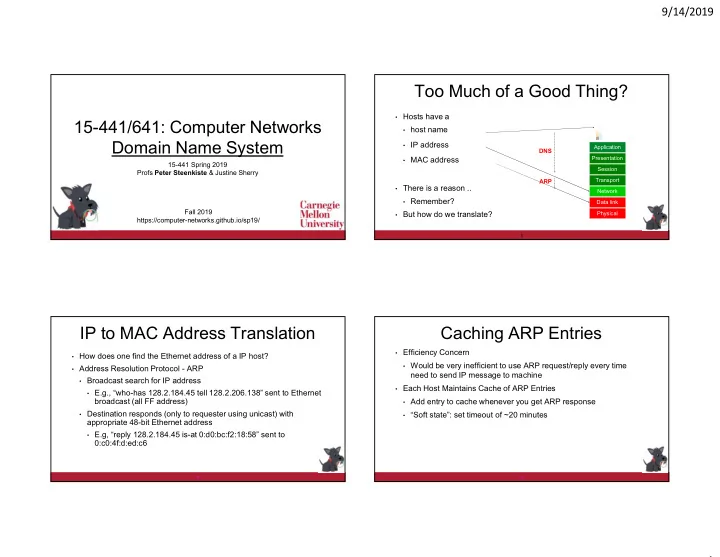
Too Much of a Good Thing?

  • Hosts have a
  • host name
  • IP address
  • MAC address
  • There is a reason ..
  • Remember?
  • But how do we translate?

2

Application Presentation Session Transport Network Data link Physical

DNS ARP

IP to MAC Address Translation

  • How does one find the Ethernet address of a IP host?
  • Address Resolution Protocol - ARP
  • Broadcast search for IP address
  • E.g., “who-has 128.2.184.45 tell 128.2.206.138” sent to Ethernet

broadcast (all FF address)

  • Destination responds (only to requester using unicast) with

appropriate 48-bit Ethernet address

  • E.g, “reply 128.2.184.45 is-at 0:d0:bc:f2:18:58” sent to

0:c0:4f:d:ed:c6

3

Caching ARP Entries

  • Efficiency Concern
  • Would be very inefficient to use ARP request/reply every time

need to send IP message to machine

  • Each Host Maintains Cache of ARP Entries
  • Add entry to cache whenever you get ARP response
  • “Soft state”: set timeout of ~20 minutes

4

slide-2
SLIDE 2

9/14/2019 2

ARP Cache Example

  • Show using command “arp -a”

5

Interface: 128.2.222.198 on Interface 0x1000003 Internet Address Physical Address Type 128.2.20.218 00-b0-8e-83-df-50 dynamic 128.2.102.129 00-b0-8e-83-df-50 dynamic 128.2.194.66 00-02-b3-8a-35-bf dynamic 128.2.198.34 00-06-5b-f3-5f-42 dynamic 128.2.203.3 00-90-27-3c-41-11 dynamic 128.2.203.61 08-00-20-a6-ba-2b dynamic 128.2.205.192 00-60-08-1e-9b-fd dynamic 128.2.206.125 00-d0-b7-c5-b3-f3 dynamic 128.2.206.139 00-a0-c9-98-2c-46 dynamic 128.2.222.180 08-00-20-a6-ba-c3 dynamic 128.2.242.182 08-00-20-a7-19-73 dynamic 128.2.254.36 00-b0-8e-83-df-50 dynamic

Challenge: Broadcast!

  • Overhead scales (roughly) as N2 for an N host network
  • N host does an ARP broadcast for each (new) destination
  • Each broadcast is delivered to N hosts
  • Remember the solution?
  • Subnetting!
  • Break up network into networks

connected by router

  • Not always a good idea
  • Extra complexity, management
  • verhead, cost, …

Router

BIG Network Internet

Network Network

Subnetting is an Option

  • Subnetting!
  • Break up network into networks

connected by router

  • Limits the scope of ARP

requests/responses inside smaller L2 networks

  • But not always a good always a

good idea

  • Extra complexity, management
  • verhead, cost, …
  • Example: WiFi network

Internet

Network Network Router

N3 N5 N4 N2 N1

Proxy ARP

  • Limit the scope of ARP requests/responses inside an L2
  • Proxy ARP makes it look like ne network:
  • Host1 in N1 sends ARP for host 2 in N2
  • Proxy ARP looks up MAC address
  • May require discovery using ARP
  • Responds to host 1’s request
  • Acts as proxy for host 2
  • Also forwards packets from host 1

to host 2 at layer 2

  • Acts as a switch

Internet

Network Network Router Proxy ARP Proxy ARP

N3 N5 N4 N2 N1

slide-3
SLIDE 3

9/14/2019 3

Host Names & Addresses

  • Host addresses: e.g., 169.229.131.109
  • a number used by protocols
  • conforms to network structure (the “where”)
  • Host names: e.g., linux.andrew.cmu.edu
  • mnemonic name usable by humans
  • conforms to organizational structure (the “who”)
  • The Domain Name System (DNS) is how we map from one to the
  • ther
  • a directory service for hosts on the Internet

Why bother?

  • Convenience
  • Easier to remember www.google.com than 74.125.239.49
  • Provides a level of indirection!
  • Decoupled names from addresses
  • Many uses beyond just naming a specific host

DNS provides Indirection

  • Addresses can change underneath
  • Move www.cnn.com to a new IP address
  • People and applications are unaffected
  • Name can map to multiple IP addresses
  • Enables load-balancing
  • Multiple names for the same address
  • E.g., many services (mail, www, ftp) collocated on the same machine
  • Allowing “host” names to evolve into “service” names

DNS: Early days

  • Mappings stored in a hosts.txt file (in /etc/hosts)
  • maintained by the Stanford Research Institute (SRI)
  • new versions periodically copied from SRI (via FTP)
  • As the Internet grew this system broke down
  • SRI couldn’t handle the load
  • conflicts in selecting names
  • hosts had inaccurate copies of hosts.txt
  • The Domain Name System (DNS) was invented to fix this
slide-4
SLIDE 4

9/14/2019 4

Obvious Solutions (1)

Why not centralize DNS?

  • Distant centralized database
  • Traffic volume
  • Single point of failure
  • Single point of update
  • Single point of control
  • Doesn’t scale!

13

Goals?

  • Scalable
  • many names
  • many updates
  • many users creating names
  • many users looking up names
  • Highly available
  • Correct
  • no naming conflicts (uniqueness)
  • consistency
  • Lookups are fast

How?

  • Partition the namespace – Hierarchy!
  • Distribute the administration of each name space partition
  • Autonomy to update a network’s own (machines’) names
  • Translation of cmu.edu names is done by CMU
  • Don’t have to track everybody’s updates
  • Distribute name resolution for each partition
  • How should we partition things?

Key idea: hierarchical distribution

Three intertwined hierarchies

  • Hierarchical namespace
  • As opposed to original flat namespace
  • Hierarchically administered
  • As opposed to centralized administrator
  • Hierarchy of servers
  • As opposed to centralized storage
slide-5
SLIDE 5

9/14/2019 5

DNS Design: Hierarchy Definitions

17

root edu net

  • rg

uk com gwu ucb cmu bu mit cs ece cmcl

  • Each node in hierarchy stores a list of

names that end with same suffix

  • Suffix = path up tree
  • E.g., given this tree, where would

following be stored:

  • Fred.com
  • Fred.edu
  • Fred.cmu.edu
  • Fred.cmcl.cs.cmu.edu
  • Fred.cs.mit.edu

DNS Design: Zone Definitions

18

root edu net

  • rg

uk com ca gwu ucb cmu bu mit cs ece cmcl

Single node Subtree Complete Tree

  • Zone = contiguous section of name space
  • E.g., Complete tree, single node or subtree
  • A zone has an associated set of name

servers

  • Must store list of names and tree links

Server Hierarchy

  • Top of hierarchy: Root servers
  • Location hardwired into other DNS servers
  • Next Level: Top-level domain (TLD) servers
  • .com, .edu, .uk, etc.
  • Managed professionally
  • Bottom Level: Authoritative DNS servers
  • Actually store the name-to-address of devices mapping
  • Maintained by the corresponding administrative authority

New TLDs started in 2012 … expect to see more in the future.

Server Hierarchy

  • Every server knows the address of the root name server
  • Root servers know the address of all TLD servers
  • An authoritative DNS server stores name-to-address mappings (“resource

records”) for all DNS names in the domain that it has authority for  Each server stores a subset of the total DNS database  Each server can discover the server(s) responsible for any portion of the hierarchy

slide-6
SLIDE 6

9/14/2019 6

DNS Root

  • Located in Virginia, USA

Verisign, Dulles, VA

DNS Root Servers

  • 13 root servers (labeled A-M; see http://www.root-servers.org/)

B USC-ISI Marina del Rey, CA L ICANN Los Angeles, CA E NASA Mt View, CA F Internet Software Consortium Palo Alto, CA I Autonomica, Stockholm K RIPE London M WIDE Tokyo A Verisign, Dulles, VA C Cogent, Herndon, VA D U Maryland College Park, MD G US DoD Vienna, VA H ARL Aberdeen, MD J Verisign

DNS Root Servers

B USC-ISI Marina del Rey, CA L ICANN Los Angeles, CA E NASA Mt View, CA F Internet Software Consortium, Palo Alto, CA (and 37 other locations) I Autonomica, Stockholm (plus 29

  • ther locations)

K RIPE London (plus 16 other locations) M WIDE Tokyo plus Seoul, Paris, San Francisco A Verisign, Dulles, VA C Cogent, Herndon, VA (also Los Angeles, NY, Chicago) D U Maryland College Park, MD G US DoD Vienna, VA H ARL Aberdeen, MD J Verisign (21 locations)

 13 root servers (labeled A-M; see http://www.root-servers.org/)  Each server is replicated via any-casting

Anycast in a nutshell

  • Routing finds shortest paths to destination
  • What happens if multiple machines advertise the same address?
  • The network will deliver the packet to the closest machine with that

address

  • This is called “anycast”
  • Very robust
  • Requires no modification to routing algorithms
slide-7
SLIDE 7

9/14/2019 7

Programmer’s View of DNS

  • Conceptually, programmers can view the DNS database as a

collection of millions of host entry structures:

  • Functions for retrieving host entries from DNS:
  • getaddrinfo: query key is a DNS host name.
  • getnameinfo: query key is an IP address.

25

/* DNS host entry structure */ struct addrinfo { int ai_family; /* host address type (AF_INET) */ size_t ai_addrlen; /* length of an address, in bytes */ struct sockaddr *ai_addr; /* address! */ char *ai_canonname; /* official domain name of host */ struct addrinfo *ai_next; /* other entries for host */ };

Properties of DNS Host Entries

  • Different kinds of mappings are possible:
  • Simple case: 1-1 mapping between domain name and IP addr:
  • kittyhawk.cmcl.cs.cmu.edu maps to 128.2.194.242
  • Multiple domain names maps to the same IP address:
  • eecs.mit.edu and cs.mit.edu both map to 18.62.1.6
  • Single domain name maps to multiple IP addresses:
  • www.google.com maps to multiple IP addresses
  • Some valid domain names don’t map to any IP address:
  • For example: cmcl.cs.cmu.edu

26 27

DNS Records

RR format: (class, name, value, type, ttl)

  • DB contains tuples called resource records (RRs)
  • Classes = Internet (IN), Chaosnet (CH), etc.
  • Each class defines a name-value binding based on its type

FOR IN class:

  • Type=A
  • name is hostname
  • value is IP address
  • Type=NS
  • name is domain (e.g. foo.com)
  • value is name of authoritative name

server for this domain

  • Type=CNAME
  • name is an alias name for some

“canonical” (the real) name

  • value is canonical name
  • Type=MX
  • value is hostname of mailserver

associated with name

Inserting RRs into DNS

  • Example: you just created company “FooBar”
  • You get a block of IP addresses from your ISP
  • say 212.44.9.128/25
  • Register foobar.com at registrar (e.g., NameCheap)
  • Provide registrar with names and IP addresses of your

authoritative name server(s)

  • The registrar inserts RR pairs into the .com TLD server:
  • (foobar.com, dns1.foobar.com, NS)
  • (dns1.foobar.com, 212.44.9.129, A)
  • You store resource records in your server dns1.foobar.com
  • e.g., type A record for www.foobar.com
  • e.g., type MX record for foobar.com
slide-8
SLIDE 8

9/14/2019 8

Using DNS (Client/App View)

  • Two components
  • Resolver software on hosts
  • Local DNS servers
  • Each host has a resolver
  • Typically a library that applications can link to
  • Client application
  • Obtain DNS name (e.g., from URL) by calling resolver
  • This triggers a DNS request to the local DNS server

Servers/Resolvers

  • Name servers: generally responsible for some zone
  • Answers queries about their zone
  • Local DNS server (“default name server”) has two responsibilities
  • Answer queries about the local zone
  • Also do lookup of distant host names for local hosts
  • Can cache the response for other local hosts!
  • Clients configured with the default DNS server’s address or

they learn it via a host configuration protocol

30 31

DNS client

(me.cs.cmu.edu)

DNS server

root servers

local

(mydns.cmu.edu) .edu servers nyu.edu servers

32

DNS client

(me.cs.cmu.edu)

DNS server

root servers .edu servers nyu.edu servers

local

(mydns.cmu.edu)

slide-9
SLIDE 9

9/14/2019 9

33

root DNS server DNS client

(me.cs.cmu.edu)

DNS server

.edu servers nyu.edu servers (mydns.cmu.edu)

local

34

root DNS server DNS client

(me.cs.cmu.edu)

DNS server

.edu servers nyu.edu servers (mydns.cmu.edu)

local

35

root DNS server

recursive DNS query

DNS client

(me.cs.cmu.edu)

DNS server

(mydns.cmu.edu) .edu servers nyu.edu servers

local

36

root DNS server DNS client

(me.cs.cmu.edu)

DNS server

(mydns.cmu.edu) .edu servers nyu.edu servers

local

slide-10
SLIDE 10

9/14/2019 10

root DNS server

iterative DNS query

DNS client

(me.cs.cmu.edu)

DNS server

(mydns.cmu.edu) .edu servers nyu.edu servers

local

Goals – how are we doing?

  • Scalable
  • many names
  • many updates
  • many users creating names
  • many users looking up names
  • Highly available

Per-domain availability

  • DNS servers are replicated
  • Primary and secondary name servers required
  • Name service available if at least one replica is up
  • Queries can be load-balanced between replicas
  • Try an alternate servers on timeout
  • Exponential backoff when retrying the same server

Scalability: DNS Caching

  • Caching of DNS responses at all levels
  • Reduces load at all levels
  • Reduces delay experienced by DNS client
  • How DNS caching works
  • DNS servers cache responses to queries
  • Responses include a “time to live” (TTL) field
  • Server deletes cached entry after TTL expires
  • Why caching is effective
  • The top-level servers very rarely change
  • Popular sites are visited often

 local DNS server often has the information cached

slide-11
SLIDE 11

9/14/2019 11

Negative Caching

  • Remember things that don’t work
  • Misspellings like www.cnn.comm and www.cnnn.com
  • E.g., broken URLs in web pages, people making he same typo, ..
  • These can take a long time to fail the first time
  • Good to remember that they don’t work
  • … so the failure takes less time the next time around
  • Negative caching is optional

Goals – how are we doing?

  • Scalable
  • many names
  • many updates
  • many users creating names
  • many users looking up names
  • Highly available
  • Correct
  • no naming conflicts (uniqueness)
  • consistency
  • Lookups are fast

43

DNS Message Format

Identification

  • No. of Questions
  • No. of Authority RRs

Questions (variable number of answers) Answers (variable number of resource records) Authority (variable number of resource records) Additional Info (variable number of resource records) Flags

  • No. of Answer RRs
  • No. of Additional RRs

Name, type fields for a query RRs in response to query Records for authoritative servers Additional “helpful info that may be used 12 bytes

DNS Header Fields

  • Identification
  • Used to match up request/response
  • Flags
  • 1-bit to mark query or response
  • 1-bit to mark authoritative or not
  • 1-bit to request recursive resolution
  • 1-bit to indicate support for recursive resolution

44

slide-12
SLIDE 12

9/14/2019 12

45

How can one attack DNS? How can one attack DNS?

  • Impersonate the local DNS server
  • give the wrong IP address to the DNS client
  • Denial-of-service the root or TLD servers
  • make them unavailable to the rest of the world
  • Poison the cache of a DNS server
  • trick the server into caching the wrong IP address

47

DNS client DNS server local root DNS server .edu TLD DNS server nyu.edu DNS server Persa (the impersonator)

  • Impersonate the local DNS server
  • give the wrong IP address to the DNS client

48

DNS client DNS server local root DNS server .edu TLD DNS server epfl.ch DNS server Denis (the denial-of- service attacker)

  • Denial-of service attack on the root or TLD server
  • flood the server with packets
slide-13
SLIDE 13

9/14/2019 13

DNS client DNS server local root DNS server .edu TLD DNS server nyu.edu DNS server Casha

  • Poison the cache of a DNS server
  • trick the server into caching the wrong IP address

Enter: DNSSEC

50

An extension to DNS to improve DNS security.

Enter DNSSEC

Extension to DNS to improve DNS security

  • provides message authentication and integrity verification through

cryptographic signatures

  • You know who provided the signature
  • No modifications between signing and validation
  • It does not provide authorization
  • It does not provide confidentiality
  • It does not provide protection against DDOS

DNSSEC: Deployment Status

  • 89% of top-level domains (TLDs) zones signed.
  • ~47% of country-code TLDs (ccTLDs) signed.
  • Second-level domains (SLDs) vary widely:
  • Over 2.5 million .nl domains signed (~45%) (Netherlands). [1]
  • ~88% of measured zones in .gov are signed.
  • Over 50% of .cz (Czech Republic) domains signed.
  • ~24% of .br domains signed (Brazil). [2]
  • While only about 0.5% of zones in .com are signed, that

percentage represents ~600,000 zones.

52

slide-14
SLIDE 14

9/14/2019 14

DNSSEC: Deployment Status

53

Important Properties of DNS

  • Easy unique, human-readable naming
  • Hierarchy helps with scalability
  • Caching lends scalability, performance
  • Not strongly consistent
  • Trust model has some problems!