Back to Basics 15-441/641: Physical and 1. Physical layer. 2. - - PowerPoint PPT Presentation

back to basics 15 441 641 physical and
SMART_READER_LITE
LIVE PREVIEW

Back to Basics 15-441/641: Physical and 1. Physical layer. 2. - - PowerPoint PPT Presentation

11/9/2019 Back to Basics 15-441/641: Physical and 1. Physical layer. 2. Datalink layer Application Datalink Layers introduction, framing, Presentation error coding, switched Session networks. 15-441 Fall 2019 Transport Profs Peter


slide-1
SLIDE 1

11/9/2019 1

15-441/641: Physical and Datalink Layers

15-441 Fall 2019 Profs Peter Steenkiste & Justine Sherry Fall 2019 https://computer-networks.github.io/fa19/

Back to Basics

  • 1. Physical layer.
  • 2. Datalink layer

introduction, framing, error coding, switched networks.

  • 3. Contention-based

networks, e.g., ethernet.

Application Presentation Session Transport Network Datalink Physical

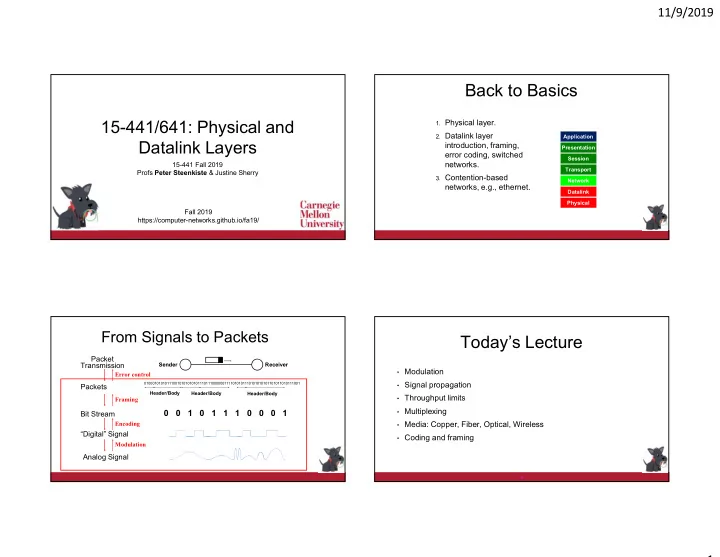
From Signals to Packets

Analog Signal “Digital” Signal Bit Stream

0 0 1 0 1 1 1 0 0 0 1

Packets

0100010101011100101010101011101110000001111010101110101010101101011010111001

Header/Body Header/Body Header/Body

Receiver Sender

Packet Transmission

Modulation Encoding Framing Error control

Today’s Lecture

  • Modulation
  • Signal propagation
  • Throughput limits
  • Multiplexing
  • Media: Copper, Fiber, Optical, Wireless
  • Coding and framing

4

slide-2
SLIDE 2

11/9/2019 2

Wires – Boring?

  • You are responsible for installing

the networking in a new office

  • building. What wires will you use:

1.

Inside each office?

2.

Connecting offices to the wiring closet?

3.

Between floors?

4.

Between buildings?

Transferring Information

  • Information transfer is a physical process
  • In this class, we generally care about
  • Electrical signals (on a wire)
  • Optical signals (in a fiber)
  • Wireless signals (over the “ether”)
  • More broadly, electromagnetic waves
  • Information carriers can also be
  • Sound waves
  • Quantum states
  • Ink & paper, etc.

6

What is Modulation?

  • The sender sends an EM signal and changes in a way that the receiver

can recognize – this conveys information

  • Ways to modulate a signal (think: sinusoidal wave)
  • Change frequency, phase, or amplitude
  • Similar to AM/FM radio:
  • But digital: we encode bits!
  • Many forms of modulation!
  • Basic AM, FM, and PM - OK for “easy” environments
  • Wireless environments are very challenging – uses much more

aggressive forms of modulation

7

Binary Modulation

  • AM: change the strength of the signal
  • FM: change frequency:
  • PM: change phase

8

0 1 1 0 1 1 0 0 0 1 1 0 1 0 0 0 1 1 0 0 1 1 0 0 0 1 1 1 0 0 0 1 1 0 0 0 1 1 1

slide-3
SLIDE 3

11/9/2019 3

Why Different Modulation Methods?

Offers choices with different tradeoffs:

  • Transmitter/Receiver complexity
  • Power requirements, e.g., battery lifetime
  • Bandwidth
  • Medium (air, copper, fiber, …)
  • Noise immunity
  • Range
  • Multiplexing options

9

Today’s Lecture

  • Modulation
  • Signal propagation
  • Throughput limits
  • Multiplexing
  • Media: Copper, Fiber, Optical, Wireless
  • Coding and modulation

10

Some “Wire” Questions

  • Is there a limit to the capacity of a wire?
  • How do the properties of copper, fiber, and wireless compare?
  • Price, bandwidth, easy of deployment, …
  • What limits the physical size of the network?
  • Or: how long can the wires be
  • Does the modulation technique matter?
  • How can multiple hosts communicate over the same wire at the

same time?

→ How does signal propagation affect the signal quality and bitrate?

11

Signal = Sum of Waves

≈ + 1.3 X + 0.56 X + 1.15 X

slide-4
SLIDE 4

11/9/2019 4

The Frequency Domain

  • A (periodic) signal can be viewed as a sum of sine waves of different

strengths.

  • Corresponds to energy at a certain frequency
  • Every signal has an equivalent representation in the frequency

domain.

  • What frequencies are present?

and what is their strength (energy)

  • Use Fourier transform to translate

between frequency and time view

  • Channel properties can be

frequency dependent

  • E.g., attenuation

13

Transmission Channel Considerations

  • Every medium supports transmission in a

certain frequency range

  • Good transmission inside some range – “channel width”
  • Question: is channel width (Hz) related to throughput (MHz)?
  • Outside this range, effects such as attenuation, .. degrade the

signal significantly

  • Transmit and receive hardware tries to

maximize the useful bandwidth, given channel properties

  • Tradeoffs between cost, distance, bit rate
  • As technology improves, these parameters

change, even for the same the wire

Frequency Good Bad Signal Attenuation

Attenuation & Distortion

  • Different frequencies in the signal are “abused” differently
  • This is especially bad in wireless
  • Changes over time – frequency selective fading (bad!)
  • Results in distortion of the signal

Frequency Good Bad

+

 Receiver

Attenuation

Spectral Bandwidth

  • Bandwidth is width of the frequency range in which the Fourier

transform is above some threshold

  • For example, the half power threshold
  • Sometimes referred to as the signal width
  • Power levels are often specified in dB - short for decibel
  • Defined as 10 * log10(P1/P2)
  • When used for signal to noise: 10 * log10(S/N)
  • Also: dBm – power relative to 1 milliwatt
  • Defined as 10 * log10(P/1 mW)

16

slide-5
SLIDE 5

11/9/2019 5

Limits to Speed and Distance

  • Noise: “random” energy is added to the

signal.

  • Attenuation: some of the energy in the

signal leaks away.

  • Dispersion: attenuation and propagation

speed are frequency dependent. (Changes the shape of the signal) ►Effects limit the data rate that a channel can sustain.

» But affects different technologies in different ways

►Effects become worse with distance.

» Tradeoff between data rate and distance

Today’s Lecture

  • Modulation.
  • Signal propagation
  • Throughput limits
  • Multiplexing
  • Media: Copper, Fiber, Optical, Wireless
  • Coding and framing

18

The Nyquist Limit

  • A noiseless channel of width H can at most transmit a

binary signal at a rate 2 x H.

  • Assumes binary amplitude modulation
  • Example: a 3000 Hz channel can transmit data at a

rate of at most 6000 bits/second

19

1 0 0 1 1 0

Past the Nyquist Limit

  • More aggressive encoding can increase the bandwidth
  • Example: modulate multi-valued symbols
  • Modulate blocks of “digital signal” bits, e.g, 3 bits = 8 values
  • Often combine multiple modulation techniques
  • Problem? Noise!
  • The signals representing two symbols are less distinct
  • Noise can prevent receiver from decoding them correctly

1 0 0 1 1 0 11 01 00 10 11 01

111 001 000 010 011 010

Which symbol size is the best?

slide-6
SLIDE 6

11/9/2019 6

Capacity of a Noisy Channel

  • Places upper bound on channel capacity, while considering noise
  • Shannon’s theorem:

C = B x log2(1 + S/N)

  • C: maximum capacity (bps)
  • B: channel bandwidth (Hz)
  • S/N: signal to noise ratio of the channel (not in dB)

S/N often expressed in decibels (db) ::= 10 log(S/N)

  • Example:
  • Local loop bandwidth: 3200 Hz
  • Typical S/N: 1000 (30db)
  • What is the upper limit on capacity?

C = 3200 x log2(1 + 1000) = 31.9 Kbps

Today’s Lecture

  • Modulation
  • Signal propagation
  • Throughput limits
  • Multiplexing
  • Media: Copper, Fiber, Optical, Wireless
  • Coding and framing

23

Supporting Multiple Channels

  • What do we do if a transmission medium has a very large

(spectral) bandwidth?

  • Example: fiber has several THz of usable bandwidth
  • Good news: we can send at Tbits/second!
  • Bad news: would be very expensive!
  • Also: user do not need that much bandwidth
  • Frequency multiplexing means that different users use a

different part of the spectrum.

  • Very common for fiber, wireless, and coax cable
  • Similar to radio: 95.5 FM versus 102.5 FM radio station

Time Division Multiplexing

  • Different users use the wire at different points in time.
  • Aggregate bandwidth also requires more spectrum.

26

Frequency Frequency

slide-7
SLIDE 7

11/9/2019 7

Frequency Multiplexing

  • Remember: we send data by modulating a carrier signal with a

certain (high) frequency

  • How about if different users use carriers with a different frequency?
  • Moves the signal around in the spectrum
  • There are relatively simple EE techniques to do this (“mixing”)
  • This is called Frequency Division Multiplexing (FDM)
  • The alternative is Time Division Multiplexing (TDM)
  • Multiple users share the same carrier (i.e., on same frequency)
  • Tradeoffs are complex (out of scope)

FDM: Multiple Channels

30

Amplitude

Different Carrier Frequencies Bandwidth

  • f Channel

Bandwidth of Link

Today’s Lecture

  • Modulation.
  • Signal propagation
  • Throughput limits
  • Multiplexing.
  • Media: Copper, Fiber, Optical, Wireless.

32

Copper Wire

  • Unshielded twisted pair (UTP)
  • Two copper wires twisted - avoid antenna effect
  • Grouped into cables: multiple pairs with common sheath
  • Category 3 (voice grade) versus category 7
  • Cheapest technology
  • Coax cables.
  • One connector is placed inside the other connector
  • Holds the signal in place and keeps out noise
  • Gigabitd up to a km

33

slide-8
SLIDE 8

11/9/2019 8

Light Transmission in Fiber

1000

loss (dB/km)

1500 nm (~200 Thz) 0.0 0.5 1.0

tens of THz 1.3 1.55

LEDs Lasers

Ray Propagation

lower index

  • f refraction

core cladding Example – there are many types of fiber!

Fiber Types

  • Multimode fiber.
  • 62.5 or 50 micron core carries multiple “modes”
  • Used at 1.3 microns, usually LED source
  • Subject to mode dispersion: different propagation modes travel at different speeds
  • Typical limit: 1 Gbps at 100m
  • Single mode
  • 8 micron core carries a single mode
  • Used at 1.3 or 1.55 microns, usually laser diode source
  • Typical limit: 10s of Gbps at 60 km or more
  • Still subject to dispersion

37

Wavelength Division Multiplexing

  • Send multiple wavelengths through the same fiber.
  • Multiplex and demultiplex the optical signal on the fiber
  • Each wavelength represents an optical carrier that can carry

a separate signal.

  • E.g., 16 colors of 2.4 Gbit/second
  • Like radio, but optical and much faster

Optical Splitter

Frequency

slide-9
SLIDE 9

11/9/2019 9

Wires: Things to Remember

  • Bandwidth and distance of network links is limited by physical properties of

media.

  • Attenuation, noise, dispersion, …
  • Network properties are determined by transmission medium and

transmit/receive hardware.

  • Nyquist gives a rough idea of idealized throughput
  • Can do much better with better encoding
  • Especially important in wireless
  • Shannon: C = B x log2(1 + S/N)
  • Multiple users can be supported using space, time, or frequency division

multiplexing.

  • Properties of different transmission media.

Outline

  • Encoding and decoding
  • Translate between bits and digital signal
  • Framing
  • Bit stream to packets
  • Dealing with errors
  • Error detection and correction

From Signals to Packets

Analog Signal “Digital” Signal Bit Stream

0 0 1 0 1 1 1 0 0 0 1

Packets

0100010101011100101010101011101110000001111010101110101010101101011010111001

Header/Body Header/Body Header/Body

Receiver Sender

Packet Transmission

Modulation Encoding Framing Error control

Datalink Functions

  • Encoding: change bit stream before transmission
  • Framing: encapsulating a network layer datagram into a bit stream.
  • Add header, mark and detect frame boundaries
  • Error control: error detection and correction to deal with bit errors.
  • May also include other reliability support, e.g. retransmission
  • Flow control: avoid that sender outruns the receiver
  • Media access: controlling which frame should be sent next over

datalink.

  • Hubbing, bridging: extend the size of the network
slide-10
SLIDE 10

11/9/2019 10

Link Layer: Implementation

  • Implemented most in in the network interface
  • Typically includes: RAM, DSP chips, host bus interface, and link interface
  • Some control logic in the network device driver

application transport network link physical network link physical

M M M M H t H t H n H t H n H l M H t H n H l frame

  • phys. link

data link protocol adapter card

Do We Need Coding?

  • Of course not – why waste time on this? Just modulate the signal!

But:

  • How easily can the receiver retrieve the bit stream?
  • What happens when there are errors: a bit gets flipped
  • Many solutions have been proposed – not a focus of this course

V .85

  • .85

1 1 1 1

How about the Poor Receiver?

  • Sender needs to help the receiver by “shaping” the digital bit stream

so it easy to correctly interpret

  • Applies to combination of modulation and coding
  • Problem in this case: not enough transitions

0 1 0 1 How many more ones?

Why Do We Need Encoding?

  • Keep receiver synchronized with sender.
  • Create control symbols, in addition to regular data symbols.
  • E.g. start or end of frame, escape, ...
  • Error detection or error corrections.
  • Some codes are illegal so receiver can detect certain classes of errors
  • Minor errors can be corrected by having multiple “adjacent” bit sequences

mapped to the same data symbol

  • Encoding can be done one bit at a time or in multi-bit blocks, e.g., 4
  • r 8 bits.
  • Encoding can be very complex, e.g. wireless
slide-11
SLIDE 11

11/9/2019 11

Example: Manchester Encoding

  • Used by Ethernet
  • 0=low to high transition, 1=high to low transition.
  • Very robust: many transitions simplify clock recovery for any bit stream
  • But you pay a price!
  • Doubles the number of transitions – more spectrum!
  • Circuitry must run twice as fast

V .85

  • .85

1 1 . 1 sec

Why Framing?

0100010101011100101010101011101110000001111010101110101010101101011010111001

Start delim Access ctrl Body checksum Frame ctrl Dest adr Src adr End delim Access ctrl Body checksum Frame ctrl Dest adr Src adr

?

Example: Ethernet

  • Uses Manchester encoding, which turns each bit into two bits: 10 or 01
  • Very robust with a transition for every bit but doubles spectrum use!
  • Uses preamble of 7 bytes (10101010 - 5 MHz square wave) followed by
  • ne byte of 10101011
  • Allows receivers to recognize start of transmission after idle channel
  • Challenge: what happens if the user data includes of the above bit

sequences?

  • Bit stuffing: sender inserts extra bit in sequence (details omitted)

preamble datagram length more stuff

Example: 4B/5B Encoding

  • Symbols of 4 data bits are encoded as 5 line bits, so 100 Mbps (data)

results in 125 Mbps on the wire (25% overhead)

  • Encoding ensures there are no more than 3 consecutive 0’s
  • Allows the use of an efficient modulation scheme
  • Provides 16 data codes (4 data bits), 8 control codes
  • Data codes: represent 4 data bits each
  • Control codes: idle, begin frame, etc.
  • Other 8 codes are invalid
  • Example: FDDI.
slide-12
SLIDE 12

11/9/2019 12

4B/5B Encoding

0000 0001 0010 0011 0100 0101 0110 0111 11110 01001 10100 10101 01010 01011 01110 01111 Data Code 1000 1001 1010 1011 1100 1101 1110 1111 10010 10011 10110 10111 11010 11011 11100 11101 Data Code

From datalink To modulator

Other Encodings

  • 8B/10B: Fiber Channel and Gigabit Ethernet
  • 64B/66B: 10 Gbit Ethernet (& 40 and 100 Gb/S)
  • Trend: efficiency improves over time
  • Rule of thumb:
  • Little bandwidth  complex encoding
  • Example: wireless
  • Lots of bandwidth  simple encoding
  • Example: fiber