Outline Circuit switching refresher Virtual Circuits 15-441/641: - - PowerPoint PPT Presentation

outline
SMART_READER_LITE
LIVE PREVIEW

Outline Circuit switching refresher Virtual Circuits 15-441/641: - - PowerPoint PPT Presentation

11/23/2019 Outline Circuit switching refresher Virtual Circuits 15-441/641: Computer Networks Why virtual circuits? Virtual Circuits, MPLS,VLAN How do they work? Todays virtual circuits: MPLS 15-441 Fall 2019 Profs


slide-1
SLIDE 1

11/23/2019 1

15-441/641: Computer Networks Virtual Circuits, MPLS,VLAN

15-441 Fall 2019 Profs Peter Steenkiste & Justine Sherry Fall 2019 https://computer-networks.github.io/fa19/

Outline

  • Circuit switching refresher
  • Virtual Circuits
  • Why virtual circuits?
  • How do they work?
  • Today’s virtual circuits: MPLS
  • Virtual LANs
  • How do they differ?

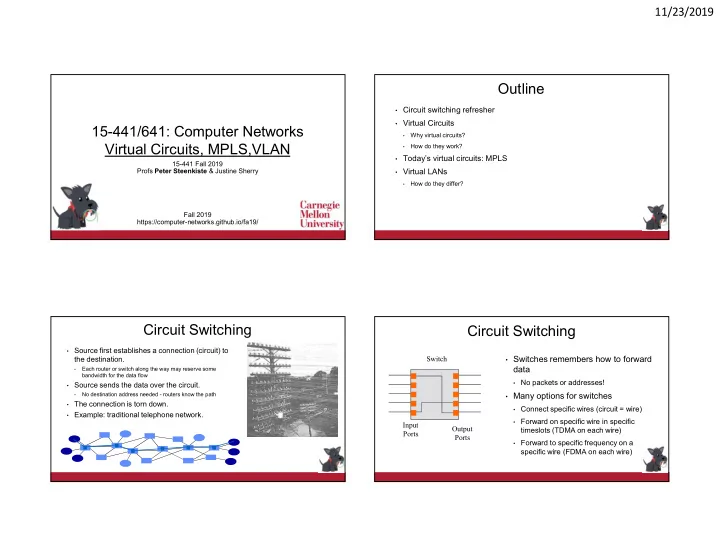
Circuit Switching

  • Source first establishes a connection (circuit) to

the destination.

  • Each router or switch along the way may reserve some

bandwidth for the data flow

  • Source sends the data over the circuit.
  • No destination address needed - routers know the path
  • The connection is torn down.
  • Example: traditional telephone network.

Circuit Switching

  • Switches remembers how to forward

data

  • No packets or addresses!
  • Many options for switches
  • Connect specific wires (circuit = wire)
  • Forward on specific wire in specific

timeslots (TDMA on each wire)

  • Forward to specific frequency on a

specific wire (FDMA on each wire) Input Ports Output Ports Switch

slide-2
SLIDE 2

11/23/2019 2

Circuit Versus Packet Switching

  • Fast switches can be built

relatively inexpensively

  • Inefficient for bursty data
  • Predictable performance

(e.g. hard QoS)

  • Requires circuit

establishment before communication

  • Switch design is more

complex and expensive

  • Allows statistical

multiplexing

  • Difficult to provide QoS

guarantees

  • Data can be sent without

signaling delay and

  • verhead

Circuit Switching Packet Switching Can we get the benefits of both?

Virtual Circuits

  • Each wire carries many “virtual” circuits
  • Forwarding based on virtual circuit (VC) identifier in a packet header
  • IP header: source IP, destination IP, etc.
  • Virtual circuit header: VC ID, ..
  • A path through the network is set up when the VC is established
  • Statistical multiplexing for efficiency, similar to IP
  • Can support wide range of quality of service
  • No guarantees: best effort service
  • Weak guarantees: delay < 300 msec, …
  • Strong guarantees: e.g. equivalent of physical circuit

Virtual Circuits Versus Packet Switching

  • Many similarities:
  • Forwarding based on “address” (VCID or destination address)
  • Statistical multiplexing for efficiency
  • Must have buffers space on switches
  • Virtual circuit switching:
  • Uses short connection identifiers to forward packets
  • Switches maintain state for each connection so they can more easily implement features such

as quality of service

  • Switches are stateful: VC connection state cannot be lost
  • Packet switching:
  • Uses full destination addresses for forwarding packets
  • Can send data right away: no need to establish a connection first
  • Switches are stateless: easier to recover from failures
  • Adding QoS is hard, kind of – see QoS lecture

1

Virtual Circuit Forwarding

  • The address used for look up in the forwarding

table is a virtual circuit identifier (VC id)

  • Forwarding table entries are filled in during

signaling

  • VC id is often shorter than destination address

and is typically “flat” (e.g., no CIDR) VC1 3

Switch

VC2 3 VC3 4 VC4 ? VC5 ?

Address Next Hop

A C B D E

3 4

F

2 VC1 VC3 VC2

slide-3
SLIDE 3

11/23/2019 3

VC versus Packets: Control over the End-to-End Path

A B R2 R1 R3 R4 R1 packet forwarding table: Dst R2 R1 VC table: VC 1 R2 VC 2 R3 Different paths to same destination! (useful for traffic engineering!)

VCI

Payload

Dst

Payload Dst

1 2 3 4 3 3 3 1 1 1 2 2 4 4 4 2

1

How to Pick a New VC Id?

  • When B establishes green virtual circuit, how does it know

what VC ids are available at all hops along the path?

  • Even worse: every VC id may already be used on a link along

the path to the destination!

  • Solution: VC id swapping

Switch

A C B D E

3 4

F

2 VC1 = 1 VC3 = 3 VC2 = 2 1

VC id Swapping

  • Look up is based on VC id in

header + incoming port number

  • Forwarding table specifies
  • utgoing port and new VC id
  • VC id conflicts can be resolved

locally during signaling VC1 = 1 3

Switch

VC2 = 2 3 VC3 = 1 4 VC4 = 2 3

Address Next Hop

A C B D E

3 4

F

2 VC1 VC3

2 3 1 1

Next id

1 2 1

VC2

2 3 2 1 1 1 3 2 2 1 2

Connections and Signaling

  • Permanent vs. switched virtual connections (PVC/SVC)
  • static vs. dynamic. PVCs last “a long time”
  • E.g., connect two bank locations with a PVC
  • SVCs are more like a phone call
  • PVCs administratively configured (but not “manually”)
  • SVCs dynamically set up on a “per-call” basis
  • Topology
  • point to point, point to multipoint, multipoint to multipoint
  • Challenges: How to configure these things?
  • What VCI to use?
  • Setting up the path
slide-4
SLIDE 4

11/23/2019 4

Basic SVC Connection Setup

calling party network called party

SETUP SETUP CONNECT ACK CONNECT ACK CONNECT CONNECT

Virtual Circuits In Practice

  • Asynchronous Transfer Mode - ATM: Teleco approach
  • Based on 53 byte “cells”, not packets (I am not kidding)
  • Kitchen sink: design driven by voice requirements, but supports file transfer,

video, etc.,

  • Intended as IP replacement. That didn’t happen. :)
  • Today: dead.
  • MPLS: The “IP Heads” answer to ATM
  • Stole all the good ideas from ATM and integrated them into IP
  • Today: Used inside many transit networks to provide traffic engineering, VPN

support, ..

  • Other networks just run IP.
  • Older (ancient?) technology: Frame Relay
  • Only provided PVCs. Used for quasi-dedicated 56k/T1 links between offices,
  • etc. Slower, less flexible than ATM.

Outline

  • Circuit switching refresher
  • Virtual Circuits
  • Why virtual circuits?
  • How do they work?
  • Today’s virtual circuits: MPLS
  • Virtual LANs
  • How do they differ?

MPLS

  • Multi-Protocol Label Switching
  • Brings the virtual circuit concept into IP
  • Driven by multiple forces
  • QoS, traffic engineering
  • Simplifies packet forwarding
  • MPLS is implemented using an MPLS that sits

between the IP and datalink header

  • VC ID is called an MPLS label

Some MPLS slides from H. Zhang Layer 2 header Layer 3 (IP) header Layer 2 header Layer 3 (IP) header MPLS label

slide-5
SLIDE 5

11/23/2019 5

Label Switched Paths (LSP)

  • Uni-directional path between two routers in an ISP’s network
  • Forces packet along a specific path (set of routers)

San Francisco New York

Label Switched Router (LSR)

  • Performs LSP setup and MPLS packet forwarding
  • Label Edge Router (LER): LSP ingress or egress
  • Transit Router: forwards packet and swaps MPLS label

San Francisco New York Ingress Egress Transit

  • IP packet is encapsulated in MPLS header by the LSP ingress

router and sent down a LSP

  • MPLS forward packet based on the label
  • IP packet is restored at end of LSP by egress router
  • TTL is adjusted, transit LSP routers count towards the TTL
  • MPLS is an optimization – it does not affect IP semantics

MPLS Header

IP Packet

32-bit MPLS Header

MPLS Header

  • Label – 20 bits that identify LSP
  • Class of service
  • Stacking bit
  • Packets can be encapsulated in multiple MPLS headers
  • Time to live
  • Decrement at each LSR, or
  • Pass through unchanged

TTL Label CoS S

slide-6
SLIDE 6

11/23/2019 6

Forwarding Equivalence Classes

  • FEC = “A subset of packets that are all treated the same way by a LSR”
  • The concept of FECs provides for a great deal of flexibility and scalability
  • Can be used to force flows of different “sizes” (e.g., Mbps) to follow certain

paths through the network – more flexible than traditional routing

Packets are destined for different address prefixes, but can be mapped to common path

IP1 IP2 IP1 IP2

LSR LSR LER LER

LSP IP1 #L1 IP2 #L1 IP1 #L2 IP2 #L2 IP1 #L3 IP2 #L3

Establishing LSPs

  • Use the Label Distribution Protocol (LDP) to establish paths

based on IP forwarding tables

  • Simple: IP routing protocols map forwarding of IP prefixes to

LSPs as they fill in IP forwarding tables

  • Establish new LSPs as needed
  • MPLS packets follow the same path as IP – lose some MPLS

benefits

  • Explicitly establish LSPs to control flow of traffic
  • More work
  • Provides finer grain control over how traffic is distributed

throughout the network

  • Important tool for traffic engineering

#216 #612 #5 #311 #14 #99 #963 #462

  • A LSP is actually part of a sink tree with paths from every

source to a destination (unidirectional).

  • A control protocol (e.g. Label Distribution Protocol, LDP)

builds the tree based on the IP forwarding tables.

#963 #14 #99 #311 #311 #311

LSPs Driven by IP Routing

MPLS Builds on Standard IP

47.1 47.2 47.3

D e s t O u t 4 7 . 1 1 4 7 . 2 2 4 7 . 3 3

1 2 3

D e s t O u t 4 7 . 1 1 4 7 . 2 2 4 7 . 3 3 D e s t O u t 4 7 .1 1 4 7 .2 2 4 7 .3 3

1 2 1 2 3

  • Destination based forwarding tables as built by OSPF, IS-IS, RIP, etc.
slide-7
SLIDE 7

11/23/2019 7

Label Switched Path (LSP)

Intf In Label In Dest Intf Out 3 40 47.1 1 Intf In Label In Dest Intf Out Label Out 3 50 47.1 1 40

47.1 47.2 47.3 1 2 3 1 2 1 2 3 3

Intf In Dest Intf Out Label Out 3 47.1 1 50

IP 47.1.1.1 IP 47.1.1.1 #216 #14 #462

ER-LSP follows a route that is explicated selected by a network manager.

#972 #14 #972

A B C Route= {A,B,C}

Explicityly Routed - ER-LSP

Intf In Label In Dest Intf Out 3 40 47.1 1 Intf In Label In Dest Intf Out Label Out 3 50 47.1 1 40

47.1 47.2 47.3 1 2 3 1 2 1 2 3 3

In tf In D e s t In tf O u t L a b e l O u t 3 4 7 .1 .1 2 3 3 3 4 7 .1 1 5 0

IP 47.1.1.1 IP 47.1.1.1

Explicitly Routed LSP - Example Outline

  • Circuit switching refresher
  • Virtual Circuits
  • Why virtual circuits?
  • How do they work?
  • Today’s virtual circuits: MPLS
  • Virtual LANs
  • How do they differ?
slide-8
SLIDE 8

11/23/2019 8

VLAN Introduction

  • VLANs logically segment switched LANs
  • Separates hardware topology from LAN topology
  • They operate at layer 2 (very different from MPLS!)
  • Partitioning is based on organization or function
  • It is independent of the physical location of nodes in the

network

  • Devices on a VLAN share their own (private) LAN
  • It is indistinguishable from a physical LAN, e.g., Ethernet,

that has its own dedicated hardware (switches, wires)

  • Has all the same properties, e.g., broadcast capability
  • Form their own IP subnet

VLAN Benefits

Performance: limits broadcast messages to the VLAN – improves scalability

E.g., very large organizations Support for mobility in WiFi

Management: manage network topology without changing the physical topology

E.g., departments in a university or company

Security: isolates VLAN – VLANs connected by routers with smarter filtering capabilities

E.g., separate “guest” network from internal network so traffic is fully isolated

VLAN Example

Devices with the same color form their own VLAN sharing the red physical hardware

VLAN Logical Topology

slide-9
SLIDE 9

11/23/2019 9

VLAN Types

  • The VLAN for each packet is selected by a switch, not the host
  • First switch adds a VLAN ID to the packet
  • Why?
  • Last switch in the path removes the VLAN ID
  • Add field to existing header or encapsulation
  • VLAN memberships can be controlled in different ways, based
  • n:
  • Port: incoming switch ports are tagged with VLAN ID
  • MAC address: switch has (MAC, VLAN ID) table
  • Protocol: switch as (protocol, VLAN ID) table

Example: 802.1Q Standard for VLANs over Ethernet

  • A 32 bit VLAN header is inserted after the MAC addresses
  • Header consists of
  • Tag Protocol Identifier (16b): single value that marks frame as a VLAN

frame

  • Control bits (4b): mostly priority
  • VLAN Identifier (12b): identifies VLAN

Take Home Points

  • Costs/benefits/goals of virtual circuits
  • Tag/label swapping - basis for most VCs.
  • Makes label assignment link-local. Understand mechanism.
  • MPLS - IP meets virtual circuits (links)
  • Used for VPNs, traffic engineering, reduced core routing table sizes
  • Management of ISPs at layer 3
  • Virtual LANs – manage LANs in software
  • Simplifies management of edge networks at layer 2
  • Very widely used, e.g., cmu-guest versus cmu-secure WiFi access
  • Set up by manager based on organizational structure – no tag swapping