15-441/641: Wireless Networks Application Presentation ISO 15-441 - - PowerPoint PPT Presentation

15 441 641 wireless networks
SMART_READER_LITE
LIVE PREVIEW

15-441/641: Wireless Networks Application Presentation ISO 15-441 - - PowerPoint PPT Presentation

4/28/2019 Standardization Local Area Networks Wireless networks are standardized by IEEE Under 802 LAN MAN standards committee 15-441/641: Wireless Networks Application Presentation ISO 15-441 Spring 2019 Session IEEE 802 OSI Profs


slide-1
SLIDE 1

4/28/2019 1

15-441/641: Wireless Networks

15-441 Spring 2019 Profs Peter Steenkiste & Justine Sherry Spring 2019 https://computer-networks.github.io/sp19/

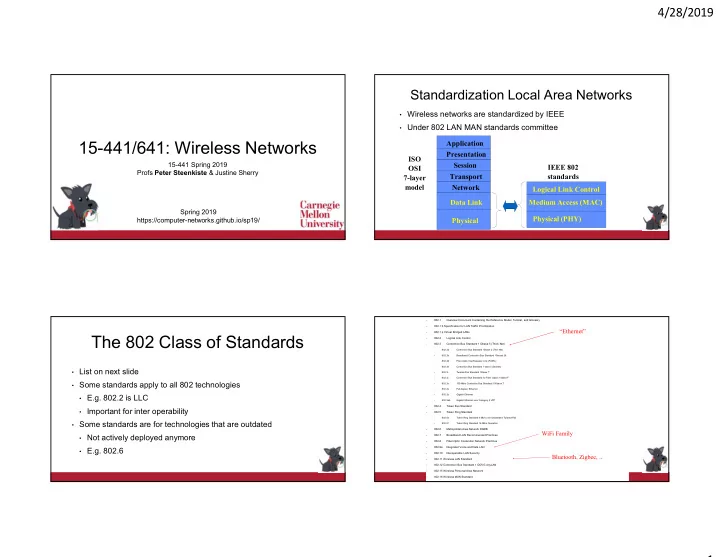
Standardization Local Area Networks

  • Wireless networks are standardized by IEEE
  • Under 802 LAN MAN standards committee

Application Presentation Session Transport Network Data Link Physical ISO OSI 7-layer model Logical Link Control Medium Access (MAC) Physical (PHY) IEEE 802 standards

The 802 Class of Standards

  • List on next slide
  • Some standards apply to all 802 technologies
  • E.g. 802.2 is LLC
  • Important for inter operability
  • Some standards are for technologies that are outdated
  • Not actively deployed anymore
  • E.g. 802.6
  • 802.1

Overview Document Containing the Reference Model, Tutorial, and Glossary

  • 802.1 b Specification for LAN Traffic Prioritization
  • 802.1 q Virtual Bridged LANs
  • 802.2

Logical Link Control

  • 802.3

Contention Bus Standard 1 Obase 5 (Thick Net)

  • 802.3a

Contention Bus Standard 10base 2 (Thin Net)

  • 802.3b

Broadband Contention Bus Standard 10broad 36

  • 802.3d

Fiber-Optic InterRepeater Link (FOIRL)

  • 802.3e

Contention Bus Standard 1 base 5 (Starlan)

  • 802.3i

Twisted-Pair Standard 10base T

  • 802.3j

Contention Bus Standard for Fiber Optics 10base F

  • 802.3u

100-Mb/s Contention Bus Standard 100base T

  • 802.3x

Full-Duplex Ethernet

  • 802.3z

Gigabit Ethernet

  • 802.3ab

Gigabit Ethernet over Category 5 UTP

  • 802.4

Token Bus Standard

  • 802.5

Token Ring Standard

  • 802.5b

Token Ring Standard 4 Mb/s over Unshielded Twisted-Pair

  • 802.5f

Token Ring Standard 16-Mb/s Operation

  • 802.6

Metropolitan Area Network DQDB

  • 802.7

Broadband LAN Recommended Practices

  • 802.8

Fiber-Optic Contention Network Practices

  • 802.9a

Integrated Voice and Data LAN

  • 802.10

Interoperable LAN Security

  • 802.11 Wireless LAN Standard
  • 802.12 Contention Bus Standard 1 OOVG AnyLAN
  • 802.15 Wireless Personal Area Network
  • 802.16 Wireless MAN Standard

WiFi Family Bluetooth, Zigbee, .. “Ethernet”

slide-2
SLIDE 2

4/28/2019 2

5

Overview

  • Link layer challenges and WiFi
  • WiFi
  • Basic WiFi design
  • Some deployment issues
  • WiFi version
  • Cellular

Wireless Communication

  • Wireless communication is based on

broadcast

  • A, B, and C can all hear each
  • ther’s signal
  • Looks like Ethernet!
  • Why not use CSMA/CD?
  • Carrier-sense Multiple Access /

Collision Detection

  • Well, it is not that easy

A C B D E A B C D E

What is the Problem? There are no Wires!

  • Attenuation is very high!
  • Signal is not contained in a wire
  • Attenuation is 1/D2 for distance D
  • In addition, there is significant noise and

interference

  • No wire to protect the signal
  • Much higher error rates

7

A C B D E A C B D E

  • Not all nodes in the wireless network can hear each other
  • Wireless communication range is shorter
  • Standard cannot limit the length of the wires

Implications for Wireless Ethernet

  • Collision detection is not practical
  • Ratio of transmitted signal power to received power is way too

high at the transmitter

  • Transmitter cannot detect colliding transmissions (deaf while

transmitting)

  • So how do you detect collisions?
  • Not all nodes can hear each other
  • “Listen before you talk” often fails
  • Hidden and exposed terminals
  • Made worse by fading
  • Changes over time!
slide-3
SLIDE 3

4/28/2019 3

Hidden Terminal Problem

  • Lack signal between S1 and S2 and cause collision at R1
  • Severity of the problem depends on the sensitivity of the

carrier sense mechanism

  • Clear Channel Assessment (CCA) threshold

RTS CTS CTS

S1 S2 R1 R2

Exposed Terminal Problem

  • Carrier sense prevents two senders from sending simultaneously although they

do not reach each other’s receiver

  • Severity again depends on CCA threshold
  • Higher CCA reduces occurrence of exposed terminals, but can create hidden terminal

scenarios

S1 R1 R2 S2

History

  • Aloha wireless data network
  • Car phones
  • Big and heavy “portable” phones
  • Limited battery life time
  • But introduced people to “mobile networking”
  • Later turned into truly portable cell phones
  • Wireless LANs
  • Originally in the 900 MHz band
  • Later evolved into the 802.11 standard
  • Later joined by the 802.15 and 802.16 standards
  • Cellular data networking
  • Data networking over the cell phone
  • Many standards – throughput is the challenge

Spectrum Allocation in US

12

slide-4
SLIDE 4

4/28/2019 4

Spectrum Use Comments

  • Each country is in charge of spectrum allocation and use

internally

  • Federal Communication Commission (FCC) and National

Telecommunication and Information Administration in the US

  • Spectrum allocation differs quite a bit – implications for mobile users?
  • Broadly speaking two types of spectrum
  • Licensed spectrum: allocated to licensed user(s)
  • Unlicensed spectrum: no license needed but device must respect rules

13

Some IEEE 802.11 Standards

  • IEEE 802.11a
  • PHY Standard : 8 channels : up to 54 Mbps : some deployment
  • IEEE 802.11b
  • PHY Standard : 3 channels : up to 11 Mbps : widely deployed.
  • IEEE 802.11d
  • MAC Standard : support for multiple regulatory domains (countries)
  • IEEE 802.11e
  • MAC Standard : QoS support : supported by many vendors
  • IEEE 802.11f
  • Inter-Access Point Protocol : deployed
  • IEEE 802.11g
  • PHY Standard: 3 channels : OFDM and PBCC : widely deployed (as b/g)
  • IEEE 802.11h
  • Suppl. MAC Standard: spectrum managed 802.11a (TPC, DFS): standard
  • IEEE 802.11i
  • Suppl. MAC Standard: Alternative WEP : standard
  • IEEE 802.11n
  • MAC Standard: MIMO : significant improvements in throughput
  • IEEE 802.11ac
  • Support for multi-user MIMO
  • IEEE 802.11ad
  • WiFi in the 60 GHz band

Frequency Bands

Low Medium High Very High Ultra High Super High Infrared Visible Light Ultra- violet X-Rays AM Broadcast Short Wave Radio FM Broadcast Television Infrared wireless LAN Cellular (840MHz) NPCS (1.9GHz)

2.4 - 2.4835 GHz 83.5 MHz (IEEE 802.11b and later) 902 - 928 MHz 26 MHz

  • Industrial, Scientific, and Medical (ISM) bands
  • Generally called “unlicensed” bands

5 GHz IEEE 802.11a and later

Millimeter wave

60 GHz IEEE 802.11ad

IEEE 802.11 Overview

  • Adopted in 1997 with goal of providing
  • Giving wireless users access to services in wired networks
  • High throughput and reliability
  • Continuous network connection, e.g. while mobile
  • The protocol defines
  • MAC sublayer
  • MAC management protocols and services
  • Several physical layers: IR, FHSS, DSSS, OFDM
  • Wi-Fi Alliance is industry group that certifies

interoperability of 802.11 products

slide-5
SLIDE 5

4/28/2019 5

Features of 802.11 MAC protocol

  • Supports MAC functionality
  • Addressing – based on 48-bit IEEE addresses
  • CSMA/CA
  • Error detection (checksum)
  • Error correction (ACK frame)
  • Flow control: stop-and-wait
  • Fragmentation (More Frag)
  • Collision Avoidance (RTS-CTS)

Infrastructure and Ad Hoc Mode

  • Infrastructure mode: stations communicate with one or more

access points which are connected to the wired infrastructure

  • What is deployed in practice
  • Two modes of operation:
  • Distributed Control Functions - DCF
  • Point Control Functions – PCF
  • PCF is rarely used - inefficient
  • Alternative is “ad hoc” mode: multi-hop, assumes no

infrastructure

  • Rarely used, e.g. military
  • Hot research topic!

Our Focus

802.11: Infrastructure Mode

  • Station (STA)
  • terminal with access mechanisms to the wireless

medium and radio contact to the access point

  • Access Point
  • station integrated into the wireless LAN and the

distribution system

  • Basic Service Set (BSS)
  • group of stations using the same AP
  • Portal
  • bridge to other (wired) networks
  • Distribution System
  • interconnection network to form one logical

network (ESS: Extended Service Set) based on several BSS

Distribution System Portal 802.x LAN Access Point 802.11 LAN BSS2 802.11 LAN BSS1 Access Point STA1 STA2 STA3 ESS

20

Wireless Collision Avoidance

  • Problem: two nodes, hidden from each other, transmit complete frames to

base station

  • Collision detection not reliable: “listen before talking” canfail
  • Solution: rely on ACKs instead to detect packet loss
  • Collisions waste bandwidth for long duration !
  • Plus also exponential back off before retransmissions – collisions are expensive!
  • Solution: “CA” using small reservation packets
  • Nodes track reservation interval with internal “network allocation vector” (NAV)
  • This is called “virtual carrier sense”
  • Note that nodes still do “physical” carrier sense
  • “Listen before you talk” often works and is cheap
slide-6
SLIDE 6

4/28/2019 6

21

Collision Avoidance: RTS-CTS Exchange

  • Explicit channel reservation
  • Sender: send short RTS: request to send
  • Receiver: reply with short CTS: clear to send
  • CTS reserves channel for sender, notifying

(possibly hidden) stations

  • RTS and CTS are short:
  • collisions are less likely, of shorter duration
  • end result is similar to collision detection
  • Avoid hidden station collisions
  • Not widely used (not used really)
  • Overhead is too high!
  • Not a serious problem in typical deployments

22

IEEE 802.11 MAC Protocol

  • RTS/CTS implemented using NAV:

Network Allocation Vector

  • NAV is also used with data packets
  • 802.11 data frame has transmission time

field

  • Others (hearing data header) defer access

for NAV time units

  • But why do you need NAV if you can hear

the header?

  • Fading?
  • Header is sent at lower bit rate

How About Exposed Terminal?

  • Exposed terminals result in a lost

transmission opportunity

  • Reduces capacity – no collisions
  • Exposed terminals are difficult to deal with
  • Even hard to detect them!
  • Good news – they are very rare!
  • So we live with them

23

A B C D

Exposed

DCF mode transmission without RTS/CTS

source destination

  • ther

DIFS

Data Ack

SIFS

NAV

Must defer access DIFS Congestion Window Random backoff

Not used in Ethernet WiFi is more concerned about collisions

slide-7
SLIDE 7

4/28/2019 7

Exponential Backoff

  • Force stations to wait for random amount of time to reduce the chance of

collision

  • Backoff period increases exponential after each collision
  • Similar to Ethernet
  • Also used when the medium is sensed as busy:
  • Wait for medium to be idle for a DIFS (DCF IFS) period
  • Pick random number in contention window (CW) = backoff counter
  • Decrement backoff timer until it reaches 0
  • But freeze counter whenever medium becomes busy
  • When counter reaches 0, transmit frame
  • If two stations have their timers reach 0 at same time; collision will occur;
  • After every failed retransmission attempt:
  • increase the contention window exponentially
  • 2i –1 starting with CWmin up to CWmax e.g., 7, 15, 31, …

Now What about PCF?

  • IEEE 802.11 combines random access with a “taking turns” protocol
  • DCF (Distributed Coordination Mode) – Random access
  • CP (Contention Period): CSMA/CA is used
  • PCF (Point Coordination Mode) – Polling
  • CFP (Contention-Free Period): AP polls hosts
  • Basestation can control who access to medium
  • Can offer bandwidth guarantees
  • Rarely used in practice

CP

CFP CFP

Super-frame

Frame

28

Overview

  • Link layer challenges and WiFi
  • WiFi
  • Basic WiFi design
  • Some deployment issues
  • WiFi version
  • Cellular

Association Management

 Stations must associate with an AP before they can use the

wireless network

  • AP must know about them so it can forward packets
  • Often also must authenticate

 Association is initiated by the wireless host – involves

multiple steps:

  • 1. Scanning: finding out what access points are available
  • 2. Selection: deciding what AP (or ESS) to use
  • 3. Association: protocol to “sign up” with AP – share configuration info
  • 4. Authentication: needed to gain access to secure APs – many options

 Disassociation: station or AP can terminate association

slide-8
SLIDE 8

4/28/2019 8 “Static” Channel – Bitrate Adaptation

1 Mbps 2 Mbps 5.5 Mbps 11 Mbps

Lower signal rates enable coverage of large additional area

Mobile Channel – Pedestrian

1 Mbps 2 Mbps 5.5 Mbps 11 Mbps 18 Mbps 24 Mbps 36 Mbps 48 Mbps 54 Mbps

Infrastructure Deployments Frequency Reuse in Space

  • Set of cooperating cells with a base

stations must cover a large area

  • Cells that reuse frequencies should

be as distant as possible to minimize interference and maximize capacity

  • Minimizes hidden and exposed terminals
  • 3D problem!
  • Lots of measurements

35

Overview

  • Link layer challenges and WiFi
  • WiFi
  • Basic WiFi design
  • Some deployment issues
  • WiFi version
  • Cellular
slide-9
SLIDE 9

4/28/2019 9

IEEE 802.11 Family

Protocol Release Data Freq. Rate (typical) Rate (max) Range (indoor) Legacy 1997 2.4 GHz 1 Mbps 2Mbps ? 802.11a 1999 5 GHz 25 Mbps 54 Mbps ~30 m 802.11b 1999 2.4 GHz 6.5 Mbps 11 Mbps ~30 m 802.11g 2003 2.4 GHz 25 Mbps 54 Mbps ~30 m 802.11n 2008 2.4/5 GHz 20/40 MHz 200 Mbps 600 Mbps ~50 m 802.11ac 2013 5 GHz

20→160 MHz

100s Mbps per user 1.3 Gbps ~50 m 802.11ad 2016 60 GHz Gbps 7 Gbps Short - room

A Factor of 1000+ Speedup?

  • 802.11b: first WiFi to be standardized and widely deployed
  • Used 20MHz channels, 2.4 GHz only, inefficient modulation
  • 802.11a and g: increases rates from 11 to 54Mbit/sec
  • Key factor is better modulation (“OFDM”)
  • They are the same standard, but 802.11a runs in 5GHz band
  • 5GHz band is wider and has lower utilization – more capacity!
  • 802.11n: runs in both 5 and 2.4GHz bands – significant speed up
  • How? Better modulation, channel bonding, and MIMO

Channel Bonding

  • Why only use 20Mhz channels per user?
  • Remember Shannon?
  • What changes are needed?
  • Radios need to use a wider channel: adds complexity, cost
  • Interoperability between 20 and 40 MHz devices – messy
  • Mostly useful in 5 GHz band – more spectrum

20 MHz 40 MHz

How do we Go Faster?

  • Wired world:

Pull more wires!

  • Wireless world:

How about if we could do the same thing and simply use more antennas?

slide-10
SLIDE 10

4/28/2019 10

MIMO: Multiple In – Multiple Out

  • Key idea: use multiple antenna pairs to send parallel data streams
  • Should give us linear capacity increase (just like the wired world)
  • Problem: the different transmissions interfere!
  • Each receiving antenna receives (weighted) sum of all transmissions
  • Could be viewed as noise – low S/N ration in Shannon
  • Solution: interference is not random but can be subtracted

T R

Input Streams Postprocessing Preprocessing Output Streams 4 Channels

How Do We Go Even Faster?

  • 802.11ac: faster, mostly by more aggressive modulation and MIMO
  • Also uses multi-user MIMO: AP can send packets to multiple

stations simultaneously (don’t worry about the details)

  • 802.11ad: first WiFi to use the 60 GHz band

+ Lots of bandwidth available, mostly unused ‒ Transmission only over short distances ‒ Signal does not penetrate objects, i.e., mostly LOS

  • In practice, need to use beam forming
  • While standardized, lots of open questions remain

42

Overview

  • Link layer challenges and WiFi
  • WiFi
  • Basic WiFi design
  • Some deployment issues
  • WiFi version
  • Cellular

Cellular versus WiFi

Spectrum Service model MAC services Cellular Licensed Provisioned “for pay” Fixed bandwidth SLAs WiFi Unlicensed Unprovisioned “free” – no SLA Best effort no SLAs

slide-11
SLIDE 11

4/28/2019 11

Implication No control –

  • pen, diverse access

No guarantees maximize throughput, fairness FCC rules to avoid collapse

Implications WiFi

Spectrum Service model MAC services WiFi Unlicensed Unprovisioned “free” Best effort no SLAs

Implications Cellular

Spectrum Service model MAC services Cellular Licensed Provisioned “for pay” Fixed bandwidth SLAs Implication Provider has control

  • ver interference

Can and must charge + make commitments TDMA, FDMA, CDMA; access control

But There are Many Similarities

  • Cellular and WiFi face the same fundamental physical layer

challenges

  • Interference, attenuation, multi-path, …
  • Spatial frequency reuse based on “cells”
  • Adjacent cells use different frequencies
  • Over time, they use similar modulation schemes
  • Each generation uses the best technology available at that time
  • Rapid improvements in throughputs
  • Better modulation and coding, increasingly aggressive MIMO, …

46

Early Cellular Networks

  • Mobile radio telephone system was based on:
  • High power transmitter/receivers
  • Could support about 25 channels
  • in a radius of 80 Km
  • To increase network capacity:
  • Multiple low-power transmitters (100W or less)
  • Small transmission radius -> area split in cells
  • Each cell with its own frequencies and base station
  • Adjacent cells use different frequencies
  • The same frequency can be reused at sufficient distance
slide-12
SLIDE 12

4/28/2019 12

Cellular Standards

  • 1G systems: analog voice
  • Not unlike a wired voice line (without the wire)
  • Pure FDMA: each voice channel gets two frequencies
  • 2G systems: digital voice
  • Many standards
  • Example: GSM - FDMA/TDMA, most widely deployed, 200 countries, a billion

people

  • 2.5G systems: voice and data channels
  • Example: GPRS - evolved from GSM, packet-switched, 170 kbps (30-70 in

practice)

  • Use some of the “voice slots” for data

1 2 4 3 5 6 7 1 2 3 4 1 2 4 3 5 6 7 1 2 3 4 1 2 4 3 5 6 7 1 2 3 4 1 2 4 3 5 6 7 1 2 3 4

Uplink Downlink

User1 Voice User2 Voice User3 GPRS User4 GPRS User5 GPRS

F1 F2 F3 F4 F1 F2 F3 F4

Time Slot Carrier frequency

GPRS Radio Interface Cellular Standards

  • 3G: voice (circuit-switched) and data (packet-switched)
  • Several standards
  • Most use Code Division Multiple Access (CDMA)
  • 4G: 10 Mbps and up, seamless mobility between different

cellular technologies

  • LTE the dominating technology
  • Completely packet switched, voice sent as packets
  • Uses Orthogonal Frequency Division Multiplexing (OFDM) for

increased robustness wrt. frequency selective fading and mobility

How to Increase Capacity?

  • Adding new channels
  • More spectrum – spectrum auctions
  • Frequency borrowing
  • More flexible sharing of channels across cells
  • Sectoring antennas
  • Split cell into smaller cells using directional

antennas – 3-6 per cell

  • Microcells, picocells, …
  • Antennas on top of buildings, lamp posts
  • Form micro cells with reduced power
  • Good for city streets, roads and inside buildings
slide-13
SLIDE 13

4/28/2019 13

Old Slides