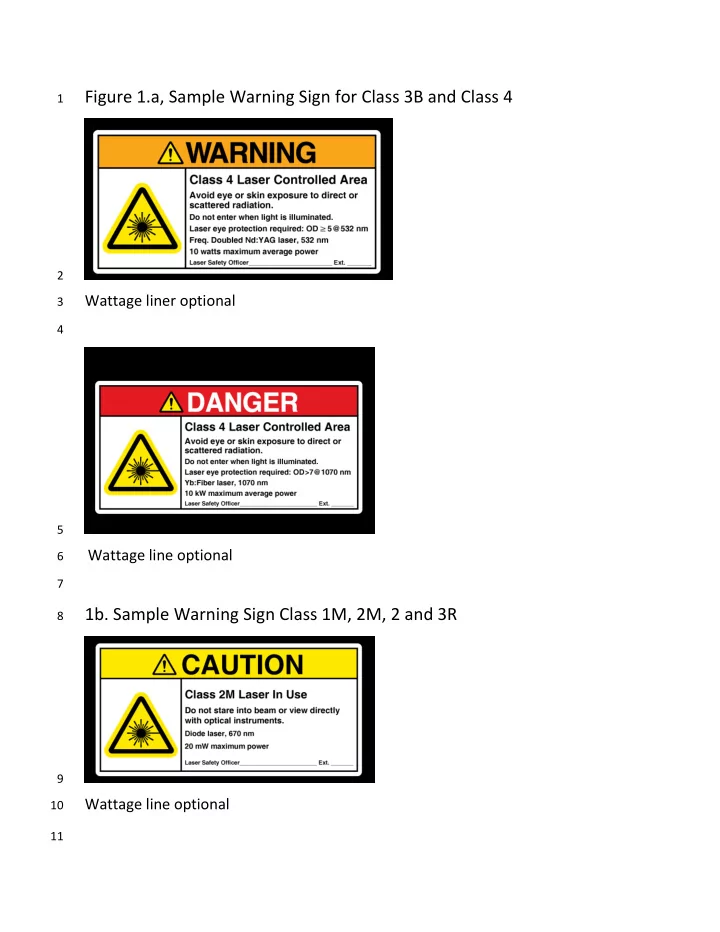
Figure 1.a, Sample Warning Sign for Class 3B and Class 4 1 2 - - PDF document

figure 1 a sample warning sign for class 3b and class 4
SMART_READER_LITE
LIVE PREVIEW

Figure 1.a, Sample Warning Sign for Class 3B and Class 4 1 2 - - PDF document

Figure 1.a, Sample Warning Sign for Class 3B and Class 4 1 2 Wattage liner optional 3 4 5 Wattage line optional 6 7 1b. Sample Warning Sign Class 1M, 2M, 2 and 3R 8 9 Wattage line optional 10 11 Figure 1c. ANSI Z353.2 Compliant Laser

slide-1
SLIDE 1

Figure 1.a, Sample Warning Sign for Class 3B and Class 4

1 2

Wattage liner optional

3 4 5 Wattage line optional 6 7

  • 1b. Sample Warning Sign Class 1M, 2M, 2 and 3R

8 9

Wattage line optional

10 11

slide-2
SLIDE 2

Figure 1c. ANSI Z353.2 Compliant Laser Area Warning Sign Formats

12 13 14 15 16 17 18 19 20 21 22 23 24 25 26

slide-3
SLIDE 3

Figure: 2 Laser Warning Signs that have been grandfathered by Z136.1

27 28 29

Would now apply to Kilowatt laser system

30 31 32

Application has not changed

33 34 35

Application would not change, but a strict interpretation of ANSI sign standard,

36

would remove wording on eyewear use

37 38 39

slide-4
SLIDE 4

Figure 3 Exterior if LCA Entryway Class 4 Lasers Utilizing a positive

40

access mechanism (interlock, electronic lock)

41 42 43 44 45 46 47 48 49 50 51 52 53 54 55 56 57 58 59 60 61 62 63 64 65 66 67 68 69 70 71 72

Figure Key & Additional Comments:

73

  • 1. ANSI Warning sign, can be integrated into Institution Hazard Communication Posting, but must contain

74

required information, not just laser symbol

75

  • 2. Illuminated Warning sign most commonly indicates that power is on to the laser, not that the beam is

76

  • accessible. This can be corrected with a dual or tri-light system or programmable digital or flat screen sign.

77

  • 3. Missing from figure is Emergency Stop button, LSO needs to determine if this is required as well as

78

possible alternatives to the red mushroom crash button, indication to wear circuit breaker is located.

79

  • 4. Light over door frame with no indication of its function can lead to false impressions to area staff and

80

visitors

81

Warning light too high, laser on indicator over door frame out of line of sight, poor location

Better position for illuminated warning sign

Interlock by pass key pad, in some situations could be replaced by an electronic or card swipe system (which would prevent unauthorized access, but not affect laser).

ANSI Warning Sign

slide-5
SLIDE 5

Figure 4 Class 4 laser lab

82 83 84

Entry key pad Warning sign (grandfathered version)

85 86

Note: This example shows a laser free zone upon entry (dog leg maze). Eyewear, SOPs, Safety

87

notices, bench to put on booties are examples of items that could be in this area. This also

88

prevents stray beams from exiting LCA.

89 90 91 92 93 94 95 Eyewear holder inside &

  • ut

Laser free zone Illuminated warning

slide-6
SLIDE 6

Figure 5 Perimeter guard around optical table

96 97 98 99

Perimeter guard, purpose to contain beams and reflections on the optical table.

100

Best practice is to have the guard made with a diffuse surface, at least on the

101

inside and to be noncombustible for the laser output in use.

102

  • 1. Guard walls need to be higher than optics on post,8- 12 inches works well.

103

Depending on how installed, sections can be removed for access.

104

  • 2. A step on platform or step stool will allow greater access to center of table,

105

this avoids lend in and back strain.

106

  • 3. Over any periscope optics should have a cover or block a best practice is to

107

label it indicating upward beams present.

108

  • 4. Optical tables with energized equipment on them need to be grounded.

109

  • 5. If shelves are hanging over optical table, the edges of such shelves need to

110

be padded (pipe instillation works very well for this).

111

  • 6. Note this set up only allows access from three sides, this might create

112

safety concerns or be acceptable due to space limitations in LCA.

113 114