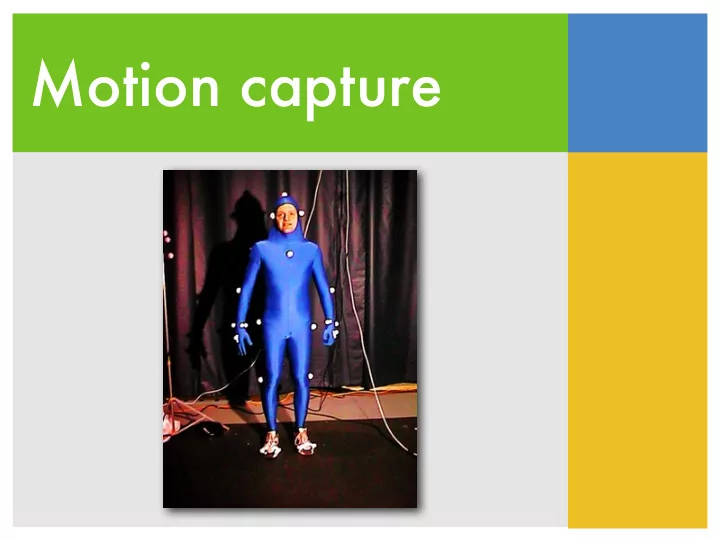
Motion capture Applications Systems Motion capture pipeline - - PowerPoint PPT Presentation
Motion capture Applications Systems Motion capture pipeline Biomechanical analysis Applications Computer animation Biomechanics Robotics Cinema Video games Anthropology (with Dr. Cronk and Dr. Trivers from Anthropology,
- Applications
- Systems
- Motion capture pipeline
- Biomechanical analysis
Applications
Biomechanics Computer animation Robotics Video games Anthropology Cinema
Is a good dancer more sexually attractive?
(with Dr. Cronk and Dr. Trivers from Anthropology, Rutgers)
What is captured?
Animals Humans Celebrities Objects
What is captured?
Whole body Face Hands
Pros and cons
- Truthfully record all the fine details of the
natural motion
- The captured motion is difficult to be
- generalized
- modified
- controlled
How to use the data?
- Off-line
- Motion libraries
- Motion graphs
- Training examples
How to use the data?
- Off-line
- Motion libraries
- Motion graphs
- Training examples
- On-line
- Drive characters based on the movement of the
actors in real time
Performance animation
- Applications
- Systems
- Motion capture pipeline
- Biomechanical analysis
Types of Systems
- Optical systems
- Magnetic systems
- Motion tapes
- Vision-based systems
- Inertial and ultrasonic systems
Optical systems
- Cameras
- High temporal resolution (120+ fps)
- Detect the locations of reflective markers
- Markers
- passive: sensitive to infrared
- active: emit LED light
Magnetic system
- Cumbersome sensors (heavier and also
wired)
- Smaller workspace
- Record both position and orientation
- Lower resolution (80 fps max)
- Sensitive to EMI/metal in the environment
Motion tapes
Contain optical fibers and sensors that can detect the bending and twisting Restriction of movement Need another technology for detecting root translation Measure the shape of surface precisely
Markerless mocap
- http://www.organicmotion.com/
- Kinect
Ultrasonic + Inertial
- A wearable self-contained system
- Inertial information is provided by
gyroscopes and accelerometers
- Microphones are used to record the
distance between each pair of sensors
Body-mounted cameras
- Applications
- Systems
- Motion capture pipeline
- Biomechanical analysis
Motion capture pipeline
calibration capturing model building marker labeling inverse kinematics trajectory smoothing
Motion capture pipeline
calibration capturing model building marker labeling inverse kinematics trajectory smoothing
Calibration
- Static calibration
- Figure out where the
floor is
- Dynamic calibration
- Figure out the capture
volume
Motion capture pipeline
calibration capturing model building marker labeling inverse kinematics trajectory smoothing
Capturing
- Marker placement
- Markers should move rigidly
with joints
- Asymmetric placement helps
in post-processing
- T-pose and range of motion
- Recording specific poses can
help estimating bone lengths
3D marker position
- In principle, two cameras are sufficient to
reconstruct the 3D location of a marker
- In practice, more cameras can
- reduce occlusion
- increase precision
Motion capture pipeline
calibration capturing model building marker labeling inverse kinematics trajectory smoothing
Model building
- Given recored marker positions, estimate the
dimension of each body part
- Optimize both bone length and handle positions
at the same time
- Templates and heuristics help
Problem statement
generic skeleton rough handle positions specific pose used for calibration bone length handle offset
+
Motion capture pipeline
calibration capturing model building marker labeling inverse kinematics trajectory smoothing
Marker labeling
- Ghost markers
- Missing markers
- Switching trajectories
Raw data
3D locations of markers
Motion capture pipeline
calibration capturing model building marker labeling inverse kinematics trajectory smoothing
Inverse kinematics
- Input: articulated body with handles + desired
handle positions
- Joint angles that move handles to desired
positions
Motion capture pipeline
calibration capturing model building marker labeling inverse kinematics trajectory smoothing
Trajectory smoothing
- Global optimization that minimizes the velocity
- f the joint angles while staying as close as
possible to the desired handle positions
Final motion
Issues
The main problem with motion capture associated with characters has to do with mass distribution, weight and exaggeration. It is impossible for a performer to produce the kind of motion exaggeration that a cartoon character needs, and the mass and weight of the performer almost never looks good when applied to a character
- f different proportions.
Eric Darnell, codirector of Antz
Issues
The mapping of human motion to a character with non-human proportions doesn’t work, because the most important things you get out
- f motion capture are the weight shifts and the
subtleties and that balancing act of the human body. If the proportions change, you throw all that out the door, so you might as well animate it.
Richard Chuang, VP at PDI
- Applications
- Systems
- Motion capture pipeline
- Biomechanical analysis
Biomechanical applications
- Understand and quantify the forces produced
by muscles, ligaments, and tendons via noninvasive instruments
- Synthesize realistic human locomotion
Measurement
- Need to record accurate kinematic properties
- f the motion
- video or infrared based motion analysis
systems
- Need to measure the external forces precisely
- force platforms that measures the ground
reaction forces
Motion analysis
- Interaction of muscle
contractions across several joints is extremely complex
- Most invasive devices can
- nly measure forces in single
tissues
- surgical stables
- buckle force transducers
Motion analysis
- Inverse dynamics can only measure the net
effect of the internal forces and torques across several joints
- Inverse dynamics can compute total load on a
system, but can not determine the distribution of the load
Measurement
- Inverse dynamics
assumes there is no co- contraction of agonist and antagonist muscles
Joint kinetics
Equal in joint forces and moments, but completely different in muscle activities
Model reduction
Reduce complex anatomical structures
F F F∗ F∗ −F∗ MF
Foot with muscle force F Forces F* and -F* added at ankle center Couple F and -F* replaced by MF moment
Model reduction
force from triceps surae ligament force bone-on-bone forces force from tibialis anterior gravity gravity ground contact force ground contact force
Fankle Mankle
Limitations
- ID relies on assumption that are not always valid
- joint friction and air friction
- non-uniform distribution of mass
- movement of joint center of rotation
- approximation of body segment parameters
- Measurement error and numerical error propagation
What’s next?
- Field trip to Mocap lab (TSRB 325)
- Need one volunteer