Concept of an array rotation Arrays part 2 Imagine we want to - - PowerPoint PPT Presentation

concept of an array rotation
SMART_READER_LITE
LIVE PREVIEW

Concept of an array rotation Arrays part 2 Imagine we want to - - PowerPoint PPT Presentation

Topic 20 Concept of an array rotation Arrays part 2 Imagine we want to 'rotate' the elements of an array; that is, to shift them left by one index. The element that used to be "42 million of anything is a lot." at index 0 will


slide-1
SLIDE 1

CS305j Introduction to Computing Arrays Part 2

1

Topic 20 Arrays part 2

"42 million of anything is a lot."

  • Doug Burger

(commenting on the number of transistors in the Pentium IV processor)

Based on slides for Building Java Programs by Reges/Stepp, found at http://faculty.washington.edu/stepp/book/

CS305j Introduction to Computing Arrays Part 2

2

Concept of an array rotation

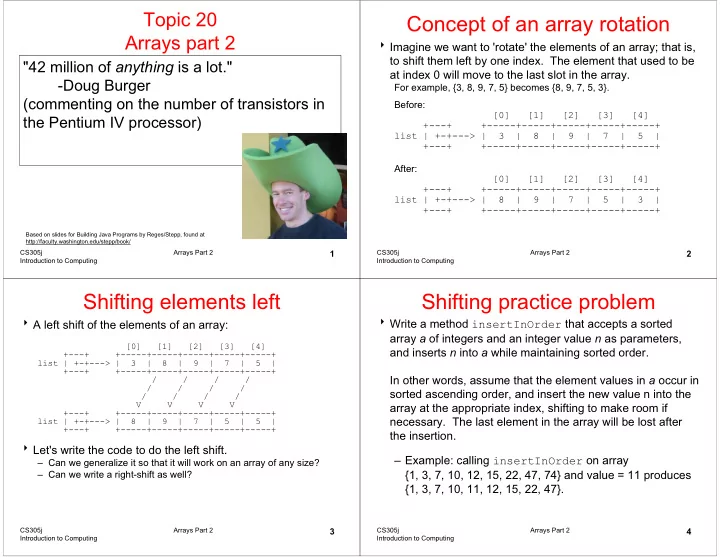
Imagine we want to 'rotate' the elements of an array; that is, to shift them left by one index. The element that used to be at index 0 will move to the last slot in the array.

For example, {3, 8, 9, 7, 5} becomes {8, 9, 7, 5, 3}. Before: [0] [1] [2] [3] [4] +---+ +-----+-----+-----+-----+-----+ list | +-+---> | 3 | 8 | 9 | 7 | 5 | +---+ +-----+-----+-----+-----+-----+ After: [0] [1] [2] [3] [4] +---+ +-----+-----+-----+-----+-----+ list | +-+---> | 8 | 9 | 7 | 5 | 3 | +---+ +-----+-----+-----+-----+-----+

CS305j Introduction to Computing Arrays Part 2

3

Shifting elements left

A left shift of the elements of an array:

[0] [1] [2] [3] [4] +---+ +-----+-----+-----+-----+-----+ list | +-+---> | 3 | 8 | 9 | 7 | 5 | +---+ +-----+-----+-----+-----+-----+ / / / / / / / / / / / / V V V V +---+ +-----+-----+-----+-----+-----+ list | +-+---> | 8 | 9 | 7 | 5 | 5 | +---+ +-----+-----+-----+-----+-----+

Let's write the code to do the left shift.

– Can we generalize it so that it will work on an array of any size? – Can we write a right-shift as well?

CS305j Introduction to Computing Arrays Part 2

4

Shifting practice problem

Write a method insertInOrder that accepts a sorted array a of integers and an integer value n as parameters, and inserts n into a while maintaining sorted order. In other words, assume that the element values in a occur in sorted ascending order, and insert the new value n into the array at the appropriate index, shifting to make room if

  • necessary. The last element in the array will be lost after

the insertion. – Example: calling insertInOrder on array {1, 3, 7, 10, 12, 15, 22, 47, 74} and value = 11 produces {1, 3, 7, 10, 11, 12, 15, 22, 47}.

slide-2
SLIDE 2

CS305j Introduction to Computing Arrays Part 2

5

String methods with arrays

These String methods return arrays:

String s = "long book";

s.split(" ") returns {"long", "book"} s.split("o") returns {"l", "ng b", "", "k"} separates this String into substrings by the given delimiter split(delimiter) s.toCharArray() returns {'l', 'o', 'n', 'g', ' ', 'b', 'o', 'o', 'k'} separates this String into an array of its characters toCharArray() Example Description Method name

CS305j Introduction to Computing Arrays Part 2

6

String practice problems

Write a method named areAnagrams that accepts two Strings as its parameters and returns whether those two Strings contain the same letters (possibly in different orders).

– areAnagrams("bear", "bare") returns true – areAnagrams("sale", "sail") returns false

Write a method that accepts an Array of Strings and counts the number of times a given letter is present in all the Strings

CS305j Introduction to Computing Arrays Part 2

7

Graphics methods with arrays

These Graphics methods use arrays:

int[] xPoints = {10, 30, 50, 70, 90}; int[] yPoints = {20, 50, 35, 90, 15}; g.setColor(Color.GREEN); g.drawPolyline(xPoints, yPoints, 5); xPoints and yPoints are "parallel" arrays parallel arrays: two or more separate arrays, usually

  • f the same length, whose elements with equal

indices are associated with each other in some way

drawPolyline(int[] xPoints, int[] yPoints, int length) fillPolygon(int[] xPoints, int[] yPoints, int length) drawPolygon(int[] xPoints, int[] yPoints, int length)

Method name

CS305j Introduction to Computing Arrays Part 2

8

Arrays of objects

Recall: when you construct an array of primitive values like ints, the elements' values are all initialized to 0.

– What is the equivalent of 0 for objects?

When you construct an array of objects (such as Strings), each element initially stores a special reference value called null.

– null means 'no object' – Your program will crash if you try to call methods on a null reference.

String[] words = new String[5];

null null null null null value 4 3 2 1 index

slide-3
SLIDE 3

CS305j Introduction to Computing Arrays Part 2

9

The dreaded 'null pointer'

Null array elements often lead to program crashes:

String[] words = new String[5]; System.out.println(words[0]); words[0] = words[0].toUpperCase(); // kaboom!

Output:

null Exception in thread "main" java.lang.NullPointerException at ExampleProgram.main(DrawPolyline.java:8)

The array elements should be initialized somehow:

for (int i = 0; i < words.length; i++) { words[i] = "this is string #" + (i + 1); } words[0] = words[0].toUpperCase(); // okay now

CS305j Introduction to Computing Arrays Part 2

10

Command-line arguments

command-line arguments: If you run your Java program from the Command Prompt, you can write parameters after the program's name.

– The parameters are passed into main as an array of Strings. public static void main(String[] args) { for (int i = 0; i < args.length; i++) {

System.out.println("arg " + i + ": " + args[i]);

} }

Usage:

C:\hw6> java ExampleProgram how are you? Or BlueJ call to main arg 0: how arg 1: are arg 2: you?

CS305j Introduction to Computing Arrays Part 2

11

Java's Arrays class

The Arrays class in package java.util has several useful static methods for manipulating arrays:

arranges the elements in the array into ascending order sort(array) returns a String representing the array toString(array) sets every element in the array to have the given value fill(array, value) whether the two given arrays contain exactly the same elements in the same

  • rder

equals(array1, array2) returns the index of the given value in this array (-1 if not found) binarySearch(array, value) Description Method name

CS305j Introduction to Computing Arrays Part 2

12

Arrays class example

Searching and sorting numbers in an array:

int[] numbers = {23, 13, 480, -18, 75}; int index = Arrays.binarySearch(numbers, -18); System.out.println("index = " + index); – Output: index = 3

Sorting and searching:

Arrays.sort(numbers);// now {-18, 13, 23, 75, 480} index = Arrays.binarySearch(numbers, -18); System.out.println("index = " + index); System.out.println(Arrays.toString(numbers)); – Output: index = 0 [-18, 13, 23, 75, 480]