14:332:231 DIGITAL LOGIC DESIGN Ivan Marsic, Rutgers University - - PDF document

14 332 231 digital logic design
SMART_READER_LITE
LIVE PREVIEW

14:332:231 DIGITAL LOGIC DESIGN Ivan Marsic, Rutgers University - - PDF document

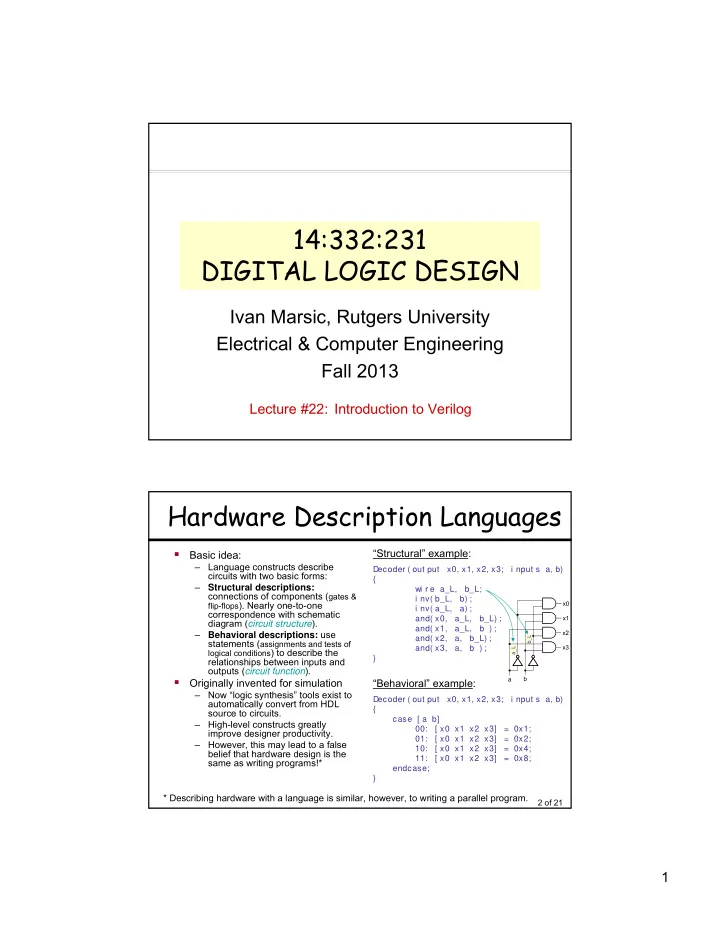
14:332:231 DIGITAL LOGIC DESIGN Ivan Marsic, Rutgers University Electrical & Computer Engineering Fall 2013 Lecture #22: Introduction to Verilog Hardware Description Languages Structural example: Basic idea: Language


slide-1
SLIDE 1

1

14:332:231 DIGITAL LOGIC DESIGN

Ivan Marsic, Rutgers University Electrical & Computer Engineering Fall 2013

Lecture #22: Introduction to Verilog

2 of 21

Hardware Description Languages

  • Basic idea:

– Language constructs describe circuits with two basic forms: – Structural descriptions: connections of components (gates &

flip-flops). Nearly one-to-one

correspondence with schematic diagram (circuit structure). – Behavioral descriptions: use statements (assignments and tests of

logical conditions) to describe the

relationships between inputs and

  • utputs (circuit function).
  • Originally invented for simulation

– Now “logic synthesis” tools exist to automatically convert from HDL source to circuits. – High-level constructs greatly improve designer productivity. – However, this may lead to a false belief that hardware design is the same as writing programs!* * Describing hardware with a language is similar, however, to writing a parallel program.

“Structural” example:

Decoder ( out put x0, x1, x2, x3; i nput s a, b) { wi r e a_L, b_L; i nv( b_L, b) ; i nv( a_L, a) ; and( x0, a_L, b_L) ; and( x1, a_L, b ) ; and( x2, a, b_L) ; and( x3, a, b ) ; }

“Behavioral” example:

Decoder ( out put x0, x1, x2, x3; i nput s a, b) { case [ a b] 00: [ x0 x1 x2 x3] = 0x1; 01: [ x0 x1 x2 x3] = 0x2; 10: [ x0 x1 x2 x3] = 0x4; 11: [ x0 x1 x2 x3] = 0x8; endcase; }

a_L b_L

x0 x1 x2 x3 a b

slide-2
SLIDE 2

2

3 of 21

Sample Design Methodology

HDL Specification Simulation Synthesis

Hierarchically defines structure and/or function of circuit. Verification: Checks if the design behaves as required with regards to function, timing, and power consumption. Maps specification to resources

  • f the implementation platform

(FPGA or custom silicon).

4 of 21

Top-Down Architecture (1)

  • Top Down Refinement Process
  • Start Here:

Project

Inputs Outputs

slide-3
SLIDE 3

3

5 of 21

Top-Down Architecture (2)

  • End Here:

6 of 21

History of the Verilog HDL

  • 1984: Gateway Design Automation introduced Verilog-XL

– digital logic simulator – The Verilog language was part of the Verilog-XL simulator – The language was mostly created by 1 person, Phil Moorby – The language was intended to be used with only 1 product

  • 1989: Gateway merged into Cadence Design Systems
  • 1990: Cadence made the Verilog HDL public domain
  • 1995: The IEEE standardized the Verilog HDL (IEEE 1364)
  • 2001: The IEEE enhanced the Verilog HDL for modeling

scalable designs, deep sub-micron accuracy, etc.

  • 2005: The IEEE added minor corrections, spec

clarifications, and a few new language features

  • 2009: The IEEE standardized SystemVerilog, with many

new features and capabilities to aid design verification and design modeling

slide-4
SLIDE 4

4

7 of 21

Verilog Introduction

  • A m
  • dul e definition describes a component in a circuit
  • Two ways to describe module contents:

– Structural Verilog

  • Lists sub-components and how they are connected
  • Just like schematics, but using text
  • Tedious to write, hard to understand
  • You get precise control over circuit details
  • May be necessary to map to special resources of the FPGA

– Behavioral Verilog

  • Describes what a component does, not how it does it
  • Synthesized into a circuit that has this behavior
  • Result is only as good as the tools
  • Build up a hierarchy of modules. Top-level module is your

entire design (or the test environment for your design).

8 of 21

Verilog Modules

declarations statements module

declarations statements module A declarations statements declarations statements declarations statements declarations statements declarations statements module B module C module D module E module F

■ One module ■ Modules instantiating

  • ther modules hierarchically

■ Verilog modules are the building blocks for Verilog designs

slide-5
SLIDE 5

5

9 of 21

Contents of a Verilog Module

  • Modules may

represent:

– An entire design – Major hierarchical blocks within a design – Individual components within a design

  • Modules are

completely self contained

– The only things “global” in Verilog are the names of modules and primitives – Verilog does not have global variables or functions

m

  • dul e nam

e ( por t s ) ; por t decl ar at i ons dat a t ype decl ar at i ons f unct i onal i t y t i m i ng endm

  • dul e

10 of 21

Verilog Modules and Instantiation

  • Modules define circuit components
  • Instantiation defines hierarchy of the design

m

  • dul e addr _cel l

( a, b, ci n, s, cout ) ; i nput a, b, ci n;

  • ut put

s, cout ; endm

  • dul e

m

  • dul e adder ( A, B, S) ;

. . . addr _cel l ac1 ( … connections … ) ; addr _cel l ac2 ( … connections … ) ; . . . endm

  • dul e

Note: A module is not a function in the C sense. There is no call and return

  • mechanism. Think of it more like a hierarchical data structure.

module name port list keywords (reserved words) module body port declarations: i nput identifier, … identifier;

  • ut put identifier, … identifier;

i nout identifier, … identifier; i nput [msb:lsb] identifier, … identifier;

  • ut put [msb:lsb] identifier, … identifier;

i nout [msb:lsb] identifier, … identifier; instance of addr_cell module range specification (defined later)

top-level module

adder

lower-level module

addr_cell

slide-6
SLIDE 6

6

11 of 21

Verilog Modules and Instantiation

  • Verilog supports ANSI C style port declarations

– The port direction and data type of the signal can be included in the port list

m

  • dul e addr _cel l

( i nput wi r e a, i nput wi r e b, i nput wi r e ci n,

  • ut put r eg sum

, cout ) ; endm

  • dul e

m

  • dul e adder ( A, B, S) ;

. . . addr _cel l ac1 ( … connections … ) ; addr _cel l ac2 ( … connections … ) ; . . . endm

  • dul e

port list module body instance of addr_cell module 12 of 21

Verilog Logical System

  • Verilog uses four-valued logic system
  • A 1-bit signal can take on one of 4 values:

0 Logical 0, or false 1 Logical 1, or true x An unknown/undefined logical value z High impedance (floating), as in three-state logic

  • Verilog has built-in bitwise boolean
  • perators (see table in a later slide)
slide-7
SLIDE 7

7

13 of 21

Verilog Nets and Wires

  • Verilog has two classes of signals: Nets and Variables
  • A net corresponds to a wire in a physical circuit and provides

connectivity between modules

– wire is the default Net type

  • 'wire' is any signal name that appears in a module’s input/output port list, but

not in module’s net declaration

  • 'wire' can be a scalar (single connection) or a vector (multiple connection)
  • Verilog net types:

wi r e, t r i , t r i and, t r i or , t r i 0, t r i 1, t r i r eg, wand, wor , suppl y0, suppl y1

– supply0, supply1 are considered to be permanently wired to the power rail

– 'wire' is conventionally used when a single driver is present – 'tri' is used when multiple drivers are present

  • When a 'tri' net is driven to a single value by ≥1 drivers, it takes on that value
  • When a 'tri' net is undriven, it floats (value 'z')
  • When it’s driven to different values (0, 1, or x) by different drivers, it is in

contention (value 'x')

  • 'wire' is obsolete in SystemVerilog; instead, use the l ogi c

l ogi c signal type

14 of 21

Verilog Internal Variables

  • Internal variables store values during a Verilog module’s execution

– They are neither inputs nor outputs, but are used only internal to the module – Don’t have physical significance in a circuit – Used when describing circuit’s behavior, in “procedural code” when we need to break a complex function into intermediate steps

  • A variable can be assigned value in one Verilog statement; retains this

value until overwritten in a later statement

– Unlike a Net, a variable’s value can be changed only within procedural code in a module, not from outside the module – Input & inout ports of a module cannot be variables; they must be 'net' types (e.g., 'wire') – Output ports can be either be 'net' or variable ('reg') types

  • Two common types of variables:

– r eg (in old Verilog, but l ogi c in SystemVerilog) – i nt eger (used as loop control variables, e.g., in f or loops)

  • 'reg' is NOT a register or flip-flop

– It’s just a variable used on the left hand side of <= or = assignment statements – It’s replaced with l ogi c in SystemVerilog

slide-8
SLIDE 8

8

15 of 21

Verilog Numbers

  • Constants / Literals

14

  • rdinary decimal number

–14 2’s complement representation 12' b0000_0100_0110 12-bit binary number (“_” is ignored) 12' h046 12-bit hexadecimal number 4' bx 4-bit binary number with unknown value xxxx 8' hf x 8-bit hexadecimal number, equivalent to 8' b1111_xxxx

  • Parameter declaration for defining named constants

par am et er BUS_SI ZE = 32, M SB = BUS_SI ZE–1;

  • Signal values

– By default, Values are unsigned

  • e.g., C[ 4: 0] = A[ 3: 0] + B[ 3: 0] ;
  • if A = 0110 (6) and B = 1010(–6) then C = 10000 not 00000
  • i.e., B is zero-padded, not sign-extended

wi r e si gned [ 31: 0] x; Declares a signed (2’s complement) signal array.

n'Bdd…d

size in bits base (b=binary, o=octal, h=hexadec.) digits 16 of 21

Vectors and Bit Selection

  • Vector is a group of individual 1-bit signals

– Nets, variables, and constants can all be vectors – Examples:

r eg [ 7: 0] byt e1, byt e2, byt e3; r eg [ 15: 0] wor d1, wor d2; r eg [ 1: 16] Zbus;

– Note: in SystemVerilog use l ogi c instead of r eg

  • Bit select syntax to select individual bits

– Example: byt e1[ 7] selects the leftmost bit

  • Part select selects a range of bits

– Example: byt e1[ 5: 2] selects the middle 4 bits

slide-9
SLIDE 9

9

17 of 21

Verilog Operators (1)

  • Concatenation operator { } joins together two or

more bits or vectors into a single vector

– Example: { 2' b00, 2' b11} produces { 4' b0011}

  • Replication operator n{ } replicates a bit or vector

n times

– Example: { 2{ byt e1} , 2{ byt e2} } produces a 32-bit vector { byt e1, byt e1, byt e2, byt e2} – “Bit swizzling”: using bit/part select and concatenation to form busses

  • Example: { c[ 2: 1] , { 3{ d[ 0] } } , c[ 0] , 3' b101} forms

a 9-bit bus c2c 1d0d0d0c0101

  • See next-slide table for more operators
  • Padding: vectors of different sizes are aligned on

their rightmost bits and padded with zeros at left

– Example: 2' b11 & 4' b0101 produces 4' b0001

18 of 21

Verilog Operators (2)

Shift Shift shift left shift right << >> Arithmetic Arithmetic binary plus (addition) binary minus (subtraction) + – Arithmetic Arithmetic Arithmetic multiply divide modulus * / % Replication replication { { } } Concatenation concatenation { } Arithmetic Arithmetic unary plus (sign) unary minus (sign) + – Logical Bit-wise Reduction Reduction Reduction Reduction Reduction Reduction logical negation negation reduction AND reduction OR reduction NAND reduction NOR reduction XOR reduction XNOR ! ~ & | ~& ~| ^ ~^ or ^~ parenthesis ( ) bit-select or part-select [ ]

Functional Group Name Verilog Operator

Relational Relational Relational Relational greater than greater than or equal to less than less than or equal to > >= < <= Equality Equality logical equality logical inequality == ! = Conditional conditional ?: Logical logical OR | | Logical logical AND && Bit-wise bit-wise OR | Bit-wise Bit-wise bit-wise XOR bit-wise XNOR ^ ^~ or ~^ Bit-wise bit-wise AND & Equality Equality case equality case inequality === ! == Arithmetic Arithmetic arithmetic shift left arithmetic shift right <<< >>>

slide-10
SLIDE 10

10

19 of 21

Verilog Operators (3)

  • Built-in arithmetic operators treat vectors as

unsigned integers; leftmost bit of a vector is MSB

  • Shift operator shifts the 1st operand by a number
  • f positions given by the 2nd operand

– Example: 8' b11010011<<3 gives 8' b10011000

  • Boolean reduction operators take a single vector
  • perand and collapse it to a 1-bit result

– Reduction operators combine all bits in the vector and return a 1-bit result – Example: ^wor d produces 1' b1 if odd number of bits of 'word' are 1 (parity calculation using XOR operation ^)

20 of 21

Verilog Operators (4)

Arithmetic Shift Operators

  • The >>>

>>> token does an arithmetic shift right, filling with the value of the sign bit

– Different than the >>

>> bit shift right operator, which always fills with zero

  • The <<<

<<< token does an arithmetic shift left, filling with zeros

– Same functionality as the <<

<< bit shift left operator

  • Example:

– Given: i n = 8' b11001010; assi gn out = i n >> 3; / / bi t shi f t r i ght r esul t s i n 8' b00011001 assi gn out = i n >>> >>> 3; / / ar i t hm et i c shi f t r i ght r esul t s i n 8' b11111001

slide-11
SLIDE 11

11

21 of 21

Verilog Operators (5)

"case equality" operator ===

  • == tests logical equality

(tests for 1 and 0, all other will result in x)

  • === tests 4-state logical equality

(tests for 1, 0, z and x)

  • Example, after executing dat aout put

= 52' bx:

– i f ( dat aout put [ 7: 0] == 8' bx) begi n . . .

versus

– i f ( dat aout put [ 7: 0] === 8' bx) begi n . . .

  • the second gives 1, but the first gives 0.

– The result of dat aout put == 8' bx is not really "0", it is "x". However, both "0" and "x" are false values, meaning the body of the i f will not be executed. – For the === and !== operators, bits with x and z are included in the comparison and must match for the result to be true. – So, a == b is 'a equals b‘ and a === b is 'a really equals b'