Outline Combinational Element Combinational & sequential logic - - PDF document

outline combinational element
SMART_READER_LITE
LIVE PREVIEW

Outline Combinational Element Combinational & sequential logic - - PDF document

Outline Combinational Element Combinational & sequential logic Single-cycle CPU Multi-cycle CPU


slide-1
SLIDE 1
  • Outline
  • Combinational & sequential logic
  • Single-cycle CPU
  • Multi-cycle CPU
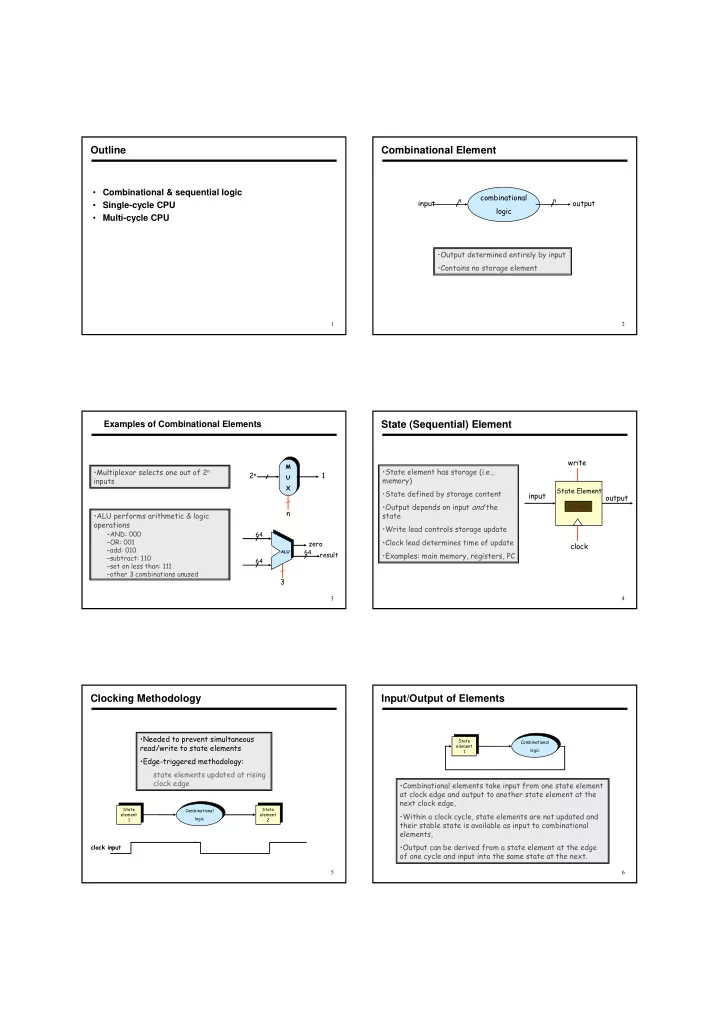
  • Combinational Element
  • Examples of Combinational Elements
  • !"#$$$

%#$$ #$$ #$ # &

  • '(

'( '(

&

  • )
  • State (Sequential) Element
  • *+
  • ,
  • *.//0

1 *

  • 2
  • +#003
  • Clocking Methodology

!4 5, +6#

  • *
  • *
  • *
  • *
  • Input/Output of Elements

2-0 4 4 /

*
  • *
slide-2
SLIDE 2
  • Register File
% % 2 2
  • 7
7 7 %
  • %
  • '(
'( %
  • "
'(

% 8&

  • ,
  • %98:5

&4

  • .

,1 ,

  • %8,

4 %, %2

%2
  • MIPS64 Instruction Formats
  • 3

' '

! / ;

  • 3/
  • '

7 7 ' :6; %6; <6;

  • '

7 7

  • 7
  • 7
  • '
  • Common Steps in Instruction Execution
  • Execution of all instructions require the following steps

– send PC to memory and fetch instruction stored at location specified by PC – read 0-2 registers, using fields specifying the registers in the instruction

  • All instructions use ALU functionality

– data transfer instructions: compute address – ALU instructions: execute ALU operations – branch instructions: comparison & address compuation

  • Differences in Instruction Execution
  • Data transfer (strictly load/store ISA)

– load: access memory for read data {ld R1, 0(R2)} – store: access memory for write data {ld 0(R2), R1}

  • ALU instruction

– no memory access for operands – access a register for write of result {add R1,R2, R3}

  • Branch instruction

– change PC content based on comparison {bnez R1, Loop}

  • Summary

9 " % %

  • 2

% 5 = = = = =

  • =

= = = = =

  • =

= = = =

  • =

= = =

  • =

= =

  • Data Path & Control path
  • Datapath is the signal path through which data in the CPU

flows including the functional elements

  • Elements of Datapath

– combinational elements – state (sequential) elements

  • Control path

– the signal path from the controller to the Datapath elements – exercises timing & control over Datapath elements

slide-3
SLIDE 3
  • What Should be in the Datapath
  • At a minimum we need combinational and

sequential logic elements in the datapath to support the following functions

– fetch instructions and data from memory – Read registers – decode instructions and dispatch them to the execution unit – execute arithmetic & logic operations – update state elements (registers and memory)

  • Datapath Schematic
  • :
  • "
%> %> %>
  • "
  • %
  • :
  • (

&

!"" #$%

Datapath Building Blocks: Instruction Access

  • Program Counter (PC)
– a register that points to the next instruction to be fetched – it is incremented each clock cycle
  • Content of PC is input to Instruction

Memory

  • The instruction is fetched and

supplied to upstream datapath elements

  • Adder is used to increment PC by 4 in

preparation for the next instruction (why 4?)

  • Adder: an ALU with control input

hardwired to perform add instruction

  • nly
  • For reasons that will become clear

later, we assume separate memory units for instructions & data

  • Datapath Building Blocks: R-Type Instruction
% % 2 2

% 9

%
  • %
  • :

%2

  • 7
7 7

)

  • '

7 7

  • 7
  • 7
  • '

%6;9

  • Used for arithmetic & logic
  • perations
  • Read two register, rs and rt
  • ALU operates on registers’

content

  • Write result to register rd
  • Example: add R1, R2, R3

– rs=R2, rt=R3, rd=R1

  • Controls

– RegWrite is asserted to enable write at clock edge – ALUop to control operation

  • I-Type Instruction: load/store
  • '

7 7 ' :6;

2%0&.%1 *2%706??.%(1 2%0&.%1 *2%706??.%(1

  • rs contains the base field for

the displacement address mode

  • rt specifies register

– to load from memory for load – to write to memory for store

  • Immediate contains address
  • ffset
  • To compute memory

address, we must

– sign-extend the 16-bit immediate to 64 bits – add it to the base in rs

  • Register file

– load: registers to read for base address & to write for data – store: registers to read for base address & for data

  • Sign extender

– to sign-extend and condition immediate field for 2’s complement addition

  • f address offset using 64-bit ALU
  • ALU

– to add base address and sign-extended immediate field

  • Data memory to load/store data:

– memory address; data input for store; data output for load – control inputs: MemRead, MemWrite, clock

Required Datapath Elements for load/store

  • 64
16
slide-4
SLIDE 4
  • Datapath Building Blocks: load/store
Read reg 1 Read reg 2 Write reg Write data

Registers

Read data 1 Read data 2 ALU ALU

Instruction

RegWrite ALUop

5 5

zero

sign extend 5 16 Address

Write data

Data Memory

Read data

64

MemWrite MemRead

  • pcode

rs rt immediate 6 5 5 16 I-Type

  • I-Type Instruction: bne
  • '

7 7 ' :6;

%0%0: %0%0:

  • Branch datapath must compute

branch condition & branch address

  • rs and rt refer to registers to be

compared for branch condition

  • if Reg[rs] != Reg[rd],

– PC = PC + Imm<< 2 (note that at this point PC is already

  • incremented. In effect

PCcurrent=(PCprevious+4) + Imm<< 2

  • else if Reg[rs] == Reg[rt]

– PC remains unchanged: PCcurrent=(PCprevious+4) – the next sequential instruction is taken

  • Required functional elements

– RegFile, sign extender, adder, shifter

'(
  • '(
  • Sign Extend & Shift Operations
  • Sign extension is required

because

– 16-bit offset must be expanded to 64 bits in order to be used in the 64-bit adder – we are using 2’s complement arithmetic

  • Shift by 2 is required

because

– instructions are 32-bits wide and are aligned on a word (4 bytes) boundary – in effect we are using an 18- bit offset instead of 16

'(
  • '(
  • '
  • 3@(

&'()*+ &'()*+ &'%,

  • *&),.
  • *&),.
  • ,&/0$
  • Datapath Building Blocks: bne
% % 2 2

%

%
  • %
  • :

%2 A

7

)

  • '
'( 7

;

  • 3@(

:"

  • B
  • '

7 7 ' :6;

  • Computing Address & Branch Condition
  • The register operands of bne are compared in the same ALU

we use for load/store/arithmetic/logic instructions

– the ALU provides a ZERO output signal to indicate condition – the ZERO signal controls what instruction will be fetched next depending on whether the branch is taken or not

  • We also need to compute the address

– we may not be able to use the ALU if it is being used to compute the branch condition (more on this later) – need an additional ADDER (an ALU hardwired to add only) to compute branch address

  • Putting it All Together
  • Combine datapath building blocks to build the full datapath

– now we must decide some specifics of implementation

  • Single-cycle CPU

– each instruction executes in one clock cycle – CPI=1 for all instructions

  • Multi-cycle CPU

– instructions execute in multiples of a shorter clock cycle – different instructions have different CPI

slide-5
SLIDE 5
  • Single-Cycle CPU
  • One clock cycle for all instructions
  • No datapath resource can be used more than once per

clock cycle – results in resource duplication for elements that must be used more than once – examples: separate memory units for instruction and data; two ALUs for conditional branches

  • Some datapath elements may be shared through

multiplexing as long as they are used once

  • We're ready to look at an implementation of the MIPS
  • Simplified to contain only:

– memory-reference instructions: lw, sw – arithmetic-logical instructions: add, sub, and, or, slt – control flow instructions: beq, j

  • Generic Implementation:

– use the program counter (PC) to supply instruction address – get the instruction from memory – read registers – use the instruction to decide exactly what to do

  • All instructions use the ALU after reading the registers

Why? memory-reference? arithmetic? control flow?

The Processor: Datapath & Control

  • Data In
Address Program Memory Control Logic Rdest Rs Rt Instruction Register Data Memory (Register File) Program Counter (PC) ALU 4

MIPS Fetch-Execute Processor Architecture

  • Data In
Address Program Memory Control Logic Rdest Rs Rt Instruction Register Data Memory (Register File) Program Counter (PC) ALU 4

Initialize Program Counter (PC)

  • first instruction
  • Activate Control Logic
Data In Address Program Memory Control Logic Rdest Rs Rt Instruction Register Data Memory (Register File) Program Counter (PC) ALU 4
  • Route Address to Program Memory
Data In Address Program Memory Control Logic Rdest Rs Rt Instruction Register Data Memory (Register File) Program Counter (PC) ALU 4
slide-6
SLIDE 6
  • Data In
Address Program Memory Control Logic Rdest Rs Rt Instruction Register Data Memory (Register File) Program Counter (PC) ALU 4

Route Instruction to Instruction Register (IR)

  • Data In
Address Program Memory Control Logic Rdest Rs Rt Instruction Register Data Memory (Register File) Program Counter (PC) ALU 4

Select Appropriate Data From Register File

  • Data In
Address Program Memory Control Logic Rdest Rs Rt Instruction Register Data Memory (Register File) Program Counter (PC) ALU 4

Route Data to Arithmetic Logic Unit (ALU)

  • Data In
Address Program Memory Control Logic Rdest Rs Rt Instruction Register Data Memory (Register File) Program Counter (PC) ALU 4

Do the Computation

  • Data In
Address Program Memory Control Logic Rdest Rs Rt Instruction Register Data Memory (Register File) Program Counter (PC) ALU 4

Store the Result

  • Data In
Address Program Memory Control Logic Rdest Rs Rt Instruction Register Data Memory (Register File) Program Counter (PC) ALU 4

Increment PC

  • Point to Next Instruction
slide-7
SLIDE 7
  • Data In
Address Program Memory Control Logic Rdest Rs Rt Instruction Register Data Memory (Register File) Program Counter (PC) ALU 4

Increment PC

  • Point to Next Instruction
  • Data In
Address Program Memory Control Logic Rdest Rs Rt Instruction Register Data Memory (Register File) Program Counter (PC) ALU 4

Execute Next Instruction

  • Unclocked vs. Clocked
  • Clocks used in synchronous logic

– when should an element that contains state be updated?

State Elements

Clock period Rising edge Falling edge

cycle time
  • The set-reset latch

– output depends on present inputs and also on past inputs

An unclocked state element

R S Q Q

  • Output is equal to the stored value inside the

element (don't need to ask for permission to look at the value)

  • Change of state (value) is based on the clock

– Latches: output changes whenever the inputs change, and the clock is asserted (level-triggered methodology) – Flip-flops: state changes only on a clock edge (edge-triggered methodology)

  • A clocking methodology defines when signals can be read

and written— wouldn't want to read a signal at the same time it was being written

Latches and Flip-flops

  • Two inputs:

– the data value to be stored (D) – the clock signal (C) indicating when to read & store D

  • Two outputs:

– the value of the internal state (Q) and it's complement

D-latch

Q C D _ Q

D C Q
slide-8
SLIDE 8
  • D flip-flop
  • Output changes only on the clock edge
D C Q D C D latch D C Q D latch D C Q Q Q Q
  • Our Implementation
  • An edge triggered methodology
  • Typical execution:

– read contents of some state elements – send values through some combinational logic – write results to one or more state elements

State element 1 State element 2 Combinational logic Clock cycle
  • Built using D flip-flops

Register File

Read register number 1 Read data 1 Read register number 2 Read data 2 Write register Write Write data Register file Read register number 1 Register 0 Register 1 . . . Register n – 2 Register n – 1 M u x Read register number 2 M u x Read data 1 Read data 2

Do you understand? What is the “Mux” above?

  • Abstraction
  • Make sure you understand the abstractions!
  • Sometimes it is easy to think you do, when you

don’t

M u x C Select 32 32 32 B A M u x Select B31 A31 C31 M u x B30 A30 C30 M u x B0 A0 C0 . . . . . .
  • Register File
  • Note: we still use the real clock to determine when

to write

Write 1 n-to-2n decoder n – 1 n Register 0 C D Register 1 C D Register n – 2 C D Register n – 1 C D . . . Register number . . . Register data
  • Simple Implementation
  • Include the functional units we need for each instruction
PC Instruction address Instruction Instruction memory Add Sum
  • a. Instruction memory
  • b. Program counter
  • c. Adder
Read register 1 Read register 2 Write register Write Data Registers ALU Data Data Zero ALU result RegWrite
  • a. Registers
  • b. ALU
5 5 5 Register numbers Read data 1 Read data 2 ALU operation 4 Address Read data Data memory
  • a. Data memory unit
Write data MemRead MemWrite
  • b. Sign-extension unit
Sign extend 16 32
slide-9
SLIDE 9
  • Building the Datapath
  • Use multiplexors to stitch them together
Read register 1 Read register 2 Write register Write data Write data Registers ALU Add Zero RegWrite MemRead MemWrite PCSrc MemtoReg Read data 1 Read data 2 ALU operation 4 Sign extend 16 32 Instruction ALU result Add ALU result M u x M u x M u x ALUSrc Address Data memory Read data Shift left 2 4 Read address Instruction memory PC
  • Control
  • Selecting the operations to perform (ALU, read/write, etc.)
  • Controlling the flow of data (multiplexor inputs)
  • Information comes from the 32 bits of the instruction
  • Example:

add $8, $17, $18 Instruction Format:

000000 10001 10010 01000 00000 100000

  • p

rs rt rd shamt funct

  • ALU's operation based on instruction type and function code
  • e.g., what should the ALU do with this instruction
  • Example: lw $1, 100($2)

35 2 1 100

  • p

rs rt 16 bit offset

  • ALU control input

0000 AND 0001 OR 0010 add 0110 subtract 0111 set-on-less-than 1100 NOR

  • Why is the code for subtract 0110 and not 0011?

Control

  • Must describe hardware to compute 4-bit ALU control input

– given instruction type 00 = lw, sw 01 = beq, 10 = arithmetic – function code for arithmetic

  • Describe it using a truth table (can turn into gates):

ALUOp computed from instruction type

Control

Instruction RegDst ALUSrc Memto- Reg Reg Write Mem Read Mem Write Branch ALUOp1 ALUp0 R-format 1 1 1 lw 1 1 1 1 sw X 1 X 1 beq X X 1 1

Read register 1 Read register 2 Write register Write data Write data Registers ALU Add Zero Read data 1 Read data 2 Sign extend 16 32 Instruction [31–0] ALU result Add ALU result M u x M u x M u x Address Data memory Read data Shift left 2 4 Read address Instruction memory PC 1 1 1 M u x 1 ALU control Instruction [5–0] Instruction [25–21] Instruction [31–26] Instruction [15–11] Instruction [20–16] Instruction [15–0] RegDst Branch MemRead MemtoReg ALUOp MemWrite ALUSrc RegWrite Control
  • R-type Instruction
slide-10
SLIDE 10
  • Load Instruction
  • Branch on Equal
  • Control
  • Simple combinational logic (truth tables)
Operation2 Operation1 Operation0 Operation ALUOp1 F3 F2 F1 F0 F (5– 0) ALUOp0 ALUOp ALU control block R-format Iw sw beq Op0 Op1 Op2 Op3 Op4 Op5 Inputs Outputs RegDst ALUSrc MemtoReg RegWrite MemRead MemWrite Branch ALUOp1 ALUOpO
  • All of the logic is combinational
  • We wait for everything to settle down, and the right

thing to be done

– ALU might not produce “right answer” right away – we use write signals along with clock to determine when to write

  • Cycle time determined by length of the longest path

Our Simple Control Structure

We are ignoring some details like setup and hold times

State element 1 State element 2 Combinational logic Clock cycle
  • Single Cycle Implementation
  • Calculate cycle time assuming negligible delays except:

– memory (200ps), ALU and adders (100ps), register file access (50ps)

Read register 1 Read register 2 Write register Write data Write data Registers ALU Add Zero RegWrite MemRead MemWrite PCSrc MemtoReg Read data 1 Read data 2 ALU operation 4 Sign extend 16 32 Instruction ALU result Add ALU result M u x M u x M u x ALUSrc Address Data memory Read data Shift left 2 4 Read address Instruction memory PC
  • Where we are headed
  • Single Cycle Problems:

– what if we had a more complicated instruction like floating point? – wasteful of area

  • One Solution:

– use a “smaller” cycle time – have different instructions take different numbers of cycles – a “multicycle” datapath:

Data Register # Register # Register # PC Address Instruction
  • r data
Memory Registers ALU Instruction register Memory data register ALUOut A B Data
slide-11
SLIDE 11
  • Reuse functional units

– ALU used to compute address and to increment PC – Memory used for instruction and data

  • Control signals will not be determined directly by

instruction

– e.g., what should the ALU do for a “subtract” instruction? – There must be some sequencing involved leading to ….

  • Use a finite state machine for control

Multicycle Approach

  • Break up the instructions into steps, each step takes a cycle

– balance the amount of work to be done – restrict each cycle to use only one major functional unit

  • At the end of a cycle

– store values for use in later cycles (easiest thing to do) – this introduces additional “internal” registers

Multicycle Approach

Read register 1 Read register 2 Write register Write data Registers ALU Zero Read data 1 Read data 2 Sign extend 16 32 Instruction [25–21] Instruction [20–16] Instruction [15–0] ALU result M u x M u x Shift left 2 Instruction register PC 1 M u x 1 M u x 1 M u x 1 A B 1 2 3 ALUOut Instruction [15–0] Memory data register Address Write data Memory MemData 4 Instruction [15–11]
  • Instructions from ISA perspective
  • Consider each instruction from the perspective of ISA
  • Example:

– The add instruction changes a register – Instruction specified by the PC – Destination register specified by bits 15:11 of instruction – New value is the sum (“op”) of two registers – Source registers specified by bits 25:21 and 20:16 of the instruction Reg[Memory[PC][15:11]] <= Reg[Memory[PC][25:21]] op Reg[Memory[PC][20:16]] – In order to accomplish this, we must break up the instruction (kind

  • f like introducing variables when programming)
  • Breaking down an instruction
  • ISA definition of arithmetic:

Reg[Memory[PC][15:11]] <= Reg[Memory[PC][25:21]]

  • p Reg[Memory[PC][20:16]]
  • Could break down to:

– IR <= Memory[PC] – A <= Reg[IR[25:21]] – B <= Reg[IR[20:16]] – ALUOut <= A op B – Reg[IR[20:16]] <= ALUOut

  • Don’t forget an important part of the operation:

– PC <= PC + 4

  • Idea behind multicycle approach
  • We define each instruction from the ISA perspective
  • Break it down into steps following the rule that data flows

through, at most, one major functional unit (e.g., balance work across steps)

  • Introduce new registers as needed (A, B, ALUOut, MDR, etc.)
  • Finally, try and pack as much work into each step (avoid

unnecessary cycles) while also trying to share steps where possible (minimizes control and likely hardware, helps to simplify solution) Result: The textbook’s multicycle Implementation.

  • Instruction Fetch
  • Instruction Decode and Register Fetch
  • Execution, Memory Address Computation, or Branch

Completion

  • Memory Access or R-type instruction completion
  • Write-back step

INSTRUCTIONS TAKE FROM 3 - 5 CYCLES

Five Execution Steps

slide-12
SLIDE 12
  • Use PC to get instruction and put it in the Instruction Register
  • Increment the PC by 4 and put the result back in the PC
  • Can be described succinctly using RTL "Register-Transfer

Language" IR <= Memory[PC]; PC <= PC + 4;

What is the advantage of updating the PC now?

Step 1: Instruction Fetch

  • Read registers rs and rt in case we need them
  • Compute the branch address in case the

instruction is a branch

  • RTL:

A <= Reg[IR[25:21]]; B <= Reg[IR[20:16]]; ALUOut <= PC + (sign-extend(IR[15:0]) << 2);

  • We aren't setting any control lines based on the

instruction type

Step 2: Instruction Decode and Register Fetch

  • ALU is performing one of three functions, based on

instruction type

– Memory Reference: ALUOut <= A + sign-extend(IR[15:0]); – R-type: ALUOut <= A op B; – Branch: if (A==B) PC <= ALUOut;

Step 3: (Instruction dependent)

  • Loads and stores access memory

MDR <= Memory[ALUOut];

  • r

Memory[ALUOut] <= B;

  • R-type instructions finish

Reg[IR[15:11]] <= ALUOut; The write actually takes place at the end of the cycle on the edge

Step 4: (R-type or memory-access)

  • Reg[IR[20:16]] <= MDR;

Which instruction needs this?

Step 5: Write-back step

  • Summary:
slide-13
SLIDE 13
  • How many cycles will it take to execute this code?

lw $t2, 0($t3) lw $t3, 4($t3) beq $t2, $t3, Label nop add $t5, $t2, $t3 sw $t5, 8($t3) Label: ...

  • What is going on during the 8th cycle of execution?
  • In what cycle does the actual addition of $t2 and $t3 take

place?

Simple Questions

Read register 1 Read register 2 Write register Write data Registers ALU Zero Read data 1 Read data 2 Sign extend 16 32 Instruction [31–26] Instruction [25–21] Instruction [20–16] Instruction [15–0] ALU result M u x M u x Shift left 2 Shift left 2 Instruction register PC 1 M u x 1 M u x 1 M u x 1 A B 1 2 3 M u x 1 2 ALUOut Instruction [15–0] Memory data register Address Write data Memory MemData 4 Instruction [15–11] PCWriteCond PCWrite IorD MemRead MemWrite MemtoReg IRWrite PCSource ALUOp ALUSrcB ALUSrcA RegWrite RegDst 26 28 Outputs Control Op [5–0] ALU control PC [31–28] Instruction [25-0] Instruction [5–0] Jump address [31–0]
  • Finite state machines:

– a set of states and – next state function (determined by current state and the input) – output function (determined by current state and possibly input) – We’ll use a Moore machine (output based only on current state)

Review: finite state machines

Inputs Current state Outputs Clock Next-state function Output function Next state
  • Review: finite state machines
  • Example:
  • B. 37 A friend would like you to build an “electronic eye” for use as a

fake security device. The device consists of three lights lined up in a row, controlled by the outputs Left, Middle, and Right, which, if asserted, indicate that a light should be on. Only one light is on at a time, and the light “moves” from left to right and then from right to left, thus scaring away thieves who believe that the device is monitoring their activity. Draw the graphical representation for the finite state machine used to specify the electronic eye. Note that the rate of the eye’s movement will be controlled by the clock speed (which should not be too great) and that there are essentially no inputs.

  • Value of control signals is dependent upon:

– what instruction is being executed – which step is being performed

  • Use the information we’ve accumulated to specify a

finite state machine

– specify the finite state machine graphically, or – use microprogramming

  • Implementation can be derived from specification

Implementing the Control

  • Note:

– don’t care if not mentioned – asserted if name only – otherwise exact value

  • How many state

bits will we need?

Graphical Specification of FSM

MemRead ALUSrcA = 0 IorD = 0 IRWrite ALUSrcB = 01 ALUOp = 00 PCWrite PCSource = 00 ALUSrcA = 0 ALUSrcB = 11 ALUOp = 00 ALUSrcA = 1 ALUSrcB = 00 ALUOp = 10 ALUSrcA = 1 ALUSrcB = 10 ALUOp = 00 MemRead IorD = 1 MemWrite IorD = 1 RegDst = 1 RegWrite MemtoReg = 0 RegDst = 1 RegWrite MemtoReg = 0 PCWrite PCSource = 10 ALUSrcA = 1 ALUSrcB = 00 ALUOp = 01 PCWriteCond PCSource = 01 Instruction decode/ register fetch Instruction fetch 1 Start Jump completion 9 8 6 2 3 4 5 7 Memory read completon step R-type completion Memory access Memory access Execution Branch completion Memory address computation
slide-14
SLIDE 14
  • Implementation:

Finite State Machine for Control

PCWrite PCWriteCond IorD MemtoReg PCSource ALUOp ALUSrcB ALUSrcA RegWrite RegDst NS3 NS2 NS1 NS0 Op5 Op4 Op3 Op2 Op1 Op0 S3 S2 S1 S0 State register IRWrite MemRead MemWrite Instruction register
  • pcode field
Outputs Control logic Inputs
  • PLA Implementation
  • If I picked a horizontal or vertical line could you

explain it?

Op5 Op4 Op3 Op2 Op1 Op0 S3 S2 S1 S0 IorD IRWrite MemRead MemWrite PCWrite PCWriteCond MemtoReg PCSource1 ALUOp1 ALUSrcB0 ALUSrcA RegWrite RegDst NS3 NS2 NS1 NS0 ALUSrcB1 ALUOp0 PCSource0
  • ROM = "Read Only Memory"

– values of memory locations are fixed ahead of time

  • A ROM can be used to implement a truth table

– if the address is m-bits, we can address 2m entries in the ROM. – our outputs are the bits of data that the address points to. m is the "height", and n is the "width"

ROM Implementation

m n

0 0 0 0 0 1 1 0 0 1 1 1 0 0 0 1 0 1 1 0 0 0 1 1 1 0 0 0 1 0 0 0 0 0 0 1 0 1 0 0 0 1 1 1 0 0 1 1 0 1 1 1 0 1 1 1

  • How many inputs are there?

6 bits for opcode, 4 bits for state = 10 address lines (i.e., 210 = 1024 different addresses)

  • How many outputs are there?

16 datapath-control outputs, 4 state bits = 20 outputs

  • ROM is 210 x 20 = 20K bits (and a rather unusual size)
  • Rather wasteful, since for lots of the entries, the outputs are

the same — i.e., opcode is often ignored

ROM Implementation

  • Break up the table into two parts

— 4 state bits tell you the 16 outputs, 24x16 bits of ROM — 10 bits tell you the 4 next state bits, 210x4 bits of ROM — Total: 4.3K bits of ROM

  • PLA is much smaller

— can share product terms — only need entries that produce an active output — can take into account don't cares

  • Size is (#inputs
  • #product-terms) + (#outputs
  • #product-

terms) For this example = (10x17)+(20x17) = 510 PLA cells

  • PLA cells usually about the size of a ROM cell (slightly bigger)

ROM vs PLA

  • Complex instructions: the "next state" is often

current state + 1

Another Implementation Style

AddrCtl Outputs PLA or ROM State Address select logic Op[5– 0] Adder Instruction register
  • pcode field
1 Control unit Input PCWrite PCWriteCond IorD MemtoReg PCSource ALUOp ALUSrcB ALUSrcA RegWrite RegDst IRWrite MemRead MemWrite BWrite
slide-15
SLIDE 15
  • Details
Dispatch ROM 1 Dispatch ROM 2 Op Opcode name Value Op Opcode name Value 000000 R-format 0110 100011 lw 0011 000010 jmp 1001 101011 sw 0101 000100 beq 1000 100011 lw 0010 101011 sw 0010 State number Address-control action Value of AddrCtl Use incremented state 3 1 Use dispatch ROM 1 1 2 Use dispatch ROM 2 2 3 Use incremented state 3 4 Replace state number by 0 5 Replace state number by 0 6 Use incremented state 3 7 Replace state number by 0 8 Replace state number by 0 9 Replace state number by 0 State Adder 1 PLA or ROM Mux 3 2 1 Dispatch ROM 1 Dispatch ROM 2 AddrCtl Address select logic Instruction register
  • pcode field
  • Microprogramming
  • What are the “microinstructions” ?
PCWrite PCWriteCond IorD MemtoReg PCSource ALUOp ALUSrcB ALUSrcA RegWrite AddrCtl Outputs Microcode memory IRWrite MemRead MemWrite RegDst Control unit Input Microprogram counter Address select logic Adder 1 Instruction register
  • pcode field
BWrite Datapath
  • A specification methodology

– appropriate if hundreds of opcodes, modes, cycles, etc. – signals specified symbolically using microinstructions

  • Will two implementations of the same architecture have the same

microcode?

  • What would a microassembler do?

Microprogramming

Label ALU control SRC1 SRC2 Register control Memory PCWrite control Sequencing Fetch Add PC 4 Read PC ALU Seq Add PC Extshft Read Dispatch 1 Mem1 Add A Extend Dispatch 2 LW2 Read ALU Seq Write MDR Fetch SW2 Write ALU Fetch Rformat1 Func code A B Seq Write ALU Fetch BEQ1 Subt A B ALUOut-cond Fetch JUMP1 Jump address Fetch

  • Microinstruction format
Field name Value Signals active Comment Add ALUOp = 00 Cause the ALU to add. ALU control Subt ALUOp = 01 Cause the ALU to subtract; this implements the compare for branches. Func code ALUOp = 10 Use the instruction's function code to determine ALU control. SRC1 PC ALUSrcA = 0 Use the PC as the first ALU input. A ALUSrcA = 1 Register A is the first ALU input. B ALUSrcB = 00 Register B is the second ALU input. SRC2 4 ALUSrcB = 01 Use 4 as the second ALU input. Extend ALUSrcB = 10 Use output of the sign extension unit as the second ALU input. Extshft ALUSrcB = 11 Use the output of the shift-by-two unit as the second ALU input. Read Read two registers using the rs and rt fields of the IR as the register numbers and putting the data into registers A and B. Write ALU RegWrite, Write a register using the rd field of the IR as the register number and Register RegDst = 1, the contents of the ALUOut as the data. control MemtoReg = 0 Write MDR RegWrite, Write a register using the rt field of the IR as the register number and RegDst = 0, the contents of the MDR as the data. MemtoReg = 1 Read PC MemRead, Read memory using the PC as address; write result into IR (and lorD = 0 the MDR). Memory Read ALU MemRead, Read memory using the ALUOut as address; write result into MDR. lorD = 1 Write ALU MemWrite, Write memory using the ALUOut as address, contents of B as the lorD = 1 data. ALU PCSource = 00 Write the output of the ALU into the PC. PCWrite PC write control ALUOut-cond PCSource = 01, If the Zero output of the ALU is active, write the PC with the contents PCWriteCond
  • f the register ALUOut.
jump address PCSource = 10, Write the PC with the jump address from the instruction. PCWrite Seq AddrCtl = 11 Choose the next microinstruction sequentially. Sequencing Fetch AddrCtl = 00 Go to the first microinstruction to begin a new instruction. Dispatch 1 AddrCtl = 01 Dispatch using the ROM 1. Dispatch 2 AddrCtl = 10 Dispatch using the ROM 2.
  • No encoding:

– 1 bit for each datapath operation – faster, requires more memory (logic) – used for Vax 780 — an astonishing 400K of memory!

  • Lots of encoding:

– send the microinstructions through logic to get control signals – uses less memory, slower

  • Historical context of CISC:

– Too much logic to put on a single chip with everything else – Use a ROM (or even RAM) to hold the microcode – It’s easy to add new instructions

Maximally vs. Minimally Encoded

  • Microcode: Trade-offs
  • Distinction between specification and implementation is sometimes

blurred

  • Specification Advantages:

– Easy to design and write – Design architecture and microcode in parallel

  • Implementation (off-chip ROM) Advantages

– Easy to change since values are in memory – Can emulate other architectures – Can make use of internal registers

  • Implementation Disadvantages, SLOWER now that:

– Control is implemented on same chip as processor – ROM is no longer faster than RAM – No need to go back and make changes

slide-16
SLIDE 16
  • Historical Perspective
  • In the ‘60s and ‘70s microprogramming was very important

for implementing machines

  • This led to more sophisticated ISAs and the VAX
  • In the ‘80s RISC processors based on pipelining became

popular

  • Pipelining the microinstructions is also possible!
  • Implementations of IA-32 architecture processors since 486

use:

– “hardwired control” for simpler instructions

(few cycles, FSM control implemented using PLA or random logic)

– “microcoded control” for more complex instructions

(large numbers of cycles, central control store)

  • The IA-64 architecture uses a RISC-style ISA and can be

implemented without a large central control store

  • Pentium 4
  • Pipelining is important (last IA-32 without it was 80386 in 1985)
  • Pipelining is used for the simple instructions favored by

compilers “Simply put, a high performance implementation needs to ensure that the simple instructions execute quickly, and that the burden

  • f the complexities of the instruction set penalize the complex,

less frequently used, instructions”

Control Control Control Enhanced floating point and multimedia Control I/O interface Instruction cache Integer datapath Data cache Secondary cache and memory interface Advanced pipelining hyperthreading support

Chapter 6 Chapter 7

  • Pentium 4
  • Somewhere in all that “control” we must handle complex instructions
  • Processor executes simple microinstructions, 70 bits wide

(hardwired)

  • 120 control lines for integer datapath (400 for floating point)
  • If an instruction requires more than 4 microinstructions to implement,

control from microcode ROM (8000 microinstructions)

  • Its complicated!
Control Control Control Enhanced floating point and multimedia Control I/O interface Instruction cache Integer datapath Data cache Secondary cache and memory interface Advanced pipelining hyperthreading support
  • Chapter 5 Summary
  • If we understand the instructions …

We can build a simple processor!

  • If instructions take different amounts of time, multi-cycle is

better

  • Datapath implemented using:

– Combinational logic for arithmetic – State holding elements to remember bits

  • Control implemented using:

– Combinational logic for single-cycle implementation – Finite state machine for multi-cycle implementation