News Review: Basic OpenGL Texturing Review: Reconstruction CPSC - - PowerPoint PPT Presentation

news review basic opengl texturing review reconstruction
SMART_READER_LITE
LIVE PREVIEW

News Review: Basic OpenGL Texturing Review: Reconstruction CPSC - - PowerPoint PPT Presentation

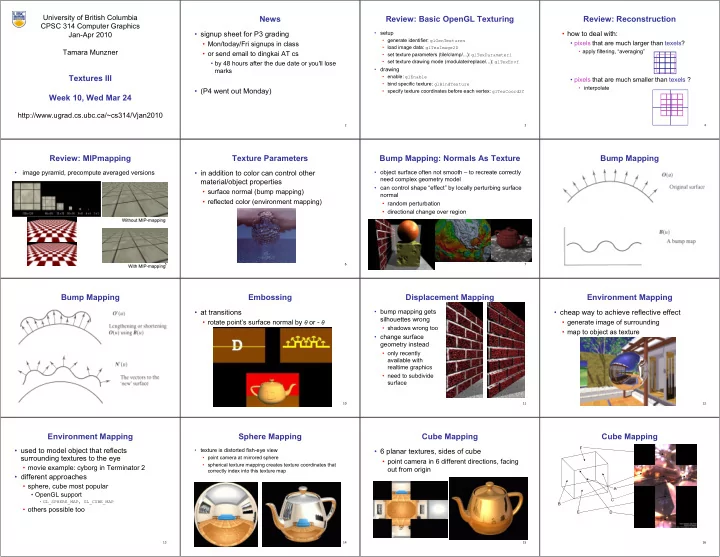
University of British Columbia News Review: Basic OpenGL Texturing Review: Reconstruction CPSC 314 Computer Graphics signup sheet for P3 grading setup how to deal with: Jan-Apr 2010 generate identifier: glGenTextures


slide-1
SLIDE 1

University of British Columbia CPSC 314 Computer Graphics Jan-Apr 2010 Tamara Munzner http://www.ugrad.cs.ubc.ca/~cs314/Vjan2010

Textures III Week 10, Wed Mar 24

2

News

  • signup sheet for P3 grading
  • Mon/today/Fri signups in class
  • or send email to dingkai AT cs
  • by 48 hours after the due date or you'll lose

marks

  • (P4 went out Monday)
3

Review: Basic OpenGL Texturing

  • setup
  • generate identifier: glGenTextures
  • load image data: glTexImage2D
  • set texture parameters (tile/clamp/...): glTexParameteri
  • set texture drawing mode (modulate/replace/...): glTexEnvf
  • drawing
  • enable: glEnable
  • bind specific texture: glBindTexture
  • specify texture coordinates before each vertex: glTexCoord2f
4

Review: Reconstruction

  • how to deal with:
  • pixels that are much larger than texels?
  • apply filtering, “averaging”
  • pixels that are much smaller than texels ?
  • interpolate
5

Review: MIPmapping

  • image pyramid, precompute averaged versions

Without MIP-mapping Without MIP-mapping With MIP-mapping With MIP-mapping

6

Texture Parameters

  • in addition to color can control other

material/object properties

  • surface normal (bump mapping)
  • reflected color (environment mapping)
7

Bump Mapping: Normals As Texture

  • object surface often not smooth – to recreate correctly

need complex geometry model

  • can control shape “effect” by locally perturbing surface

normal

  • random perturbation
  • directional change over region
8

Bump Mapping

9

Bump Mapping

10

Embossing

  • at transitions
  • rotate point’s surface normal by θ or - θ
11

Displacement Mapping

  • bump mapping gets

silhouettes wrong

  • shadows wrong too
  • change surface

geometry instead

  • only recently

available with realtime graphics

  • need to subdivide

surface

12

Environment Mapping

  • cheap way to achieve reflective effect
  • generate image of surrounding
  • map to object as texture
13

Environment Mapping

  • used to model object that reflects

surrounding textures to the eye

  • movie example: cyborg in Terminator 2
  • different approaches
  • sphere, cube most popular
  • OpenGL support
  • GL_SPHERE_MAP, GL_CUBE_MAP
  • others possible too
14

Sphere Mapping

  • texture is distorted fish-eye view
  • point camera at mirrored sphere
  • spherical texture mapping creates texture coordinates that

correctly index into this texture map

15

Cube Mapping

  • 6 planar textures, sides of cube
  • point camera in 6 different directions, facing
  • ut from origin
16

Cube Mapping

A B C E F D

slide-2
SLIDE 2 17

Cube Mapping

  • direction of reflection vector r selects the face of the cube to

be indexed

  • co-ordinate with largest magnitude
  • e.g., the vector (-0.2, 0.5, -0.84) selects the –Z face
  • remaining two coordinates (normalized by the 3rd coordinate)

selects the pixel from the face.

  • e.g., (-0.2, 0.5) gets mapped to (0.38, 0.80).
  • difficulty in interpolating across faces
18

Volumetric Texture

  • define texture pattern over 3D

domain - 3D space containing the object

  • texture function can be

digitized or procedural

  • for each point on object

compute texture from point location in space

  • common for natural

material/irregular textures (stone, wood,etc…)

19

Volumetric Bump Mapping

Marble Bump

20

Volumetric Texture Principles

  • 3D function ρ(x,y,z)
  • texture space – 3D space that holds the

texture (discrete or continuous)

  • rendering: for each rendered point P(x,y,z)

compute ρ(x,y,z)

  • volumetric texture mapping function/space

transformed with objects

21

Procedural Approaches

22

Procedural Textures

  • generate “image” on the fly, instead of

loading from disk

  • often saves space
  • allows arbitrary level of detail
23

Procedural Texture Effects: Bombing

  • randomly drop bombs of various shapes, sizes and
  • rientation into texture space (store data in table)
  • for point P search table and determine if inside shape
  • if so, color by shape
  • otherwise, color by objects color
24

Procedural Texture Effects

  • simple marble

function boring_marble(point) x = point.x; return marble_color(sin(x)); // marble_color maps scalars to colors

25

Perlin Noise: Procedural Textures

  • several good explanations
  • FCG Section 10.1
  • http://www.noisemachine.com/talk1
  • http://freespace.virgin.net/hugo.elias/models/m_perlin.htm
  • http://www.robo-murito.net/code/perlin-noise-math-faq.html

http://mrl.nyu.edu/~perlin/planet/

26

Perlin Noise: Coherency

  • smooth not abrupt changes

coherent white noise

27

Perlin Noise: Turbulence

  • multiple feature sizes
  • add scaled copies of noise
28

Perlin Noise: Turbulence

  • multiple feature sizes
  • add scaled copies of noise
29

Perlin Noise: Turbulence

  • multiple feature sizes
  • add scaled copies of noise

function turbulence(p) t = 0; scale = 1; while (scale > pixelsize) { t += abs(Noise(p/scale)*scale); scale/=2; } return t;

30

Generating Coherent Noise

  • just three main ideas
  • nice interpolation
  • use vector offsets to make grid irregular
  • optimization
  • sneaky use of 1D arrays instead of 2D/3D one
31

Interpolating Textures

  • nearest neighbor
  • bilinear
  • hermite
32

Vector Offsets From Grid

  • weighted average of gradients
  • random unit vectors
slide-3
SLIDE 3 33

Optimization

  • save memory and time
  • conceptually:
  • 2D or 3D grid
  • populate with random number generator
  • actually:
  • precompute two 1D arrays of size n (typical size 256)
  • random unit vectors
  • permutation of integers 0 to n-1
  • lookup
  • g(i, j, k) = G[ ( i + P[ (j + P[k]) mod n ] ) mod n ]
34

Perlin Marble

  • use turbulence, which in turn uses noise:

function marble(point) x = point.x + turbulence(point); return marble_color(sin(x))

35

Procedural Modeling

  • textures, geometry
  • nonprocedural: explicitly stored in memory
  • procedural approach
  • compute something on the fly
  • often less memory cost
  • visual richness
  • fractals, particle systems, noise
36

Fractal Landscapes

  • fractals: not just for “showing math”
  • triangle subdivision
  • vertex displacement
  • recursive until termination condition

http://www.fractal-landscapes.co.uk/images.html

37

Self-Similarity

  • infinite nesting of structure on all scales
38

Fractal Dimension

  • D = log(N)/log(r)

N = measure, r = subdivision scale

  • Hausdorff dimension: noninteger

D = log(N)/log(r) D = log(4)/log(3) = 1.26 coastline of Britain Koch snowflake http://www.vanderbilt.edu/AnS/psychology/cogsci/chaos/workshop/Fractals.html

39

Language-Based Generation

  • L-Systems: after Lindenmayer
  • Koch snowflake: F :- FLFRRFLF
  • F: forward, R: right, L: left
  • Mariano’s Bush:

F=FF-[-F+F+F]+[+F-F-F] }

  • angle 16

http://spanky.triumf.ca/www/fractint/lsys/plants.html

40

1D: Midpoint Displacement

  • divide in half
  • randomly displace
  • scale variance by half

http://www.gameprogrammer.com/fractal.html

41

2D: Diamond-Square

  • fractal terrain with diamond-square approach
  • generate a new value at midpoint
  • average corner values + random displacement
  • scale variance by half each time
42

Particle Systems

  • loosely defined
  • modeling, or rendering, or animation
  • key criteria
  • collection of particles
  • random element controls attributes
  • position, velocity (speed and direction), color,

lifetime, age, shape, size, transparency

  • predefined stochastic limits: bounds, variance,

type of distribution

43

Particle System Examples

  • objects changing fluidly over time
  • fire, steam, smoke, water
  • objects fluid in form
  • grass, hair, dust
  • physical processes
  • waterfalls, fireworks, explosions
  • group dynamics: behavioral
  • birds/bats flock, fish school,

human crowd, dinosaur/elephant stampede

44

Particle Systems Demos

  • general particle systems
  • http://www.wondertouch.com
  • boids: bird-like objects
  • http://www.red3d.com/cwr/boids/
45

Particle Life Cycle

  • generation
  • randomly within “fuzzy” location
  • initial attribute values: random or fixed
  • dynamics
  • attributes of each particle may vary over time
  • color darker as particle cools off after explosion
  • can also depend on other attributes
  • position: previous particle position + velocity + time
  • death
  • age and lifetime for each particle (in frames)
  • or if out of bounds, too dark to see, etc
46

Particle System Rendering

  • expensive to render thousands of particles
  • simplify: avoid hidden surface calculations
  • each particle has small graphical primitive

(blob)

  • pixel color: sum of all particles mapping to it
  • some effects easy
  • temporal anti-aliasing (motion blur)
  • normally expensive: supersampling over time
  • position, velocity known for each particle
  • just render as streak
47

Procedural Approaches Summary

  • Perlin noise
  • fractals
  • L-systems
  • particle systems
  • not at all a complete list!
  • big subject: entire classes on this alone