Motion capture A technology of recording the movement of real - - PowerPoint PPT Presentation

motion capture
SMART_READER_LITE
LIVE PREVIEW

Motion capture A technology of recording the movement of real - - PowerPoint PPT Presentation

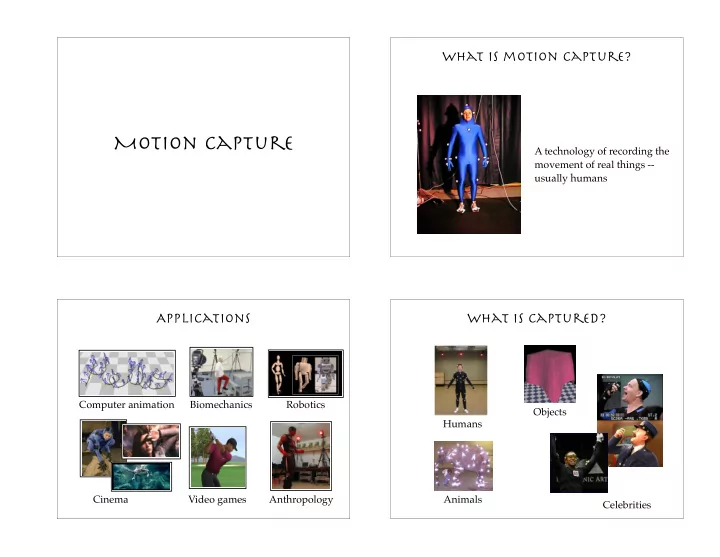
What is motion capture? Motion capture A technology of recording the movement of real things -- usually humans Applications What is captured? Computer animation Biomechanics Robotics Objects Humans Cinema Video games Anthropology


slide-1
SLIDE 1

Motion capture

What is motion capture?

A technology of recording the movement of real things -- usually humans

Applications

Biomechanics Computer animation Robotics Video games Anthropology Cinema

What is captured?

Animals Humans Celebrities Objects

slide-2
SLIDE 2

What is captured?

Whole body Face Hands

Pros and cons

Truthfully record all the fine details of the natural motion The captured motion is difficult to be generalized modified controlled

How to use the data?

Off-line Motion libraries Motion graphs Training examples On-line Drive characters based on the movement of the actors in real time

Types of Systems

Optical systems Magnetic systems Motion tapes

slide-3
SLIDE 3

Optical systems

Cameras High temporal resolution (120+ fps) Detect the locations of reflective markers Markers Sensitive to infrared

Magnetic system

Cumbersome sensors (heavier and also wired) Smaller workspace Record both position and orientation Lower resolution (80 fps max) Sensitive to EMI/metal in the environment

Motion tapes

Contain optical fibers and sensors that can detect the bending and twisting Restriction of movement Another technology for detecting root translation Measure the shape of surface precisely

Motion capture pipeline

calibration capturing model building marker labeling inverse kinematics trajectory smoothing

slide-4
SLIDE 4

Motion capture pipeline

calibration capturing model building marker labeling inverse kinematics trajectory smoothing

Calibration

Static calibration

Figure out where the floor is

Dynamic calibration

Figure out the capture volume

Motion capture pipeline

calibration capturing model building marker labeling inverse kinematics trajectory smoothing

Capturing

Marker placement Markers should move rigidly with joints Asymmetric placement helps in post-processing T-pose and joint exercises Recording specific poses can help estimating bone lengths

slide-5
SLIDE 5

3D marker position

In principle, two cameras are sufficient to reconstruct the 3D location of a marker In practice, more cameras can

reduce occlusion increase precision

Motion capture pipeline

calibration capturing model building marker labeling inverse kinematics trajectory smoothing

Model building

Given recored marker positions, estimate the dimension of each body part Optimize both bone length and handle positions at the same time Templates and heuristics help

Problem statement

generic skeleton rough handle positions specific pose used for calibration bone length handle offset

+

slide-6
SLIDE 6

Motion capture pipeline

calibration capturing model building marker labeling inverse kinematics trajectory smoothing

marker labeling

Ghost markers Missing markers Switching trajectories

Raw data

3D locations of markers

Motion capture pipeline

calibration capturing model building marker labeling inverse kinematics trajectory smoothing

slide-7
SLIDE 7

Inverse kinematics

Input: articulated body with handles + desired handle positions Joint angles that move handles to desired positions

Motion capture pipeline

calibration capturing model building marker labeling inverse kinematics trajectory smoothing

Trajectory smoothing

Global optimization that minimizes the velocity of the joint angles while staying as close as possible to the desired handle positions

Issues

The main problem with motion capture associated with characters has to do with mass distribution, weight and exaggeration. It is impossible for a performer to produce the kind of motion exaggeration that a cartoon character needs, and the mass and weight of the performer almost never looks good when applied to a character

  • f different proportions.

Eric Darnell, codirector of Antz

slide-8
SLIDE 8

Issues

The mapping of human motion to a character with non-human proportions doesn’t work, because the most important things you get out

  • f motion capture are the weight shifts and the

subtleties and that balancing act of the human body. If the proportions change, you throw all that out the door, so you might as well animate it.

Richard Chuang, VP at PDI

Motion-based user interface