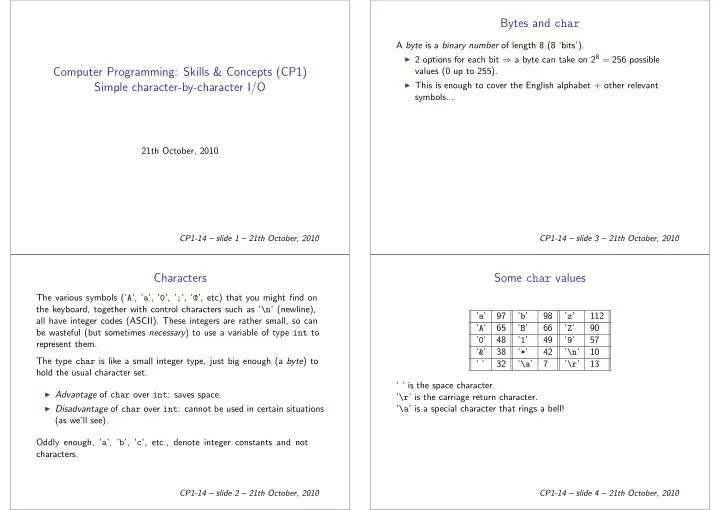
SLIDE 1
Computer Programming: Skills & Concepts (CP1) Simple character-by-character I/O
21th October, 2010
CP1-14 – slide 1 – 21th October, 2010
Characters
The various symbols (’A’, ’a’, ’0’, ’;’, ’@’, etc) that you might find on the keyboard, together with control characters such as ’\n’ (newline), all have integer codes (ASCII). These integers are rather small, so can be wasteful (but sometimes necessary) to use a variable of type int to represent them. The type char is like a small integer type, just big enough (a byte) to hold the usual character set.
◮ Advantage of char over int: saves space. ◮ Disadvantage of char over int: cannot be used in certain situations
(as we’ll see). Oddly enough, ’a’, ’b’, ’c’, etc., denote integer constants and not characters.
CP1-14 – slide 2 – 21th October, 2010
Bytes and char
A byte is a binary number of length 8 (8 ‘bits’).
◮ 2 options for each bit ⇒ a byte can take on 28 = 256 possible
values (0 up to 255).
◮ This is enough to cover the English alphabet + other relevant
symbols...
CP1-14 – slide 3 – 21th October, 2010
Some char values
’a’ 97 ’b’ 98 ’z’ 112 ’A’ 65 ’B’ 66 ’Z’ 90 ’0’ 48 ’1’ 49 ’9’ 57 ’&’ 38 ’*’ 42 ’\n’ 10 ’ ’ 32 ’\a’ 7 ’\r’ 13 ’ ’ is the space character. ’\r’ is the carriage return character. ’\a’ is a special character that rings a bell!
CP1-14 – slide 4 – 21th October, 2010
SLIDE 2 I/O with characters
◮ getchar(): returns the next character from the input stream
(could be characters typed at a keyboard, or read from a file). If the end of the stream has been reached (user types CTRL/D or the end
- f the file is reached) the special value EOF is returned.
◮ putchar(c): writes the character c to the output stream (could be
the screen, or another file). We can make this available by adding #include <stdio.h> to the top
CP1-14 – slide 5 – 21th October, 2010
Library functions
In addition, #include <ctype.h> gives us various functions on charac- ters:
◮ isalpha(c): is c alphabetic? ◮ isupper(c): is c upper case? ◮ isdigit(c): is c a digit (0 to 9)? ◮ toupper(c): if c is a lower case letter, return the corresponding
upper case letter; otherwise return c. . . . and several others: see Kelley and Pohl A.2.
CP1-14 – slide 6 – 21th October, 2010
Printing Roman numerals
void PrintNum(int n) { while (n > 0) { if (n >= 100) { n = n - 100; putchar(’C’); } else if (n >= 90) { n = n + 10; putchar(’X’); } else if (n >= 50) { n = n - 50; putchar(’L’); } else if (n >= 40) { n = n + 10; putchar(’X’); } else if (n >= 10) { n = n - 10; putchar(’X’); CP1-14 – slide 7 – 21th October, 2010 } else if (n >= 9) { n = n + 1; putchar(’I’); } else if (n >= 5) { n = n - 5; putchar(’V’); } else if (n >= 4) { n = n + 1; putchar(’I’); } else { n = n - 1; putchar(’I’); } } } CP1-14 – slide 8 – 21th October, 2010
SLIDE 3 Printing decimal numbers
void PrintDecimal(int n) { int m = 100000; while (m > 0) { putchar(n/m + ’0’); n = n%m; m = m/10; } } Not elegant. How to do better?
CP1-14 – slide 9 – 21th October, 2010
Idiom for single character I/O
We can do a surprising amount by filling in the following template: #include <stdio.h> #include <stdlib.h> int c; while ((c = getchar()) != EOF) { /* Code for processing the character c. */ } The while-loop condition is a bit tricky: it reads a character from the input, assigns it to c and tests whether the character is EOF (i.e., whether we have reached the end of the input)!
CP1-14 – slide 10 – 21th October, 2010
Continuing the Roman theme: Caesar cypher
#define offset 13 int c, ord; /* Why is c declared as int and not char? */ while ((c = getchar()) != EOF) { c = toupper(c); if (isupper(c)) {
/* Integer in range [0,25] */
- rd = (ord + offset) % 26;
/* permute by offset */ c = ord + ’A’; /* back to char */ } putchar(c); } CP1-14 – slide 11 – 21th October, 2010
Example: Letter frequencies
int c, i, count[26]; for (i = 0; i <= 25; ++i) count[i] = 0; while ((c = getchar()) != EOF) { c = toupper(c); if (isupper(c)) { i = c - ’A’; /* Integer in [0,25] */ ++count[i]; } } for (i = 0; i <= 25; ++i) printf("%c: %d\n", i + ’A’, count[i]); CP1-14 – slide 12 – 21th October, 2010
SLIDE 4 Idiom for line-oriented I/O
We can do a surprising amount by filling in the following template: #include <stdio.h> #include <stdlib.h> int c; while ((c = getchar()) != EOF) { if (c == ’\n’) { /* Code for processing the line just read. */ } else { /* Code for processing the character c. */ } }
CP1-14 – slide 13 – 21th October, 2010
Example: recording line lengths
int c, charCount = 0, lineCount = 0; while ((c = getchar()) != EOF) { if (c == ’\n’) { ++lineCount; printf(" [Line %d has %d characters]\n", lineCount, charCount); charCount = 0; } else { ++charCount; putchar(c); } }
CP1-14 – slide 14 – 21th October, 2010
Input and output redirection
Suppose we have compiled a program, similar to the ones considered earlier, and placed the resulting object code in the file prog (maybe done by creating a Makefile and using make; or alternatively just by copying a.out into prog). By default, input is from the keyboard, and output is to the screen. So
◮ Typing ./prog
in the shell window runs prog, with input being taken from the keyboard, and output being written to the shell window. However, by extending the command, we may redirect input from the keyboard to a nominated input file, and redirect the output from the screen to a nominated output file.
CP1-14 – slide 15 – 21th October, 2010
◮ ./prog < data
takes input from the file data, but continues to send output to the shell window.
◮ ./prog > results
takes input from the keyboard, but sends
- utput to the file results.
◮ ./prog < data > results
takes input from the file data, and sends output to the file results.
Reading material :) Kelley and Pohl, subsections 3.2, 3.2 and 3.9
CP1-14 – slide 16 – 21th October, 2010