CS1063: Understanding CS1063: Understanding Computer Hardware - - PDF document

cs1063 understanding cs1063 understanding computer
SMART_READER_LITE
LIVE PREVIEW

CS1063: Understanding CS1063: Understanding Computer Hardware - - PDF document

9/30/2009 CS1063: Understanding CS1063: Understanding Computer Hardware Computer Hardware Lots of Bytes Lots of Bytes To talking about lots of bytes, we use To talking about lots of bytes, we use prefixes prefixes like like kilo,


slide-1
SLIDE 1

9/30/2009 1

16 16 9/30/2009 9/30/2009 CS1063 CS1063

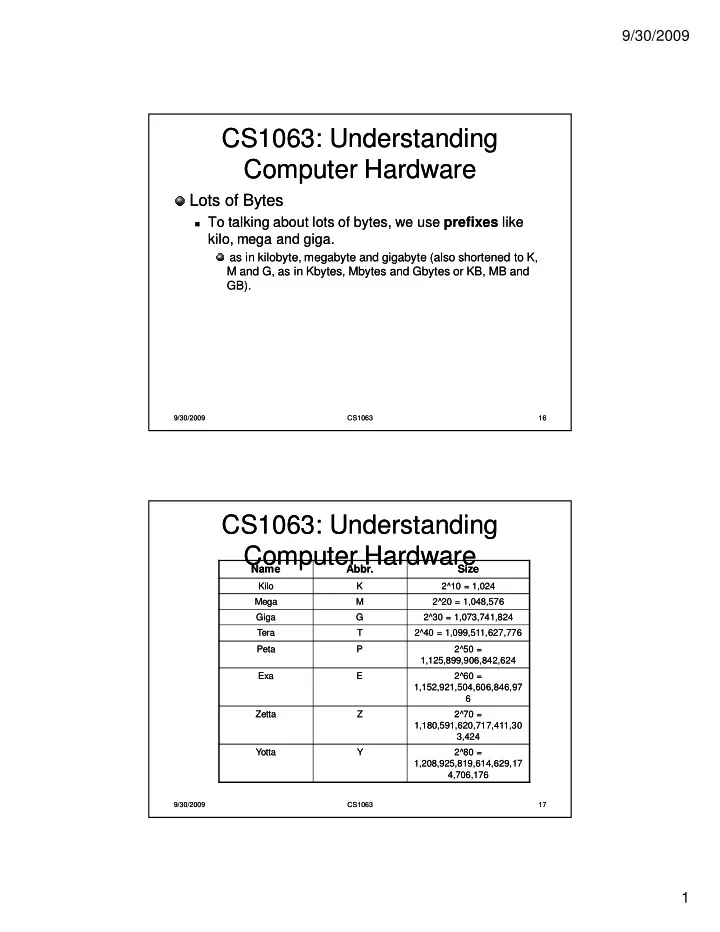
CS1063: Understanding CS1063: Understanding Computer Hardware Computer Hardware

Lots of Bytes Lots of Bytes

  • To talking about lots of bytes, we use

To talking about lots of bytes, we use prefixes prefixes like like kilo, mega and giga. kilo, mega and giga.

as in kilobyte, megabyte and gigabyte (also shortened to K, as in kilobyte, megabyte and gigabyte (also shortened to K, M and G, as in Kbytes, Mbytes and Gbytes or KB, MB and M and G, as in Kbytes, Mbytes and Gbytes or KB, MB and GB). GB).

17 17 9/30/2009 9/30/2009 CS1063 CS1063

CS1063: Understanding CS1063: Understanding Computer Hardware Computer Hardware

Name Name Abbr. Abbr. Size Size

Kilo Kilo K 2^10 = 1,024 2^10 = 1,024 Mega Mega M 2^20 = 1,048,576 2^20 = 1,048,576 Giga Giga G 2^30 = 1,073,741,824 2^30 = 1,073,741,824 Tera Tera T 2^40 = 1,099,511,627,776 2^40 = 1,099,511,627,776 Peta Peta P 2^50 = 2^50 = 1,125,899,906,842,624 1,125,899,906,842,624 Exa Exa E 2^60 = 2^60 = 1,152,921,504,606,846,97 1,152,921,504,606,846,97 6 Zetta Zetta Z 2^70 = 2^70 = 1,180,591,620,717,411,30 1,180,591,620,717,411,30 3,424 3,424 Yotta Yotta Y 2^80 = 2^80 = 1,208,925,819,614,629,17 1,208,925,819,614,629,17 4,706,176 4,706,176

slide-2
SLIDE 2

9/30/2009 2

18 18 9/30/2009 9/30/2009 CS1063 CS1063

CS1063: Understanding CS1063: Understanding Computer Hardware Computer Hardware

A kilo is about a thousand, mega is about a A kilo is about a thousand, mega is about a million, giga is about a billion, and so on. million, giga is about a billion, and so on.

  • So when someone says, "This computer has a 2 gig

So when someone says, "This computer has a 2 gig hard drive," what he or she means is that the hard hard drive," what he or she means is that the hard drive stores 2 gigabytes, or approximately 2 billion drive stores 2 gigabytes, or approximately 2 billion bytes, or exactly 2,147,483,648 bytes. bytes, or exactly 2,147,483,648 bytes.

  • How could you possibly need 2 gigabytes of space?

How could you possibly need 2 gigabytes of space?

When you consider that one CD holds 650 megabytes, you When you consider that one CD holds 650 megabytes, you can see that just three CDs worth of data will fill the whole can see that just three CDs worth of data will fill the whole thing! Terabyte databases are fairly common these days, and thing! Terabyte databases are fairly common these days, and there are probably a few petabyte databases floating around there are probably a few petabyte databases floating around the Pentagon by now. the Pentagon by now.

19 19 9/30/2009 9/30/2009 CS1063 CS1063

CS1063: Understanding CS1063: Understanding Computer Hardware Computer Hardware

Boolean Logic Boolean Logic

  • How can a "chip" made up of silicon and wires do something that

How can a "chip" made up of silicon and wires do something that seems like it requires human thought? seems like it requires human thought?

  • To understand the answer to this question you need to

To understand the answer to this question you need to understand understand Boolean logic Boolean logic. .

  • Developed by George Boole in the mid 1800s.

Developed by George Boole in the mid 1800s.

Simple Gates Simple Gates

  • There are three, five or seven simple gates, depending on how

There are three, five or seven simple gates, depending on how you want to count them you want to count them

  • Combinations of these will implement any digital component you

Combinations of these will implement any digital component you can imagine. can imagine.

  • The simplest possible gate is called an "inverter," or a

The simplest possible gate is called an "inverter," or a NOT gate NOT gate. . It takes one bit as input and produces as output its opposite. The It takes one bit as input and produces as output its opposite. The table below shows a logic table for the NOT gate and the normal table below shows a logic table for the NOT gate and the normal symbol for it in circuit diagrams: symbol for it in circuit diagrams:

slide-3
SLIDE 3

9/30/2009 3

20 20 9/30/2009 9/30/2009 CS1063 CS1063

CS1063: Understanding CS1063: Understanding Computer Hardware Computer Hardware

A Q 1 1

  • The NOT gate has one input called A and one output called Q
  • The table shows how the gate behaves. When A has the value 0, Q

has the value 1. And visa versa.

A

21 21 9/30/2009 9/30/2009 CS1063 CS1063

CS1063: Understanding CS1063: Understanding Computer Hardware Computer Hardware

The The AND gate AND gate performs a logical "and" operation on two performs a logical "and" operation on two inputs, A and B inputs, A and B

  • The idea behind an AND gate is, "If A

The idea behind an AND gate is, "If A AND AND B are both 1, then Q B are both 1, then Q should be 1." You can see that behaviour in the logic table for should be 1." You can see that behaviour in the logic table for the gate. the gate.

A B Q 1 1 1 1 1 A.B

slide-4
SLIDE 4

9/30/2009 4

22 22 9/30/2009 9/30/2009 CS1063 CS1063

CS1063: Understanding CS1063: Understanding Computer Hardware Computer Hardware

The next gate is an The next gate is an OR gate OR gate. .

  • Its basic idea is, "If A is 1

Its basic idea is, "If A is 1 OR OR B is 1 (or both are 1), B is 1 (or both are 1), then Q is 1." then Q is 1." A B Q 1 1 1 1 1 1 1 A+B

23 23 9/30/2009 9/30/2009 CS1063 CS1063

CS1063: Understanding CS1063: Understanding Computer Hardware Computer Hardware

Those are the three basic gates. Those are the three basic gates.

  • It is quite common to recognize two others as well:

It is quite common to recognize two others as well: the the NAND NAND and the and the NOR NOR gate. gate.

These two gates are combinations of an AND or an OR gate These two gates are combinations of an AND or an OR gate with a NOT gate. with a NOT gate.

A B Q 1 1 1 1 1 1 1 A B Q 1 1 1 1 1 NAND NOR A.B A+B

slide-5
SLIDE 5

9/30/2009 5

24 24 9/30/2009 9/30/2009 CS1063 CS1063

CS1063: Understanding CS1063: Understanding Computer Hardware Computer Hardware

The final two gates are the The final two gates are the XOR XOR and and XNOR XNOR gates, also known as "exclusive or" and gates, also known as "exclusive or" and "exclusive nor" gates, respectively. Here are "exclusive nor" gates, respectively. Here are their tables their tables

A B Q 1 1 1 1 1 1 A B Q 1 1 1 1 1 1 XOR XNOR A O B A O B