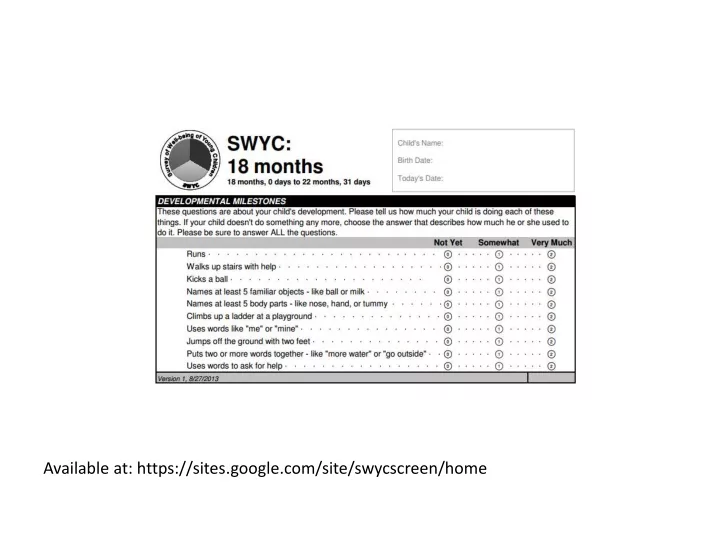
Available at: https://sites.google.com/site/swycscreen/home Scoring - - PowerPoint PPT Presentation

available at https sites google com site swycscreen home
SMART_READER_LITE
LIVE PREVIEW

Available at: https://sites.google.com/site/swycscreen/home Scoring - - PowerPoint PPT Presentation

Available at: https://sites.google.com/site/swycscreen/home Scoring Available at: https://sites.google.com/site/swycscreen/home Scoring Score each item Not yet= 0 Somewhat = 1 Very much = 2 Add items 1-10 Match age in far


slide-1
SLIDE 1

Available at: https://sites.google.com/site/swycscreen/home
slide-2
SLIDE 2

Scoring

Available at: https://sites.google.com/site/swycscreen/home

slide-3
SLIDE 3

Scoring

  • Score each item

– Not yet= 0 – Somewhat = 1 – Very much = 2

  • Add items 1-10
  • Match age in far left column
  • “Below average” requires further evaluation

Available at: https://sites.google.com/site/swycscreen/home

slide-4
SLIDE 4

Making this work in your practice: Case studies

slide-5
SLIDE 5

Case 1: Clara Maas

  • Clara is an 18 month old girl who

you have followed since birth presenting for well child care

  • Her mother was also your
  • patient. She is now 22 years old

and has transitioned to an adult provider

  • Clara recently started day care

and her mother expresses concerns about recent upper respiratory infections

slide-6
SLIDE 6

How might surveillance and screening look?

  • As part of developmental surveillance you ask “Do

you have any specific concerns about your child’s development, learning or behavior?”

  • The mother replies “no”
  • The front desk handed mother the SWYC Milestones

which she completed in the waiting room and the medical assistant scored it after obtaining weight and height

  • You review the results
slide-7
SLIDE 7

Raw score: 6

slide-8
SLIDE 8
slide-9
SLIDE 9

Case 2: Robert W. Johnson

  • Robert is a 9 month old

boy presenting for well child care

  • Dad would like to know

when Robert is supposed to start walking

slide-10
SLIDE 10

How might surveillance and screening look?

  • Dad completed the SWYC

milestones on a computer in your waiting room

  • You review the results in

your EMR

slide-11
SLIDE 11

Raw score: 5

slide-12
SLIDE 12
slide-13
SLIDE 13

Additional resources

  • CDC

– http://www.cdc.gov/

  • Birth to 5: Watch me thrive

– http://www.acf.hhs.gov/programs/ecd/child-health- development/watch-me-thrive

  • American Academy of Pediatrics

– http://www2.aap.org/sections/dbpeds/screening.asp

  • Center for Medical Home Implementation

– http://www.medicalhomeinfo.org/