VMware vCloud Director Provider 2.5 The VMware vCloud Director - - PDF document

vmware vcloud director provider 2 5
SMART_READER_LITE
LIVE PREVIEW

VMware vCloud Director Provider 2.5 The VMware vCloud Director - - PDF document

VMware vCloud Director Provider 2.5 The VMware vCloud Director provider is used to interact with the resources supported by VMware vCloud Director. The provider needs to be congured with the proper credentials before it can be used. Use the


slide-1
SLIDE 1

VMware vCloud Director Provider 2.5

The VMware vCloud Director provider is used to interact with the resources supported by VMware vCloud Director. The provider needs to be congured with the proper credentials before it can be used. Use the navigation to the left to read about the available resources. NOTE: The VMware vCloud Director Provider went through a refresh at the beginning of 2019 and some semantic changes were made compared to the previously available initial version. Please check docs for v2.0+, v2.1+, v2.2+, v2.4+ labels and your existing .tf conguration les carefully when shifting to this new version.

Supported vCD Versions

The following vCloud Director versions are supported by this provider: 9.0 9.1 9.5 9.7 10.0

Example Usage

Connecting as Org Admin

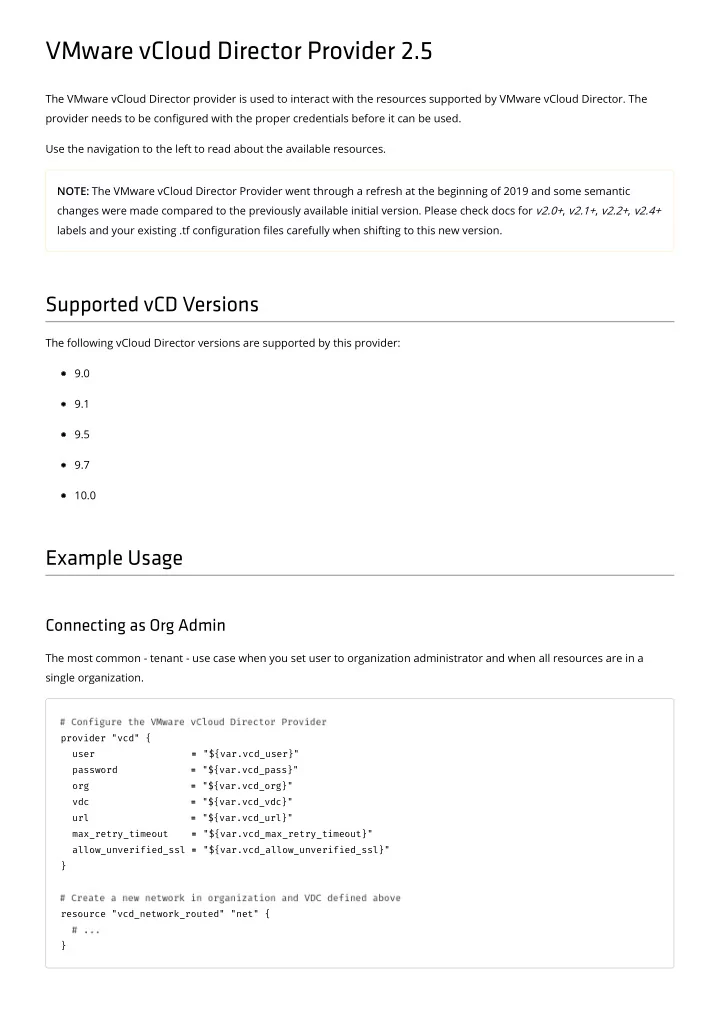
The most common - tenant - use case when you set user to organization administrator and when all resources are in a single organization.

provider "vcd" { user = = "${var.vcd_user}" password = = "${var.vcd_pass}"

  • rg =

= "${var.vcd_org}" vdc = = "${var.vcd_vdc}" url = = "${var.vcd_url}" max_retry_timeout = = "${var.vcd_max_retry_timeout}" allow_unverified_ssl = = "${var.vcd_allow_unverified_ssl}" } resource "vcd_network_routed" "net" { }

slide-2
SLIDE 2

Connecting as Sys Admin

When you want to manage resources across dierent organizations from a single conguration.

provider "vcd" { user = = "administrator" password = = "${var.vcd_pass}"

  • rg =

= "System" url = = "${var.vcd_url}" max_retry_timeout = = "${var.vcd_max_retry_timeout}" allow_unverified_ssl = = "${var.vcd_allow_unverified_ssl}" } resource "vcd_network_routed" "net1" {

  • rg =

= "Org1" vdc = = "Org1VDC" } resource "vcd_network_routed" "net2" {

  • rg =

= "Org2" vdc = = "Org2VDC" }

Connecting as Sys Admin with Default Org and VDC

When you want to manage resources across dierent organizations but set a default one.

slide-3
SLIDE 3

provider "vcd" { user = = "administrator" password = = "${var.vcd_pass}" sysorg = = "System"

  • rg =

= "${var.vcd_org}" vdc = = "${var.vcd_vdc}" url = = "${var.vcd_url}" max_retry_timeout = = "${var.vcd_max_retry_timeout}" allow_unverified_ssl = = "${var.vcd_allow_unverified_ssl}" } resource "vcd_network_routed" "net1" { } resource "vcd_network_routed" "net2" {

  • rg =

= "OrgZ" vdc = = "OrgZVDC" }

Argument Reference

The following arguments are used to congure the VMware vCloud Director Provider:

user - (Required) This is the username for vCloud Director API operations. Can also be specied with the VCD_USER

environment variable. v2.0+ user may be "administrator" (set org or sysorg to "System" in this case).

password - (Required) This is the password for vCloud Director API operations. Can also be specied with the VCD_PASSWORD environment variable.

  • rg - (Required) This is the vCloud Director Org on which to run API operations. Can also be specied with the

VCD_ORG environment variable.

v2.0+ org may be set to "System" when connection as Sys Admin is desired (set user to "administrator" in this case). Note: org value is case sensitive.

sysorg - (Optional; v2.0+) - Organization for user authentication. Can also be specied with the VCD_SYS_ORG

environment variable. Set sysorg to "System" and user to "administrator" to free up org argument for setting a default organization for resources to use.

url - (Required) This is the URL for the vCloud Director API endpoint. e.g. https://server.domain.com/api

(https://server.domain.com/api). Can also be specied with the VCD_URL environment variable.

vdc - (Optional) This is the virtual datacenter within vCloud Director to run API operations against. If not set the plugin

will select the rst virtual datacenter available to your Org. Can also be specied with the VCD_VDC environment variable.

slide-4
SLIDE 4

max_retry_timeout - (Optional) This provides you with the ability to specify the maximum amount of time (in

seconds) you are prepared to wait for interactions on resources managed by vCloud Director to be successful. If a resource action fails, the action will be retried (as long as it is still within the max_retry_timeout value) to try and ensure success. Defaults to 60 seconds if not set. Can also be specied with the VCD_MAX_RETRY_TIMEOUT environment variable.

maxRetryTimeout - (Deprecated) Use max_retry_timeout instead. allow_unverified_ssl - (Optional) Boolean that can be set to true to disable SSL certicate verication. This should

be used with care as it could allow an attacker to intercept your auth token. If omitted, default value is false. Can also be specied with the VCD_ALLOW_UNVERIFIED_SSL environment variable.

logging - (Optional; v2.0+) Boolean that enables API calls logging from upstream library go-vcloud-director . The

logging le will record all API requests and responses, plus some debug information that is part of this provider. Logging can also be activated using the VCD_API_LOGGING environment variable.

logging_file - (Optional; v2.0+) The name of the log le (when logging is enabled). By default is go-vcloud- director and it can also be changed using the VCD_API_LOGGING_FILE environment variable. import_separator - (Optional; v2.5+) The string to be used as separator with terraform import . By default it is a

dot ( . ).

Connection Cache (2.0+)

vCloud Director connection calls can be expensive, and if a denition le contains several resources, it may trigger multiple

  • connections. There is a cache engine, disabled by default, which can be activated by the VCD_CACHE environment variable.

When enabled, the provider will not reconnect, but reuse an active connection for up to 20 minutes, and then connect again.

slide-5
SLIDE 5

vcd_catalog

Provides a vCloud Director Catalog data source. A Catalog can be used to manage catalog items and media items. Supported in provider v2.5+

Example Usage

data "vcd_catalog" "my-cat" {

  • rg =

= "my-org" name = = "my-cat" } resource "vcd_catalog_item" "myItem" {

  • rg =

= "${data.vcd_catalog.my-cat.org}" catalog = = "${data.vcd_catalog.my-cat.name}" name = = "myItem" description = = "Belongs to ${data.vcd_catalog.my-cat.id}"

  • va_path =

= "/path/to/test_vapp_template.ova" upload_piece_size = = 5 show_upload_progress = = "true" }

Argument Reference

The following arguments are supported:

  • rg - (Optional, but required if not set at provider level) Org name

name - (Required) Catalog name

Attribute Reference

description - Catalog description.

slide-6
SLIDE 6

vcd_catalog_item

Provides a vCloud Director Catalog item data source. A Catalog item can be used to reference a catalog item and use its data within other resources or data sources. Supported in provider v2.5+

Example Usage

data "vcd_catalog_item" "my-first-item" {

  • rg =

= "my-org" catalog = = "my-cat" name = = "my-first-item" } resource "vcd_catalog_item" "my-second-item" {

  • rg =

= "${data.vcd_catalog_item.my-first-item.org}" catalog = = "${data.vcd_catalog_item.my-first-item.catalog}" name = = "my-second-item" description = = "Belongs to ${data.vcd_catalog_item.my-first-item.catalog}"

  • va_path =

= "/path/to/test_vapp_template.ova" upload_piece_size = = 5 show_upload_progress = = "true" metadata = = "${data.vcd_catalog_item.my-first-item.metadata}" }

Argument Reference

The following arguments are supported:

  • rg - (Optional, but required if not set at provider level) Org name

catalog - (Required) Catalog name name - (Required) Catalog Item name

Attribute Reference

description - Catalog item description. metadata - Key value map of metadata.

slide-7
SLIDE 7

vcd_catalog_media

Provides a vCloud Director Catalog media data source. A Catalog media can be used to reference a catalog media and use its data within other resources or data sources. Supported in provider v2.5+

Example Usage

data "vcd_catalog_media" "existing-media" {

  • rg =

= "my-org" catalog = = "my-cat" name = = "my-media" }

  • utput "media_size" {

value = = data.vcd_catalog_media vcd_catalog_media.existing existing-

  • media.size

size }

  • utput "type_is_iso" {

value = = data.vcd_catalog_media vcd_catalog_media.existing existing-

  • media.is_iso

is_iso }

Argument Reference

The following arguments are supported:

  • rg - (Optional) The name of organization to use, optional if dened at provider level

catalog - (Required) The name of the catalog where media le is name - (Required) Media name in catalog

Attribute reference

All attributes dened in catalog_media (/docs/providers/vcd/r/catalog_media.html#attribute-reference) are supported.

slide-8
SLIDE 8

vcd_edgegateway

Provides a vCloud Director edge gateway data source, directly connected to one or more external networks. This can be used to reference edge gateways for Org VDC networks to connect. Supported in provider v2.5+

Example Usage

data "vcd_edgegateway" "mygw" { name = = "mygw"

  • rg =

= "myorg" vdc = = "myvdc" }

  • utput "external_network" {

value = = data.vcd_edgegateway vcd_edgegateway.mygw mygw.default_gateway_network default_gateway_network } data "vcd_external_network" "external_network1" { name = = "${data.vcd_edgegateway.mygw.default_gateway_network}" }

  • utput "gateway" {

value = = data.vcd_external_network vcd_external_network.external_network1 external_network1.ip_scope ip_scope. .0.gateway gateway }

  • utput "netmask" {

value = = data.vcd_external_network vcd_external_network.external_network1 external_network1.ip_scope ip_scope. .0.netmask netmask }

  • utput "DNS" {

value = = data.vcd_external_network vcd_external_network.external_network1 external_network1.ip_scope ip_scope. .0.dns1 dns1 }

  • utput "external_ip" {

value = = data.vcd_external_network vcd_external_network.external_network1 external_network1.ip_scope ip_scope. .0.static_ip_pool static_ip_pool. .0.start_address start_address }

Argument Reference

The following arguments are supported:

name - (Required) A unique name for the edge gateway.

  • rg - (Optional) The name of organization to which the VDC belongs. Optional if dened at provider level.

vdc - (Optional) The name of VDC that owns the edge gateway. Optional if dened at provider level.

slide-9
SLIDE 9

Attribute Reference

All attributes dened in edge gateway resource (/docs/providers/vcd/r/edgegateway.html#attribute-reference) are supported.

slide-10
SLIDE 10

external_network

Provides a vCloud Director external network data source. This can be used to reference external networks and their properties. Supported in provider v2.5+

Example Usage

data "vcd_external_network" "tf-external-network" { name = = "my-extnet" } resource "vcd_dnat" "tf-nat-rule" {

  • rg =

= "tf-org" vdc = = "tf-vdc" network_name = = "${data.vcd_external_network.tf-external-network.name}" network_type = = "ext" edge_gateway = = "tf-gw" external_ip = = "${data.vcd_external_network.extnet-datacloud.ip_scope[0].static_ip_pool[0].start_add ress}" port = = 7777 protocol = = "tcp" internal_ip = = "10.10.102.60" translated_port = = 77 description = = "test run" }

Argument Reference

The following arguments are supported:

name - (Required) external network name

Attribute Reference

description - Network friendly description ip_scope - A list of IP scopes for the network. See IP Scope (/docs/providers/vcd/r/external_network.html#ipscope)

for details.

vsphere_network - A list of DV_PORTGROUP or NETWORK objects names that back this network. Each referenced

DV_PORTGROUP or NETWORK must exist on a vCenter server registered with the system. See vSphere Network (/docs/providers/vcd/r/external_network.html#vspherenetwork) for details.

slide-11
SLIDE 11

retain_net_info_across_deployments - Species whether the network resources such as IP/MAC of router will be

retained across deployments.

slide-12
SLIDE 12

vcd_independent_disk

Provides a vCloud Director Independent disk data source. A independent disk data source can be used to reference an independent disk and use its data within other resources or data sources. Supported in provider v2.5+

Example Usage

data "vcd_independent_disk" "existing-disk" {

  • rg =

= "my-org" vdc = = "my-vdc" id = = "urn:vcloud:disk:1bbc273d-7701-4f06-97be-428b46b0805e" name = = "my-disk" }

  • utput "disk-iops" {

value = = data.vcd_independent_disk vcd_independent_disk.existing existing-

  • disk.iops

iops }

  • utput "type_is_attached" {

value = = data.vcd_independent_disk vcd_independent_disk.existing existing-

  • disk.is_attached

is_attached }

Argument Reference

The following arguments are supported:

  • rg - (Optional) The name of organization to use, optional if dened at provider level. Useful when connected as

sysadmin working across dierent organisations

vdc - (Optional) The name of VDC to use, optional if dened at provider level id - (Optional) Disk id or name is required. If both provided - Id is used. Id can be found by using import function

Listing independent disk IDs (/docs/providers/vcd/r/independent_disk.html#listing-independent-disk-ids)

name - (Optional) Disk name. Warning please use id as there is possibility to have more than one independent disk

with same name. As result data source will fail.

Attribute reference

All attributes dened in independent disk (/docs/providers/vcd/r/independent_disk.html#attribute-reference) are supported.

slide-13
SLIDE 13

vcd_lb_app_prole

Provides a vCloud Director Edge Gateway Load Balancer Application Prole data source. An application prole denes the behavior of the load balancer for a particular type of network trac. After conguring a prole, you associate it with a virtual

  • server. The virtual server then processes trac according to the values specied in the prole.

Note: See additional support notes in application prole resource page (/docs/providers/vcd/r/lb_app_prole.html). Supported in provider v2.4+

Example Usage

data "vcd_lb_app_profile" "my-profile" {

  • rg =

= "my-org" vdc = = "my-org-vdc" edge_gateway = = "my-edge-gw" name = = "not-managed" }

Argument Reference

The following arguments are supported:

  • rg - (Optional) The name of organization to use, optional if dened at provider level

vdc - (Optional) The name of VDC to use, optional if dened at provider level edge_gateway - (Required) The name of the edge gateway on which the service monitor is dened name - (Required) Application prole name for identifying the exact application prole

Attribute Reference

All the attributes dened in vcd_lb_app_profile resource are available.

slide-14
SLIDE 14

vcd_lb_app_rule

Provides a vCloud Director Edge Gateway Load Balancer Application Rule data source. An application rule allows to directly manipulate and manage IP application trac with load balancer. Note: See additional support notes in application rule resource page (/docs/providers/vcd/r/lb_app_rule.html). Supported in provider v2.4+

Example Usage

data "vcd_lb_app_rule" "my-rule" {

  • rg =

= "my-org" vdc = = "my-org-vdc" edge_gateway = = "my-edge-gw" name = = "not-managed" }

Argument Reference

The following arguments are supported:

  • rg - (Optional) The name of organization to use, optional if dened at provider level

vdc - (Optional) The name of VDC to use, optional if dened at provider level edge_gateway - (Required) The name of the edge gateway on which the service monitor is dened name - (Required) Application rule name for identifying the exact application rule

Attribute Reference

All the attributes dened in vcd_lb_app_rule resource are available.

slide-15
SLIDE 15

vcd_lb_server_pool

Provides a vCloud Director Edge Gateway Load Balancer Server Pool data source. A Server Pool denes a group of backend servers (dened as pool members), manages load balancer distribution methods, and has a service monitor attached to it for health check parameters. Note: See additional support notes in server pool resource page (/docs/providers/vcd/r/lb_server_pool.html). Supported in provider v2.4+

Example Usage

data "vcd_lb_server_pool" "sp-ds" {

  • rg =

= "my-org" vdc = = "my-org-vdc" edge_gateway = = "my-edge-gw" name = = "not-managed" }

Argument Reference

The following arguments are supported:

  • rg - (Optional) The name of organization to use, optional if dened at provider level. Useful when connected as

sysadmin working across dierent organisations

vdc - (Optional) The name of VDC to use, optional if dened at provider level edge_gateway - (Required) The name of the edge gateway on which the server pool is dened name - (Required) Server Pool name for identifying the exact server pool

Attribute Reference

All the attributes dened in vcd_lb_server_pool resource are available.

slide-16
SLIDE 16

vcd_lb_service_monitor

Provides a vCloud Director Edge Gateway Load Balancer Service Monitor data source. A service monitor denes health check parameters for a particular type of network trac. It can be associated with a pool. Pool members are monitored according to the service monitor parameters. See example usage of this data source in server pool resource page (/docs/providers/vcd/r/lb_server_pool.html). Note: See additional support notes in service monitor resource page (/docs/providers/vcd/r/lb_service_monitor.html). Supported in provider v2.4+

Example Usage

data "vcd_lb_service_monitor" "my-monitor" {

  • rg =

= "my-org" vdc = = "my-org-vdc" edge_gateway = = "my-edge-gw" name = = "not-managed" }

Argument Reference

The following arguments are supported:

  • rg - (Optional) The name of organization to use, optional if dened at provider level. Useful when connected as

sysadmin working across dierent organisations

vdc - (Optional) The name of VDC to use, optional if dened at provider level edge_gateway - (Required) The name of the edge gateway on which the service monitor is dened name - (Required) Service Monitor name for identifying the exact service monitor

Attribute Reference

All the attributes dened in vcd_lb_service_monitor resource are available.

slide-17
SLIDE 17

vcd_lb_virtual_server

Provides a vCloud Director edge gateway load balancer virtual server data source. Adds an edge gateway internal or uplink interface as a virtual server. A virtual server has a public IP address and services all incoming client requests. Note: To make load balancing work one must ensure that load balancing is enabled on edge gateway (edge gateway must be advanced). This depends on NSX version to work properly. Please refer to VMware Product Interoperability Matrices (https://www.vmware.com/resources/compatibility/sim/interop_matrix.php#interop&29=&93=) to check supported vCloud director and NSX for vSphere congurations. Note: The vCloud Director API for NSX supports a subset of the operations and objects dened in the NSX vSphere API

  • Guide. The API supports NSX 6.2, 6.3, and 6.4.

Supported in provider v2.4+

Example Usage

data "vcd_lb_virtual_server" "my-vs" {

  • rg =

= "my-org" vdc = = "my-org-vdc" edge_gateway = = "my-edge-gw" name = = "not-managed" }

Argument Reference

The following arguments are supported:

  • rg - (Optional) The name of organization to use, optional if dened at provider level. Useful when connected as

sysadmin working across dierent organisations

vdc - (Optional) The name of VDC to use, optional if dened at provider level edge_gateway - (Required) The name of the edge gateway on which the virtual server is dened name - (Required) Name for identifying the exact virtual server

Attribute Reference

All the attributes dened in vcd_lb_virtual_server resource are available.

slide-18
SLIDE 18

vcd_network_direct

Provides a vCloud Director Org VDC Network data source directly connected to an external network. This can be used to reference internal networks for vApps to connect. Supported in provider v2.5+

Example Usage

data "vcd_network_direct" "net" {

  • rg =

= "my-org" vdc = = "my-vdc" name = = "my-net" }

  • utput "external_network" {

value = = data.vcd_network_direct vcd_network_direct.net net.external_network external_network } data "vcd_external_network" "external_network1" { name = = "${data.vcd_network_direct.net.external_network}" }

  • utput "gateway" {

value = = data.vcd_external_network vcd_external_network.external_network1 external_network1.ip_scope ip_scope. .0.gateway gateway }

  • utput "external_network_gateway" {

value = = data.vcd_network_direct vcd_network_direct.net net.external_network_gateway external_network_gateway }

  • utput "netmask" {

value = = data.vcd_external_network vcd_external_network.external_network1 external_network1.ip_scope ip_scope. .0.netmask netmask }

  • utput "external_network_netmask" {

value = = data.vcd_network_direct vcd_network_direct.net net.external_network_netmask external_network_netmask }

  • utput "DNS" {

value = = data.vcd_external_network vcd_external_network.external_network1 external_network1.ip_scope ip_scope. .0.dns1 dns1 }

  • utput "external_network_dns" {

value = = data.vcd_network_direct vcd_network_direct.net net.external_network_dns1 external_network_dns1 }

  • utput "external_ip" {

value = = data.vcd_external_network vcd_external_network.external_network1 external_network1.ip_scope ip_scope. .0.static_ip_pool static_ip_pool. .0.start_address start_address }

slide-19
SLIDE 19

Argument Reference

The following arguments are supported:

  • rg - (Optional) The name of organization to use, optional if dened at provider level.

vdc - (Optional) The name of VDC to use, optional if dened at provider level. name - (Required) A unique name for the network

Attribute Reference

external_network - The name of the external network. shared - Denes if this network is shared between multiple vDCs in the vOrg.

slide-20
SLIDE 20

vcd_network_isolated

Provides a vCloud Director Org VDC isolated Network data source. This can be used to reference internal networks for vApps to connect. This network is not attached to external networks or routers. Supported in provider v2.5+

Example Usage

data "vcd_network_isolated" "net" {

  • rg =

= "my-org" vdc = = "my-vdc" name = = "my-net" }

  • utput "gateway" {

value = = data.vcd_network_isolated vcd_network_isolated.net net.gateway gateway }

  • utput "dns1" {

value = = data.vcd_network_isolated vcd_network_isolated.net net.dns1 dns1 }

  • utput "dhcp_start_address" {

value = = tolist(data.vcd_network_isolated vcd_network_isolated.net net.dhcp_pool dhcp_pool)[0].start_address start_address }

  • utput "dhcp_end_address" {

value = = tolist(data.vcd_network_isolated vcd_network_isolated.net net.dhcp_pool dhcp_pool)[0].end_address end_address }

  • utput "static_ip_start_address" {

value = = tolist(data.vcd_network_isolated vcd_network_isolated.net net.static_ip_pool static_ip_pool)[0].start_address start_address }

  • utput "static_ip_end_address" {

value = = tolist(data.vcd_network_isolated vcd_network_isolated.net net.static_ip_pool static_ip_pool)[0].end_address end_address }

Argument Reference

The following arguments are supported:

  • rg - (Optional) The name of organization to use, optional if dened at provider level

vdc - (Optional) The name of VDC to use, optional if dened at provider level name - (Required) A unique name for the network

slide-21
SLIDE 21

Attribute reference

All attributes dened in isolated network resource (/docs/providers/vcd/r/network_isolated.html#attribute-reference) are supported.

slide-22
SLIDE 22

vcd_network_routed

Provides a vCloud Director Org VDC routed Network data source. This can be used to reference internal networks for vApps to connect. Supported in provider v2.5+

Example Usage

data "vcd_network_routed" "net" {

  • rg =

= "my-org" vdc = = "my-vdc" name = = "my-net" }

  • utput "edge_gateway" {

value = = data.vcd_network_routed vcd_network_routed.net net.edge_gateway edge_gateway }

  • utput "gateway" {

value = = data.vcd_network_routed vcd_network_routed.net net.gateway gateway }

  • utput "dhcp_start_address" {

value = = tolist(data.vcd_network_routed vcd_network_routed.net net.dhcp_pool dhcp_pool)[0].start_address start_address }

  • utput "dhcp_end_address" {

value = = tolist(data.vcd_network_routed vcd_network_routed.net net.dhcp_pool dhcp_pool)[0].end_address end_address }

  • utput "static_ip_start_address" {

value = = tolist(data.vcd_network_routed vcd_network_routed.net net.static_ip_pool static_ip_pool)[0].start_address start_address }

  • utput "static_ip_end_address" {

value = = tolist(data.vcd_network_routed vcd_network_routed.net net.static_ip_pool static_ip_pool)[0].end_address end_address }

Argument Reference

The following arguments are supported:

  • rg - (Optional) The name of organization to use, optional if dened at provider level

vdc - (Optional) The name of VDC to use, optional if dened at provider level name - (Required) A unique name for the network

Attribute reference

slide-23
SLIDE 23

All attributes dened in routed network resource (/docs/providers/vcd/r/network_routed.html#attribute-reference) are supported.

slide-24
SLIDE 24

vcd_nsxv_dnat

Provides a vCloud Director DNAT data source for advanced edge gateways (NSX-V). This can be used to read existing rule by ID and use its attributes in other resources. Note: This data source requires advanced edge gateway. For non-advanced edge gateways please use the vcd_dnat (/docs/providers/vcd/r/dnat.html) resource.

Example Usage

data "vcd_nsxv_dnat" "my-rule" {

  • rg =

= "my-org" vdc = = "my-org-vdc" edge_gateway = = "my-edge-gw" rule_id = = "197864" }

Argument Reference

The following arguments are supported:

  • rg - (Optional) The name of organization to use, optional if dened at provider level. Useful when connected as

sysadmin working across dierent organisations.

vdc - (Optional) The name of VDC to use, optional if dened at provider level. edge_gateway - (Required) The name of the edge gateway on which to apply the DNAT rule. rule_id - (Required) ID of DNAT rule as shown in the UI.

Attribute Reference

All the attributes dened in vcd_nsxv_dnat resource are available.

slide-25
SLIDE 25

vcd_nsxv_rewall_rule

Provides a vCloud Director rewall rule data source for advanced edge gateways (NSX-V). This can be used to read existing rules by ID and use its attributes in other resources. Note: This data source requires advanced edge gateway. For non-advanced edge gateways please use the

vcd_firewall_rules (/docs/providers/vcd/r/rewall_rules.html) resource.

Example Usage

data "vcd_nsxv_firewall_rule" "my-rule" {

  • rg =

= "my-org" vdc = = "my-org-vdc" edge_gateway = = "my-edge-gw" rule_id = = "133048" }

Argument Reference

The following arguments are supported:

  • rg - (Optional) The name of organization to use, optional if dened at provider level. Useful when connected as

sysadmin working across dierent organisations.

vdc - (Optional) The name of VDC to use, optional if dened at provider level. edge_gateway - (Required) The name of the edge gateway on which to apply the DNAT rule. rule_id - (Required) ID of rewall rule (not UI number). See more information about rewall rule ID in vcd_nsxv_firewall_rule import section (/docs/providers/vcd/r/nsxv_rewall_rule.html#listing-real-rewall-rule-ids).

Attribute Reference

All the attributes dened in vcd_nsxv_firewall_rule (/docs/providers/vcd/r/nsxv_rewall_rule.html) resource are available.

slide-26
SLIDE 26

vcd_nsxv_snat

Provides a vCloud Director SNAT data source for advanced edge gateways (NSX-V). This can be used to read existing rule by ID and use its attributes in other resources. Note: This data source requires advanced edge gateway. For non-advanced edge gateways please use the vcd_snat (/docs/providers/vcd/r/snat.html) resource.

Example Usage

data "vcd_nsxv_snat" "my-rule" {

  • rg =

= "my-org" vdc = = "my-org-vdc" edge_gateway = = "my-edge-gw" rule_id = = "197867" }

Argument Reference

The following arguments are supported:

  • rg - (Optional) The name of organization to use, optional if dened at provider level. Useful when connected as

sysadmin working across dierent organisations.

vdc - (Optional) The name of VDC to use, optional if dened at provider level. edge_gateway - (Required) The name of the edge gateway on which to apply the SNAT rule. rule_id - (Required) ID of SNAT rule as shown in the UI.

Attribute Reference

All the attributes dened in vcd_nsxv_snat resource are available.

slide-27
SLIDE 27

vcd_org

Provides a vCloud Director Org data source. An organization can be used to manage catalogs, virtual data centers, and users. Supported in provider v2.5+

Example Usage

data "vcd_org" "my-org" { name = = "my-org" } resource "vcd_org" "my-org-clone" { name = = "my-org-clone" full_name = = "${data.vcd_org.my-org.full_name}" can_publish_catalogs = = "${data.vcd_org.my-org.can_publish_catalogs}" deployed_vm_quota = = "${data.vcd_org.my-org.deployed_vm_quota}" stored_vm_quota = = "${data.vcd_org.my-org.stored_vm_quota}" is_enabled = = "${data.vcd_org.my-org.is_enabled}" delete_force = = "true" delete_recursive = = "true" }

Argument Reference

The following arguments are supported:

name - (Required) Org name

Attribute Reference

full_name - Org full name is_enabled - True if this organization is enabled (allows login and all other operations). description - Org description. deployed_vm_quota - Maximum number of virtual machines that can be deployed simultaneously by a member of

this organization.

stored_vm_quota - Maximum number of virtual machines in vApps or vApp templates that can be stored in an

undeployed state by a member of this organization.

can_publish_catalogs - True if this organization is allowed to share catalogs. delay_after_power_on_seconds - Species this organization's default for virtual machine boot delay after power on.

slide-28
SLIDE 28

vcd_org_vcd

Provides a vCloud Director Organization VDC data source. An Organization VDC can be used to reference a VCD and use its data within other resources or data sources. Supported in provider v2.5+

Example Usage

data "vcd_org_vdc" "my-org-vdc" {

  • rg =

= "my-org" name = = "my-vdc" }

  • utput "provider_vdc" {

value = = data.vcd_org_vdc vcd_org_vdc.my my-

  • org-
  • vdc.provider_vdc_name

provider_vdc_name }

Argument Reference

The following arguments are supported:

  • rg - (Optional, but required if not set at provider level) Org name

name - (Required) Organization VDC name

Attribute Reference

description - VDC friendly description provider_vdc_name -A name of the Provider VDC from which this organization VDC is provisioned. allocation_model - The allocation model used by this VDC; must be one of {AllocationVApp ("Pay as you go"),

AllocationPool ("Allocation pool"), ReservationPool ("Reservation pool")}

compute_capacity - The compute capacity allocated to this VDC. See Compute Capacity below for details. nic_quota - Maximum number of virtual NICs allowed in this VDC. Defaults to 0, which species an unlimited

number.

network_quota - Maximum number of network objects that can be deployed in this VDC. Defaults to 0, which means

no networks can be deployed.

vm_quota - The maximum number of VMs that can be created in this VDC. Includes deployed and undeployed VMs in

vApps and vApp templates. Defaults to 0, which species an unlimited number.

enabled - True if this VDC is enabled for use by the organization VDCs. Default is true.

slide-29
SLIDE 29

storage_profile - Storage proles supported by this VDC. See Storage Prole below for details. memory_guaranteed - Percentage of allocated memory resources guaranteed to vApps deployed in this VDC. For

example, if this value is 0.75, then 75% of allocated resources are guaranteed. Required when AllocationModel is AllocationVApp or AllocationPool. When Allocation model is AllocationPool minimum value is 0.2. If left empty, vCD sets a value.

cpu_guaranteed - Percentage of allocated CPU resources guaranteed to vApps deployed in this VDC. For example, if

this value is 0.75, then 75% of allocated resources are guaranteed. Required when AllocationModel is AllocationVApp

  • r AllocationPool. If left empty, vCD sets a value.

cpu_speed - Species the clock frequency, in Megahertz, for any virtual CPU that is allocated to a VM. A VM with 2

vCPUs will consume twice as much of this value. Ignored for ReservationPool. Required when AllocationModel is AllocationVApp or AllocationPool, and may not be less than 256 MHz. Defaults to 1000 MHz if value isn't provided.

metadata - Key value map of metadata to assign to this VDC enable_thin_provisioning - Boolean to request thin provisioning. Request will be honored only if the underlying

data store supports it. Thin provisioning saves storage space by committing it on demand. This allows over-allocation

  • f storage.

enable_fast_provisioning - (Request fast provisioning. Request will be honored only if the underlying datastore

supports it. Fast provisioning can reduce the time it takes to create virtual machines by using vSphere linked clones. If you disable fast provisioning, all provisioning operations will result in full clones.

network_pool_name - Reference to a network pool in the Provider VDC. Required if this VDC will contain routed or

isolated networks.
allow_over_commit - Set to false to disallow creation of the VDC if the AllocationModel is AllocationPool or

ReservationPool and the ComputeCapacity you specied is greater than what the backing Provider VDC can supply. Default is true.

enable_vm_discovery - If true, discovery of vCenter VMs is enabled for resource pools backing this VDC. If false,

discovery is disabled. If left unspecied, the actual behaviour depends on enablement at the organization level and at the system level.

Storage Prole

name - Name of Provider VDC storage prole. enabled - True if this storage prole is enabled for use in the VDC. Default is true. limit - Maximum number of MB allocated for this storage prole. A value of 0 species unlimited MB. default - True if this is default storage prole for this VDC. The default storage prole is used when an object that

can specify a storage prole is created with no storage prole specied.

Compute Capacity

Capacity must be specied twice, once for memory and another for cpu . Each has the same structure:

allocated - Capacity that is committed to be available. Value in MB or MHz. Used with AllocationPool ("Allocation

slide-30
SLIDE 30

pool") and ReservationPool ("Reservation pool").

limit - Capacity limit relative to the value specied for Allocation. It must not be less than that value. If it is greater

than that value, it implies over provisioning. A value of 0 species unlimited units. Value in MB or MHz. Used with AllocationVApp ("Pay as you go").

slide-31
SLIDE 31

vcd_vapp

Provides a vCloud Director vApp data source. This can be used to reference vApps. Supported in provider v2.5+

Example Usage

data "vcd_vapp" "test-tf" { name = = "test-tf"

  • rg =

= "tf" vdc = = "vdc-tf" }

  • utput "name" {

value = = data.vcd_vapp vcd_vapp.test test-

  • tf.name

name }

  • utput "description" {

value = = data.vcd_vapp vcd_vapp.test test-

  • tf.description

description }

  • utput "href" {

value = = data.vcd_vapp vcd_vapp.test test-

  • tf.href

href }

  • utput "status_text" {

value = = data.vcd_vapp vcd_vapp.test test-

  • tf.status_text

status_text }

Argument Reference

The following arguments are supported:

name - (Required) A unique name for the vApp

  • rg - (Optional) The name of organization to use, optional if dened at provider level. Useful when connected as

sysadmin working across dierent organisations

vdc - (Optional) The name of VDC to use, optional if dened at provider level

Attribute reference

href - The vApp Hyper Reference metadata - Key value map of metadata to assign to this vApp. Key and value can be any string. power_on - A boolean value stating if this vApp should be powered on. Default is true

slide-32
SLIDE 32

guest_properties - Key value map of vApp guest properties. status - The vApp status as a numeric code status_text - The vApp status as text.

slide-33
SLIDE 33

vcd_catalog

Provides a vCloud Director catalog resource. This can be used to create and delete a catalog. Supported in provider v2.0+

Example Usage

resource "vcd_catalog" "myNewCatalog" {

  • rg =

= "my-org" name = = "my-catalog" description = = "catalog for files" delete_recursive = = "true" delete_force = = "true" }

Argument Reference

The following arguments are supported:

  • rg - (Optional) The name of organization to use, optional if dened at provider level. Useful when connected as

sysadmin working across dierent organisations

name - (Required) Catalog name description - (Optional) - Description of catalog delete_recursive - (Required) - When destroying use delete_recursive=True to remove the catalog and any objects

it contains that are in a state that normally allows removal

delete_force -(Required) - When destroying use delete_force=True with delete_recursive=True to remove a catalog

and any objects it contains, regardless of their state

Importing

Note: The current implementation of Terraform import can only import resources into the state. It does not generate

  • conguration. More information. (https://www.terraform.io/docs/import/)

An existing catalog can be imported (https://www.terraform.io/docs/import/) into this resource via supplying the full dot separated path for a catalog. For example, using this structure, representing an existing catalog that was not created using Terraform:

slide-34
SLIDE 34

resource "vcd_catalog" "my-catalog" {

  • rg =

= "my-org" name = = "my-catalog" delete_recursive = = "true" delete_force = = "true" }

You can import such catalog into terraform state using this command

terraform import vcd_catalog.my-catalog my-org.my-catalog

NOTE: the default separator (.) can be changed using Provider.import_separator or variable VCD_IMPORT_SEPARATOR After that, you can expand the conguration le and either update or delete the catalog as needed. Running terraform

plan at this stage will show the dierence between the minimal conguration le and the catalog's stored properties.

slide-35
SLIDE 35

vcd_catalog_item

Provides a vCloud Director catalog item resource. This can be used to upload OVA to catalog and delete it. Supported in provider v2.0+

Example Usage

resource "vcd_catalog_item" "myNewCatalogItem" {

  • rg =

= "my-org" catalog = = "my-catalog" name = = "my ova" description = = "new vapp template"

  • va_path =

= "/home/user/file.ova" upload_piece_size = = 10 show_upload_progress = = true true metadata = = { license = = "public" version = = "v1" } }

Argument Reference

The following arguments are supported:

  • rg - (Optional) The name of organization to use, optional if dened at provider level. Useful when connected as

sysadmin working across dierent organisations

catalog - (Required) The name of the catalog where to upload OVA le name - (Required) Item name in catalog description - (Optional) - Description of item

  • va_path - (Required) - Absolute or relative path to le to upload

upload_piece_size - (Optional) - Size in MB for splitting upload size. It can possibly impact upload performance.

Default 1MB.

show_upload_progress - (Optional) - Default false. Allows to see upload progress metadata - (Optional; v2.5+) Key value map of metadata to assign

Importing

slide-36
SLIDE 36

Note: The current implementation of Terraform import can only import resources into the state. It does not generate

  • conguration. More information. (https://www.terraform.io/docs/import/)

An existing catalog item can be imported (https://www.terraform.io/docs/import/) into this resource via supplying the full dot separated path for a catalog item. For example, using this structure, representing an existing catalog item that was not created using Terraform:

resource "vcd_catalog_item" "my-item" {

  • rg =

= "my-org" catalog = = "my-catalog" name = = "my-item"

  • va_path =

= "guess" }

You can import such catalog item into terraform state using this command

terraform import vcd_catalog_item.my-item my-org.my-catalog.my-item

NOTE: the default separator (.) can be changed using Provider.import_separator or variable VCD_IMPORT_SEPARATOR After that, you can expand the conguration le and either update or delete the catalog item as needed. Running

terraform plan at this stage will show the dierence between the minimal conguration le and the item's stored

properties.

slide-37
SLIDE 37

vcd_catalog_media

Provides a vCloud Director media resource. This can be used to upload media to catalog and delete it. Supported in provider v2.0+

Example Usage

resource "vcd_catalog_media" "myNewMedia" {

  • rg =

= "my-org" catalog = = "my-catalog" name = = "my iso" description = = "new os versions" media_path = = "/home/user/file.iso" upload_piece_size = = 10 show_upload_progress = = true true metadata = = { license = = "public" version = = "v1" } }

Argument Reference

The following arguments are supported:

  • rg - (Optional) The name of organization to use, optional if dened at provider level. Useful when connected as

sysadmin working across dierent organisations

catalog - (Required) The name of the catalog where to upload media le name - (Required) Media le name in catalog description - (Optional) - Description of media le media_path - (Required) - Absolute or relative path to le to upload upload_piece_size - (Optional) - size in MB for splitting upload size. It can possibly impact upload performance.

Default 1MB.

show_upload_progress - (Optional) - Default false. Allows to see upload progress metadata - (Optional; v2.5+) Key value map of metadata to assign

Attribute reference

slide-38
SLIDE 38

Supported in provider v2.5+

is_iso - (Computed) returns True if this media le is ISO

  • wner_name - (Computed) returns owner name

is_published - (Computed) returns True if this media le is in a published catalog creation_date - (Computed) returns creation date size - (Computed) returns media storage in Bytes status - (Computed) returns media status storage_profile_name - (Computed) returns storage prole name

Importing

Supported in provider v2.5+ Note: The current implementation of Terraform import can only import resources into the state. It does not generate

  • conguration. More information. (https://www.terraform.io/docs/import/)

An existing media item can be imported (https://www.terraform.io/docs/import/) into this resource via supplying its path. The path for this resource is made of org-name.catalog-name.media-name For example, using this structure, representing a media item that was not created using Terraform:

resource "vcd_catalog_media" "tf-mymedia" {

  • rg =

= "my-org" catalog = = "my-catalog" name = = "my-media" }

You can import such catalog media into terraform state using this command

terraform import vcd_catalog_media.tf-mymedia my-org.my-catalog.my-media

After importing, if you run terraform plan you will see the rest of the values and modify the script accordingly for further

  • perations.
slide-39
SLIDE 39

vcd_dnat

Provides a vCloud Director DNAT resource. This can be used to create, modify, and delete destination NATs to map an external IP/port to an internal IP/port. Note: This resource may corrupt UI edited NAT rules when used with advanced edge gateways. Please use

vcd_nsxv_dnat (/docs/providers/vcd/r/nsxv_dnat.html) in that case.

Note: From v2.4+ protocol requires lower case values. This may result in invalid conguration if upper case was used previously. Warning: When advanced edge gateway is used and the rule is updated using UI, then ID mapping will be lost and Terraform won't nd the rule anymore and remove it from state.

Example Usage

resource "vcd_dnat" "web" {

  • rg =

= "my-org" vdc = = "my-vdc" edge_gateway = = "Edge Gateway Name" external_ip = = "78.101.10.20" port = = 80 internal_ip = = "10.10.0.5" translated_port = = 8080 } resource "vcd_dnat" "forIcmp" {

  • rg =

= "my-org" vdc = = "my-vdc" network_name = = "my-external-network" network_type = = "ext" edge_gateway = = "Edge Gateway Name" external_ip = = "78.101.10.20" port = = -

  • 1

internal_ip = = "10.10.0.5" protocol = = "icmp" icmp_sub_type = = "router-solicitation" }

Argument Reference

The following arguments are supported:

slide-40
SLIDE 40

edge_gateway - (Required) The name of the edge gateway on which to apply the DNAT external_ip - (Required) One of the external IPs available on your Edge Gateway port - (Required) The port number to map. -1 translates to "any" translated_port - (Optional) The port number to map internal_ip - (Required) The IP of the VM to map to protocol - (Optional; v2.0+) The protocol type. Possible values are tcp , udp , tcpupd , icmp , any . tcp is default

to be backward compatible with previous version

icmp_sub_type - (Optional; v2.0+) The name of ICMP type. Possible values are address-mask-request, destination-

unreachable, echo-request, echo-reply, parameter-problem, redirect, router-advertisement, router-solicitation, source-quench, time-exceeded, timestamp-request, timestamp-reply, any

network_type - (Optional; v2.4+) Type of the network on which to apply the NAT rule. Possible values org or ext . ext requires system administrator privileges. network_type will be a required eld in the next major version. network_name - (Optional; v2.4+) The name of the network on which to apply the SNAT. network_name will be a

required eld in the next major version.

  • rg - (Optional; v2.0+) The name of organization to use, optional if dened at provider level. Useful when connected

as sysadmin working across dierent organisations

vdc - (Optional; v2.0+) The name of VDC to use, optional if dened at provider level description - (Optional; v2.4+) - Description of item

slide-41
SLIDE 41

vcd_edgegateway

Provides a vCloud Director edge gateway directly connected to one or more external networks. This can be used to create and delete edge gateways for Org VDC networks to connect. Supported in provider v2.4+ Note: Only System Administrator can create an edge gateway. You must use System Adminstrator account in

provider conguration and then provide org and vdc arguments for edge gateway to work.

Note: Load balancing capabilities will work only when edge gateway is advanced . Load balancing settings will be ignored when it is not. Refer to ocial vCloud Director documentation (https://docs.vmware.com/en/vCloud- Director/9.7/com.vmware.vcloud.tenantportal.doc/GUID-7E082E77-B459-4CE7-806D-2769F7CB5624.html) for more information.

Example Usage

resource "vcd_edgegateway" "egw" {

  • rg =

= "my-org" vdc = = "my-vdc" name = = "my-egw" description = = "new edge gateway" configuration = = "compact" default_gateway_network = = "my-ext-net1" external_networks = = [ "my-ext-net1", "my-ext-net2" ] advanced = = true true } resource "vcd_network_routed" "rnet1" { name = = "rnet1"

  • rg =

= "my-org" vdc = = "my-vdc" edge_gateway = = "${vcd_edgegateway.egw.name}" gateway = = "192.168.2.1" static_ip_pool { start_address = = "192.168.2.2" end_address = = "192.168.2.100" } }

Argument Reference

The following arguments are supported:

  • rg - (Optional) The name of organization to which the VDC belongs. Optional if dened at provider level.
slide-42
SLIDE 42

vdc - (Optional) The name of VDC that owns the edge gateway. Optional if dened at provider level. name - (Required) A unique name for the edge gateway. external_networks - (Required) An array of external network names. configuration - (Required) Conguration of the vShield edge VM for this gateway. One of: compact , full

("Large"), x-large , full4 ("Quad Large").

default_gateway_network - (Optional) Name of the external network to be used as default gateway. It must be

included in the list of external_networks . Providing an empty string or omitting the argument will create the edge gateway without a default gateway.

advanced - (Optional) True if the gateway uses advanced networking. Default is true . ha_enabled - (Optional) Enable high availability on this edge gateway. Default is false . distributed_routing - (Optional) If advanced networking enabled, also enable distributed routing. Default is false . lb_enabled - (Optional) Enable load balancing. Default is false . lb_acceleration_enabled - (Optional) Enable to congure the load balancer to use the faster L4 engine rather than

L7 engine. The L4 TCP VIP is processed before the edge gateway rewall so no allow rewall rule is required. Default is false . Note: L7 VIPs for HTTP and HTTPS are processed after the rewall, so when Acceleration Enabled is not selected, an edge gateway rewall rule must exist to allow access to the L7 VIP for those protocols. When Acceleration Enabled is selected and the server pool is in non-transparent mode, an SNAT rule is added, so you must ensure that the rewall is enabled on the edge gateway.

lb_logging_enabled - (Optional) Enables the edge gateway load balancer to collect trac logs. Default is false . lb_loglevel - (Optional) Choose the severity of events to be logged. One of emergency , alert , critical , error , warning , notice , info , debug fw_enabled (Optional) Enable rewall. Default true . Note: Disabling Firewall will also disable NAT and other NAT

dependent features like Load Balancer.

fw_default_rule_logging_enabled (Optional) Enable default rewall rule (last in the processing order) logging.

Default false .

fw_default_rule_action (Optional) Default rewall rule (last in the processing order) action. One of accept or deny . Default deny .

Importing

Supported in provider v2.5+ Note: The current implementation of Terraform import can only import resources into the state. It does not generate

  • conguration. More information. (https://www.terraform.io/docs/import/)

An existing edge gateway can be imported (https://www.terraform.io/docs/import/) into this resource via supplying its path. The path for this resource is made of org-name.vdc-name.edge-name For example, using this structure, representing an edge gateway that was not created using Terraform:

slide-43
SLIDE 43

resource "vcd_edgegateway" "tf-edgegateway" { name = = "my-edge-gw"

  • rg =

= "my-org" vdc = = "my-vdc" configuration = = "COMPUTE" external_networks = = ["COMPUTE"] }

You can import such edge gateway into terraform state using this command

terraform import vcd_edgegateway.tf-edgegateway my-org.my-vdc.my-edge-gw

// Note: the separator can be changed using Provider.import_separator or variable VCD_IMPORT_SEPARATOR After importing, if you run terraform plan you will see the rest of the values and modify the script accordingly for further

  • perations.
slide-44
SLIDE 44

vcd_edgegateway_vpn

Provides a vCloud Director IPsec VPN. This can be used to create, modify, and delete VPN settings and rules.

Example Usage

resource "vcd_edgegateway_vpn" "vpn" { edge_gateway = = "Internet_01(nti0000bi2_123-456-2)" name = = "west-to-east" description = = "Description" encryption_protocol = = "AES256" mtu = = 1400 peer_id = = "64.121.123.11" peer_ip_address = = "64.121.123.11" local_id = = "64.121.123.10" local_ip_address = = "64.121.123.10" shared_secret = = "***********************" peer_subnets { peer_subnet_name = = "DMZ_WEST" peer_subnet_gateway = = "10.0.10.1" peer_subnet_mask = = "255.255.255.0" } peer_subnets { peer_subnet_name = = "WEB_WEST" peer_subnet_gateway = = "10.0.20.1" peer_subnet_mask = = "255.255.255.0" } local_subnets { local_subnet_name = = "DMZ_EAST" local_subnet_gateway = = "10.0.1.1" local_subnet_mask = = "255.255.255.0" } local_subnets { local_subnet_name = = "WEB_EAST" local_subnet_gateway = = "10.0.22.1" local_subnet_mask = = "255.255.255.0" } }

Argument Reference

The following arguments are supported:

edge_gateway - (Required) The name of the edge gateway on which to apply the Firewall Rules name - (Required) The name of the VPN

slide-45
SLIDE 45

description - (Required) A description for the VPN encryption_protocol - (Required) - E.g. AES256 local_ip_address - (Required) - Local IP Address local_id - (Required) - Local ID mtu - (Required) - The MTU setting peer_ip_address - (Required) - Peer IP Address peer_id - (Required) - Peer ID shared_secret - (Required) - Shared Secret local_subnets - (Required) - List of Local Subnets see Local Subnets below for details. peer_subnets - (Required) - List of Peer Subnets see Peer Subnets below for details.

  • rg - (Optional; v2.0+) The name of organization to use, optional if dened at provider level. Useful when connected

as sysadmin working across dierent organisations

vdc - (Optional; v2.0+) The name of VDC to use, optional if dened at provider level

Local Subnets

Each Local Subnet supports the following attributes:

local_subnet_name - (Required) Name of the local subnet local_subnet_gateway - (Required) Gateway of the local subnet local_subnet_mask - (Required) Subnet mask of the local subnet

Peer Subnets

Each Peer Subnet supports the following attributes:

peer_subnet_name - (Required) Name of the peer subnet peer_subnet_gateway - (Required) Gateway of the peer subnet peer_subnet_mask - (Required) Subnet mask of the peer subnet

slide-46
SLIDE 46

vcd_external_network

Provides a vCloud Director external network resource. This can be used to create and delete external networks. Requires system administrator privileges. Supported in provider v2.2+

Example Usage

provider "vcd" { user = = "${var.admin_user}" password = = "${var.admin_password}"

  • rg =

= "System" url = = "https://Vcd/api" } resource "vcd_external_network" "net" { name = = "my-ext-net" description = = "Reference for vCD external network" ip_scope { gateway = = "192.168.30.49" netmask = = "255.255.255.240" dns1 = = "192.168.0.164" dns2 = = "192.168.0.196" dns_suffix = = "mybiz.biz" static_ip_pool { start_address = = "192.168.30.51" end_address = = "192.168.30.62" } } ip_scope { gateway = = "192.168.31.49" netmask = = "255.255.255.240" dns1 = = "192.168.1.164" dns2 = = "192.168.1.196" dns_suffix = = "my.biz" static_ip_pool { start_address = = "192.168.31.51" end_address = = "192.168.31.55" } static_ip_pool { start_address = = "192.168.31.57" end_address = = "192.168.31.59" } } vsphere_network { name = = "myNetwork" type = = "DV_PORTGROUP"

slide-47
SLIDE 47

type = = "DV_PORTGROUP" vcenter = = "vcenter-name" } vsphere_network { name = = "myNetwork2" type = = "DV_PORTGROUP" vcenter = = "vcenter-name2" } retain_net_info_across_deployments = = "false" } resource "vcd_network_direct" "net" {

  • rg =

= "my-org" vdc = = "my-vdc" name = = "my-net" external_network = = "${vcd_external_network.net.name}" }

Argument Reference

The following arguments are supported:

name - (Required) A unique name for the network description - (Optional) Network friendly description ip_scope - (Required) A list of IP scopes for the network. See IP Scope below for details. vsphere_network - (Required) A list of DV_PORTGROUP or NETWORK objects names that back this network. Each

referenced DV_PORTGROUP or NETWORK must exist on a vCenter server registered with the system. See vSphere Network below for details.

retain_net_info_across_deployments - (Optional) Species whether the network resources such as IP/MAC of

router will be retained across deployments. Default is false.

IP Scope

gateway - (Required) Gateway of the network netmask - (Required) Network mask dns1 - (Optional) Primary DNS server dns2 - (Optional) Secondary DNS server dns_suffix (Optional) A FQDN for the virtual machines on this network. static_ip_pool - (Required) IP ranges used for static pool allocation in the network. See IP Pool below for details.

slide-48
SLIDE 48

IP Pool

start_address - (Required) Start address of the IP range end_address - (Required) End address of the IP range

vSphere Network

name - (Required) Port group name type - (Required) The vSphere type of the object. One of: DV_PORTGROUP (distributed virtual port group), NETWORK

(standard switch port group)

vcenter - (Required) The vCenter server name

Importing

Supported in provider v2.5+ Note: The current implementation of Terraform import can only import resources into the state. It does not generate

  • conguration. More information. (https://www.terraform.io/docs/import/)

An existing external network can be imported (https://www.terraform.io/docs/import/) into this resource via supplying the path for an external network. Since the external network is at the top of the vCD hierarchy, the path corresponds to the external network name. For example, using this structure, representing an existing external network that was not created using Terraform:

resource "vcd_external_network" "tf-external-network" { name = = "my-ext-net" }

You can import such external network into terraform state using this command

terraform import vcd_external_network.tf-external-network my-ext-net

NOTE: the default separator (.) can be changed using Provider.import_separator or variable VCD_IMPORT_SEPARATOR While the above structure is the minimum needed to get an import, it is not sucient to run terraform plan , as it lacks several mandatory elds. To use the imported resource, you will need to add the missing properties using the data in

terraform.tfstate as a reference. If the resource does not need modications, consider using an external network data

source (/docs/providers/vcd/d/external_network.html) instead.

slide-49
SLIDE 49

vcd_rewall_rules

Provides a vCloud Director Firewall resource. This can be used to create, modify, and delete rewall settings and rules. Note: Please use the improved vcd_nsxv_firewall_rule (/docs/providers/vcd/r/nsxv_rewall_rule.html) resource with advanced edge gateways (NSX-V). Note: Using this resource automatically enables default rewall rule logging. This may cause vcd_edgegateway (/docs/providers/vcd/r/edgegateway.html) resource to report changes for eld fw_default_rule_logging_enabled during plan / apply phases.

Example Usage

slide-50
SLIDE 50

resource "vcd_firewall_rules" "fw" { edge_gateway = = "Edge Gateway Name" default_action = = "drop" rule { description = = "drop-ftp-out" policy = = "drop" protocol = = "tcp" destination_port = = "21" destination_ip = = "any" source_port = = "any" source_ip = = "10.10.0.0/24" } rule { description = = "allow-outbound" policy = = "allow" protocol = = "any" destination_port = = "any" destination_ip = = "any" source_port = = "any" source_ip = = "10.10.0.0/24" } } resource "vcd_vapp" "web" { } resource "vcd_firewall_rules" "fw-web" { edge_gateway = = "Edge Gateway Name" default_action = = "drop" rule { description = = "allow-web" policy = = "allow" protocol = = "tcp" destination_port = = "80" destination_ip = = "${vcd_vapp.web.ip}" source_port = = "any" source_ip = = "any" } }

Argument Reference

The following arguments are supported:

edge_gateway - (Required) The name of the edge gateway on which to apply the Firewall Rules default_action - (Required) Either "allow" or "drop". Species what to do should none of the rules match rule - (Optional) Congures a rewall rule; see Rules below for details.

  • rg - (Optional; v2.0+) The name of organization to use, optional if dened at provider level. Useful when connected
slide-51
SLIDE 51

as sysadmin working across dierent organisations

vdc - (Optional; v2.0+) The name of VDC to use, optional if dened at provider level

Rules

Each rewall rule supports the following attributes:

description - (Required) Description of the reall rule policy - (Required) Species what to do when this rule is matched. Either "allow" or "drop" protocol - (Required) The protocol to match. One of "tcp", "udp", "icmp" or "any" destination_port - (Required) The destination port to match. Either a port number or "any" destination_ip - (Required) The destination IP to match. Either an IP address, IP range or "any" source_port - (Required) The source port to match. Either a port number or "any" source_ip - (Required) The source IP to match. Either an IP address, IP range or "any"

slide-52
SLIDE 52

vcd_independent_disk

Provides a vCloud Director independent disk resource. This can be used to create and delete independent disks. Supported in provider v2.1+

Example Usage

resource "vcd_independent_disk" "myNewIndependentDisk" { vdc = "my-vcd" name = "logDisk" size = "33000" bus_type = "SCSI" bus_sub_type = "VirtualSCSI" storage_profile = "external" } resource "vcd_vapp_vm" "web2" { vapp_name = "${vcd_vapp.web.name}" ... disk { name = "${vcd_independent_disk.myNewIndependentDisk.name}" bus_number = 1 unit_number = 0 } depends_on = ["vcd_independent_disk.myNewIndependentDisk"] }

Argument Reference

The following arguments are supported:

  • rg - (Optional) The name of organization to use, optional if dened at provider level. Useful when connected as

sysadmin working across dierent organisations

vdc - (Optional) The name of VDC to use, optional if dened at provider level name - (Required) Disk name size - (Required) Size of disk in MB. On read this values isn't refreshed. bus_type - (Optional) Disk bus type. Values can be: IDE , SCSI , SATA bus_sub_type - (Optional) Disk bus subtype. Values can be: buslogic , lsilogic , lsilogicsas , VirtualSCSI for SCSI and ahci for SATA storage_profile - (Optional) The name of storage prole where disk will be created

slide-53
SLIDE 53

Attribute reference

Supported in provider v2.5+

iops - (Computed) IOPS request for the created disk

  • wner_name - (Computed) The owner name of the disk

datastore_name - (Computed) Data store name. Readable only for system user. is_attached - (Computed) True if the disk is already attached

Importing

Supported in provider v2.5+ Note: The current implementation of Terraform import can only import resources into the state. It does not generate

  • conguration. More information. (https://www.terraform.io/docs/import/)

An existing independent disk can be imported (https://www.terraform.io/docs/import/) into this resource via supplying its

  • path. The path for this resource is made of org-name.vdc-name.disk-id For example, using this structure, representing a

independent disk that was not created using Terraform:

resource "vcd_independent_disk" "tf-myDisk" { vdc = = "my-vdc" name = = "my-disk" }

You can import such independent disk into terraform state using this command

terraform import vcd_independent_disk.tf-myDisk org-name.vdc-name.my-disk-id

After importing, if you run terraform plan you will see the rest of the values and modify the script accordingly for further

  • perations.

Listing independent disk IDs

If you want to list IDs there is a special command terraform import vcd_independent_disk.imported list@org-

terraform import vcd_independent_disk.imported list@org- name.vdc-name.my-independent-disk-name name.vdc-name.my-independent-disk-name where org-name is the organization used, vdc-name is vDC name and my- independent-disk-name is independent disk name. The output for this command should look similar to below one:

slide-54
SLIDE 54

$ terraform import vcd_independent_disk.imported list@org-name.vdc-name.my-independent-disk-name vcd_independent_disk.Disk_import: Importing from ID "list@org-name.vdc-name.my-independent-disk-name"... Retrieving all disks by name No ID Name Description Size

  • - -- ---- ------ ----

1 urn:vcloud:disk:1bbc273d-7701-4f06-97be-428b46b0805e diskV2 loging 78946548 2 urn:vcloud:disk:6e1c996f-48b8-4e78-8111-a6407188d8b6 diskV2 5557452 Error: resource was not imported! resource id must be specified in in one of these formats: 'org-name.vdc-name.my-independent-disk-id' to import by rule id 'list@org-name.vdc-name.my-independent-disk-name' to get a list of disks with their IDs

Now to import disk with ID urn:vcloud:disk:1bbc273d-7701-4f06-97be-428b46b0805e one could supply this command:

$ terraform import vcd_independent_disk.imported list@org-name.vdc-name.urn:vcloud:disk:1bbc273d-7701-4f0 6-97be-428b46b0805e

slide-55
SLIDE 55

vcd_inserted_media

Provides a vCloud Director resource for inserting or ejecting media (ISO) le for the VM. Create this resource for inserting the media, and destroy it for ejecting. Supported in provider v2.0+

Example Usage

resource "vcd_inserted_media" "myInsertedMedia" {

  • rg = "my-org"

vdc = "my-vcd" catalog = "my-catalog" name = "my-iso" vapp_name = "my-vApp" vm_name = "my-VM" eject_force = true }

Argument Reference

The following arguments are supported:

  • rg - (Optional; v2.0+) The name of organization to use, optional if dened at provider level. Useful when connected

as sysadmin working across dierent organisations

vdc - (Optional; v2.0+) The name of VDC to use, optional if dened at provider level catalog - (Required) The name of the catalog where to nd media le name - (Required) Media le name in catalog which will be inserted to VM vapp_name - (Required) - The name of vApp to nd vm_name - (Required) - The name of VM to be used to insert media le eject_force - (Optional; v2.1+) Allows to pass answer to question in vCD "The guest operating system has locked the

CD-ROM door and is probably using the CD-ROM. Disconnect anyway (and override the lock)?" when ejecting from a VM which is powered on. True means "Yes" as answer to question. Default is true

slide-56
SLIDE 56

vcd_lb_app_prole

Provides a vCloud Director Edge Gateway Load Balancer Application Prole resource. An application prole denes the behavior of the load balancer for a particular type of network trac. After conguring a prole, you associate it with a virtual

  • server. The virtual server then processes trac according to the values specied in the prole.

Note: This resource does not currently support attaching Pool and Virtual Server certicates. The

enable_pool_side_ssl only toggles the option, but does not setup certicates.

Note: To make load balancing work one must ensure that load balancing is enabled on edge gateway (edge gateway must be advanced). This depends on NSX version to work properly. Please refer to VMware Product Interoperability Matrices (https://www.vmware.com/resources/compatibility/sim/interop_matrix.php#interop&29=&93=) to check supported vCloud director and NSX for vSphere congurations. Note: The vCloud Director API for NSX supports a subset of the operations and objects dened in the NSX vSphere API

  • Guide. The API supports NSX 6.2, 6.3, and 6.4.

Supported in provider v2.4+

Example Usage 1 (TCP Application Prole)

resource "vcd_lb_app_profile" "tcp" {

  • rg =

= "my-org" vdc = = "my-org-vdc" edge_gateway = = "my-edge-gw" name = = "tcp-app-profile" type = = "tcp" }

Example Usage 2 (HTTP Cookie based Application Prole)

slide-57
SLIDE 57

resource "vcd_lb_app_profile" "http" {

  • rg =

= "my-org" vdc = = "my-org-vdc" edge_gateway = = "my-edge-gw" name = = "http-profile" type = = "http" http_redirect_url = = "/service-one" persistence_mechanism = = "cookie" cookie_name = = "JSESSIONID" cookie_mode = = "insert" insert_x_forwarded_http_header = = "true" }

Argument Reference

The following arguments are supported:

  • rg - (Optional) The name of organization to use, optional if dened at provider level. Useful when connected as

sysadmin working across dierent organisations

vdc - (Optional) The name of VDC to use, optional if dened at provider level edge_gateway - (Required) The name of the edge gateway on which the application prole is to be created name - (Required) Application prole name type - (Required) Protocol type used to send requests to the server. One of tcp , udp , http , or https enable_ssl_passthrough - (Optional) Enable SSL authentication to be passed through to the virtual server.

Otherwise SSL authentication takes place at the destination address

http_redirect_url - (Optional) The URL to which trac that arrives at the destination address should be redirected.

Only applies for types http and https

persistence_mechanism - (Optional) Persistence mechanism for the prole. One of 'cookie', 'ssl-sessionid', 'sourceip' cookie_name - (Optional) Used to uniquely identify the session the rst time a client accesses the site. The load

balancer refers to this cookie when connecting subsequent requests in the session, so that they all go to the same virtual server. Only applies for persistence_mechanism 'cookie'

cookie_mode - (Optional) The mode by which the cookie should be inserted. One of 'insert', 'prex', or 'appsession' expiration - (Optional) Length of time in seconds that persistence stays in eect insert_x_forwarded_http_header - (Optional) Enables 'X-Forwarded-For' header for identifying the originating IP

address of a client connecting to a Web server through the load balancer. Only applies for types http and https

enable_pool_side_ssl - (Optional) Enable to dene the certicate, CAs, or CRLs used to authenticate the load

balancer from the server side. Note: This resource does not currently support attaching Pool and Virtual Server certicates therefore this toggle only enables it. To make it fully work certicates must be currently attached manually.

slide-58
SLIDE 58

Attribute Reference

The following attributes are exported on this resource:

id - The NSX ID of the load balancer application prole

Importing

Note: The current implementation of Terraform import can only import resources into the state. It does not generate

  • conguration. More information. (https://www.terraform.io/docs/import/)

An existing load balancer application prole can be imported (https://www.terraform.io/docs/import/) into this resource via supplying the full dot separated path for load balancer application prole. An example is below:

terraform import vcd_lb_app_profile.imported my-org.my-org-vdc.my-edge-gw.my-lb-app-profile

The above would import the application prole named my-lb-app-profile that is dened on edge gateway my-edge-gw which is congured in organization named my-org and vDC named my-org-vdc .

slide-59
SLIDE 59

vcd_lb_app_rule

Provides a vCloud Director Edge Gateway Load Balancer Application Rule resource. An application rule allows to directly manipulate and manage IP application trac with load balancer. Note: To make load balancing work one must ensure that load balancing is enabled on edge gateway (edge gateway must be advanced). This depends on NSX version to work properly. Please refer to VMware Product Interoperability Matrices (https://www.vmware.com/resources/compatibility/sim/interop_matrix.php#interop&29=&93=) to check supported vCloud director and NSX for vSphere congurations. Note: The vCloud Director API for NSX supports a subset of the operations and objects dened in the NSX vSphere API

  • Guide. The API supports NSX 6.2, 6.3, and 6.4.

Supported in provider v2.4+

Example Usage 1 (Application rule with single line script)

resource "vcd_lb_app_rule" "example-one" { edge_gateway = = "my-edge-gw"

  • rg =

= "my-org" vdc = = "my-org-vdc" name = = "script1" script = = "acl vmware_page url_beg / vmware redirect location https://www.vmware.com/ ifvmware_page" }

Example Usage 2 (Application rule with multi line script)

resource "vcd_lb_app_rule" "example-two" { edge_gateway = = "my-edge-gw"

  • rg =

= "my-org" vdc = = "my-org-vdc" name = = "script1" script = = <<- <<-EOT acl vmware_page url_beg / vmware redirect location https://www.vmware.com/ ifvmware_page acl other_page2 url_beg / other2 redirect location https://www.other2.com/ ifother_page2 acl hello payload(0,6) -m bin 48656c6c6f0a EOT }

Argument Reference

The following arguments are supported:

slide-60
SLIDE 60
  • rg - (Optional) The name of organization to use, optional if dened at provider level. Useful when connected as

sysadmin working across dierent organisations

vdc - (Optional) The name of VDC to use, optional if dened at provider level edge_gateway - (Required) The name of the edge gateway on which the application rule is to be created name - (Required) Application rule name script - (Required) A multiline application rule script. Terraform's HEREDOC syntax

(https://www.terraform.io/docs/conguration/expressions.html#string-literals) may be useful for multiline scripts. Note: For information on the application rule syntax, see more in vCloud Director documentation (https://docs.vmware.com/en/vCloud-Director/9.7/com.vmware.vcloud.tenantportal.doc/GUID-AFF9F70F-85C9-4053- BA69-F2B062F34C7F.html)

Attribute Reference

The following attributes are exported on this resource:

id - The NSX ID of the load balancer application rule

Importing

Note: The current implementation of Terraform import can only import resources into the state. It does not generate

  • conguration. More information. (https://www.terraform.io/docs/import/)

An existing load balancer application rule can be imported (https://www.terraform.io/docs/import/) into this resource via supplying the full dot separated path for load balancer application rule. An example is below:

terraform import vcd_lb_app_rule.imported my-org.my-org-vdc.my-edge-gw.my-lb-app-rule

The above would import the application rule named my-lb-app-rule that is dened on edge gateway my-edge-gw which is congured in organization named my-org and vDC named my-org-vdc .

slide-61
SLIDE 61

vcd_lb_server_pool

Provides a vCloud Director Edge Gateway Load Balancer Server Pool resource. A Server Pool can have a group of backend servers set (dened as pool members), manages load balancer distribution methods, and may have a service monitor attached to it for health check parameters. Note: To make load balancing work one must ensure that load balancing is enabled on edge gateway. This depends on NSX version to work properly. Please refer to VMware Product Interoperability Matrices (https://www.vmware.com/resources/compatibility/sim/interop_matrix.php#interop&29=&93=) to check supported vCloud director and NSX for vSphere congurations. Note: The vCloud Director API for NSX supports a subset of the operations and objects dened in the NSX vSphere API

  • Guide. The API supports NSX 6.2, 6.3, and 6.4.

Supported in provider v2.4+

Example Usage 1 (Simple Server Pool without Service Monitor)

resource "vcd_lb_server_pool" "web-servers" {

  • rg =

= "my-org" vdc = = "my-org-vdc" edge_gateway = = "my-edge-gw" name = = "web-servers" algorithm = = "round-robin" member { condition = = "enabled" name = = "member1" ip_address = = "1.1.1.1" port = = 8443 monitor_port = = 9000 weight = = 1 min_connections = = 0 max_connections = = 100 } }

Example Usage 2 (Server Pool with multiple members, algorithm parameters, and existing Service Monitor as data source)

slide-62
SLIDE 62

data "vcd_lb_service_monitor" "web-monitor" {

  • rg =

= "my-org" vdc = = "my-org-vdc" edge_gateway = = "my-edge-gw" name = = "existing-web-monitor-name" } resource "vcd_lb_server_pool" "web-servers" {

  • rg =

= "my-org" vdc = = "my-org-vdc" edge_gateway = = "my-edge-gw" name = = "web-servers" description = = "description" algorithm = = "httpheader" algorithm_parameters = = "headerName=host" enable_transparency = = "true" monitor_id = = "${data.vcd_lb_service_monitor.web-monitor.id}" member { condition = = "enabled" name = = "member1" ip_address = = "1.1.1.1" port = = 8443 monitor_port = = 9000 weight = = 1 min_connections = = 0 max_connections = = 100 } member { condition = = "drain" name = = "member2" ip_address = = "2.2.2.2" port = = 7000 monitor_port = = 4000 weight = = 2 min_connections = = 6 max_connections = = 8 } }

Argument Reference

The following arguments are supported:

  • rg - (Optional) The name of organization to use, optional if dened at provider level. Useful when connected as

sysadmin working across dierent organisations

vdc - (Optional) The name of VDC to use, optional if dened at provider level edge_gateway - (Required) The name of the edge gateway on which the server pool is to be created

slide-63
SLIDE 63

name - (Required) Server Pool name description - (Optional) Server Pool description algorithm - (Required) Server Pool load balancing method. Can be one of ip-hash , round-robin , uri , leastconn , url , or httpheader algorithm_parameters - (Optional) Valid only when algorithm is httpheader or url . The httpheader

algorithm parameter has one option headerName=<name> while the url algorithm parameter has option urlParam=

<url> . enable_transparency - (Optional) When transparency is false (default) backend servers see the IP address of the

trac source as the internal IP address of the load balancer. When it is true the source IP address is the actual IP address of the client and the edge gateway must be set as the default gateway to ensure that return packets go through the edge gateway.

monitor_id - (Optional) vcd_lb_service_monitor resource id to attach to server pool for health check

parameters

member - (Optional) A block to dene server pool members. Multiple can be used. See Member and example for usage

details.

Member

condition - (Required) State of member in a pool. One of enabled , disabled , or drain . When member condition

is set to drain it stops taking new connections and calls, while it allows its sessions on existing connections to continue until they naturally end. This allows to gracefully remove member node from load balancing rotation.

name - (Required) Member name ip_address - (Required) Member IP address port - (Required) The port at which the member is to receive trac from the load balancer. monitor_port - (Required) Monitor Port at which the member is to receive health monitor requests. Note: can be the

same as port

weight - (Required) The proportion of trac this member is to handle. Must be an integer in the range 1-256. min_connections - (Optional) The maximum number of concurrent connections the member can handle. Note:

when the number of incoming requests exceeds the maximum, requests are queued and the load balancer waits for a connection to be released.

max_connections - (Optional) The minimum number of concurrent connections a member must always accept.

Attribute Reference

The following attributes are exported on this resource:

id - The NSX ID of the load balancer server pool

Additionally each of members dened in blocks expose their own id elds as well

slide-64
SLIDE 64

Importing

Note: The current implementation of Terraform import can only import resources into the state. It does not generate

  • conguration. More information. (https://www.terraform.io/docs/import/)

An existing load balancer server pool can be imported (https://www.terraform.io/docs/import/) into this resource via supplying the full dot separated path for load balancer service monitor. An example is below:

terraform import vcd_lb_server_pool.imported my-org.my-org-vdc.my-edge-gw.my-lb-server-pool

The above would import the server pool named my-lb-server-pool that is dened on edge gateway my-edge-gw which is congured in organization named my-org and vDC named my-org-vdc .

slide-65
SLIDE 65

vcd_lb_service_monitor

Provides a vCloud Director Edge Gateway Load Balancer Service Monitor resource. A service monitor denes health check parameters for a particular type of network trac. It can be associated with a pool. Pool members are monitored according to the service monitor parameters. Note: To make load balancing work one must ensure that load balancing is enabled on edge gateway (edge gateway must be advanced). This depends on NSX version to work properly. Please refer to VMware Product Interoperability Matrices (https://www.vmware.com/resources/compatibility/sim/interop_matrix.php#interop&29=&93=) to check supported vCloud director and NSX for vSphere congurations. Note: The vCloud Director API for NSX supports a subset of the operations and objects dened in the NSX vSphere API

  • Guide. The API supports NSX 6.2, 6.3, and 6.4.

Supported in provider v2.4+

Example Usage

resource "vcd_lb_service_monitor" "monitor" {

  • rg =

= "my-org" vdc = = "my-org-vdc" edge_gateway = = "my-edge-gw" name = = "http-monitor" interval = = "5" timeout = = "20" max_retries = = "3" type = = "http" method = = "GET" url = = "/health" send = = "{\"key\": \"value\"}" extension = = { content-

  • type =

= "application/json" linespan = = "" } }

Argument Reference

The following arguments are supported:

  • rg - (Optional) The name of organization to use, optional if dened at provider level. Useful when connected as

sysadmin working across dierent organisations

vdc - (Optional) The name of VDC to use, optional if dened at provider level edge_gateway - (Required) The name of the edge gateway on which the service monitor is to be created

slide-66
SLIDE 66

name - (Required) Service Monitor name interval - (Optional) Interval in seconds at which a server is to be monitored using the specied Method. Defaults to

10

timeout - (Optional) Maximum time in seconds within which a response from the server must be received. Defaults

to 15

max_retries - (Optional) Number of times the specied monitoring Method must fail sequentially before the server

is declared down. Defaults to 3

type - (Required) Select the way in which you want to send the health check request to the server — http , https , tcp , icmp , or udp . Depending on the type selected, the remaining attributes are allowed or not method - (Optional) For types http and https . Select http method to be used to detect server status. One of

OPTIONS, GET, HEAD, POST, PUT, DELETE, TRACE, or CONNECT

url - (Optional) For types http and https . URL to be used in the server status request send - (Optional) For types http , https , and udp . The data to be sent. expected - (Optional) For types http and https . String that the monitor expects to match in the status line of the

HTTP or HTTPS response (for example, HTTP/1.1 )

receive - (Optional) For types http , https , and udp . The string to be matched in the response content. Note:

When expected is not matched, the monitor does not try to match the Receive content

extension - (Optional) A map of advanced monitor parameters as key=value pairs (i.e. max-age=SECONDS , invert- regex ) Note: When you need a value of key only format just set value to empty string (i.e. linespan = "" )

Attribute Reference

The following attributes are exported on the base level of this resource:

id - The NSX ID of the load balancer service monitor

Importing

Note: The current implementation of Terraform import can only import resources into the state. It does not generate

  • conguration. More information. (https://www.terraform.io/docs/import/)

An existing load balancer service monitor can be imported (https://www.terraform.io/docs/import/) into this resource via supplying the full dot separated path for load balancer service monitor. An example is below:

terraform import vcd_lb_service_monitor.imported my-org.my-org-vdc.my-edge-gw.my-lb-service-monitor

The above would import the service monitor named my-lb-service-monitor that is dened on edge gateway my-edge-

gw which is congured in organization named my-org and vDC named my-org-vdc .

slide-67
SLIDE 67

vcd_lb_virtual_server

Provides a vCloud Director edge gateway load balancer virtual server resource. Adds an edge gateway internal or uplink interface as a virtual server. A virtual server has a public IP address and services all incoming client requests. Note: To make load balancing work one must ensure that load balancing is enabled on edge gateway (edge gateway must be advanced). This depends on NSX version to work properly. Please refer to VMware Product Interoperability Matrices (https://www.vmware.com/resources/compatibility/sim/interop_matrix.php#interop&29=&93=) to check supported vCloud director and NSX for vSphere congurations. Note: The vCloud Director API for NSX supports a subset of the operations and objects dened in the NSX vSphere API

  • Guide. The API supports NSX 6.2, 6.3, and 6.4.

Supported in provider v2.4+

Example Usage 1 (HTTP virtual server)

resource "vcd_lb_virtual_server" "http" {

  • rg =

= "my-org" vdc = = "my-org-vdc" edge_gateway = = "my-edge-gw" name = = "http-virtual-server" ip_address = = "1.1.1.1" protocol = = "http" port = = 80 app_profile_id = = "${vcd_lb_app_profile.http.id}" server_pool_id = = "${vcd_lb_server_pool.web-servers.id}" app_rule_ids = = ["${vcd_lb_app_rule.redirect.id}", "${vcd_lb_app_rule.language.id}"] }

Example Usage 2 (Complete load balancer setup)

variable "org" { default = = "my-org" } variable "vdc" { default = = "my-org-vdc" } variable "edge_gateway" { default = = "my-edge-gw" } variable "protocol" {

slide-68
SLIDE 68

default = = "http" } variable "edge_gateway_ip" { default = = "192.168.1.110" } resource "vcd_lb_virtual_server" "http" {

  • rg =

= "${var.org}" vdc = = "${var.vdc}" edge_gateway = = "${var.edge_gateway}" name = = "my-virtual-server" ip_address = = "${var.edge_gateway_ip}" protocol = = "${var.protocol}" port = = 8888 app_profile_id = = "${vcd_lb_app_profile.http.id}" server_pool_id = = "${vcd_lb_server_pool.web-servers.id}" app_rule_ids = = ["${vcd_lb_app_rule.redirect.id}"] } resource "vcd_lb_service_monitor" "monitor" {

  • rg =

= "${var.org}" vdc = = "${var.vdc}" edge_gateway = = "${var.edge_gateway}" name = = "http-monitor" interval = = "5" timeout = = "20" max_retries = = "3" type = = "${var.protocol}" method = = "GET" url = = "/health" send = = "{\"key\": \"value\"}" extension = = { content-

  • type =

= "application/json" linespan = = "" } } resource "vcd_lb_server_pool" "web-servers" {

  • rg =

= "${var.org}" vdc = = "${var.vdc}" edge_gateway = = "${var.edge_gateway}" name = = "web-servers" description = = "description" algorithm = = "httpheader" algorithm_parameters = = "headerName=host" enable_transparency = = "true" monitor_id = = "${vcd_lb_service_monitor.monitor.id}" member { condition = = "enabled" name = = "member1" ip_address = = "1.1.1.1" port = = 8443 monitor_port = = 9000

slide-69
SLIDE 69

monitor_port = = 9000 weight = = 1 min_connections = = 0 max_connections = = 100 } member { condition = = "drain" name = = "member2" ip_address = = "2.2.2.2" port = = 7000 monitor_port = = 4000 weight = = 2 min_connections = = 6 max_connections = = 8 } } resource "vcd_lb_app_profile" "http" {

  • rg =

= "${var.org}" vdc = = "${var.vdc}" edge_gateway = = "${var.edge_gateway}" name = = "http-app-profile" type = = "${var.protocol}" } resource "vcd_lb_app_rule" "redirect" {

  • rg =

= "${var.org}" vdc = = "${var.vdc}" edge_gateway = = "${var.edge_gateway}" name = = "redirect" script = = "acl vmware_page url_beg / vmware redirect location https://www.vmware.com/ ifvmware_page" }

Argument Reference

The following arguments are supported:

  • rg - (Optional) The name of organization to use, optional if dened at provider level. Useful when connected as

sysadmin working across dierent organisations

vdc - (Optional) The name of VDC to use, optional if dened at provider level edge_gateway - (Required) The name of the edge gateway on which the virtual server is to be created name - (Required) Virtual server name description - (Optional) Virtual server description enabled - (Optional) Denes if the virtual server is enabled. Default true enable_acceleration - (Optional) Denes if the virtual server uses acceleration. Default false ip_address - (Required) Set the IP address that the load balancer listens on

slide-70
SLIDE 70

protocol - (Required) Select the protocol that the virtual server accepts. One of tcp , udp , http , or https Note:

You must select the same protocol used by the selected Application Prole

port - (Required) The port number that the load balancer listens on connection_limit - (Optional) Maximum concurrent connections that the virtual server can process connection_rate_limit - (Optional) Maximum incoming new connection requests per second server_pool_id - (Optional) The server pool that the load balancer will use app_profile_id - (Optional) Application prole ID to be associated with the virtual server app_rule_ids - (Optional) List of attached application rule IDs

Attribute Reference

The following attributes are exported on the base level of this resource:

id - The NSX ID of the load balancer virtual server

Importing

Note: The current implementation of Terraform import can only import resources into the state. It does not generate

  • conguration. More information. (https://www.terraform.io/docs/import/)

An existing load balancer virtual server can be imported (https://www.terraform.io/docs/import/) into this resource via supplying the full dot separated path for load balancer virtual server. An example is below:

terraform import vcd_lb_virtual_server.imported my-org.my-org-vdc.my-edge-gw.my-lb-virtual-server

The above would import the virtual server named my-lb-virtual-server that is dened on edge gateway my-edge-gw which is congured in organization named my-org and vDC named my-org-vdc .

slide-71
SLIDE 71

vcd_network_direct

Provides a vCloud Director Org VDC Network directly connected to an external network. This can be used to create, modify, and delete internal networks for vApps to connect. Supported in provider v2.0+ Note: Only System Administrator can create an organization virtual datacenter network that connects directly to an external network. You must use System Adminstrator account in provider conguration and then provide org and vdc arguments for direct networks to work.

Example Usage

resource "vcd_network_direct" "net" {

  • rg =

= "my-org" vdc = = "my-vdc" name = = "my-net" external_network = = "my-ext-net" }

Argument Reference

The following arguments are supported:

  • rg - (Optional; v2.0+) The name of organization to use, optional if dened at provider level. Useful when connected

as sysadmin working across dierent organisations

vdc - (Optional; v2.0+) The name of VDC to use, optional if dened at provider level name - (Required) A unique name for the network external_network - (Required) The name of the external network. shared - (Optional) Denes if this network is shared between multiple VDCs in the Org. Defaults to false .

Attribute reference

Supported in provider v2.5+

external_network_gateway - (Computed) returns the gateway from the external network external_network_netmask - (Computed) returns the netmask from the external network external_network_dns1 - (Computed) returns the rst DNS from the external network external_network_dns2 - (Computed) returns the second DNS from the external network

slide-72
SLIDE 72

external_network_dns_suffix - (Computed) returns the DNS sux from the external network

Importing

Supported in provider v2.5+ Note: The current implementation of Terraform import can only import resources into the state. It does not generate

  • conguration. More information. (https://www.terraform.io/docs/import/)

An existing direct network can be imported (https://www.terraform.io/docs/import/) into this resource via supplying its path. The path for this resource is made of orgName.vdcName.networkName. For example, using this structure, representing a direct network that was not created using Terraform:

resource "vcd_network_direct" "tf-mynet" { name = = "my-net"

  • rg =

= "my-org" vdc = = "my-vdc" external_network = = "COMPUTE" }

You can import such isolated network into terraform state using this command

terraform import vcd_network_direct.tf-mynet my-org.my-vdc.my-net

NOTE: the default separator (.) can be changed using Provider.import_separator or variable VCD_IMPORT_SEPARATOR After importing, if you run terraform plan you will see the rest of the values and modify the script accordingly for further

  • perations.
slide-73
SLIDE 73

vcd_network (Deprecated)

Provides a vCloud Director Org VDC Network. This can be used to create, modify, and delete internal networks for vApps to connect. Deprecated in v2.0+ : this resource is deprecated and replaced by vcd-network-routed (/docs/providers/vcd/r/network_routed.html). It is also complemented by vcd-network-isolated (/docs/providers/vcd/r/network_isolated.html) and vcd-network-direct (/docs/providers/vcd/r/network_direct.html).

Example Usage

resource "vcd_network" "net" { name = = "my-net" edge_gateway = = "Edge Gateway Name" gateway = = "10.10.0.1" dhcp_pool { start_address = = "10.10.0.2" end_address = = "10.10.0.100" } static_ip_pool { start_address = = "10.10.0.152" end_address = = "10.10.0.254" } }

Argument Reference

The following arguments are supported:

name - (Required) A unique name for the network edge_gateway - (Required) The name of the edge gateway netmask - (Optional) The netmask for the new network. Defaults to 255.255.255.0 gateway (Required) The gateway for this network dns1 - (Optional) First DNS server to use. Defaults to 8.8.8.8 dns2 - (Optional) Second DNS server to use. Defaults to 8.8.4.4 dns_suffix - (Optional) A FQDN for the virtual machines on this network shared - (Optional) Denes if this network is shared between multiple vDCs in the vOrg. Defaults to false . dhcp_pool - (Optional) A range of IPs to issue to virtual machines that don't have a static IP; see IP Pools below for

details.

static_ip_pool - (Optional) A range of IPs permitted to be used as static IPs for virtual machines; see IP Pools below

slide-74
SLIDE 74

for details.

IP Pools

Static IP Pools and DHCP Pools support the following attributes:

start_address - (Required) The rst address in the IP Range end_address - (Required) The nal address in the IP Range

DHCP Pools additionally support the following attributes:

default_lease_time - (Optional) The default DHCP lease time to use. Defaults to 3600 . max_lease_time - (Optional) The maximum DHCP lease time to use. Defaults to 7200 .

slide-75
SLIDE 75

vcd_network_isolated

Provides a vCloud Director Org VDC isolated Network. This can be used to create, modify, and delete internal networks for vApps to connect. This network is not attached to external networks or routers. Supported in provider v2.0+

Example Usage

resource "vcd_network_isolated" "net" {

  • rg =

= "my-org" vdc = = "my-vdc" name = = "my-net" gateway = = "192.168.2.1" dns1 = = "192.168.2.1" dhcp_pool { start_address = = "192.168.2.2" end_address = = "192.168.2.50" } static_ip_pool { start_address = = "192.168.2.51" end_address = = "192.168.2.100" } }

Argument Reference

The following arguments are supported:

  • rg - (Optional; v2.0+) The name of organization to use, optional if dened at provider level. Useful when connected

as sysadmin working across dierent organisations

vdc - (Optional; v2.0+) The name of VDC to use, optional if dened at provider level name - (Required) A unique name for the network netmask - (Optional) The netmask for the new network. Defaults to 255.255.255.0 gateway (Required) The gateway for this network dns1 - (Optional) First DNS server to use. Defaults to 8.8.8.8 dns2 - (Optional) Second DNS server to use. Defaults to 8.8.4.4 dns_suffix - (Optional) A FQDN for the virtual machines on this network shared - (Optional) Denes if this network is shared between multiple VDCs in the Org. Defaults to false . dhcp_pool - (Optional) A range of IPs to issue to virtual machines that don't have a static IP; see IP Pools below for

slide-76
SLIDE 76

details.

static_ip_pool - (Optional) A range of IPs permitted to be used as static IPs for virtual machines; see IP Pools below

for details.

IP Pools

Static IP Pools and DHCP Pools support the following attributes:

start_address - (Required) The rst address in the IP Range end_address - (Required) The nal address in the IP Range

DHCP Pools additionally support the following attributes:

default_lease_time - (Optional) The default DHCP lease time to use. Defaults to 3600 . max_lease_time - (Optional) The maximum DHCP lease time to use. Defaults to 7200 .

Importing

Supported in provider v2.5+ Note: The current implementation of Terraform import can only import resources into the state. It does not generate

  • conguration. More information. (https://www.terraform.io/docs/import/)

An existing isolated network can be imported (https://www.terraform.io/docs/import/) into this resource via supplying its

  • path. The path for this resource is made of orgName.vdcName.networkName. For example, using this structure,

representing an isolated network that was not created using Terraform:

resource "vcd_network_isolated" "tf-mynet" { name = = "my-net"

  • rg =

= "my-org" vdc = = "my-vdc" gateway = = "COMPUTE" }

You can import such isolated network into terraform state using this command

terraform import vcd_network_isolated.tf-mynet my-org.my-vdc.my-net

NOTE: the default separator (.) can be changed using Provider.import_separator or variable VCD_IMPORT_SEPARATOR After importing, if you run terraform plan you will see the rest of the values and modify the script accordingly for further

  • perations.
slide-77
SLIDE 77

vcd_network_routed

Provides a vCloud Director Org VDC routed Network. This can be used to create, modify, and delete internal networks for vApps to connect. Supported in provider v2.0+

Example Usage

resource "vcd_network_routed" "net" {

  • rg =

= "my-org" vdc = = "my-vdc" name = = "my-net" edge_gateway = = "Edge Gateway Name" gateway = = "10.10.0.1" dhcp_pool { start_address = = "10.10.0.2" end_address = = "10.10.0.100" } static_ip_pool { start_address = = "10.10.0.152" end_address = = "10.10.0.254" } }

Argument Reference

The following arguments are supported:

  • rg - (Optional; v2.0+) The name of organization to use, optional if dened at provider level. Useful when connected

as sysadmin working across dierent organisations

vdc - (Optional; v2.0+) The name of VDC to use, optional if dened at provider level name - (Required) A unique name for the network edge_gateway - (Required) The name of the edge gateway netmask - (Optional) The netmask for the new network. Defaults to 255.255.255.0 gateway (Required) The gateway for this network dns1 - (Optional) First DNS server to use. Defaults to 8.8.8.8 dns2 - (Optional) Second DNS server to use. Defaults to 8.8.4.4 dns_suffix - (Optional) A FQDN for the virtual machines on this network shared - (Optional) Denes if this network is shared between multiple VDCs in the Org. Defaults to false .

slide-78
SLIDE 78

dhcp_pool - (Optional) A range of IPs to issue to virtual machines that don't have a static IP; see IP Pools below for

details.

static_ip_pool - (Optional) A range of IPs permitted to be used as static IPs for virtual machines; see IP Pools below

for details.

IP Pools

Static IP Pools and DHCP Pools support the following attributes:

start_address - (Required) The rst address in the IP Range end_address - (Required) The nal address in the IP Range

DHCP Pools additionally support the following attributes:

default_lease_time - (Optional) The default DHCP lease time to use. Defaults to 3600 . max_lease_time - (Optional) The maximum DHCP lease time to use. Defaults to 7200 .

Importing

Supported in provider v2.5+ Note: The current implementation of Terraform import can only import resources into the state. It does not generate

  • conguration. More information. (https://www.terraform.io/docs/import/)

An existing routed network can be imported (https://www.terraform.io/docs/import/) into this resource via supplying its

  • path. The path for this resource is made of orgName.vdcName.networkName. For example, using this structure,

representing a routed network that was not created using Terraform:

resource "vcd_network_routed" "tf-mynet" { name = = "my-net"

  • rg =

= "my-org" vdc = = "my-vdc" edge_gateway = = "COMPUTE" gateway = = "COMPUTE" }

You can import such routed network into terraform state using this command

terraform import vcd_network_routed.tf-mynet my-org.my-vdc.my-net

NOTE: the default separator (.) can be changed using Provider.import_separator or variable VCD_IMPORT_SEPARATOR After importing, if you run terraform plan you will see the rest of the values and modify the script accordingly for further

  • perations.
slide-79
SLIDE 79

vcd_nsxv_dnat

Provides a vCloud Director DNAT resource for advanced edge gateways (NSX-V). This can be used to create, modify, and delete destination NATs to map an external IP/port to an internal IP/port. Replaces vcd_dnat (/docs/providers/vcd/r/dnat.html) resource. Note: This resource requires advanced edge gateway. For non-advanced edge gateways please use the vcd_dnat (/docs/providers/vcd/r/dnat.html) resource. Warning: Do not use older vcd_dnat (/docs/providers/vcd/r/dnat.html) resource with this one because it will change IDs and this resource will not be able to lookup rules.

Example Usage 1 (Minimal input)

resource "vcd_nsxv_dnat" "web" {

  • rg =

= "my-org" vdc = = "my-vdc" edge_gateway = = "Edge Gateway Name" network_type = = "ext" network_name = = "my-external-network"

  • riginal_address =

= "1.1.1.1" translated_address = = "10.10.10.15" }

Example Usage 2 (ICMP)

resource "vcd_nsxv_dnat" "forIcmp" {

  • rg =

= "my-org" vdc = = "my-vdc" edge_gateway = = "Edge Gateway Name" network_name = = "my-external-network" network_type = = "ext"

  • riginal_address =

= "78.101.10.20-78.101.10.30" translated_address = = "10.10.0.5" protocol = = "icmp" icmp_type = = "router-advertisement" }

Example Usage 3 (More settings)

slide-80
SLIDE 80

resource "vcd_nsxv_dnat" "forIcmp" {

  • rg =

= "my-org" vdc = = "my-vdc" edge_gateway = = "Edge Gateway Name" network_name = = "my-external-network" network_type = = "ext" enabled = = false false logging_enabled = = true true description = = "My DNAT rule"

  • riginal_address =

= "78.101.10.20"

  • riginal_port =

= 443 translated_address = = "10.10.0.5" translated_port = = 8443 protocol = = "tcp" }

Argument Reference

The following arguments are supported:

  • rg - (Optional) The name of organization to use, optional if dened at provider level. Useful when connected as

sysadmin working across dierent organisations.

vdc - (Optional) The name of VDC to use, optional if dened at provider level. edge_gateway - (Required) The name of the edge gateway on which to apply the DNAT rule. network_type - (Required) Type of the network on which to apply the DNAT rule. Possible values org or ext . network_name - (Required) The name of the network on which to apply the DNAT rule. enabled - (Optional) Denes if the rule is enabaled. Default true . logging_enabled - (Optional) Denes if the logging for this rule is enabaled. Default false . description - (Optional) Free text description. rule_tag - (Optional) This can be used to specify user-controlled rule tag. If not specied, it will report rule ID after

  • creation. Must be between 65537-131072.
  • riginal_address - (Required) IP address, range or subnet. This address must be the public IP address of the edge

gateway for which you are conguring the DNAT rule. In the packet being inspected, this IP address or range would be those that appear as the destination IP address of the packet. These packet destination addresses are the ones translated by this DNAT rule.

  • riginal_port - (Optional) Select the port or port range that the incoming trac uses on the edge gateway to

connect to the internal network on which the virtual machines are connected. This selection is not available when the Protocol is set to icmp or any . Default any .

translated_address - (Required) IP address, range or subnet. IP addresses to which destination addresses on

slide-81
SLIDE 81

inbound packets will be translated. These addresses are the IP addresses of the one or more virtual machines for which you are conguring DNAT so that they can receive trac from the external network.

translated_port - (Optional) Select the port or port range that inbound trac is connecting to on the virtual

machines on the internal network. These ports are the ones into which the DNAT rule is translating for the packets inbound to the virtual machines.

protocol - (Optional) Select the protocol to which the rule applies. One of tcp , udp , icmp , any . Default any

protocols, select Any.

icmp_type - (Optional) Only when protocol is set to icmp . One of any , address-mask-request , address-mask- reply , destination-unreachable , echo-request , echo-reply , parameter-problem , redirect , router- advertisement , router-solicitation , source-quench , time-exceeded , timestamp-request , timestamp- reply . Default any

Attribute Reference

The following additional attributes are exported:

rule_type - Possible values - user , internal_high .

Importing

Note: The current implementation of Terraform import can only import resources into the state. It does not generate

  • conguration. More information. (https://www.terraform.io/docs/import/)

An existing dnat rule can be imported (https://www.terraform.io/docs/import/) into this resource via supplying the full dot separated path for DNAT rule. An example is below:

terraform import vcd_nsxv_dnat.imported my-org.my-org-vdc.my-edge-gw.my-dnat-rule-id

NOTE: the default separator (.) can be changed using Provider.import_separator or variable VCD_IMPORT_SEPARATOR The above would import the application rule named my-dnat-rule-id that is dened on edge gateway my-edge-gw which is congured in organization named my-org and vDC named my-org-vdc .

slide-82
SLIDE 82

vcd_nsxv_rewall_rule

Provides a vCloud Director rewall rule resource for advanced edge gateways (NSX-V). This can be used to create, modify, and delete rewall rules. Replaces vcd_firewall_rules (/docs/providers/vcd/r/rewall_rules.html) resource. Note: This resource requires advanced edge gateway (NSX-V). For non-advanced edge gateways please use the

vcd_firewall_rules (/docs/providers/vcd/r/rewall_rules.html) resource.

Example Usage 1 (Minimal input)

resource "vcd_nsxv_firewall_rule" "my-rule-1" {

  • rg =

= "my-org" vdc = = "my-vdc" edge_gateway = = "my-edge-gateway" source { ip_addresses = = ["any"] } destination { ip_addresses = = ["192.168.1.110"] } service { protocol = = "any" } }

Example Usage 2 (Multiple services)

slide-83
SLIDE 83

resource "vcd_nsxv_firewall_rule" "my-rule-1" {

  • rg =

= "my-org" vdc = = "my-vdc" edge_gateway = = "my-edge-gateway" source { ip_addresses = = ["any"] gateway_interfaces = = ["internal"] } destination { ip_addresses = = ["192.168.1.110"] } service { protocol = = "icmp" } service { protocol = = "tcp" port = = "443" } }

Example Usage 3 (Use exclusion in source)

resource "vcd_nsxv_firewall_rule" "my-rule-1" {

  • rg =

= "my-org" vdc = = "my-vdc" edge_gateway = = "my-edge-gateway" source { exclude = = true true gateway_interfaces = = ["internal"] } destination { ip_addresses = = ["any"] } service { protocol = = "icmp" } }

Example Usage 4 (Deny rule using exclusion and priority set using above_rule_id)

slide-84
SLIDE 84

resource "vcd_nsxv_firewall_rule" "my-rule-1" {

  • rg =

= "my-org" vdc = = "my-vdc" edge_gateway = = "my-edge-gateway" logging_enabled = = "true" action = = "deny" source { ip_addresses = = ["30.10.10.0/24", "31.10.10.0/24"]

  • rg_networks =

= ["org-net-1", "org-net-2"] } destination { ip_addresses = = ["any"] } service { protocol = = "icmp" } } resource "vcd_nsxv_firewall_rule" "my-rule-2" {

  • rg =

= "my-org" vdc = = "my-vdc" edge_gateway = = "my-edge-gateway" above_rule_id = = "${vcd_nsxv_firewall_rule.my-rule-1.id}" name = = "my-friendly-name" source { ip_addresses = = ["30.10.10.0/24", "31.10.10.0/24"]

  • rg_networks =

= ["org-net-1", "org-net-2"] } destination { ip_addresses = = ["any"] } service { protocol = = "icmp" } }

Argument Reference

The following arguments are supported:

  • rg - (Optional) The name of organization to use, optional if dened at provider level. Useful when connected as

sysadmin working across dierent organisations.

vdc - (Optional) The name of VDC to use, optional if dened at provider level.

slide-85
SLIDE 85

edge_gateway - (Required) The name of the edge gateway on which to apply the rewall rule. action - (Optional) Denes if the rule is set to accept or deny trac. Default accept enabled - (Optional) Denes if the rule is enabaled. Default true . logging_enabled - (Optional) Denes if the logging for this rule is enabaled. Default false . name - (Optional) Free text name. Can be duplicate. rule_tag - (Optional) This can be used to specify user-controlled rule tag. If not specied, it will report rule ID after

  • creation. Must be between 65537-131072.

above_rule_id - (Optional) This can be used to alter default rule placement order. By default every rule is appended

to the end of rewall rule list. When a value of another rule is set - this rule will be placed above the specied rule.

source - (Required) Exactly one block to dene source criteria for rewall. See Endpoint and example for usage

details.

destination - (Required) Exactly one block to dene source criteria for rewall. See Endpoint and example for usage

details.

service - (Required) One or more blocks to dene protocol and port details. Use multiple blocks if you want to dene

multiple port/protocol combinations for the same rule. See Service and example for usage details.

Endpoint (source or destination)

exclude - (Optional) When the toggle exclusion is selected, the rule is applied to trac on all sources except for the

locations you excluded. When the toggle exclusion is not selected, the rule applies to trac you specied. Default

false . This example uses it. ip_addresses - (Optional) A set of IP addresses, CIDRs or ranges. A keyword any is also accepted as a parameter. gateway_interfaces - (Optional) A set of with either three keywords vse (UI names it as any ), internal , external or an org network name. It automatically looks up vNic in the backend. virtual_machine_ids - (Optional) A set of .id elds of vcd_vapp_vm resources.

  • rg_networks - (Optional) A set of org network names.

Service

protocol - (Required) One of any , tcp , udp , icmp to apply. port - (Optional) Port number or range separated by - for port number. Default 'any'. source_port - (Optional) Port number or range separated by - for port number. Default 'any'.

Attribute Reference

The following additional attributes are exported:

slide-86
SLIDE 86

rule_type - Possible values - user , internal_high .

Importing

Note: The current implementation of Terraform import can only import resources into the state. It does not generate

  • conguration. More information. (https://www.terraform.io/docs/import/)

An existing rewall rule can be imported (https://www.terraform.io/docs/import/) into this resource via supplying the full dot separated path for rewall rule. There are a few ways as per examples below. NOTE: The default separator (.) can be changed using Provider.import_separator or variable VCD_IMPORT_SEPARATOR Warning: The UI shows only rewall rule order numbers (not their real IDs). Real rewall rules have IDs with larger integer numbers like 132730 . See below for possible options to use import.

Import by real rewall rule ID

terraform import vcd_nsxv_firewall_rule.imported my-org-name.my-org-vdc-name.my-edge-gw-name.my-firewall- rule-id

The above would import the application rule named my-firewall-rule-id that is dened on edge gateway my-edge-gw-

name which is congured in organization named my-org-name and vDC named my-org-vdc-name .

Import by rewall rule number as shown in the UI ("No." eld)

terraform import vcd_nsxv_firewall_rule.imported my-org-name.my-org-vdc-name.my-edge-gw-name.ui-no.3

Pay attention to the specic format of rewall rule number ui-no.3 . The ui-no. ags that import must be performed by UI number of rewall rule rather than real ID.

Listing real rewall rule IDs and their numbers

If you want to list the real IDs and rewall rule numbers there is a special command terraform import

terraform import vcd_nsxv_firewall_rule.imported list@my-org-name.my-org-vdc-name.my-edge-gw-name vcd_nsxv_firewall_rule.imported list@my-org-name.my-org-vdc-name.my-edge-gw-name where my-org-name is

the organization used, my-org-vdc-name is vDC name and my-edge-gw-name is edge gateway name. The output for this command should look similar to below one:

slide-87
SLIDE 87

$ terraform import vcd_nsxv_firewall_rule.import list@my-org-name.my-org-vdc-name.my-edge-gw-name vcd_nsxv_firewall_rule.import: Importing from ID "list@my-org-name.my-org-vdc-name.my-edge-gw-name"... Retrieving all firewall rules UI No ID Name Action Type

  • ---- -- ---- ------ ----

1 132589 firewall accept internal_high 2 132730 My deny rule deny user 3 132729 My accept rule accept user 4 132588 default rule for for ingress traffic deny default_policy Error: Resource was not imported! Please use the above ID to format the command as: terraform import vcd_nsxv_firewall_rule.resource-name org-name.vdc-name.edge-gw-name.firewall-rule-id

Now to import rule with UI ID 2 (real ID 132730) one could supply this command:

$ terraform import vcd_nsxv_firewall_rule.import my-org-name.my-org-vdc-name.my-edge-gw-name.132730 vcd_nsxv_firewall_rule.import: Importing from ID "my-org-name.my-org-vdc-name.my-edge-gw-name.132730"... vcd_nsxv_firewall_rule.import: Import prepared! Prepared vcd_nsxv_firewall_rule for for import vcd_nsxv_firewall_rule.import: Refreshing state... [ [id= =132730] Import successful! The resources that were imported are shown above. These resources are now in in your Terraform state and will henceforth be managed by Terraform.

slide-88
SLIDE 88

vcd_nsxv_snat

Provides a vCloud Director SNAT resource for advanced edge gateways (NSX-V). This can be used to create, modify, and delete source NATs to allow vApps to send external trac. Replaces vcd_snat (/docs/providers/vcd/r/snat.html) resource. Note: This resource requires advanced edge gateway. For non-advanced edge gateways please use the vcd_snat (/docs/providers/vcd/r/snat.html) resource. Warning: Do not use older vcd_snat (/docs/providers/vcd/r/snat.html) resource with this one because it will change IDs and this resource will not be able to lookup rules.

Example Usage

resource "vcd_nsxv_snat" "web" {

  • rg =

= "my-org" vdc = = "my-vdc" edge_gateway = = "Edge Gateway Name" network_type = = "org" network_name = = "my-org-network"

  • riginal_address =

= "10.10.10.15/24" translated_address = = "78.101.10.20" }

Argument Reference

The following arguments are supported:

  • rg - (Optional) The name of organization to use, optional if dened at provider level. Useful when connected as

sysadmin working across dierent organisations.

vdc - (Optional) The name of VDC to use, optional if dened at provider level. edge_gateway - (Required) The name of the edge gateway on which to apply the SNAT rule. network_type - (Required) Type of the network on which to apply the DNAT rule. Possible values org or ext . network_name - (Required) The name of the network on which to apply the SNAT rule. enabled - (Optional) Denes if the rule is enabaled. Default true . logging_enabled - (Optional) Denes if the logging for this rule is enabaled. Default false . description - (Optional) Free text description. rule_tag - (Optional) This can be used to specify user-controlled rule tag. If not specied, it will report rule ID after

  • creation. Must be between 65537-131072.
slide-89
SLIDE 89
  • riginal_address - (Required) IP address, range or subnet. These addresses are the IP addresses of one or more

virtual machines for which you are conguring the SNAT rule so that they can send trac to the external network.

translated_address - (Required) IP address, range or subnet. This address is always the public IP address of the

gateway for which you are conguring the SNAT rule. Species the IP address to which source addresses (the virtual machines) on outbound packets are translated to when they send trac to the external network.

Attribute Reference

The following additional attributes are exported:

rule_type - Possible values - user , internal_high .

Importing

Note: The current implementation of Terraform import can only import resources into the state. It does not generate

  • conguration. More information. (https://www.terraform.io/docs/import/)

An existing dnat rule can be imported (https://www.terraform.io/docs/import/) into this resource via supplying the full dot separated path for SNAT rule. An example is below:

terraform import vcd_nsxv_dnat.imported my-org.my-org-vdc.my-edge-gw.my-snat-rule-id

NOTE: the default separator (.) can be changed using Provider.import_separator or variable VCD_IMPORT_SEPARATOR The above would import the application rule named my-snat-rule-id that is dened on edge gateway my-edge-gw which is congured in organization named my-org and vDC named my-org-vdc .

slide-90
SLIDE 90

vcd_org

Provides a vCloud Director Org resource. This can be used to create, update, and delete an organization. Requires system administrator privileges. Supported in provider v2.0+

Example Usage

provider "vcd" { user = = "${var.admin_user}" password = = "${var.admin_password}"

  • rg =

= "System" url = = "https://AcmeVcd/api" } resource "vcd_org" "my-org" { name = = "my-org" full_name = = "My organization" description = = "The pride of my work" is_enabled = = "true" delete_recursive = = "true" delete_force = = "true" }

Argument Reference

The following arguments are supported:

name - (Required) Org name full_name - (Required) Org full name delete_recursive - (Required) - pass delete_recursive =true as query parameter to remove an organization or

VDC and any objects it contains that are in a state that normally allows removal.

delete_force - (Required) - pass delete_force=true and delete_recursive=true to remove an organization or

VDC and any objects it contains, regardless of their state.

is_enabled - (Optional) - True if this organization is enabled (allows login and all other operations). Default is true . description - (Optional) - Org description. Default is empty. deployed_vm_quota - (Optional) - Maximum number of virtual machines that can be deployed simultaneously by a

member of this organization. Default is unlimited (0)

stored_vm_quota - (Optional) - Maximum number of virtual machines in vApps or vApp templates that can be stored

in an undeployed state by a member of this organization. Default is unlimited (0)

can_publish_catalogs - (Optional) - True if this organization is allowed to share catalogs. Default is true .

slide-91
SLIDE 91

delay_after_power_on_seconds - (Optional) - Species this organization's default for virtual machine boot delay

after power on. Default is 0 .

Importing

Supported in provider v2.5+ Note: The current implementation of Terraform import can only import resources into the state. It does not generate

  • conguration. More information. (https://www.terraform.io/docs/import/)

An existing Org can be imported (https://www.terraform.io/docs/import/) into this resource via supplying the path for an

  • Org. Since the Org is at the top of the vCD hierarchy, the path corresponds to the Org name. For example, using this

structure, representing an existing Org that was not created using Terraform:

resource "vcd_org" "my-orgadmin" { name = = "my-org" full_name = = "guessing" delete_recursive = = "true" delete_force = = "true" }

You can import such organization into terraform state using this command

terraform import vcd_org.my-org my-org

The state (in terraform.tfstate ) would look like this:

slide-92
SLIDE 92

{ "version" "version": 4, "terraform_version" "terraform_version": "0.12.0", "serial" "serial": 1, "lineage" "lineage": "4f328a1d-3ac3-a1be-b739-c1edde689335", "outputs" "outputs": {}, "resources" "resources": [ { "mode" "mode": "managed", "type" "type": "vcd_org", "name" "name": "my-org", "provider" "provider": "provider.vcd", "instances" "instances": [ { "schema_version" "schema_version": 0, "attributes" "attributes": { "can_publish_catalogs" "can_publish_catalogs": true true, "delay_after_power_on_seconds" "delay_after_power_on_seconds": null null, "delete_force" "delete_force": null null, "delete_recursive" "delete_recursive": null null, "deployed_vm_quota" "deployed_vm_quota": 50, "description" "description": "", "full_name" "full_name": "my-org", "id" "id": "urn:vcloud:org:875e81c4-3d7a-4bf4-b7db-9d0abe0f0b0d", "is_enabled" "is_enabled": true true, "name" "name": "my-org", "stored_vm_quota" "stored_vm_quota": 50 } } ] } ] }

After that, you can expand the conguration le and either update or delete the org as needed. Running terraform plan at this stage will show the dierence between the minimal conguration le and the Org's stored properties.

Sources

OrgType (https://code.vmware.com/apis/287/vcloud#/doc/doc/types/OrgType.html) ReferenceType (https://code.vmware.com/apis/287/vcloud#/doc/doc/types/ReferenceType.html) Org deletion (https://code.vmware.com/apis/287/vcloud#/doc/doc/operations/DELETE-Organization.html)

slide-93
SLIDE 93

vcd_org_user

Provides a vCloud Director Org User. This can be used to create, update, and delete organization users, including org administrators. Supported in provider v2.4+ Note: Only System Administrator or Org Administrator users can create users.

Example Usage

resource "vcd_org_user" "my-org-admin" {

  • rg =

= "my-org" name = = "my-org-admin" description = = "a new org admin" role = = "Organization Administrator" password = = "change-me" } resource "vcd_org_user" "test_user_vapp_author" {

  • rg =

= "datacloud" name = = "test_user_vapp_author" password_file = = "pwd201907101300.txt" full_name = = "test user vapp author" description = = "Org user test_user_vapp_author" role = = "vApp Author" enabled = = true true take_ownership = = true true provider_type = = "INTEGRATED" stored_vm_quota = = 20 deployed_vm_quota = = 20 instant_messaging = = "@test_user_vapp_author" email_address = = "test_user_vapp_author@test.company.org" }

Argument Reference

The following arguments are supported:

  • rg - (Optional) The name of organization to which the VDC belongs. Optional if dened at provider level.

name - (Required) A unique name for the user. password - (Optional, but required if password_file was not given) The user password. This value is never returned

slide-94
SLIDE 94
  • n read. It is inspected on create and modify. To modify, ll with a dierent value. Note that if you remove the

password on update, Terraform will indicate that a change was occurring, but the empty password will be ignored by vCD.

password_file (Optional, but required if password was not given). A text le containing the password.

Recommended usage: after changing the password, run an apply again with the password blank. Using this property instead of password has the advantage that the sensitive data is not saved into Terraform state le. The disadvantage is that a password change requires also changing the le name.

provider_type - (Optional) Identity provider type for this this user. One of: INTEGRATED , SAML , OAUTH . The default

is INTEGRATED .

role - (Required) The role of the user. Role names can be retrieved from the organization. Both built-in roles and

custom built can be used. The roles normally available are:

Organization Administrator Catalog Author vApp Author vApp User Console Access Only Defer to Identity Provider full_name - (Optional) The full name of the user. description - (Optional) An optional description of the user. telephone - (Optional) The Org User telephone number. email_address - (Optional) The Org User email address. Needs to be a properly formatted email address. instant_messaging - (Optional) The Org User instant messaging. enabled - (Optional) True if the user is enabled and can log in. The default is true . is_group_role - (Optional) True if this user has a group role.. The default is false . is_locked - (Optional)aIf the user account has been locked due to too many invalid login attempts, the value will

change to true (only the system can lock the user). To unlock the user re-set this ag to false.

take_ownership - (Optional) Take ownership of user's objects on deletion. deployed_vm_quota - (Optional) Quota of vApps that this user can deploy. A value of 0 species an unlimited quota.

The default is 10.

stored_vm_quota - (Optional) Quota of vApps that this user can store. A value of 0 species an unlimited quota. The

default is 10.

Attribute Reference

The following attributes are exported on this resource:

id - The ID of the Organization user

slide-95
SLIDE 95

Importing

Note: The current implementation of Terraform import can only import resources into the state. It does not generate

  • conguration. More information. (https://www.terraform.io/docs/import/)

An existing user can be imported (https://www.terraform.io/docs/import/) into this resource via supplying the full dot separated path for an org user. For example, using this structure, representing an existing user that was not created using Terraform:

resource "vcd_org_user" "my-org-admin" {

  • rg =

= "my-org" name = = "my-org-admin" role = = "Organization Administrator" }

You can import such user into terraform state using this command

terraform import vcd_org_user.my-org-admin my-org.my-org-admin

NOTE: the default separator (.) can be changed using Provider.import_separator or variable VCD_IMPORT_SEPARATOR The state (in terraform.tfstate ) would look like this:

slide-96
SLIDE 96

{ "version" "version": 4, "terraform_version" "terraform_version": "0.12.0", "serial" "serial": 1, "lineage" "lineage": "f3fb8d07-8fe5-4fe3-3afe-c9050ffe68f6", "outputs" "outputs": {}, "resources" "resources": [ { "mode" "mode": "managed", "type" "type": "vcd_org_user", "name" "name": "my-org-user", "provider" "provider": "provider.vcd", "instances" "instances": [ { "schema_version" "schema_version": 0, "attributes" "attributes": { "deployed_vm_quota" "deployed_vm_quota": 50, "description" "description": "This is my-org main user", "email_address" "email_address": "my-org-admin@mycompany.com", "full_name" "full_name": "My Org Admin", "id" "id": "urn:vcloud:user:5fd69dfa-6bbe-40a6-9ee3-70448b6601ef", "instant_messaging" "instant_messaging": "@my_org_admin", "enabled" "enabled": true true, "is_group_role" "is_group_role": false false, "is_locked" "is_locked": false false, "name" "name": "my-org-user", "org" "org": "my-org", "password" "password": null null, "password_file" "password_file": null null, "provider_type" "provider_type": "INTEGRATED", "role" "role": "Organization Administrator", "stored_vm_quota" "stored_vm_quota": 50, "take_ownership" "take_ownership": null null, "telephone" "telephone": "123-456-7890" } } ] } ] }

After that, you can expand the conguration le and either update or delete the user as needed. Running terraform plan at this stage will show the dierence between the minimal conguration le and the user's stored properties.

slide-97
SLIDE 97

vcd_org_vdc

Provides a vCloud Director Organization VDC resource. This can be used to create and delete an Organization VDC. Requires system administrator privileges. Supported in provider v2.2+

Example Usage

provider "vcd" { user = = "${var.admin_user}" password = = "${var.admin_password}"

  • rg =

= "System" url = = "https://AcmeVcd/api" } resource "vcd_org_vdc" "my-vdc" { name = = "my-vdc" description = = "The pride of my work"

  • rg =

= "my-org" allocation_model = = "ReservationPool" network_pool_name = = "vDC1-VXLAN-NP" provider_vdc_name = = "vDC1" compute_capacity { cpu { allocated = = 2048 } memory { allocated = = 2048 } } storage_profile { name = = "storage-name" limit = = 10240 default = = true true } metadata = = { role = = "customerName" env = = "staging" version = = "v1" } enabled = = true true enable_thin_provisioning = = true true enable_fast_provisioning = = true true delete_force = = true true delete_recursive = = true true }

slide-98
SLIDE 98

Argument Reference

The following arguments are supported:

  • rg - (Optional) Organization to create the VDC in, optional if dened at provider level

name - (Required) VDC name description - (Optional) VDC friendly description provider_vdc_name - (Required) A name of the Provider VDC from which this organization VDC is provisioned. allocation_model - (Required) The allocation model used by this VDC; must be one of {AllocationVApp ("Pay as you

go"), AllocationPool ("Allocation pool"), ReservationPool ("Reservation pool")}

compute_capacity - (Required) The compute capacity allocated to this VDC. See Compute Capacity below for details. nic_quota - (Optional) Maximum number of virtual NICs allowed in this VDC. Defaults to 0, which species an

unlimited number.

network_quota - (Optional) Maximum number of network objects that can be deployed in this VDC. Defaults to 0,

which means no networks can be deployed.

vm_quota - (Optional) The maximum number of VMs that can be created in this VDC. Includes deployed and

undeployed VMs in vApps and vApp templates. Defaults to 0, which species an unlimited number.

enabled - (Optional) True if this VDC is enabled for use by the organization VDCs. Default is true. storage_profile - (Required) Storage proles supported by this VDC. See Storage Prole below for details. memory_guaranteed - (Optional) Percentage of allocated memory resources guaranteed to vApps deployed in this

  • VDC. For example, if this value is 0.75, then 75% of allocated resources are guaranteed. Required when

AllocationModel is AllocationVApp or AllocationPool. When Allocation model is AllocationPool minimum value is 0.2. If left empty, vCD sets a value.

cpu_guaranteed - (Optional) Percentage of allocated CPU resources guaranteed to vApps deployed in this VDC. For

example, if this value is 0.75, then 75% of allocated resources are guaranteed. Required when AllocationModel is AllocationVApp or AllocationPool. If left empty, vCD sets a value.

cpu_speed - (Optional) Species the clock frequency, in Megahertz, for any virtual CPU that is allocated to a VM. A VM

with 2 vCPUs will consume twice as much of this value. Ignored for ReservationPool. Required when AllocationModel is AllocationVApp or AllocationPool, and may not be less than 256 MHz. Defaults to 1000 MHz if value isn't provided.

metadata - (Optional; v2.4+) Key value map of metadata to assign to this VDC enable_thin_provisioning - (Optional) Boolean to request thin provisioning. Request will be honored only if the

underlying data store supports it. Thin provisioning saves storage space by committing it on demand. This allows over- allocation of storage.

enable_fast_provisioning - (Optional) Request fast provisioning. Request will be honored only if the underlying

datastore supports it. Fast provisioning can reduce the time it takes to create virtual machines by using vSphere linked

  • clones. If you disable fast provisioning, all provisioning operations will result in full clones.

network_pool_name - (Optional) Reference to a network pool in the Provider VDC. Required if this VDC will contain

routed or isolated networks.

slide-99
SLIDE 99

allow_over_commit - (Optional) Set to false to disallow creation of the VDC if the AllocationModel is AllocationPool or

ReservationPool and the ComputeCapacity you specied is greater than what the backing Provider VDC can supply. Default is true.

enable_vm_discovery - (Optional) If true, discovery of vCenter VMs is enabled for resource pools backing this VDC. If

false, discovery is disabled. If left unspecied, the actual behaviour depends on enablement at the organization level and at the system level.

delete_force - (Required) When destroying use delete_force=True to remove a VDC and any objects it contains,

regardless of their state.

delete_recursive - (Required) When destroying use delete_recursive=True to remove the VDC and any objects

it contains that are in a state that normally allows removal.

Storage Prole

name - (Required) Name of Provider VDC storage prole. enabled - (Optional) True if this storage prole is enabled for use in the VDC. Default is true. limit - (Required) Maximum number of MB allocated for this storage prole. A value of 0 species unlimited MB. default - (Required) True if this is default storage prole for this VDC. The default storage prole is used when an

  • bject that can specify a storage prole is created with no storage prole specied.

Compute Capacity

Capacity must be specied twice, once for memory and another for cpu . Each has the same structure:

allocated - (Optional) Capacity that is committed to be available. Value in MB or MHz. Used with AllocationPool

("Allocation pool") and ReservationPool ("Reservation pool").

limit - (Optional) Capacity limit relative to the value specied for Allocation. It must not be less than that value. If it is

greater than that value, it implies over provisioning. A value of 0 species unlimited units. Value in MB or MHz. Used with AllocationVApp ("Pay as you go").

Importing

Supported in provider v2.5+ Note: The current implementation of Terraform import can only import resources into the state. It does not generate

  • conguration. More information. (https://www.terraform.io/docs/import/)

An existing an organization VDC can be imported (https://www.terraform.io/docs/import/) into this resource via supplying the full dot separated path to VDC. An example is below:

terraform import vcd_org_vdc.my-vdc my-org.my-vdc

slide-100
SLIDE 100

NOTE: the default separator (.) can be changed using Provider.import_separator or variable VCD_IMPORT_SEPARATOR After that, you can expand the conguration le and either update or delete the VDC as needed. Running terraform plan at this stage will show the dierence between the minimal conguration le and the VDC's stored properties.

slide-101
SLIDE 101

vcd_snat

Provides a vCloud Director SNAT resource. This can be used to create, modify, and delete source NATs to allow vApps to send external trac. Note: This resource may corrupt UI edited NAT rules when used with advanced edge gateways. Please use

vcd_nsxv_snat (/docs/providers/vcd/r/nsxv_snat.html) in that case.

Warning: When advanced edge gateway is used and the rule is updated using UI, then ID mapping will be lost and Terraform won't nd the rule anymore and remove it from state.

Example Usage

resource "vcd_snat" "outbound" { edge_gateway = = "Edge Gateway Name" network_name = = "my-org-vdc-network" network_type = = "org" external_ip = = "78.101.10.20" internal_ip = = "10.10.0.0/24" }

Argument Reference

The following arguments are supported:

edge_gateway - (Required) The name of the edge gateway on which to apply the SNAT external_ip - (Required) One of the external IPs available on your Edge Gateway internal_ip - (Required) The IP or IP Range of the VM(s) to map from network_type - (Optional; v2.4+) Type of the network on which to apply the NAT rule. Possible values org or ext . network_type will be a required eld in the next major version. network_name - (Optional; v2.4+) The name of the network on which to apply the SNAT. network_name will be a

required eld in the next major version.

  • rg - (Optional; v2.0+) The name of organization to use, optional if dened at provider level. Useful when connected

as sysadmin working across dierent organisations

vdc - (Optional; v2.0+) The name of VDC to use, optional if dened at provider level description - (Optional; v2.4+) - Description of item

slide-102
SLIDE 102

vcd_vapp

Provides a vCloud Director vApp resource. This can be used to create, modify, and delete vApps.

Example Usage

Example with more than one VM under a vApp.

slide-103
SLIDE 103

resource "vcd_network_direct" "net" { name = = "net" external_network = = "corp-network" } resource "vcd_vapp" "web" { name = = "web" metadata = = { CostAccount = = "Marketing Department" } depends_on = = ["vcd_network_direct.net"] } resource "vcd_vapp_vm" "web1" { vapp_name = = "${vcd_vapp.web.name}" name = = "web1" catalog_name = = "Boxes" template_name = = "lampstack-1.10.1-ubuntu-10.04" memory = = 2048 cpus = = 1 network_name = = "net" ip = = "10.10.104.161" guest_properties = = { "vapp.property1" = = "value1" "vapp.property2" = = "value2" } depends_on = = ["vcd_vapp.web"] } resource "vcd_vapp_vm" "web2" { vapp_name = = "${vcd_vapp.web.name}" name = = "web2" catalog_name = = "Boxes" template_name = = "lampstack-1.10.1-ubuntu-10.04" memory = = 2048 cpus = = 1 network_name = = "net" ip = = "10.10.104.162" depends_on = = ["vcd_vapp.web"] }

Example of vApp with single VM

Not recommended in v2.0+ : in the earlier version of the provider it was possible to dene a vApp with a single VM in one resource, but it is not recommended as of v2.0+ provider. Please dene vApp and VM in separate resources instead. The implicit inclusion of one VM in a vApp is Deprecated in 2.5

slide-104
SLIDE 104

resource "vcd_network_routed" "net" { } resource "vcd_vapp" "web" { name = = "web" catalog_name = = "Boxes" template_name = = "lampstack-1.10.1-ubuntu-10.04" memory = = 2048 cpus = = 1 network_name = = "${vcd_network.net.name}" ip = = "10.10.104.160" metadata = = { role = = "web" env = = "staging" version = = "v1" }

  • vf {

hostname = = "web" } depends_on = = ["vcd_network_routed.net"] }

Example of Empty vApp with no VMs

resource "vcd_network_routed" "net" { } resource "vcd_vapp" "web" { name = = "web" metadata = = { boss = = "Why is this vApp empty?" john = = "I don't really know. Maybe somebody did forget to clean it up." } depends_on = = ["vcd_network_routed.net"] }

Argument Reference

The following arguments are supported:

name - (Required) A unique name for the vApp

  • rg - (Optional; v2.0+) The name of organization to use, optional if dened at provider level. Useful when connected
slide-105
SLIDE 105

as sysadmin working across dierent organisations

vdc - (Optional; v2.0+) The name of VDC to use, optional if dened at provider level power_on - (Optional) A boolean value stating if this vApp should be powered on. Default is true storage_profile - (Optional) Storage prole to override the default one. metadata - (Optional) Key value map of metadata to assign to this vApp. Key and value can be any string. (Since v2.2+

metadata is added directly to vApp instead of rst VM in vApp)

guest_properties - (Optional; v2.5+) Key value map of vApp guest properties href - (Computed) The vApp Hyper Reference status - (Computed; v2.5+) The vApp status as a numeric code status_text - (Computed; v2.5+) The vApp status as text.

Deprecated arguments

The following arguments are deprecated because they refer to the ability of deploying an implicit VM within the vApp. The recommended method is now to use the attributes above to set an empty vApp and then use the resource vcd_vapp_vm to deploy one or more VMs within the vApp.

catalog_name - (Optional; Deprecated) The catalog name in which to nd the given vApp Template template_name - (Optional; Deprecated) The name of the vApp Template to use memory - (Optional; Deprecated) The amount of RAM (in MB) to allocate to the vApp cpus - (Optional; Deprecated) The number of virtual CPUs to allocate to the vApp initscript (Optional; Deprecated) A script to be run only on initial boot network_name - (Optional; Deprecated) Name of the network this vApp should join. Use the network block in vcd_vapp_vm instead. ip - (Optional; Deprecated) The IP to assign to this vApp. Must be an IP address or one of dhcp, allocated or none. If

given the address must be within the static_ip_pool set for the network. If left blank, and the network has

dhcp_pool set with at least one available IP then this will be set with DHCP. Use the network block in vcd_vapp_vm

instead.

  • vf - (Optional; Deprecated) Key value map of ovf parameters to assign to VM product section. Use

guest_properties either in this resource or in vcd_vapp_vm instead. Note ovf attribute sets guest properties on

the rst VM using a legacy ability of this resource to spawn 1 VM.

accept_all_eulas - (Optional; v2.0+; Deprecated) Automatically accept EULA if OVA has it. Default is true

Importing

Supported in provider v2.5+

slide-106
SLIDE 106

Note: The current implementation of Terraform import can only import resources into the state. It does not generate

  • conguration. More information. (https://www.terraform.io/docs/import/)

An existing vApp can be imported (https://www.terraform.io/docs/import/) into this resource via supplying its path. The path for this resource is made of org-name.vdc-name.vapp-name. For example, using this structure, representing a vapp that was not created using Terraform:

resource "vcd_vapp" "tf-vapp" { name = = "my-vapp"

  • rg =

= "my-org" vdc = = "my-vdc" }

You can import such vapp into terraform state using this command

terraform import vcd_vapp.tf-vapp my-org.my-vdc.my-vapp

NOTE: the default separator (.) can be changed using Provider.import_separator or variable VCD_IMPORT_SEPARATOR After importing, if you run terraform plan you will see the rest of the values and modify the script accordingly for further

  • perations.
slide-107
SLIDE 107

vcd_vapp_network

Provides a vCloud Director vApp isolated Network. This can be used to create and delete internal networks for vApps to

  • connect. This network is not attached to external networks or routers.

Supported in provider v2.1+

Example Usage

resource "vcd_vapp_network" "vappNet" {

  • rg =

= "my-org" vdc = = "my-vdc" name = = "my-net" vapp_name = = "my-vapp" gateway = = "192.168.2.1" netmask = = "255.255.255.0" dns1 = = "192.168.2.1" dns2 = = "192.168.2.2" dns_suffix = = "mybiz.biz" guest_vlan_allowed = = true true static_ip_pool { start_address = = "192.168.2.51" end_address = = "192.168.2.100" } dhcp_pool { start_address = = "192.168.2.2" end_address = = "192.168.2.50" } }

Argument Reference

The following arguments are supported:

  • rg - (Optional; v2.0+) The name of organization to use, optional if dened at provider level. Useful when connected

as sysadmin working across dierent organisations.

vdc - (Optional; v2.0+) The name of VDC to use, optional if dened at provider level. name - (Required) A unique name for the network. vapp_name - (Required) The vApp this VM should belong to. netmask - (Optional) The netmask for the new network. Default is 255.255.255.0 . gateway (Optional) The gateway for this network. dns1 - (Optional) First DNS server to use. Default is 8.8.8.8 .

slide-108
SLIDE 108

dns2 - (Optional) Second DNS server to use. Default is 8.8.4.4 . dns_suffix - (Optional) A FQDN for the virtual machines on this network. guest_vlan_allowed (Optional) True if Network allows guest VLAN tagging. This value supported from vCD version

9.0

static_ip_pool - (Optional) A range of IPs permitted to be used as static IPs for virtual machines; see IP Pools below

for details.

dhcp_pool - (Optional) A range of IPs to issue to virtual machines that don't have a static IP; see IP Pools below for

details.

IP Pools

Static IP Pools and DHCP Pools support the following attributes:

start_address - (Required) The rst address in the IP Range. end_address - (Required) The nal address in the IP Range.

DHCP Pools additionally support the following attributes:

default_lease_time - (Optional) The default DHCP lease time to use. Defaults to 3600 . max_lease_time - (Optional) The maximum DHCP lease time to use. Defaults to 7200 . enabled - (Optional) Allows to enable or disable service. Default is true.

slide-109
SLIDE 109

vcd_vapp_vm

Provides a vCloud Director VM resource. This can be used to create, modify, and delete VMs within a vApp. Note: To make sure resources are created in the right order and both plan apply and destroy succeeds, use the

depends_on clause (see example below)

Example Usage

resource "vcd_network_direct" "net" { name = = "net" external_network = = "corp-network" } resource "vcd_vapp" "web" { name = = "web" depends_on = = ["vcd_network_direct.net"] } resource "vcd_vapp_vm" "web1" { vapp_name = = "${vcd_vapp.web.name}" name = = "web1" catalog_name = = "Boxes" template_name = = "lampstack-1.10.1-ubuntu-10.04" memory = = 2048 cpus = = 2 cpu_cores = = 1 metadata = = { role = = "web" env = = "staging" version = = "v1" my_key = = "my value" } guest_properties = = { "guest.hostname" = = "my-host" "another.var.name" = = "var-value" } network { type = = "org" name = = "net" ip = = "10.10.104.161" ip_allocation_mode = = "MANUAL" is_primary = = true true } depends_on = = ["vcd_vapp.web"] } resource "vcd_vapp_vm" "web2" { vapp_name = = "${vcd_vapp.web.name}"

slide-110
SLIDE 110

vapp_name = = "${vcd_vapp.web.name}" name = = "web2" catalog_name = = "Boxes" template_name = = "lampstack-1.10.1-ubuntu-10.04" memory = = 2048 cpus = = 1 metadata = = { role = = "web" env = = "staging" version = = "v1" my_key = = "my value" } network { type = = "org" name = = "net" ip = = "10.10.104.162" ip_allocation_mode = = "MANUAL" is_primary = = true true } network { type = = "vapp" name = = "vapp-network" ip_allocation_mode = = "POOL" } network { type = = "none" ip_allocation_mode = = "NONE" } disk { name = = "logDisk1" bus_number = = 1 unit_number = = 0 } disk { name = = "logDisk2" bus_number = = 1 unit_number = = 1 } guest_properties = = { "guest.hostname" = = "my-hostname" "guest.other" = = "another-setting" } depends_on = = ["vcd_vapp.web"] }

Argument Reference

slide-111
SLIDE 111

The following arguments are supported:

  • rg - (Optional; v2.0+) The name of organization to use, optional if dened at provider level. Useful when connected

as sysadmin working across dierent organisations

vdc - (Optional; v2.0+) The name of VDC to use, optional if dened at provider level vapp_name - (Required) The vApp this VM should belong to. name - (Required) A unique name for the VM computer_name - (Optional; v2.5+) Computer name to assign to this virtual machine. catalog_name - (Required) The catalog name in which to nd the given vApp Template template_name - (Required) The name of the vApp Template to use memory - (Optional) The amount of RAM (in MB) to allocate to the VM cpus - (Optional) The number of virtual CPUs to allocate to the VM. Socket count is a result of: virtual logical

processors/cores per socket

cpu_cores - (Optional; v2.1+) The number of cores per socket metadata - (Optional; v2.2+) Key value map of metadata to assign to this VM initscript (Optional) A script to be run only on initial boot network_name - (Optional; Deprecated by network ) Name of the network this VM should connect to. vapp_network_name - (Optional; v2.1+; Deprecated by network ) Name of the vApp network this VM should connect

to.

ip - (Optional; Deprecated by network ) The IP to assign to this vApp. Must be an IP address or one of dhcp , allocated , or none . If given the address must be within the static_ip_pool set for the network. If left blank, and

the network has dhcp_pool set with at least one available IP then this will be set with DHCP.

power_on - (Optional) A boolean value stating if this vApp should be powered on. Default is true accept_all_eulas - (Optional; v2.0+) Automatically accept EULA if OVA has it. Default is true disk - (Optional; v2.1+) Independent disk attachment conguration. See Disk below for details. expose_hardware_virtualization - (Optional; v2.2+) Boolean for exposing full CPU virtualization to the guest

  • perating system so that applications that require hardware virtualization can run on virtual machines without binary

translation or paravirtualization. Useful for hypervisor nesting provided underlying hardware supports it. Default is

false . network - (Optional; v2.2+) A block to dene network interface. Multiple can be used. See Network and example for

usage details. Deprecates: network_name , ip , vapp_network_name .

customization - (Optional; v2.5+) A block to dene for guest customization options. See Customization guest_properties - (Optional; v2.5+) Key value map of guest properties

Disk

slide-112
SLIDE 112

name - (Required) Independent disk name bus_number - (Required) Bus number on which to place the disk controller unit_number - (Required) Unit number (slot) on the bus specied by BusNumber.

Network

type (Required) Network type, one of: none , vapp or org . none creates a NIC with no network attached, vapp

attaches a vApp network, while org attaches organization VDC network.

name (Optional) Name of the network this VM should connect to. Always required except for type NONE . is_primary (Optional) Set to true if network interface should be primary. First network card in the list will be primary

by default.

mac - (Computed) Mac address of network interface. ip_allocation_mode (Required) IP address allocation mode. One of POOL , DHCP , MANUAL , NONE : POOL - Static IP address is allocated automatically from dened static pool in network. DHCP - IP address is obtained from a DHCP service. Field ip is not guaranteed to be populated. Because of this

it may appear after multiple terraform refresh operations.

MANUAL - IP address is assigned manually in the ip eld. Must be valid IP address from static pool. NONE - No IP address will be set because VM will have a NIC without network. ip (Optional, Computed) Settings depend on ip_allocation_mode . Field requirements for each ip_allocation_mode are listed below: ip_allocation_mode=POOL - ip ip value must be omitted or empty string "". Empty string may be useful when

doing HCL variable interpolation. Field ip will be populated with an assigned IP from static pool after run.

ip_allocation_mode=DHCP - ip ip value must be omitted or empty string "". Field ip is not guaranteed to be

populated after run due to the VM lacking VMware tools or not working properly with DHCP. Because of this ip may also appear after multiple terraform refresh operations when is reported back to vCD.

ip_allocation_mode=MANUAL - ip ip value must be valid IP address from a subnet dened in static pool for

network.

ip_allocation_mode=NONE - ip ip eld can be omitted or set to an empty string "". Empty string may be useful

when doing HCL variable interpolation.

Customization

force (Optional) Warning. true value will cause the VM to reboot on every apply operation. This eld works as a

ag and triggers force customization when true during an update ( terraform apply ) every time. It never complains about a change in statele. Can be used when guest customization is needed after VM conguration (e.g. NIC change, customization options change, etc.) and then set back to false . Note. It will not have eect when power_on eld is set to false . See example workow below.

slide-113
SLIDE 113

Example forced customization workow

Step 1 - Setup VM:

resource "vcd_vapp_vm" "web2" { vapp_name = = "${vcd_vapp.web.name}" name = = "web2" catalog_name = = "Boxes" template_name = = "lampstack-1.10.1-ubuntu-10.04" memory = = 2048 cpus = = 1 network { type = = "org" name = = "net" ip = = "10.10.104.162" ip_allocation_mode = = "MANUAL" } }

Step 2 - Change VM conguration and force customization (VM will be rebooted during terraform apply ):

resource "vcd_vapp_vm" "web2" { ... ... network { type = = "org" name = = "net" ip_allocation_mode = = "DHCP" } customization { force = = true true } }

Step 3 - Once customization is done, set the force customization ag to false (or remove it) to prevent forcing customization

  • n every terraform apply command:

resource "vcd_vapp_vm" "web2" { ... ... network { type = = "org" name = = "net" ip_allocation_mode = = "DHCP" } customization { force = = false false } }