The MTF what should it do for the PE ? what does it contain ? - - PowerPoint PPT Presentation

the mtf
SMART_READER_LITE
LIVE PREVIEW

The MTF what should it do for the PE ? what does it contain ? - - PowerPoint PPT Presentation

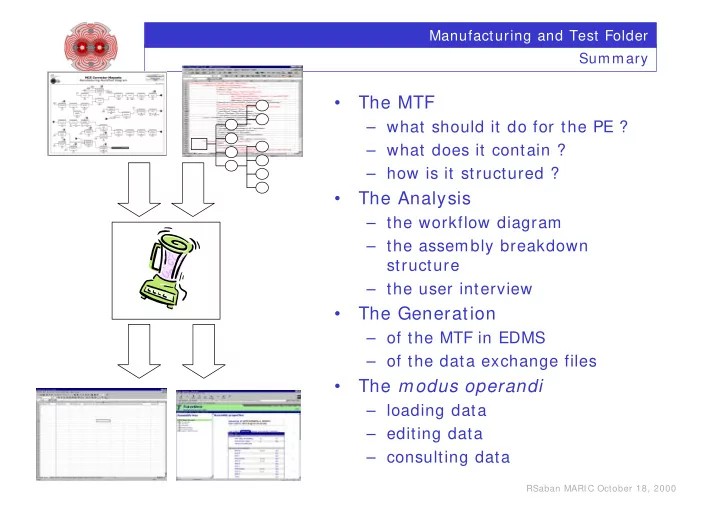
Manufacturing and Test Folder Sum mary The MTF what should it do for the PE ? what does it contain ? how is it structured ? The Analysis the workflow diagram the assembly breakdown structure the user


slide-1
SLIDE 1

RSaban MARI C October 18, 2000

Manufacturing and Test Folder Sum mary

  • The MTF

– what should it do for the PE ? – what does it contain ? – how is it structured ?

  • The Analysis

– the workflow diagram – the assembly breakdown structure – the user interview

  • The Generation

– of the MTF in EDMS – of the data exchange files

  • The modus operandi

– loading data – editing data – consulting data

slide-2
SLIDE 2

RSaban MARI C October 18, 2000

Manufacturing and Test Folder

The Data Import

The MCS, MCDO and MSCB Exercise

P.Martel M.Allitt M.Karppinnen S.Mallon-Am erigo P.Nitter P.Bonnal M.Allitt M.Karppinnen S.Mallon-Am erigo The Workflow Diagram The Assem bly Breakdown Structure The Traveller Application

What is the added value ? What is the cost of the exercise ?

slide-3
SLIDE 3

RSaban MARI C October 18, 2000

Manufacturing and Test Folder The ABS : the catalogue of the collider com ponents

Project or sub-project leading to the production of a collider component Item, collider component

  • r sub-component

Manufacturing or Assembly Procedure

Describes

  • each collider component in terms
  • f its sub-com ponents
  • its assembly process

Provides

  • a model of the documentation

required for the m anufacturing, the assembly, the tests and the installation

Models for Test and Measurements Results LBA Dipole Magnet

slide-4
SLIDE 4

RSaban MARI C October 18, 2000

Manufacturing and Test Folder The workflow diagram : a description of the manufacturing process Describes

  • each process in terms of the transformation it operates on the

raw m aterial (input) and what it produces (output)

  • all the resources (m aterials and human) required for each

process Provides

  • a consolidation of the ABS
  • the sequencing of the processes

The resources The input to the MTF The output of step MCD0 6 and 07 is the input to step MCD0 8

wind the coil

  • peration # MCO·06

fix end saddles to mandrel

  • peration # MCO·08

1 connection end type + 1 non-connection end type

t raveller

14 MCO winding mandrel 14 MCO winding mandrel check the dimensions

  • f the end saddles
  • peration # MCO·07

end saddle connection end

t raveller

17 end saddle for MCO measuring gauge

slide-5
SLIDE 5

RSaban MARI C October 18, 2000

Manufacturing and Test Folder The MTF (The Traveller)

Manufacturing or Assembly Procedure Test and Measurements Results MBP2N1 Dipole Magnet

slide-6
SLIDE 6

RSaban MARI C October 18, 2000

Manufacturing and Test Folder What should it do for the Project Engineer trace the equipment during operation and after decom missioning for INB provide a detailed trace of the manufacturing process, the test and measurement results allow a maintenance follow-up of the equipment once it has been installed, commissioned and is in operation

1 2 3

data is centrally stored in computer readable form data accessible worldwide via the Web data is preserved across time unlike some Excel file stored in the PC of somebody

slide-7
SLIDE 7

RSaban MARI C October 18, 2000

Manufacturing and Test Folder

It traces all events concerning an equipm ent during its entire life-cycle

manufacturing test installation

  • peration

repair removal

! Is subdivided into steps ! Each step yields a data set particular to the step ! The values, in some cases

(eg m anufacturing, test, repair),

determine whether or not the equipment is viable

Any Manufacturing or Test Process non conformity !

slide-8
SLIDE 8

RSaban MARI C October 18, 2000

Manufacturing and Test Folder The Data

Physical Layout

  • f the Collider

Physical Element 1 Physical Element 2

Data describing the m anufacture and test of a particular component manufactured, being manufactured, being tested or already installed in the collider Inventory of the different collider components

Parameter Database

EDMS

PBS MTF MTF ABS

Part List of each type of collider components

slide-9
SLIDE 9

RSaban MARI C October 18, 2000

Manufacturing and Test Folder Phase 1 : The Analysis

The Project Engineer List of steps and the data associated to each List of steps and the data associated to each The Workflow Diagram The Workflow Diagram The Assem bly Breakdown Structure The Assem bly Breakdown Structure Interview Forms Interview Forms 1 2 3

slide-10
SLIDE 10

RSaban MARI C October 18, 2000

Manufacturing and Test Folder Phase 2 : The Generation of the Data Structures

List of steps and the data associated to it List of steps and the data associated to it Excel file form at to exchange between the manufacturer and CERN Excel file form at to exchange between the manufacturer and CERN Em pty manufacturing and test folders for each manufactured equipm ent Em pty manufacturing and test folders for each manufactured equipm ent LHC Part ID

Check dim ensions L1 L2 M1 M2 … W4

slide-11
SLIDE 11

RSaban MARI C October 18, 2000

Manufacturing and Test Folder Phase 3 : The Collection and Entry of the Data

The Project Engineer upload data entry

Data arrives from manufacturer via e-mail, CD or floppy disk Data arrives from manufacturer via e-mail, CD or floppy disk

slide-12
SLIDE 12

RSaban MARI C October 18, 2000

Manufacturing and Test Folder … in summ ary

Phase 1 The Analysis Phase 2 The Generation

  • f the Data

Structures

The inputs required are

The workflow diagram The assembly break down structure Via an interview

The products are

Each manufacturing or test step is identified together the structured data set associated to it

Phase 3 The Collection and Entry of the Data

It is almost automatic, the result must be checked by the PE. It strongly relies on the consistence of the data with the information which was gathered about it. The PE must verify the quality of the data entered.

slide-13
SLIDE 13

RSaban MARI C October 18, 2000

Manufacturing and Test Folder Software Structure

Design Documents

CADIM (& CDD)

Asset tracking Job management

MP5

EDMS common layer

Other databases

LHC Parameters Etc.

slide-14
SLIDE 14

RSaban MARI C October 18, 2000

Manufacturing and Test Folder Conclusion

The exercise is expensive but essential investment 6 meetings/ iterations involving up to 5 participants 4 weeks for development and data import The Project Engineer is at the center of this exercise during all the phases

Assistance can be obtained ! during the Analysis Phase (PBonnal, RSaban) ! during the Data Entry or Upload (Data Aid in EST/ I SS)

Provided the analysis is done seriously, the system fulfills its promises of

1 2 3

will be m echanised ! tracing the manufacturing and test, ! allowing m aintenance follow-up and ! tracing the equipm ent during operation and after decomm issioning

slide-15
SLIDE 15

RSaban MARI C October 18, 2000

Manufacturing and Test Folder Milestones

Consult Manufacturing and Test Data Manually Enter Manufacturing and Test Data Upload Manufacturing and Test Data

End November 2000 Ready

Interview Forms Interview Forms

End October 2000

slide-16
SLIDE 16
slide-17
SLIDE 17
slide-18
SLIDE 18
slide-19
SLIDE 19
slide-20
SLIDE 20
slide-21
SLIDE 21
slide-22
SLIDE 22
slide-23
SLIDE 23
slide-24
SLIDE 24
slide-25
SLIDE 25
  • T. Pettersson TCC - 20/ 10/ 2000

Manufacturing and Test Folder ( MTF) Application

slide-26
SLIDE 26
  • T. Pettersson TCC - 20/ 10/ 2000
  • What is the Manufacturing and Test Folder :

!A standardized application for production follow up - requires some customisation (in the example: MCS) !Centralised support for all LHC components can be provided !Only intended to replace paper reports following LHC QAP standards !Interesting data can immediately or later be used by ”any” other application!

slide-27
SLIDE 27
  • T. Pettersson TCC - 20/ 10/ 2000

The MTF Home page

slide-28
SLIDE 28
  • T. Pettersson TCC - 20/ 10/ 2000

Searching for an equipment

slide-29
SLIDE 29
  • T. Pettersson TCC - 20/ 10/ 2000

Select one specific item

slide-30
SLIDE 30
  • T. Pettersson TCC - 20/ 10/ 2000

Data for the MCS called HCMCSMG000-E_000001

slide-31
SLIDE 31
  • T. Pettersson TCC - 20/ 10/ 2000

What design data did we use - Check in EDMS!

slide-32
SLIDE 32
  • T. Pettersson TCC - 20/ 10/ 2000

Looking at a component

slide-33
SLIDE 33
  • T. Pettersson TCC - 20/ 10/ 2000

Coil assembly component

slide-34
SLIDE 34
  • T. Pettersson TCC - 20/ 10/ 2000

Technical data may be on paper or in MTF The user may fill in values

  • n-line or in batch mode
slide-35
SLIDE 35
  • T. Pettersson TCC - 20/ 10/ 2000

On many sheets Technical data may be on paper or in MTF

  • r in a spreadsheet..

extracted from MTF

slide-36
SLIDE 36
  • T. Pettersson TCC - 20/ 10/ 2000

The workflow - progress tracking

slide-37
SLIDE 37
  • T. Pettersson TCC - 20/ 10/ 2000

Links to related documents in EDMS- standards and a test result file

Other related documents

Non- conformities tracking

slide-38
SLIDE 38
  • T. Pettersson TCC - 20/ 10/ 2000

Conclusion

  • The MTF advantage :

–The data, once stored, may be exploited by “any” application and “any” user… –Data for analysis of manufacturing and test results can be extracted as specified by the users and used in “any” application. –The data will not disappear... –The raw data files remain accessible for authorised users. –Non-conformities may be traced (under implementation).

slide-39
SLIDE 39

LHC Quality Assurance Working Group - M. Mottier September 2000

Nonconformance Tracking

Objectives Objectives

To provide an on-line system to report, To provide an on-line system to report, analyze,and correct non conformities as analyze,and correct non conformities as required by ISO 9001 and the LHC Quality required by ISO 9001 and the LHC Quality Assurance Plan: Assurance Plan:

!

To enable the reporting of non conformities, on- site and off-site, detected in production, assembly and installation.

!

To provide a comprehensive view of the state of non conformities at part level, equipment level, system level and project level.

!

To provide for searching, reporting and statistical analysis.

slide-40
SLIDE 40

LHC Quality Assurance Working Group - M. Mottier September 2000

Nonconformance Tracking

Method Method

" "

Use the EDMS and its web interface. Use the EDMS and its web interface.

" "

Use a document, the nonconformance Use a document, the nonconformance report. report.

" "

Use a specific document type, QN. Use a specific document type, QN. The nonconformance report (NCR) is used to The nonconformance report (NCR) is used to document the history of a non-conformity, from its document the history of a non-conformity, from its detection to the implementation of the solution. detection to the implementation of the solution. The document status is used to display the main The document status is used to display the main steps in the nonconformance evolution. steps in the nonconformance evolution.

slide-41
SLIDE 41

LHC Quality Assurance Working Group - M. Mottier September 2000

Nonconformance Tracking Initiates NC process Completes first part of NCR Stores NCR in EDMS

Production Manager

Makes analysis Proposes solution, including corrective action

Inspector

Verifies and Approves solution

Project Engineer Project Management

Implements solution

Production Manager

Implementation complete Stops NC process

Production Manager Project Engineer OPEN (IN WORK) ACCEPTED (RELEASED) CLOSED (OBSOLETE)

NC Status

UNDER APPROVAL There is a problem Waiting for a solution There is a problem Solution found Waiting for approval There is a problem Solution approved Correction in-progress There was a problem It has been corrected

slide-42
SLIDE 42

LHC Quality Assurance Working Group - M. Mottier September 2000

Nonconformance Tracking

Confidentiality Confidentiality

" "

Inspector and Production Manager Inspector and Production Manager

! May only see NC’s related to their contract

" "

Project Engineer Project Engineer

! May see NC’s related to all his contracts and to

all related equipment

" "

Project Management Project Management

! May see all NC’s related to the project

slide-43
SLIDE 43

LHC Quality Assurance Working Group - M. Mottier September 2000

Nonconformance Tracking

Web interface Web interface

" "

Specific form to store and search for Specific form to store and search for NC’s: NC’s:

! To clearly segregate NC’s, as processes, from

documents.

! To display NC status and hide the NCR document

status.

! To automatically assign the doc type.

" "

Pre-defined search as for Pre-defined search as for ECR’s ECR’s

! Search by status, like ECRs.

slide-44
SLIDE 44

LHC Quality Assurance Working Group - M. Mottier September 2000

Nonconformance Tracking

Production sites without Internet (1) Production sites without Internet (1)

" "

Inspector: Inspector:

! Fills points 1 to 12 of the form and sends it to

Production Manager

" "

Production Manager: Production Manager:

! Fills point 13 of the form and faxes to PE at CERN

" "

PE (or secretary) PE (or secretary)

! Completes point 14 or 15 of the form and faxes it to

Production Manager

! Creates an empty (no file attached) NC Report ! Changes the status of NC to IN-PROGRESS

When Implementation is completed:

! Scans the completed form and stores it in EDMS ! Change status to CLOSED

C C C Co

  • n

n n ntr tr tr tra a a ac c c ct t t to

  • r

r r rs s s s m m m mu u u us s s st t t t h h h ha a a av v v ve e e e a a a a W W W We e e eb b b b a a a ac c c cc c c ce e e ess ss ss ss! ! ! !

slide-45
SLIDE 45

LHC Quality Assurance Working Group - M. Mottier September 2000

Nonconformance Tracking

Production sites without Internet (2) Production sites without Internet (2)

In cases where it has been demonstrated that In cases where it has been demonstrated that communication via the web is not possible: communication via the web is not possible: " " Use the nonconformance report as a paper Use the nonconformance report as a paper document. document. " " Communicate via telephone, fax and mail. Communicate via telephone, fax and mail. " " Scan and store the nonconformance report Scan and store the nonconformance report when the nonconformance has been when the nonconformance has been resolved, with the status OBSOLETE. resolved, with the status OBSOLETE.

slide-46
SLIDE 46

LHC Quality Assurance Working Group - M. Mottier September 2000

Nonconformance Tracking

LHC-PM-QA-509.00