Show files during a presentation Explanation/How to do it Show files - - PDF document

show files during a presentation explanation how to do it
SMART_READER_LITE
LIVE PREVIEW

Show files during a presentation Explanation/How to do it Show files - - PDF document

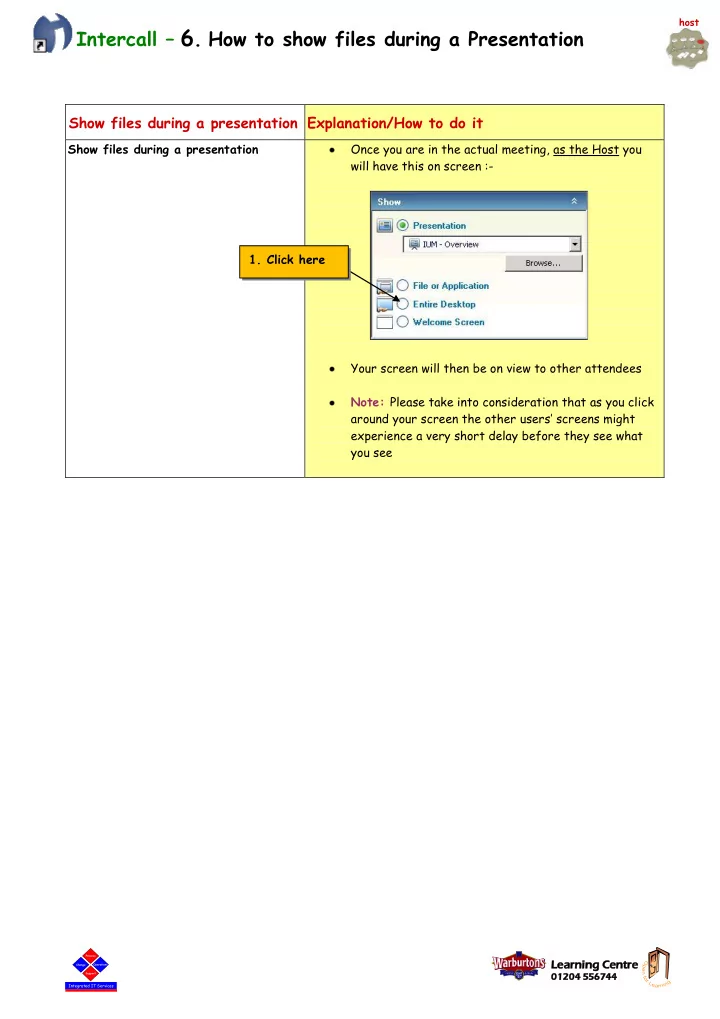
host Intercall 6 . How to show files during a Presentation Show files during a presentation Explanation/How to do it Show files during a presentation Once you are in the actual meeting, as the Host you will have this on screen :- 1. Click


slide-1
SLIDE 1

Learning g Centre

01204 01204 5567 56744 44

Operations

Integrated IT Services

Change Process Support Operations

Integrated IT Services

Change Process Support

Intercall – 6. How to show files during a Presentation

Show files during a presentation Explanation/How to do it

Show files during a presentation Once you are in the actual meeting, as the Host you will have this on screen :- Your screen will then be on view to other attendees Note: Please take into consideration that as you click around your screen the other users’ screens might experience a very short delay before they see what you see

  • 1. Click here

host

slide-2
SLIDE 2

Learning g Centre

01204 01204 5567 56744 44

Operations

Integrated IT Services

Change Process Support Operations

Integrated IT Services

Change Process Support

Switch control of your screen over to someone who is attending the meeting As the host of the meeting you may wish to pass control of your screen over to someone who is attending it.

Show files during a presentation Explanation/How to do it

Gain control back from the attendee

  • 5. As the Host, to gain control of the screen again, just

click anywhere on your screen

  • 2. Right click here on

the person’s name

  • 3. Left click here
  • 4. The attendee will see this,

minus the red line & the shading…as it suggests…if they click it they will get control of the Host’s desktop

slide-3
SLIDE 3

Learning g Centre

01204 01204 5567 56744 44

Operations

Integrated IT Services

Change Process Support Operations

Integrated IT Services

Change Process Support

How to view someone else’s screen The Host may wish to pass control over to someone else in the meeting & for everyone to then see their

  • screen. (i.e. to see the other person’s screen not

yours) Note: The person who wishes to show their screen to everyone must have access to the Intercall software Everyone will then see the person’s screen that you have just given control over to To gain control back & to show the Host screen :-

  • 8. Right click on the

person’s name & choose this

  • 6. The Host needs to

right click on the person’s name that they wish to give control of the meeting to

  • 7. The Host clicks here