Information Visualization Software Visualization Different - - PDF document

information visualization software visualization
SMART_READER_LITE
LIVE PREVIEW

Information Visualization Software Visualization Different - - PDF document

Information Visualization Software Visualization Different Techniques for structured data Textual data and tables Information Visualization Hierarchical data Techniques Networks Graphs (later!) A closer look at tree


slide-1
SLIDE 1

1

Software Visualization

Information Visualization Techniques

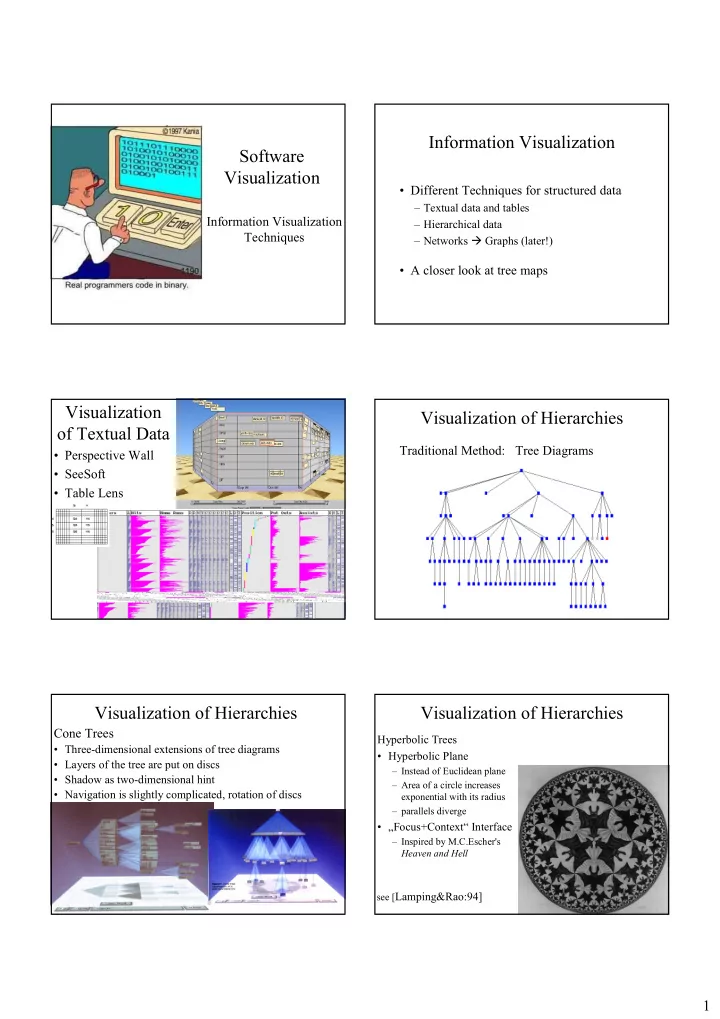
Information Visualization

  • Different Techniques for structured data

– Textual data and tables – Hierarchical data – Networks Graphs (later!)

  • A closer look at tree maps

Visualization

  • f Textual Data
  • Perspective Wall
  • SeeSoft
  • Table Lens

Visualization of Hierarchies

Traditional Method: Tree Diagrams Cone Trees

  • Three-dimensional extensions of tree diagrams
  • Layers of the tree are put on discs
  • Shadow as two-dimensional hint
  • Navigation is slightly complicated, rotation of discs

Visualization of Hierarchies Visualization of Hierarchies

Hyperbolic Trees

  • Hyperbolic Plane

– Instead of Euclidean plane – Area of a circle increases exponential with its radius – parallels diverge

  • „Focus+Context“ Interface

– Inspired by M.C.Escher's Heaven and Hell see [Lamping&Rao:94]

slide-2
SLIDE 2

2

Visualization of Hierarchies Visualization of Hierarchies

  • Xdu

– Vertical split

Visualization of Hierarchies

Tree Maps

– Space-filling trees – Hierarchy is mapped recursively on rectangles

  • Alternating vertical and horizontal split

– Information encoded by rectangles:

  • Type or age by color
  • Size by size of area
  • In addition text labels

See [Johnson&Shneiderman:91]

Tree Map Visualization of Hierarchies

Information Pyramids

– Largest plateau represents the root of the tree. The children of the root are put on top of this plateau and so on. – The size of each plateau is proportional to the size

  • f its contents.

– Good overview, foccusing difficult

See [Andrews_et_al:97]

Information Pyramids

slide-3
SLIDE 3

3

Visualization of Hierarchies

Semi-Circular Discs

– Two semi-circular discs – Each discs represents several levels of the hierarchy – „Focus+Context“ Interface – Focus: Expansion of a subtree on the second disc

See [Andrews&Heidegger:98]

Semi-Circular Discs

Visualization of Hierarchies

Sunburst

– Space-filling views – Combines Focussing of Semi-Circular Discs with animated, smooth transitions – To display focus and context there are 3 different selection methods:

  • Angular Detail: Detail is shown as a partial outer ring
  • Detail Outside: Detail is shown as an outer ring
  • Detail Inside: Detail is shown as an inner ring

See [Stasko&Zhang:2000]

Sunburst

Visualization of Networks

  • Graph Layout lecture next year

A closer look at tree maps

Horizontal split h ri*h Vertical split w ri*w

slide-4
SLIDE 4

4

Auxilliary Classes for Project

  • File DirectoryTree.java can be downloaded from lecture homepage.

::Default

Dire c toryTre e files : Dir LINEAR : int now : long scaleMode : int getDirectoryTree(...) getDirectoryTree(...) main(...) scale(...) scale(...) scale(...) Entry age : long fullname : String h : float name : String size : long w : float x : float y : float print(...) print(...) Dir files : Vector Dir(...) print(...) S ingle File file : File print(...) SingleFile(...) LOCS rgb : Color[] size : int drawScale(...)

Some hints for the project

  • Use floats for computations of coordinates and

Math.round() when you actually draw on screen.

  • You could implement a recursive function

void drawTreeMap(Dir d, // Directory tree to be visualized Graphics g, // AWT Graphics object of frame, window, etc. float xx, // (xx,yy) upper left corner of box for directory float yy, float ww, // (ww,hh) width and height of box float hh, boolean horizontal) // split box horizontally for // subdirectories and files