Data Visualization Tools, How do you make a visualization? Is it - - PowerPoint PPT Presentation

data visualization tools
SMART_READER_LITE
LIVE PREVIEW

Data Visualization Tools, How do you make a visualization? Is it - - PowerPoint PPT Presentation

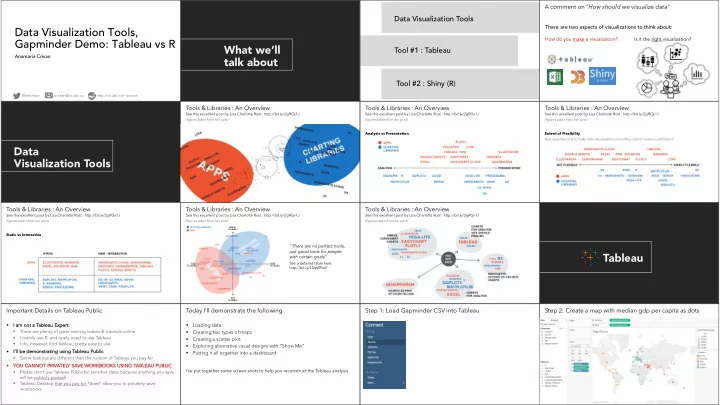
A comment on How should we visualize data Data Visualization Tools There are two aspects of visualizations to think about: Data Visualization Tools, How do you make a visualization? Is it the right visualization? Gapminder Demo: Tableau


slide-1
SLIDE 1

Data Visualization Tools, Gapminder Demo: Tableau vs R

Anamaria Crisan

@amcrisan http://cs.ubc.ca/~acrisan acrisan@cs.ubc.ca

What we’ll talk about

Data Visualization Tools Tool #1 : Tableau Tool #2 : Shiny (R)

There are two aspects of visualizations to think about: How do you make a visualization? Is it the right visualization?

A comment on “How should we visualize data”

Data Visualization Tools

Tools & Libraries : An Overview

See this excellent post by Lisa Charlotte Rost : http://bit.ly/2gRGx1J (figures taken from her post) See this excellent post by Lisa Charlotte Rost : http://bit.ly/2gRGx1J (figures taken from her post) Analysis vs Presentation

Tools & Libraries : An Overview

See this excellent post by Lisa Charlotte Rost : http://bit.ly/2gRGx1J (figures taken from her post) Extent of Flexibility How easy/hard it is to make data visualizations (including custom/novel visualizations)

Tools & Libraries : An Overview

See this excellent post by Lisa Charlotte Rost : http://bit.ly/2gRGx1J (figures taken from her post) Static vs Interactive

Tools & Libraries : An Overview

See this excellent post by Lisa Charlotte Rost : http://bit.ly/2gRGx1J (figures taken from her post)

“There are no perfect tools, just good tools for people with certain goals”

See a detailed table here: http://bit.ly/2DeWPwV

Tools & Libraries : An Overview

See this excellent post by Lisa Charlotte Rost : http://bit.ly/2gRGx1J (figures taken from her post)

Tools & Libraries : An Overview

Tableau

§ I am I am n not a T a Tab able leau au E Expert § There are plenty of great training videos & tutorials online § I mainly use R, and rarely need to use Tableau § I do, however, find Tableau pretty easy to use § I’ I’ll b ll be d demonstrat atin ing u usin ing T Tab able leau au P Public lic § Some features are different than the version of Tableau you pay for § YOU CANNOT PRIVATELY SAVE WORKBOOKS USING TABLE LEAU PUBLI LIC § Please don’t use Tableau Public for sensitive data, because anything you save will be publicly posted! § Tableau Desktop that you pay for *does* allow you to privately save workbooks

Important Details on Tableau Public

§ Loading data § Creating two types of maps § Creating a scatter plot § Exploring alternative visual designs with “Show Me” § Putting it all together into a dashboard

Today I’ll demonstrate the following

I’ve put together some screen shots to help you reconstruct the Tableau analysis

Step 1: Load Gapminder CSV into Tableau Step 2: Create a map with median gdp per capita as dots

slide-2
SLIDE 2

Step 2: Create a map with median gdp per capita as dots

A: Drag Dimensions & measures to marks B: Set gpdPerCaptial to median (sum is default)

Step 3: Create a small multiples choropleth map

A: Drag Dimensions & measures to marks B: Create a new group

Step 3: Create a small multiples choropleth map

Same as before New!

Step 3: Create a small multiples choropleth map

B: Create a new group

Step 4: Create a scatter plot

Try it on your own

Step 5: Explore the ShowMe panel

Try it on your own

Step 6: Create a dashboard

Create a filter

See more online at the Tableau Public gallery!

https://public.tableau.com /en-us/s/gallery

Shiny

§ To To introduce shiny, I am using selected slide content from several pr presenta tati tions de develope ped d for r th the “Shi hiny ny qui uick st start gui uide” e” available e her here: e: §

Pa Part 1: bit.ly/shiny-quickstart-1 § Pa Part 2: bit.ly/shiny-quickstart-2

§ Th These quick start slides are also

  • presented as a video
  • on
  • n the Shiny website

§ https://shiny.rstudio.com/tutorial/

Important Details on R and Shiny The Challenges of Briefly Introducing Shiny

§ Shiny is powerful and somewhat simpler than web languages - but it still takes some time to learn it § I want to show you some basic info, and give you a sense of what Shiny can do - but there is a lot of in between I won’t cover

+

Basic Structure Presentation, Layouts, formatting Webpage / Application Behavior Most glorious of programming languages

What is Shiny?

bit.ly/shiny-quickstart-1

How Does Shiny Work?

Server runs R code User Interface (UI)

Basic Structure of a Shiny Application

bit.ly/shiny-quickstart-1

Basic Structure of a Shiny Application

An entire application can be a single file, or broken down into a ui.R & server.R files You must use app.r (single file); or ui.r and server.r names, or your application won’t run

The user interface (ui.r) houses inputs & outputs

Example of inputs

slide-3
SLIDE 3

The user interface (ui.r) houses inputs & outputs

Example of inputs Changing the slider number (i.e. dragging the circle left to right) causes R to automatically initiate an action to update all outputs that use the slider number. bit.ly/shiny-quickstart-1

The user interface (ui.r) houses inputs & outputs

Example of outputs Function = command telling R & shiny to do some particular task

server.r stiches inputs & outputs together input render

  • utput

ui.r server.r

ggplot code dataset manipulation Shiny widgets Interface elements

  • utput

function render function Output & render functions are complimentary plotOutput( ) renderPlot( ) tableOutput( ) renderTable( )

A simple worked example

bit.ly/shiny-quickstart-1

Reactivity in Shiny – a Very Brief Introduction

bit.ly/shiny-quickstart-1

Reactivity in Shiny – a Very Brief Introduction

bit.ly/shiny-quickstart-1

Let’s go through a more complex example

See more online at the Shiny Gallery!

https://www.rstudio.com /products/shiny/shiny- user-showcase/ bit.ly/shiny-quickstart-1