How to upload a Presentation in Google Doc 1. Start in the - - PDF document

how to upload a presentation in google
SMART_READER_LITE
LIVE PREVIEW

How to upload a Presentation in Google Doc 1. Start in the - - PDF document

Google Apps Handout: How to upload a Presentation in Google Doc 1. Start in the Google Docs main page 2. Click on the grey Create new drop down menu in the upper left hand corner. Click the


slide-1
SLIDE 1

¡ Google Apps Handout:

How to upload a Presentation in Google Doc ¡

¡ ¡

How to upload Google Presentation Google Apps Handouts Last Modified: 6-1-10

¡ ¡ 1 ¡

  • 1. Start ¡in ¡the ¡Google ¡Docs ¡main ¡page
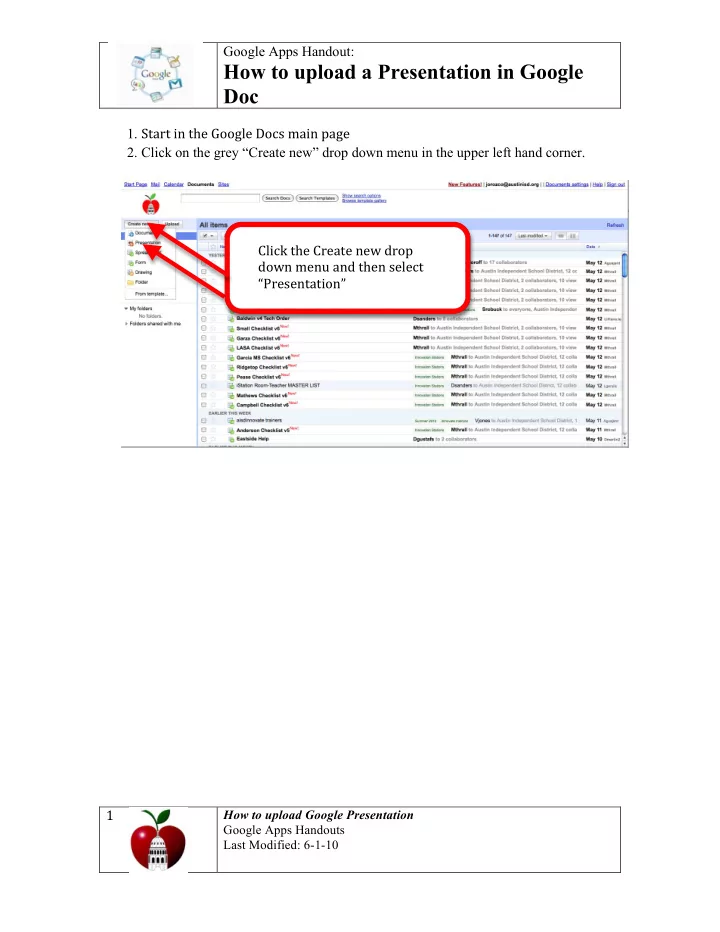
  • 2. Click on the grey “Create new” drop down menu in the upper left hand corner.

¡ ¡ Click ¡the ¡Create ¡new ¡drop ¡ down ¡menu ¡and ¡then ¡select ¡ “Presentation” ¡ ¡ ¡

slide-2
SLIDE 2

¡ Google Apps Handout:

How to upload a Presentation in Google Doc ¡

¡ ¡

How to upload Google Presentation Google Apps Handouts Last Modified: 6-1-10

¡ ¡ 2 ¡

  • 3. Click on the “File” tab to your left and select “upload” in the drop down menu.

¡ ¡ ¡ ¡ ¡ ¡ ¡ ¡ ¡ ¡ ¡ ¡ ¡ ¡ ¡ ¡ ¡ ¡ ¡ ¡ ¡ ¡ ¡ ¡ ¡ ¡ ¡ ¡ ¡ ¡ ¡ ¡ ¡ ¡ ¡ ¡ ¡ ¡ ¡ ¡

Select ¡“Upload” ¡ from ¡the ¡drop-­‑ down ¡menu ¡ ¡ Select ¡“Upload” ¡ from ¡the ¡drop ¡ ¡ down ¡menu ¡

slide-3
SLIDE 3

¡ Google Apps Handout:

How to upload a Presentation in Google Doc ¡

¡ ¡

How to upload Google Presentation Google Apps Handouts Last Modified: 6-1-10

¡ ¡ 3 ¡

  • 4. Click on the “Select file to upload” to your left. ¡
  • 5. Then browse your computer for the file you want to upload, select it and click on

the “open” button. ¡

  • 6. Then click on the “Start upload” bottom”. ¡

¡ ¡ ¡ ¡ ¡ ¡ ¡ ¡ ¡ ¡ ¡ ¡ ¡ ¡ ¡ ¡ ¡

Click ¡“Select ¡file ¡to ¡ upload” ¡ Click ¡“Start ¡ upload” ¡ Select ¡the ¡ PowerPoint ¡file ¡.ppt ¡ and ¡click ¡“open” ¡