Google Drive: Share V0 18 Apr 2020 V0 1 V0 2 2020 Google Drive: - - PDF document

google drive share v0 18 apr 2020
SMART_READER_LITE
LIVE PREVIEW

Google Drive: Share V0 18 Apr 2020 V0 1 V0 2 2020 Google Drive: - - PDF document

Google Drive: Share V0 18 Apr 2020 V0 1 V0 2 2020 Google Drive: Share 2020 Google Drive: Share Windows Explorer: Google Drive: Share Open MyDrive . Milo Schield Editor of www.StatLit.org Fellow, American Statistical Association


slide-1
SLIDE 1

Google Drive: Share V0 18 Apr 2020 2020-Schield-Google-Drive-Share-Slides.pdf 1

2020 Google Drive: Share

V0

1

Milo Schield

Editor of www.StatLit.org Fellow, American Statistical Association Consultant Univ. New Mexico Math&Stat President, National Numeracy Network (NNN) US Rep: International Statistical Literacy Project

April 2020

www.StatLit.org/pdf/ 2020-Schield-Google-Drive-Share-Slides.pdf

Google Drive: Share

2020 Google Drive: Share

V0

2

.

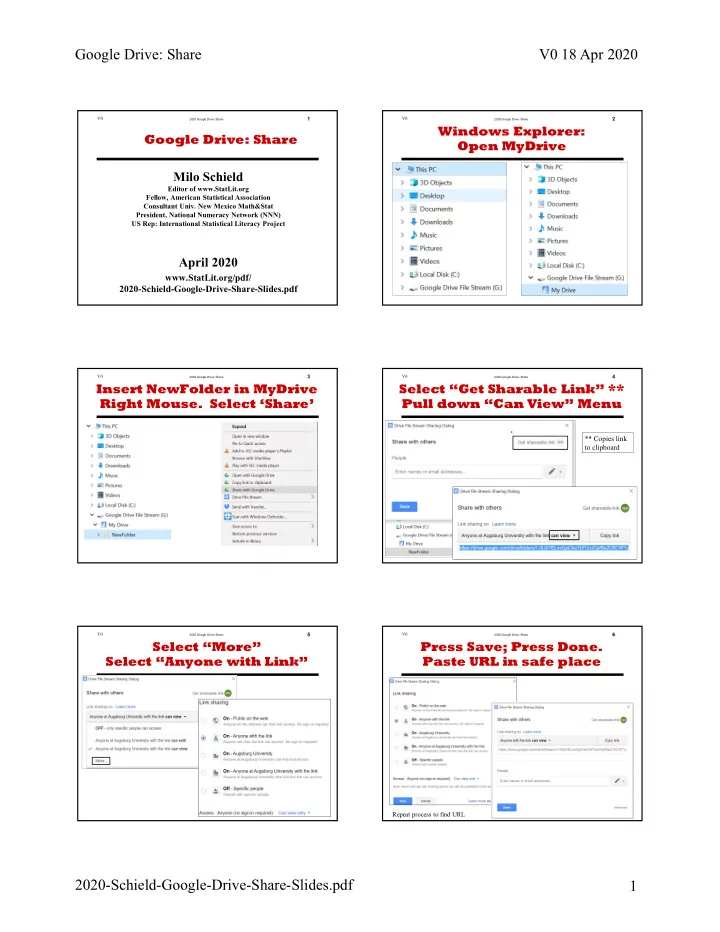
Windows Explorer: Open MyDrive

2020 Google Drive: Share

V0

3

.

Insert NewFolder in MyDrive Right Mouse. Select ‘Share’

2020 Google Drive: Share

V0

4

.

Select “Get Sharable Link” ** Pull down “Can View” Menu

** Copies link to clipboard

2020 Google Drive: Share

V0

5

.

Select “More” Select “Anyone with Link”

2020 Google Drive: Share

V0

6

.

Press Save; Press Done. Paste URL in safe place

Repeat process to find URL

slide-2
SLIDE 2

2020 Google Drive: Share

V0

1

Milo Schield

Editor of www.StatLit.org Fellow, American Statistical Association Consultant Univ. New Mexico Math&Stat President, National Numeracy Network (NNN) US Rep: International Statistical Literacy Project

April 2020

www.StatLit.org/pdf/ 2020-Schield-Google-Drive-Share-Slides.pdf

Google Drive: Share

slide-3
SLIDE 3

2020 Google Drive: Share

V0

2

.

Windows Explorer: Open MyDrive

slide-4
SLIDE 4

2020 Google Drive: Share

V0

3

.

Insert NewFolder in MyDrive Right Mouse. Select ‘Share’

slide-5
SLIDE 5

2020 Google Drive: Share

V0

4

.

Select “Get Sharable Link” ** Pull down “Can View” Menu

** Copies link to clipboard

slide-6
SLIDE 6

2020 Google Drive: Share

V0

5

.

Select “More” Select “Anyone with Link”

slide-7
SLIDE 7

2020 Google Drive: Share

V0

6

.

Press Save; Press Done. Paste URL in safe place

Repeat process to find URL