CS 4495 Computer Vision Camera Model Aaron Bobick School of - - PowerPoint PPT Presentation

cs 4495 computer vision camera model
SMART_READER_LITE
LIVE PREVIEW

CS 4495 Computer Vision Camera Model Aaron Bobick School of - - PowerPoint PPT Presentation

Camera Model CS 4495 Computer Vision A. Bobick CS 4495 Computer Vision Camera Model Aaron Bobick School of Interactive Computing Camera Model CS 4495 Computer Vision A. Bobick Administrivia Problem set 1: How did it go?


slide-1
SLIDE 1

Camera Model CS 4495 Computer Vision – A. Bobick
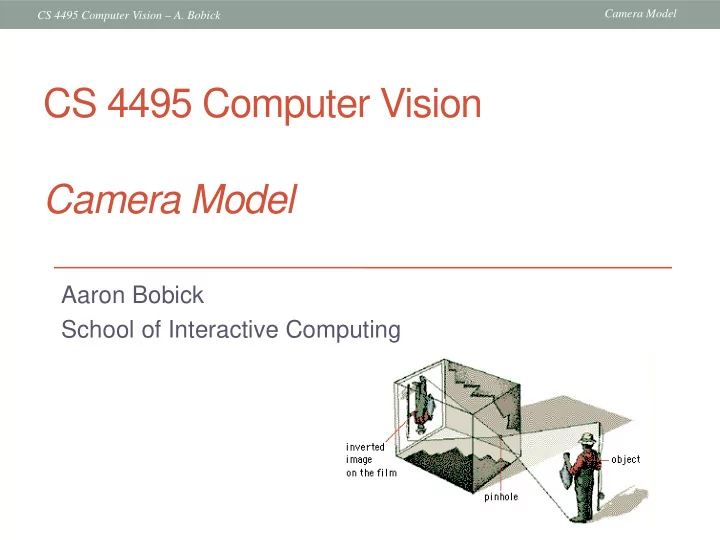
Aaron Bobick School of Interactive Computing

CS 4495 Computer Vision Camera Model

slide-2
SLIDE 2

Camera Model CS 4495 Computer Vision – A. Bobick

Administrivia

  • Problem set 1:
  • How did it go?
  • What would have made it better?
  • New problem set will be out by Thursday or Friday, due

Sunday, Sept 22nd, 11:55pm

  • Today: Camera models and cameras
  • FP Chapter 1 and 2.1-2.2
slide-3
SLIDE 3

Camera Model CS 4495 Computer Vision – A. Bobick

What is an image?

Figure from US Navy Manual of Basic Optics and Optical Instruments, prepared by Bureau of Naval Personnel. Reprinted by Dover Publications, Inc., 1969.

  • Up until now: a function – a 2D pattern of intensity values
  • Today: a 2D projection of 3D points
slide-4
SLIDE 4

Camera Model CS 4495 Computer Vision – A. Bobick

First Known Photograph

Heliograph- a pewter plate coated with bitumen of Judea (an asphalt derivative of petroleum); after at least a day-long exposure of eight hours, the plate was removed and the latent image of the view from the window was rendered visible by washing it with a mixture of oil of lavender and white petroleum which dissolved away the parts of the bitumen which had not been hardened by light. – Harry Ransom Center UT Austin Reproduction, 1952 View from the Window at le Gras, Joseph Nicéphore Niépce 1826

slide-5
SLIDE 5

Camera Model CS 4495 Computer Vision – A. Bobick

What is a camera/imaging system?

  • Some device that allows the projection of light from 3D

points to some “medium” that will record the light pattern.

  • A key to this is “projection”…
slide-6
SLIDE 6

Camera Model CS 4495 Computer Vision – A. Bobick

Projection

slide-7
SLIDE 7

Camera Model CS 4495 Computer Vision – A. Bobick

Projection

slide-8
SLIDE 8

Camera Model CS 4495 Computer Vision – A. Bobick

Image formation

  • Let’s design a camera
  • Idea 1: put a piece of film in front of an object
  • Do we get a reasonable image?
slide-9
SLIDE 9

Camera Model CS 4495 Computer Vision – A. Bobick

Pinhole camera

  • Add a barrier to block off most of the rays
  • This reduces blurring
  • The opening known as the aperture
  • How does this transform the image?
slide-10
SLIDE 10

Camera Model CS 4495 Computer Vision – A. Bobick

Camera Obscura (Latin: Darkened Room)

  • The first camera
  • Known to Aristotle (384-322 BCE)
  • According to DaVinci “When images of illuminated objects ...

penetrate through a small hole into a very dark room ... you will see [on the opposite wall] these objects in their proper form and color, reduced in size, in a reversed position, owing to the intersection of the rays".

  • Depth of the room is the “focal length”
  • How does the aperture size affect the image?
slide-11
SLIDE 11

Camera Model CS 4495 Computer Vision – A. Bobick

Home-made pinhole camera

http://www.debevec.org/Pinhole/

Why so blurry?

slide-12
SLIDE 12

Camera Model CS 4495 Computer Vision – A. Bobick

Shrinking the aperture

  • Why not make the aperture as small as possible?
  • Less light gets through
  • Diffraction effects…
slide-13
SLIDE 13

Camera Model CS 4495 Computer Vision – A. Bobick

Shrinking the aperture

slide-14
SLIDE 14

Camera Model CS 4495 Computer Vision – A. Bobick

Adding a lens – and concept of focus

  • A lens focuses light onto the film
  • There is a specific distance at which objects are “in focus”
  • other points project to a “circle of confusion” in the image
  • Changing the shape of the lens changes this distance

“circle of confusion”

slide-15
SLIDE 15

Camera Model CS 4495 Computer Vision – A. Bobick

focal point F

  • ptical center

(Center Of Projection)

Lenses

  • A lens focuses parallel rays onto a single focal point
  • focal point at a distance f beyond the plane of the lens
  • f is a function of the shape and index of refraction of the lens
  • Aperture of diameter D restricts the range of rays
  • aperture may be on either side of the lens
  • Lenses used to be typically spherical (easier to produce) but now

many “aspherical” elements – designed to improve variety of “aberrations”…

slide-16
SLIDE 16

Camera Model CS 4495 Computer Vision – A. Bobick

Thin lenses

  • Thin lens equation:
  • Any object point satisfying this equation is in focus
  • What is the shape of the focus region?
  • How can we change the focus region?
  • Thin lens applet: http://www.phy.ntnu.edu.tw/java/Lens/lens_e.html (by Fu-Kwun Hwang )

Slide by Steve Seitz

slide-17
SLIDE 17

Camera Model CS 4495 Computer Vision – A. Bobick

The thin lens

' z z y y ′ − = −

Computer Vision - A Modern Approach Set: Cameras Slides by D.A. Forsyth

slide-18
SLIDE 18

Camera Model CS 4495 Computer Vision – A. Bobick

The thin lens

' z y f y f ′ − = − ' ' z z f z f → = − − ' z z y y ′ − = −

Computer Vision - A Modern Approach Set: Cameras Slides by D.A. Forsyth

slide-19
SLIDE 19

Camera Model CS 4495 Computer Vision – A. Bobick

Computer Vision - A Modern Approach Set: Cameras Slides by D.A. Forsyth

The thin lens equation

' ' z z f z f = − − 1 1 1 f z z → = − − ′ 1 1 1 z z f → − = ′

Any object point satisfying this equation is in focus.

slide-20
SLIDE 20

Camera Model CS 4495 Computer Vision – A. Bobick

What’s in focus and what’s not?

  • A lens focuses light onto the film
  • There is a specific distance at which objects are “in focus”
  • other points project to a “circle of confusion” in the image
  • Aside: could actually compute distance from defocus
  • Changing the shape or relative locations of the lens elements

changes this distance

“circle of confusion”

slide-21
SLIDE 21

Camera Model CS 4495 Computer Vision – A. Bobick

Varying Focus

Ren Ng

slide-22
SLIDE 22

Camera Model CS 4495 Computer Vision – A. Bobick

Depth of field

  • Changing the aperture size affects depth of field
  • A smaller aperture increases the range in which the object is

approximately in focus

  • But small aperture reduces amount of light – need to increase

exposure f / 32 f / 5.6

Flower images from Wikipedia http://en.wikipedia.org/wiki/Depth_of_field

slide-23
SLIDE 23

Camera Model CS 4495 Computer Vision – A. Bobick

Varying the aperture

Large apeture = small DOF Small apeture = large DOF

slide-24
SLIDE 24

Camera Model CS 4495 Computer Vision – A. Bobick

Nice Depth of Field effect

slide-25
SLIDE 25

Camera Model CS 4495 Computer Vision – A. Bobick

Field of View (Zoom)

slide-26
SLIDE 26

Camera Model CS 4495 Computer Vision – A. Bobick

Field of View (Zoom)

slide-27
SLIDE 27

Camera Model CS 4495 Computer Vision – A. Bobick

f

FOV depends on Focal Length

Smaller FOV = larger Focal Length

slide-28
SLIDE 28

Camera Model CS 4495 Computer Vision – A. Bobick

Zooming and Moving are not the same…

slide-29
SLIDE 29

Camera Model CS 4495 Computer Vision – A. Bobick

Field of View / Focal Length

Large FOV, small f Camera close to car Small FOV, large f Camera far from the car

slide-30
SLIDE 30

Camera Model CS 4495 Computer Vision – A. Bobick

Perspective and Portraits

slide-31
SLIDE 31

Camera Model CS 4495 Computer Vision – A. Bobick

Perspective and Portraits

slide-32
SLIDE 32

Camera Model CS 4495 Computer Vision – A. Bobick

Dolly Zoom

  • Move camera while zooming, keeping foreground

stationary

  • Pioneered by Hitchcock in Vertigo (1958)
  • Original(YouTube link) (2:07)
  • Widely used (YouTube link)

An Actual Slide by Jim Rehg

slide-33
SLIDE 33

Camera Model CS 4495 Computer Vision – A. Bobick

From Zisserman & Hartley

Effect of focal length on perspective effect

slide-34
SLIDE 34

Camera Model CS 4495 Computer Vision – A. Bobick

But reality can be a problem…

  • Lenses are not thin
  • Lenses are not perfect
  • Sensing arrays are almost perfect
  • Photographers are not perfect – except some of us…
slide-35
SLIDE 35

Camera Model CS 4495 Computer Vision – A. Bobick

Geometric Distortion

  • Radial distortion of the image
  • Caused by imperfect lenses
  • Deviations are most noticeable for rays that pass through the edge
  • f the lens

No distortion Pin cushion Barrel

slide-36
SLIDE 36

Camera Model CS 4495 Computer Vision – A. Bobick

Modeling geometric distortion

  • To model lens distortion
  • Use above projection operation instead of standard projection

matrix multiplication (which you haven’t seen yet!)

Apply radial distortion Apply focal length translate image center Assume project to “normalized” image coordinates

slide-37
SLIDE 37

Camera Model CS 4495 Computer Vision – A. Bobick

Correcting radial distortion

from Helmut Dersch

slide-38
SLIDE 38

Camera Model CS 4495 Computer Vision – A. Bobick

Chromatic Aberration

Rays of different wavelength focus in different planes Can be significantly improved by “undistorting” each channel separately

slide-39
SLIDE 39

Camera Model CS 4495 Computer Vision – A. Bobick

Vignetting

  • Some light misses the lens or is otherwise blocked by parts
  • f the lens
slide-40
SLIDE 40

Camera Model CS 4495 Computer Vision – A. Bobick

Lens systems

  • Real lenses combat these effects with multiple elements.
  • Computer modeling has made lenses lighter and better.
  • Special glass, aspherical elements, etc.

Nikon 24-70mm zoom

slide-41
SLIDE 41

Camera Model CS 4495 Computer Vision – A. Bobick

Retreat to academia!!!

  • We will assume a pinhole model
  • No distortion (yet)
  • No aberrations
slide-42
SLIDE 42

Camera Model CS 4495 Computer Vision – A. Bobick

Modeling projection – coordinate syste

  • We will use the pin-hole model

as an approximation

  • Put the optical center (Center Of

Projection) at the origin

  • STANDARD (x,y)

COORDINATE SYSTEM

  • Put the image plane (Projection

Plane) in front of the COP

  • Why?
  • The camera looks down the

negative z axis

  • we need this if we want right-

handed-coordinates

slide-43
SLIDE 43

Camera Model CS 4495 Computer Vision – A. Bobick

Modeling projection

  • Projection equations
  • Compute intersection with

Perspective Projection of ray from (x,y,z) to COP

  • Derived using similar triangles
  • We get the projection by

throwing out the last coordinate:

Distant objects are smaller

slide-44
SLIDE 44

Camera Model CS 4495 Computer Vision – A. Bobick

Distant objects appear smaller

slide-45
SLIDE 45

Camera Model CS 4495 Computer Vision – A. Bobick

Homogeneous coordinates

  • Is this a linear transformation?
  • No – division by Z is non-linear

Trick: add one more coordinate:

homogeneous image (2D) coordinates homogeneous scene (3D) coordinates

Converting from homogeneous coordinates Homogenous coordinates invariant under scale

slide-46
SLIDE 46

Camera Model CS 4495 Computer Vision – A. Bobick

Perspective Projection

  • Projection is a matrix multiply using homogeneous

coordinates:

This is known as perspective projection

  • The matrix is the projection matrix
  • The matrix is only defined up to a scale
  • f is for “focal length – used to be d
  • S. Seitz

1 1 1/ 1 x y z f                        / x y z f     =      

, x y f f z z   ⇒    

( )

, u v ⇒

slide-47
SLIDE 47

Camera Model CS 4495 Computer Vision – A. Bobick

Perspective Projection

  • How does scaling the projection matrix change the transformation?

1 1 1/ 1 x y z f                        / x y z f     =      

⇒ f x z , f y z      

1 1 x f y f z                       fx fy z     =      

⇒ f x z , f y z      

  • S. Seitz
slide-48
SLIDE 48

Camera Model CS 4495 Computer Vision – A. Bobick

Geometric properties of projection

  • Points go to points
  • Lines go to lines
  • Polygons go to polygons
  • Planes go to planes (or half planes)
  • Degenerate cases:
  • line in the world through focal point yields point
  • plane through focal point yields line
slide-49
SLIDE 49

Camera Model CS 4495 Computer Vision – A. Bobick

Parallel lines in the world meet in the image

  • “Vanishing” point
slide-50
SLIDE 50

Camera Model CS 4495 Computer Vision – A. Bobick

Parallel lines converge in math too…

ct z t z bt y t y at x t x + = + = + = ) ( ) ( ) (

x'(t) = fx z = f (x0 + at) z0 + ct y'(t) = fy z = f (y0 + bt) z0 + ct

This tells us that any set of parallel lines (same a, b, c parameters) project to the same point (called the vanishing point). What does it mean if c=0? Line in 3-space Perspective projection of the line

'( ) , '( ) fa fb x t y t c c → →

In the limit as we have (for ):

±∞ → t ≠ c

slide-51
SLIDE 51

Camera Model CS 4495 Computer Vision – A. Bobick

Vanishing points

  • Each set of parallel lines

(=direction) meets at a different point

  • The vanishing point for this

direction

  • Sets of parallel lines on the

same plane lead to collinear vanishing points.

  • The line is called the horizon

for that plane

  • Good ways to spot faked

images

  • scale and perspective don’t

work

  • vanishing points behave

badly

  • supermarket tabloids are a

great source.

slide-52
SLIDE 52

Camera Model CS 4495 Computer Vision – A. Bobick

Vanishing points

VPL VPR H VP1 VP2 VP3

Different directions correspond to different vanishing points

slide-53
SLIDE 53

Camera Model CS 4495 Computer Vision – A. Bobick

http://www.michaelbach.de/ot/sze_muelue/index.html

Which line is longer?

Human vision: Müller-Lyer Illusion

slide-54
SLIDE 54

Camera Model CS 4495 Computer Vision – A. Bobick

Other projection models: Orthographic projection

) , ( ) , , ( y x z y x →

slide-55
SLIDE 55

Camera Model CS 4495 Computer Vision – A. Bobick

Orthographic projection

  • Special case of perspective projection
  • Distance from the COP to the PP is infinite
  • Good approximation for telephoto optics
  • Also called “parallel projection”: (x, y, z) → (x, y)
  • What’s the projection matrix?

Image World

slide-56
SLIDE 56

Camera Model CS 4495 Computer Vision – A. Bobick

Other projection models: Weak perspective

  • Issue
  • Perspective effects, but

not over the scale of individual objects

  • Collect points into a group

at about the same depth, then divide each point by the depth of its group

  • Adv: easy
  • Disadv: only approximate

        → , ) , , ( z fy z fx z y x

1 1 ( , ) 1 1 1 x x y y sx sy z s s                   = ⇒                  

slide-57
SLIDE 57

Camera Model CS 4495 Computer Vision – A. Bobick

Three camera projections

(1) Perspective: (2) Weak perspective: (3) Orthographic:

) , ( ) , , ( , ) , , ( , ) , , ( y x z y x z fy z fx z y x z fy z fx z y x →         →       →

3-d point 2-d image position