CPU Scheduling - II System Calls Virtual Machines Tevfik Ko ar - - PDF document

cpu scheduling ii
SMART_READER_LITE
LIVE PREVIEW

CPU Scheduling - II System Calls Virtual Machines Tevfik Ko ar - - PDF document

CSE 421/521 - Operating Systems Roadmap Fall 2011 Multilevel Feedback Queues Estimating CPU bursts Lecture - VI CPU Scheduling - II System Calls Virtual Machines Tevfik Ko ar University at Buffalo September 15 th , 2011


slide-1
SLIDE 1

1

CSE 421/521 - Operating Systems Fall 2011

Tevfik Koşar

University at Buffalo

September 15th, 2011

Lecture - VI

CPU Scheduling - II

2

Roadmap

  • Multilevel Feedback Queues
  • Estimating CPU bursts
  • System Calls
  • Virtual Machines

3

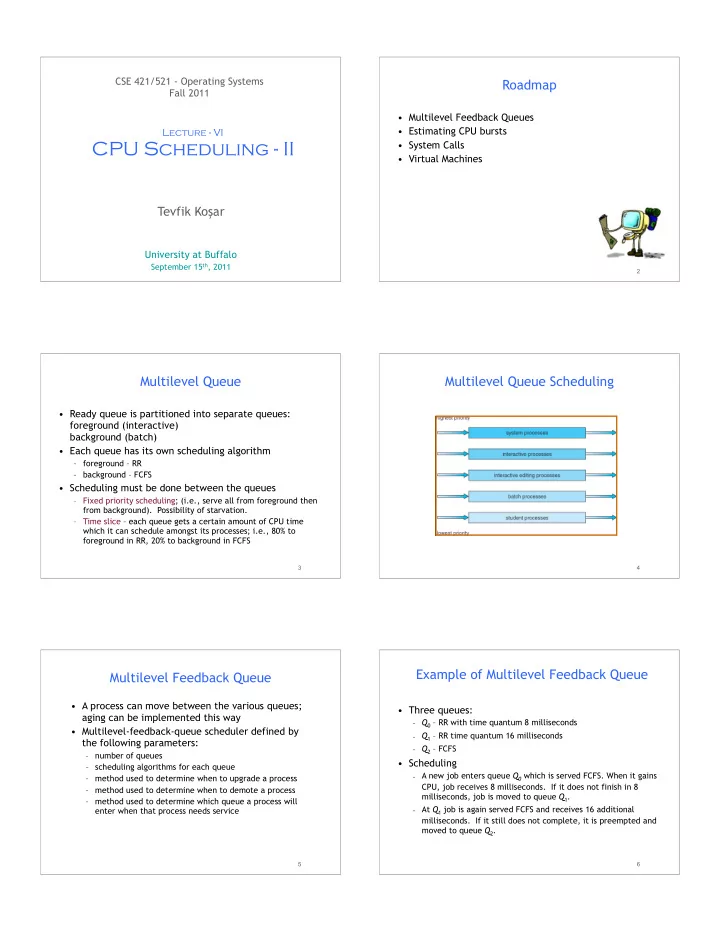
Multilevel Queue

  • Ready queue is partitioned into separate queues:

foreground (interactive) background (batch)

  • Each queue has its own scheduling algorithm

– foreground – RR – background – FCFS

  • Scheduling must be done between the queues

– Fixed priority scheduling; (i.e., serve all from foreground then from background). Possibility of starvation. – Time slice – each queue gets a certain amount of CPU time which it can schedule amongst its processes; i.e., 80% to foreground in RR, 20% to background in FCFS

4

Multilevel Queue Scheduling

5

Multilevel Feedback Queue

  • A process can move between the various queues;

aging can be implemented this way

  • Multilevel-feedback-queue scheduler defined by

the following parameters:

– number of queues – scheduling algorithms for each queue – method used to determine when to upgrade a process – method used to determine when to demote a process – method used to determine which queue a process will enter when that process needs service

6

Example of Multilevel Feedback Queue

  • Three queues:

– Q0 – RR with time quantum 8 milliseconds – Q1 – RR time quantum 16 milliseconds – Q2 – FCFS

  • Scheduling

– A new job enters queue Q0 which is served FCFS. When it gains CPU, job receives 8 milliseconds. If it does not finish in 8 milliseconds, job is moved to queue Q1. – At Q1 job is again served FCFS and receives 16 additional

  • milliseconds. If it still does not complete, it is preempted and

moved to queue Q2.

slide-2
SLIDE 2

7

Multilevel Feedback Queues

8

Determining Length of Next CPU Burst

  • Can only estimate the length
  • Can be done by using the length of previous CPU bursts,

using exponential averaging

+

9

Examples of Exponential Averaging

  • α =0

– τn+1 = τn – Recent history does not count

  • α =1

– τn+1 = α tn – Only the actual last CPU burst counts

  • If we expand the formula, we get:

τn+1 = α tn+(1 - α)α tn -1 + … +(1 - α )j α tn -j + … +(1 - α )n +1 τ0

  • Since both α and (1 - α) are less than or equal to 1,

each successive term has less weight than its predecessor

Exercise

10 11

Prediction of the Length of the Next CPU Burst

Alpha = 1/2, T0 = 10

12

OS API: System Calls

slide-3
SLIDE 3

13

System Calls

Tanenbaum, A. S. (2001) Modern Operating Systems (2nd Edition).

user space kernel space The system calls are the mandatory interface between the user programs and the O/S

!

Location of the system calls in the Computing System

System calls

14

System Calls

  • Programming interface to the services provided by the

OS

  • Typically written in a high-level language (C or C++)
  • Mostly accessed by programs via a high-level

Application Program Interface (API) rather than direct system call use

– Ease of programming – portability

  • Three most common APIs are Win32 API for Windows,

POSIX API for POSIX-based systems (including virtually all versions of UNIX, Linux, and Mac OS X), and Java API for the Java virtual machine (JVM)

15

System Calls

! All programs needing resources must use system calls

Operating system User programs Library functions & programs

. . . fputs, getchar, ls, pwd, more . . . . . . fork, open, read System calls rm, chmod, kill . . .

user space kernel space

the “middleman’s counter”

" system calls are the only entry points into the kernel and system " most UNIX commands are actually library functions and utility programs (e.g., shell interpreter) built on top of the system calls " however, the distinction between library functions and system calls is not critical to the programmer, only to the O/S designer

16

Example of System Calls

  • System call sequence to copy the contents of one file

to another file

17

System Call Implementation

  • Typically, a number associated with each system call

– System-call interface maintains a table indexed according to these numbers

  • The system call interface invokes intended system call

in OS kernel and returns status of the system call and any return values

  • The caller need know nothing about how the system

call is implemented

– Just needs to obey API and understand what OS will do as a result call – Most details of OS interface hidden from programmer by API

  • Managed by run-time support library (set of functions built into

libraries included with compiler)

18

Dual-Mode Operation

  • Dual-mode operation allows OS to protect itself and
  • ther system components

– User mode and kernel mode – Mode bit provided by hardware

  • Provides ability to distinguish when system is running user code or

kernel code

  • Protects OS from errant users, and errant users from each other
  • Some instructions designated as privileged, only executable in

kernel mode

  • System call changes mode to kernel, return from call resets it to

user

slide-4
SLIDE 4

19

Transition from User to Kernel Mode

  • How to prevent user program getting stuck in an

infinite loop / process hogging resources

# Timer: Set interrupt after specific period (1ms to 1sec) – Operating system decrements counter – When counter zero generate an interrupt – Set up before scheduling process to regain control or terminate program that exceeds allotted time

20

Standard C Library Example

  • C program invoking printf() library call, which calls

write() system call

21

Solaris System Call Tracing

22

Virtual Machines

23

Virtual Machines

  • A virtual machine takes the layered approach

to its logical conclusion. It treats hardware and the operating system kernel as though they were all hardware

  • A virtual machine provides an interface

identical to the underlying bare hardware

  • The virtual machine creates the illusion of

multiple processes, each executing on its own processor with its own (virtual) memory

24

Virtual Machines (Cont.)

  • The resources of the physical computer are shared to

create the virtual machines

– CPU scheduling can create the appearance that users have their own processor – Spooling and a file system can provide virtual card readers and virtual line printers – A normal user time-sharing terminal serves as the virtual machine operator’s console

slide-5
SLIDE 5

25

Virtual Machines (Cont.)

(a) Nonvirtual machine (b) Virtual machine Non-virtual Machine Virtual Machine

26

Virtual Machines (Cont.)

  • The virtual-machine concept provides complete

protection of system resources since each virtual machine is isolated from all other virtual machines. This isolation, however, permits no direct sharing

  • f resources.
  • A virtual-machine system is a perfect vehicle for
  • perating-systems research and development.

System development is done on the virtual machine, instead of on a physical machine and so does not disrupt normal system operation.

  • The virtual machine concept is difficult to

implement due to the effort required to provide an exact duplicate to the underlying machine

27

VMware Architecture

28

Summary

Hmm. .

  • Next Lecture: Project-1 Discussion
  • Multilevel Feedback Queues
  • Estimating CPU bursts
  • System Calls
  • Virtual Machines

29

Acknowledgements

  • “Operating Systems Concepts” book and supplementary

material by A. Silberschatz, P . Galvin and G. Gagne

  • “Operating Systems: Internals and Design Principles”

book and supplementary material by W. Stallings

  • “Modern Operating Systems” book and supplementary

material by A. Tanenbaum

  • R. Doursat and M. Yuksel from UNR