Computer Networks M Openstack & more Antonio Corradi Luca - - PDF document

computer networks m
SMART_READER_LITE
LIVE PREVIEW

Computer Networks M Openstack & more Antonio Corradi Luca - - PDF document

University of Bologna Dipartimento di Informatica Scienza e Ingegneria (DISI) Engineering Bologna Campus Class of Computer Networks M Openstack & more Antonio Corradi Luca Foschini Academic year 2015/2016 NIST STANDARD


slide-1
SLIDE 1

Class of

Computer Networks M

Antonio Corradi Luca Foschini Academic year 2015/2016 Openstack & more…

University of Bologna Dipartimento di Informatica – Scienza e Ingegneria (DISI) Engineering Bologna Campus

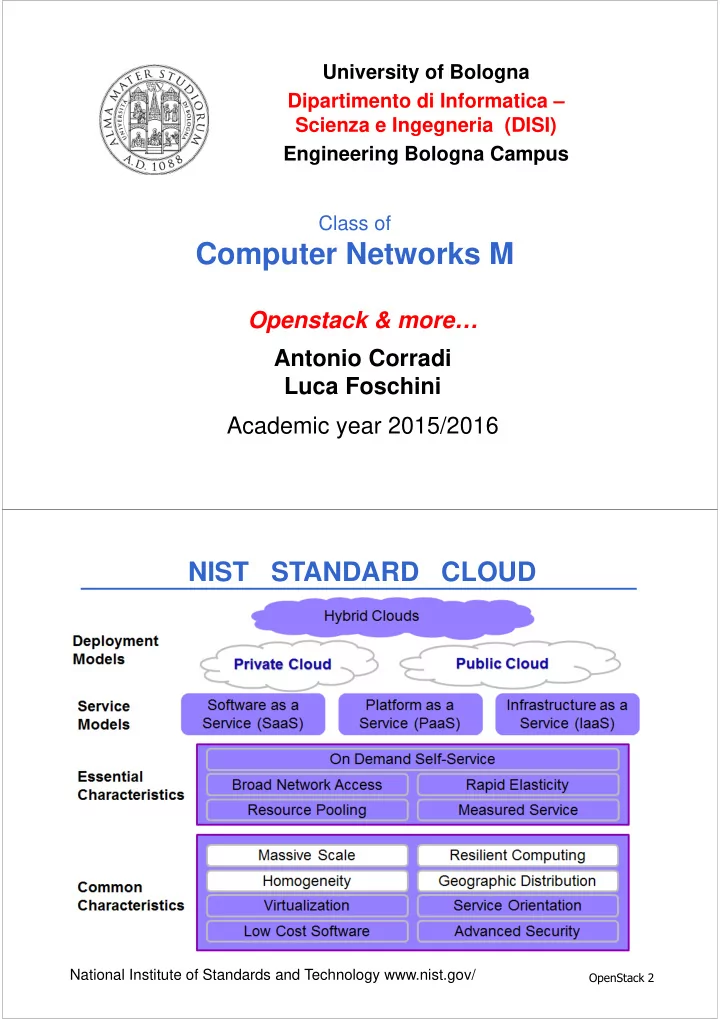
  • NIST STANDARD CLOUD

National Institute of Standards and Technology www.nist.gov/

slide-2
SLIDE 2
  • Known Deployment Models
  • First step: Server virtualization

HOST 1 HOST 2 HOST 3 HOST 4, ETC. VMs Hypervisor: Turns 1 server into many “virtual machines” (instances or VMs) (VMWare ESX, Citrix XEN Server, KVM, Etc.)

Hypervisors provide an abstraction layer between

hardware and software

Hardware abstraction Better resource utilization for every single server

Cloud: resource virtualization

slide-3
SLIDE 3
  • Second step: network and storage virtualization
  • Resource pool available for several applications

Flexibility and efficiency

Cloud: resource virtualization

  • APPS
  • USERS

ADMINS

CLOUD OPERATING SYSTEM CLOUD OPERATING SYSTEM !"

High-level Architecture

  • f the OpenStack Cloud IaaS
slide-4
SLIDE 4

#

OpenStack

– Founded by NASA and Rackspace in 2010 – Currently supported by more than 300 companies and 13866 people – Latest release: Juno, October 2014

  • Six-month time-based release cycle (aligned with

Ubuntu release cycle)

  • Open-source vs Amazon, Microsoft, Vmware…
  • Constantly growing project

OpenStack history in a nutshell

$

Main Function in a Cloud

slide-5
SLIDE 5

%

Main Function in a Cloud

!&'

  • !

()

OpenStack main services

slide-6
SLIDE 6

((

OpenStack main services

(

OpenStack main services

slide-7
SLIDE 7

(

OpenStack services

Ceilometer Heat

(

OpenStack main components

Ceilometer Heat

slide-8
SLIDE 8

(

OpenStack main components

(

OpenStack main worflow

slide-9
SLIDE 9

(#

  • Dashboard: Web application used by administrators and users to manage

cloud resources

  • Identity: provides unified authentication across the whole system
  • Object Storage: redundant and highly scalable object storage platform
  • Image Service: component to save, recover, discover, register and deliver VM

images

  • Compute: component to provision and manage large sets of VMs
  • Networking: component to manage networks in a pluggable, scalable, and API-

driven fashion

  • "&!* !
  • " !

OpenStack services (detailed)

($

All OpenStack services share the same internal architecture organization that follow a few clear design and implementation guidelines:

  • Scalability and elasticity: gained mainly through horizontal

scalability

  • Reliability: minimal dependencies between different services

and replication of core components

  • Shared nothing between different services: each service

stores all needed information internally

  • Loosely coupled asynchronous interactions: internally,

completely decoupled pub/sub communications between core components/services are preferred, even to realize high- level synch RPC-like operations

OpenStack Services: Design Guidelines

slide-10
SLIDE 10

(%

Deriving from the guidelines, every service consists of the following core components:

  • pub/sub messaging service: Advanced Message Queuing

Protocol (AMQP) standard and RabbitMQ default implementation

  • one/more internal core components: realizing the service

application logic

  • an API component: acting as a service front-end to export

service functionalities via interoperable RESTful APIs

  • a local database component: storing internal service state

adopting existing solutions, and making different technological choices depending on service requirements (ranging from MySQL to highly scalable MongoDB, SQLAlchemy, and HBase)

OpenStack Services: Main Components

)

  • Provides on-demand virtual servers
  • Provides and manages large networks of virtual

machines (functionality moving to Neutron)

  • Modular architecture designed to horizontally scale
  • n standard hardware
  • Supports several hypervisor (i.e. KVM, XenServer,

etc.)

  • Developers can access computational resources

through APIs

  • Administrators and users can access computational

resources through Web interfaces or CLI

Nova - Compute

slide-11
SLIDE 11

(

Nova – Components (a good OpenStack service example)

  • nova-API: RESTful API web service used to send

commands to interact with OpenStack. It is also possible to use CLI clients to make OpenStack API calls

  • nova-compute: hosts and manages VM instances by

communicating with the underlying hypervisor

  • nova-scheduler: coordinates all services and determines

placement of new requested resources

  • nova database: stores build-time and run-time states of

Cloud infrastructure

  • queue: handles interactions between other Nova services

By default, it is implemented by RabbitMQ, but also Qpid can be used

Nova – Components (1)

slide-12
SLIDE 12
  • nova-console, nova-novncproxy e nova-

consoleauth: provides, through a proxy, user access to the consoles of virtual instances

  • nova-network: accepts requests coming from the

queue and executes tasks to configure networks (i.e., changing IPtables rules, creating bridging interfaces, … These functionalities are now moved to Neutron service.

  • nova-volume: handles persistent volumes creation and

their de/attachment from/to virtual instances These functionalities are now moved to Cinder services

Nova – Components (2)

  • Nova General interaction scheme
slide-13
SLIDE 13
  • Swift allows to store and recover files
  • Provides a completely distributed storage platform

that can be accessed by APIs and integrated inside applications or used to store and backup data

  • It is not a traditional filesystem, but rather a

distributed storage system for static data such as virtual machine images, photo storage, email storage, backups and archives

  • It doesn’t have a central point of control, thus

providing properties like scalability, redundancy, and durability

Swift - Storage

  • Proxy Server: handles incoming

requests such as files to upload, modifications to metadata or container creation

  • Accounts server: manages

accounts defined through the

  • bject storage service
  • Container server: maps

containers inside the object storage service

  • Object server: manages files that

are stored on various storage nodes

Swift - Components

slide-14
SLIDE 14

#

Cinder handles storage devices that can be attached to VM instances

  • Handles the creation, attachment and detachment
  • f volumes to/from instances
  • Supports iSCSI, NFS, FC, RBD, GlusterFS

protocols

  • Supports several storage platforms like Ceph,

NetApp, Nexenta, SolidFire, and Zadara

  • Allows to create snapshots to backup data stored

in volumes. Snapshots can be restored or used to create a new volume

Cinder – Block Storage

$

  • cinder-API: accepts user requests

and redirects them to cinder-volume in order to be processed

  • cinder-volume: handles requests by

reading/writing from/to cinder database, in order to maintain the system in a consistent state Interacts with the other components through a message queue

  • cinder-scheduler: selects the best

storage device where to create the volume

  • cinder database: maintains

volumes’ state

Cinder – Block Storage

slide-15
SLIDE 15

%

Glance handles the discovery, registration, and delivery of disk and virtual server images

  • Allows to store images on different storage

systems, i.e., Swift

  • Supports several disk formats (i.e. Raw,

qcow2, VMDK, etc.)

Glance – Image Service

)

  • glance-API: handles API requests

to discover, store and deliver images

  • glance-registry: stores, processes

and retrieves image metadata (dimension, format,...).

  • glance database: database

containing image metadata

  • Glance uses an external

repository to store images

Currently supported repositories include filesystems, Swift, Amazon S3, and HTTP

Glance – Components

slide-16
SLIDE 16

(

Nova – Launching a VM

  • Provides a modular web-based user interface to access
  • ther OpenStack services

Through the dashboard it is possible to perform actions like launch an instance, to assign IP addresses, to upload VM images, to define access and security policies, etc.

Horizon - Dashboard

slide-17
SLIDE 17
  • Keystone is a framework for the authentication and

authorization for all the other OpenStack services

  • Creates users and groups (also called tenants),

adds/removes users to/from groups, and defines permissions for cloud resources using role-based access control features. Permissions include the possibility to launch or terminate instances

  • Provides 4 primary services:

– Identity: user information authentication – Token: after logged-in, replaces password authentication – Catalog: maintains an endpoint registry used to discovery OpenStack services endpoints – Policy: provides a rule-based authorization engine

Keystone – Authentication and Authorization

  • Keystone
slide-18
SLIDE 18
  • Pluggable, scalable e API-driven support to

manage networks and IP addresses.

  • NaaS “Network as a Service”

Users can create their own networks and plug virtual network interface into them

  • Multitenancy: isolation, abstraction and full control
  • ver virtual networks
  • Technology-agnostic: APIs specify service, while

vendor provides his own implementation. Extensions for vendor-specific features

  • Loose coupling: standalone service, not exclusive

to OpenStack

Neutron Networking

  • neutron-server: accept request sent

through APIs e and forwards them to the specific plugin

  • Plugins and Agents: executes real

actions, such as dis/connecting ports, creating networks and subnets, creating routers, etc.

  • message queue: delivers messages

between quantum-server and various agents

  • neutron database: maintains

network state for some plugins

Neutron – Components

slide-19
SLIDE 19

#

  • dhcp agent: provides DHCP functionalities to virtual

networks

  • plugin agent: runs on each hypervisor to perform

local vSwitch configuration. The agent that runs, depends on the used plug-in (e.g. OpenVSwitch, Cisco, Brocade, etc.).

  • L3 agent: provides L3/NAT forwarding to provide

external network access for VMs

Neutron – Agents

$

Neutron decouples the logical view of the network from the physical view It provides APIs to define, manage and connect virtual networks

Neutron logical view vs. physical view

slide-20
SLIDE 20

%

Neutron - logical view

  • Network: represents an isolated virtual Layer-2 domains; a network can also be regarded as

a logical switch;

  • Subnet: represents IPv4 or IPv6 address blocks that can be assigned to VMs or router on a

given network;

  • Ports: represent logical switch ports on a given network that can be attached to the

interfaces of VMs. A logical port also defines the MAC address and the IP addresses to be assigned to the interfaces plugged into them. When IP addresses are associated to a port, this also implies the port is associated with a subnet, as the IP address was taken from the allocation pool for a specific subnet.

)

Neutron - tenant networks

Tenant networks can be created by users to provide connectivity within tenants. Each tenant network is fully isolated and not shared with other tenants. Neutron supports different types of tenant networks:

  • Flat: no tenant support. Every instance resides on the same network, which can also be shared

with the hosts. No VLAN tagging or other network segregation takes place;

  • Local: !!&&! *!&*+

,

  • VLAN: each tenant network uses VLAN IDs (802.1Q tagged) corresponding to VLANs present

in the physical network. This allows instances to communicate with each other across the environment, other than with dedicated servers, firewalls, load balancers and other networking infrastructure on the same layer 2 VLAN. Switch must support 802.1Q standard in order to provide connectivity between two VMs on different hosts;

  • VXLAN and GRE: tenant networks use network overlays to support private communication

between instances. A Networking router is required to enable traffic to traverse outside of the tenant network. A router is also required to connect directly-connected tenant networks with external networks, including the Internet.
slide-21
SLIDE 21

(

Neutron – VLAN tenant network

  • Funded by VMware and EMC Corporation
  • Open Source PaaS
  • Indipendent from underlying IaaS
  • Supports the development of applications written in Ruby, Java and

Javascript, and many more…

Cloud Foundry PaaS in a Nutshell

slide-22
SLIDE 22
  • Cloud Foundry (CF) is an open PaaS that enables fast

definition, development , and scalable deployment of new applications, offering also a wide support for different:

  • Languages/frameworks
  • to develop new applications (apps)

– Languages: Ruby, Sinatra, Rack, Java, Scala, Groovy, Javascript – Frameworks: Rails, Spring, Grails, Play, Lift, Express

  • External, bind-able and ready-to-use services

– Redis, mySQL, postgreSQL, rabbitMQ, mongoDB

  • Multiple Clouds and Infrastructure as a Service (IaaS) systems

– OpenStack, WebSphere, Amazon Elastic Cloud Computing (EC2) Web Services, … Through the BOSH deployer

Cloud Foundry PaaS

  • Cloud Foundry adopts an internal architecture organization

that follow a few clear design and implementation guidelines:

  • Scalability and elasticity: gained mainly through horizontal

scalability

  • Reliability: minimal dependencies between different

components and replication of core components

  • Shared nothing between different services: each

component is self-aware (stores all needed information internally)

  • Loosely coupled asynchronous interactions: completely

decoupled pub/sub communications between core components/services are preferred

Cloud Foundry ‒ Design Guidelines

slide-23
SLIDE 23

ROUTING AUTHENTICATION APP LIFECYCLE APP STORAGE & EXECUTION SERVICES MESSAGING METRICS & LOGGING

  • !" #$%

&'

  • (

%& &) "" % %

Cloud Foundry ‒ Layered View

  • Router: forwards in-/out-bound traffic from/to the external Internet,

typically toward the Cloud Controller or an application instance

  • Cloud Controller: controls service/application lifecycle and stores

all data about services applications, services, service instances, users, etc.

  • Health Manager: monitors application status (running, stopped,

crashed)

  • Droplet Execution Agent (DEA): controls application instances

and (periodically) publishes their current application status

  • Warden: isolated and self-contained container offering APIs to

manage application execution

  • Service Broker: services front-end API controller
  • NATS: publish-subscribe internal messaging service

Main CF Components

slide-24
SLIDE 24

#

Router for applications and endpoints Brain of the architecture, REST APIs and orchestrator Execution Agent, one for each VM Central communication point

  • !

Distributed Architecture

Integration of external services

(now called Service Broker)

$ Digging into the code: DEA/Stager agent starts the app, not Cloud Controller. Cloud Controller creates an AppStagerTask, that is in charge to find an available Stager(DEA-Agent) The stager is found with “top_5_stagers_for(memory, stack)”. When the Stager is found, it handles the message, it starts the staging process and at the end invokes “notify_completion(message, task)” -> “bootstrap.start_app(message.data["start_message"])” -> instance = create_instance(data); instance.start

  • !

Management of Apps lifecycle

slide-25
SLIDE 25

% . &/! & 01

  • 2

start Staged? choose DEA start droplet fetch droplet report status report app status

  • !

Starting an App

)

A stack is a prebuilt file system, including an operating system, that supports running applications with certain characteristics. Any DEA can support exactly one stack. To stage or run an app, a DEA running the requested stack must be available (and have free memory). For instance, the lucid64 stack is supported out of the box as an Ubuntu 10.04 64-bit system containing a number of common programs and libraries. During a Staging or Start process, the Cloud Controller checks always the stack requested by the app and chooses the DEA accordingly.

  • !

Apps and stacks

slide-26
SLIDE 26

(

  • !

Management of Service lifecycle

1. Provision: to create a new Service instance 2. Bind: credentials and configuration information to access the Service instance saved in the App environment 3. Unbind: to destroy credentials/configurations from the App environment 4. Unprovision: to destroy the Service instance Plus Catalog to advertise Service offerings and service plans.

  • CF only requires that a Service implements the broker

API in order to be available to CF end users, many deployment models are possible. The following are examples of valid deployment models.

  • Entire Service packaged and deployed alongside CF
  • Broker packaged and deployed alongside CF, rest of

the service deployed and maintained by other means

  • Broker (and optionally service) pushed as an

application to CF user space

  • Entire Service, including Broker, deployed and

maintained outside of CF by other means

Services Implementation & Deployment

slide-27
SLIDE 27
  • A Stemcell is a VM template with an embedded BOSH Agent.

Stemcells are uploaded using the BOSH CLI and used by the BOSH Director when creating VMs through the Cloud Provider Interface (CPI). When the Director creates a VM through the CPI, it will pass along configurations for networking and storage, for Message Bus and the Blobstore. Director DB Blobstore Worker Message Bus Health Monitor IaaS Interface Manages VMs Contains meta data about each VM Contains stemcells, source for packages and binaries Creates, Destroys VMs JOB VM

Agent

Operating CF via Bosh Outer SHell (BOSH)

  • Director

DB Blobstore Worker Message Bus Health Monitor IaaS Interface Manages VMs Contains meta data about each VM Contains stemcells, source for packages and binaries Creates, Destroys VMs Each VM is a stemcell clone with an Agent installed Agents get instructions Agents grab packages to install

BOSH with different CPIs

slide-28
SLIDE 28
  • Micro BOSH
  • Scarce support for runtime monitoring!!!

Monitoring of CF Services

slide-29
SLIDE 29

#

  • Service Broker (Gateway): exposes four main dialogue APIs

(un/provisioning, un/binding) interacting with Cloud Controller, and handling commands to the Service Nodes

  • Service Node: real business logic component (instantiates new

service processes, binds them, etc.) that periodically publishes toward NATs service heartbeats

Monitoring of CF Services

$

  • Monitor

process: subscribes to NATS and handles incoming heartbeats

  • Check status

process: periodically controls if the service is still functioning

CF Services: Availability Monitoring

slide-30
SLIDE 30

%

Performance monitoring exploits CLI commands to periodically check for activation time by using a mockup service that is dynamically created, bound, and destroyed

CF Services: Performance Monitoring

)

CF Services: Performance Monitoring

slide-31
SLIDE 31

(

All-in-One single host environment: all Cloud Foundry components and services run on the same Virtual Machine (VM) managed via the OpenStack IaaS

Some Experimental Results: Single Host

  • Depend on the kind and version of service (different

No/SQL data bases, messaging, and analytics services)

*

Experimental Results: Provisioning Time

slide-32
SLIDE 32
  • Almost equal for all services and versions: the binding

process consists in a credential exchange between the service and the application using it

Experimental Results: Binding Time

  • Cloud Foundry distributed deployment via BOSH deployer
  • ver OpenStack IaaS

Heavy-load Experimental Results:

Distributed Deployment

slide-33
SLIDE 33
  • Sequential creation of 200 service instances by

monitoring creation time and binding times

()) (#)) (%)) ()) )) )) #)) ( # ( (%

  • (

#

  • %
  • (

# # #% $ %( %# () ()% (( (( (# ( (% ( (( (# ( (% (# ($( ($# (% (%% !! 0!&!! ) (

  • (
  • ((

( (

  • (
  • (
  • (
  • (
  • #(

# $( $ %( % ()( () ((( (( (( ( (( ( (( ( (( ( (( ( (#( (# ($( ($ (%( (% !!!

Service instance

  • Exp. Results: Accumulation Stress Test
  • Concurrent creation of service instances with different

frequencies, up to 140 service instances

Minute Minute Minute Minute

  • Exp. Results: High-Req-Freq Stress Test
slide-34
SLIDE 34

#

Incoming requests arrival frequency follows an exponential increase

  • Exp. Results: Exponential Increase

$

Motivations

– Lack of standards in PaaS domain – Solutions lock-in

Objectives

– Interoperability and portability across different PaaS – Coordination activity

formalization of use cases, concepts, guidelines, architectures, etc. identification and analysis of semantic interoperability problems

– Standardization activity

resolution of semantic interoperability problems

–Supply a Reference Architecture implementation

Semantic description of application requirements and PaaS

  • ffering

Offerings marketplace Deployment, Lifecycle management, Monitoring, Migration

Brokering Cloud PaaS: the Cloud4SOA Project

slide-35
SLIDE 35

%

Semantic Web technologies used for developing simple,

extendable and reusable resource and service models

Service Oriented Architecture used to provide a unified

Cloud broker API to retrieve resources in a as a Service fashion

Harmonized and standard API used to interface with several

Cloud platforms in an uniform way

Specific adapters used to execute harmonized API calls by

translating them into specific PaaS APIs

PaaS PaaS PaaS Cloud4SOA broker discovery deployment migration monitoring profiling Harmonized API Specific Adapter Specific Adapter Specific Adapter

User User User

Cloud4SOA Architecture

#)

Front-end Layer: allows Cloud developers to

easily access Cloud4SOA functionalities

SOA Layer: implements the core

functionalities offered by the Cloud4SOA platform broker service discovery, announcement, deployment, monitoring, migration, etc.

Distributed Repository: stores both

semantic and non-semantic information needed to perform the intermediation and harmonization processes

Semantic Layer: holds lightweight semantic

models and tools for annotating Cloud Computing resources

Governance Layer: offers a toolkit for

monitoring the lifecycle of Cloud4SOA services

Cloud4SOA Layered Architecture

slide-36
SLIDE 36

#(

Solution-independent concepts, tools and

mechanisms that can be used to model, understand, compare and exchange data in a uniform way

Interoperability and portability conflicts solved

by

– a shared knowledge base (KB) – tools and mechanisms to support the KB

Semantic description of Application

requirements and PaaS offerings

Application requirements and PaaS offerings

matching

Cloud4SOA: Semantic Layer

#

Ontology development through a 5 steps modeling

workflow

– specification – conceptualization – formalization – implementation – maintenance

Conceptualization of Cloud4SOA model follows a “meet-

in-the-middle” approach:

– Top-down: exploiting already existing ontologies (e.g. The Open

Group SOA Ontology, TOGAF 9 Meta-Model, etc.)

– Bottom-up: concepts derived from PaaS domain analysis

The ontology is formally expressed by using OWL2

  • ntology language

Cloud4SOA Ontology Design

slide-37
SLIDE 37

#

A uniform interface is provided by Cloud4SOA APIs to

interact with the platforms in a uniform and standardized way, thus enabling interoperability between the incompatible offerings

Implemented bindings for several PaaS provide full

working functionalities for deploying applications, managing their lifecycle and undeploying them

A CLI is provided in order to receive, interpret, and

execute user commands

The CLI language was designed to provide the same

expressivity of OWL2 language, but closer to the user world

  • Recall the CF Service Broker concept!!!

Cloud4SOA Bindings

#

PaaS solution provided by Amazon Based on the concept of application and application

version, representing a specific set of application functionalities at a specific time

Environment as a collection of AWS resources

instantiated to run a specific version of an application

Container type to describe the application stack, default

configuration, and the AWS resources needed to create an environment

APIs to manage the application lifecycle

– create, delete, and update an application with no version

information

– assign, remove or update a specific application version

AWS Beanstalk Amazon PaaS

slide-38
SLIDE 38

#

PaaS solution focusing on developers needs Cloud environment natively bound with tools and systems

used by developers for building and testing their applications

Continuous Integration Ecosystem

– set of third-party Cloud-based tools that can be used in the

CloudBees environment

DEV@Cloud framework

– deploy applications to the Cloud – continuous integration of a project into the Cloud

RUN@Cloud framework

– deployment and management services to run applications in

the Cloud

Cloudbees PaaS

#

A first set of tests reports on the overhead introduced by

each module when performing the broker functionalities

– performance evaluations about the deployment of an

application, by measuring the elapsed time of the operation

– use of implemented adapters for AWS Beanstalk and

Cloudbees

– Test performed by using a single account per provider

A second set of tests analyzes system performance by

varying the workload

– use of mockup modules that simulate real adapters

Application size 4KB Results are average values over 10 runs

Some Experimental Results

slide-39
SLIDE 39

##

2+! ! & *

  • CloudBees adapter

does not introduce

  • verhead because

the mapping is almost one-to-one

  • Beanstalk adapter

has to manage several interactions by calling various specific APIs

  • Specific API

execution time is the longest one also because it is affected by network latency and provider performance

Overhead for different PaaS Bindings