10/1/2011 Telematics Discussion Day in the life of a hard braking - - PDF document

10 1 2011
SMART_READER_LITE
LIVE PREVIEW

10/1/2011 Telematics Discussion Day in the life of a hard braking - - PDF document

10/1/2011 Telematics Discussion Day in the life of a hard braking incident Electronics of Usage Based Insurance 10 04 2011 Bob Mathe President and COO, Evogi Telematics Discussion Day in the life of a hard braking incident Quoting Getting


slide-1
SLIDE 1

10/1/2011 1

Telematics Discussion

Day in the life of a hard braking incident

Electronics of Usage Based Insurance

10 04 2011 Bob Mathe President and COO, Evogi I C Quoting – Getting Devices in Cars Topography

Telematics Discussion

Day in the life of a hard braking incident

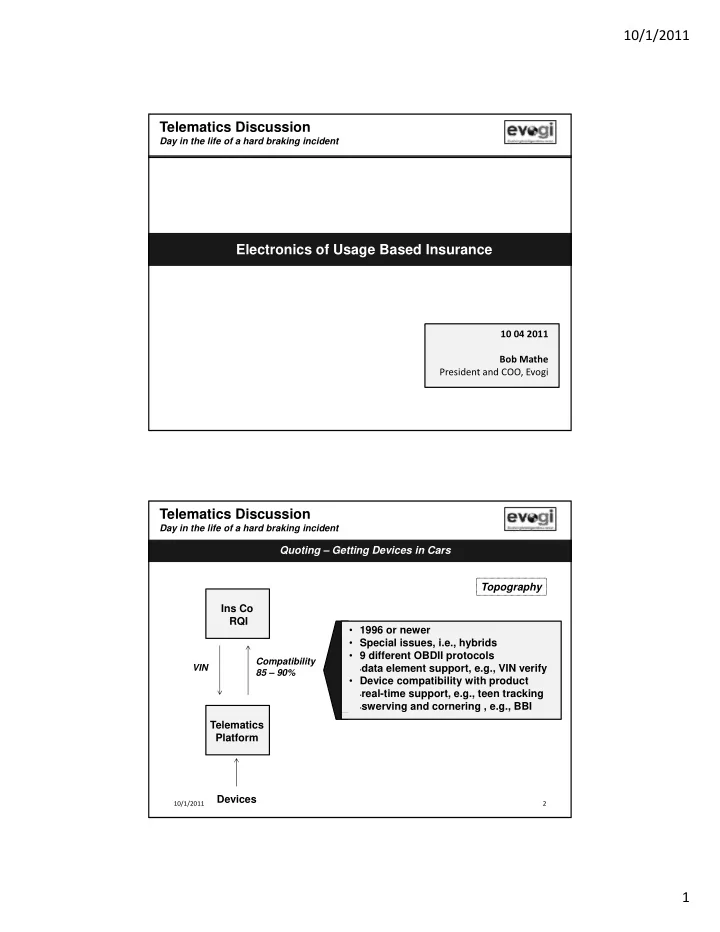
Ins Co RQI

Compatibility 85 – 90% VIN

  • 1996 or newer
  • Special issues, i.e., hybrids
  • 9 different OBDII protocols
  • data element support, e.g., VIN verify
  • Device compatibility with product
  • real-time support, e.g., teen tracking
  • swerving and cornering , e.g., BBI

Telematics Platform Devices

10/1/2011 2

slide-2
SLIDE 2

10/1/2011 2

Ins Co Risk Evaluation and Discount – Using the Results Discount calculation

Telematics Discussion

Day in the life of a hard braking incident

Topography Ins Co RQI

Equation Vehicle score VIN

Restatement

  • f price

Performance Scoring Process Customer

Claims and individual data

Telematics Platform Actuarial Process Devices

Historical data

Performance feedback

10/1/2011 3

Telematics Platform Aggregation & normalization Consumption Collection

Telematics Discussion

Day in the life of a hard braking incident R l Device 1 Gateway

Transactions Raw data BI analytics

Policyholder

Gateway Rules Rules Device 2 Device 3 Rules

Actuary Product Manager

Rules Process Objectives

  • Stable: without frequent failure
  • Reliable: same result with same event
  • Flexible
  • Useful: right data
  • Right cost: affordable

Manager

Business Objectives

  • Operational reports: QOS, functioning, etc.
  • Product segment and pricing analysis
  • DOI filing support
  • Policyholder alerts and reports
slide-3
SLIDE 3

10/1/2011 3

Telematics Platform – Area for Discussion Collection

Telematics Discussion

Day in the life of a hard braking incident Device 1 Gateway

Transactions Raw data BI analytics

Policyholder

Gateway Rules Rules Device 2 Device 3 Rules

Actuary

Rules

Product Manager

10/1/2011 5

S GPS d l d t 10 H

Telematics Discussion

Day in the life of a hard braking incident

How do you recognize a hard brake?

  • a. Source: GPS speed sampled at 10 Hz
  • b. Source: OBDII speed sampled at 1 Hz

Accelerometer sampled at 200 Hz (equation running on the device; velocity vector needs to be normalized) Raw data transferred from GPS One or more event triggers

  • n device

Granular Device 1 Device 2 /OBD/Accelerometer to gateway and rules engine decides braking data Device 3

10/1/2011 6

slide-4
SLIDE 4

10/1/2011 4

Telematics Discussion

Day in the life of a hard braking incident

What is a hard brake?

  • 88 mph per second

4g likely accident

  • 11 mph per second

.5g very hard brake

  • 7 mph per second

.32g hard brake Calculated change in speed Measured force Probable event 70 – 63 mph in 1 second is a hard brake

10/1/2011 7

Description of Activity

Summary - Key Issues

Telematics Discussion

Day in the life of a hard braking incident Device 1 Gateway Gateway Device 2 Device 3

Inputs and outputs Device differences Install orientation Acceleration equation (X, Y, Z axis) Braking example Key Concepts Acceleration and force Sampling versus transmission Accelerometer

Rules

Accelerometer Threshold (events under threshold not recorded) Car protocols Device Car matchup TCP/IP v UDP transmission and timing

10/1/2011 8

slide-5
SLIDE 5

10/1/2011 5

Telematics Platform – Area for Discussion Aggregation & normalization

Telematics Discussion

Day in the life of a hard braking incident Device 1 Gateway

Transactions Raw data BI analytics

Policyholder

Gateway Rules Rules Device 2 Device 3 Rules

Actuary

Rules

Product Manager

10/1/2011 9

Telematics Discussion

Day in the life of a hard braking incident

S GPS HDOP 7 excellent Does the quality of my braking data vary?

  • a. Source: GPS
  • b. Source: OBDII

Accelerometer Device 1 Device 2 HDOP .7 excellent 8 flag as suspect 20 discard Velocity vector accuracy: + 5% for 90% of vehicles + 20% for remaining Both above Raw data transfer Device 3 Also for all…device self check

10/1/2011 10

slide-6
SLIDE 6

10/1/2011 6

Telematics Discussion

Day in the life of a hard braking incident

What are typical process quality measures? HDOP horizontal dilution of precision

  • HDOP – horizontal dilution of precision
  • Signal strength - number of satellites fixed
  • Higher the number the greater the quality
  • Minimal 3
  • No upper limit
  • Device self-check – issues during sampling

g p g

  • High temp, humidity, vibration

10/1/2011 11

Device 1

Summary - Key Issues

Telematics Discussion

Day in the life of a hard braking incident Rules Gateway Gateway Rules Rules Device 2 Device 3 Rules

Description of Activity Inputs and outputs Inputs and outputs QOS Compensation/normalization among devices Braking example Key Concepts Real-time requirement of data transmission HDOP Rules - aggregation Rules - normalization

10/1/2011 12

slide-7
SLIDE 7

10/1/2011 7

Telematics Platform – Area for Discussion Consumption

Telematics Discussion

Day in the life of a hard braking incident Device 1 Gateway

Transactions Raw data BI analytics

Policyholder

Gateway Rules Rules Device 2 Device 3 Rules

Actuary Product

Rules

Product Manager

10/1/2011 13

Telematics Discussion

Day in the life of a hard braking incident

What problem are we trying to solve? Customer Alert Device 1: GPS or OBDII Simple calculation - threshold exceeded Stored on device Device 2: Accelerometer Stored on device Event may or may not be real-time

  • Real-time versus memory page transactions

Complex calculation - threshold exceeded Stored on device Device variances create differences in results

  • Accelerometer vendor
  • Complex calculation to normalize velocity

t Device 3: Raw Data vector

  • Complex calculation to measure event

Event may or may not be real-time

  • Real-time versus memory page transactions

Three options: GPS, OBDII or Accelerometer data Stream of data stored, not real-time Calculation on host

10/1/2011 14

slide-8
SLIDE 8

10/1/2011 8

Telematics Discussion

Day in the life of a hard braking incident

Who needs the data and for what? And, what are the business rules? Number of hard brakes per trip (incidents relative to BBI product p p ( thresholds) Example - 5 hard brakes, 2 very hard brakes, 0 possible accidents Extreme hard brake event with time stamp and latitude & longitude S d b d d t ith h d b k ith ti t BBI product element Claims FNOL feature Second-by-second data with hard brake with time stamp and latitude longitude AND added road type, weather, school zone, posted speed limit, actual speed limit for every brake event Actuarial analysis Device design and rules dictates the type and amount of data collected. A brake event support different needs depending upon set-up.

10/1/2011 15

Policyholder Description of Activity Policyholder: real time alerts, driving reports

Summary of Key Issues

Telematics Discussion

Day in the life of a hard braking incident

Transactions Raw data BI analytics

Policyholder Actuary Product Manager driving reports Actuary: accumulated data Product Manager: business performance, QOS Inputs and outputs Device differences Braking example Key Concepts Data structure S li t itti Sampling versus transmitting Real-time versus analytical

10/1/2011 16

slide-9
SLIDE 9

10/1/2011 9

A simple case… Facts: a vehicle approaches an intersection at 55 mph. on a rainy day. The driver sees crossing vehicle and locks brakes. Car slides 40 feet and hits

  • bstructing car.

Telematics Discussion

Day in the life of a hard braking incident

Is the data used for calculating hard brake correct? GPS Braking event identified

Vehicle Speed

Distance

OBDII Wheels locked, speed zero Accelerometer Braking event identified

Vehicle Speed

Distance

G force

Distance

10/1/2011 17

Telematics Discussion

Day in the life of a hard braking incident

Appendices

10/1/2011 18

slide-10
SLIDE 10

10/1/2011 10

Appendix I

Example Reports

10/1/2011 19 10/1/2011 20

slide-11
SLIDE 11

10/1/2011 11

10/1/2011 21 10/1/2011 22

slide-12
SLIDE 12

10/1/2011 12

Appendix II

Telematics Device Considerations

10/1/2011 23

Evogi EVG3000 OBD II Dongle Device

Specifications and Features Key Functionality

Available sources of OBD data* Vehicle ID (VIN) Current odometer reading Programmable Event Triggers based on Accelerometer Acceleration / Deceleration based on MEMS data Cornering I d i b d MEMS d ( b d ‘ h Current speed Engine RPMs Battery voltage Engine coolant temperature Accelerator pedal position Brake pedal position Various Diagnostic Trouble Codes (DTCs) with filtering capability Malfunction Indicator Lamp (MIL) codes Possible Future (optional) sources of OBDII Data* Integration with vehicle’s OEM security system Integration with vehicle’s OEM keyless entry and remote start functions Tire pressure Oil life Impact detection based on MEMS data (not to be used as true ‘crash detection’) Pre and Post “impact detection” log of all available vehicle and device data based on MEMS Data (configurable time pre and post impact sense) Standard Firmware Functions Programmable event processing Remote device management Over the Air firmware and configuration update support for both Application and OBD processors UDP and SMS communication support Internal logging of up to 10,000 events Automatic detection and configuration of OBD-II port Ignition Sense Airbag status Seatbelt indication Fuel level *Subject to vehicle and device compatibility Vehicle must support OBDII and supported protocols, and provide specified data from the vehicles CANbus when polled by the device. Accelerometer The device may be configured to generate inertial wake-up/free-fall interrupt signals when a programmable acceleration threshold is crossed at least in one of the three axis. Thresholds are programmable Over-The-Air and may be set between 2g and 8g. OBDII Event reporting capabilities* Vehicle ID (VIN) Current odometer reading Current speed Engine RPMs Battery voltage Engine coolant temperature Accelerator pedal position Brake pedal position Various Diagnostic Trouble Codes (DTCs) with filtering capability

24 10/1/2011

slide-13
SLIDE 13

10/1/2011 13

Evogi EVG3000 OBD II Dongle Device

Specifications and Features Key Functionality

Available sources of OBD data* Vehicle ID (VIN) Current odometer reading Programmable Event Triggers based on Accelerometer Acceleration / Deceleration based on MEMS data Cornering I d i b d MEMS d ( b d ‘ h Current speed Engine RPMs Battery voltage Engine coolant temperature Accelerator pedal position Brake pedal position Various Diagnostic Trouble Codes (DTCs) with filtering capability Malfunction Indicator Lamp (MIL) codes Possible Future (optional) sources of OBDII Data* Integration with vehicle’s OEM security system Integration with vehicle’s OEM keyless entry and remote start functions Tire pressure Oil life Impact detection based on MEMS data (not to be used as true ‘crash detection’) Pre and Post “impact detection” log of all available vehicle and device data based on MEMS Data (configurable time pre and post impact sense) Standard Firmware Functions Programmable event processing Remote device management Over the Air firmware and configuration update support for both Application and OBD processors UDP and SMS communication support Internal logging of up to 10,000 events Automatic detection and configuration of OBD-II port Ignition Sense Airbag status Seatbelt indication Fuel level *Subject to vehicle and device compatibility Vehicle must support OBDII and supported protocols, and provide specified data from the vehicles CANbus when polled by the device. Accelerometer The device may be configured to generate inertial wake-up/free-fall interrupt signals when a programmable acceleration threshold is crossed at least in one of the three axis. Thresholds are programmable Over-The-Air and may be set between 2g and 8g. OBDII Event reporting capabilities* Vehicle ID (VIN) Current odometer reading Current speed Engine RPMs Battery voltage Engine coolant temperature Accelerator pedal position Brake pedal position Various Diagnostic Trouble Codes (DTCs) with filtering capability

25 10/1/2011

Functinality cont’d Programmable Event Triggers, based on GPS data Location, Speed, Heading, Time of day Acceleration / Deceleration based on GPS data Virtual Odometer Trip Information: Engine IDLE, Distance, Duration Trip Duration between multiple speed settings Trip Distance traveled at selected speed settings Tow mode Direction Change

Standard Hardware Features

General Specifications Communications Modes GPRS packet data and SMS Location Technology 50 Channel GPS Internal antennas for Cellular and GPS antennas Operating Temperature -30°C to +75°C Mounting: J1962 OBDII port connector Electrical Specifications

Evogi EVG3000 OBD II Dongle Device

High Speed Programmable Event Triggers, based on OBD data.* High/Low limit threshold Engine running status Acceleration / Deceleration based on Speed from vehicle sensor Trip Information: Engine IDLE, Distance, based on vehicle sensors Trip Duration above multiple speed and RPM thresholds Trip Distance above selected speed and RPM thresholds High Speed from vehicle sensor Possible Future (optional) reporting capabilities, based on OBD data* Electrical Specifications Operating Voltage 9 ~ 18 startup range 7 ~ 20V running range Source: 12V battery line on OBDII connector Power Consumption 3mA deep sleep, GPS off, OBD dormant (with wake up OBD activity) 10mA in idle standby with SMS messaging available, GPS off, OBD dormant 20mA in idle standby with GPRS messaging available, GPS off, OBD dormant 150mA active tracking, GSM on, GPS on, OBD active Location Specifications Internal GPS receiver module (uBlox NEO-6x) Integration with vehicle’s OEM security system Integration with vehicle’s OEM keyless entry and remote start functions Tire pressure Oil life Airbag status Seatbelt indication Fuel level Average MPG Acceleration / Deceleration based on OBD data from in-vehicle sensors Additional custom codes Simplified route trace logging – up to 100,000 points Internal GPS receiver module (uBlox NEO-6x) 50 Channel GPS (with SBAS, DGPS) Accuracy 2.0 meters CEP (with SBAS) Tracking Sensitivity -160dBm GSM Specifications Data Support: SMS, GPRS (UDP) Cellular: FCC-Parts22,24, PTCRB GPRS: up to Class 10 Quad Band (850/900/1800/1900 MHz Output Power: 850 (class 4) 2 W 900 (Class 4) 2W 1800 (Class 1) 1W 1900 (Class 1) 1W

26 10/1/2011

slide-14
SLIDE 14

10/1/2011 14

Hardware Features, cont’d I/O 1 Serial Interface (5 Pin) 4MB serial FLASH memory for storage of event log data Store up to 10,000 events Simplified route trace logging up to 100,000 points Processors Separate STM32 processor for application processing Separate ARM-class processor for OBD-II interface control Accelerometer MEMS motion sensor and 3 Axis Accelerometer

Evogi EVG3000 OBD II Dongle Device

MEMS motion sensor and 3 Axis Accelerometer ± 2g/± 8g dynamically selectable full-scale Capable of measuring accelerations with an output data rate of 100 Hz

  • r 400 Hz

Extended Operating temperature range from -40°C to +85°C +10000g high shock survivability Status LED’s COMM = Orange GPS = Green OBD = Red OBD-II Protocol Support J1850 PWM J1850 VPW ISO 9141 2 ISO-9141-2 ISO-14230 KPW2000 ISO-15765 CAN Mechanicals Dimensions: 1.8in x 1.5in x 1.0in Weight: 90 Grams Certifications: Fully certified (FCC/IC/CE, PTCRB, AT&T and T-Mobile)

10/1/2011 27

Data Sampling Rates Data type Firmware Conditions Vehicle Data Port GPS Chipset Accelerometer Message Storage capacity Utica National Requirement Meets Specification Exceeds Specification GPS Data 50 ms N/A 200 ms 50 ms 10,000 GPS data gathered per second Yes √ Timestamp 50 ms N/A 200 ms 50 ms 10,000 GPS data gathered per second Yes √ Latitude 50 ms N/A 200 ms 50 ms 10,000 GPS data gathered per second Yes √ Longitude 50 ms N/A 200 ms 50 ms 10 000 GPS data gathered per second Yes √

Evogi EVG3000 OBD II Dongle Device

Data Sampling Rates

Longitude 50 ms N/A 200 ms 50 ms 10,000 GPS data gathered per second Yes √ Heading 50 ms N/A 200 ms 50 ms 10,000 GPS data gathered per second Yes √ Speed (from GPS) 50 ms N/A 200 ms 50 ms 10,000 GPS data gathered per second Yes √ Acceleration (from GPS Speed) 50 ms N/A 200 ms N/A 10,000 GPS data gathered per second Yes √ Braking (from GPS Speed) 50 ms N/A 200 ms N/A 10,000 GPS data gathered per second Yes √ GPS Positional Quality (HDOP) 50 ms N/A 200 ms 50 ms 10,000 GPS data gathered per second Yes √ GPS Quality (number of Satellites used to obtain fix) 50 ms N/A 200 ms 50 ms 10,000 GPS data gathered per second Yes √ Virtual Odometer (Calculated from GPS) 50 ms N/A 200 ms N/A 10,000 GPS data gathered per second Yes √ IDLE (Calculated from GPS Speed) 50 ms N/A 200 ms N/A 10,000 GPS data gathered per second Yes √ Vehicle Data Port: OBDII Data 50 ms 50 ms 200 ms N/A 10,000 GPS data gathered per second Yes √ Speed from Vehicle Speed Sensor (VSS) 50 ms 50 ms 200 ms N/A 10,000 GPS data gathered per second Yes √ Acceleration (Calculated from VSS) 50 ms 50 ms 200 ms 50 ms 10,000 GPS data gathered per second Yes √ Braking (Calculated from VSS) 50 ms 50 ms 200 ms 50 ms 10 000 GPS data gathered per second Yes √ Braking (Calculated from VSS) 50 ms 50 ms 200 ms 50 ms 10,000 GPS data gathered per second Yes √ Cornering (Calculated from VSS) 50 ms 50 ms 200 ms 50 ms 10,000 GPS data gathered per second Yes √ Swerving (Speed from VSS) 50 ms 50 ms 200 ms 50 ms 10,000 GPS data gathered per second Yes √ Impact (Speed from VSS) 50 ms 50 ms 200 ms 50 ms 10,000 GPS data gathered per second Yes √ Vehicle RPM 50 ms 50 ms 200 ms N/A 10,000 GPS data gathered per second Yes √ VIN 50 ms 50 ms 200 ms 50 ms 10,000 GPS data gathered per second Yes √ MIL 50 ms 50 ms 200 ms N/A 10,000 GPS data gathered per second Yes √ Fuel 50 ms 50 ms 200 ms N/A 10,000 GPS data gathered per second Yes √ Odometer (vehicle) 50 ms 50 ms 200 ms N/A 10,000 GPS data gathered per second Yes √

10/1/2011 28
slide-15
SLIDE 15

10/1/2011 15

Device Data Transfer Rate Uplink Downlink Wireless Network Latency Utica National Meets Exceeds

Evogi EVG3000 OBD II Dongle Device

Data Transfer Rates

Device Modem Class Speed Speed Timeout range Requirement Specification Specification EVG3000 Dongle 32Bit GPRS Class 10 43kbs 56kbs 15 Seconds >1 Second, ≥8 Seconds Not Specified Yes √ EVG3000 Dongle with OBDII support 32Bit GPRS Class 10 43kbs 56kbs 15 Seconds >1 Second, ≥8 Seconds Not Specified Yes √ EVG500 Dongle 8Bit GPRS Class 10 43kbs 18kbs 15 Seconds >1 Second, ≥8 Seconds Not Specified Yes √ EVG2600 Blackbox 32Bit GPRS Class 10 43kbs 18kbs 15 Seconds >1 Second, ≥8 Seconds Not Specified Yes √ EVG4200 Blackbox 32Bit with Jbus interface GPRS Class 12 43kbs 18kbs 15 Seconds >1 Second, ≥8 Seconds Not Specified Yes √

  • Device Certifications

Fully certified (FCC/IC/CE, PTCRB, AT&T and T-Mobile)

  • Data transmission components (GPRS, GSM, SMS, USB, etc.)

The EVG3000 supports GSM/GPRS & SMS data transmission, and is compliant with parts 22 and 24 of the FCC Rules. The EVG3000 offers quad-band (850/900/1800/1900 MHz) capabilities to support networks worldwide.

  • Certification of device by wireless carriers

The Evogi devices and system supports GSM/GPRS & SMS data transmission, and is compliant with part 15 of the FCC Rules. Certified for use on AT&T and T-Mobile networks.

10/1/2011 29

Evogi EVG3000 OBD II Dongle Device

Application Reporting

Application Reporting Driver Feedback Map View Historical View Alert Notification Geofence Administration Utica National Requirement Meets Specification Exceeds Specification p q p p Trip Data Locations √ E-Mail Range Behavior Not Specified Yes √ Fuel Consumption N/A √ E-Mail N/A Behavior Not Specified Yes √ Trip Start Timestamp Local Time Zone 12hr √ N/A N/A Behavior Not Specified Yes √ Trip End Timestamp Local Time Zone 12hr √ N/A N/A Behavior Not Specified Yes √ VIN Popup √ E-Mail N/A Exception Not Specified Yes √ Malfunction Indicator Lamp (MIL) Status Popup √ E-Mail N/A Behavior & Exception Not Specified Yes √ Distance traveled during trip Popup √ E-Mail Range Behavior Not Specified Yes √ Average Speed Popup √ N/A N/A Behavior Not Specified Yes √ Maximum Speed Popup √ E-Mail Speed Zone Behavior Not Specified Yes √ Trip Positional Quality Exception √ N/A N/A Exception Not Specified Yes √ Trip Positional Quality Exception √ N/A N/A Exception Not Specified Yes √

10/1/2011 30

slide-16
SLIDE 16

10/1/2011 16

Evogi EVG3000 OBD II Dongle Device

Conditional Reporting

Conditional Reporting Event Message type CANbus Data Calcula tion Speed Message Frequency Utica National Requirement Meets Specification Exceeds Specification Event Message type CANbus Data Speed Message Frequency Requirement Specification Exceeds Specification Trip Data Event Polled Reported 50 ms

  • n condition

Not Specified Yes √ Fuel Consumption Event Polled Accumulated 50 ms

  • n condition

Not Specified Yes √ Trip Start Timestamp Event N/A Reported 50 ms

  • n condition

Not Specified Yes √ Trip End Timestamp Event N/A Reported 50 ms

  • n condition

Not Specified Yes √ VIN Event Polled Reported 50 ms

  • n condition

Not Specified Yes √ Malfunction Indicator Lamp (MIL) Status Event Polled Reported 50 ms

  • n condition

Not Specified Yes √ Distance traveled during trip Event Polled Accumulated 50 ms

  • n condition

Not Specified Yes √ Average Speed Event Polled Accumulated 50 ms

  • n condition

Not Specified Yes √ Maximum Speed Event Polled Accumulated 50 ms

  • n condition

Not Specified Yes √ Trip Positional Quality Event N/A Reported 50 ms

  • n condition

Not Specified Yes √

10/1/2011 31

Evogi EVG3000 OBD II Dongle Device

Wireless Reporting

Wireless Network Connectivity (device message types) Device Message Preferred Message Type Configurable 1 Second 30 Seconds 60 Seconds Once per Trip Utica National Requirement Meets Specification Exceeds Specification GPS Data accumulated per second Long √ Long Long Long N/A GPS Data gathered per second Yes √ GPS Data accumulated per second Long √ Long Long Long N/A GPS Data gathered per second Yes √ Trip Data (Calculated) Long √ Long Long Long Long Evogi Proposed, Not Specified Yes √ Trip Data (Accumulated) basic Short √ Short Short N/A N/A Trip Data Gathered Per Second Yes √ Trip Data (Accumulated) advanced Long √ Long Long Long Long Trip Data Gathered Per Second Yes √ Conditional Event Data reported per occurrence Short √ Short Short Short Short Evogi Proposed, Not Specified Yes √ Electronic Data Recording Long √ Long Long Long N/A Evogi Proposed, Not Specified Yes √ Message Types Evogi supports 2 standard message types which vary in length, and are annotated by “Long” and “Short”. The minimum message size is 55bytes, and the maximum message size is 865 bytes. The short message type supports a min of 55 bytes up to a maximum 108bytes. The long message type supports a minimum of 108 bytes up to a maximum of 865 bytes. The Short message contains basic, yet substantial, information related to GPS positional quality while the long message type contains additional information related to GPS positional quality. The two message types may be configured simultaneously on a device to report different data sets at variable frequencies. Firmware remotely updatable The Evogi Group has standardized on firmware transmission upgrades over potentially expensive hardware replacements. The firmware upgrades and modifications can be transmitted

  • n an as-needed basis for firmware updates. Additionally, reporting parameter settings may also be updated remotely “over the air”. This is achieved via the device maintenance portal.

How does the device handle variable GPS data quality? The Evogi devices measures GPS signal quality and reports the HDOP and number of satellite fixes with each event message. The device uses this capability in a variety of ways based upon a sophisticated firmware platform. Special event types may be triggered and reported to record GPS signal quality changes over time. These event types are monitored in our device management platform to ensure quality of service. The Evogi devices does not collect or calibrate OBD port speeds. The device generally transmits data on a two-minute time interval. When trigger events occur, the device will transmit at shorter interval time periods. The device can be programmed to transmit at any time interval programmed.

10/1/2011 32

slide-17
SLIDE 17

10/1/2011 17

Wireless Network Connectivity (device message types) Device Message Message type Configurabl e 1 Second 30 Seconds 60 Seconds Once per Trip Utica National Requirement Meets Specification Exceeds Specificatio n GPS Data accumulated per second Long √ 108 bytes 450 bytes 865 bytes max N/A GPS Data gathered per second Yes √

Evogi EVG3000 OBD II Dongle Device

Device Messaging

Trip Data (Calculated) Long √ 865 bytes max 865 bytes max 865 bytes max 865 bytes max Evogi Proposed, Not Specified Yes √ Trip Data (Accumulated) Short √ 108 bytes 108 bytes N/A N/A Trip Data Gathered Per Second Yes √ Trip Data (Accumulated) Long √ 865 bytes max 865 bytes max 865 bytes max 865 bytes max Trip Data Gathered Per Second Yes √ Conditional Event Data per

  • ccurrence

Short √ 108 bytes 108 bytes 108 bytes 108 bytes Evogi Proposed, Not Specified Yes √ Electronic Data Recording Long √ 865 bytes max 865 bytes max 865 bytes max N/A Evogi Proposed, Not Specified Yes √ Device Messaging Managing data transmission and associated cellular data plans is quite complex; Evogi has extensive expertise and knowledge in this area and has developed a number of proprietary algorithms to manage this process. If GPRS/GSM signal is not present the device will store the event message in a log file in non-volatile memory, which has a capacity

  • f 10,000 events. The device will automatically report log files upon presence of GPRS/GSM signal coverage.

The size of a data packet per event report is: 1. Proprietary 2. Configurable.

  • This varies by the number of parameter settings and the time at which data is delivered. For example, when configured to report in real time as events are triggered, the

message size (data packet) will be smaller than if the device collects event data over time and transmits all the information at the ignition off event.

  • Data transmission volumes can be tabulated as event triggers are added or removed from the reporting structure (data packet sizes increment in very amounts, as “bits &

bytes”, depending on the trigger configuration.)

  • Average message size is generally configured at 100bytes.

Evogi handles server balancing based on customer needs, transmission rates and data demand. The devices support reporting to up to three additional IP addresses and ports.

10/1/2011 33