1 - - PDF document

1
SMART_READER_LITE
LIVE PREVIEW

1 - - PDF document

Human information processing Perception Motor skills Memory Decision making Attention


slide-1
SLIDE 1

1

Fall 2004 6.831 UI Design and Implementation 1

  • Fall 2004

6.831 UI Design and Implementation 2

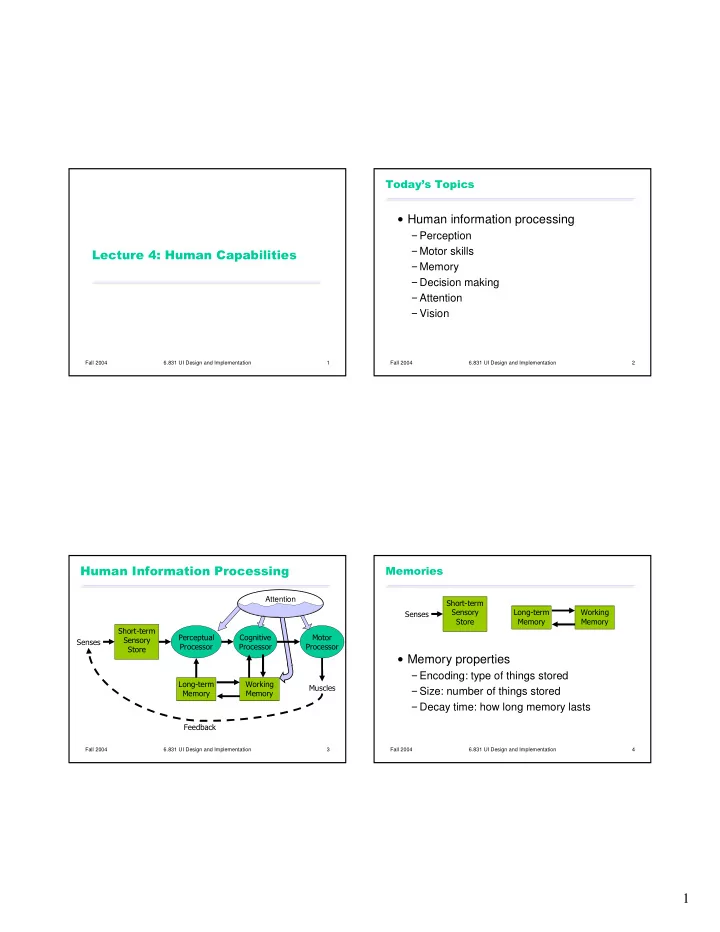
  • Human information processing

Perception Motor skills Memory Decision making Attention Vision

Fall 2004 6.831 UI Design and Implementation 3

  • Attention

Fall 2004 6.831 UI Design and Implementation 4

  • Memory properties

Encoding: type of things stored Size: number of things stored Decay time: how long memory lasts

slide-2
SLIDE 2

2

Fall 2004 6.831 UI Design and Implementation 5

Visual information store

encoded as physical image size ~ 17 [7-17] letters decay ~ 200 ms [70-1000 ms]

Auditory information store

encoded as physical sound size ~ 5 [4.4-6.2] letters decay ~ 1500 ms [900-3500 ms]

Fall 2004 6.831 UI Design and Implementation 6

  • Processors have a cycle time

Tp ~ 100ms [50-200 ms] Tc ~ 70ms [30-100 ms] Tm ~ 70ms [25-170 ms]

Fastman may be 10x faster than Slowman

  • Fall 2004

6.831 UI Design and Implementation 7

!

Two stimuli within the same PP cycle (Tp ~ 100ms) appear fused Consequences

1/ Tp frames/sec is enough to perceive a moving picture (10 fps OK, 20 fps smooth) Computer response < Tp feels instantaneous Causality is strongly influenced by fusion

Fall 2004 6.831 UI Design and Implementation 8

" #$ %& Bottom-up uses features of stimulus Top-down uses context

temporal, spatial draws on long-term memory

slide-3
SLIDE 3

3

Fall 2004 6.831 UI Design and Implementation 9

' Chunk: unit of perception or memory Chunking depends on presentation and what you already know

B M W R C A A O L I B M F B I MWR CAA OLI BMF BIB BMW RCA AOL IBM FBI

3-4 digit chunking is ideal for encoding unrelated digits

Fall 2004 6.831 UI Design and Implementation 10

( Spotlight metaphor

Spotlight moves serially from one input channel to another Visual dominance: easier to attend to visual channels than auditory channels All stimuli within spotlighted channel are processed in parallel

Whether you want to or not

Fall 2004 6.831 UI Design and Implementation 11

)(

Book Pencil Slide Window Car Hat

Fall 2004 6.831 UI Design and Implementation 12

*&%(

Green Orange Red Black Pink Blue

slide-4
SLIDE 4

4

Fall 2004 6.831 UI Design and Implementation 13

# Cognitive processor

compares stimuli selects a response

Types of decision making

Skill-based Rule-based Knowledge-based

Fall 2004 6.831 UI Design and Implementation 14

' &+

Reaction time depends on information content of stimulus

RT = c + d log2 1/Pr(stimulus) e.g., for N equiprobable stimuli, each requiring a different response:

RT = c + d log2 N

Fall 2004 6.831 UI Design and Implementation 15

( Accuracy varies with reaction time

Can choose any point on curve Can move curve with practice

log(P(correct)/P(error)) Reaction time moves up with practice

Fall 2004 6.831 UI Design and Implementation 16

%#(,'-

Resource metaphor

Attention is a resource that can be divided among different tasks simultaneously

Multitasking performance depends on:

Task structure

Modality: visual vs. auditory Encoding: spatial vs. verbal Component: perceptual/cognitive vs. motor vs. WM

Difficulty

Easy or well-practiced tasks are easier to share

slide-5
SLIDE 5

5

Fall 2004 6.831 UI Design and Implementation 17

  • Open-loop control

Motor processor runs a program by itself cycle time is Tm ~ 70 ms

Closed-loop control

Muscle movements (or their effect on the world) are perceived and compared with desired result cycle time is Tp + Tc + Tm ~ 240 ms

Fall 2004 6.831 UI Design and Implementation 18

! &

Fitts Law

Time T to move your hand to a target of size S at distance D away is:

T = RT + MT = a + b log (2D/S)

Depends only on index of difficulty log(2D/S)

D S

Fall 2004 6.831 UI Design and Implementation 19

./! & Moving your hand to a target is closed- loop control Each cycle covers remaining distance D with error D

Position Velocity Time Time

Fall 2004 6.831 UI Design and Implementation 20

! &

  • Targets at screen edge are easy to hit
  • Mac menubar beats Windows menubar
  • Unclickable margins are foolish
  • Hierarchical menus are hard to hit
  • Gimp/GTK: instantly closes menu
  • Windows: .5 s timeout destroys causality
  • Mac does it right: triangular zone
  • Linear popup menus vs. pie menus
slide-6
SLIDE 6

6

Fall 2004 6.831 UI Design and Implementation 21

&&

Time Tn to do a task the nth time is:

Tn = T1 n

is typically 0.2-0.6

Fall 2004 6.831 UI Design and Implementation 22

)',)-

Small capacity: 7 ± 2 chunks Fast decay (7 [5-226] sec) Maintenance rehearsal fends off decay Interference causes faster decay

Fall 2004 6.831 UI Design and Implementation 23

,-

Huge capacity Little decay Elaborative rehearsal moves chunks from WM to LTM by making connections with other chunks

Fall 2004 6.831 UI Design and Implementation 24

.

slide-7
SLIDE 7

7

Fall 2004 6.831 UI Design and Implementation 25

  • Rods

Only one kind (peak response in green wavelengths) Sensitive to low light (scotopic vision)

Multiple nearby rods aggregated into a single nerve signal

Saturated at moderate light intensity (photopic vision)

Cones do most of the vision under photopic conditions

Cones

Operate in brighter light Three kinds: S(hort), M(edium), L(ong) S cones are very weak, centered in blue wavelengths M and L cones are more powerful, overlapping M centered in green, L in yellow (but called red)

Fall 2004 6.831 UI Design and Implementation 26

  • Brightness

M + L + rods

Red-green difference

L - M

Blue-yellow difference

weighted sum of S, M, L

Fall 2004 6.831 UI Design and Implementation 27

" Red-green color blindness (protonopia & deuteranopia)

8% of males 0.4% of females

Blue-yellow color blindness (tritanopia)

Far more rare

Guideline: dont depend solely on color distinctions

use redundant signals: brightness, location, shape

Fall 2004 6.831 UI Design and Implementation 28

(

Different wavelengths focus differently

Highly separated wavelengths (red & blue) cant be focused simultaneously

Guideline: dont use red-on-blue text

It looks fuzzy and hurts to read
slide-8
SLIDE 8

8

Fall 2004 6.831 UI Design and Implementation 29

"%(+#

Fovea has no S cones

Cant resolve small blue features (unless they have high contrast with background)

Lens and aqueous humor turn yellow with age

Blue wavelengths are filtered out

Lens weakens with age

Blue is harder to focus

Guideline: dont use blue against dark backgrounds where small details matter (text!)

Fall 2004 6.831 UI Design and Implementation 30

!#*+

Rods are more sensitive to dim light In scotopic conditions, peripheral vision (rod-rich) is better than foveal vision

Easier to see a dim star if you dont look directly at it