Scientific Figures CASCA 2017 Graduate Student Workshop Rodrigo - - PowerPoint PPT Presentation

scientific figures
SMART_READER_LITE
LIVE PREVIEW

Scientific Figures CASCA 2017 Graduate Student Workshop Rodrigo - - PowerPoint PPT Presentation

Tautenberger et al. (2017) Scientific Figures CASCA 2017 Graduate Student Workshop Rodrigo Fernndez - University of Alberta Overview 1. Frame of mind: audience first 2. Think strategically: tell a story 3. Developing your toolbox Rodrigo


slide-1
SLIDE 1

Scientific Figures

CASCA 2017 Graduate Student Workshop

Rodrigo Fernández - University of Alberta

Tautenberger et al. (2017)
slide-2
SLIDE 2

Overview

Rodrigo Fernández - CASCA 2017 Graduate Student Workshop

  • 1. Frame of mind: audience first
  • 2. Think strategically: tell a story
  • 3. Developing your toolbox
slide-3
SLIDE 3

Frame of mind: audience-centered

Rodrigo Fernández - CASCA 2017 Graduate Student Workshop

Making figures for scientific articles involves communicating with an audience. The audience is usually made up of one or more communities of scientists working

  • n a topic.

Each community has its own language. This includes not

  • nly scientific terms used to describe concepts, but also a

graphical language: how information is communicated through images.

slide-4
SLIDE 4

Frame of mind: audience-centered

Rodrigo Fernández - CASCA 2017 Graduate Student Workshop Müller, Janka, & Heger (2012)

slide-5
SLIDE 5

Frame of mind: audience-centered

Rodrigo Fernández - CASCA 2017 Graduate Student Workshop

Each community has its own language and what makes for a good figure in one field may not necessarily be good for another. The first thing to keep in mind when making a figure is the audience you are addressing, and also the conventions within that community. How do you become familiar with what those conventions are? By reading lots of papers

slide-6
SLIDE 6

Frame of mind: audience-centered

Rodrigo Fernández - CASCA 2017 Graduate Student Workshop

The most basic way to keep the audience in mind is to think of all the possible challenges that they may have in understanding your figure. This has implications for the choices you make regarding: 1) font size 2) thickness of lines 3) color scheme

slide-7
SLIDE 7

Font Size

Rodrigo Fernández - CASCA 2017 Graduate Student Workshop

Axis labels too small:

slide-8
SLIDE 8

Font Size

Rodrigo Fernández - CASCA 2017 Graduate Student Workshop

Should be at least the size of the caption font

slide-9
SLIDE 9

Thickness of lines

Rodrigo Fernández - CASCA 2017 Graduate Student Workshop

It always looks thinner in print than on screen, especially if your color figure is printed in B/W

slide-10
SLIDE 10

Color Scheme

Rodrigo Fernández - CASCA 2017 Graduate Student Workshop

About 8% of men have some form of color impairment: red & green confusion

Jenny & Kelso (2007) colororacle.org/design.html

slide-11
SLIDE 11

Varying Color Scheme & Line Type

Rodrigo Fernández - CASCA 2017 Graduate Student Workshop

Jenny & Kelso (2007) colororacle.org/design.html

slide-12
SLIDE 12

Color Resources

Rodrigo Fernández - CASCA 2017 Graduate Student Workshop

colororacle.org colorbrewer.org http://tools.medialab.sciences-po.fr/iwanthue/

  • App to simulate color impaired vision
  • Color palettes
  • More palettes (‘I want hue’)
slide-13
SLIDE 13

Rodrigo Fernández - CASCA 2017 Graduate Student Workshop

Frame of mind: audience-centered

Finally, the best way to make sure that your figures are audience-friendly is to ask for feedback from others. The general principle to keep in mind is that others will perceive your figure differently than you, because they are not as familiar as you are with your data. Make their job of digesting your data easier! Do this with the figures already within a draft. Try to use the same journal format as the final print version (available

  • nline for most journals) fill text with Lorem Ipsum if

writing not done.

slide-14
SLIDE 14

Rodrigo Fernández - CASCA 2017 Graduate Student Workshop

Strategy: Tell a Story

Most important question when assembling your work into a paper: what figures should I make? You want the figures in our paper to tell a story, containing sufficient information to convey your most important points. Scientists are busy, and many of them will only look at the figures in your paper (perhaps also the captions). So you want to put as much thought on this as you can, being deliberate about every aspect of your figures.

slide-15
SLIDE 15

Rodrigo Fernández - CASCA 2017 Graduate Student Workshop

Storyboards

How to plan a story through figures before making them? We borrow a technique from artists and designers, and make a storyboard for prototyping. This is a set of sketches of the plots that you will make, based

  • n preliminary exploration of

your data.

Ian McCaig (pinterest)

slide-16
SLIDE 16

Rodrigo Fernández - CASCA 2017 Graduate Student Workshop

Storyboards

slide-17
SLIDE 17

Rodrigo Fernández - CASCA 2017 Graduate Student Workshop

Storyboards

10−3 10−2 10−1 100 101 102

time [s]

−0.002 0.000 0.002 0.004 0.006 0.008 0.010

[MB(t)+Mdom(t)]/[MB(0)+Mdom(0)]−1

∆r/r = 3.7% ∆r/r = 1.8% ∆r/r = 0.9%

RF et al. in prep

slide-18
SLIDE 18

Rodrigo Fernández - CASCA 2017 Graduate Student Workshop

How to design figures?

The purpose of a figure is to convey information. You want to convey interesting / new information, minimizing redundant and/or unnecessary noise. Some questions to ask: 1) What variables are the most informative? 2) What type of representation is most suitable? 3) How many datasets to show? 4) Are there any data properties worth enhancing?

slide-19
SLIDE 19

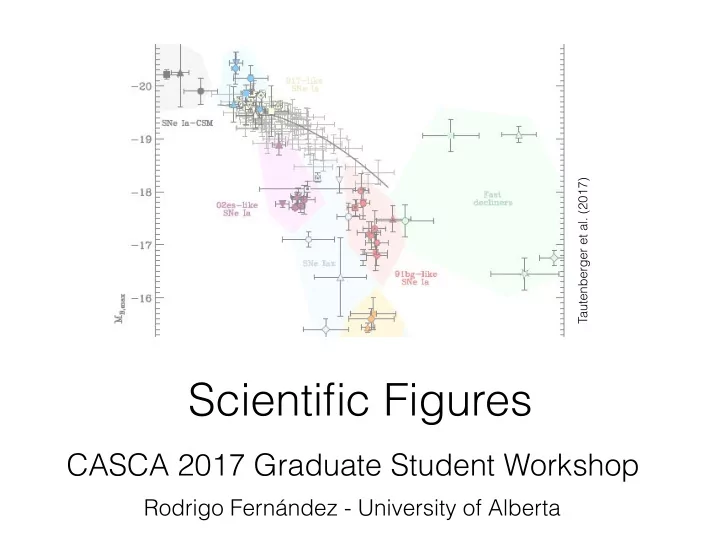
Tautenberger (2017), arXiv: 1703.00528

Example: types of SN Ia 2) Uses color to divide sets

1) Chooses right variables to describe parameter space 3) Combines symbols, annotation, and shaded background to provide clarity in groups yet allows to distinguish individual events of interest.

slide-20
SLIDE 20

How to design figures?

Be aware of all degrees of freedom at your disposal: 2) Lines or symbols: type, thickness, color, shading 1) Plot size: single or double column, vertical extent 3) Annotation: color, font, positioning 4) Background shading 5) Axes: independent or stacked, multi-panel 6) Color table & opacity if 2D or 3D plots.

Rodrigo Fernández - CASCA 2017 Graduate Student Workshop

slide-21
SLIDE 21

Tips on Figure Design

Use captions wisely. Can be purely descriptive, but also add a sentence to convey the main point of the figure (interpretation).

Rodrigo Fernández - CASCA 2017 Graduate Student Workshop

Try to present one or few ideas per figure. Sometimes you can use figures for multiple purposes, but it’s better to keep them easy to digest. Tip from a supernova observer: a good figure is one that

  • ther people can/will show in their talks!
slide-22
SLIDE 22

Developing your Toolbox

The first tool in your arsenal is your memory. Read lots of papers, all the time. Set aside those that you consider particularly good, either because the science is great (=classic paper) or because the writing or figures are particularly good. Keep this list of exemplars for reference.

Rodrigo Fernández - CASCA 2017 Graduate Student Workshop

When reading a paper, don’t start from the beginning and read sequentially. Read the abstract, put together the table of contents, look at all the figures carefully, then read the first sentence of each paragraph. Only then go through all the text if it’s still worth it.

slide-23
SLIDE 23

Developing your Toolbox

Select a suitable plotting tool. You might have your own, but it may have limited capabilities. Tools often used in astronomy:

Rodrigo Fernández - CASCA 2017 Graduate Student Workshop

1) python (matplotlib) 2) gnuplot 3) IDL 4) SM 5) Tioga (MESA) 6) Grace For multi-D plots: 1) VisIt 2) Mayavi (python) 3) ParaView 4) Vapor

slide-24
SLIDE 24

Developing your Toolbox

Understand RGB color space: 3-dimensional vector space

Rodrigo Fernández - CASCA 2017 Graduate Student Workshop

red (1,0,0) green (0,1,0) blue (0,0,1) white (1,1,1) black (0,0,0) green (0,0.75,0)

slide-25
SLIDE 25

Galleries

Rodrigo Fernández - CASCA 2017 Graduate Student Workshop

https://matplotlib.org/gallery.html

slide-26
SLIDE 26

Google + Stack Overflow are your friends

Rodrigo Fernández - CASCA 2017 Graduate Student Workshop

slide-27
SLIDE 27

Google + Stack Overflow are your friends

Rodrigo Fernández - CASCA 2017 Graduate Student Workshop

slide-28
SLIDE 28

Google + Stack Overflow are your friends

Rodrigo Fernández - CASCA 2017 Graduate Student Workshop

(use fill_between in matplotlib)

slide-29
SLIDE 29

2D plots: opacity & color scheme

Rodrigo Fernández - CASCA 2017 Graduate Student Workshop

  • 1

1 2 z [107 cm] (a) t = 0 (b) 0.7 ms (c) 2.2 ms (d) 6.5 ms 1 2 3 x [107 cm]

  • 2
  • 1

1 z [107 cm] (e) 11 ms 1 2 3 x [107 cm] (f) 15 ms 1 2 3 x [107 cm] (g) 22 ms 1 2 3 4 x [107 cm] (h) 43 ms 105 107 109 1011 disk [g cm−3] 105 107 109 1011 fallback [g cm−3] 105 107 109 1011 unbound tail [g cm−3]

RF et al. (2016)

slide-30
SLIDE 30

3D plots: opacity & color scheme

Rodrigo Fernández - CASCA 2017 Graduate Student Workshop Lentz et al. (2015)

  • pacity
slide-31
SLIDE 31

Summary

Rodrigo Fernández - CASCA 2017 Graduate Student Workshop

1) Always keep in mind that you’re making figures for an audience different than you. Learn the customs of your community by reading lots of papers. 2) Organize your paper as a story told through your

  • figures. Use storyboards to sketch, and make use of all

degrees of freedom to convey the most interesting information 3) Be systematic about the tools you use: learn what’s out there, what types of figures are made outside your field, learn RGB color space, and ask Google if you don’t know.