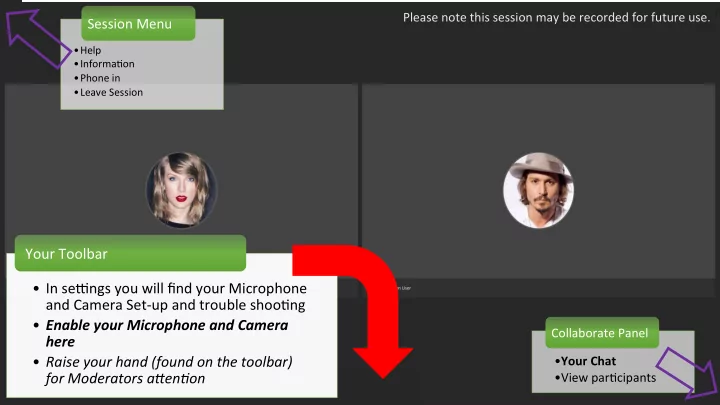
Your Toolbar In seAngs you will find your Microphone and Camera - - PowerPoint PPT Presentation

your toolbar in seangs you will find your microphone and
SMART_READER_LITE
LIVE PREVIEW

Your Toolbar In seAngs you will find your Microphone and Camera - - PowerPoint PPT Presentation

Please note this session may be recorded for future use. Session Menu Help Informa.on Phone in Leave Session Your Toolbar In seAngs you will find your Microphone and Camera Set-up and trouble shoo.ng Enable your Microphone


slide-1
SLIDE 1
  • Help
  • Informa.on
  • Phone in
  • Leave Session

Session Menu

  • Your Chat
  • View par.cipants

Collaborate Panel Please note this session may be recorded for future use.

  • In seAngs you will find your Microphone

and Camera Set-up and trouble shoo.ng

  • Enable your Microphone and Camera

here

  • Raise your hand (found on the toolbar)

for Moderators a5en6on Your Toolbar

slide-2
SLIDE 2

Enabled?

  • Your Video and Microphone are

enabled when you hit the respec.ve icon on your toolbar

Receiving?

  • Check recep.vity in the Collaborate seAngs by

hiAng 'Set up your Camera and Microphone'

Compa.bility?

  • Check the seAngs of

your computer to see if the microphone/video is receiving and not muted

slide-3
SLIDE 3

Chat E.queMe Recording Polling Groups

slide-4
SLIDE 4

Whiteboard

Start & Stop Moderator & student use PENCILS SHAPES ERASERS TEXT

slide-5
SLIDE 5

Share Applica2on

Start & Stop Moderator and student use Your screen live. SOFTWARE INTERNET CALENDAR EMAIL

slide-6
SLIDE 6

Share File

Start & Stop Moderator and student use PDFs POWERPOINT IMAGES

slide-7
SLIDE 7

Polling

Start & Stop, Open & Lock Poll for responses WriMen & Verbal Ques.ons

slide-8
SLIDE 8

Break out groups

Start and Stop Assign Create smaller groups

slide-9
SLIDE 9

Gree.ng Recorded for future use Use pointer Sharing conscious