Web Engineering simple easy to author for non-computer-experts - - PowerPoint PPT Presentation

web engineering
SMART_READER_LITE
LIVE PREVIEW

Web Engineering simple easy to author for non-computer-experts - - PowerPoint PPT Presentation

HTML Design Goals Web Engineering simple easy to author for non-computer-experts application independent Prof. Dr. Dr. h.c. mult. Gerhard Krger, Albrecht Schmidt any application should be possible Universitt Karlsruhe


slide-1
SLIDE 1

Prof. Dr. Dr. h.c. mult . Ge rhard Krüger , Albrecht Schmidt: Web Engineering, WS00/01 page 1

Web Engineering

  • Prof. Dr. Dr. h.c. mult. Gerhard Krüger, Albrecht Schmidt

Universität Karlsruhe Fakultät für Informatik Institut für Telematik Wintersemester 2000/2001

Prof. Dr. Dr. h.c. mult . Ge rhard Krüger , Albrecht Schmidt: Web Engineering, WS00/01 page 2

Web Engineering

Chapter 3: The Web – An Information System

Prof. Dr. Dr. h.c. mult . Ge rhard Krüger , Albrecht Schmidt: Web Engineering, WS00/01 page 3

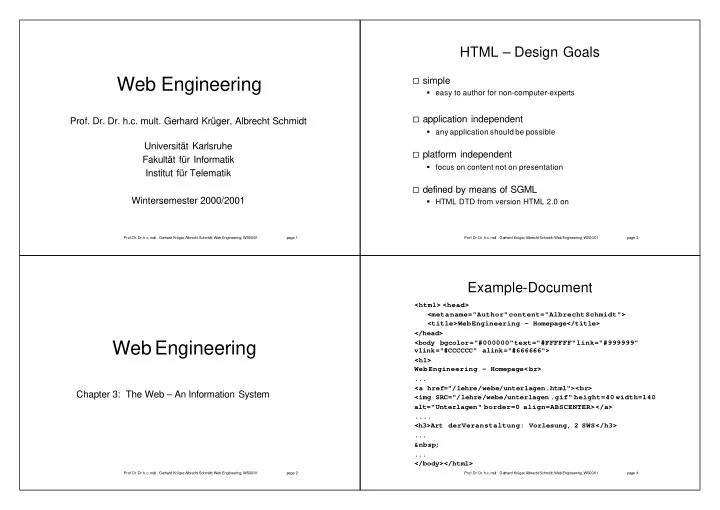
HTML – Design Goals

simple easy to author for non-computer-experts application independent any application should be possible platform independent focus on content not on presentation defined by means of SGML HTML DTD from version HTML 2.0 on

Prof. Dr. Dr. h.c. mult . Ge rhard Krüger , Albrecht Schmidt: Web Engineering, WS00/01 page 4

Example-Document

<html> <head> <meta name="Author" content="Albrecht Schmidt"> <title>Web Engineering - Homepage</title> </head> <body bgcolor="#000000" text="#FFFFFF" link="#999999" vlink="#CCCCCC" alink="#666666"> <h1> Web Engineering - Homepage< br> ... <a href="/lehre/webe/unterlagen.html"><br> <img SRC="/lehre/webe/unterlagen .gif" height=40 width=140 alt="Unterlagen" border=0 align=ABSCENTER></a> .... <h3>Art der Veranstaltung: Vorlesung, 2 SWS</h3> ... &nbsp; ... </body></html>

slide-2
SLIDE 2

Prof. Dr. Dr. h.c. mult . Ge rhard Krüger , Albrecht Schmidt: Web Engineering, WS00/01 page 5

HTML - Development

1990

HTML

CERN - first implementation 1991

HTML+

Implementation in the Arena Browser 1994

HTML 2.0

Combined features from Mosaic, Arena and other browsers

e.g. Forms

then Netscape was founded – browser are ahead of definitions 1997

HTML 3.2

when published far behind the state of the art functionality

z.B. tables, Applets, ...

Dec 1997 HTML 4.0

[Raggetet al. 1998]

Dec 1999 HTML 4.01 Jan 2000 XHTML 1.0

Prof. Dr. Dr. h.c. mult . Ge rhard Krüger , Albrecht Schmidt: Web Engineering, WS00/01 page 6

HTML 4.01

Clear distinction between content and layout

  • „clearing out“ elements
  • Cascading Style Sheets to describe presentation and layout

3 Document Type Definitions

  • The HTML 4.01 Strict DTD includes all elements and attributes that have

not been deprecated or do not appear in frameset documents. For documents that use this DTD, use this document type declaration: <!DOCTYPE HTML PUBLIC " -//W3C//DTD HTML 4.01//EN" "http://www.w3.org/TR/html4/strict.dtd">

  • The HTML 4.01 Transitional DTD includes everything in the strict DTD

plus deprecated elements and attributes (most of which concern visual presentation). For documents that use this DTD, use this document type declaration: <!DOCTYPE HTML PUBLIC " -//W3C//DTD HTML 4.01 Transitional//EN" "http://www.w3.org/TR/html4/loose.dtd">

  • The HTML 4.01 Frameset DTD includes everything in the transitional

DTD plus frames as well. For documents that use this DTD, use this document type declaration: <!DOCTYPE HTML PUBLIC "-//W3C//DTD HTML 4.01 Frameset//EN" "http://www.w3.org/TR/html4/frameset.dtd">

Prof. Dr. Dr. h.c. mult . Ge rhard Krüger , Albrecht Schmidt: Web Engineering, WS00/01 page 7

HTML - HEAD

HEAD TITLE LINK

link to other documents, e.g. Style Sheet specifying relation to other Documents

META SCRIPT STYLE

embedded Style Sheet Prof. Dr. Dr. h.c. mult . Ge rhard Krüger , Albrecht Schmidt: Web Engineering, WS00/01 page 8

HTML - BODY

BODY HEADING Text Lists

unordered list <UL>, ordered list <OL>, definition list <DL>

TABLE IMG MAP

client-side Image Map

Anchor, <A>

Source and target anchor

OBJECT

replaces other tags, e.g. <APPLET>

slide-3
SLIDE 3

Prof. Dr. Dr. h.c. mult . Ge rhard Krüger , Albrecht Schmidt: Web Engineering, WS00/01 page 9

HTML - FORMS

forms INPUT BUTTON SELECT RADIO-BUTTONS OPTION

  • TEXTAREA

connected to actions by URI Action Attribute see CGI (later chapter)

Prof. Dr. Dr. h.c. mult . GerhardKrüger, Albrecht Schmidt: Web Engineering, WS00/01 page 10

HTML - Framesets

FRAMESET DTD columns and rows of frames Interaction between Frames example part 1 – file with frame definition:

<html> <head> <title> Frame Page</title> </head> <frameset cols="200,*"> <frame src="list1.htm" name="left"> <frame src="title.htm" name="right"> </frameset> </html>

example part 2 – file list1.htm :

<html> <head> <title>List

  • f

links</title> </head> <body> <a href="news. htm" target="right"> Neuigkeiten</a> </body> </html>

Prof. Dr. Dr. h.c. mult . GerhardKrüger, Albrecht Schmidt: Web Engineering, WS00/01 page 11

HTML – Image Maps - Server-Side

Image-Maps

Server-Side IMG tag with ISMAP attribute position submitted to the server server replies with the corresponding resource mapping of position to resource on the server <a href="MapName"><img src="datei.gif" ismap></a>

Prof. Dr. Dr. h.c. mult . GerhardKrüger, Albrecht Schmidt: Web Engineering, WS00/01 page 12

HTML – Image Maps - Client-Side

Image-Maps

Client-Side IMG tag with USEMAP attribute, MAP definition browser selects based on position the resource browser request only this resource from the server

<map name="anyImage"> <area shape=rect coords="1,1,249,49" href="#Anchor"> <area shape=rect coords="1,51,149,299" href="file.htm"> <area shape=rect coords="251,1,399,399" href="../file.htm"> <area shape=rect coords="151,51,249,299" href="http://www.nix.de/"> <area shape=rect coords="1,301,249,399" nohref> </map> <img src="hypgraph.gif" usemap="#anyImage" border=0>

slide-4
SLIDE 4

Prof. Dr. Dr. h.c. mult . GerhardKrüger, Albrecht Schmidt: Web Engineering, WS00/01 page 13

Document Type Definition I

Examples from the HTML 4.0 DTD

Entities:

sequence of characters with a name, e.g.

<!ENTITY %HEADING “H1|H2|H3|H4|H5|H6”> ... <!ENTITY %INLINE “#PCDATA | %FONTSTYLE; | %PHRASE; | …”> Elements:

components in the document structure, e.g.

<!ELEMENT (%HEADING;) – – (%INLINE;)*>

  • Def. of HTML elements <H1>...</H1>, <H2>…</H2>, …

start-tag and end-tag required

Prof. Dr. Dr. h.c. mult . GerhardKrüger, Albrecht Schmidt: Web Engineering, WS00/01 page 14

Document Type Definition II

Elements with attributes (example from HTML 4.0 DTD) <!ELEMENT IMG – o EMPTY> <!ATTLIST IMG %ATTRS; SRC %URI; #REQUIRED ALT %TEXT; #REQUIRED LONGDESC %URI; #IMPLIED HEIGHT %LENGTH; #IMPLIED WIDTH %LENGTH; #IMPLIED ISMAP (ISMAP) #IMPLIED USEMAP %URI; #IMPLIED > e.g. <IMG SRC="file.gif" ALT="an Image. " HEIGHT=30>

… >

No end-tag required

Prof. Dr. Dr. h.c. mult . GerhardKrüger, Albrecht Schmidt: Web Engineering, WS00/01 page 15

Document Type Definition III

Example: Declaration of HTML Tables

<!ELEMENT TABLE – – (CAPTION?, (COL*|COLGROUP*), THEAD?, TFOOT?, TBODY+)> <!ELEMENT CAPTION – – (%INLINE;)* > caption <!ELEMENT THEAD – o (TR)+ > header <!ELEMENT TFOOT – o (TR)+ > footer <!ELEMENT TBODY

  • o (TR)+ >

body … <!ELEMENT TR – o (TH|TD)+ > line <!ELEMENT (TH|TD) – o (%FLOW;)* > header/data Cell e.g. <TABLE> <CAPTION>this is a 2*2-Table</CAPTION> <TR><TD>top left</TD ><TD>top right</TD></TR> <TR><TD>down left</TD ><TD>down right</TD ></TR> </TABLE>

Prof. Dr. Dr. h.c. mult . GerhardKrüger, Albrecht Schmidt: Web Engineering, WS00/01 page 16

Cascading Style Sheets

formats and layouts for HTML documents CSS level 1 (CSS1) [Lie et al. 1996] CSS2, positioning rule based values are assigned to properties of HTML elements

e.g.: P { text-align:

right; color: green }

selectors can be context dependent very expressive

color, font, layout, position ...

inheritance of attribute values along the HTML

document hierarchy

slide-5
SLIDE 5

Prof. Dr. Dr. h.c. mult . GerhardKrüger, Albrecht Schmidt: Web Engineering, WS00/01 page 17

CSS Rule Syntax

style sheets have one or more rules that describe the format of

elements

rules consist of selector and declaration the declaration consists of one or more pairs with property and

value

syntax:

<selector> "{" <declaration> "}" <declaration>::= <property> ":" <value-list> [";" <property> ":" <value-list>]* <value-list>::= <value> ["," <value>]*

Prof. Dr. Dr. h.c. mult . GerhardKrüger, Albrecht Schmidt: Web Engineering, WS00/01 page 18

CSS Selectors

type selectors,

HTML -elements

  • H1 { color: blue }

Groups of selectors <DIV> - Block <SPAN> - Inline selectors in context

  • H1 { color: blue }
  • H1 B { color: red }

Class ID

<HTML> <HEAD> <TITLE>Title</TITLE> <STYLE TYPE="text/css"> H1.cool { color: blue } .important { color: red} P#2311 { color: green} #2317 { color: blue} </STYLE> </HEAD> <BODY> <H1 CLASS=cool>See Here</H1> <P CLASS=important>text</P> <H2 CLASS=important>And Again</H2> <P id=2311>text</P> <H2 id=2317>And Again</H2> </BODY> </HTML>

Prof. Dr. Dr. h.c. mult . GerhardKrüger, Albrecht Schmidt: Web Engineering, WS00/01 page 19

Using Styles

Inline Styles Embedded Styles <HTML> <HEAD> <TITLE>title</TITLE> <LINK REL=STYLESHEET TYPE="text/css" HREF="http://style.com/cool" TITLE="Cool"> <STYLE TYPE="text/css"> H1 { color: blue } </STYLE> <STYLE> @import url(http://style.com/basic); </STYLE> </HEAD> <BODY> <H1>Headline is blue</H1> <P STYLE="color: green">While the paragraph is green. </BODY> </HTML> External Style Sheets Importing

Prof. Dr. Dr. h.c. mult . GerhardKrüger, Albrecht Schmidt: Web Engineering, WS00/01 page 20

Using Styles

Inline Styles Embedded Styles <HTML> <HEAD> <TITLE>title</TITLE> <LINK REL=STYLESHEET TYPE="text/css" HREF="http://style.com/cool" TITLE="Cool"> <STYLE TYPE="text/css"> H1 { color: blue } </STYLE> <STYLE> @import url(http://style.com/basic); </STYLE> </HEAD> <BODY> <H1>Headline is blue</H1> <P STYLE="color: green">While the paragraph is green. </BODY> </HTML> External Style Sheets Importing

slide-6
SLIDE 6

Prof. Dr. Dr. h.c. mult . GerhardKrüger, Albrecht Schmidt: Web Engineering, WS00/01 page 21

Using Styles

Inline Styles Embedded Styles <HTML> <HEAD> <TITLE>title</TITLE> <LINK REL=STYLESHEET TYPE="text/css" HREF="http://style.com/cool" TITLE="Cool"> <STYLE TYPE="text/css"> H1 { color: blue } </STYLE> <STYLE> @import url(http://style.com/basic); </STYLE> </HEAD> <BODY> <H1>Headline is blue</H1> <P STYLE="color: green">While the paragraph is green. </BODY> </HTML> External Style Sheets Importing

Prof. Dr. Dr. h.c. mult . GerhardKrüger, Albrecht Schmidt: Web Engineering, WS00/01 page 22

Using Styles

Inline Styles Embedded Styles <HTML> <HEAD> <TITLE>title</TITLE> <LINK REL=STYLESHEET TYPE="text/css" HREF="http://style.com/cool" TITLE="Cool"> <STYLE TYPE="text/css"> H1 { color: blue } </STYLE> <STYLE> @import url(http://style.com/basic); </STYLE> </HEAD> <BODY> <H1>Headline is blue</H1> <P STYLE="color: green">While the paragraph is green. </BODY> </HTML> External Style Sheets Importing

Prof. Dr. Dr. h.c. mult . GerhardKrüger, Albrecht Schmidt: Web Engineering, WS00/01 page 23

CSS Inheritance

ascending hierarchy of Style Sheets with overriding browser style sheet user style sheet designer style sheet multiple designer style sheets hierarchical composition of web page design

e.g.:

„common.css“ for all pages „special.css“ for specific designs on a certain topic

alternative designs

e.g.:

„big.css“ for workstation screens, „small.css“ for PDA screens

Prof. Dr. Dr. h.c. mult . GerhardKrüger, Albrecht Schmidt: Web Engineering, WS00/01 page 24

Positioning with CSS/XSL

position, layer example

#p1 {text-align: right; margin: -150px 0 50px 0}

slide-7
SLIDE 7

Prof. Dr. Dr. h.c. mult . GerhardKrüger, Albrecht Schmidt: Web Engineering, WS00/01 page 25

XHTML 1.0

basically HTML 4.0 in XML same semantic of elements and attribute as HTML 4.0 Advantage of XHTML XHTML Documents are XML conform XHTML allows the usage of the HTML or XML Document Object Models processing is simplified HTML 4.0 Browser can display XHTML 1.0 documents Based on XHTML it is simple to add new elements

Prof. Dr. Dr. h.c. mult . GerhardKrüger, Albrecht Schmidt: Web Engineering, WS00/01 page 26

Valid XHTML 1.0

criteria: according to one of the three DTDs root element is <html> the root element uses the XHTML name space the includes a DOCTYPE Declaration example

<?xml version="1.0" encoding="UTF-8"?> <!DOCTYPE html PUBLIC "-//W3C//DTD XHTML 1.0 Strict//EN" "http://www.w3.org/TR/xhtml1/DTD/strict.dtd"> <html xmlns="http://www.w3.org/1999/xhtml" xml:lang="en" lang="en"> <head> <title>Virtual Library</title> </head> <body> <p>Moved to <a href="http://vlib.org/">vlib.org</a>.</p> </body> </html>

Prof. Dr. Dr. h.c. mult . GerhardKrüger, Albrecht Schmidt: Web Engineering, WS00/01 page 27

Differences - XHTML vs. HTML

„Well-Formed-Documents“ XHTML is case sensitive end-tags are required (or <../>) values in Attributes must be quoted markup minimizing is not allowed (attributes and tags)

Prof. Dr. Dr. h.c. mult . GerhardKrüger, Albrecht Schmidt: Web Engineering, WS00/01 page 28

References Chapter 3 (I)

Abrams, M.; 1998. World Wide Web: Beyond the Basics. Prentice-Hall,

Upper Saddle River.

Berners-Lee, T.; 1989. Original Proposal at CERN.

http://www.w3.org/pub/WWW/History/1989/proposal.html

Boutell, T.; 1997. PNG (Portable Network Graphics) Specification -

Version 1.0. Internet Informational RFC 2083.

Bush, V.; 1945. As We May Think. Atlantic Monthly, 176(1),

http://www.theatlantic.com/unbound/flashbks /computer/bushf.htm

CompuServe, Inc.; 1987. GIF - Graphics Interchange Format - Version

  • 89a. Columbus.

Freed, N., and Borenstein, N.; 1996. Multipurpose Internet Mail

Extensions (MIME) - Part One: Format of Internet Message Bodies. Internet Draft Standard RFC 2045.

Freed, N., and Borenstein, N.; 1996. Multipurpose Internet Mail

Extensions (MIME) - Part Two: Media Types. Internet Draft Standard RFC 2046.

slide-8
SLIDE 8

Prof. Dr. Dr. h.c. mult . GerhardKrüger, Albrecht Schmidt: Web Engineering, WS00/01 page 29

References Chapter 3 (II)

Freed, N., Klensil, J., and Postel, J.B.; 1996. Multipurpose Internet Mail

Extensions (MIME) - Part Four: Registration Procedures. Internet best current practice RFC 2048.

Freed, N., and Borenstein, N.; 1996. Multipurpose Internet Mail

Extensions (MIME) - Part Five: Conformance Criteria and Examples. Internet Draft Standard RFC 2049.

Hoschka, P.; 1998. Synchronized Multimedia Integration Language.

W3C Recommendation, http://www.w3.org/AudioVideo

ISO; 1986. Information Processing - Text and Office Systems -

Standard Generalized Markup Language (SGML). ISO/IS 8879.

ISO; 1993. Information Technology - Digital Compression and Coding

  • f continuous-tone still Images. ISO/IEC IS 10918.

ISO; 1996. Information Technology - Processing Languages -

Document Style and Specification Language (DSSSL). ISO/IS 10179.

Lennon, J.A.; 1997. Hypermedia Systems and Applications - World

Wide Web and Beyond. Springer, Berlin.

Prof. Dr. Dr. h.c. mult . GerhardKrüger, Albrecht Schmidt: Web Engineering, WS00/01 page 30

References Chapter 3 (III)

Lie, H.W., and Bos, B.; 1996. Cascading Style Sheets, level 1. W3C

Recommendation.

Moore, K.; 1996. Multipurpose Internet Mail Extensions (MIME) - Part

Three: Message Header Extensions for non-ASCII Text . Internet Draft Standard RFC 2047.

Nelson, T.H.; 1965. A File Structure for the Complex, the Changing,

and the Intermediate. ACM 20th National Conference.

Nelson, T.H.; 1987. Literary Machines. Mindful Press, Sausalito. Online-Hilfe zu HTML und CSS, www.htmlhelp.com Powell, T.A., Jones, D.L., and Cutts, D.C.; 1998. Web Site Engineering

  • Beyond Web Page Design. Prentice Hall, Upper Saddle River.

Ragget, D., Le Hors, A., and Jacobs, I.; 1998. HTML 4.0 Specification.

W3C Recommendation.

Steinmetz, R.; 1998. Multimedia-Technologie. Springer, 2. Auflage,

Berlin.

Wilde, E.; 1999. Wilde´s

WWW . Springer, Berlin.

Prof. Dr. Dr. h.c. mult . GerhardKrüger, Albrecht Schmidt: Web Engineering, WS00/01 page 31

Selected URLs - Chapter 3(I)

Extensible Markup Language (XML) 1.0, http://www.w3.org/TR/REC-xml XML Linking Language (XLink) http://www.w3.org/TR/WD-xlink XML Pointer Language (XPointer) http://www.w3.org/TR/WD-xptr Extensible Stylesheet Language (XSL) http://www.w3.org/Style/XSL/ XHTML 1.0: The Extensible HyperText Markup Language

http://www.w3.org/TR/xhtml1/

The SGML/XML Web Page http://www.oasis-open.org/cover/ XML Path Language (XPath) Version 1.0 http://www.w3.org/TR/xpath XSL Transformations (XSLT) Version 1.0 http://www.w3.org/TR/xslt Microsoft XML developer Center http://msdn.microsoft.com/xml/default.asp SOAP: Simple Object Access Protocol

http://msdn.microsoft.com/xml/general/soapspec-v1.asp

Prof. Dr. Dr. h.c. mult . GerhardKrüger, Albrecht Schmidt: Web Engineering, WS00/01 page 32

Selected URLs - Chapter 3(II)

http://www.w3.org/XML/Linking.html http://www.w3.org/TR/xlink/ http://www.w3.org/XML/ http://www.sun.com/software/xml/developers/xlink.html http://www.w3.org/TR/xpath http://www.w3.org/XML/Schema.html http://www.oasis -open.org/cover/schemas.html http://www.w3.org/TR/xptr http://msdn.microsoft.com/library/periodic/period00/xml0500.htm http://msdn.microsoft.com/code/default.asp?URL=/code/sample.asp

?url=/MSDN-FILES/026/000/329/msdncompositedoc.xml

http://www.zvon.org/xxl/XPathTutorial/General/examples.html http://www.zvon.org/xxl/XMLTutorial/General/book_en.html http://www.w3.org/TR/html4/struct/global.html
slide-9
SLIDE 9

Prof. Dr. Dr. h.c. mult . GerhardKrüger, Albrecht Schmidt: Web Engineering, WS00/01 page 33

Web Engineering

Chapter 4: Architecture and Platform

Prof. Dr. Dr. h.c. mult . GerhardKrüger, Albrecht Schmidt: Web Engineering, WS00/01 page 34

Table of Content

  • 1. Architecture
  • 2. Web Server
  • 3. Web Client
  • 4. Performance and Efficiency

Prof. Dr. Dr. h.c. mult . GerhardKrüger, Albrecht Schmidt: Web Engineering, WS00/01 page 35

Basics of Web Applications

distributed software (client-server) server holds user interface description, program, or

software

user interface description, program, or software is

transmitted to the client on request

the client interprets and displays user interface

description or executes the program or the software

Prof. Dr. Dr. h.c. mult . GerhardKrüger, Albrecht Schmidt: Web Engineering, WS00/01 page 36

Basic Architecture

client and server basic client server relationship synchronous request-reply model protocol is HTTP

Web Client Web Server serve request blocking HTTP reply HTTP request

slide-10
SLIDE 10

Prof. Dr. Dr. h.c. mult . GerhardKrüger, Albrecht Schmidt: Web Engineering, WS00/01 page 37

Request and Reply

client requests a specific (unique) identify resource, .e.g. path and filename in a GET-request ID of an object server Server analysis the request (URI + Header) identifies the requested resource locates the resource Processes the request and the resource (e.g. HTTP-Header, DB-access) sends reply back to the client client analyses and interprets the resource e.g. display, run, execution, save,

Prof. Dr. Dr. h.c. mult . GerhardKrüger, Albrecht Schmidt: Web Engineering, WS00/01 page 38

Server holds Resources

resources have unique identifiers on the server static resources files are stored on the server HTML-pages, image files, scripts, applets, programs, ... dynamic resources resources are dynamically generated on the server e.g. generated HTML-pages, image files, scripts continuous data (e.g. Audio, Video) access to other systems (e.g. Database)

Prof. Dr. Dr. h.c. mult . GerhardKrüger, Albrecht Schmidt: Web Engineering, WS00/01 page 39

Static Resources

static documents and files e.g. HTML-pages, images, audio files, video files browser script e.g.ECMAScript , JavaScript, JScript, VBScript, ... executable software e.g. Java Applet, ActiveX

Prof. Dr. Dr. h.c. mult . GerhardKrüger, Albrecht Schmidt: Web Engineering, WS00/01 page 40

Static Resources - Process

client requests a resource server identifies the resource on the server (e.g. file

system)

server accesses loads the resource and sends it back

to the client

Client analyses the content and presents it to the user,

e.g.

HTML visualize/render JavaScript interpret Java Applet, ActiveX execute

slide-11
SLIDE 11

Prof. Dr. Dr. h.c. mult . GerhardKrüger, Albrecht Schmidt: Web Engineering, WS00/01 page 41

Web Server

Static Resources - Architecture

HTTP Web Client

static resources in the file system

Prof. Dr. Dr. h.c. mult . GerhardKrüger, Albrecht Schmidt: Web Engineering, WS00/01 page 42

Dynamic Resources

server holds the description how to generate a

resource

e.g. SSI, CGI, Server-Side-Script, ISAPI, NSAPI, Servlet the description (usually a program) is executed on

the server and only the output is sent to the client

dynamic resources can have any content , e.g. HTML images scripts code

Prof. Dr. Dr. h.c. mult . GerhardKrüger, Albrecht Schmidt: Web Engineering, WS00/01 page 43

Dynamic Resources - Process

client requests a resource server identifies the resource and recognizes that it is a

resource that is dynamically generated

the server generates the resource parameters may be given by the client

  • ften there are side effects on the server, e.g.save a file on the

server, save a record in a database, control a device The generated resource (often the output of a program)

is sent back to the client

Prof. Dr. Dr. h.c. mult . GerhardKrüger, Albrecht Schmidt: Web Engineering, WS00/01 page 44

Dynamic Resources - Architecture

Data base HTTP CGI Gateway Application Web Browser Web Server Application ISAPI/NSAPI CGI File system

slide-12
SLIDE 12

Prof. Dr. Dr. h.c. mult . GerhardKrüger, Albrecht Schmidt: Web Engineering, WS00/01 page 45

Table of Content

  • 1. Architecture
  • 2. Web Server
  • 3. Web Client
  • 4. Performance and Efficiency

Prof. Dr. Dr. h.c. mult . GerhardKrüger, Albrecht Schmidt: Web Engineering, WS00/01 page 46

How Does a Web Server Look Like?

http://www.ibm.com

Prof. Dr. Dr. h.c. mult . GerhardKrüger, Albrecht Schmidt: Web Engineering, WS00/01 page 47

How Does a Web Server Look Like?

http://www.sony.de http://www.dell.de

Prof. Dr. Dr. h.c. mult . GerhardKrüger, Albrecht Schmidt: Web Engineering, WS00/01 page 48

How Does a Web Server Look Like?

http://www.brodel.de/

slide-13
SLIDE 13

Prof. Dr. Dr. h.c. mult . GerhardKrüger, Albrecht Schmidt: Web Engineering, WS00/01 page 49

How Does a Web Server Look Like?

http://www.earthcam.com/Solutions/ether.html http://www.axis.com/products/cam_2100/

Prof. Dr. Dr. h.c. mult . GerhardKrüger, Albrecht Schmidt: Web Engineering, WS00/01 page 50

How Does a Web Server Look Like?

http://www.palm.com/ http://www.handspring.com

Prof. Dr. Dr. h.c. mult . GerhardKrüger, Albrecht Schmidt: Web Engineering, WS00/01 page 51

How Does a Web Server Look Like?

http://www.margherita2000.com/

Prof. Dr. Dr. h.c. mult . GerhardKrüger, Albrecht Schmidt: Web Engineering, WS00/01 page 52

How Does a Web Server Look Like?

http://wearables.stanford.edu/

slide-14
SLIDE 14

Prof. Dr. Dr. h.c. mult . GerhardKrüger, Albrecht Schmidt: Web Engineering, WS00/01 page 53

How Does a Web Server Look Like?

http://www -ccs.cs.umass.edu/~shri/iPic.html

Hewlett Packard

WebACE U Mass http://world.std.com/~fwhite/ace/ http://world.std.com/~fwhite/ace/ http://www.ibutton.com/TINI/ http://www.mycal.net/wsweb/

Prof. Dr. Dr. h.c. mult . GerhardKrüger, Albrecht Schmidt: Web Engineering, WS00/01 page 54

Common Properties of Web Servers

Communication e.g.ethernet, modem, serial line, GSM permanent line connection on demand

server initiated client initiated

communicates using the HTTP-Protocol accepts requests sends replies has access to resources e.g. HTML, images, etc. potentially manipulation of resources, side effects

Prof. Dr. Dr. h.c. mult . GerhardKrüger, Albrecht Schmidt: Web Engineering, WS00/01 page 55

Web Server – Functional Units

waiting for an HTTP request server socket analyzing of HTTP Request parser process request access to file system or resources delegation to other system answer with HTTP Reply generate HTTP-header send resource to client

Prof. Dr. Dr. h.c. mult . GerhardKrüger, Albrecht Schmidt: Web Engineering, WS00/01 page 56

Server - Basics

connection oriented transport system e.g. TCP/IP iterative server One request after another no concurrency concurrent server multi process server

new process per request (e.g. fork())

multi threaded server

new thread per request (e.g. new_thread.run())

thread pool

fixed number of threads dispatcher/worker-model

slide-15
SLIDE 15

Prof. Dr. Dr. h.c. mult . GerhardKrüger, Albrecht Schmidt: Web Engineering, WS00/01 page 57

Single Thread/Process Server

Server-Loop:

wait for connection request accept connection extract resource name from request (e.g. path and file name) access resource (e.g. read file from file system) send HTTP-Header send resource (e.g. sent byte stream) close connection

Goto Server-Loop