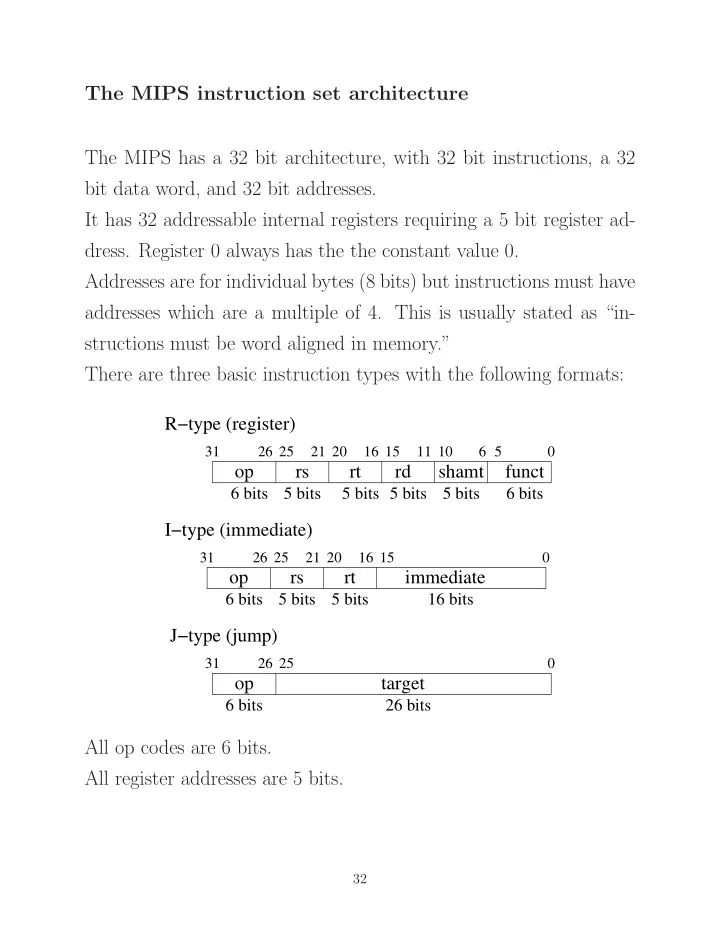
SLIDE 1 The MIPS instruction set architecture The MIPS has a 32 bit architecture, with 32 bit instructions, a 32 bit data word, and 32 bit addresses. It has 32 addressable internal registers requiring a 5 bit register ad-
- dress. Register 0 always has the the constant value 0.
Addresses are for individual bytes (8 bits) but instructions must have addresses which are a multiple of 4. This is usually stated as “in- structions must be word aligned in memory.” There are three basic instruction types with the following formats:
shamt funct
rs rt rd
31 20 21 15 16 11 10 6 5 25 26
I−type (immediate)
rs rt
31 20 21 15 16 25 26
immediate R−type (register) J−type (jump)
31 25 26
target
6 bits 6 bits 5 bits 5 bits 5 bits 5 bits 5 bits 5 bits 6 bits 16 bits 26 bits 6 bits
All op codes are 6 bits. All register addresses are 5 bits.
32
SLIDE 2 shamt funct
rs rt rd
31 20 21 15 16 11 10 6 5 25 26
R−type (register)
The R-type instructions are 3 operand arithmetic and logic instruc- tions, where the operands are contained in the registers indicated by rs, rt, and rd. For all R-type instructions, the op field is 000000. The funct field selects the particular type of operation for R-type
The shamt field determines the number of bits to be shifted (0 to 31). These instructions perform the following: R[rd] ← R[rs] op R[rt] Following are examples of R-type instructions: Instruction Example Meaning add add $s1, $s2, $s3 $s1 = $s2 + $s3 add unsigned addu $s1, $s2, $s3 $s1 = $s2 + $s3 subtract sub $s1, $s2, $s3 $s1 = $s2 - $s3 subtract unsigned subu $s1, $s2, $s3 $s1 = $s2 - $s3 and and $s1, $s2, $s3 $s1 = $s2 & $s3
- r
- r $s1, $s2, $s3 $s1 = $s2 | $s3
33
SLIDE 3 I−type (immediate)
rs rt
31 20 21 15 16 25 26
immediate
The 16 bit immediate field contains a data constant for an arithmetic
- r logical operation, or an address offset for a branch instruction.
This type of branch is called a relative branch. Following are examples of I-type instructions of type: R[rt] ← R[rs] op imm Instruction Example Meaning add addi $s1, $s2, imm $s1 = $s2 + imm add unsigned addiu $s1, $s2, imm $s1 = $s2 + imm subtract subi $s1, $s2, imm $s1 = $s2 - imm and andi $s1, $s2, imm $s1 = $s2 & imm Another I-type instruction is the branch instruction. Examples of this are: Instruction Example Meaning branch on equal beq $s1, $s2, imm if $s1 == $s2 go to PC + 4 + (4 × imm) branch on not equal bne $s1, $s2, imm if $s1 != $s2 go to PC + 4 + (4 × imm) Why is the imm field multiplied by 4 here?
34
SLIDE 4 J−type (jump)
31 25 26
target
The J-type instructions are all jump instructions. The two we will discuss are the following: Instruction Example Meaning jump j target go to address 4 × target : PC[28:31] jump and link jal target $31 = PC + 4; go to address 4 × target : PC[28:31] Why is the PC incremented by 4? Why is the target field multiplied by 4? Recall that the MIPS processor addresses data at the byte level, but instructions are addressed at the word level. Moreover, all instructions must be aligned on a word boundary (an integer multiple of 4 bytes). Therefore, the next instruction is 4 byte addresses from the current instruction. Since jumps must have an instruction as target, shifting the target address by 2 bits (which is the same as multiplying by 4) allows the instruction to specify larger jumps. Note that the jump instruction cannot span (jump across) all of memory.
35
SLIDE 5
There are a few more interesting instructions, for comparison, and memory access: R-type instructions: Instruction Example Meaning set less than slt $s1, $s2, $s3 if ($s2 < $s3), $s1=1; else $s1=0 jump register jr $ra go to $ra set less than also has an unsigned form. jump register is typically used to return from a subprogram. I-type instructions: Instruction Example Meaning set less than slti $s1, $s2, imm if ($s2 < imm), $s1=1; immediate else $s1=0 load word lw $s1, imm($s2) $s1 = Memory[$s2 + imm] store word sw $s1, imm($s2) Memory[$s2 + imm] = $s1 load word and store word are the only instructions that access memory directly. Because data must be explicitly loaded before it is operated on, and explicitly stored afterwards, the MIPS is said to be a load/store architecture. This is often considered to be an essential feature of a reduced in- struction set architecture (RISC).
36
SLIDE 6 The MIPS assembly language The previous diagrams showed examples of code in a general form which is commonly used as a simple kind of language for a processor — a language in which each line in the code corresponds to a single instruction in the language understood by the machine. For example, add $1, $2, $3 means take add together the contents of registers $2 and $3 and store the result in register $1. We call this type of language an assembly language. The language of the machine itself, called the machine language, consists only of 0’s and 1’s — a binary code. The machine language instruction corresponding to the previous in- struction (with the different fields identified) is:
31 20 21 15 16 11 10 6 5 25 26
rd shamt funct rt rs
000000 00010 00011 00001 00000 100000
There are usually programs, called assemblers, to translate the more human readable assembly code to machine language.
37
SLIDE 7 MIPS memory usage MIPS systems typically divided memory into three parts, called seg- ments. These segments are the text segment which contains the program’s instructions, the data segment, which contains the program’s data, and the stack segment which contains the return addresses for func- tion calls, and also contains register values which are to be saved and
- restored. It may also contain local variables.
- 10000000
7fffffff Reserved Static data Dynamic data stack Stack segment Data segment Text segment 400000hex
hex hex
The data segment is divided into 2 parts, the lower part for static data (with size known at compile time) and the upper part, which can grow, upward, for dynamic data structures. The stack segment varies in size during the execution of a program, as functions are called and returned from. It starts at the top of memory and grows down.
44
SLIDE 8
MIPS register names and conventions about their use
Register Name Number Usage zero Constant 0 at 1 Reserved for assembler v0 2 Expression evaluation and v1 3 results of a function a0 4 Argument 1 a1 5 Argument 2 a2 6 Argument 3 a3 7 Argument 4 t0 8 Temporary (not preserved across call) t1 9 Temporary (not preserved across call) t2 10 Temporary (not preserved across call) t3 11 Temporary (not preserved across call) t4 12 Temporary (not preserved across call) t5 13 Temporary (not preserved across call) t6 14 Temporary (not preserved across call) t7 15 Temporary (not preserved across call) s0 16 Saved temporary (preserved across call) s1 17 Saved temporary (preserved across call) s2 18 Saved temporary (preserved across call) s3 19 Saved temporary (preserved across call) s4 20 Saved temporary (preserved across call) s5 21 Saved temporary (preserved across call) s6 22 Saved temporary (preserved across call) s7 23 Saved temporary (preserved across call) t8 24 Temporary (not preserved across call) t9 25 Temporary (not preserved across call) k0 26 Reserved for OS kernel k1 27 Reserved for OS kernel gp 28 Pointer to global area sp 29 Stack pointer fp 30 Frame pointer ra 31 Return address (used by function call) 54
SLIDE 9
Presently, we are interested in the CPU only, which we concluded would have a structure similar to the following:
Address Generator PCU PC General Registers and/or Accumulator Instruction decode and Control Unit ALU M D R M A R
The memory address register (MAR) and memory data register(MDR) are the interface to memory. The ALU and register file are the core of the data path. The program control unit (PCU) fetches instructions and data, and handles branches and jumps. The instruction decode unit (IDU) is the control unit for the proces- sor.
188
SLIDE 10 The “building blocks” We have already designed many of the major components for the processor, or have at least identified how they could be implemented. For example, we have already designed an ALU, a data register, and a register file. A controller is merely a state machine, and we can implement one using, say, a PLA, after identifying the required states and transi- tions. Following are some of the combinational logic components we will use:
✲ ✲
OP S
❅ ❅ ❅ ❅ ◗ ◗✑ ✑
❄ ❅ ❅ ❅ ❅ ◗ ◗✑ ✑
❄ ❄
❄ ❄
❄ ❄
Adder Sum Carry Adder ALU Result Zero ALU Multiplexor A
32
B
32
A
32
B
32 32 32
MUX A B Y
Note that the diagram highlights the control signals (OP and S).
189
SLIDE 11 Following are some of the register components we will use:
✂ ✂❇ ❇ ✂ ✂❇ ❇ ✂ ✂❇ ❇
Write enable Clock Clock Write enable Clock Register file
✲ ✲ ✲ ✲
✲ ✲ ✲ ✲ ✲
PC 32 32 30 Register Counter Data out Data in Registers
Read Register Write register 2 register 1 Read Write data data 1 Read Read data 2
32 32 5 5 5 32
Note that the registers have a write enable input as well as a clock
- input. This input must be asserted in order for the register to be
written. We have already seen how to construct a register file from simple D registers.
190
SLIDE 12
Timing considerations In a single-cycle implementation of the processor, a single instruction (e.g., add) may require that a register be read from and written into in the same clock period. In order to accomplish this, the register file (and other register elements) must be edge triggered. This can be done by using edge triggered elements directly, or by using a master-slave arrangement similar to one we saw earlier:
❞ ❍ ❍ ✟ ✟ s
D Q D Q > >
master slave Another observation about a single cycle processor — the memory for instructions must be different from the memory for data, because both must be addressed in the same cycle. Therefore, there must be two memories; one for instructions, and one for data.
Memory Data Read data Instruction [31-0] Write data
✲ ✁ ✁ ✲ ✁ ✁ ✲ ✁ ✁ ✲ ✲ ✁ ✁ ✁ ✁
32 Address 32 Read Memory Instruction 32 Address 32 32
MemWr MemRd
Data memory Instruction memory
191
SLIDE 13 The MIPS instruction set: Following is the MIPS instruction format: shamt funct
rs rt rd
31 20 21 15 16 11 10 6 5 25 26
I-type (immediate)
rs rt
31 20 21 15 16 25 26
immediate R-type (register) J-type (jump)
31 25 26
target
6 bits 6 bits 5 bits 5 bits 5 bits 5 bits 5 bits 5 bits 6 bits 16 bits 26 bits 6 bits
We will develop an implementation of a very basic processor having the instructions: R-type instructions add, sub, and, or, slt I-type instructions addi, lw, sw, beq J-type instructions j Later, we will add additional instructions.
192
SLIDE 14 Steps in designing a processor
- Express the instruction architecture in a Register Transfer Lan-
guage (RTL)
- From the RTL description of each instruction, determine
– the required datapath components – the datapath interconnections
- Determine the control signals required to enable the datapath
elements in the appropriate sequence for each instruction
- Design the control logic required to generate the appropriate
control signals at the correct time
193
SLIDE 15 A Register Transfer Language description of some op- erations: The ADD instruction add rd, rs, rt
Fetch the instruction from memory
Set register rd to the value of the sum of the contents of registers rs and rt
calculate the address of the next in- struction All other R-type instructions will be similar. The addi instruction addi rs, rt, imm16
Fetch the instruction from memory
SignExt(imm16) Set register rt to the value of the sum of the contents of register rs and the immediate data word imm16
calculate the address of the next in- struction All immediate arithmetic and logical instructions will be similar.
194
SLIDE 16 The load instruction lw rs, rt, imm16
Fetch the instruction from memory
SignExt(imm16) Set memory address to the value of the sum of the contents of register rs and the immediate data word imm16
load the data at address Addr into register rt
calculate the address of the next in- struction The store instruction sw rs, rt, imm16
Fetch the instruction from memory
SignExt(imm16) Set memory address to the value of the sum of the contents of register rs and the immediate data word imm16
store the data from register rt into memory at address Addr
calculate the address of the next in- struction
195
SLIDE 17 The branch instruction beq rs, rt, imm16
Fetch the instruction from memory
Evaluate the branch condition
PC ← PC + 4 + (SignExt(imm16) × 4) calculate the address of the next in- struction
The jump instruction j target target is a memory address
Fetch the instruction from memory
increment PC by 4
replace low order 28 bits with concat I<25:0> << 2 the low order 26 bits from the in- struction left shifted by 2
196
SLIDE 18 The Instruction Fetch Unit Note that all instructions require that the PC be incremented. We will design a datapath which performs this function — the In- struction Fetch Unit. Its operation is described by the following:
Fetch the instruction from memory
Increment the PC
Instruction [31−0] Memory Instruction address Read PC Add 4
Note that this does not yet handle branches or jumps. Since it is the same for all instructions, when describing individual instructions this component will normally be omitted.
197
SLIDE 19 Datapath for R-type instructions
Example: add rd, rs, rt Recall that this instruction type has the following format:
R−type (register) shamt funct
rs rt rd
31 20 21 15 16 11 10 6 5 25 26 6 bits 5 bits 5 bits 5 bits 6 bits 5 bits
The datapath contains the 32 bit register file and and ALU capable
- f performing all the required arithmetic and logic functions.
data Write Register Write Read Register 2 Register 1 Read Read data 1 Read data 2 ALU Result 32 Registers 32 32 rs rt rd clk ALUCtr RegWr Inst[15−11] Inst[20−16] Inst[25−21] BusA BusB Inst
Note that the register is read from and written to at the “same time.” This implies that the register’s memory elements must be edge triggered, or are read and written on different clock phases, to allow the arithmetic operation to complete before the data is written in the register.
198
SLIDE 20 This datapath contains everything required to implement the re- quired instructions add, sub, and, or, slt. All that is required is that the appropriate values be provided for the ALUCtr input for the required operation. The register operands in the instruction field determine the regis- ters which are read from and written to, and the funct field of the instruction determine which particular ALU operation is executed. Recalling the control inputs for the ALU seen earlier, the values for the control input are: ALU control lines Function 000 and 001
010 add 110 subtract 111 set on less than A control unit for the processor will be designed later. It will set all the required control signals for each instruction, de- pending both on the particular instruction being executed (the op code) and, for r-type instructions, the funct field.
199
SLIDE 21 Datapath for Immediate arithmetic and logical instruc- tions
Example: addi rt, rs, imm16 Recall that this instruction type has the following format:
I−type (immediate)
rs rt
31 20 21 15 16 25 26
immediate
6 bits 5 bits 5 bits 16 bits
The main difference between this and an r-type instruction is that here one operand is taken from the instruction, and sign extended (for signed data) or zero extended (for logical and unsigned operations.)
RegDst ALUSrc data Write Register Write Read Register 2 Register 1 Read Read data 1 Read data 2 ALU Registers Inst[20−16] Inst[25−21] 32 extend 16 imm16 rs rt ALUCtr BusB BusA 32 32 Clk RegWr M U X 1 M U X 1 Inst[15−0] Inst[15−11] Sign
Note the use of MUX’s (with control inputs) to add functionality.
200
SLIDE 22 Datapath for the Load instruction lw rt, rs, imm16
SignExt(imm16) Calculate the memory address
load the data into register rt This is also an immediate type instruction:
I−type (immediate)
rs rt
31 20 21 15 16 25 26
immediate
6 bits 5 bits 5 bits 16 bits
Clk
RegWr AluSrc AluCtr RegDst MemRd MemtoReg
M U X 1 data Write Read data Memory Data M U X 1 data Write Register Write Read Register 2 Register 1 Read Read data 1 Read data 2 extend Sign ALU Address Registers Inst[20−16] Inst[25−21] Inst[15−11] 16 32 Inst[15−0] 32 M U 1 X 32 BusB BusA 32 32 32 Data In
201
SLIDE 23 Datapath for the Store instruction sw rt, rs, imm16
SignExt(imm16) Calculate the memory address
Store the data from register rt to memory This is also an immediate type instruction:
I−type (immediate)
rs rt
31 20 21 15 16 25 26
immediate
6 bits 5 bits 5 bits 16 bits
M U X 1 data Write Read data Memory Data M U X 1 data Write Register Write Read Register 2 Register 1 Read Read data 1 Read data 2 extend Sign ALU Address Registers Inst[20−16] Inst[25−21] Inst[15−11] 16 32 Clk Inst[15−0]
RegWr AluSrc AluCtr MemWr MemtoReg
32
RegDst
32
MemRd
BusA BusB Data In 32 32 M U X 1
202
SLIDE 24 Datapath for the Branch instruction beq rt, rs, imm16
Calculate the branch condition
PC ← PC + 4 + (SignExt(imm16) × 4) calculate the address of the next in- struction
This is also an immediate type instruction. In the load and store instructions, the ALU was used to calculate the address for data memory. It is possible to do this for the branch instructions as well, but it would require first performing the comparison using the ALU, and then using the ALU to calculate the address. This would require two clock periods, in order to sequence the oper- ations correctly. A faster implementation would be to provide another adder to im- plement the address calculation. This is what we will do, for the present example.
203
SLIDE 25 RegWr RegDst
Zero
ALUSrc ALUCtr Branch
PCSrc
M U X 1 data Write Register Write Read Register 2 Register 1 Read Read data 1 Read data 2 extend Sign Instruction [31−0] Memory Instruction address Read PC Add 4 Registers Inst[20−16] Inst[25−21] Inst[15−11] 16 32 Inst[15−0] ALU Add M U X 1 Shift left 2 M U X 1
204
SLIDE 26 Datapath for the Jump instruction j target
concat target<25:0> Calculate the jump address by con- catenating the high order 4 bits of the PC with the target address Here, the address calculation is just obtained from the high order 4 bits of the PC and the 26 bits (shifted left by 2 bits to make 28) of the target address. The additions to the datapath are straightforward.
6 bits
J−type (jump)
31 25 26
target address
26 bits
205
SLIDE 27 RegWr RegDst
Zero
ALUSrc ALUCtr Branch Jump
PCSrc
M U X 1 data Write Register Write Read Register 2 Register 1 Read Read data 1 Read data 2 extend Sign Instruction [31−0] Memory Instruction address Read PC Add 4 Shift left 2 M U X 1 Registers Inst[20−16] Inst[25−21] Inst[15−11] 16 32 Inst[15−0] ALU Add M U X 1 M U X 1 Shift left 2
206
SLIDE 28 Putting it together The datapath was shown in segments, some of which built on each
Required control signals were identified, and all that remains is to:
- 1. Combine the datapath elements
- 2. Design the appropriate control signals
Combining the datapath elements is rather straightforward, since we have mainly built up the datapath by adding functionality to accommodate the different instruction types. When two paths are required, we have implemented both and used multiplexors to choose the appropriate results. The required control signals are mainly the inputs for those MUX’s and the signals required by the ALU. The next slide shows the combined data path, and the required con- trol signals. The actual control logic is yet to be designed.
207
SLIDE 29 control ALU MemRead MemtoReg MemWrite ALUSrc RegWrite ALUOp Inst [31−26] RegDst Branch Control Jump PCSrc Inst[5−0] M U X 1 Shift left 2 extend Sign Shift left 2 M U X 1 M U X 1 data Write Register Write Read Register 2 Register 1 Read Read data 1 Read data 2 Registers M U X 1 Instruction [31−0] Memory Instruction address Read Add 4 PC data Write Read data Memory Data Address M U X 1 Add Zero 16 32 Inst[25−0] 26 28 PC+4[31−28] Jump address[31−0]
funct
32 32 ALU 32 32 32 32 BusA BusB Inst[20−16] Inst[15−11]
rt rd rs
Inst[25−21] Inst[15−0] 32
208
SLIDE 30 Designing the control logic The control logic depends on the details of the devices in the control path, and on the individual bits in the op code for the instructions. The arithmetic and logic operations for the r-type instructions also depend on the funct field of the instruction. The datapath elements we have used are:
- a 32 bit ALU with an output indicating if the result is zero
- adders
- MUX’s (2 line to 1-line)
- a 32 register × 32 bits/register register file
- individual 32 bit registers
- a sign extender
- instruction memory
- data memory
209
SLIDE 31
The ALU — a single bit
+
1 1 3 2 Carryin Operation Binvert a b Less Result Carryout
Note that there are three control bits; the single bit Binvert, and the two bit input to the MUX, labeled Operation. The ALU performs the operations and, or, add, and subtract.
210
SLIDE 32 The 32 bit ALU
a0 b0 Carryin ALU0 Less CarryOut Result0 Carryin ALU31 a31 b31 Less Overflow zero Operation Carryin ALU1 Less CarryOut a1 b1 Result1 Result31 Set Binvert Carryin ALU2 Less CarryOut a2 b2 Result2
ALU control lines Function 000 and 001
010 add 110 subtract 111 set on less than
211
SLIDE 33
We will design the control logic to implement the following instruc- tions (others can be added similarly): Name Op-code Op5 Op4 Op3 Op2 Op1 Op0 R-format lw 1 1 1 sw 1 1 1 1 beq 1 j 1 Note that we have omitted the immediate arithmetic and logic func- tions. The funct field will also have to be decoded to produce the required control signals for the ALU. A separate decoder will be used for the main control signals and the ALU control. This approach is sometimes called local decoding. Its main advantage is in reducing the size of the main controller.
212
SLIDE 34 The control signals The signals required to control the datapath are the following:
- Jump — set to 1 for a jump instruction
- Branch — set to 1 for a branch instruction
- MemtoReg — set to 1 for a load instruction
- ALUSrc — set to 0 for r-type instructions, and 1 for instructions
using immediate data in the ALU (beq requires this set to 0)
- RegDst — set to 1 for r-type instructions, and 0 for immediate
instructions
- MemRead — set to 1 for a load instruction
- MemWrite — set to 1 for a store instruction
- RegWrite — set to 1 for any instruction writing to a register
- ALUOp (k bits) — encodes ALU operations except for r-type
- perations, which are encoded by the funct field
For the instructions we are implementing, ALUOp can be encoded using 2 bits as follows: ALUOp[1] ALUOp[0] Instruction memory operations (load, store) 1 beq 1 r-type operations
213
SLIDE 35
The following tables show the required values for the control signals as a function of the instruction op codes: Instruction Op-code RegDst ALUSrc MemtoReg Reg Write r-type 0 0 0 0 0 0 1 1 lw 1 0 0 0 1 1 1 1 1 sw 1 0 1 0 1 1 x 1 x beq 0 0 0 1 0 0 x x j 0 0 0 0 1 0 x x x Instruction Op-code Mem Mem Branch ALUOp[1:0] Jump Read Write r-type 0 0 0 0 0 0 1 0 lw 1 0 0 0 1 1 1 0 0 sw 1 0 1 0 1 1 1 0 0 beq 0 0 0 1 0 0 1 0 1 j 0 0 0 0 1 0 x x 1 This is all that is required to implement the control signals; each control signal can be expressed as a function of the op-code bits. For example, RegDst = Op5 · Op4 · Op3 · Op2 · Op1 · Op0 ALUSrc = Op5 · Op4 · Op2 · Op1 · Op0 All that remains is to design the control for the ALU.
214
SLIDE 36 The ALU control The inputs to the ALU control are the ALUOp control signals, and the 6 bit funct field. The funct field determines the ALU operations for the r-type op- erations, and ALUOp signals determine the ALU operations for the
- ther types of instructions.
Previously, we saw that if ALUOp[1] was 1, it indicated an r-type
- peration. ALUOp[0] was set to 0 for memory operations (requiring
the ALU to perform an add operation to calculate the address for data) and to 1 for the beq operation, requiring a subtraction to compare the two operands. The ALU itself requires three inputs. The following table shows the required inputs and outputs for the instructions using the ALU: Instruction ALUOp funct ALU ALU control
input lw 0 0 x x x x x x add 0 1 0 sw 0 0 x x x x x x add 0 1 0 beq 0 1 x x x x x x subtract 1 1 0 add 1 0 1 0 0 0 0 0 add 0 1 0 sub 1 0 1 0 0 0 1 0 subtract 1 1 0 and 1 0 1 0 0 1 0 0 AND 0 0 0
1 0 1 0 0 1 0 1 OR 0 0 1 slt 1 0 1 0 1 0 1 0 set on less than 1 1 1
215
SLIDE 37 The time required for single cycle instructions
- Inst. Memory
- Reg. Read mux
PC ALU mux Reg. Write
- Inst. Memory
- Reg. Read mux
- Inst. Memory
- Reg. Read mux
- Inst. Memory
PC PC PC mux mux Reg. Write Data Mem. ALU ALU (The sign extension and add occur in parallel with the other operations, register read and ALU comparision )
- Inst. Memory
- Reg. Read mux
Sign ext. add PC ALU mux mux Data Memory Arithmetic and logical instructions time Branch Store Load Jump The "critical path"
The clock period must be at least as long as the time for the critical path.
223
SLIDE 38 Looking back at the instruction timing for the single cycle processor, we see that the load instruction requires two memory accesses, and therefore will require at least two cycles.
- Inst. Memory Reg. Read mux
PC ALU mux Reg. Write
- Inst. Memory Reg. Read mux
PC mux Reg. Write ALU Data Memory
✛ ✲
Load The ”critical path”
PC mux Jump
✲
Arithmetic and logical instructions time
Considering the option of using the ALU to increment the PC, note also that if the PC is read at the beginning of a cycle and loaded at the end of the cycle, then it can be incremented in parallel with the memory access. Also, if the diagram really represents the time for the various operations, the register and MUX operations together require approximately the same time as a memory operation, requiring five cycles in total.
- Inst. Memory Reg. Read mux
mux Reg. Write ALU Data Memory PC
✛ ✲
The ”critical path” 1 2 3 4 5
233
SLIDE 39 A multi-cycle implementation We will consider the design of a multi-cycle implementation of the processor developed so far. The processor will have:
- a single memory for instructions and data
- a single ALU for both addressing and data operations
- instructions requiring different numbers of cycles
There are now resource limitations — only one access to memory,
- ne access to the register file, and one ALU operation can occur in
each clock cycle. It is clear that both the instruction and data would be required during the execution of an instruction. Additional registers, the instruction register (IR) and the memory data register (MDR) will be required to hold the instruction and data words from memory between cycles. Registers may also be required to hold the register operands from BusA and BusB (registers A and B, respectively). (Recall that the branch instructions require an arithmetic compari- son before an address calculation.) We will look at each type of instruction individually to determine if it can actually be done with the time and resources available.
234
SLIDE 40 The R-type instructions
Example: add rd, rs, rt
- Inst. Memory Reg. Read mux
ALU mux Reg. Write PC 1 2 3 4
Clearly, the instruction can be completed in four cycles, from the
- timing. We need only determine if the required resources are avail-
able.
- In the first cycle, the instruction is fetched from memory, and
the ALU is used to increment the PC. The instruction must be saved in the instruction register (IR) so it can be used in the following cycles. (This may extend the cycle time).
- In the second cycle, the registers are read, and the values from
the registers to be used by the ALU must be saved, in registers A and B, again new registers.
- In the third cycle, the r-type operation is completed in the ALU,
and the result saved in another new register, ALUOut.
- In the fourth cycle, the value in register ALUOut is written into
the register file. Four registers had to be added to preserve values from one cycle to the next, but there were no resource conflicts — the ALU was required only in the first and third cycle.
235
SLIDE 41 We can capture these steps in an RTL description: Cycle 1 IR ← mem[PC] Save instruction in IR PC ← PC + 4 increment PC Cycle 2 A ← R[rs] save register values for next cycle B ← R[rt] Cycle 3 ALUOut ← A op B calculate result and store in ALUOut Cycle 4 R[rd] ← ALUOut store result in register file This is really an expansion of the original RTL description of the R-type instructions, where the internal registers are also used. The
mem[PC] Fetch the instruction from memory R[rd] ← R[rs] op R[rt] Set register rd to the value of the
- peration applied to the contents of
registers rs and rt PC ← PC + 4 calculate the address of the next in- struction When using a “silicon compiler” to design a processor, designers often refine the RTL description in a similar way in order to achieve a more efficient implementation for the datapath or control.
236
SLIDE 42 The Branch instruction — beq
Calculate the branch condition
PC ← PC + 4 + (SignExt(imm16) × 4) calculate the address of the next in- struction
- else PC ← PC + 4
- Inst. Memory Reg. Read mux
Sign ext. add ALU mux mux PC 1 2 3
In this case, three arithmetic operations are required, (incrementing the PC, comparing the register values, and adding the immediate field to the PC.) Clearly, the comparison could not be done until the values have been read from the register, so this must be done in cycle 3. The address calculation could be done in cycle 2, however, since it uses only data from the instruction (the immediate field) and the new value of the PC, and the ALU is not being used in this cycle. The result would have to be stored in a register, to be used in the next cycle. We could use the register ALUOut for this, since the R-type operations only require it at the end of cycle 3. Recall that the ALU produced an output Zero which could be used to implement the comparison. It is available during the third cycle, and could be used to enable the replacement of the PC with the value stored in ALUOut in the previous cycle.
237
SLIDE 43 The original RTL for the beq was:
Fetch the instruction from memory
Evaluate the branch condition
PC ← PC + 4 + (SignExt(imm16) × 4) calculate the address of the next in- struction
Rewriting the RTL code for the beq instruction, including the oper- ations on the internal registers, we have: Cycle 1 IR ← mem[PC] Save instruction in IR PC ← PC + 4 increment PC Cycle 2 A ← R[rs] save register values for next cycle B ← R[rt] (for comparison) ALUOut ← PC + calculate address for branch signextend(imm16) << 2 and place in ALUOut Cycle 3 Compare A and B if Zero is set replace PC with ALUOut if Zero then PC ← ALUOut is set, otherwise do not change PC Note that this instruction now requires three cycles. Also, the first cycle is identical to that of the R-type instructions. The second cycle does the same as the R-type, and also does the address calculation. Note that, at this point, the instruction may not require the result of the address calculation, but it is calculated anyway.
238
SLIDE 44 The Load instruction
- Addr ← R[rs] + SignExt(imm16) Calculate the memory address
- R[rt] ← Mem[Addr]
load data into register rt
- Inst. Memory Reg. Read mux
mux Reg. Write ALU Data Memory PC 1 2 3 4 5
Clearly, the first cycle is the same as in the previous examples. For the second cycle, register R[rs] contains part of an address, and register R[rt] contains a value to be saved in memory (for store)
- r to be replaced from memory (for load). They must therefore be
saved in registers (A and B) for future use, like the previous instruc- tions. In the third cycle, the address is calculated from the contents of A and the imm16 field of the instruction and stored in a register (ALUOut) for use in the next cycle. This address (now in ALUOut) is used to access the appropriate mem-
- ry location in the fourth cycle, and the contents of memory are
placed in a register MDR, the memory data register. In the fifth cycle, the contents of the MDR are stored in the register file in register R[rt].
239
SLIDE 45 The original RTL for load was:
Fetch the instruction from memory
SignExt(imm16) Set memory address to the value of the sum of the contents of register rs and the immediate data word imm16
load the data at address Addr into register rt
calculate the address of the next in- struction The RTL for this implementation is: Cycle 1 IR ← mem[PC] Save instruction in IR PC ← PC + 4 increment PC Cycle 2 A ← R[rs] save address register for next cycle B ← R[rt] Cycle 3 ALUOut ← A + calculate address for data signextend(imm16) and place in ALUOut Cycle 4 MDR ← Mem[ALUOut] store contents of memory at address ALUOut in MDR Cycle 5 R[rt] ← MDR store value originally from memory in R[rt] Recall that this instruction was the longest instruction in the single cycle implementation.
240
SLIDE 46 The Store instruction
- Addr ← R[rs] + SignExt(imm16) Calculate the memory address
- Mem[Addr] ← R[rt]
store the contents of register rt in memory
- Inst. Memory Reg. Read mux
ALU Data Memory PC 1 2 3 4
The store instruction is much like the load instruction, except that the value in register R[rt] is written into memory, rather than read from it. The main difference is that, in the fourth cycle, the address calculated from R[rs] and imm16 (and saved in ALUOut) is used to store the value from register R[rt] in memory. A fifth cycle is not required.
241
SLIDE 47 The Jump instruction
concat target<25:0> Calculate the jump address by con- catenating the high order 4 bits of the PC with the target address
PC mux 1 2
The first cycle, which fetches the instruction from memory and places it in IR, and increments PC by 4, is the same as other instructions. The next operation is to concatenate the low order 26 bits of the instruction with the high order 4 bits of the PC. In the PC, the low order 2 bits are 0, so they are not actually loaded
The shift of the bits from the instruction can be accomplished without any additional hardware, merely by connecting bit IR[25] to bit PC[27], etc. Note that adding 4 to the PC may cause the four high order bits to change. Could this cause problems ?
243
SLIDE 48
Changes to the datapath for a multi-cycle implementa- tion We have found that several additional registers are required in the multi-cycle datapath in order to save information from one cycle to the next. These were the registers IR, MDR, A, B, and ALUOut. The overall hardware complexity may be reduced, however, since the adders required for addressing have been replaced by the ALU. Recall that the primary reason for choosing five cycles was the as- sumption that the time to obtain a value from memory was the single slowest operation in the datapath. Also, we assumed that the register file operations take a smaller, but comparable, amount of time. If either of these conditions were not true, then quite a different schedule of operations might have been chosen.
245
SLIDE 49 The datapath for the multi-cycle processor Fortunately, after our design of the single cycle processor, we have a good idea of the datapath elements required to implement each individual instruction. We can also seek opportunities to reuse func- tional blocks in different cycles, potentially reducing the number of hardware blocks (and hence the complexity and cost) of the datap- ath. The datapath for the multi-cycle processor is similar to that of the single cycle processor, with
- the addition of the registers noted (IR, MDR, A, B, and ALUOut)
- the elimination of the adders for address calculation
- a MUX must be extended because there are now three separate
calculations for the next address (jump, branch, and the normal incrementing of the PC).
- additional control signals controlling the writing of the registers.
The following diagrams show the datapath for the multi-cycle imple- mentation of the processor. The additions to the datapath for each cycle is shown in red. The required control signals are shown in green in the final figure.
249
SLIDE 50 PC ALU Zero 4 Memory Write data MemData Address M U X 1 M X U M X U M U X Inst[31−26] Inst[25−21] Inst[15−0] Instruction Register Inst[20−16] PCW MemWrite MemRead IorD IRWrite ALUSrcA ALUSrcB ALU PCSource
250
SLIDE 51 32 BusA BusB rs rt 16 3 Registers Read Register 2 A B Read data 1 Register 1 Read data 2 Register Write data Write Read extend Sign Shift left 2 ALUOut RegWrite PC ALU Zero 4 Memory Write data MemData Address M U X 1 M X U M X U M U X Inst[31−26] Inst[25−21] Inst[15−0] Instruction Register Inst[20−16] PCW MemWrite MemRead IorD IRWrite ALUSrcA ALUSrcB ALU PCSource
251
SLIDE 52 PC[31−28] 28 address Jump Inst[25−0] 26 2 1 2 Shift left 2 1 32 BusA BusB rs rt 16 3 Registers Read Register 2 A B Read data 1 Register 1 Read data 2 Register Write data Write Read extend Sign Shift left 2 ALUOut RegWrite PC ALU Zero 4 Memory Write data MemData Address M U X 1 M X U M X U M U X Inst[31−26] Inst[25−21] Inst[15−0] Instruction Register Inst[20−16] PCW MemWrite MemRead IorD IRWrite ALUSrcA ALUSrcB ALU PCSource
252
SLIDE 53 1 Memory Data Register PC[31−28] 28 address Jump Inst[25−0] 26 2 1 1 2 Shift left 2 32 BusA BusB rs rt 16 3 Registers Read Register 2 A B Read data 1 Register 1 Read data 2 Register Write data Write Read extend Sign Shift left 2 ALUOut RegWrite PC ALU Zero 4 Memory Write data MemData Address M U X 1 M X U M X U M U X Inst[31−26] Inst[25−21] Inst[15−0] Instruction Register Inst[20−16] PCW MemWrite MemRead IorD IRWrite ALUSrcA ALUSrcB ALU PCSource
253
SLIDE 54 M U X 1 rd Inst[15−11] M U X 1 RegDst MemtoReg 1 Memory Data Register 1 Memory Data Register PC[31−28] 28 address Jump Inst[25−0] 26 2 1 2 Shift left 2 1 PC[31−28] 28 address Jump Inst[25−0] 26 2 1 1 2 Shift left 2 32 BusA BusB rs rt 16 3 Registers Read Register 2 A B Read data 1 Register 1 Read data 2 Register Write data Write Read extend Sign Shift left 2 ALUOut RegWrite 32 BusA BusB rs rt 16 3 Registers Read Register 2 A B Read data 1 Register 1 Read data 2 Register Write data Write Read extend Sign Shift left 2 ALUOut RegWrite PC ALU Zero 4 Memory Write data MemData Address M U X 1 M X U M X U M U X Inst[31−26] Inst[25−21] Inst[15−0] Instruction Register Inst[20−16] PCW MemWrite MemRead IorD IRWrite ALUSrcA ALUSrcB ALU PCSource
254
SLIDE 55 Inst[5−0] RegWrite RegDst IRWrite MemRead PCWriteCond PCWrite IorD MemWrite ALUSrcA ALUSrcB ALUOp Control Outputs funct
ALU control MemtoReg
PCSource M U X 1 M U X 1 rd Inst[15−11] MemtoReg RegDst 1 Memory Data Register PC[31−28] 28 address Jump Inst[25−0] 26 2 1 1 2 Shift left 2 32 BusA BusB rs rt 16 3 Registers Read Register 2 A B Read data 1 Register 1 Read data 2 Register Write data Write Read extend Sign Shift left 2 ALUOut RegWrite PC ALU Zero 4 Memory Write data MemData Address M U X 1 M X U M X U M U X Inst[31−26] Inst[25−21] Inst[15−0] Instruction Register Inst[20−16] PCW MemWrite MemRead IorD IRWrite ALUSrcA ALUSrcB ALU PCSource
255
SLIDE 56
The control signals The following control signals are identified in the datapath: Action when Signal 0 (deasserted) 1 (asserted) RegDst the register written is the rt field the register written is the rd field RegWrite the register file will not be written into the register addressed by the instruction will be written into ALUSrcA the first ALU operand is the PC the first ALU operand is register A MemRead no memory read occurs the contents of memory at the specified address is placed on the data bus MemWrite no memory write occurs the contents of register B is written to memory at the specified address MemtoReg the value written to the register file comes from ALUOut the value written to the register file comes from the MDR
256
SLIDE 57
Action when Signal 0 (deasserted) 1 (asserted) IorD the memory address comes from the PC (an instruction) the memory address comes from ALUOut (a data read) IRWrite the IR is not written into the IR is written into (an instruction is read) PCWrite none (see below) the PC is written into; the value comes from the MUX controlled by the signal PCSource PCWriteCond if both it and PCWrite are not asserted, the PC is not written the PC is written if the ALU output Zero is active
257
SLIDE 58
Following are the 2-bit control signals: Signal Value Action taken ALUOp 00 ALU performs ADD operation 01 ALU performs SUBTRACT operation 10 ALU performs operation specified by funct field ALUSrcB 00 the second ALU operand is from register B 01 the second ALU operand is 4 10 the second ALU operand is the sign extended low order 16 bits of the IR (imm16) 11 the second ALU operand is the sign extended low order 16 bits of the IR shifted left by 2 bits PCSource 00 the PC is updated with the value PC + 4 01 the PC is updated with the value in regis- ter ALUOut (the branch target address, for a branch instruction) 10 the PC is updated with the jump target address The control unit must now be designed. Since the instructions will now require several states, the control will be a state machine, with the instruction op codes as inputs and the control signals as outputs.
258
SLIDE 59
Review of instruction cycles and actions Cycle Instruction type action IF all IR ← Memory[PC] PC ← PC + 4 ID all A ← Reg[rs] B ← Reg[rt] ALUOut ← PC + (imm16 <<2) EX R-type ALUOut ← A op B Load/Store ALUOut ← A + sign-extend(imm16) Branch if (A == B) then PC ← ALUOut Jump PC ← PC[31:28] || (IR[25:0] <<2) MEM Load MDR ← Memory[ALUOut] Store Memory[ALUOut] ← B WB R-type Reg[rd] ← ALUOut Load Reg[rt] ← MDR Note that the first two steps are required for all instructions, and all instructions require at least the first 3 cycles. The MEM step is required only by the load and store instructions. The ALU control unit is still a combinational logic block, as before.
259
SLIDE 60
Design of the control unit The control unit is a state machine, implementing the state sequenc- ing for every instruction. Following is a partial state machine, detailing the IF and ID stages, which are the same for all instructions:
IorD = 0 ALUSrcA = 0 Memread = 1 IRWrite = 1 ALUSrcB = 01 ALUOp = 00 PCWrite = 1 PCSource = 00 ALUSrcB = 11 ALUOp = 00 ALUSrcA = 0 1 Start IF ID OP = ’BEQ’ OP = ’R−type’ OP = ’SW’ OP = ’LW’ OP = ’J’
The partial state machines which implement each of the instructions follow.
260
SLIDE 61 The combined control unit
MemtoReg = 0 RegWrite = 1 RegDst = 1 7 IorD = 1 MemRead = 1 3 IorD = 1 MemWrite = 1 5 RegWrite = 1 MemtoReg = 1 RegDst = 0 4 IorD = 0 ALUSrcA = 0 Memread = 1 IRWrite = 1 ALUSrcB = 01 ALUOp = 00 PCWrite = 1 PCSource = 00 ALUSrcB = 11 ALUOp = 00 ALUSrcA = 0 1 9 PCSource = 10 PCWrite = 1 ALUSrcB = 10 ALUOp = 00 ALUSrcA = 1 2 ALUSrcB = 00 ALUOp = 10 ALUSrcA = 1 6 ALUSrcA = 1 ALUSrcB = 00 ALUOp = 01 PCWriteCond = 1 8 PCSource = 01 OP = ’LW’ OP = ’SW’ Start OP = ’J’ OP = ’BEQ’ OP = ’LW’
OP = ’SW’ OP = ’R−type’
264
SLIDE 62 Implementing the control unit All that remains is to implement the control unit is to design the control logic itself. Inputs are the instruction op codes, as before, and the outputs are the control signals. The following steps are typically followed in the implementation of any sequential device:
- Construct the state diagram or equivalent (done).
- Assign numeric (binary) values to the states.
- Choose a memory element for state memory. (Normally, these
would be D flip flops or JK flip flops.)
- Design the combinational logic blocks to implement the next-
state functions.
- Design the combinational logic blocks to implement the outputs.
The actual implementation can be done in a number of ways; as discrete logic, a PLA, read-only memory, etc. Typically, the control unit would be automatically generated from a description in some high level design language.
265
SLIDE 63 Adding exception handling We will implement the hardware and control functions to handle two types of exceptions; undefined instruction and arithmetic overflow. Recall that the ALU had an overflow detection output, which can be used as an input to the controller.
- 1. We will use a register labeled Cause to store a number (0 or 1)
to identify the type of exception, (0 for undefined instruction, 1 for arithmetic overflow). It requires a control signal CauseWrite to be generated by the controller. The controller also must set the value written to the register, depending on whether or not the exception was an arithmetic overflow. The control signal IntCause is used to set this value.
- 2. The PC will be set to memory address C0000000 where the
- perating system is expected to provide an event handler.
This is accomplished by adding another input (input 3) to the MUX which updates the PC address. The MUX is controlled by the 2-bit signal PCSource.
- 3. The address of the instruction which caused the exception is
stored in the register EPC, a 32 bit register. Writing to this register is controlled by the new signal EPCWrite.
291
SLIDE 64
Storing the address of the instruction can be done several ways; for example, it could be stored at the beginning of each instruction. This would require a change to the datapath, and a way to disable the storing of the address after each exception. It is possible to store the address with only a small change to the datapath (merely adding the EPC register to accept the output of the ALU). Recall that the next address (PC + 4) is calculated in the ALU, and is written to the PC in the first cycle of every instruction. The ALU can be used to subtract the value 4 from the PC after an exception is detected, but before it is written into the EPC, so it contains the actual address of the present instruction. (Actually, there would be no real problem with saving the value PC + 4 in the EPC; the interrupt handler could be responsible for the subtraction.) So, in order to handle these two exceptions, we have added two registers — EPC and Cause, and three control signals — EPCWrite, IntCause, and CauseWrite. The changes to the processor datapath and control signals required for the implementation of the exceptions detailed above are shown in the following diagram.
292
SLIDE 65 ALU control RegWrite RegDst IRWrite MemRead MemWrite ALUSrcA ALUSrcB
Outputs Control EPCWrite CauseWrite PCSource ALUOp IorD PCWrite PCWriteCond MemtoReg IntCause PC M U X 1 Inst[31−26] Inst[25−21] Inst[20−16] Inst[15−0] Instruction Register M U X 1 Memory Data Register extend Sign Shift left 2 data Write Register Write Read Register 2 Register 1 Read Read data 1 Read data 2 Registers B A M X U 1 2 3 M U X 1 Shift left 2 M X U Memory Write data MemData ALU Zero Inst[5−0] 32 BusA BusB 4 Address PC[31−28] 28 address Jump funct rs rt M U X 1 Inst[25−0] 26 16 Inst[15−11] rd Cause 1 C0000000 2 1 3 M U X 1
ALUOut EPC
293
SLIDE 66 Adding exception handling to the control unit The exceptions overflow and undefined can be implemented by the addition of only one state each:
IntCause = 1 CauseWrite = 1 ALUSrcA = 0 ALUSrcB = 01 ALUOp = 01 PCSource = 11 EPCWrite = 1 PCWrite = 1 11 CauseWrite = 1 ALUSrcA = 0 ALUSrcB = 01 ALUOp = 01 PCSource = 11 EPCWrite = 1 PCWrite = 1 IntCause = 0 10
OP = ’other’ to state 0
The input overflow is an output from the ALU. It is a combi- national logic output, produced while the ALU is performing the selected operation.
294
SLIDE 67 The control unit, with exception handling
IorD = 0 ALUSrcA = 0 Memread = 1 IRWrite = 1 ALUSrcB = 01 ALUOp = 00 PCWrite = 1 PCSource = 00 ALUSrcB = 11 ALUOp = 00 ALUSrcA = 0 1 9 PCSource = 10 PCWrite = 1 ALUSrcB = 00 ALUOp = 10 ALUSrcA = 1 6 ALUSrcB = 10 ALUOp = 00 ALUSrcA = 1 2 IorD = 1 MemRead = 1 3 IorD = 1 MemWrite = 1 5 RegWrite = 1 MemtoReg = 1 RegDst = 0 4 MemtoReg = 0 RegWrite = 1 RegDst = 1 7 IntCause = 1 CauseWrite = 1 ALUSrcA = 0 ALUSrcB = 01 ALUOp = 01 PCSource = 11 EPCWrite = 1 PCWrite = 1 CauseWrite = 1 ALUSrcA = 0 ALUSrcB = 01 ALUOp = 01 PCSource = 11 EPCWrite = 1 PCWrite = 1 IntCause = 0 ALUSrcA = 1 ALUSrcB = 00 ALUOp = 10 PCWriteCond = 1 8 PCSource = 01 Start OP = ’J’ OP = ’BEQ’ OP = ’LW’
OP = ’SW’ OP = ’R−type’ OP = ’LW’ OP = ’SW’ OP = ’other’ 11 10
The ALU operation which could result in an overflow is done in the EX cycle, and the overflow signal is only available then, unless it is saved in a register.
295
SLIDE 68
More about interrupts The ability to handle interrupts and exceptions is an important fea- ture for processors. We have added the control logic to detect the two types of excep- tions described earlier, but note that the Cause and the EPC register cannot be read. Instructions would have to be provided to allow these registers to be read and manipulated. Processors usually have policies relating to exceptions. The MIPS processor had the policy that instructions which cause an exception has no effect (e.g., nothing is written into a register.) For some exceptions, if this policy is used, the operation may have to complete before the exception can be detected, and the result of the operation must then be “rolled back.” This makes the implementation of exceptions difficult — sometimes the state prior to an operation must be saved so it can be restored. This constraint alone sometimes results in instructions requiring more cycles for their implementation.
299
SLIDE 69 Exceptions and interrupts in other processors A common type of interrupt is a vectored interrupt. Here, differ- ent interrupts or exceptions jump to different addresses in memory. The operating system places an appropriate interrupt handler for the particular interrupt at each of these locations. A vectored interrupt both identifies the type of interrupt, and pro- vides the handler at the same time. (Since different interrupts or exceptions have different vectors.) In the INTEL processors, it is the responsibility of the interrupting device to provide the interrupt vector. (This is usually done by
- ne of the peripheral controller chips, under control of the operating
system.) A major problem with the PC architecture is that only a small num- ber of interrupts (typically 16) can be handled by the controller chip. this has lead to many problems with hardware devices “sharing in- terrupts” — defeating the advantages of vectored interrupts. We will look at interrupts again, later, when we discuss input and
300
SLIDE 70 Some questions about exceptions and interrupts The following questions often have different answers for different pro- cessors:
- How does a processor return control of the program flow from
the exception or interrupt handler to the interrupted program? Some processors have explicit instructions for this (e.g., the MIPS processors), others treat interrupts and exceptions as being sim- ilar to subprogram calls (INTEL processors do this.)
- What happens when an exception or interrupt is itself inter-
rupted? Some processors save the return addresses in a stack data struc- ture, and successive levels of interrupts just increase the stack
- depth. Typically, this is the way subprogram return addresses
are also stored. Some processors automatically turn off the interrupt capability at the beginning of an interrupt, and it must be explicitly turned back on by the interrupt or exception handler to accept another interrupt. Some processors have both features — instructions can turn the interrupt capability on and off, and can allow interrupts to be interrupted themselves. (This turns out to be important for implementing certain operating system functions.)
301
SLIDE 71 Comments on our implementation of exceptions Note that our implementation has only one register for the address
- f the interrupting instruction, and no way to read that address and
modify it to resume the program where the exception occurred. What changes would be required to the instruction set accomplish this? The simplest solution would probably be to allow only one interrupt at a time, by disabling the interrupt capability, and to provide:
- 1. An instruction to store the EPC in the register file.
- 2. An instruction to store the Cause register in the register file.
- 3. An instruction to turn on interrupt capability after the next
instruction completed execution. (This assumes that the next instruction restores the PC to the address of the instruction fol- lowing the one that caused the exception.) Note that these would require changes to the datapath and control. This example was just to give the flavor of the problems involved with handling exceptions in the processor. More complex instruction sets and architectures exacerbate the problems.
302
SLIDE 72 Comments on handling interrupts Although exception handling is complex, it is often simpler than the handling of external interrupts. Exceptions occur as a result of occurrences internal to the processor. Consequently, they are usually both predictable, and occur and are detected at known times in the execution of a particular instruction. Interrupts are external events, and are not at all synchronized with the execution of instructions in the processor. Since interrupts may be notification of an urgent event, they usually require fast servicing. Decisions therefore have to be taken about exactly when in the exe- cution of an instruction an interrupt will be detected and handled. Some of the considerations are:
- If the instruction is not allowed to complete, information must
be retained in order to either continue or restart the interrupted
- instruction. How will this be done?
- If the interrupted instruction is allowed to complete, how will the
processor return to the next instruction in the current program?
- Can the interrupt handler be interrupted?
- Can interrupts be prioritized so that a high priority interrupt
can interrupt a lower priority interrupt?
303