SX- -690 for 690 for Bars & Restaurants SX Bars & - - PowerPoint PPT Presentation

sx 690 for
SMART_READER_LITE
LIVE PREVIEW

SX- -690 for 690 for Bars & Restaurants SX Bars & - - PowerPoint PPT Presentation

High Quality at Affordable Cost High Quality at Affordable Cost SX- -690 for 690 for Bars & Restaurants SX Bars & Restaurants Shown with optional i-button for server ID and without standard cash drawer February, 2007 Table of


slide-1
SLIDE 1

High Quality at Affordable Cost High Quality at Affordable Cost

SX SX-

  • 690 for

690 for Bars & Restaurants

Bars & Restaurants

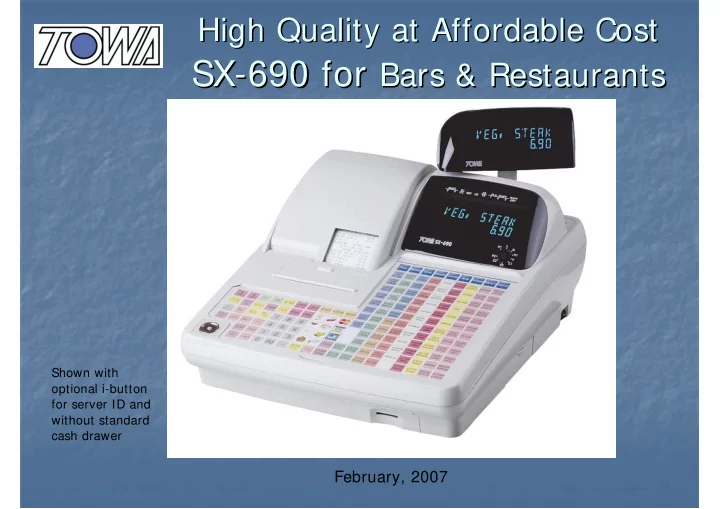
Shown with

  • ptional i-button

for server ID and without standard cash drawer

February, 2007

slide-2
SLIDE 2

Table of Contents Table of Contents

  • Main specifications

Main specifications 3 3

  • Sample system configuration 4

Sample system configuration 4

  • Keyboard

Keyboard 5 5

  • SD card for back up/software load 6

SD card for back up/software load 6

  • i

i-

  • Button Server key for clerk ID 7

Button Server key for clerk ID 7

‘Help

Help’

’ function 8

function 8-

  • 9

9

slide-3
SLIDE 3

Main specifications Main specifications

Item Item Item Item keyboard keyboard keyboard keyboard 173-position Flat Keyboard Display Display Display Display U nion Jack type for both operator and custom er sides U pper line: union-jack type, 10 dig its/ Lower line: 7 seg m ent type, 10dig its Drawer Drawer Drawer Drawer N 26 rem

  • vable with m

edia slot Printer Printer Printer Printer Drop-In' paper loading m echanism 2x 58m m therm al without auto-cutter Interface Interface Interface Interface R S-232(R J45)x3, R S-485 for IR C for up to 8 units (R J11) x 2, SD Card Slot x 1 O ptions O ptions O ptions O ptions PC, Scanner, Slip/ Kitchen/ W ide receipt Printer, Scale, M ag netic I-Botton (server key), shared K/ P for 4 K/ P share PLU PLU PLU PLU 1,500 (m axim um 20,000 with optional m em

  • ry board w

ithout g uest/ account) Default setting (w/ o Default setting (w/ o Default setting (w/ o Default setting (w/ o extra m em

  • ry)

extra m em

  • ry)

extra m em

  • ry)

extra m em

  • ry)

Dept 299, PLU 1500, Cashier 10, Clerk 30, G uest 50, G uest item 100, Account 20, Account item 50 M ain software M ain software M ain software M ain software Floating g uest and m em

  • ry billing

, Table/ Item transfer features features features features H appy H

  • ur with auto price chang

e by tim e Bar code 'learning ', E uro/ Foreig n Currency M acro key, M ix and M atch/ M ulti-buy Loyalty point, Stock control, Prom

  • tion Item

s, Condim ents

slide-4
SLIDE 4

Sample configuration Sample configuration

RS232C RS485 (IRC)

(via modem in case PC is at remote site)

Kitchen Printer Bar Printer ECR # 1 ECR # 2 ECR# 3 (up to 8 ECRs in network)

PC at back office

(K/P and bar printer x up to 4 printers can be shared among the ECRs in network) At souvenir shop in the restaurant In the restaurant In the bar

slide-5
SLIDE 5

173 keys to allow fast one touch keyboard menus

You have as many as 173 keys on the SX-690 flat keyboard, out of which 108 default direct PLUs for wide variety of menus are provided. No extra keyboard or no need to use PLU shift. Just a single touch to ring up a PLU for fast operation.

i button Server lock (option) comes here

slide-6
SLIDE 6

Easy to back up and to load the Easy to back up and to load the updated application software updated application software

* SD card slot is located in the front right hand side of the ECR for easy access. * SD card is useful for sales and programming data back up and also to load the application software. * SD card can be formatted in the SX-690 – PC is not necessary to format the card

slide-7
SLIDE 7

Optional I button can be used for Clerk selection for security and conserve keys on keyboard. * Server key compulsory, Log-on/log-off as you put/remove the server key by flag option. * Report by clerk/server available

i i-

  • button server key

button server key

slide-8
SLIDE 8

‘Help’ functions for when access to

a manual is not possible

Dept/PLU flag Meaning can be printed

slide-9
SLIDE 9

Help function for System Flags

You can print the meaning of each Bit of a system flag

Or you can print by search Item – for example by E/Journal