Shape from Texture Texture Discrimination 1 Texture Texture - - PowerPoint PPT Presentation

shape from texture
SMART_READER_LITE
LIVE PREVIEW

Shape from Texture Texture Discrimination 1 Texture Texture - - PowerPoint PPT Presentation

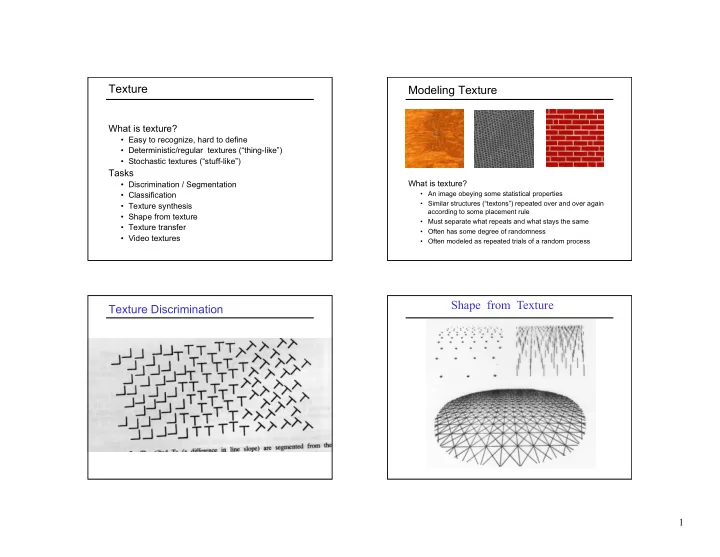
Texture Modeling Texture What is texture? Easy to recognize, hard to define Deterministic/regular textures (thing-like) Stochastic textures (stuff-like) Tasks What is texture? Discrimination / Segmentation An


slide-1
SLIDE 1

1

Texture

What is texture?

  • Easy to recognize, hard to define
  • Deterministic/regular textures (“thing-like”)
  • Stochastic textures (“stuff-like”)

Tasks

  • Discrimination / Segmentation
  • Classification
  • Texture synthesis
  • Shape from texture
  • Texture transfer
  • Video textures

Modeling Texture

What is texture?

  • An image obeying some statistical properties
  • Similar structures (“textons”) repeated over and over again

according to some placement rule

  • Must separate what repeats and what stays the same
  • Often has some degree of randomness
  • Often modeled as repeated trials of a random process

Texture Discrimination

Shape from Texture

slide-2
SLIDE 2

2

Texture

  • Texture is often “stuff” (as opposed to “things”)
  • Characterized by spatially repeating patterns
  • Texture lacks the full range of complexity of

photographic imagery, but makes a good starting point for study of image-based techniques

radishes rocks yogurt

Texture Synthesis

  • Goal of texture synthesis: Create new samples of a

given texture

  • Many applications: virtual environments, hole-

filling, inpainting, texturing surfaces, image compression

The Challenge

  • Need to model the whole

spectrum, from regular to stochastic textures

regular stochastic Both?

Method 1: Copy Blocks of Pixels

Photo Pattern Repeated

Visual artifacts at block boundaries

slide-3
SLIDE 3

3

Statistical Modeling of Texture

  • Assume stochastic model of texture (Markov

Random Field)

  • Assume Stationarity: the stochastic model is the

same regardless of position in the image

stationary texture non-stationary texture

Markov Chain

  • Markov Chain

– a sequence of random variables x1 , x2 , …, xn – xt is the state of the model at time t – Markov assumption: each state is dependent only on the previous one

  • dependency given by a conditional probability:

– The above is actually a first-order Markov chain – An Nth-order Markov chain:

x2 x1 x3 x5 x4 P(xt | xt-1 ) P(xt | xt-1, …, xt-n )

Markov Random Field

A Markov Random Field (MRF)

  • Generalization of Markov chains to two or more dimensions

First-order MRF:

  • Probability that pixel X takes a certain value given the values
  • f neighbors A, B, C, and D:

D C X A B X * * * * * * * * X * * * * * * * * * * * *

  • Higher-order MRFs have larger neighborhoods, e.g.:

P(X | A, B, C, D)

Statistical Modeling of Texture

  • Assume stochastic model of texture (Markov

Random Field)

  • Assume Stationarity: the stochastic model is the

same regardless of position

  • Assume Markov (i.e., local) property :

p(pixel | rest of image) = p(pixel | neighborhood)

?

slide-4
SLIDE 4

4

Motivation from Language

  • Shannon (1948) proposed a way to generate

English-looking text using N-grams:

– Assume a Markov model – Use a large text corpus to compute probability distributions of each letter given N–1 previous letters – Starting from a seed, repeatedly sample the conditional probabilities to generate new letters – Can use whole words instead of letters too

Mark V. Shaney (Bell Labs)

  • Results (using alt.singles corpus):

– “As I've commented before, really relating to someone involves standing next to impossible.” – “One morning I shot an elephant in my arms and kissed him.” – “I spent an interesting evening recently with a grain of salt.”

  • Notice how well local structure is preserved!

– Now let’s try this in 2D using pixels

Efros & Leung Algorithm

Idea initially proposed in 1981 (Garber ’81), but dismissed as too computationally expensive

  • A. Efros and T. Leung, Texture synthesis by non-parametric

sampling, Proc. ICCV, 1999

Synthesizing One Pixel

– What is P(x | neighborhood of pixels around x) ? – Find all the windows in the image that match the neighborhood

  • consider only pixels in the neighborhood that are already

filled in – To synthesize pixel x, pick one matching window at random and assign x to be the center pixel of that window sample image Generated image

SAMPLE x

slide-5
SLIDE 5

5

Efros & Leung Algorithm

  • Assume Markov property, sample from P(x | Nbr(x))

– Building explicit probability tables is infeasible x

Synthesizing a pixel

non-parametric sampling

Input image

– Instead, we search the input image for all sufficiently similar neighborhoods and pick one match at random

Really Synthesizing One Pixel

sample image

– An exact neighborhood match might not be present – So we find the best matches using “SSD error” and randomly choose between them, preferring better matches with higher probability SAMPLE

Generated image

x

Computing P(x | Nbr(x))

  • Given output image patch w(x) centered

around pixel x

  • Find best matching patch in sample image:
  • Note: normalize d by number of known pixels in w(x)
  • Find all image patches in sample image that

are close matches to best patch:

  • Compute a histogram of all center pixels in Ω
  • Histogram = conditional pdf of x

sample w best

I w x w d w ⊂ = ) ), ( ( min arg ) ), ( ( ) 1 ( ) ), ( ( | { ) (

best

w x w d w x w d w x ε + < = Ω

sum( sum( .− ).^2))

Finding Matches

  • Sum of squared differences (SSD)
  • r, in Matlab:

|| − ||2

slide-6
SLIDE 6

6

|| .*( .– )||

2

Finding Matches

  • Sum of squared differences (SSD)

– Gaussian-weighted to make sure closer neighbors are in better agreement

  • The picture shows a smoothing

kernel proportional to (which is a reasonable model of a circularly symmetric fuzzy blob)

Slide by D.A. Forsyth

Gaussian Filtering

2 2 2

2σ y x

e

+ −

Growing Texture

– Starting from the initial configuration, “grow” the texture

  • ne pixel at a time

– The size of the neighborhood window is a parameter that specifies how stochastic the user believes the texture to be – To grow from scratch, we use a random 3 x 3 patch from input image as seed

Details

  • Random sampling from the set of candidates
  • vs. picking the best candidate
  • Initialization for blank output image

– Start with a “seed” in the middle and grow outward in layers

  • Hole filling: Growing in “onion skin” order

– Within each “layer”, pixels with the largest number of known-neighbors are synthesized first – Normalize error by the number of known pixels – If no close match can be found, the pixel is not synthesized until the end

slide-7
SLIDE 7

7

Varying Window Size

input

Varying Window Size

Increasing window size

Synthesis Results

french canvas raffia weave

Results

aluminum wire reptile skin

slide-8
SLIDE 8

8

Results

white bread brick wall

Results

wood granite

Hole Filling Extrapolation

slide-9
SLIDE 9

9

Failure Cases

Growing “garbage” Verbatim copying

Homage to Shannon

Summary of Efros and Leung Algorithm

  • Advantages:

– conceptually simple – models a wide range of real-world textures – naturally does hole-filling

  • Disadvantages:

– it’s greedy – it’s slow – it’s heuristic

Accelerating Texture Synthesis

  • For textures with large-scale

structure, use a Gaussian pyramid to reduce required neighborhood size

L.-Y. Wei and M. Levoy, "Fast Texture Synthesis using Tree-structured Vector Quantization," SIGGRAPH 2000

slide-10
SLIDE 10

10

Another Property of Gaussians

  • Cascading Gaussians: Convolution of a

Gaussian with itself is another Gaussian

– So, we can first smooth an image with a small Gaussian – Then, we convolve that smoothed image with another small Gaussian and the result is equivalent to smoothing the original image with a larger Gaussian – If we smooth an image with a Gaussian having standard deviation σ twice, then we get the same result as smoothing the image with a Gaussian having standard deviation √2σ

Pyramids

  • Useful for representing images at multiple

“scales”

  • Pyramid is built using multiple copies of

image

  • Each level in the pyramid is an image with

1/4 the number of pixels of previous level, i.e., each dimension is 1/2 resolution of previous level

Pyramids

slide-11
SLIDE 11

11

Reduce Gaussian Pyramids

) 2 , 2 ( ) , ( ) , (

2 2 2 2 1

n v m u g n m w v u g

m n l l

+ + = ∑ ∑

− = − = −

] [

1 −

=

l l

g REDUCE g

Expand Gaussian Pyramids

] [

1 , , −

=

n l n l

g EXPAND g

) 2 , 2 ( ) , ( ) , (

2 2 2 2 1 , ,

q v p u g q p w v u g

p q n l n l

− − = ∑ ∑

− = − = −

slide-12
SLIDE 12

12

Convolution Mask

Commonly used masks: [.05, .25, .4, .25, .4]

  • r 1/20 [1, 5, 8, 5, 1]
  • r 1/16 [1, 4, 6, 4, 1]

)] 2 ( ), 1 ( ), ( ), 1 ( ), 2 ( [ w w w w w − −

Exploit separability property of Gaussian filtering

Accelerating Texture Synthesis

  • For textures with large-scale

structure, use a Gaussian pyramid to reduce required neighborhood size

– Low-resolution image is synthesized first – For synthesis at a given pyramid level, the neighborhood consists of already generated pixels at this level plus all neighboring pixels at the lower-resolution level

L.-Y. Wei and M. Levoy, "Fast Texture Synthesis using Tree-structured Vector Quantization," SIGGRAPH 2000

Gaussian Pyramid

High resolution Low resolution p

Image Quilting

  • Observation: neighbor pixels are highly correlated

Input image

non-parametric sampling

B Idea: unit of synthesis = block of pixels

  • Exactly the same as Efros & Leung but now we want

P(B|Nbr(B)) where B is a block of pixels

  • Much faster: synthesize all pixels in a block at once

Synthesizing a block

  • A. Efros and W. Freeman, Image quilting for texture synthesis and transfer,
  • Proc. SIGGRAPH, 2001
slide-13
SLIDE 13

13

Input texture

B1 B2

Random placement

  • f blocks

block

B1 B2

Neighboring blocks constrained by overlap

B1 B2

Minimum error boundary cut

Main Idea

  • The “Plagiarist’s Algorithm”

– Copy as much of the source image as you can – Then try to cover up the evidence

  • Rationale:

– Texture blocks are by definition correct samples

  • f texture so the only problem is connecting them

together

Algorithm

– User picks size of block and size of overlap – Synthesize blocks in raster order – Search input texture for all blocks that satisfy overlap constraints (above and left)

  • Overlap error SSD < threshhold

– Paste new block into resulting texture

  • Use Dynamic Programming to compute minimum error

boundary cut

  • min. error boundary

Minimum Error Boundary

  • verlapping blocks

vertical boundary

_

=

2

  • verlap error
slide-14
SLIDE 14

14

Dynamic Programming

  • Linear time algorithm for solving sequential decision

(optimal path) problems

1 2 3 1 2 3 1 2 3

1 = t 2 = t 3 = t 1 = i 2 = i 3 = i

1 2 3 T t =

How many paths through this trellis?

T

3

Assume cost can be decomposed into stages

Dynamic Programming

1 2 3 1 2 3 1 2 3

1 − t

C

t

C

1 + t

C

12

Π

22

Π

32

Π States:

1 = i 2 = i 3 = i

Dynamic Programming

1 2 3 1 2 3 1 2 3

Principle of Optimality for an n-stage assignment problem:

)) ( ( min ) (

1 i

C j C

t ij i t −

+ Π =

2 = j 1 = i 2 = i

3 = i

1 − t

C

t

C

1 + t

C

12

Π

22

Π

32

Π

22

Π

32

Π 2 ) 2 ( =

t

b

Dynamic Programming

1 2 3 1 2 3 1 2 3

)) ( ( min arg ) ( )) ( ( min ) (

1 1

i C j b i C j C

t ij i t t ij i t − −

+ Π = + Π =

remember best predecessor

2 = j 1 = i 2 = i

3 = i

1 − t

C

t

C

1 + t

C

slide-15
SLIDE 15

15

Minimum Error Boundary

_

=

2

  • verlap error
  • Let i = 1, …, number of columns of overlap
  • Let t = 1, …, number of rows in overlap
slide-16
SLIDE 16

16

Failures

slide-17
SLIDE 17

17

input image

Wei & Levoy Efros & Freeman Wei & Levoy Efros & Freeman

input image

Wei & Levoy Efros & Freeman

input image

Political Texture Synthesis!

slide-18
SLIDE 18

18

Texture Transfer

  • Take the texture from one source “palette”

image and “paint” it onto another “target” image – This requires separating texture and shape – That’s HARD, but we can cheat

  • Just add another constraint when picking a

block: similarity to target image at that position

  • Error = α(overlap error w/ palette block) +

(1-α)(diff w/ target image)

  • Here, diff w/ target image = SSD between

palette texture block and intensity in block

  • f target face image
  • Iterate using successively smaller block sizes

Here, bright patches of rice should match bright patches of face, and dark patches match too

+ = + =

parmesan rice

+ =

Target image Source palette image Output image Here, diff w/ target image = SSD between blurred palette texture block and blurred intensity in block of target face image

slide-19
SLIDE 19

19

+ =

Source palette Target

= +

Target Palette

Efros and Freeman Alg. Summary

  • Quilt together patches of input image

– randomly (texture synthesis) – constrained (texture transfer)

  • Image Quilting

– No filters, no multi-scale, no one-pixel-at-a-time! – fast and very simple – Results are not bad

Extension: Texture Transfer Using Objects as Primitives

Lorenzo De Carli, UW

  • Throughout the centuries, many artists created

stunning visual effects by rendering well-known physical objects using combinations of other

  • bjects.
  • The first to do so was probably the 16th century

Italian painter Giuseppe Arcimboldo

  • The technique is also popular among modern

artists such as Octavio Ocampo

slide-20
SLIDE 20

20

Giuseppe Arcimboldo Method

  • Small images of a user-specified library of objects

are used as "macropixels" to render the image

  • The algorithm works by computing all possible

matchings of the objects in the library with the source image – computing the pixel-by-pixel difference (SSD) between the colors of the two images

  • The closest matchings are chosen and used to

generate the result image

Library of Object Images

Matching an Object with an Image Patch

slide-21
SLIDE 21

21

Full Image Rendering Multiple Region Rendering Results Extension: Texture Synthesis from Non-Fronto-Parallel Textures

Input Output Saurabh Goyal, UW-Madison

slide-22
SLIDE 22

22

Extension: Texture Synthesis on Surfaces

L.-Y. Wei and M. Levoy, “Texture Synthesis over Arbitrary Manifold Surfaces,” SIGGRAPH 2001

+

Input Texture Input Mesh Result

Extension: 3D Texture Synthesis

  • J. Kopf et al., “Solid Texture Synthesis from 2D Exemplars,” SIGGRAPH 2007

Multiscale Texture Synthesis

Input: Multiscale texture graph Output: Multiscale texture image

  • C. Han et al., SIGGRAPH 2008

A Simple Graph

slide-23
SLIDE 23

23

Image Analogies

Hertzmann et al., SIGGRAPH 2001

Input image A Input image A´ Input image B Output image B´

Image Analogies

Unfiltered source Filtered source Unfiltered target Filtered target

Image Analogies: Assumptions

  • Image A´ is assumed to have been created

from A by applying some unknown filter

  • Images A and A´ are assumed to be

registered, i.e., the colors around pixel p in A correspond to the colors around pixel p in A´, though transformed via some image filter

  • Each pixel has an associated feature vector

specifying color, luminance, and various filter outputs

  • Implemented as “resynthesizer” in GIMP

The Approach

Unfiltered target Filtered target Unfiltered source Filtered source

slide-24
SLIDE 24

24

The Approach

Unfiltered source Filtered source Unfiltered target Filtered target

How to Select Best Pixel for B´(q)?

  • Nearest-Neighbor Match: Given F(q) =

concatenation of feature vectors around q in B and B´ at levels l and l-1, find pixel p in A such that F(p) is closest match to F(q) (using Gaussian weighted SSD)

  • Coherence Match: Find pixel r in A such

that F(r) is closest match to F(q) for all r’s used to synthesize already synthesized pixels in neighborhood of q

  • Pick “best” of p and r

Results: Blur Filter Learning

F(p) = luminance at pixel p in A and A´ in 5 × 5 neighborhood at current level, and 3 × 3 neighborhood at next coarser level

Results: Edge Filter

F(p) = luminance at pixel p

slide-25
SLIDE 25

25

Texture Synthesis

Source images (A, B) are blank/constant

Unfiltered source Filtered source Unfiltered target Filtered target

Texture Synthesis Texture Transfer

  • A and A´ is the same (or A is a blurred version of A´)
  • Optional: Use a weight to control the tradeoff between

matching (A, B) and (A´, B´)

Unfiltered source Filtered source Unfiltered target Filtered target

Texture Transfer

Images A and A´ Image B

slide-26
SLIDE 26

26

Texture Transfer

2 result images, B´ A A´ B B´

Artistic Filters Artistic Filters

A A´ B B´

Artistic Filters

slide-27
SLIDE 27

27

Artistic Filters

A A´ B B´

Artistic Filters Artistic Filters

A A´ B B´

Artistic Filters

slide-28
SLIDE 28

28

Artistic Filters

A A´ B B´

Artistic Filters Super-Resolution

A A´ B B´

Super-Resolution

B B´

slide-29
SLIDE 29

29

Colorization