Purpose HDLs were originally used to model and simulate hardware - - PowerPoint PPT Presentation

purpose
SMART_READER_LITE
LIVE PREVIEW

Purpose HDLs were originally used to model and simulate hardware - - PowerPoint PPT Presentation

1 2 Purpose HDLs were originally used to model and simulate hardware before building it Verilog HDL In the past 20 years, synthesis tools were developed that can essentially build the hardware from the same description Mark


slide-1
SLIDE 1

1

Verilog HDL

Mark Redekopp

2

Purpose

  • HDL’s were originally used to model and

simulate hardware before building it

  • In the past 20 years, synthesis tools were

developed that can essentially build the hardware from the same description

3

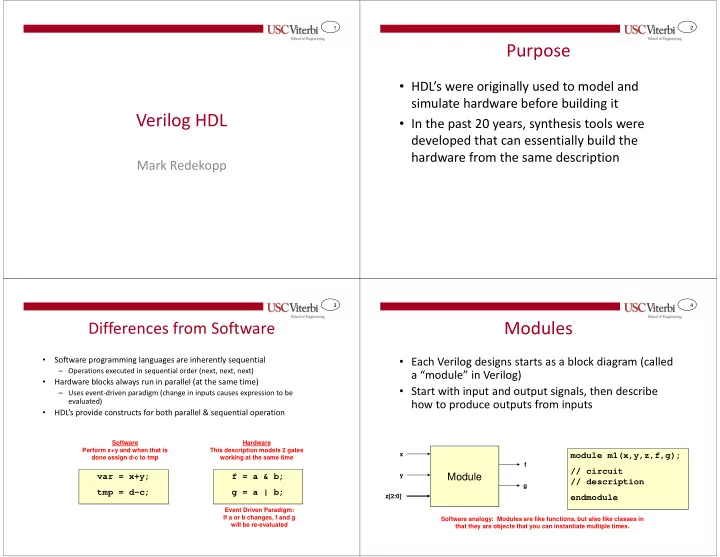
Differences from Software

  • Software programming languages are inherently sequential

– Operations executed in sequential order (next, next, next)

  • Hardware blocks always run in parallel (at the same time)

– Uses event-driven paradigm (change in inputs causes expression to be evaluated)

  • HDL’s provide constructs for both parallel & sequential operation

f = a & b; g = a | b; var = x+y; tmp = d-c;

Software Perform x+y and when that is done assign d-c to tmp Hardware This description models 2 gates working at the same time Event Driven Paradigm: If a or b changes, f and g will be re-evaluated

4

Modules

  • Each Verilog designs starts as a block diagram (called

a “module” in Verilog)

  • Start with input and output signals, then describe

how to produce outputs from inputs

module m1(x,y,z,f,g); // circuit // description endmodule

Software analogy: Modules are like functions, but also like classes in that they are objects that you can instantiate multiple times.

Module

x y z[2:0] f g

slide-2
SLIDE 2

5

Ports

  • Input and output signals of a module are called “ports”

(similar to parameters/arguments of a software function)

  • Unlike software, ports need to be declared as “input” or

“output”

  • Vectors declared using [MSB : LSB] notation

Module

module m1(x,y,z,f,g); input x,y; input [2:0] z;

  • utput f;
  • utput [1:0] g;

endmodule

x y z[2:0] f g[1:0] These are the ports

6

Signal Types

  • Signals represent the inputs, outputs, and

internal values

  • Signals need to be typed

– Similar to variables in software (e.g. int, char)

  • 2 basic types

– Wire: Represents a node connecting two logic elements

  • Only for modeling combinational logic
  • Used in “assign” statements
  • Use for signals connecting outputs of

instantiated modules (structural modeling)

– Reg(ister): Used for signals that are described behaviorally

  • Used to model combinational & sequential

logic

  • Used for anything produced by an “always” or

“initial” block module m1(x,y,z,f,g); input x,y; input [2:0] z

  • utput f;
  • utput reg [1:0] g;

wire n1, n2; reg n3, n4; ... endmodule

Inputs are always type ‘wire’. Outputs are assumed ‘wire’ but can be redefined as ‘reg’

7

Constants

  • Multiple bit constants can be written in the form:

– [size] `base value

  • size is number of bits in constant
  • base is o or O for octal, b or B for binary, d or D for decimal, h or H for

hexadecimal

  • value is sequence of digits valid for specified base

– Values a through f (for hexadecimal base) are case-insensitive

  • Examples:

– 4’b0000 // 4-bits binary – 6’b101101 // 6-bits binary – 8’hfC // 8-bits in hex – Decimal is default – 17 // 17 decimal converted to appropriate # of unsigned bits

8

Structural vs. Behavioral Modeling

Structural

  • Starting with primitive

gates, build up a hierarchy

  • f components and specify

how they should be connected Behavioral

  • Describe behavior and let

synthesis tools select internal components and connections

slide-3
SLIDE 3

9

Structural Modeling

  • Starting with primitive gates, build

up a hierarchy of components and specify how they should be connected

  • Structural

specification of a half adder Use HA’s to structurally describe incrementer

module ha(x,y,s,co); input x,y;

  • utput s,co;

xor i1(s,x,y); and i2(co,x,y); endmodule module incrementer(a,z); input [3:0] a;

  • utput [3:0] z;

wire [3:1] c; ha ha0(a[0],1,z[0],c[1]); ha ha1(a[1],c[1],z[1],c[2]); ha ha2(a[2],c[2],z[2],c[3]); ha ha3(a[3],c[3],z[3], ); endmodule

10

Structural Modeling of Logic Gates

  • Modules and primitive gates can be instantiated

using the following format:

module_name instance_name(output, input1, input2,…)

  • Input and outputs must be wire types
  • Supported Gates: and, or, not, nand, nor, xor, xnor

module m1(c16,c8,c4,f); input c16,c8,c4;

  • utput f;

wire n1;

  • r i1(n1,c8,c4);

nand i2(f,c16,n1); endmodule

“n1” net (wire) Verilog Description “i2” instance name

11

Instantiating User-Defined Modules

  • Format: module_name instance_name(port1, port2, port3, …)
  • Positional mapping

– Signals of instantiation ports are associated using the order of module’s port declaration (i.e. order is everything)

  • Named mapping

– Signals of instantiation ports are explicitly associated with module’s ports (i.e.

  • rder is unimportant)

– module_name instance_name(.module_port_name(signal_name),…);

module ha(x,y,s,co); ... endmodule module incrementer(a,z); ha ha0(a[0],1,z[0],c[1]); ... endmodule module ha(x,y,s,co); ... endmodule module incrementer(a,z); ha ha0(.x(a[0]), .s(z[0]), .y(1), .co(c[1]) ); ... endmodule Positional mapping Named Mapping

12

Internal Signals

  • Define signals (wire or reg) for each internal

signal/wire

module m2(x,y,z,f); input x,y,z;

  • utput f;

wire n1,n2,n3; and u1(n1,x,z); // instance names need and u2(n2,x,y); // not be declared not u3(n3,z);

  • r u4(f,n1,n2,n3);

endmodule

slide-4
SLIDE 4

13

Behavioral Modeling

  • Describe behavior and let synthesis tools select internal

components and connections

  • Advantages:

– Easier to specify – Synthesis tool can pick appropriate implementation (for speed / area / etc.)

Use higher level operations and let synthesis tools infer the necessary logic

module incrementer(a,z); input [3:0] a;

  • utput [3:0] z;

assign z = a + 1'b1; endmodule

Could instantiate a ripple- carry adder, a fast carry- lookahead adder, etc. as needed

14

Operators

  • Operator types

– Non-blocking / Blocking assignment ( <=, = ) – Arithmetic (+, -, *, /, %) – Relational (<, <=, >, >=) – Equality (= =, !=, = = = , ! = =) – Logical (&&, ||, !) – Bitwise (~, &, |, ^, ~^) – Reduction (&, ~&, |, ~|, ^, ~^) – Shift (<<, >>) – Conditional ( ? : ) – Concatenation and replication

15

Assign Statement

  • Used for combinational logic

expressions (must output to a ‘wire’ signal type)

  • Can be used anywhere in the body of a

module’s code

  • All ‘assign’ statements run in parallel
  • Change of any signal on RHS (right-

hand side) triggers re-evaluation of LHS (output)

  • Format:

– assign output = expr;

  • ‘&’ means AND
  • ‘|’ means OR
  • ‘~’ means NOT
  • ‘^’ means XOR

module m1(c16,c8,c4,f); input c16,c8,c4;

  • utput f;

assign f = ~(c16 & (c8 | c4)); endmodule module m1(c16,c8,c4,f); input c16,c8,c4;

  • utput f;

wire n1;

  • r i1(n1,c8,c4);

nand i2(f,c16,n1); endmodule

16

Multi-bit (Vector) Signals

  • Reference individual bits
  • r groups of bits by

placing the desired index in brackets (e.g. x[3] or x[2:1])

  • Form vector from

individual signals by placing signals in brackets (i.e. { }) and separate with commas

module m1(x,f); input [2:0] x;

  • utput f;

// f = minterm 5 assign f = x[2] & ~x[1] & x[0]; endmodule module incrementer(a,x,y,z); input [2:0] a;

  • utput x,y,z;

assign {x,y,z} = a + 1; endmodule

slide-5
SLIDE 5

17

More Assign Statement

  • Can be used with other
  • perators besides simple

logic functions

– Arithmetic (+, -, *, /, %=modulo/remainder) – Shifting (<<, >>) – Relational (<, <=, >, >=, !=, ==)

  • Produces a single bit output

(‘1’ = true / ‘0’ false)

– Conditional operator ( ? : )

  • Syntax:

condition ? statement_if_true : statement_if_false;

module m1(x,y,sub,s,cout,d,z,f,g); input [3:0] x,y; input sub;

  • utput [3:0] s,d;
  • utput [3:0] z;
  • utput cout,f,g;

assign {cout,s} = {0,x} + {0,y}; assign d = x – y; assign f = (x == 4’h5); assign g = (y < 0); assign z = (sub==1) ? x-y : x+y; endmodule Sample “Assign” statements

18

Always Block (Combinational)

  • Primary unit of parallelism in code

– ‘always’ and ‘assign’ statements run in parallel – Statements w/in always blocks are executed sequentially

  • Format

– always @(sensitivity list) begin statements end

  • Always blocks are “executed” when there is a change

in a signal in the sensitivity list

  • When modeling combinational logic, sensitivity lists

should include ALL inputs (i.e. all signals in the RHS’s)

  • Generation of a signal must be done within a single

always block (not spread across multiple always blocks)

– Signals generated in an always block must be declared type ‘reg’

module addsub(a,b,sub,s); input [3:0] a,b; input sub;

  • utput reg [3:0] s;

reg [3:0] newb; always @(b,sub) begin if(sub == 1) newb = ~b; else newb = b; end always @* begin s = a + newb + sub; end endmodule

19

Always Block (Sequential)

  • Flip-flops (sequential logic)

are modeled using an always block sensitive to the edge (posedge or negedge)

  • f the clock

– block will only be executed on the positive edge of the clock

  • Use the non-blocking

assignment operator (<=) in clocked “always” blocks

module accumulator(x,z,clk,rst); input [3:0] x; input clk,rst;

  • utput [3:0] z;

reg [3:0] z; always @(posedge clk) begin if(rst == 1) z <= 4’b0000; else z <= z + x; end endmodule

20

Procedural Statements

  • Must appear inside an always or initial block
  • Procedural statements include

– if…else if…else… – case statement – for loop (usually unnecessary for describing logic) – while loop (usually unnecessary for describing logic)

slide-6
SLIDE 6

21

If…Else If…Else Statements

  • Syntax

if(expr) begin statements; end else if(expr) statement; else statement;

  • If multiple statements as the body of if…else if…else then

enclose in begin…end construct

// 4-to-1 mux description always @(i0,i1,i2,i3,sel) begin if(sel == 2’b00) y <= i0; else if(sel == 2’b01) y <= i1; else if(sel == 2’b10) y <= i2; else y <= i3; end ...

22

Case Statements

  • Syntax

case(expr)

  • ption 1: begin

statements; end

  • ption 2: statement;

[default: statement;] endcase

  • Default statement is optional
  • If multiple statements as the body of an option then enclose

in begin…end construct

// 4-to-1 mux description always @(i0,i1,i2,i3,sel) begin case(sel) 2’b00: y <= i0; 2’b01: y <= i1; 2’b10: y <= i2; default: y <= i3; endcase end

23

Traffic Light State Machine

module trafficlight(s1, s2, clk, rst, msg, ssg, mtg, msr, ssr, mtr); input s1, s2, clk, rst;

  • utput msg, ssg, mtg, msr, ssr, mtr;

reg msg, ssg, mtg, msr, ssr, mtr; reg [1:0] state; reg [1:0] state_d; wire s; parameter MT = 2'b11; parameter MS = 2'b10; parameter SS = 2'b00; assign s = s1 | s2; always @(state, s) begin if(state == MS) state_d <= SS; else if(state == SS) if(s == 1) state_d <= MT; else state_d <= MS; else // state == MT state_d <= MS; end always @(posedge clk) begin if(rst == 1) state <= SS; else state <= state_d; end always @(state) begin mtg <= 0; msg <= 0; ssg <= 0; mtr <= 0; msr <= 0; ssr <= 0; case(state) MT: begin mtg <= 1; ssr <= 1; msr <= 1; end MS: begin msg <= 1; ssr <= 1; mtr <= 1; end SS: begin ssg <= 1; msr <= 1; mtr <= 1; end endcase end endmodule

24

Understanding Simulation Timing

  • When expressing parallelism, an understanding of

how time works is crucial

  • Even though ‘always’ and ‘assign’ statements specify
  • perations to be run in parallel, simulator tools run
  • n traditional computers that can only execute

sequential operations

  • To maintain the appearance of parallelism, the

simulator keeps track of events in a sorted event queue and updates signal values at appropriate times, triggering more statements to be executed

slide-7
SLIDE 7

25

Explicit Time Delays

  • In testbenches, explicit

delays can be specified using ‘# delay’

– When this is done, the RHS of the expression is evaluated at time t but the LHS is not updated until t+delay

module m1_tb; reg a,b,c; wire w,x,y,z; assign a = 1; #5 // delay 5 ns (ns = default) assign a = 0; assign b = 0; #2 // delay 2 more ns assign a = 1; endmodule

Time Event 0 ns a = 1 5 ns a = 0 5 ns b = 0 7 ns a = 1

Simulator Event Queue

26

Explicit Time Delays

  • Assignments to the same

signal without an intervening delay will cause

  • nly the last assignment to

be seen

module m1_tb; reg a,b,c; wire w,x,y,z; assign a = 1; #5 // delay 5 ns (ns = default) assign a = 0; assign a = 1; endmodule

Time Event 0 ns a = 1 5 ns a = 0→1 5 ns b = 0 7 ns a = 1

Simulator Event Queue

27

Explicit Propagation Delay

  • When modeling logic, explicit propagation

delays can be inserted

– Normally behavioral descriptions should avoid this since the delays will be determined by the synthesis tools

  • Verilog supports different propagation

delay paradigms

  • One paradigm is to specify the delay with

the RHS of an assignment in an always block.

  • When this is done, the RHS of the

expression is evaluated at time t but the LHS is not updated until t+delay

  • This is called “transport” delay since we are

specifying the time to transport the value from inputs to output

module m1(a,b,c,w,x,y,z); input a,b,c;

  • utput w,x,y,z;

always @(a,b,c) begin w <= #4 a ^ b; x <= #5 b | c; end endmodule

Time Event 0 ns a,b,c = 0,0,1 4 ns w = 0 5 ns x = 1

Simulator Event Queue

28

Implicit Time Delays

  • Normal behavioral descriptions don’t

model propagation delay until the code is synthesized

  • To operate correctly the simulators

event queue must have some notion

  • f what happens first, second, third,

etc.

  • Delta (δ) time is used

– Delta times are purely for ordering events and all occur in “0 time” – The first event(s) occur at time 0 ns – Next event(s) occur at time 0 + δ – Next event(s) occur at time 0 + 2δ

always @(a,b,c,w,x,y) begin w <= a ^ b; x <= b | c; y <= w & x; z <= ~y; end

Time Event Triggers 0 ns a,b,c = 0,0,1 w and x assigns 0 + δ w=0, x=1 y assign 0 + 2δ y = 0 z assign 0 + 3δ z = 1 Anything sensitive to z Simulator Event Queue

assign w = a ^ b; assign x = b | c; assign y = w & x; assign z = ~y;

Equivalent Implementations

slide-8
SLIDE 8

29

Synthesized Logic & Timing

  • Synthesis tools have to determine

whether you are describing combinational or sequential logic in an always block

  • If we reach the end of a block

attempting to model combinational logic without assigning a signal then it infers that the signal should be remembered (i.e. sequential logic) and a latch results (usually undesired)

  • When modeling combinational logic

ALWAYS:

– Provide a default assignment or – Provide an else/default case

// 2-to-1 mux description always @(i0,i1,sel) begin if(sel == 0) y = i0; else y = i1; endcase end // 2-to-1 mux description always @(i0,i1,sel) begin y = i1; if(sel == 0) y = i0; end Default assignment of y

  • verwritten if necessary

Else case acts as a catch-all / default case.

30

TESTBENCHES

31

Testbenches

  • Generate input stimulus (values) to

your design over time

  • Simulator will run the inputs through

the circuit you described and find what the output from your circuit would be

  • Designer checks whether the output

is as expected, given the input sequence

  • Testbenches consist of code to

generate the inputs as well as instantiating the design/unit under test and possibly automatically checking the results

Testbench Module Unit Under Test (UUT) (Your design module) Code to generate input stimulus

Inputs Outputs

32

Testbench Modules

  • Declared as a module

just like the design circuit

  • No inputs or outputs

module my_tb; // testbench code endmodule

slide-9
SLIDE 9

33

Testbench Signals

  • Declare signals in the

testbench for the inputs and

  • utputs of the design under

test

– inputs to your design should be declared type ‘reg’ in the testbench (since you are driving them and their value should be retained until you change them) – outputs from your design should be declared type ‘wire’ since your design is driving them

module my_tb; reg x,y,z; wire f,g; endmodule module m1(x,y,z,f,g); input x,y,z;

  • utput f,g;

...

Unit Under Test Testbench

34

UUT Instantiation

  • Instantiate your design module

as a component (just like you instantiate a gate in you design)

  • Pass the input and output

signals to the ports of the design

  • For designs with more than 4 or

5 ports, use named mapping rather than positional mapping

module my_tb; reg x,y,z; wire f,g; m1 uut(x,y,z,f,g); /* m1 uut(.x(x), .y(y), .z(z), .f(f), .g(g)); */ endmodule

module m1(x,y,z,f,g); input x,y,z;

  • utput f,g;

... endmodule

Unit Under Test Testbench

35

Generating Input Stimulus (Values)

  • Now use Verilog code

to generate the input values over a period of time

module my_tb; reg x,y,z; wire f,g; m1 uut(x,y,z,f,g); /* m1 uut(.x(x), .y(y), .z(z), .f(f), .g(g)); */ endmodule

module m1(x,y,z,f,g); input x,y,z;

  • utput f,g;

... endmodule

Unit Under Test Testbench

36

Initial Block Statement

  • Tells the simulator to run this

code just once (vs. always block that runs on changes in sensitivity list signals)

  • Inside the “initial” block we can

write code to generate values

  • n the inputs to our design
  • Use “begin…end” to bracket the

code (similar to { .. } in C or Java)

module my_tb; reg x,y,z; wire f,g; m1 uut(x,y,z,f,g); initial begin // input stimulus // code end endmodule

Testbench

slide-10
SLIDE 10

37

Assignment Statement

  • Use ‘=‘ to assign a

signal a value

– Can assign constants

  • x = 0; y = 1;

– Can assign logical relationships

  • x = ~x // x = not x
  • x = y & z // x = y and z

module my_tb; reg x,y,z; wire f,g; m1 uut(x,y,z,f,g); initial begin x = 0; end endmodule

Testbench

38

Aggregate Assignment Statement

  • Can assign multiple signals at
  • nce
  • Place signals in brackets

(i.e. { }) and separate with commas

  • Multiple bit constants can be

written in the form:

  • num_bits ’{b,o,d,h} value

– 4’b0000 // 4-bits binary – 6’b101101 // 6-bits binary – 8’hFF // 8-bits in hex – Decimal is default – 17 // 17 decimal module my_tb; reg x,y,z; wire f,g; m1 uut(x,y,z,f,g); initial begin {x,y,z} = 3’b000; end endmodule

Testbench

39

Time

  • We must explicitly

indicate when and how much time should pass between assignments

  • Statement (‘#’ indicates a

time delay):

– # 10; // wait 10 ns; – # 50; // wait 50 ns;

  • Default timescale is

nanoseconds (ns)

module my_tb; reg x,y,z; wire f,g; m1 dut(x,y,z,f,g); initial begin {x,y,z} = 3’b000; #10; {x,y,z} = 3’b001; #25; end endmodule

Testbench

40

Integer Signal Type

  • To model a collection of bits

representing a number, declare signals as type ‘integer’

  • Assigning an integer to a bit or

group of bits will cause them to get the binary equivalent

  • Assigning an integer value too

large for the number of bits will cause just the LSB’s of the number to be assigned

– Assigning 810=10002 to a 3-bit value will cause the 3-bit value to be 000 (i.e. the 3 LSB’s of 1000)

module my_tb; reg w,x,y,z; integer num; initial begin num = 15; {w,x,y,z} = num; // assigns // w,x,y,z = 1111 #10; num = num+1; // num = 16 {w,x,y,z} = num; // w,x,y,z = 0000 end endmodule

Testbench

slide-11
SLIDE 11

41

For loop

  • Integers can also be used

as program control variables

  • Verilog supports ‘for’

loops to repeatedly execute a statement

  • Format:

– for(initial_condition; end_condition; increment statement)

module my_tb; reg a,b; integer i; initial begin for(i=0;i<4;i=i+1) begin {a,b} = i; end end endmodule

Here, ‘i’ acts as a counter for a loop. Each time through the loop, i is incremented and then the decimal value is converted to binary and assigned to a and b You can’t do “i++” as in C/C++ or Java a,b = 00, then 01, then 10, then 11

42

For loop

  • Question: How much time

passes between assignments to {a,b}

  • Answer: 0 time…in fact if

you look at a waveform, {a,b} will just be equal to 1,1…you’ll never see any

  • ther combinations
  • We must explicitly insert

time delays!

module my_tb; reg a,b; integer i; initial begin for(i=0;i<4;i=i+1) begin {a,b} = i; #10; end end endmodule

Now, 10 nanoseconds will pass before we start the next iteration of the loop

43

Generating Sequential Stimulus

  • Clock Generation

– Initialize in an initial block – Continue toggling via an always process

  • Reset generation

– Activate in initial block – Deactivate after some period of time – Can wait for each clock edge via @(posedge clk)

module my_tb; reg clk, rst, s; always #5 clk = ~clk; initial begin clk = 1; rst = 1; s=0; // wait 2 clocks @(posedge clk); @(posedge clk); rst = 0; s=1; @(posedge clk); s=0; end endmodule

Generated stimulus CLK RST S