
SLIDE 1
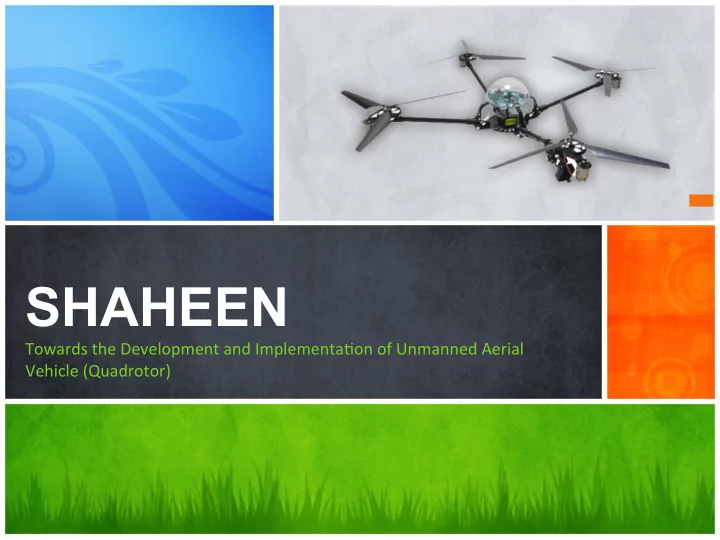
SHAHEEN ¡
Towards ¡the ¡Development ¡and ¡Implementa3on ¡of ¡Unmanned ¡Aerial ¡ Vehicle ¡(Quadrotor)
Project Shaheen Supervisors Mr Imran Raza Dr Tauseef - - PowerPoint PPT Presentation
SHAHEEN Vehicle (Quadrotor) Towards the Development and Implementa3on of Unmanned Aerial Project Shaheen Supervisors Mr Imran Raza Dr Tauseef Gulrez Group
Towards ¡the ¡Development ¡and ¡Implementa3on ¡of ¡Unmanned ¡Aerial ¡ Vehicle ¡(Quadrotor)
¡ ¡ ¡ ¡ ¡ ¡ ¡ ¡ ¡ ¡ ¡ ¡ ¡ ¡
Architecture ¡of ¡System ¡
¡ ¡ ¡ ¡ ¡ ¡ ¡ ¡ ¡ ¡ ¡ ¡ ¡ ¡
Indoor ¡LocalizaAon ¡(SLAM) ¡
¡ ¡ ¡ ¡ ¡ ¡ ¡ ¡ ¡ ¡ ¡ ¡ ¡ ¡
Simulator ¡
¡ ¡ ¡ ¡ ¡ ¡ ¡ ¡ ¡ ¡ ¡ ¡ ¡ ¡
Path ¡Planning ¡
¡ ¡ ¡ ¡ ¡ ¡ ¡ ¡ ¡ ¡ ¡ ¡ ¡ ¡
Outdoor ¡LocalizaAon ¡(GPS) ¡
¡ ¡ ¡ ¡ ¡ ¡ ¡ ¡ ¡ ¡ ¡ ¡ ¡ ¡
Physical ¡Design ¡
¡ ¡ ¡ ¡ ¡ ¡ ¡ ¡ ¡ ¡ ¡ ¡ ¡ ¡
Interfacing ¡
¡ ¡ ¡ ¡ ¡ ¡ ¡ ¡ ¡ ¡ ¡ ¡ ¡ ¡
Problem ¡Statement ¡
¡ ¡ ¡ ¡ ¡ ¡ ¡ ¡ ¡ ¡ ¡ ¡ ¡ ¡
Conclusion ¡
¡ ¡ ¡ ¡ ¡ ¡ ¡ ¡ ¡ ¡ ¡ ¡ ¡ ¡ ¡ ¡ ¡ ¡ ¡ ¡ ¡ ¡ ¡ ¡ ¡ ¡ ¡ ¡ ¡ ¡ ¡ ¡ ¡ ¡ ¡ ¡ ¡ ¡ ¡ ¡ ¡ ¡ ¡ ¡ ¡ ¡ ¡ ¡ ¡ ¡ ¡ ¡ ¡ ¡ ¡ ¡
Problem ¡and ¡its ¡proposed ¡soluAon ¡
This ¡ project ¡ aims ¡ to ¡ develop ¡ and ¡ implement ¡ an ¡ autonomous ¡ flying ¡ robot ¡ (Quadrotor) ¡with ¡dynamic ¡path ¡planning ¡and ¡adap3ve ¡control ¡system ¡(LQR, ¡ LQG, ¡ PID). ¡ The ¡ flying ¡ robot ¡ will ¡ be ¡ capable ¡ of ¡ flying ¡ on ¡ the ¡ designated ¡ coordinates ¡ indoor ¡ and ¡ outdoor ¡ environments. ¡ Moreover, ¡ the ¡ control ¡ strategy ¡will ¡enable ¡the ¡flying ¡robot ¡to ¡stabilize ¡itself ¡while ¡maneuvering ¡the ¡
¡ ¡ ¡ ¡ ¡ ¡ ¡ ¡ ¡ ¡ ¡ ¡ ¡ ¡ ¡ ¡ ¡ ¡ ¡ ¡ ¡ ¡ ¡ ¡ ¡ ¡ ¡ ¡ ¡ ¡ ¡ ¡ ¡ ¡
Components ¡and ¡Assembly ¡
Fig1.1: ¡Quadrotor ¡
» Aluminum ¡Arms ¡ » Motors ¡ » Propellers ¡ » RC ¡Controller ¡(6 ¡Channels) ¡ » Gyroscope ¡(Fei ¡Yu ¡FY-‑90Q) ¡ » Lipo ¡Ba\ery ¡(2100mAh) ¡
¡ ¡ ¡ ¡ ¡ ¡ ¡ ¡ ¡ ¡ ¡ ¡ ¡ ¡ ¡ ¡ ¡ ¡ ¡ ¡ ¡ ¡ ¡ ¡ ¡ ¡ ¡ ¡ ¡ ¡ ¡ ¡ ¡ ¡ ¡ ¡ ¡ ¡ ¡ ¡ ¡ ¡ ¡ ¡ ¡ ¡ ¡ ¡ ¡ ¡ ¡ ¡ ¡ ¡ ¡ ¡
Indoor ¡SLAM ¡ Outdoor ¡GPS ¡ Simulator ¡ Path ¡Planning ¡ Expert ¡System ¡ Interfacing ¡ Fig ¡2.1: ¡Architecture ¡of ¡System ¡
¡ ¡ ¡ ¡ ¡ ¡ ¡ ¡ ¡ ¡ ¡ ¡ ¡ ¡ ¡ ¡ ¡ ¡ ¡ ¡ ¡ ¡ ¡ ¡ ¡ ¡ ¡ ¡ ¡ ¡ ¡ ¡ ¡ ¡ ¡ ¡ ¡ ¡ ¡ ¡ ¡ ¡ ¡ ¡ ¡ ¡ ¡ ¡ ¡ ¡ ¡ ¡ ¡ ¡ ¡ ¡
Simultaneous ¡LocalizaAon ¡and ¡Mapping ¡
» Understanding ¡of ¡Laser ¡Sensor ¡ » Integra3on ¡with ¡Matlab ¡ » Literature ¡Review ¡ » Transform ¡Spherical ¡Coordinates ¡ ¡to ¡Cartesian ¡ » Localiza3on ¡Problems ¡ » New ¡Algorithms ¡of ¡SLAM ¡
START ¡ Laser ¡Scan ¡ Cartesian ¡ Conversion ¡ Make ¡Objects ¡
IdenAfy ¡ Landmarks ¡
Calculate ¡Distance ¡ from ¡Landmarks ¡
Es3mate ¡Pos3on ¡ Update ¡Map ¡& ¡ Current ¡Posi3on ¡ Require ¡ Next ¡ Posi3on ¡ Finish ¡ Yes ¡ Yes ¡ No ¡ No ¡
Y b X a c
(x1, y1) (x2, y2)
(x, y)
𝑐= ¡√(𝑦−𝑦1)↑2 +(𝑧−𝑧1)↑2 ¡ 𝑑= ¡√(𝑦−𝑦2)↑2 +(𝑧−𝑧2)↑2 ¡
¡
¡ Subtrac3ng ¡Eq1 ¡from ¡Eq2 ¡
¡ Assuming ¡𝑏↑2 −𝑧1↑2 −2𝑦1𝑑1/2𝑦3 −𝑑1↑2 /4𝑦3↑2
¡ ¡ ¡ ¡ ¡ ¡ ¡ ¡ ¡ ¡ ¡ ¡ ¡ ¡ ¡ ¡ ¡ ¡ ¡ ¡ ¡ ¡
Path ¡Planning ¡in ¡SimulaAon ¡and ¡RealAme ¡
» Path ¡Planning ¡Algorithm ¡(A*) ¡
Fig ¡5.1: ¡Path ¡Planning ¡with ¡A* ¡
Fig ¡5.2: ¡Path ¡Planning ¡with ¡Real ¡Data ¡
X ¡ Y ¡ 10 ¡ 100 ¡ 10 ¡ 90 ¡ 10 ¡ 80 ¡ 20 ¡ 70 ¡ 30 ¡ 60 ¡ 40 ¡ 70 ¡ 50 ¡ 60 ¡ 60 ¡ 50 ¡ 70 ¡ 40 ¡ 80 ¡ 30 ¡ 90 ¡ 20 ¡
Fig ¡5.3: ¡Flight ¡Control ¡module ¡in ¡Simulink ¡ Fig ¡5.4: ¡Obtained ¡Path ¡
¡ ¡ ¡ ¡ ¡ ¡ ¡ ¡
Outdoor ¡localizaAon ¡with ¡the ¡help ¡of ¡GPS ¡
» Laser ¡Range ¡Problem ¡ » Availability ¡of ¡GPS ¡Device ¡ » iPhone ¡GPS ¡Precision ¡ » iPhone ¡GPS ¡Data ¡Retrieval ¡Problem ¡ » Shaheen ¡iPhone ¡App ¡ ¡ » Google ¡Maps ¡API ¡and ¡Tracking ¡
Shaheen ¡ Fig ¡6.1: ¡Screen ¡1 ¡[Shaheen] ¡ Fig ¡6.2: ¡Screen ¡2 ¡[Shaheen] ¡
¡ ¡ ¡ ¡ ¡ ¡ ¡ ¡
Simulator ¡of ¡Quadrotor ¡with ¡PID, ¡LQR ¡and ¡LQG ¡
» Dynamics ¡of ¡Quadrotor ¡ » Different ¡Control ¡System ¡ ¡ » PID ¡ » LQR ¡ » LQG ¡ » Virtual ¡Reality ¡
Translation ¡Force
Rota3onal ¡Force ¡
Basic ¡Dynamics ¡of ¡Quadrotor ¡
Thrust ¡Calcula3on ¡
» b ¡is ¡ ¡Thrust ¡of ¡single ¡propeller ¡ » d ¡is ¡the ¡drag ¡of ¡propeller ¡ » l ¡is ¡length ¡b/w ¡prop ¡and ¡central ¡hub ¡
Fig ¡7.1: ¡Quadrotor ¡Dynamics ¡and ¡Transforma3on ¡
Fig ¡7.2: ¡PID ¡Controller ¡Implementa3on ¡
Fig ¡7.3: ¡LQR ¡Controller ¡Implementa3on ¡
Fig ¡7.4: ¡LQG ¡Controller ¡Implementa3on ¡
Fig ¡7.5: ¡Virtual ¡Reality ¡ Fig ¡7.6: ¡VR ¡Model ¡
Fig ¡7.7: ¡Complete ¡Simulink ¡Model ¡
Fig ¡7.8: ¡No ¡dynamic ¡changed ¡ Fig ¡7.9: ¡Changing ¡value ¡ ¡ dynamically ¡
Fig ¡7.10: ¡With ¡and ¡without ¡Kalman ¡Filter ¡
¡ ¡ ¡ ¡ ¡ ¡ ¡ ¡
Interfacing ¡of ¡RC ¡with ¡computer ¡
» Need ¡of ¡Interfacing ¡ » Previous ¡System ¡and ¡Problems ¡ » Understanding ¡of ¡RC ¡ » New ¡Approach ¡and ¡Problems ¡ » Circuit ¡Simula3on ¡and ¡Design ¡ » Implementa3on ¡
Fig ¡8.1: ¡Relay ¡Circuit ¡
» Microcontroller ¡ » Digital ¡to ¡Analog ¡Convertor ¡(DAC) ¡ » Serial ¡Port ¡Driver/Receiver ¡ » Miscellaneous ¡Components ¡ ¡ » Microcontroller ¡Programming ¡
Human ¡ Interface ¡ Control ¡ Computer ¡ Serial ¡Port ¡ Circuit ¡Serial ¡ Port ¡ Microcontroller ¡ DAC1 ¡ DAC2 ¡ Quadrotor ¡Remote ¡ Serial ¡Port ¡ Driver/Receiver ¡
U1
PIC16F628A SCK 4 CS 3 SDI 5 LDAC 8 VOUTA 14 VREFA 13 VOUTB 10 VREFB 11 SHDN 9U2
MCP4922 +88.8 Volts +88.8 VoltsV1
5VV2
5V SCK 4 CS 3 SDI 5 LDAC 8 VOUTA 14 VREFA 13 VOUTB 10 VREFB 11 SHDN 9U3
MCP4922 +88.8 Volts +88.8 VoltsV3
5VV4
5V RXD RTS TXD CTS +88.8 +88.8 +88.8 +88.8Fig ¡8.2: ¡Simula3ng ¡Circuit ¡
Fig ¡8.3: ¡Interfacing ¡Circuit ¡
Fig ¡8.4: ¡Graphical ¡User ¡Interface ¡
¡ ¡ ¡ ¡ ¡ ¡ ¡ ¡ ¡ ¡ ¡ ¡ ¡ ¡ ¡ ¡ ¡ ¡ ¡ ¡ ¡ ¡ ¡ ¡ ¡ ¡ ¡ ¡ ¡ ¡ ¡ ¡ ¡ ¡ ¡ ¡ ¡ ¡ ¡ ¡ ¡ ¡
» Quadrotor ¡Simulator ¡ » Virtual ¡Reality ¡ » New ¡Algorithm ¡of ¡SLAM ¡ » iPhone ¡App ¡and ¡Outdoor ¡Localiza3on ¡ » Path ¡Planning ¡ » Interfacing ¡