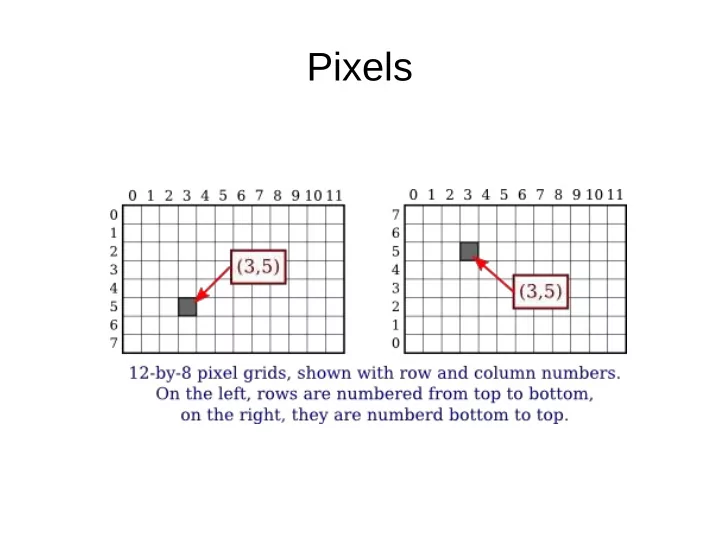
Pixels Pixels Row and column indicates a PIXEL not a POINT. A - - PowerPoint PPT Presentation

pixels
SMART_READER_LITE
LIVE PREVIEW

Pixels Pixels Row and column indicates a PIXEL not a POINT. A - - PowerPoint PPT Presentation

Pixels Pixels Row and column indicates a PIXEL not a POINT. A pixel can theoretically contain infinitely many points Drawing lines with pixels: fill pixels along the trajectory of a line from point p1 to p2 Aliasing Antialiasing


slide-1
SLIDE 1

Pixels

slide-2
SLIDE 2

Pixels

  • Row and column indicates a PIXEL not a
  • POINT. A pixel can theoretically contain

infinitely many points

  • Drawing lines with pixels: fill pixels along the

trajectory of a line from point p1 to p2

Aliasing

slide-3
SLIDE 3

Antialiasing

  • Antialiasing is a term for techniques that are

designed to mitigate the effects of aliasing

  • The idea is that when a pixel is only partially

covered by a shape, the color of the pixel should be a mixture of the color of the shape and the color of the background.

slide-4
SLIDE 4

Line algorithm

  • A naive line-drawing algorithm

Problems with this? Assume order is OK, x2>x1

dx = x2 - x1 dy = y2 - y1 for x from x1 to x2 { y = y1 + dy * (x - x1) / dx plot(x, y) }

slide-5
SLIDE 5

Naive line-drawing

  • Inefficient, slow due to floating point

computations

  • If dx<dy, the line becomes sparse with lots of

gaps

  • What happens at dx=0?
slide-6
SLIDE 6

Bresenham’s Line Algorithm

  • Solve inefficiency due to floating point arithmetic by

using ONLY integer arithmetic

  • Key idea:

– when focusing on one octant, say 0 – start point of line is origin, slope is < 1 – loop x over integers from x1 to x2 – y will go from y1 to y2 and at every

point we have to decide to increase y by 1 or not

slide-7
SLIDE 7

Breshenman contd.

A point (x, y) is on the line when f(x, y) = 0

slide-8
SLIDE 8

Bresenham contd.

  • At each point, base decision to increase y on

where the integer x is w.r.t. true line

slide-9
SLIDE 9

Line w.r.t. halfway point

  • Points on the line
  • How can we evaluate the line at next integer

x0+1 and midway between two vertical integers?

  • How about
  • But the whole point of this was to avoid floating

point arithmetic… so why all the complications?

  • Let’s do a little more algebra
slide-10
SLIDE 10

Integer Arithmetic

  • Decision at x0
  • Simplifying
  • If D is positive then increase y, otherwise leave y alone
  • What about x0 +1?
slide-11
SLIDE 11

Second point

  • If the difference is positive, then increase y by 1
  • The error D accumulates as x increases
  • But there are still fractions…? We only care about sign so

we can multiply the equation by 2 with no consequence

slide-12
SLIDE 12

Bresenham Algorithm

plotLine(x0,y0, x1,y1) dx = x1 - x0 dy = y1 - y0 D = 2*dy - dx y = y0 for x from x0 to x1 plot(x,y) if D > 0 y = y + 1 D = D - 2*dx end if D = D + 2*dy Homework: implement Bresenham’s line algorithm in Java. The above algorithm sketch only works for one of the 8 octants.

slide-13
SLIDE 13

Coordinate Systems

  • We will talk about orthogonal coordinate systems:

axes are perpendicular to each other

  • We have to be flexible when we think about coordinate

systems and transforming from one to another

  • The display is a rectangle of pixels, the last

destination of the output of our algorithms, however, we may want to specify other intermediary rectangles with their own origins, e.g., window or part of a window

slide-14
SLIDE 14

Transforming between real-number Coordinate Systems

newX = newLeft + ((oldX - oldLeft) / (oldRight - oldLeft)) * (newRight - newLeft)) newY = newTop + ((oldY - oldTop) / (oldBottom - oldTop)) * (newBotom - newTop)

slide-15
SLIDE 15

Aspect Ratio