Opera.ng Systems History and Overview Por*ons of this material - - PDF document

opera ng systems history and overview
SMART_READER_LITE
LIVE PREVIEW

Opera.ng Systems History and Overview Por*ons of this material - - PDF document

2/29/16 CSE 306: Opera.ng Systems CSE 306: Opera.ng Systems So what is an OS? Opera.ng Systems History and Overview Por*ons of this material courtesy Profs. Wong and Stark 2-2 CSE 306: Opera.ng Systems CSE 306: Opera.ng Systems One view of


slide-1
SLIDE 1

2/29/16 1

CSE 306: Opera.ng Systems

Opera.ng Systems History and Overview

Por*ons of this material courtesy Profs. Wong and Stark

CSE 306: Opera.ng Systems

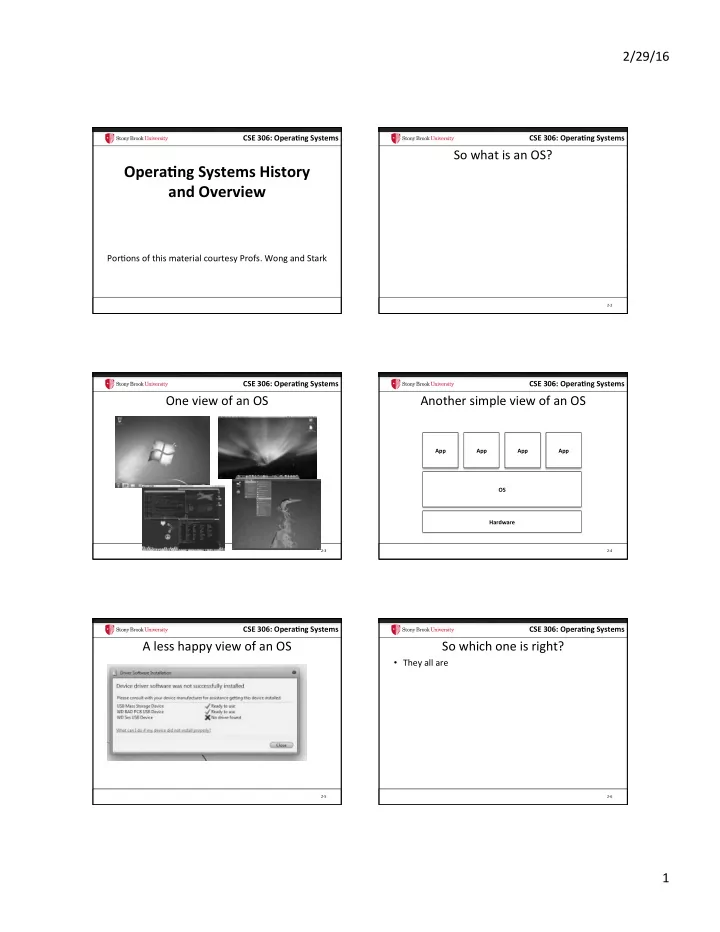
So what is an OS?

2-2

CSE 306: Opera.ng Systems

One view of an OS

2-3

CSE 306: Opera.ng Systems

Another simple view of an OS

2-4

Hardware OS App App App App

CSE 306: Opera.ng Systems

A less happy view of an OS

2-5

CSE 306: Opera.ng Systems

So which one is right?

  • They all are

2-6

slide-2
SLIDE 2

2/29/16 2

CSE 306: Opera.ng Systems

An OS serves three masters

  • 1. Give users a desktop environment
  • 2. Give applica*ons a more usable abstrac*on of the

hardware

  • 3. Give hardware manufacturers an abstrac*on of the

applica*ons

2-7

CSE 306: Opera.ng Systems

Background (1)

  • CPUs have 2 modes: user and supervisor

– Some*mes more, but whatevs

  • Supervisor mode:

– Issue commands to hardware devices – Power off, Reboot, Suspend – Launch missiles, Do awesome stuff

  • User mode:

– Run other code, hardware taXles if you try anything reserved for the supervisor

2-8

CSE 306: Opera.ng Systems

OS architecture

2-9

Hardware OS App App App App

CSE 306: Opera.ng Systems

OS architecture

2-10

Hardware Libraries App App App App Kernel User Super- visor

CSE 306: Opera.ng Systems

Master #2: Applica*ons

  • Applica*on Programming Interface (API)

– Win32 (Windows) – POSIX (Unix/Linux) – Cocoa/Cocoa Touch (Mac OS/iOS)

  • Applica*on-facing func*ons provided by libraries

– Injected by the OS into each applica*on

2-11

CSE 306: Opera.ng Systems

OS architecture

2-12

Hardware Libraries App App App App Kernel User Super- visor

slide-3
SLIDE 3

2/29/16 3

CSE 306: Opera.ng Systems

App

OS architecture

2-13

Hardware Libraries Kernel User Super- visor App Libraries App Libraries Win32 API

CSE 306: Opera.ng Systems

Famous libraries, anyone?

  • Windows: ntdll.dll, kernel32.dll, user32.dll, gdi32.dll
  • Linux/Unix: libc.so, ld.so, libpthread.so, libm.so

2-14

CSE 306: Opera.ng Systems

Caveat 1

  • Libraries include a lot of code for common func*ons

– Why bother reimplemen*ng sqrt?

  • They also give high-level abstrac*ons of hardware

– Files, printer, dancing Homer Simpson USB doll

  • How does this work?

2-15

CSE 306: Opera.ng Systems

System Call

  • Special instruc*on to switch from user to supervisor

mode

  • Transfers CPU control to the kernel

– One of a small-ish number of well-defined func*ons

  • How many system calls does Windows or Linux

have?

– Windows ~1200 – Linux ~350

2-16

CSE 306: Opera.ng Systems

App

OS architecture

2-17

Hardware Libraries Kernel User Super- visor App Libraries App Libraries System Call Table (350—1200) Open file “hw1.txt” Ok, here’s handle 4

CSE 306: Opera.ng Systems

Caveat 2

  • Some libraries also call special apps provided by the

OS, called a daemon (or service)

– Communicate through kernel-provided API

  • Example: Print spooler

– App sends pdf to spooler – Spooler checks quotas, etc. – Turns pdf into printer-specific format – Sends reformaXed document to device via OS kernel

2-18

slide-4
SLIDE 4

2/29/16 4

CSE 306: Opera.ng Systems

App

OS architecture

2-19

Hardware Libraries Kernel User Super- visor App Libraries Daemon Libraries System Call Table (350—1200)

CSE 306: Opera.ng Systems

Master 3: Hardware

  • OS kernels are programmed at a higher low level of

abstrac*on

– Disk blocks vs. specific types of disks

  • For most types of hardware, the kernel has a “lowest

common denominator” interface

– E.g., Disks, video cards, network cards, keyboard – Think Java abstract class – Some*mes called a hardware abstrac*on layer (HAL)

  • Each specific device (Nvidia GeForce 600) needs to

implement the abstract class

– Each implementa*on is called a device driver

2-20

CSE 306: Opera.ng Systems

App

OS architecture

2-21

Hardware Libraries Kernel User Super- visor App Libraries Daemon Libraries System Call Table (350—1200) HAL Driver Driver Driver

CSE 306: Opera.ng Systems

What about Master 1

  • What is the desktop?
  • Really just a special daemon that interacts closely

with keyboard, mouse, and display drivers

– Launches programs when you double click, etc. – Some program libraries call desktop daemon to render content, etc.

2-22

CSE 306: Opera.ng Systems

An OS serves three masters

  • 1. Give users a desktop environment

– Desktop, or window manager, or GUI

  • 2. Give applica*ons a more usable abstrac*on of the

hardware

– Libraries (+ system calls and daemons)

  • 3. Give hardware manufacturers an abstrac*on of the

applica*ons

– Device Driver API (or HAL)

2-23

CSE 306: Opera.ng Systems

Mul*plexing Resources

  • Many applica*ons may need to share the hardware
  • Different strategies based on the device:

– Time sharing: CPUs, disk arm

  • Each app gets the resource for a while and passes it on

– Space sharing: RAM, disk space

  • Each app gets part of the resource all the *me

– Exclusive use: mouse, keyboard, video card

  • One app has exclusive use for an indefinite period
slide-5
SLIDE 5

2/29/16 5

CSE 306: Opera.ng Systems

So what is Linux?

  • Really just an OS kernel

– Including lots of device drivers

  • Conflated with environment consis*ng of:

– Linux kernel – Gnu libc – X window manager daemon – CUPS printer manager – Etc.

2-25

CSE 306: Opera.ng Systems

So what is Ubuntu? Centos?

  • A distribu.on: bundles all of that stuff together

– Pick versions that are tested to work together – Usually also includes a sonware update system

2-26

CSE 306: Opera.ng Systems

OSX vs iOS?

  • Same basic kernel (a few different compile op*ons)
  • Different window manager and libraries

2-27

CSE 306: Opera.ng Systems

What is Unix?

  • A very old OS (1970s), innova*ve, s*ll in use
  • Innova*ons:

– Kernel wriXen in C (first one not in assembly)

  • Co-designed C language with Unix

– Several nice API abstrac*ons

  • Fork, pipes, everything a file
  • Several implementa*ons: *BSDs, Solaris, etc.

– Linux is a Unix-like kernel

2-28

CSE 306: Opera.ng Systems

What is POSIX?

  • A standard for Unix compa*bility
  • Even Windows is POSIX compliant!

2-29

CSE 306: Opera.ng Systems

History of Opera*ng Systems

  • Two ways to look at history:

– Evolu*on of the Theory – Evolu*on of the Machine/Hardware

slide-6
SLIDE 6

2/29/16 6

CSE 306: Opera.ng Systems

Evolu*on of OS Theory

  • 1. Centralized opera*ng system

– Resource management and mul*programming, Virtuality

  • 2. Network opera*ng system

– Resource sharing to achieve Interoperability

  • 3. Distributed opera*ng system

– Singe computer view of a mul*ple computer system for Transparency

  • 4. Coopera*ve autonomous system

– Coopera*ve work with Autonomicity

CSE 306: Opera.ng Systems

Evolu*on of OS Machine/Hardware

CSE 306: Opera.ng Systems

1940’s – First Computers

  • One user/programmer at a *me (serial

– Program loaded manually using switches – Debug using the console lights

  • ENIAC

– 1st gen purpose machine – Calcula*ons for Army – Each panel had specific func*on

ENIAC (Electronic Number Integrator and Computer)

CSE 306: Opera.ng Systems

1940’s – First Computers

Pros:

  • Interac*ve – immediate

response on lights

  • Programmers were women

J Cons:

  • Lots of Idle *me

– Expensive computa*on

  • Error-prone/tedious
  • Each program needs all driver

code

  • Vacuum Tubes and Plugboards
  • Single group of people designed, built,

programmed, operated and maintained each machine

  • No Programming language, only absolute

machine language (101010)

  • O/S? What is an O/S?
  • All programs basically did numerical

calcula*ons

CSE 306: Opera.ng Systems

1950’s – Batch Processing

  • Deck of cards to describe job
  • Jobs submiXed by mul*ple users are sequenced

automa*cally by a resident monitor

  • Resident monitor was a basic O/S

– S/W controls sequence of events – Command processor – Protec*on from bugs (eventually) – Device drivers CSE 306: Opera.ng Systems

Monitor’s Perspec*ve

  • Monitor controls the sequence of

events

  • Resident Monitor is sonware always

in memory

  • Monitor reads in job and gives

control

  • Job returns control to monitor
slide-7
SLIDE 7

2/29/16 7

CSE 306: Opera.ng Systems

1950’s – Batch Processing

Pros:

  • CPU kept busy, less idle *me
  • Monitor could provide I/O

services

Cons:

  • No longer interac*ve – longer

turnaround *me

  • Debugging more difficult
  • CPU s*ll idle for I/O-bound

jobs

  • Buggy jobs could require
  • perator interven*on

IBM 7090

CSE 306: Opera.ng Systems

Mul*programmed Batch Systems

  • CPU is onen idle

– Even with automa*c job sequencing. – I/O devices are slow compared to processor CSE 306: Opera.ng Systems

Uniprogramming

  • Processor must wait for I/O instruc*on to complete

before preceding

CSE 306: Opera.ng Systems

Mul*programming

  • When one job needs to wait for I/O, the processor

can switch to the other job

CSE 306: Opera.ng Systems

Mul*programming

CSE 306: Opera.ng Systems

1960’s – Mul*programming (*me-sharing)

  • CPU and I/O devices are mul*plexed (shared)

between a number of jobs

– While one job is wai*ng for I/O another can use the CPU – SPOOLing: Simultaneous Peripheral Opera*on OnLine

  • 1st and simplest mul*programming system
  • Monitor (resembles O/S)

– Starts job, spools opera*ons, I/O, switch jobs, protec*on between memory

slide-8
SLIDE 8

2/29/16 8

CSE 306: Opera.ng Systems

1960’s – Mul*programming (*me-sharing)

Pros:

  • Paging and swapping (RAM)
  • Interac*veness
  • Output available at comple*on
  • CPU kept busy, less idle *me

Cons:

  • H/W more complex
  • O/S complexity?

IBM System 360

CSE 306: Opera.ng Systems

1970’s - Minicomputers and Microprocessors

  • Trend toward many small personal computers or

worksta*ons, rather than a single mainframe.

– Advancement of Integrated circuits

  • Timesharing

– Each user has a terminal and shares a single machine (Unix) CSE 306: Opera.ng Systems

1980’s – Personal Computers & Networking

  • Microcomputers = PC (size and $)
  • MS-DOS, GUI, Apple, Windows
  • Networking: Decentraliza*on of compu*ng required

communica*on

– Not cost-effec*ve for every user to have printer, full copy

  • f sonware, etc.

– Rise of cheap, local area networks (Ethernet), and access to wide area networks (Arpanet). CSE 306: Opera.ng Systems

1980’s – Personal Computers & Networking

  • OS issues:

– Communica*on protocols, client/server paradigm – Data security, encryp*on, protec*on – Reliability, consistency, availability of distributed data – Heterogeneity – Reducing Complexity

  • Ex: Byte Ordering

CSE 306: Opera.ng Systems

1990’s – Global Compu*ng

  • Dawn of the Internet

– Global compu*ng system

  • Powerful CPUs cheap! Mul*core systems
  • High speed links
  • Standard protocols (HTTP, FTP, HTML, XML, etc)
  • OS Issues:

– Communica*on costs dominate

  • CPU/RAM/disk speed mismatch
  • Send data to program vs. sending program to data

– QoS gurantees – Security CSE 306: Opera.ng Systems

In the year 2000…

slide-9
SLIDE 9

2/29/16 9

CSE 306: Opera.ng Systems

2000’s – Embedded and Ubiquitous Compu*ng

  • Mobile and wearable computers
  • Networked household devices
  • Absorp*on of telephony, entertainment func*ons

into compu*ng systems

  • OS issues:

– Security, privacy – Mobility, ad-hoc networks, power management – Reliability, service guarantees CSE 306: Opera.ng Systems

2000’s – Embedded and Ubiquitous Compu*ng

  • Real-*me compu*ng

– Guaranteed upper bound on task comple*on

  • Dedicated computers/Embedded systems

– Applica*on specific, designed to complete par*cular tasks

  • Distributed systems

– Redundant resources, transparent to user CSE 306: Opera.ng Systems

Mul*-core

  • New hotness in CPU design. Not going away.

– Why?

  • Being able to program with threads and concurrent

algorithms will be a crucial job skill going forward

– Don’t leave SBU without mastering these skills – We will do some thread programming in Lab 3 CSE 306: Opera.ng Systems

Editorial

  • Some textbooks imply modern OSes are

microkernels

  • This is false

– Windows NT and OSX were designed as microkernels – Then reverted to essen*ally monolithic designs in prac*ce

  • Linux was never a microkernel

– Google the famous Torvalds Tanenbaum debate

  • Similarly, Distributed OSes are mostly abandoned

CSE 306: Opera.ng Systems

Object orienta*on

  • Objects are a key feature of the Windows NT kernel

design

– IMO a good idea

  • Linux actually has its own bizarre version of object
  • rienta*on using C structs and func*on pointers

– In Unix, everything is a file – How did they pull this off? – Poor-man’s object inheritance CSE 306: Opera.ng Systems

Summary

  • OS’s began with big expensive computers used

interac*vely by one user at a *me.

  • Batch systems sequences jobs to keep computer
  • busier. Interac*vity sacrificed.
  • Mul*programming developed to make more efficient

use of expensive hardware and restore interac*veness.

  • Cheap CPU/memory/storage make communica*on

the dominant cost.

  • Mul*programming s*ll central for handling

concurrent interac*on with environment.

slide-10
SLIDE 10

2/29/16 10

CSE 306: Opera.ng Systems

Summary (2)

  • Understand what an OS is

– Three masters – Nomenclature

  • Ques*ons?

2-55