More Raster Line Issues Fat lines with multiple pixel width - - PDF document

more raster line issues
SMART_READER_LITE
LIVE PREVIEW

More Raster Line Issues Fat lines with multiple pixel width - - PDF document

Spring 2013 More Raster Line Issues Fat lines with multiple pixel width Bresenham Circles Symmetric lines End point geometry how should it Lecture Set 3 look? CS5600 Intro to Computer Graphics Generating curves, e.g.,


slide-1
SLIDE 1

Spring 2013 CS5600

Spring 2013 CS 5600 1

Bresenham Circles

CS5600 Intro to Computer Graphics

From Rich Riesenfeld

Spring 2013

Lecture Set 3

More Raster Line Issues

  • Fat lines with multiple pixel width
  • Symmetric lines
  • End point geometry – how should it

look?

  • Generating curves, e.g., circles, etc.
  • Jaggies, staircase effect, aliasing...

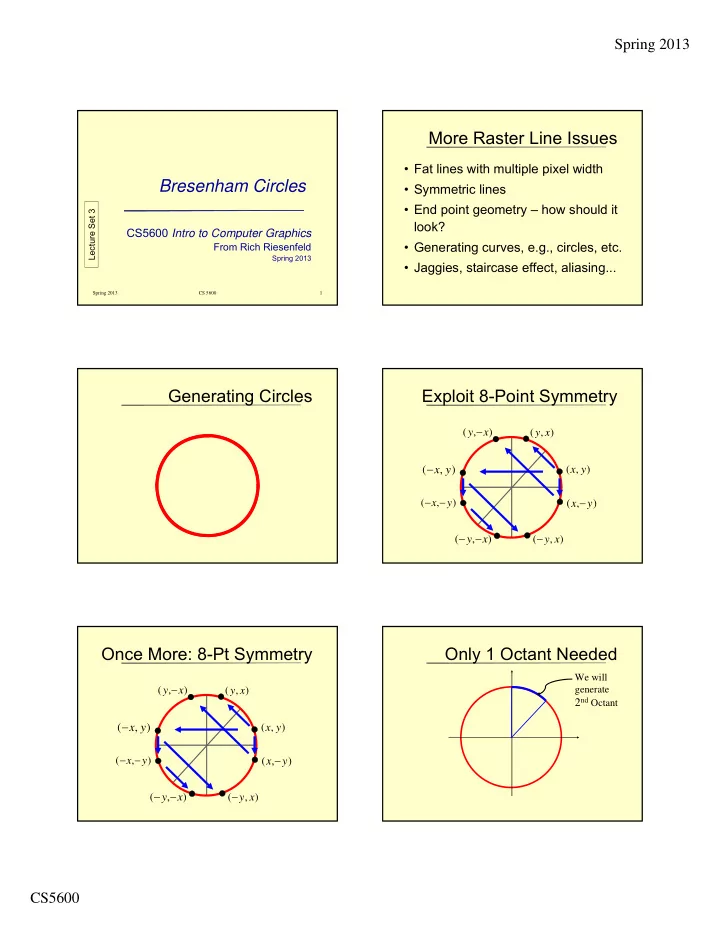
Generating Circles Exploit 8-Point Symmetry

) , ( y x

) , ( y x  ) , ( y x 

) , ( y x   ) , ( x y ) , ( x y  ) , ( x y  ) , ( x y  

Once More: 8-Pt Symmetry

) , ( y x

) , ( y x  ) , ( y x 

) , ( y x   ) , ( x y ) , ( x y  ) , ( x y  ) , ( x y  

Only 1 Octant Needed

We will generate

2nd Octant

slide-2
SLIDE 2

Spring 2013 CS5600

Generating pt (x,y) gives

the following 8 pts by symmetry:

{(x,y), (-x,y), (-x,-y), (x,-y), (y,x), (-y,x), (-y,-x), (y,-x)}

2nd Octant Is a Good Arc

  • It is a function in this domain

– single-valued – no vertical tangents: |slope|  1

  • Lends itself to Bresenham

– only need consider E or SE

Implicit Eq’s for Circle

  • Let F(x,y) = x2 + y2 – r 2
  • For (x,y) on the circle, F(x,y) = 0
  • So, F(x,y) > 0  (x,y) Outside
  • And, F(x,y) < 0  (x,y) Inside

Choose E or SE

  • Function is x2 + y2 – r 2 = 0
  • So, F(M)  0  SE
  • And, F(M) < 0  E

E

SE

M

ideal curve

F(M)  0  SE E

SE

M

ideal curve

F(M) < 0  E

slide-3
SLIDE 3

Spring 2013 CS5600

Decision Variable d

Again, we let,

d = F(M)

E

SE

M

ideal curve

Look at Case 1: E

1 ( 1, ) 2 2 2 1 2 ( 1) ( ) 2

  • ld

p p p

F y x y x r p

d

       

dold < 0  E dold < 0  E

1 ( 2, ) 2 2 2 1 2 ( 2) ( ) 2

new

p p p p

F y x y x r

d

       

dold < 0  E

(2 3)

p new

  • ld

x

d d

  

Since,

3 2 ) 1 2 ( ) 4 4 ( ) 1 ( 2 ) 2 ( 2

2 2

           x p x p x p x p x p x p x p

  • ld

new

d d 

dold < 0  E

, 2 3

E new

  • ld

E p

x

d d

     

where,

slide-4
SLIDE 4

Spring 2013 CS5600

E

SE

M

ideal curve

Look at Case 2: SE

dold  0  SE

Because,…, straightforward manipulation

3 ( 2, ) 2 2 2 3 2 ( 2) ( ) 2 (2 2 5)

new new

  • ld

p p

p p p p

F y x y x r y d d x

d

           

dold  0  SE

              

2 2 2 2 2 2

) 2 1 ( ) 1 ( ) 2 3 ( ) 2 ( r y p x p r y p x p

  d d

  • ld

new

             4 1 4 9 3 ) 3 2 (

2 2

y p y p y p y p x p

=

dold  0  SE

              

2 2 2 2 2 2

) 2 1 ( ) 1 ( ) 2 3 ( ) 2 ( r y p x p r y p x p

  d d

  • ld

new

             4 1 4 9 3 ) 3 2 (

2 2

y p y p y p y p x p

=

x x

dold  0  SE

              

2 2 2 2 2 2

) 2 1 ( ) 1 ( ) 2 3 ( ) 2 ( r y p x p r y p x p

  d d

  • ld

new

             4 1 4 9 3 ) 3 2 (

2 2

y p y p y p y p x p

=

x x x x

dold  0  SE

) 4 4 9

1 ( ) 3 ( ) 3 2 (        y p y p x p               

From calculation From new y-coordinate

  d d

  • ld

new

E

From old y-coordinate

slide-5
SLIDE 5

Spring 2013 CS5600

dold  0  SE

(2 2 5)

new

  • ld

p p SE

  • ld

y d d x d       

I.e.,

2 2 5

SE p p

y x    

Note: ∆΄s Not Constant

depend on values of xp and yp

  and

E SE

Summary

  • ∆΄s are no longer constant over entire line
  • Algorithm structure is exactly the same
  • Major difference from the line algorithm

– ∆ is re-evaluated at each step

– Requires real arithmetic

Initial Condition

  • Let r be an integer. Start at
  • Next midpoint M lies at
  • So,

) , ( r

) , 1 (

2 1

 r

r r r r F 2 ) 2 ( 1 ) , 1 (

4 1 2 1

     

r 

4 5

Ellipses

  • Evaluation is analogous
  • Structure is same
  • Have to work out the ∆΄s

Getting to Integers

  • Note the previous algorithm

involves real arithmetic

  • Can we modify the algorithm to use

integer arithmetic?

slide-6
SLIDE 6

Spring 2013 CS5600

Integer Circle Algorithm

  • Define a shift decision variable
  • In the code, plug in

4 1

  d h

4 1

  h d

Integer Circle Algorithm

  • Now, the initialization is h = 1 - r
  • So the initial value becomes

r r r F

    

 

1 4 1 ) 4 5 ( 4 1 2 1)

, 1 (

Integer Circle Algorithm

  • Then,
  • Since h an integer

1 0 becomes 4 d

h

 

1 4 h

h

 

 

Integer Circle Algorithm

  • But,h begins as an integer
  • And, h gets incremented by integer
  • Hence, we have an integer circle

algorithm

  • Note: Sufficient to test for h < 0

End of Bresenham Circles Another Digital Line Issue

  • Clipping Bresenham lines
  • The integer slope is not the true

slope

  • Have to be careful
  • More issues to follow
slide-7
SLIDE 7

Spring 2013 CS5600

Line Clipping Problem

min

y y  min

x x 

Clipping Rectangle

) ,

(

y

x

) 1 , 1

(

y

x

max

x x 

Clipped Line

min

y y 

min

x x 

Clipping Rectangle

)

,

(

y x  

) 1 , 1

(

y

x

max

x x 

max

y y 

Drawing Clipped Lines

) ,

(

y

x

) 1 , 1

(

y

x

Clipped Line Has Different Slope !

34 m  1 2 m 

Pick Right Slope to Reproduce Original Line Segment

Zoom of previous situation

Pick Right Slope to Reproduce Original Line Segment

Zoom of previous situation

slide-8
SLIDE 8

Spring 2013 CS5600

Clipping Against x = xmin

E NE min

y y  min

x x 

         )) (

min ( , min

B x m x

 Clip Rectangle Clip Rectangle

           )) (

min ( , min

B x m x

Round 

midpoint M

Clipping Against y = ymin

min

y y  min

x x 

1 min 

 y y

2 1 min 

 y y

Line getting clipped

B A

Clipping Against y = ymin

  • Situation is complicated
  • Multiple pixels involved at (y = ymin)
  • Want all of those pixels as “in”
  • Analytic ∩ , rounding x gives A
  • We want point B

Clipping Against y = ymin

  • Use Line ∩ y = ymin - ½
  • Round up to nearest integer x
  • This yields point B, the desired result

Jaggies-Manifestation of Aliasing

Added resolution helps, but does not directly address underlying issue of aliasing

Jaggies and Aliasing

  • To represent a line with discrete pixel

values is to sample finitely a continuous function

  • Jaggies are visual manifestation,

artifacts, resulting from information loss

  • The term aliasing is a complicated,

unintuitive phenomenon which will be defined later

slide-9
SLIDE 9

Spring 2013 CS5600

Jaggies and Aliasing

  • Doubling resolution in x and y

reduces the effect of the problem, but does not fix it

  • Doubling resolution costs 4 times

memory, memory bandwidth and scan conversion time!

Anti-aliasing

5 4 3 2 1 0 1 2 3 4 5 6 7 8 9 10 11

Pixel intensity (darkness, in this case) is proportional to area covered by line Pixel Space

Anti-aliasing

Pixel intensity (darkness, in this case) is proportional to area covered by line Pixel Space

Anti-aliasing

  • Set each pixel’s intensity value

proportional to its area of overlap (i.e. sub-area) covered by primitive

  • Not more than 1 pixel/column for

lines with

0 < slope < 1

Gupta-Sproull Algorithm -1

  • Standard Bresenham chooses E or NE
  • Incrementally compute distance D from

chosen pixel to center of line

  • Vary pixel intensity by value of D
  • Do this for line above and below

Gupta-Sproull Algorithm -2

  • Use coarse (4-bit, say) lookup table for

intensity : Filter (D,t)

  • Note, Filter value depends only on D

and t, not the slope of line! (Very clever)

  • For line_width t = 1 geometry and

associated calculations greatly simplify

slide-10
SLIDE 10

Spring 2013 CS5600

Cone Filter for Weighted Area Sampling

1 r  1 t   D              

Unit thickness line intersects no more than 3 pixels

Observations

  • Lines are complicated
  • Many aspects to consider
  • We omitted many
  • What about intensity of

y = x

vs

y = 0 ?

The End Bresenham Circles

Lecture Set 3