Module 3: XML Query and Manipulati Key XML query and manipulation - - PDF document

module 3 xml query and manipulati
SMART_READER_LITE
LIVE PREVIEW

Module 3: XML Query and Manipulati Key XML query and manipulation - - PDF document

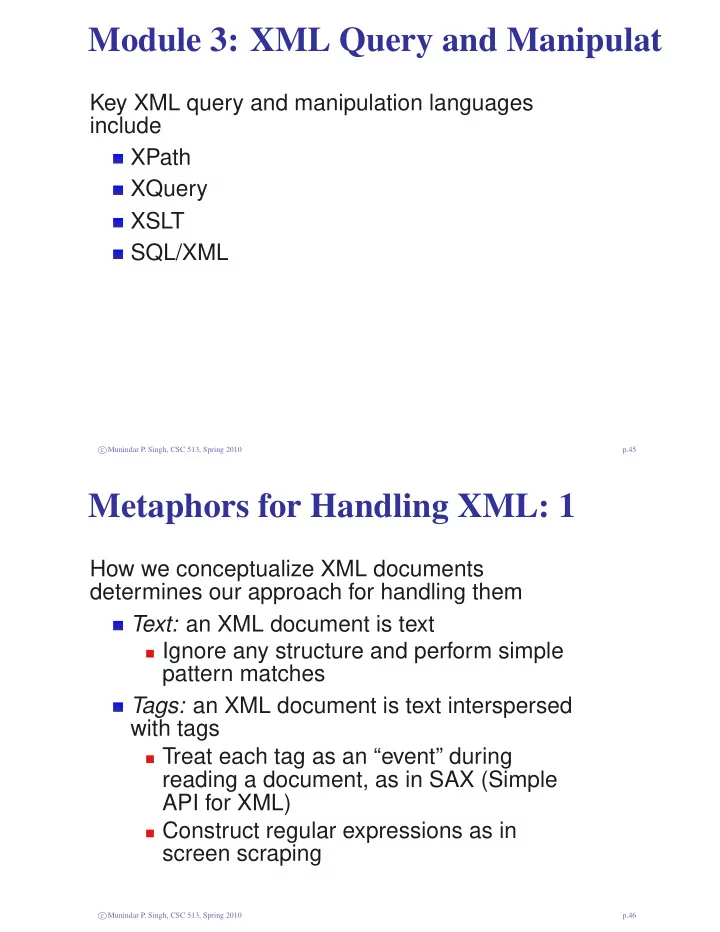
Module 3: XML Query and Manipulati Key XML query and manipulation languages include XPath XQuery XSLT SQL/XML c Munindar P. Singh, CSC 513, Spring 2010 p.45 Metaphors for Handling XML: 1 How we conceptualize XML documents determines


slide-1
SLIDE 1

Module 3: XML Query and Manipulati

Key XML query and manipulation languages include XPath XQuery XSLT SQL/XML

c Munindar P. Singh, CSC 513, Spring 2010 p.45

Metaphors for Handling XML: 1

How we conceptualize XML documents determines our approach for handling them Text: an XML document is text Ignore any structure and perform simple pattern matches Tags: an XML document is text interspersed with tags Treat each tag as an “event” during reading a document, as in SAX (Simple API for XML) Construct regular expressions as in screen scraping

c Munindar P. Singh, CSC 513, Spring 2010 p.46

slide-2
SLIDE 2

Metaphors for Handling XML: 2

Tree: an XML document is a tree Walk the tree using DOM (Document Object Model) Template: an XML document has regular structure Let XPath, XSLT, XQuery do the work Thought: an XML document represents an information model Access knowledge via RDF or OWL

c Munindar P. Singh, CSC 513, Spring 2010 p.47

XPath

Used as part of XPointer, SQL/XML, XQuery, and XSLT Models XML documents as trees with nodes Elements Attributes Text (PCDATA) Comments Root node: above root of document

c Munindar P. Singh, CSC 513, Spring 2010 p.48

slide-3
SLIDE 3

Achtung!

Parent in XPath is like parent as traditionally in computer science Child in XPath is confusing: An attribute is not a child of its parent Makes a difference for recursion (e.g., in XSLT apply-templates) Our terminology follows computer science: e-children, a-children, t-children Sets via et-, ta-, and so on

c Munindar P. Singh, CSC 513, Spring 2010 p.49

XPath Location Paths: 1

Relative or absolute Reminiscent of file system paths, but much more subtle Name of an element to walk down Leading /: root /: indicates walking down a tree .: currently matched (context) node ..: parent node

c Munindar P. Singh, CSC 513, Spring 2010 p.50

slide-4
SLIDE 4

XPath Location Paths: 2

@attr: to check existence or access value of the given attribute text(): extract the text comment(): extract the comment [ ]: generalized array accessors Variety of axes, discussed below

c Munindar P. Singh, CSC 513, Spring 2010 p.51

XPath Navigation

Select children according to position, e.g., [j], where j could be 1 . . . last() Descendant-or-self operator, // .//elem finds all elems under the current node //elem finds all elems in the document Wildcard, *: collects e-children (subelements) of the node where it is applied, but omits the t-children @*: finds all attribute values

c Munindar P. Singh, CSC 513, Spring 2010 p.52

slide-5
SLIDE 5

XPath Queries (Selection Conditions)

Attributes: //Song[@genre="jazz"] Text: //Song[starts-with(.//group, "Led")] Existence of attribute: //Song[@genre] Existence of subelement: //Song[group] Boolean operators: and, not, or Set operator: union (|), analogous to choice Arithmetic operators: >, <, . . . String functions: contains(), concat(), length(), starts-with(), ends-with() distinct-values() Aggregates: sum(), count()

c Munindar P. Singh, CSC 513, Spring 2010 p.53

XPath Axes: 1

Axes are addressable node sets based on the document tree and the current node Axes facilitate navigation of a tree Several are defined Mostly straightforward but some of them

  • rder the nodes as the reverse of others

Some captured via special notation current, child, parent, attribute, . . .

c Munindar P. Singh, CSC 513, Spring 2010 p.54

slide-6
SLIDE 6

XPath Axes: 2

preceding: nodes that precede the start of the context node (not ancestors, attributes, namespace nodes) following: nodes that follow the end of the context node (not descendants, attributes, namespace nodes) preceding-sibling: preceding nodes that are children of the same parent, in reverse document order following-sibling: following nodes that are children of the same parent

c Munindar P. Singh, CSC 513, Spring 2010 p.55

XPath Axes: 3

ancestor: proper ancestors, i.e., element nodes (other than the context node) that contain the context node, in reverse document order descendant: proper descendants ancestor-or-self: ancestors, including self (if it matches the next condition) descendant-or-self: descendants, including self (if it matches the next condition)

c Munindar P. Singh, CSC 513, Spring 2010 p.56

slide-7
SLIDE 7

XPath Axes: 4

Longer syntax: child::Song Some captured via special notation self::*: child::node(): node() matches all nodes preceding::* descendant::text() ancestor::Song descendant-or-self::node(), which abbreviates to // Compare /descendant-or-self::Song[1] (first descendant Song) and //Song[1] (first Songs (children of their parents))

c Munindar P. Singh, CSC 513, Spring 2010 p.57

XPath Axes: 5

Each axis has a principal node kind attribute: attribute namespace: namespace All other axes: element * matches whatever is the principal node kind of the current axis node() matches all nodes

c Munindar P. Singh, CSC 513, Spring 2010 p.58

slide-8
SLIDE 8

XPointer

Enables pointing to specific parts of documents Combines XPath with URLs URL to get to a document; XPath to walk down the document Can be used to formulate queries, e.g., Song- URL#xpointer(//Song[@genre="jazz"]) The part after # is a fragment identifier Fine-grained addressability enhances the Web architecture High-level “conceptual” identification of node sets

c Munindar P. Singh, CSC 513, Spring 2010 p.59

XQuery

The official query language for XML, now a W3C recommendation, as version 1.0 Given a non-XML syntax, easier on the human eye than XML An XML rendition, XqueryX, is in the works

c Munindar P. Singh, CSC 513, Spring 2010 p.60

slide-9
SLIDE 9

XQuery Basic Paradigm

The basic paradigm mimics the SQL (SELECT–FROM–WHERE) clause

f o r $x in doc ( ’ q2 . xml ’ ) / / Song where $x / @lg = ’en ’ return

4

<English−Sgr name= ’{ $x / Sgr /@name} ’ t i = ’{ $x / @ti } ’/ >

c Munindar P. Singh, CSC 513, Spring 2010 p.61

FLWOR Expressions

Pronounced “flower” For: iterative binding of variables over range

  • f values

Let: one shot binding of variables over vector

  • f values

Where (optional) Order by (sort: optional) Return (required) Need at least one of for or let

c Munindar P. Singh, CSC 513, Spring 2010 p.62

slide-10
SLIDE 10

XQuery For Clause

The for clause Introduces one or more variables Generates possible bindings for each variable Acts as a mapping functor or iterator In essence, all possible combinations of bindings are generated: like a Cartesian product in relational algebra The bindings form an ordered list

c Munindar P. Singh, CSC 513, Spring 2010 p.63

XQuery Where Clause

The where clause Selects the combinations of bindings that are desired Behaves like the where clause in SQL, in essence producing a join based on the Cartesian product

c Munindar P. Singh, CSC 513, Spring 2010 p.64

slide-11
SLIDE 11

XQuery Return Clause

The return clause Specifies what node-sets are returned based

  • n the selected combinations of bindings

c Munindar P. Singh, CSC 513, Spring 2010 p.65

XQuery Let Clause

The let clause Like for, introduces one or more variables Like for, generates possible bindings for each variable Unlike for, generates the bindings as a list in

  • ne shot (no iteration)

c Munindar P. Singh, CSC 513, Spring 2010 p.66

slide-12
SLIDE 12

XQuery Order By Clause

The order by clause Specifies how the vector of variable bindings is to be sorted before the return clause Sorting expressions can be nested by separating them with commas Variants allow specifying descending or ascending (default) empty greatest or empty least to accommodate empty elements stable sorts: stable order by collations: order by $t collation collation-URI: (obscure, so skip)

c Munindar P. Singh, CSC 513, Spring 2010 p.67

XQuery Positional Variables

The for clause can be enhanced with a positional variable A positional variable captures the position of the main variable in the given for clause with respect to the expression from which the main variable is generated Introduce a positional variable via the at $var construct

c Munindar P. Singh, CSC 513, Spring 2010 p.68

slide-13
SLIDE 13

XQuery Declarations

The declare clause specifies things like Namespaces: declare namespace pref=’value’ Predefined prefixes include XML, XML Schema, XML Schema-Instance, XPath, and local Settings: declare boundary-space preserve (or strip) Default collation: a URI to be used for collation when no collation is specified

c Munindar P. Singh, CSC 513, Spring 2010 p.69

XQuery Quantification: 1

Two quantifiers some and every Each quantifier expression evaluates to true

  • r false

Each quantifier introduces a bound variable, analogous to for

1 f o r

$x in . . . where some $y in . . . s a t i s f i e s $y . . . $x return . . .

Here the second $x refers to the same variable as the first

c Munindar P. Singh, CSC 513, Spring 2010 p.70

slide-14
SLIDE 14

XQuery Quantification: 2

A typical useful quantified expression would use variables that were introduced outside of its scope The order of evaluation is implementation-dependent: enables

  • ptimization

If some bindings produce errors, this can matter some: trivially false if no variable bindings are found that satisfy it every: trivially true if no variable bindings are found

c Munindar P. Singh, CSC 513, Spring 2010 p.71

Variables: Scoping, Bound, and Free

for, let, some, and every introduce variables The visibility variable follows typical scoping rules A variable referenced within a scope is Bound if it is declared within the scope Free if it not declared within the scope

1 f o r

$x in . . . where some $x in . . . s a t i s f i e s . . . return . . .

Here the two $x refer to different variables

c Munindar P. Singh, CSC 513, Spring 2010 p.72

slide-15
SLIDE 15

XQuery Conditionals

Like a classical if-then-else clause The else is not optional Empty sequences or node sets, written ( ), indicate that nothing is returned

c Munindar P. Singh, CSC 513, Spring 2010 p.73

XQuery Constructors

Braces { } to delimit expressions that are evaluated to generate the content to be included; analogous to macros document { }: to create a document node with the specified contents element { } { }: to create an element element foo { ’bar’ }: creates <foo>Bar</foo> element { ’foo’ } { ’bar’ }: also evaluates the name expression attribute { } { }: likewise text { body}: simpler, because anonymous

c Munindar P. Singh, CSC 513, Spring 2010 p.74

slide-16
SLIDE 16

XQuery Effective Boolean Value

Analogous to Lisp, a general value can be treated as if it were a Boolean A xs:boolean value maps to itself An empty sequence maps to false A sequence whose first member is a node maps to true A numeric that is 0 or NaN maps to false, else to true An empty string maps to false, others to true

c Munindar P. Singh, CSC 513, Spring 2010 p.75

Defining Functions

1 declare

function l o c a l : itemftop ( $t ) { l o c a l : itemf ( $t , ( ) ) } ;

Here local: is the namespace of the query The arguments are specified in parentheses All of XQuery may be used within the defining braces Such functions can be used in place of XPath expressions

c Munindar P. Singh, CSC 513, Spring 2010 p.76

slide-17
SLIDE 17

Functions with Types

1 declare

function l o c a l : itemftop ( $t as element ( ) ) as element ( ) ∗ { l o c a l : itemf ( $t , ( ) ) } ;

Return types as above Also possible for parameters, but ignore such for this course

c Munindar P. Singh, CSC 513, Spring 2010 p.77

XSLT

A programming language with a functional flavor Specifies (stylesheet) transforms from documents to documents Can be included in a document (best not to)

<?xml version ="1.0"? > <?xml−stylesheet type =" t e x t / xsl " href ="URL −to−xsl−sheet "?> <main−element >

5

. . . </main−element >

c Munindar P. Singh, CSC 513, Spring 2010 p.78

slide-18
SLIDE 18

XQuery versus XSLT: 1

Competitors in some ways, but Share a basis in XPath Consequently share the same data model Same type systems (in the type-sensitive versions) XSLT got out first and has a sizable following, but XQuery has strong backing among vendors and researchers

c Munindar P. Singh, CSC 513, Spring 2010 p.79

XQuery versus XSLT: 2

XQuery is geared for querying databases Supported by major relational DBMS vendors in their XML offerings Supported by native XML DBMSs Offers superior coverage of processing joins Is more logical (like SQL) and potentially more optimizable XSLT is geared for transforming documents Is functional rather than declarative Based on template matching

c Munindar P. Singh, CSC 513, Spring 2010 p.80

slide-19
SLIDE 19

XQuery versus XSLT: 3

There is a bit of an arms race between them Types XSLT 1.0 didn’t support types XQuery 1.0 does XSLT 2.0 does too XQuery presumably will be enhanced with capabilities to make updates, but XSLT could too

c Munindar P. Singh, CSC 513, Spring 2010 p.81

XSLT Stylesheets

A programming language that follows XML syntax Use the XSLT namespace (conventionally abbreviated xsl) Includes a large number of primitives, especially: <copy-of> (deep copy) <copy> (shallow copy) <value-of> <for-each select="..."> <if test="..."> <choose>

c Munindar P. Singh, CSC 513, Spring 2010 p.82

slide-20
SLIDE 20

XSLT Templates: 1

A pattern to specify where the given transform should apply: an XPath expression This match only works on the root:

< xsl : template match ="/" > . . . </ xsl : template >

Example: Duplicate text in an element

< xsl : template match=" t e x t ()" >

2

<xsl : value−of select = ’. ’/ > <xsl : value−of select = ’. ’/ > </ xsl : template >

c Munindar P. Singh, CSC 513, Spring 2010 p.83

XSLT Templates: 2

If no pattern is specified, apply recursively on et-children via <xsl:apply-templates/> By default, if no other template matches, recursively apply to et-children of current node (ignores attributes) and to root:

1 < xsl : template match ="∗|/" >

<xsl : apply−templates / > </ xsl : template >

c Munindar P. Singh, CSC 513, Spring 2010 p.84

slide-21
SLIDE 21

XSLT Templates: 3

Copy text node by default Use an empty template to override the default:

< xsl : template match="X"/ >

2 <!−− X = desired

pattern − − >

Confine ourselves to the examples discussed in class (ignore explicit priorities, for example)

c Munindar P. Singh, CSC 513, Spring 2010 p.85

XSLT Templates: 4

Templates can be named Templates can have parameters Values for parameters are supplied at invocation Empty node sets by default Additional parameters are ignored

c Munindar P. Singh, CSC 513, Spring 2010 p.86

slide-22
SLIDE 22

XSLT Variables

Explicitly declared Values are node sets Convenient way to document templates

c Munindar P. Singh, CSC 513, Spring 2010 p.87

Integrity Constraints in XML

Entity: xsd:unique and xsd:key Referential: xsd:keyref Data type: XML Schema specifications Value: Solve custom queries using XPath or XQuery Entity and referential constraints are based on XPath

c Munindar P. Singh, CSC 513, Spring 2010 p.88

slide-23
SLIDE 23

XML Keys: 1

Keys serve as generalized identifiers, and are captured via XML Schema elements: Unique: candidate key The selected elements yield unique field tuples Key: primary key, which means candidate key plus The tuples exist for each selected element Keyref: foreign key Each tuple of fields of a selected element corresponds to an element in the referenced key

c Munindar P. Singh, CSC 513, Spring 2010 p.89

XML Keys: 2

Two subelements built using restricted application of XPath from within XML Schema Selector: specify a set of objects: this is the scope over which uniqueness applies Field: specify what is unique for each member of the above set: this is the identifier within the targeted scope Multiple fields are treated as ordered to produce a tuple of values for each member of the set The order matters for matching keyref to key

c Munindar P. Singh, CSC 513, Spring 2010 p.90

slide-24
SLIDE 24

Selector XPath Expression

A selector finds descendant elements of the context node The sublanguage of XPath used allows Children via ./child or ./* or child Descendants via .// (not within a path) Choice via | The subset of XPath used does not allow Parents or ancestors text() Attributes Fancy axes such as preceding, preceding-sibling, . . .

c Munindar P. Singh, CSC 513, Spring 2010 p.91

Field XPath Expression

A field finds a unique descendant element (simple type only) or attribute of the context node The subset of XPath used allows Children via ./child or ./* Descendants via .// (not within a path) Choice via | Attributes via @attribute or @* The subset of XPath used does not allow Parents or ancestors text() Fancy axes such as preceding, . . . An element yields its text()

c Munindar P. Singh, CSC 513, Spring 2010 p.92

slide-25
SLIDE 25

XML Foreign Keys

<keyref name = " . . . " r e f e r =" primary−key− name"> < selector xpath = " . . . " / >

3

< f i e l d name = " . . . " / > </ keyref >

Relational requirement: foreign keys don’t have to be unique or non-null, but if one component is null, then all components must be null.

c Munindar P. Singh, CSC 513, Spring 2010 p.93

Document Object Model (DOM)

Basis for parsing XML, which provides a node-labeled tree in its API Conceptually simple: traverse by requesting element, its attribute values, and its children Processing program reflects document structure, as in recursive descent Can edit documents Inefficient for large documents: parses them first entirely even if a tiny part is needed Can validate with respect to a schema

c Munindar P. Singh, CSC 513, Spring 2010 p.94

slide-26
SLIDE 26

DOM Example

1 DOMParser p = new DOMParser ( ) ;

p . parse ( " filename " ) ; Document d = p . getDocument ( ) Element s = d . getDocumentElement ( ) ; NodeList l = s . getElementsByTagName ( " member " ) ;

6 Element m = ( Element )

l . item ( 0 ) ; i n t code = m. g e t A t t r i b u t e ( " code " ) ; NodeList kids = m. getChildNodes ( ) ; Node kid = kids . item ( 0 ) ; String elemName = ( ( Element ) kid ) . getTagName ( ) ; . . .

c Munindar P. Singh, CSC 513, Spring 2010 p.95

Simple API for XML (SAX)

Parser generates a sequence of events: startElement, endElement, . . . Programmer implements these as callbacks More control for the programmer Processing program does not necessarily reflect document structure

c Munindar P. Singh, CSC 513, Spring 2010 p.96

slide-27
SLIDE 27

SAX Example: 1

class MemberProcess extends DefaultHandler { public void startElement ( String uri , String n , String qName, A t t r i b u t e s a t t r s ) { i f ( n . equals ( " member " ) ) code = a t t r s . getValue ( " code " ) ;

5

i f ( n . equals ( " project " ) ) inProject = true ; buffer . reset ( ) ; } . . .

c Munindar P. Singh, CSC 513, Spring 2010 p.97

SAX Example: 2

1

. . . public void endElement ( String uri , String n , String qName) {

6

i f ( n . equals ( " project " ) ) inProject = false ; i f ( n . equals ( " member " ) && ! inProject ) . . . do something . . . } }

c Munindar P. Singh, CSC 513, Spring 2010 p.98

slide-28
SLIDE 28

SAX Filters

A component that mediates between an XMLReader (parser) and a client A filter would present a modified set of events to the client Typical uses: Make minor modifications to the structure Search for patterns efficiently What kinds of patterns, though? Ideally modularize treatment of different event patterns In general, a filter can alter the structure of the document

c Munindar P. Singh, CSC 513, Spring 2010 p.99

Programming with XML

Limitations Difficult to construct and maintain documents Internal structures are cumbersome; hence the criticisms of DOM parsers Emerging approaches provide superior binding from XML to Programming languages Relational databases Check pull-based versus push-based parsers

c Munindar P. Singh, CSC 513, Spring 2010 p.100