Querying XML Documents Querying XML Documents How XML may be - - PowerPoint PPT Presentation

querying xml documents querying xml documents
SMART_READER_LITE
LIVE PREVIEW

Querying XML Documents Querying XML Documents How XML may be - - PowerPoint PPT Presentation

Objectives Objectives How XML generalizes relational databases An Introduction to XML and Web Technologies An Introduction to XML and Web Technologies The XQuery language Querying XML Documents Querying XML Documents How XML may be


slide-1
SLIDE 1

1

An Introduction to XML and Web Technologies An Introduction to XML and Web Technologies

Querying XML Documents Querying XML Documents with with XQuery XQuery

Anders Møller & Michael I. Schwartzbach  2006 Addison-Wesley

2

An Introduction to XML and Web Technologies

Objectives Objectives

How XML generalizes relational databases The XQuery language How XML may be supported in databases

3

An Introduction to XML and Web Technologies

XQuery 1.0 XQuery 1.0

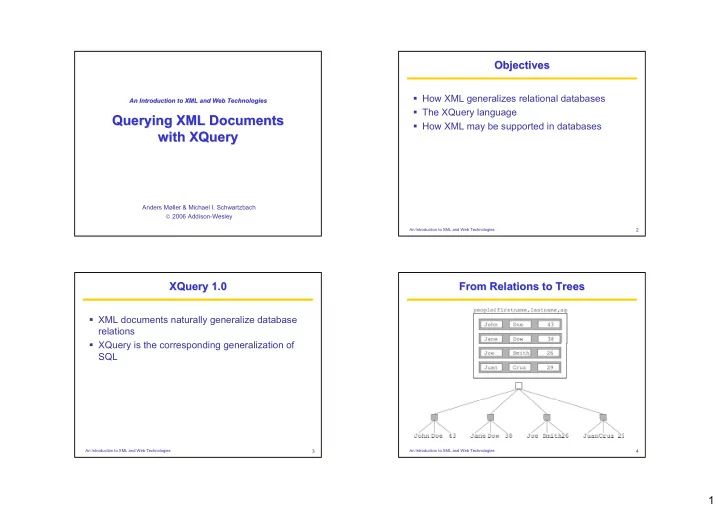
XML documents naturally generalize database relations XQuery is the corresponding generalization of SQL

4

An Introduction to XML and Web Technologies

From Relations to Trees From Relations to Trees

slide-2
SLIDE 2

2

5

An Introduction to XML and Web Technologies

Only Some Trees are Relations Only Some Trees are Relations

They have height two The root has an unbounded number of children All nodes in the second layer (records) have a fixed number of child nodes (fields)

6

An Introduction to XML and Web Technologies

Trees Are Not Relations Trees Are Not Relations

Not all trees satisfy the previous characterization Trees are ordered, while both rows and columns

  • f tables may be permuted without changing the

meaning of the data

7

An Introduction to XML and Web Technologies

A Student Database A Student Database

8

An Introduction to XML and Web Technologies

A More Natural Model (1/2) A More Natural Model (1/2)

<students> <student id="100026"> <name>Joe Average</name> <age>21</age> <major>Biology</major> <results> <result course="Math 101" grade="C-"/> <result course="Biology 101" grade="C+"/> <result course="Statistics 101" grade="D"/> </results> </student>

slide-3
SLIDE 3

3

9

An Introduction to XML and Web Technologies

A More Natural Model (2/2) A More Natural Model (2/2)

<student id="100078"> <name>Jack Doe</name> <age>18</age> <major>Physics</major> <major>XML Science</major> <results> <result course="Math 101" grade="A"/> <result course="XML 101" grade="A-"/> <result course="Physics 101" grade="B+"/> <result course="XML 102" grade="A"/> </results> </student> </students>

10

An Introduction to XML and Web Technologies

Usage Scenario: Data Usage Scenario: Data-

  • Oriented

Oriented

We want to carry over the kinds of queries that we performed in the original relational model

11

An Introduction to XML and Web Technologies

Usage Scenario: Document Usage Scenario: Document-

  • Oriented

Oriented

Queries could be used

  • to retrieve parts of documents
  • to provide dynamic indexes
  • to perform context-sensitive searching
  • to generate new documents as combinations of

existing documents

12

An Introduction to XML and Web Technologies

Usage Scenario: Programming Usage Scenario: Programming

Queries could be used to automatically generate documentation

slide-4
SLIDE 4

4

13

An Introduction to XML and Web Technologies

Usage Scenario: Hybrid Usage Scenario: Hybrid

Queries could be used to data mine hybrid data, such as patient records

14

An Introduction to XML and Web Technologies

XQuery Design Requirements XQuery Design Requirements

Must have at least one XML syntax and at least

  • ne human-readable syntax

Must be declarative Must be namespace aware Must coordinate with XML Schema Must support simple and complex datatypes Must combine information from multiple documents Must be able to transform and create XML trees

15

An Introduction to XML and Web Technologies

Relationship to XPath Relationship to XPath

XQuery 1.0 is a strict superset of XPath 2.0 Every XPath 2.0 expression is directly an XQuery 1.0 expression (a query) The extra expressive power is the ability to

  • join information from different sources and
  • generate new XML fragments

16

An Introduction to XML and Web Technologies

Relationship to XSLT Relationship to XSLT

XQuery and XSLT are both domain-specific languages for combining and transforming XML data from multiple sources They are vastly different in design, partly for historical reasons XQuery is designed from scratch, XSLT is an intellectual descendant of CSS Technically, they may emulate each other

slide-5
SLIDE 5

5

17

An Introduction to XML and Web Technologies

XQuery Prolog XQuery Prolog

Like XPath expressions, XQuery expressions are evaluated relatively to a context This is explicitly provided by a prolog Settings define various parameters for the XQuery processor language, such as:

xquery version "1.0"; declare xmlspace preserve; declare xmlspace strip;

18

An Introduction to XML and Web Technologies

More From the Prolog More From the Prolog

declare default element namespace URI; declare default function namespace URI; import schema at URI; declare namespace NCName = URI;

19

An Introduction to XML and Web Technologies

Implicit Declarations Implicit Declarations

declare namespace xml = "http://www.w3.org/XML/1998/namespace"; declare namespace xs = "http://www.w3.org/2001/XMLSchema"; declare namespace xsi = "http://www.w3.org/2001/XMLSchema-instance"; declare namespace fn = "http://www.w3.org/2005/11/xpath-functions"; declare namespace xdt = "http://www.w3.org/2005/11/xpath-datatypes"; declare namespace local = "http://www.w3.org/2005/11/xquery-local-functions";

20

An Introduction to XML and Web Technologies

XPath Expressions XPath Expressions

XPath expressions are also XQuery expressions The XQuery prolog gives the required static context The initial context node, position, and size are undefined

slide-6
SLIDE 6

6

21

An Introduction to XML and Web Technologies

Datatype Expressions Datatype Expressions

Same atomic values as XPath 2.0 Also lots of primitive simple values:

xs:string("XML is fun") xs:boolean("true") xs:decimal("3.1415") xs:float("6.02214199E23") xs:dateTime("1999-05-31T13:20:00-05:00") xs:time("13:20:00-05:00") xs:date("1999-05-31") xs:gYearMonth("1999-05") xs:gYear("1999") xs:hexBinary("48656c6c6f0a") xs:base64Binary("SGVsbG8K") xs:anyURI("http://www.brics.dk/ixwt/") xs:QName("rcp:recipe")

22

An Introduction to XML and Web Technologies

XML Expressions XML Expressions

XQuery expressions may compute new XML nodes Expressions may denote element, character data, comment, and processing instruction nodes Each node is created with a unique node identity Constructors may be either direct or computed

23

An Introduction to XML and Web Technologies

Direct Constructors Direct Constructors

Uses the standard XML syntax The expression <foo><bar/>baz</foo> evaluates to the given XML fragment Note that <foo/> is <foo/> evaluates to false

24

An Introduction to XML and Web Technologies

Namespaces in Constructors (1/3) Namespaces in Constructors (1/3)

dec decla lare re de defa fault ult el elem ement ent n namesp espace ace " "htt http: p:// //bus busine iness sscar card. d.or

  • rg";

g"; <card> <name>John Doe</name> <title>CEO, Widget Inc.</title> <email>john.doe@widget.com</email> <phone>(202) 555-1414</phone> <logo uri="widget.gif"/> </card>

slide-7
SLIDE 7

7

25

An Introduction to XML and Web Technologies

Namespaces in Constructors (2/3) Namespaces in Constructors (2/3)

dec decla lare na re name mespa space b = ce b = "http:// ://bus busin iness essca card rd.or .org"; g"; <b:card> <b:name>John Doe</b:name> <b:title>CEO, Widget Inc.</b:title> <b:email>john.doe@widget.com</b:email> <b:phone>(202) 555-1414</b:phone> <b:logo uri="widget.gif"/> </b:card>

26

An Introduction to XML and Web Technologies

Namespaces in Constructors (3/3) Namespaces in Constructors (3/3)

<card xmlns= xmlns="ht "http: tp:// //bus busin ines essca scard. rd.or

  • rg"

g"> <name>John Doe</name> <title>CEO, Widget Inc.</title> <email>john.doe@widget.com</email> <phone>(202) 555-1414</phone> <logo uri="widget.gif"/> </card>

27

An Introduction to XML and Web Technologies

Enclosed Expressions Enclosed Expressions

<foo>1 2 3 4 5</foo> <foo>{1, 2, 3, 4, 5}</foo> <foo>{1, "2", 3, 4, 5}</foo> <foo>{1 to 5}</foo> <foo>1 {1+1} {" "} {"3"} {" "} {4 to 5}</foo> <foo bar="1 2 3 4 5"/> <foo bar="{1, 2, 3, 4, 5}"/> <foo bar="1 {2 to 4} 5"/>

28

An Introduction to XML and Web Technologies

Explicit Constructors Explicit Constructors

<card xmlns="http://businesscard.org"> <name>John Doe</name> <title>CEO, Widget Inc.</title> <email>john.doe@widget.com</email> <phone>(202) 555-1414</phone> <logo uri="widget.gif"/> </card> element card { namespace { "http://businesscard.org" }, element name { text { "John Doe" } }, element title { text { "CEO, Widget Inc." } } , element email { text { "john.doe@widget.com" } }, element phone { text { "(202) 555-1414" } }, element logo { attribute uri { "widget.gif" } } }

slide-8
SLIDE 8

8

29

An Introduction to XML and Web Technologies

Computed QNames Computed QNames

element { "card" "card" } { namespace { "http://businesscard.org" }, element { "name" "name" } { text { "John Doe" } }, element { "title" "title" } { text { "CEO, Widget Inc." } }, element { "email" "email" } { text { "john.doe@widget.com" } }, element { "phone" "phone" } { text { "(202) 555-1414" } }, element { "logo" "logo" } { attribute { "uri" "uri" } { "widget.gif" } } }

30

An Introduction to XML and Web Technologies

element { if ($lang="Danish" if ($lang="Danish") then "kort" ) then "kort" else "card" else "card" } { namespace { "http://businesscard.org" }, element { if ($lang="Danis if ($lang="Danish") then "navn h") then "navn" else "name" " else "name" } { text { "John Doe" } }, element { if ($lang="Danis if ($lang="Danish") then "tite h") then "titel" else "title l" else "title" } { text { "CEO, Widget Inc." } }, element { "email" } { text { "john.doe@widget.inc" } }, element { if ($lang="Danis if ($lang="Danish") then "tele h") then "telefon" else "pho fon" else "phone"} ne"} { text { "(202) 456-1414" } }, element { "logo" } { attribute { "uri" } { "widget.gif" } } }

Biliingual Business Cards Biliingual Business Cards

31

An Introduction to XML and Web Technologies

FLWOR Expressions FLWOR Expressions

Used for general queries:

<doubles> { for for $s in fn:doc("students.xml")//student let let $m := $s/major where where fn:count($m) ge 2

  • rder
  • rder by $s/@id

return return <double> { $s/name/text() } </double> } </doubles>

32

An Introduction to XML and Web Technologies

The Difference Between For and Let (1/4) The Difference Between For and Let (1/4)

fo for $x in (1, 2, 3, 4) le let $y := ("a", "b", "c") return ($x, $y) 1, a, b, c, 2, a, b, c, 3, a, b, c, 4, a, b, c

slide-9
SLIDE 9

9

33

An Introduction to XML and Web Technologies

The Difference Between For and Let (2/4) The Difference Between For and Let (2/4)

le let $x in (1, 2, 3, 4) fo for $y := ("a", "b", "c") return ($x, $y) 1, 2, 3, 4, a, 1, 2, 3, 4, b, 1, 2, 3, 4, c

34

An Introduction to XML and Web Technologies

The Difference Between For and Let (3/4) The Difference Between For and Let (3/4)

fo for $x in (1, 2, 3, 4) fo for $y in ("a", "b", "c") return ($x, $y) 1, a, 1, b, 1, c, 2, a, 2, b, 2, c, 3, a, 3, b, 3, c, 4, a, 4, b, 4, c

35

An Introduction to XML and Web Technologies

The Difference Between For and Let (4/4) The Difference Between For and Let (4/4)

le let $x := (1, 2, 3, 4) le let $y := ("a", "b", "c") return ($x, $y) 1, 2, 3, 4, a, b, c

36

An Introduction to XML and Web Technologies

Computing Joins Computing Joins

What recipes can we (sort of) make?

declare namespace rcp = "http://www.brics.dk/ixwt/recipes"; for $r in fn:doc("recipes.xml")//rcp:recipe for $i in $r//rcp:ingredient/@name for $s in fn:doc("fridge.xml")//stuff[text()=$i] return $r/rcp:title/text() <fridge> <stuff>eggs</stuff> <stuff>olive oil</stuff> <stuff>ketchup</stuff> <stuff>unrecognizable moldy thing</stuff> </fridge>

slide-10
SLIDE 10

10

37

An Introduction to XML and Web Technologies

Inverting a Relation Inverting a Relation

declare namespace rcp = "http://www.brics.dk/ixwt/recipes"; <ingredients> { for $i in distinct-values( fn:doc("recipes.xml")//rcp:ingredient/@name ) return <ingredient name="{$i}"> { for $r in fn:doc("recipes.xml")//rcp:recipe where $r//rcp:ingredient[@name=$i] return <title>$r/rcp:title/text()</title> } </ingredient> } </ingredients>

38

An Introduction to XML and Web Technologies

Sorting the Results Sorting the Results

declare namespace rcp = "http://www.brics.dk/ixwt/recipes"; <ingredients> { for $i in distinct-values( fn:doc("recipes.xml")//rcp:ingredient/@name )

  • rder by $i

return <ingredient name="{$i}"> { for $r in fn:doc("recipes.xml")//rcp:recipe where $r//rcp:ingredient[@name=$i]

  • rder by $r/r
  • rder by $r/rcp:title/text(

cp:title/text() return <title>$r/rcp:title/text()</title> } </ingredient> } </ingredients>

39

An Introduction to XML and Web Technologies

A More Complicated Sorting A More Complicated Sorting

for $s in document("students.xml")//student

  • rd
  • rder

er by by fn:count($s/results/result[fn:contains(@grade,"A")]) desce descendi nding ng, fn:count($s/major) descen descendin ding, xs:integer($s/age/text()) as ascen cendi ding ng return $s/name/text()

40

An Introduction to XML and Web Technologies

Using Functions Using Functions

declare function local:grade($g) { if ($g="A") then 4.0 else if ($g="A-") then 3.7 else if ($g="B+") then 3.3 else if ($g="B") then 3.0 else if ($g="B-") then 2.7 else if ($g="C+") then 2.3 else if ($g="C") then 2.0 else if ($g="C-") then 1.7 else if ($g="D+") then 1.3 else if ($g="D") then 1.0 else if ($g="D-") then 0.7 else 0 }; declare function local:gpa($s) { fn:avg(for $g in $s/results/result/@grade return local:grade($g)) }; <gpas> { for $s in fn:doc("students.xml")//student return <gpa id="{$s/@id}" gpa="{local:gpa($s)}"/> } </gpas>

slide-11
SLIDE 11

11

41

An Introduction to XML and Web Technologies

A Height Function A Height Function

declare function local:height($x) { if (fn:empty($x/*)) then 1 else fn:max(for $y in $x/* return local:height($y))+1 };

42

An Introduction to XML and Web Technologies

A Textual Outline A Textual Outline

Cailles en Sarcophages pastry chilled unsalted butter flour salt ice water filling baked chicken marinated chicken small chickens, cut up Herbes de Provence dry white wine

  • range juice

minced garlic truffle oil ...

43

An Introduction to XML and Web Technologies

Computing Textual Outlines Computing Textual Outlines

declare namespace rcp = "http://www.brics.dk/ixwt/recipes"; declare function local:ingredients($i,$p) { fn:string-join( for $j in $i/rcp:ingredient return fn:string-join(($p,$j/@name," ",local:ingredients($j,fn:concat($p," "))),""),"") }; declare function local:recipes($r) { fn:concat($r/rcp:title/text()," ",local:ingredients($r," ")) }; fn:string-join( for $r in fn:doc("recipes.xml")//rcp:recipe[5] return local:recipes($r),"" )

44

An Introduction to XML and Web Technologies

Sequence Types Sequence Types

2 instance of xs:integer 2 instance of item() 2 instance of xs:integer? () instance of empty() () instance of xs:integer* (1,2,3,4) instance of xs:integer* (1,2,3,4) instance of xs:integer+ <foo/> instance of item() <foo/> instance of node() <foo/> instance of element() <foo/> instance of element(foo) <foo bar="baz"/> instance of element(foo) <foo bar="baz"/>/@bar instance of attribute() <foo bar="baz"/>/@bar instance of attribute(bar) fn:doc("recipes.xml")//rcp:ingredient instance of element()+ fn:doc("recipes.xml")//rcp:ingredient instance of element(rcp:ingredient)+
slide-12
SLIDE 12

12

45

An Introduction to XML and Web Technologies

An Untyped Function An Untyped Function

declare function local:grade($g) { if ($g="A") then 4.0 else if ($g="A-") then 3.7 else if ($g="B+") then 3.3 else if ($g="B") then 3.0 else if ($g="B-") then 2.7 else if ($g="C+") then 2.3 else if ($g="C") then 2.0 else if ($g="C-") then 1.7 else if ($g="D+") then 1.3 else if ($g="D") then 1.0 else if ($g="D-") then 0.7 else 0 };

46

An Introduction to XML and Web Technologies

A Default Typed Function A Default Typed Function

declare function local:grade($g as item()* as item()*) as item()* as item()* { if ($g="A") then 4.0 else if ($g="A-") then 3.7 else if ($g="B+") then 3.3 else if ($g="B") then 3.0 else if ($g="B-") then 2.7 else if ($g="C+") then 2.3 else if ($g="C") then 2.0 else if ($g="C-") then 1.7 else if ($g="D+") then 1.3 else if ($g="D") then 1.0 else if ($g="D-") then 0.7 else 0 };

47

An Introduction to XML and Web Technologies

A Precisely Typed Function A Precisely Typed Function

declare function local:grade($g as xs:stri as xs:string ng) as xs:deci xs:decimal mal { if ($g="A") then 4.0 else if ($g="A-") then 3.7 else if ($g="B+") then 3.3 else if ($g="B") then 3.0 else if ($g="B-") then 2.7 else if ($g="C+") then 2.3 else if ($g="C") then 2.0 else if ($g="C-") then 1.7 else if ($g="D+") then 1.3 else if ($g="D") then 1.0 else if ($g="D-") then 0.7 else 0 };

48

An Introduction to XML and Web Technologies

Another Typed Function Another Typed Function

declare function local:grades($s as el as elem emen ent( t(st stud uden ents ts)) as att attri ribu bute te(g (gra rade de)* )* { $s/student/results/result/@grade };

slide-13
SLIDE 13

13

49

An Introduction to XML and Web Technologies

Runtime Type Checks Runtime Type Checks

Type annotations are checked during runtime A runtime type error is provoked when

  • an actual argument value does not match the declared

type

  • a function result value does not match the declared

type

  • a valued assigned to a variable does not match the

declared type

50

An Introduction to XML and Web Technologies

Built Built-

  • In Functions Have Signatures

In Functions Have Signatures

fn:contains($x as xs:string?, $y as xs:string?) as xs:boolean

  • p:union($x as node()*, $y as node()*) as node()*

51

An Introduction to XML and Web Technologies

XQueryX XQueryX

for $t in fn:doc("recipes.xml")/rcp:collection/rcp:recipe/rcp:title return $t

<xqx:module xmlns:xqx="http://www.w3.org/2003/12/XQueryX" xmlns:xsi="http://www.w3.org/2001/XMLSchema-instance" xsi:schemaLocation="http://www.w3.org/2003/12/XQueryX xqueryx.xsd"> <xqx:mainModule> <xqx:queryBody> <xqx:expr xsi:type="xqx:flwrExpr"> <xqx:forClause> <xqx:forClauseItem> <xqx:typedVariableBinding> <xqx:varName>t</xqx:varName> </xqx:typedVariableBinding> <xqx:forExpr> <xqx:expr xsi:type="xqx:pathExpr"> <xqx:expr xsi:type="xqx:functionCallExpr"> <xqx:functionName>doc</xqx:functionName> <xqx:parameters> <xqx:expr xsi:type="xqx:stringConstantExpr"> <xqx:value>recipes.xml</xqx:value> </xqx:expr> </xqx:parameters> <xqx:stepExpr> <xqx:xpathAxis>child</xqx:xpathAxis> <xqx:elementTest> <xqx:nodeName> <xqx:QName>rcp:collection</xqx:QName> </xqx:nodeName> </xqx:elementTest> </xqx:stepExpr> <xqx:stepExpr> <xqx:xpathAxis>child</xqx:xpathAxis> <xqx:elementTest> <xqx:nodeName> <xqx:QName>rcp:recipe</xqx:QName> </xqx:nodeName> </xqx:elementTest> </xqx:stepExpr> <xqx:stepExpr> <xqx:xpathAxis>child</xqx:xpathAxis> xqx:nodeName> <xqx:QName>rcp:title</xqx:QName> </xqx:nodeName> </xqx:elementTest> </xqx:stepExpr> </xqx:expr> </xqx:forExpr> </xqx:forClauseItem> </xqx:forClause> <xqx:returnClause> <xqx:expr xsi:type="xqx:variable"> <xqx:name>t</xqx:name> </xqx:expr> </xqx:returnClause> </xqx:expr> </xqx:elementContent> </xqx:expr> </xqx:queryBody> </xqx:mainModule> </xqx:module>

52

An Introduction to XML and Web Technologies

XML Databases XML Databases

How can XML and databases be merged? Several different approaches:

  • extract XML views of relations
  • use SQL to generate XML
  • shred XML into relational databases
slide-14
SLIDE 14

14

53

An Introduction to XML and Web Technologies

The Student Database Again The Student Database Again

54

An Introduction to XML and Web Technologies

Automatic XML Views (1/2) Automatic XML Views (1/2)

<Students> <record id="100026" name="Joe Average" age="21"/> <record id="100078" name="Jack Doe" age="18"/> </Students>

55

An Introduction to XML and Web Technologies

Automatic XML Views (2/2) Automatic XML Views (2/2)

<Students> <record> <id>100026</id> <name>Joe Average</name> <age>21</age> </record> <record> <id>100078</id> <name>Jack Doe</name> <age>18</age> </record> </Students>

56

An Introduction to XML and Web Technologies

Programmable Views Programmable Views

xmlelement(name, "Students", select xmlelement(name, "record", xmlattributes(s.id, s.name, s.age)) from Students ) xmlelement(name, "Students", select xmlelement(name, "record", xmlforest(s.id, s.name, s.age)) from Students )

slide-15
SLIDE 15

15

57

An Introduction to XML and Web Technologies

XML Shredding XML Shredding

Each element type is represented by a relation Each element node is assigned a unique key in document order Each element node contains the key of its parent The possible attributes are represented as fields, where absent attributes have the null value Contents consisting of a single character data node is inlined as a field

58

An Introduction to XML and Web Technologies

From XQuery to SQL From XQuery to SQL

Any XML document can be faithfully represented This takes advantage of the existing database implementation Queries must now be phrased in ordinary SQL rather than XQuery But an automatic translation is possible

//rcp:ingredient[@name="butter"]/@amount select ingredient.amount from ingredient where ingredient.name="butter"

59

An Introduction to XML and Web Technologies

Summary Summary

XML trees generalize relational tables XQuery similarly generalizes SQL XQuery and XSLT have roughly the same expressive power But they are suited for different application domains: data-centric vs. document-centric

60

An Introduction to XML and Web Technologies

Essential Online Resources Essential Online Resources

http://www.w3.org/TR/xquery/ http://www.galaxquery.org/ http://www.w3.org/XML/Query/