LOGITECH ALERT: High-Definition Video Security You Can Setup - - PowerPoint PPT Presentation

logitech alert
SMART_READER_LITE
LIVE PREVIEW

LOGITECH ALERT: High-Definition Video Security You Can Setup - - PowerPoint PPT Presentation

LOGITECH ALERT: High-Definition Video Security You Can Setup Yourself WHATS YOUR #1 PRIORITY? Safety Security Peace of Mind 2 KEEP CONTROL WHILE NOT AT HOME 3 LOCAL LAW ENFORCEMENT WORRIES 4 YOUR PROTECTION OPTIONS Burglar


slide-1
SLIDE 1

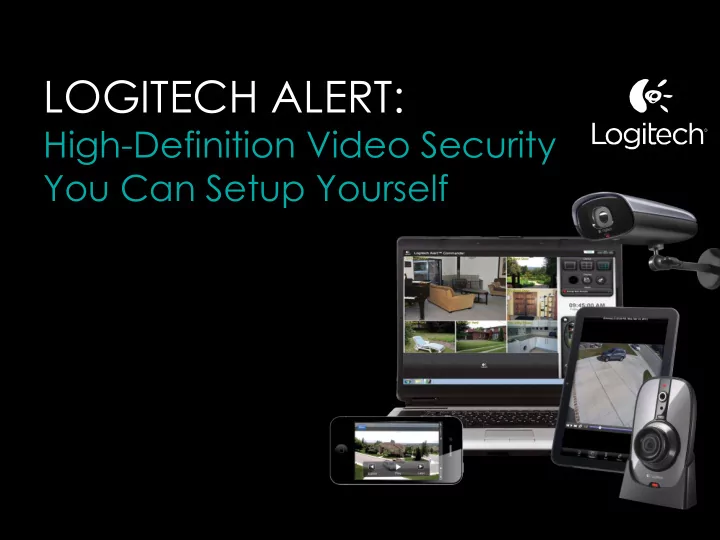
LOGITECH ALERT:

High-Definition Video Security You Can Setup Yourself

slide-2
SLIDE 2

WHAT’S YOUR #1 PRIORITY?

  • Safety
  • Security
  • Peace of Mind

2

slide-3
SLIDE 3

KEEP CONTROL WHILE NOT AT HOME

3

slide-4
SLIDE 4

LOCAL LAW ENFORCEMENT WORRIES

4

slide-5
SLIDE 5

YOUR PROTECTION OPTIONS

“Burglar Alarm” Solutions:

  • Pros: Protection, if alarm is set off
  • Cons: Costly to install, expensive

monthly fees

5

slide-6
SLIDE 6
  • Pros: Low-cost
  • Cons: Low-quality, difficult to install,

difficult to configure network setup

OTHER DO-IT-YOURSELF SOLUTIONS

6

slide-7
SLIDE 7

High-Quality, High-Definition Video Security System:

  • Complete solution
  • Set up yourself in three easy steps
  • Easy to manage
  • High-definition video
  • Free alerts
  • via email & text
  • laptop, smartphone, tablet

LOGITECH ALERT

7

slide-8
SLIDE 8

SELECTING THE RIGHT SYSTEM

8

slide-9
SLIDE 9

Logitech Alert Systems Include:

  • HD digital video camera
  • Logitech Alert Commander Software
  • Free Logitech Alert Apps for iPhone, iPad

Android, BlackBerry

  • Camera mounts
  • Cables
  • 2 GB memory card
  • HomePlug technology

SELECTING THE RIGHT SYSTEM

9

slide-10
SLIDE 10

LOGITECH ALERT:

High-Definition Video

slide-11
SLIDE 11

A difference you can see

  • HD 720p video

HIGH-DEFINITION VIDEO

Others – 640 x 480 Pixels Logitech HD resolution 960 x 720 pixels 11

slide-12
SLIDE 12
slide-13
SLIDE 13
slide-14
SLIDE 14

LOGITECH ALERT:

Wide angle lens

slide-15
SLIDE 15

WIDE-ANGLE LENS

15

FPO New image from PANG Logitech HD Wide Angle Competitor’s Camera 1 Competitor’s Camera 2

slide-16
SLIDE 16

LOGITECH ALERT:

Best in class Night Vision

slide-17
SLIDE 17

Logitech Confidential

During the day During the night- lights on Lights off Logitech Night Vision Competitor’s Night Vision

BEST-IN-CLASS NIGHT VISION

17

slide-18
SLIDE 18
slide-19
SLIDE 19

LOGITECH ALERT:

Setup in minutes

slide-20
SLIDE 20

SETUP IN JUST MINUTES

20

1 2 3

Install

Alert Commander Software

Connect

HomePlug network adapter to your router

Plug in

Mount camera and plug power adapter into a wall

  • utlet
slide-21
SLIDE 21

RELIABLE CONNECTIVITY: HOMEPLUG™ NETWORKING

21

slide-22
SLIDE 22

22

slide-23
SLIDE 23

LOGITECH ALERT:

Powerful PC Software

slide-24
SLIDE 24

POWERFUL PC SOFTWARE

24

Free Logitech Alert Commander Software

  • View live 6-camera up
  • View recordings
  • Configure cameras and system
  • Configure motion detection and alerts

FPO Review Recorded video

View Live Video View Recordings Configure Alerts

slide-25
SLIDE 25

POWERFUL PC SOFWARE

25

FPO Review Recorded video

slide-26
SLIDE 26

LOGITECH ALERT:

Motion Detection and Zones

slide-27
SLIDE 27

MOTION DETECTION AND ZONE SETTING

Zeroing in on what’s important

  • Set up to 16 motion zones
  • Determine what gets recorded and trigger alerts

27

slide-28
SLIDE 28

28

slide-29
SLIDE 29

LOGITECH ALERT:

Motion Triggered Alerts

slide-30
SLIDE 30

MOTION-TRIGGERED ALERT

30

slide-31
SLIDE 31

KEEPING INFORMED WHEN YOU’RE NOT HOME

31

slide-32
SLIDE 32

LOGITECH ALERT:

Watch from anywhere- for free

slide-33
SLIDE 33

FREE WEB VIEWER

33

Automatic backup to PC

  • Log in securely at http://alert.logitech.com

Log in securely View Live Video

slide-34
SLIDE 34

34

slide-35
SLIDE 35

35

slide-36
SLIDE 36

36

slide-37
SLIDE 37

VIDEO ALWAYS SAFE AND SECURE

Camera’s video can be stored in 3 places

37

1 2 3

Built-in DVR – 2GB microSD card (expandable to 32GBs) Automatic backup to PC Optional Dropbox cloud backup for even more peace of mind

Continue recording even when your computer is off

slide-38
SLIDE 38

PREMIUM SERVICE

Logitech Alert Web & Mobile Commander

  • Complete control and management away from home
  • Recorded video playback
  • Configure Motion Zones, Alerts and Share video

38

  • See at LIVE demo: http://alert.logitech.com
  • USER NAME: alertdemocams@gmail.com
  • PASSWORD: password

Recorded video playback Configure motion zones Share video

slide-39
SLIDE 39

39

slide-40
SLIDE 40

PREMIUM SERVICE

40

Features Home Management Remote Management

Free PC Commander Free web viewer Web & Mobile Commander

View live video Motion-triggered email alerts Fully control your system remotely

  • Playback recorded video
  • Configure and Manage alerts
  • Digital pan, tilt, zoom
  • Download and share clips
  • Control multiple sites
slide-41
SLIDE 41

LOGITECH ALERT

Affordable protection for what matters most

41

slide-42
SLIDE 42

LOGITECH ALERT SYSTEMS

42

Indoor

700i Add-on Camera: $199.99 700e Add-on Camera: $279.99 750i Master System $279.99 750e Master System $349.99

Outdoor

750n Master System $299.99 700n Add-on Camera: $229.99

  • Indoor
  • Indoor
  • 50ft Night Vision
  • Outdoor Weatherproof
  • 100ft Night Vision
slide-43
SLIDE 43

LOGITECH ALERT:

Busted! Videos

slide-44
SLIDE 44

44

slide-45
SLIDE 45

45

slide-46
SLIDE 46

46

slide-47
SLIDE 47

“Over a year ago, our city was faced with a financial crisis that caused many of our safety resources to be cut including downsizing our police force. As a result, our community was hit with a huge increase in crime. We had a series of meetings to discuss surveillance cameras where we looked at many different solutions and concluded that Logitech provided the perfect combination of low cost, excellent video quality and ease of installation that it was the best choice for people looking for a “do it yourself” solution. There was a crime spree being committed by a single individual who was eventually caught on a Logitech Outdoor System and as a result, OPD was able to have enough evidence to prosecute and thus wipe out

  • ne player. Our Problem Solving Officer mentioned that he has received images from other camera

systems where he was unable to use as a result of poor quality and that the Logitech system has provided by far the clearest evidence even at night.” Carolyn Winters- Montclair Safety & Improvement Council- Oakland, CA “The River Park Estates Homeowners Association has always been plagued by mini crime-waves. In 2009 we decided to do something about it by acquiring ten camera systems and distributing them strategically among the homeowners who had PCs that are left on. We also posted neighborhood watch camera alert signs at the neighborhood entrances. In the months following, we noticed a huge drop in petty crime

  • by about 50 to 75%. We also adopted an email alert system where any property crime was reported,

then alerts were immediately sent out by email to each of the camera owners to check for specific dates and times for suspicious activity. The Logitech cameras really helped with peace of mind in the

  • neighborhood. Since it has been all voluntary, there hasn't been any opposition to the concept. Thank

you Logitech for offering these inexpensive camera recording systems. We've really appreciated the help they have been for our neighborhood.” Jerry Toomey, Vice President River Park Estates Homeowners Association- Draper, UT

TESTIMONIALS

47

slide-48
SLIDE 48

LOGITECH ALERT DIGITAL VIDEO SECURITY:

Help Protect What Matters Most

For SPECIAL HOMEOWNERS’ OFFER, email us at: alertforcommunities@logitech.com www.logitech.com/alert

48