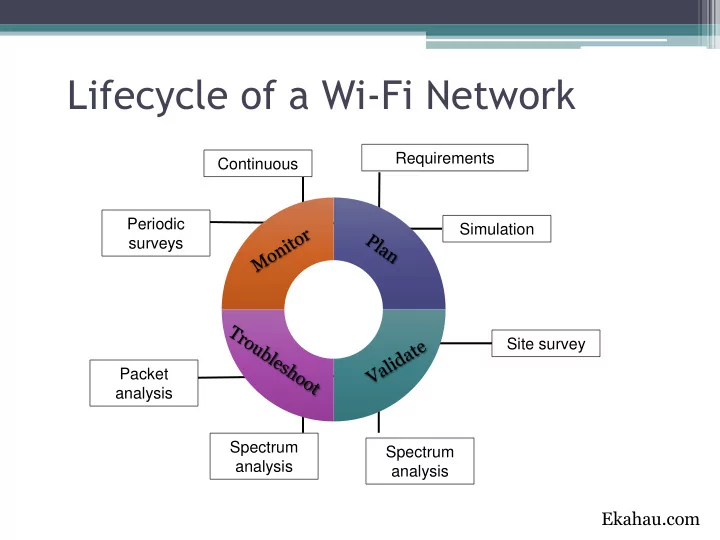
Lifecycle of a Wi-Fi Network Requirements Continuous Periodic - - PowerPoint PPT Presentation

lifecycle of a wi fi network
SMART_READER_LITE
LIVE PREVIEW

Lifecycle of a Wi-Fi Network Requirements Continuous Periodic - - PowerPoint PPT Presentation

Lifecycle of a Wi-Fi Network Requirements Continuous Periodic Simulation surveys Site survey Packet analysis Spectrum Spectrum analysis analysis Ekahau.com Types of Surveys Active Survey measure packets in two directions (send


slide-1
SLIDE 1

Requirements Simulation Site survey Spectrum analysis Spectrum analysis Continuous Packet analysis Periodic surveys

Lifecycle of a Wi-Fi Network

Ekahau.com
slide-2
SLIDE 2

Types of Surveys

  • Active Survey measure packets in two directions (send & receive). Used for packet loss,

packet delay,…

  • Passive Survey listen to probes & beacons passively. Used for coverage & SNR maps, etc.
  • Hybrid Survey passive & active simultaneously
slide-3
SLIDE 3

Ekahau Site Survey

  • 1. Import map
  • 2. Set scale, using a long wall
  • 3. Choose your survey method - continuous or stop & go
  • 4. Review data and create reports
slide-4
SLIDE 4

Ekahau WiFi Planner

  • Set your site requirements and capacity requirements.
  • Create a template if you have a standard that will be used

for multiple sites.

Read: Wi-Fi Capacity Analysis for 802.11ac and 802.11n: Theory & Practice

slide-5
SLIDE 5

Maps

  • Import a quality map – jpeg will work and is

typically fine when surveying, but CAD will save you time in the planning stage.

  • If you don’t have a CAD file, you will need to

build walls and set scale.

slide-6
SLIDE 6

Ekahau Tool Checkout!

  • Send us an email to schedule a checkout
  • Feel free to just request the tool to do surveys &

planning on your own or request Lane ESD to do the surveys/planning and generate reports.

slide-7
SLIDE 7

802.11ac

slide-8
SLIDE 8

802.11ac: An Overview

  • Breaks “gigabit”

barrier

  • Max of 6.9 Gbps

Increased Speed

5 GHz Only

5G 2.4G

  • Focuses on capacity-rich,

low-interference spectrum

  • Benefits entire Wi-Fi

ecosystem

80/160 MHz channels

160

40 20 80

  • Very wide channels
  • One of the primary

reasons for 11ac’s very high data rates

A P

  • N-fold efficiency

improvement

  • Requires client-side

support

  • Wave 2 only

256-QAM

  • More efficient

modulation

  • 33% data rate gains
  • Very short ranges only
  • Requires 11ac clients

Multi-user MIMO (MU-MIMO)

  • Simultaneous downlink Tx

to single-stream clients

  • Multiplies network capacity
  • Key differentiator from

802.11n

8 Up to 8 spatial streams Ruckus.com

slide-9
SLIDE 9

802.11n > 802.11ac W1 > 802.11ac W2

cisco.com

slide-10
SLIDE 10

Ruckus Debuts First 802.11ac Wave 2 AP

http://www.networkcomputing.com/wireless-infrastructure/ruckus-debuts-first-80211ac-wave-2-ap/a/d-id/1319738

  • First AP to be able to service up to three concurrent streams to different users

in what was a one-user-at-a-time paradigm for client access in 11ac Wave 1 and the earlier 11n standard.

  • Supports dual 1 Gbps uplinks
  • Ruckus claims that the R710 can go to 1,733 Mbps in 5 GHz (with 80 MHz

channels and 256 QAM), and 800 Mbps in the 2.4 GHz spectrum

slide-11
SLIDE 11

Implementing 802.11ac

  • Use Ekahau Planner!
  • Ensure minimum of 1 Gbps uplink ports available per AP.
  • Consider two 1 Gbps uplink ports, some APs have two ports that

support link aggregation for more bandwidth and redundancy

  • Buy switches that support 802.3at (PoE+), some new ac APs

may have limited functionality without it.

  • Is your edge switch and the core 10Gbps?