Lecture 15 Lecture 15 2. B inary R epresentation Data - - PDF document

lecture 15 lecture 15
SMART_READER_LITE
LIVE PREVIEW

Lecture 15 Lecture 15 2. B inary R epresentation Data - - PDF document

1. Introduction Lecture 15 Lecture 15 2. B inary R epresentation Data Structures 3. H ardw are and S oftw are 4. H igh Level Languages One use of functions is that of procedural abstraction 5. S tandard input and output


slide-1
SLIDE 1

1

1. Introduction 2. B inary R epresentation 3. H ardw are and S

  • ftw

are 4. H igh Level Languages 5. S tandard input and output 6. Operators, expression and statem ents 7. M aking Decisions 8. Looping 9. A rrays 10. B asics of pointers 11. S trings 12. B asics of functions 13. M

  • re about functions

14. Files 15. D ata S tructures 16. C ase study: lottery num ber generator

Lecture 15 Lecture 15

Page 81 of notes

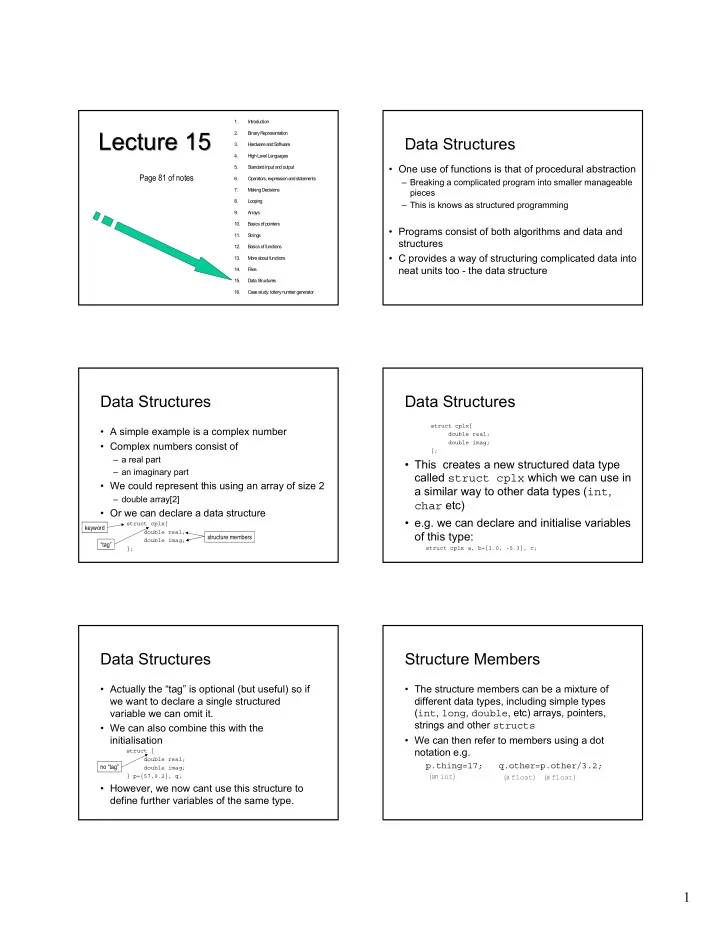
Data Structures

  • One use of functions is that of procedural abstraction

– Breaking a complicated program into smaller manageable pieces – This is knows as structured programming

  • Programs consist of both algorithms and data and

structures

  • C provides a way of structuring complicated data into

neat units too - the data structure

Data Structures

  • A simple example is a complex number
  • Complex numbers consist of

– a real part – an imaginary part

  • We could represent this using an array of size 2

– double array[2]

  • Or we can declare a data structure

struct cplx{ double real; double imag; };

keyword “tag” structure members

Data Structures

struct cplx{ double real; double imag; };

  • This creates a new structured data type

called struct cplx which we can use in a similar way to other data types (int, char etc)

  • e.g. we can declare and initialise variables
  • f this type:

struct cplx a, b={1.0, -5.3}, c;

Data Structures

  • Actually the “tag” is optional (but useful) so if

we want to declare a single structured variable we can omit it.

  • We can also combine this with the

initialisation

struct { double real; double imag; } p={57,9.2}, q;

  • However, we now cant use this structure to

define further variables of the same type.

no “tag”

Structure Members

  • The structure members can be a mixture of

different data types, including simple types (int, long, double, etc) arrays, pointers, strings and other structs

  • We can then refer to members using a dot

notation e.g.

p.thing=17; q.other=p.other/3.2;

(an int) (a float) (a float)

slide-2
SLIDE 2

2

Structure Members

/* Example: using structures to represent complex numbers */ #include <stdio.h> void main(void) { struct cplx { double real; /* real part */ double imag; /* imaginary part */ }; struct cplx x = {2.5, 5.0}, y = {3.2, -1.7}, z; z.real = x.real + y.real; /* add real parts */ z.imag = x.imag + y.imag; /* add imaginary parts */ printf("z = %4.2f + %4.2f j\n", z.real, z.imag); return; } /* Example: using structures to represent complex numbers */ #include <stdio.h> void main(void) { struct cplx { double real; /* real part */ double imag; /* imaginary part */ }; struct cplx x = {2.5, 5.0}, y = {3.2, -1.7}, z; z.real = x.real + y.real; /* add real parts */ z.imag = x.imag + y.imag; /* add imaginary parts */ printf("z = %4.2f + %4.2f j\n", z.real, z.imag); return; }

z = 5.70 + 3.30 j z = 5.70 + 3.30 j complex1.c pg 81 complex1.c pg 81

Operations on Structures

  • The only legal operations on a structure are

– accessing its members (see last slide) – copying or assigning to it – taking its address

  • In the previous example we could have written q=p; then q

is an individual copy of p

– we don’t have to copy the members of the structure individually the compiler will do this for us

  • Remember that

– calling a function by value includes copying its arguments – returning a value also includes a copy process

  • Structures are therefore a very convenient way of passing

information into and out of functions

/* Example: structures as function arguments and return values */ #include <stdio.h> struct cplx { double real; /* real part */ double imag; /* imaginary part */ }; struct cplx add(struct cplx a, struct cplx b); /* function prototype */ void main(void) { struct cplx x = {2.5, 5.0}, y = {3.2, -1.7}, z; z = add(x, y); printf("z = %4.2f + %4.2f j\n", z.real, z.imag); return; } struct cplx add(struct cplx a, struct cplx b) { struct cplx c = a; /* can initialise an auto struct variable */ c.real += b.real; c.imag += b.imag; return c; /* can return a struct value */ } /* Example: structures as function arguments and return values */ #include <stdio.h> struct cplx { double real; /* real part */ double imag; /* imaginary part */ }; struct cplx add(struct cplx a, struct cplx b); /* function prototype */ void main(void) { struct cplx x = {2.5, 5.0}, y = {3.2, -1.7}, z; z = add(x, y); printf("z = %4.2f + %4.2f j\n", z.real, z.imag); return; } struct cplx add(struct cplx a, struct cplx b) { struct cplx c = a; /* can initialise an auto struct variable */ c.real += b.real; c.imag += b.imag; return c; /* can return a struct value */ }

complex2.c pg 82 complex2.c pg 82

z = 5.70 + 3.30 j z = 5.70 + 3.30 j

Scope of Structures

  • The scope rules for struct are similar to

those for variables

  • A struct declared within a block (including

function body) is visible only within that block

  • A struct declared at the start of a program,
  • utside any block is visible throughout the

program i.e. it is global

– This is useful where a struct is to be passed to functions

Pointers to Structures

  • A pointer to a struct can be created and

initialised with the & (address of operator) just as with any other type

  • e.g. using the struct cplx previously

declared

struct cplx x={1.0, -2.1}, y; struct cplx* px; px=&x; y=*px; (*px).real=33.5;

Pointers to Structures

(*px).real=33.5;

  • Note that the parentheses () are necessary
  • This is such a common operation that there is

a special notation for it

(*px).real = px->real

  • which means take the thing px points to and

access its member

  • Pointers allow us to use call-by-reference

– useful because it can avoid a lot of copying if structures are large, this can slow down your program

slide-3
SLIDE 3

3

/* Example: pointers to structures */ #include <stdio.h> struct cplx { double real; /* real part */ double imag; /* imaginary part */ }; void add(struct cplx *pa, struct cplx *pb, struct cplx *pc); void main(void) { struct cplx x = {2.5, 5.0}, y = {3.2, -1.7}, z; add(&x, &y, &z); /* call by reference: pointers are passed */ printf("z = %4.2f + %4.2f j\n", z.real, z.imag); return; } void add(struct cplx *pa, struct cplx *pb, struct cplx *pc) { (*pc).real = (*pa).real + (*pb).real; /* add real parts */ (*pc).imag = (*pa).imag + (*pb).imag; /* add imaginary parts */ /* Or we could write pc->real = pa->real + pb->real; pc->imag = pa->imag + pb->imag; which is a shorthand notation meaning exactly the same thing. */ return; } /* Example: pointers to structures */ #include <stdio.h> struct cplx { double real; /* real part */ double imag; /* imaginary part */ }; void add(struct cplx *pa, struct cplx *pb, struct cplx *pc); void main(void) { struct cplx x = {2.5, 5.0}, y = {3.2, -1.7}, z; add(&x, &y, &z); /* call by reference: pointers are passed */ printf("z = %4.2f + %4.2f j\n", z.real, z.imag); return; } void add(struct cplx *pa, struct cplx *pb, struct cplx *pc) { (*pc).real = (*pa).real + (*pb).real; /* add real parts */ (*pc).imag = (*pa).imag + (*pb).imag; /* add imaginary parts */ /* Or we could write pc->real = pa->real + pb->real; pc->imag = pa->imag + pb->imag; which is a shorthand notation meaning exactly the same thing. */ return; }

complex3.c pg 82 complex3.c pg 82

Arrays of Structures

  • As with other data types we can have

arrays which are very useful

e.g. struct cplx arr[35];

/* Example: array of structures -- stores items */ #include <stdio.h> #include <string.h> void main(void) { struct { char part_no[7]; /* stores part number */ char desc[40]; /* description */ float price; /* price each */ int qty; /* quantity in stock */ } part[20]; /* array of structures */ int total_stock; float total_value; /* assign values to structure members (in practice this would probably be done by reading the data from a file): */ strcpy(part[0].part_no, "4Y4759"); strcpy(part[0].desc, "741 OP AMP IC"); part[0].price = 0.25; part[0].qty = 1738; strcpy(part[1].part_no, "2X6641"); strcpy(part[1].desc, "10K OHM 5% 0.24W RESISTOR"); part[1].price = 0.05; part[1].qty = 23438; /* access structure members: */ total_stock = part[0].qty + part[1].qty; total_value = part[0].qty * part[0].price + part[1].qty * part[1].price; printf("Total stock level = %i items\n", total_stock); printf("Total stock value = %4.2f\n", total_value); return; } /* Example: array of structures -- stores items */ #include <stdio.h> #include <string.h> void main(void) { struct { char part_no[7]; /* stores part number */ char desc[40]; /* description */ float price; /* price each */ int qty; /* quantity in stock */ } part[20]; /* array of structures */ int total_stock; float total_value; /* assign values to structure members (in practice this would probably be done by reading the data from a file): */ strcpy(part[0].part_no, "4Y4759"); strcpy(part[0].desc, "741 OP AMP IC"); part[0].price = 0.25; part[0].qty = 1738; strcpy(part[1].part_no, "2X6641"); strcpy(part[1].desc, "10K OHM 5% 0.24W RESISTOR"); part[1].price = 0.05; part[1].qty = 23438; /* access structure members: */ total_stock = part[0].qty + part[1].qty; total_value = part[0].qty * part[0].price + part[1].qty * part[1].price; printf("Total stock level = %i items\n", total_stock); printf("Total stock value = %4.2f\n", total_value); return; }

stores.c pg 83 stores.c pg 83

Structures containing Structures

  • There is no reason why one structure cant

contain another

  • This allows us to build up complicated real-

world data records step by step

  • If structure1 contains structure2 which has a

member x we can access it using

structure1.structure2.x

/* Example: building a complicated data structure, step by step */ #include <stdio.h> /* declare structures: */ struct date { int d; /* day of month, 1 to 31 */ int m; /* month, 1 to 12 */ int y; /* year, e.g. 1996 - avoids millenium bug! */ }; struct module { unsigned int pc; /* percentage mark, 0 to 100 */ char gr; /* letter grade, S to F */ unsigned int cr; /* credits awarded */ }; struct student { long urn; /* University Reg. No. */ char surname[20]; /* surname */ char forenames[30]; /* forenames */ struct date born; /* date of birth */ struct date enrol; /* date of enrolment */ struct module L1U10; /* programming module */ }; void print_results(struct student s); /* function prototype */ void main(void) { /* declare and initialise structured variables: */ struct student him = {1234567, "JOHNSON", "Jeremiah Methuselah", {27, 3, 1974}, {3, 9, 1995}, {0, '\0', 0,} }; struct student her = {5342096, "ROBINSON", "Anne Louise", {5, 11, 1978}, {1, 9, 1996}, {0, '\0', 0,} }; /* assign values to structure members: */ him.L1U10.pc = 23; him.L1U10.gr = 'F'; him.L1U10.cr = 0; her.L1U10.pc = 89; her.L1U10.gr = 'S'; her.L1U10.cr = 10; /* call a function, passing structure as argument: */ print_results(him); print_results(her); return; } void print_results(struct student s) { printf("URN: %li -- ", s.urn); printf("%s %s\n", s.forenames, s.surname); printf(" Born: %i/%i/%i\n", s.born.d, s.born.m, s.born.y); printf(" Enrolled: %i/%i/%i\n", s.enrol.d, s.enrol.m, s.enrol.y); printf(" Module L1U10: %i%%, ", s.L1U10.pc); printf("grade %c, ", s.L1U10.gr); printf("%i credits\n\n", s.L1U10.cr); return; } /* Example: building a complicated data structure, step by step */ #include <stdio.h> /* declare structures: */ struct date { int d; /* day of month, 1 to 31 */ int m; /* month, 1 to 12 */ int y; /* year, e.g. 1996 - avoids millenium bug! */ }; struct module { unsigned int pc; /* percentage mark, 0 to 100 */ char gr; /* letter grade, S to F */ unsigned int cr; /* credits awarded */ }; struct student { long urn; /* University Reg. No. */ char surname[20]; /* surname */ char forenames[30]; /* forenames */ struct date born; /* date of birth */ struct date enrol; /* date of enrolment */ struct module L1U10; /* programming module */ }; void print_results(struct student s); /* function prototype */ void main(void) { /* declare and initialise structured variables: */ struct student him = {1234567, "JOHNSON", "Jeremiah Methuselah", {27, 3, 1974}, {3, 9, 1995}, {0, '\0', 0,} }; struct student her = {5342096, "ROBINSON", "Anne Louise", {5, 11, 1978}, {1, 9, 1996}, {0, '\0', 0,} }; /* assign values to structure members: */ him.L1U10.pc = 23; him.L1U10.gr = 'F'; him.L1U10.cr = 0; her.L1U10.pc = 89; her.L1U10.gr = 'S'; her.L1U10.cr = 10; /* call a function, passing structure as argument: */ print_results(him); print_results(her); return; } void print_results(struct student s) { printf("URN: %li -- ", s.urn); printf("%s %s\n", s.forenames, s.surname); printf(" Born: %i/%i/%i\n", s.born.d, s.born.m, s.born.y); printf(" Enrolled: %i/%i/%i\n", s.enrol.d, s.enrol.m, s.enrol.y); printf(" Module L1U10: %i%%, ", s.L1U10.pc); printf("grade %c, ", s.L1U10.gr); printf("%i credits\n\n", s.L1U10.cr); return; }

students.c pg 84 students.c pg 84

Defining a Structural Data Type

  • The typedef keyword allows us to use a

name as a synonym for another type

e.g.

typedef long, urn; urn u, v=1234567;

  • This is most useful when a structured data

type is to be used widely e.g. for the complex number program

typedef struct { double real; double imag; } Cplx;

  • riginal type

new type

slide-4
SLIDE 4

4

/* Example: using typedef to define a structure type */ /* This program is based closely on complex2.c; compare them */ #include <stdio.h> typedef struct { double real; /* real part */ double imag; /* imaginary part */ } Cplx; /* "Cplx" can now be used as a synonym for this struct. This neatens things up somewhat. */ Cplx add(Cplx a, Cplx b); /* function prototype */ void main(void) { Cplx x = {2.5, 5.0}, y = {3.2, -1.7}, z; z = add(x, y); printf("z = %4.2f + %4.2f j\n", z.real, z.imag); return; } Cplx add(Cplx a, Cplx b) { Cplx c = a; c.real += b.real; c.imag += b.imag; return c; } /* Example: using typedef to define a structure type */ /* This program is based closely on complex2.c; compare them */ #include <stdio.h> typedef struct { double real; /* real part */ double imag; /* imaginary part */ } Cplx; /* "Cplx" can now be used as a synonym for this struct. This neatens things up somewhat. */ Cplx add(Cplx a, Cplx b); /* function prototype */ void main(void) { Cplx x = {2.5, 5.0}, y = {3.2, -1.7}, z; z = add(x, y); printf("z = %4.2f + %4.2f j\n", z.real, z.imag); return; } Cplx add(Cplx a, Cplx b) { Cplx c = a; c.real += b.real; c.imag += b.imag; return c; }

typedef.c pg 85 typedef.c pg 85 What are the advantages of this approach ?

What are the advantages of this approach?

  • Hides the complexity of the data structure
  • Our user defined type can be used almost

exactly the same way as any other data type

– simpler to write – makes the program easier to understand – we can write more complex functions which perform higher level operations on structured data rather than just simple variables

  • If you think of these structures as objects then

you are well on the way of moving to Object Orientated Programming and C++

The FILE data type

  • Remember last lecture we looked at

files/streams and the use of the FILE data type

  • Well FILE is actually a typedef in <stdio.h>

/* Typical definition of type FILE in <stdio.h>*/ #define OPEN_MAX 32 typedef struct _iobuf { int cnt; /* characters left */ char *ptr; /* next character */ char *base; /* start of buffer */ int bufsize; /* size of buffer */ int flag; /* file access mode */ int fd; /* file “handle” */ } FILE; FILE _iob[OPEN_MAX]; /* global array of FILE structs */ #define stdin (&_iob[0]) /* standard input stream */ #define stdout (&_iob[1]) /* standard output stream */ #define stderr (&_iob[2]) /* standard error stream */

pg 86 pg 86

  • Lectures 12 and 13 looked at how to use functions

to structure your programs

  • Today we looked at how to also structure your data

– This was the last piece of the equation for programming C

  • You are now programmers!!!

– Well not really but you now know enough C to become programmers – The rest is up to you and it involves practice

  • Next Lecture we will cover some of the revision

topics you have requested, namely

  • Arrays
  • Pointers
  • Functions
  • Is there anything else you would like to cover again