Laptop Sales Presentation + eApp = Success When Medicare - - PDF document

laptop sales presentation eapp success
SMART_READER_LITE
LIVE PREVIEW

Laptop Sales Presentation + eApp = Success When Medicare - - PDF document

Laptop Sales Presentation + eApp = Success When Medicare was signed into law in 1966, United American Insurance Company made the decision to


slide-1
SLIDE 1

¡ ¡

*NAIC ¡2010 ¡Medicare ¡Supplement ¡Insurance ¡Experience ¡Report, ¡May ¡2010 ¡ ¡

¡ ¡ ¡ ¡ ¡ ¡ ¡ ¡ ¡UAI2052 ¡0611 ¡ ¡

Laptop ¡Sales ¡Presentation ¡+ ¡eApp ¡= ¡Success ¡

When ¡Medicare ¡was ¡signed ¡into ¡law ¡in ¡1966, ¡United ¡American ¡Insurance ¡Company ¡made ¡the ¡decision ¡to ¡ focus ¡its ¡attention ¡on ¡the ¡individual ¡health ¡market ¡with ¡an ¡emphasis ¡on ¡Seniors. ¡This ¡foresight ¡paid ¡off, ¡ and ¡as ¡Senior ¡health ¡plans ¡took ¡a ¡more ¡prominent ¡position ¡in ¡UA's ¡product ¡line, ¡we ¡gained ¡recognition ¡ as ¡one ¡of ¡the ¡nation's ¡leading ¡writers ¡of ¡individual ¡Medicare ¡Supplements ¡-­‑ ¡a ¡distinction ¡we ¡still ¡maintain ¡ today*. ¡As ¡we ¡have ¡kept ¡our ¡strong ¡focus ¡on ¡the ¡Senior ¡market, ¡one ¡thing ¡that ¡hasn’t ¡stayed ¡the ¡same ¡is ¡

  • technology. ¡United ¡American ¡has ¡taken ¡advantage ¡of ¡this ¡change ¡in ¡technology, ¡and ¡currently ¡offers ¡two ¡

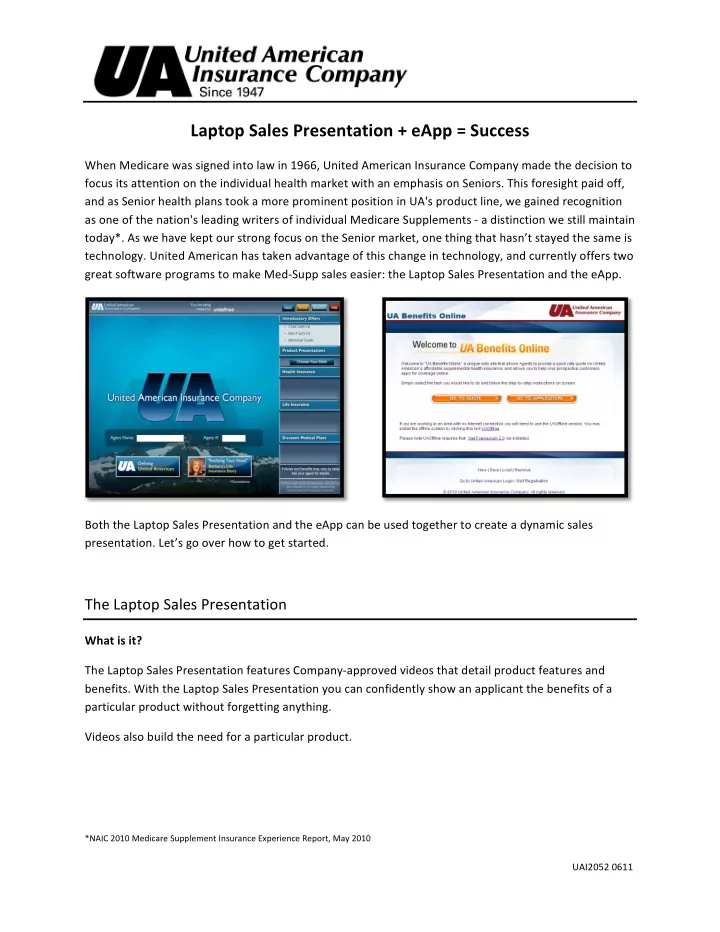
great ¡software ¡programs ¡to ¡make ¡Med-­‑Supp ¡sales ¡easier: ¡the ¡Laptop ¡Sales ¡Presentation ¡and ¡the ¡eApp. ¡ ¡ ¡ ¡ ¡ ¡ ¡ ¡ ¡ ¡ ¡ ¡ ¡ ¡ Both ¡the ¡Laptop ¡Sales ¡Presentation ¡and ¡the ¡eApp ¡can ¡be ¡used ¡together ¡to ¡create ¡a ¡dynamic ¡sales ¡

  • presentation. ¡Let’s ¡go ¡over ¡how ¡to ¡get ¡started. ¡ ¡

¡

The ¡Laptop ¡Sales ¡Presentation ¡

What ¡is ¡it? ¡ ¡ ¡ The ¡Laptop ¡Sales ¡Presentation ¡features ¡Company-­‑approved ¡videos ¡that ¡detail ¡product ¡features ¡and ¡

  • benefits. ¡With ¡the ¡Laptop ¡Sales ¡Presentation ¡you ¡can ¡confidently ¡show ¡an ¡applicant ¡the ¡benefits ¡of ¡a ¡

particular ¡product ¡without ¡forgetting ¡anything. ¡ Videos ¡also ¡build ¡the ¡need ¡for ¡a ¡particular ¡product. ¡ ¡ ¡ ¡ ¡

slide-2
SLIDE 2

¡ ¡

¡ ¡ ¡ ¡ ¡ ¡ ¡ ¡ ¡UAI2052 ¡0611 ¡ ¡

¡ ¡ ¡ ¡ ¡ ¡ ¡ ¡ ¡ ¡ ¡ ¡ ¡ ¡ ¡ ¡ Next, ¡you ¡can ¡show ¡Barbara’s ¡story ¡or ¡Renee’s ¡story. ¡Both ¡stories ¡demonstrate ¡the ¡need ¡for ¡final ¡ expense ¡coverage. ¡Then ¡you ¡can ¡show ¡other ¡presentations ¡as ¡you ¡get ¡a ¡feel ¡for ¡what ¡type ¡of ¡product ¡the ¡ applicant ¡is ¡looking ¡for. ¡ ¡ Now ¡that ¡you ¡know ¡how ¡important ¡the ¡Laptop ¡Sales ¡Presentation ¡is, ¡you’ll ¡need ¡to ¡know ¡how ¡to ¡ download ¡it. ¡There’s ¡a ¡guide ¡on ¡UA ¡General ¡Agency ¡Office ¡that ¡describes ¡this ¡process ¡in ¡great ¡detail. ¡ We’ll ¡show ¡you ¡how ¡to ¡find ¡the ¡installation ¡guide ¡in ¡the ¡‘Installation’ ¡section. ¡ ¡ Installation ¡ Make ¡sure ¡your ¡Laptop ¡meets ¡these ¡minimum ¡requirements ¡before ¡you ¡begin ¡installing ¡the ¡Laptop ¡Sales ¡ Presentation: ¡

  • CPU: ¡1.6 ¡GHz ¡Pentium ¡
  • RAM: ¡1-­‑2 ¡GB ¡
  • Operating ¡System: ¡Windows ¡XP ¡or ¡newer ¡
  • 40 ¡GB ¡Hard ¡Drive ¡(2MB ¡required) ¡

To ¡check ¡your ¡current ¡computer ¡settings ¡click ¡‘Start’ ¡and ¡right ¡click ¡‘My ¡Computer.’ ¡Click ¡‘Properties’ ¡and ¡ your ¡current ¡system ¡settings ¡will ¡be ¡displayed. ¡ ¡

slide-3
SLIDE 3

¡ ¡

¡ ¡ ¡ ¡ ¡ ¡ ¡ ¡ ¡UAI2052 ¡0611 ¡ ¡

¡ To ¡get ¡complete ¡installation ¡instructions ¡for ¡the ¡Laptop ¡Sales ¡Presentation: ¡ ¡

  • Go ¡to ¡UAOnline ¡at ¡unitedamerican.com/logon ¡ ¡
  • Log ¡in ¡using ¡your ¡username ¡and ¡password ¡ ¡
  • Click ¡‘UA ¡General ¡Agency ¡Office’ ¡
  • Click ¡‘Instructions’ ¡under ¡Laptop ¡Presentation ¡ ¡

This ¡document ¡will ¡provide ¡you ¡with ¡instructions ¡to ¡download ¡the ¡Laptop ¡Sales ¡Presentation. ¡The ¡ download ¡link ¡is ¡also ¡located ¡in ¡the ¡same ¡location ¡when ¡you’re ¡ready ¡to ¡download ¡the ¡Laptop ¡Sales ¡

  • Presentation. ¡ ¡ ¡

¡

slide-4
SLIDE 4

¡ ¡

¡ ¡ ¡ ¡ ¡ ¡ ¡ ¡ ¡UAI2052 ¡0611 ¡ ¡

¡ ¡ Now ¡that ¡you ¡know ¡what ¡the ¡Laptop ¡Sales ¡Presentation ¡is ¡and ¡where ¡to ¡download ¡it, ¡let’s ¡take ¡a ¡look ¡at ¡ the ¡eApp. ¡ ¡ ¡

The ¡eApp ¡

What ¡is ¡it? ¡ ¡ ¡ The ¡eApp, ¡or ¡electronic ¡application, ¡is ¡an ¡application ¡that ¡is ¡completed ¡electronically ¡on ¡a ¡computer. ¡The ¡ electronic ¡application ¡is ¡a ¡relatively ¡new ¡innovation ¡in ¡the ¡insurance ¡field, ¡and ¡United ¡American ¡has ¡ developed ¡one ¡that’s ¡quick ¡and ¡convenient ¡for ¡their ¡Agents. ¡ The ¡eApp ¡has ¡applications ¡for: ¡ ¡

  • Foundation ¡Signature ¡Series ¡(MMGAP) ¡ ¡
  • ProCare ¡Medicare ¡Supplement ¡Individual ¡/ ¡Disability ¡
  • Plans ¡A, ¡B, ¡C, ¡D, ¡F, ¡G, ¡HDF, ¡and ¡N ¡– ¡where ¡state ¡approved ¡

Additional ¡applications ¡for ¡other ¡products ¡and ¡required ¡forms ¡may ¡also ¡be ¡included. ¡ ¡

slide-5
SLIDE 5

¡ ¡

¡ ¡ ¡ ¡ ¡ ¡ ¡ ¡ ¡UAI2052 ¡0611 ¡ ¡

¡ The ¡eApp ¡is ¡much ¡more ¡convenient ¡than ¡paper ¡applications. ¡The ¡most ¡beneficial ¡advantage ¡is ¡that ¡the ¡ system ¡won’t ¡allow ¡you ¡to ¡miss ¡answering ¡a ¡question. ¡Since ¡the ¡eApp ¡is ¡electronic, ¡it’s ¡also ¡easier ¡and ¡ faster ¡to ¡send ¡the ¡application ¡to ¡Home ¡Office. ¡Other ¡benefits ¡of ¡the ¡eApp ¡include: ¡ ¡

  • Quick, ¡accurate ¡rate ¡quote—rates ¡are ¡programmed ¡in ¡the ¡system ¡
  • Saves ¡you ¡and ¡the ¡applicant ¡time ¡because ¡it’s ¡electronic ¡ ¡
  • Reduces ¡use ¡of ¡paper ¡ ¡ ¡
  • Bank ¡routing ¡numbers ¡are ¡verified ¡using ¡an ¡electronic ¡bank ¡verification ¡feature ¡
  • Electronically ¡attaches ¡applicant ¡documentation ¡required ¡for ¡policy ¡issue ¡if ¡an ¡applicant’s ¡

previous ¡coverage ¡was ¡terminated ¡

  • Includes ¡applications ¡for ¡optional ¡products ¡and ¡services ¡so ¡you ¡can ¡make ¡the ¡most ¡of ¡your ¡sale ¡

The ¡application ¡is ¡easy ¡to ¡go ¡through ¡and, ¡since ¡the ¡applicant ¡is ¡sitting ¡there ¡with ¡you, ¡it’s ¡fast ¡too. ¡ ¡ ¡ Installation ¡ Make ¡sure ¡your ¡Laptop ¡meets ¡these ¡minimum ¡requirements ¡before ¡you ¡begin ¡installing ¡the ¡eApp: ¡

  • CPU: ¡1.6 ¡GHz ¡Pentium ¡
  • RAM: ¡1-­‑2 ¡GB ¡
  • Operating ¡System: ¡Windows ¡XP ¡or ¡newer ¡
  • 40 ¡GB ¡Hard ¡Drive ¡(2MB ¡required) ¡

To ¡check ¡your ¡current ¡computer ¡settings ¡click ¡‘Start’ ¡and ¡right ¡click ¡‘My ¡Computer.’ ¡Click ¡‘Properties’ ¡and ¡ your ¡current ¡system ¡settings ¡will ¡be ¡displayed. ¡ ¡

slide-6
SLIDE 6

¡ ¡

¡ ¡ ¡ ¡ ¡ ¡ ¡ ¡ ¡UAI2052 ¡0611 ¡ ¡

¡ To ¡download ¡the ¡UA ¡eApp, ¡go ¡to ¡UAOnline ¡at ¡unitedamerican.com/logon ¡and ¡log ¡in ¡using ¡your ¡ username ¡and ¡password. ¡Click ¡‘eApplication,’ ¡and ¡then ¡click ¡‘UAOffline.’ ¡[This ¡will ¡change ¡to ¡redirect ¡to ¡ the ¡eApp ¡installation ¡guide ¡when ¡link ¡is ¡updated.] ¡ ¡ ¡ ¡

slide-7
SLIDE 7

¡ ¡

¡ ¡ ¡ ¡ ¡ ¡ ¡ ¡ ¡UAI2052 ¡0611 ¡ ¡

¡

The ¡Laptop ¡Sales ¡Presentation ¡and ¡the ¡eApp ¡

Two ¡different ¡programs ¡ United ¡American ¡is ¡providing ¡you ¡with ¡two ¡great ¡tools. ¡Now ¡that ¡you ¡know ¡how ¡to ¡access ¡both, ¡be ¡sure ¡ to ¡lead ¡into ¡the ¡sale ¡with ¡the ¡Laptop ¡Sales ¡Presentation, ¡and ¡close ¡the ¡sale ¡with ¡the ¡eApp. ¡ ¡ ¡ ¡ ¡ ¡ ¡ ¡ ¡ ¡ ¡ ¡ ¡ ¡ ¡ ¡ ¡ ¡ ¡ ¡ ¡ ¡ ¡ ¡ ¡ ¡ ¡ ¡ ¡ ¡ ¡ ¡ ¡ ¡ ¡ Building ¡the ¡need ¡and ¡closing ¡the ¡sale ¡ During ¡a ¡sales ¡appointment ¡with ¡a ¡Senior, ¡show ¡the ¡ProCare ¡Laptop ¡Sales ¡Presentation ¡to ¡illustrate ¡the ¡ need ¡for ¡the ¡product. ¡After ¡the ¡video, ¡you ¡can ¡switch ¡over ¡to ¡the ¡eApp ¡and ¡provide ¡the ¡applicant ¡with ¡a ¡

  • quote. ¡You ¡already ¡have ¡your ¡laptop ¡out, ¡so ¡why ¡would ¡you ¡use ¡a ¡paper ¡application? ¡It ¡looks ¡

professional ¡if ¡you ¡stay ¡with ¡your ¡laptop, ¡plus ¡it ¡can ¡save ¡you ¡and ¡the ¡applicant ¡time. ¡ ¡ You’ll ¡always ¡be ¡prepared ¡using ¡the ¡Laptop ¡Sales ¡Presentation ¡with ¡the ¡eApp. ¡So ¡start ¡using ¡both ¡today! ¡ ¡