SLIDE 1
About My New Laptop
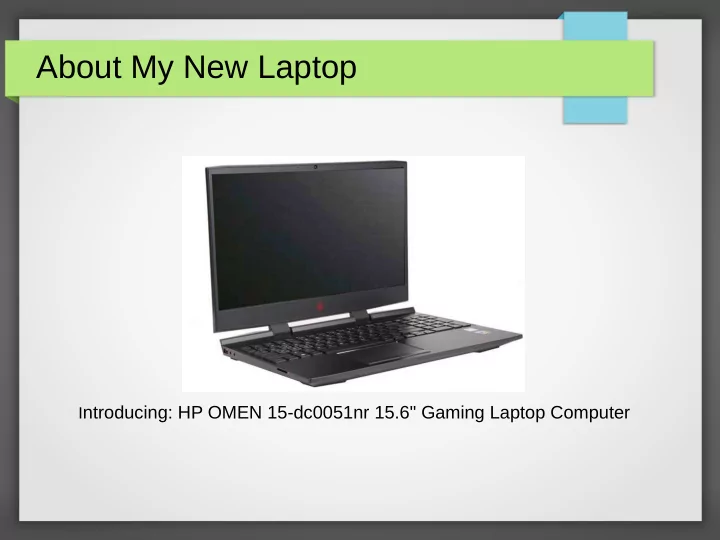
Introducing: HP OMEN 15-dc0051nr 15.6" Gaming Laptop Computer
SLIDE 2
The Reason for Purchasing
Performance Price/Value
From Microcenter Website
SLIDE 3
Overview of Specs
From Microcenter Website
SLIDE 4
More Spec Details:
Specs per Microcenter website HP Omen 15
SLIDE 5
Physical Comparison
New: HP Omen 15, 2018 Old: HP HDX 16t, 2009 Vintage Size: 14.9” x 10.0” x 1.7” Weight: 6.8 lbs Key size: 0.72” x 0.72” Shiny display Size: 14.17” x 10.35” x 1.02” Weight: 5.56 lbs Key size: 0.61” x 0.61” Matte display
SLIDE 6
Connections:
Back Left Side Right Side
SLIDE 7
Keyboard
SLIDE 8
Back Cover Removed
Memory 16GB M.2 SSD 256 GB HDD 1 TB Cooling Fan Battery
SLIDE 9 Performance Tests
– Demo –
– Demo
SLIDE 10
Comparison of My PC’s
SLIDE 11
HP Omen 15: 2018 Vintage
SLIDE 12
HP HDX 16t: 2009 Vintage
SLIDE 13
HP Micro Tower: Pentium, 2011 Vintage
SLIDE 14
Desktop 4770K: 4th Gen, 2013 Vintage
SLIDE 15
PassMark Test 9.0 Comparison
Computer HP HDX 16t HP Microtower 4770 K Desktop HP Omen 15 CPU Frequency/OS 2.9 GHz Win 10 Pro 2.6 GHz Win7 Pro 4.0 GHz Win 10 Pro 4.0 GHz Win 10 Home Value %tile Value %tile Value %tile Value %tile
Passmark Rating
1087 20 922 16 4415 86 5552 96
CPU Mark 2117 15 2514 18 10910 89 12131 93 2D Graphics 381 23 474 35 793 78 810 80 3D Graphics 209 17 168 17 4201 71 9492 93 Memory Mark 887 20 1443 46 2582 86 2577 86 Disk Mark 10942 98 594 22 7627 96 14348 99
SLIDE 16
3DMark11 Test for HP Omen & 4770K
HP Omen 15 with Nvidia 1060 GPU 4770 K with Nvida GTX 760 GPU
SLIDE 17
Computing Pi Test: 3.14159……………...
Computer CPU/ /Speed 1 Million 10 Million HP HDX 16t 2 cores/ 2.8 GHz 1.5 sec 25.66 sec HP MicroTower 2 cores/ 2.6 GHz 1.33 sec 25.29 sec 4770K Desktop 4 cores/ 4.1 GHz 0.72 sec 12.08 sec HP Omen 6 cores/ 4.0 GHz 0.77 sec 12.08 sec
Using PiFast: Calculate Pi to 1 million and 10 million digits
PiFast Website Demo calculating Pi How these results compare to early computers?
SLIDE 18 HP Omen 15/Windows 10 Features
- Now going to talk/demo about more features of the the HP
Omen laptop combined with Windows 10:
– Driving 2K and 4K Displays simultaneously – Omen Command Center – Windows Mixed Reality Portal – Windows Mixed Reality Viewer – Touch-pad multiple finger functions – Keep plugged in or NOT
SLIDE 19
HP Omen 15 2K & 4K Monitor
Asus MG28UQ 27” 4K Monitor Connected via Displayport 3840 x 2160 Omen 15.6” 2K Display 1920 x 1080
SLIDE 20
Omen 15 Display Res: 1920 x 1080
SLIDE 21
4K Monitor Res: 3840 x2160
SLIDE 22
Blank Slide
My Experience with Virtual Reality (VR)
SLIDE 23
My experience with Virtual Reality (VR)
SLIDE 24
Open Oculus Rift Kit Package
SLIDE 25
Oculus Rift Detail
Courtesy: Oculus Website
SLIDE 26
My Oculus Rigt-Omen Setup
SLIDE 27 Oculus Rift Kit & PC Requirements
- As shown Cost $399 (Microcenter, Bestbuy, Amazon)
- Requires 3 ports: 1 HDMI, 3 USB 3’s
- GPU:NVIDIA GTX 1060 / AMD Radeon RX 480 or greater
- CPU:Intel i5-4590 / AMD Ryzen 5 1500X or greater
- RAM Memeory: 8GB +
- OS: Windows 10
- The Oculus Rift does not work with Windows Mixed Reality
SLIDE 28 My Experience So Far….
- Setup took about an hour, following tutorial steps
- One defines a 5 x 7 ft safety zone as part of set up.
- Resolution is 2160x 1200 (1080x1200 per eyeball but Image is
pixelated/grainy. (current state-of the art)
- Power supply has to be plugged in to work headset
- The Omen runs “hot”, fans at full speed, when doing VR
- 360 degree viewing with the 2 sensors
- Headset includes earphones; audio is very good
- In VR, hand controllers appear as white hands; they move as a
natural extension of your arms
SLIDE 29 My Experience continued...
- There are 27 free programs on Oculus website and 100s of games.
- Programs I played with:
– Google Earth VR (5GB download) – Earth is a 3D globe – Use controllers to zoom in/out, pick a place on the globe – Real easy to fly over terrain e.g Alps, Cities, etc – Visited Rome Colosseum with 360 3D street views – Street views are static – Smithonian Journeys: Venice (19.1GB download) – You are on piazza’s and canals in 360 with a University of Toronto
historian providing commentary.
– There is motion in 360. People, are live; gondolas move!!!
SLIDE 30 My Experience continued:
- I sit in a my rotating office chair while viewing.
- I have to wear my glasses to get clearest images. Requires
me to make headset adjustments
- The controllers are comfortable and easy to use.
- No feelings of “Vertigo” when suspended in air next to top
- f Eiffel Tower. Or on top of Matterhorn.
- No nausea when moving head or flying over Alps.
- Do feel slight nausea after maybe 30 minute session
- Will work on demoing it at my next presentation in the fall!