Karnaugh Maps (K-Maps) Boolean expressions can be minimized by - - PowerPoint PPT Presentation

β–Ά
karnaugh maps k maps
SMART_READER_LITE
LIVE PREVIEW

Karnaugh Maps (K-Maps) Boolean expressions can be minimized by - - PowerPoint PPT Presentation

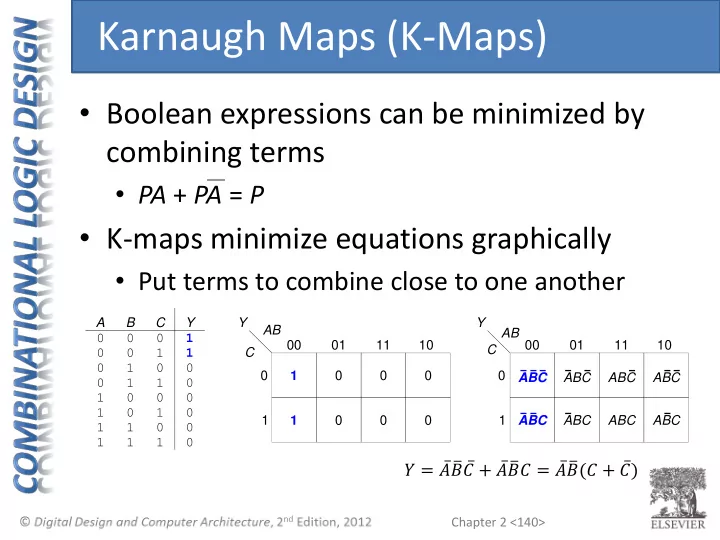
Karnaugh Maps (K-Maps) Boolean expressions can be minimized by combining terms PA + PA = P K-maps minimize equations graphically Put terms to combine close to one another A B C Y Y Y AB AB 0 0 0 1 00 01 11 10 00 01


slide-1
SLIDE 1

Chapter 2 <140>

  • Boolean expressions can be minimized by

combining terms

  • PA + PA = P
  • K-maps minimize equations graphically
  • Put terms to combine close to one another

C 00 01 1 Y 11 10 AB 1 1 C 00 01 1 Y 11 10 AB ABC ABC ABC ABC ABC ABC ABC ABC B C 1 1 1 1 A 1 1 1 1 1 1 1 1 1 1 Y

Karnaugh Maps (K-Maps)

𝑍 = 𝐡 𝐢 𝐷 + 𝐡 𝐢 𝐷 = 𝐡 𝐢 (𝐷 + 𝐷 )

slide-2
SLIDE 2

Chapter 2 <141>

C 00 01 1 Y 11 10 AB 1 1

B C 1 1 1 1 A 1 1 1 1 1 1 1 1 1 1 Y

  • Circle 1’s in adjacent squares
  • In Boolean expression, include only

literals whose true and complement form are not in the circle

𝑍 = 𝐡 𝐢

K-Map

𝐷 not included because both 𝐷 and 𝐷 included in circle

slide-3
SLIDE 3

Chapter 2 <142>

C 00 01 1 Y 11 10 AB ABC ABC ABC ABC ABC ABC ABC ABC

1 B C Y 1 1 1 1 1 Truth Table C 00 01 1 Y 11 10 AB A 1 1 1 1 1 1 1 1 1 K-Map

3-Input K-Map

slide-4
SLIDE 4

Chapter 2 <143>

  • Complement: variable with a bar over it

A, B, C

  • Literal: variable or its complement

A, A, B, B, C, C

  • Implicant: product of literals

ABC, AC, BC

  • Prime implicant: implicant corresponding to

the largest circle in a K-map

K-Map Definitions

slide-5
SLIDE 5

Chapter 2 <144>

  • Every 1 must be circled at least once
  • Each circle must span a power of 2 (i.e. 1, 2,

4) squares in each direction

  • Each circle must be as large as possible
  • A circle may wrap around the edges
  • A β€œdon't care” (X) is circled only if it helps

minimize the equation

K-Map Rules

slide-6
SLIDE 6

Chapter 2 <145>

01 11 01 11 10 00 00 10 AB CD Y C D 1 1 1 1 B 1 1 1 1 1 1 1 1 1 1 1 1 1 1 Y A 1 1 1 1 1 1 1 1 1 1 1 1 1 1 1 1 1 1 1 1 1 1 1

4-Input K-Map

slide-7
SLIDE 7

Chapter 2 <146>

01 11 1 1 1 1 01 1 1 1 1 1 11 10 00 00 10 AB CD Y C D 1 1 1 1 B 1 1 1 1 1 1 1 1 1 1 1 1 1 1 Y A 1 1 1 1 1 1 1 1 1 1 1 1 1 1 1 1 1 1 1 1 1 1 1

4-Input K-Map

slide-8
SLIDE 8

Chapter 2 <147>

01 11 1 1 1 1 01 1 1 1 1 1 11 10 00 00 10 AB CD Y Y = AC + ABD + ABC + BD C D 1 1 1 1 B 1 1 1 1 1 1 1 1 1 1 1 1 1 1 Y A 1 1 1 1 1 1 1 1 1 1 1 1 1 1 1 1 1 1 1 1 1 1 1

4-Input K-Map

slide-9
SLIDE 9

Chapter 2 <148>

C D 1 1 1 1 B 1 1 1 1 1 1 1 1 1 1 1 X 1 1 Y A 1 1 1 1 1 1 1 1 1 1 1 1 1 1 1 1 1 1 1 1 1 1 X X X X X X 01 11 01 11 10 00 00 10 AB CD Y

K-Maps with Don’t Cares

slide-10
SLIDE 10

Chapter 2 <149>

C D 1 1 1 1 B 1 1 1 1 1 1 1 1 1 1 1 X 1 1 Y A 1 1 1 1 1 1 1 1 1 1 1 1 1 1 1 1 1 1 1 1 1 1 X X X X X X 01 11 1 X X X 1 1 01 1 1 1 1 X X X X 11 10 00 00 10 AB CD Y

K-Maps with Don’t Cares

slide-11
SLIDE 11

Chapter 2 <150>

C D 1 1 1 1 B 1 1 1 1 1 1 1 1 1 1 1 X 1 1 Y A 1 1 1 1 1 1 1 1 1 1 1 1 1 1 1 1 1 1 1 1 1 1 X X X X X X 01 11 1 X X X 1 1 01 1 1 1 1 X X X X 11 10 00 00 10 AB CD Y Y = A + BD + C

K-Maps with Don’t Cares

slide-12
SLIDE 12

Chapter 2 <151>

01 11 1 1 1 1 01 1 1 1 1 1 11 10 00 00 10 AB CD Y C D 1 1 1 1 B 1 1 1 1 1 1 1 1 1 1 1 1 1 1 Y A 1 1 1 1 1 1 1 1 1 1 1 1 1 1 1 1 1 1 1 1 1 1 1

4-Input K-Map: POS & SOP Form

slide-13
SLIDE 13

Chapter 2 <152>

01 11 1 1 1 1 01 1 1 1 1 1 11 10 00 00 10 AB CD Y Y = AC + ABD + ABC + BD C D 1 1 1 1 B 1 1 1 1 1 1 1 1 1 1 1 1 1 1 Y A 1 1 1 1 1 1 1 1 1 1 1 1 1 1 1 1 1 1 1 1 1 1 1

4-Input K-Map: POS Form

slide-14
SLIDE 14

Chapter 2 <153>

01 11 1 1 1 1 01 1 1 1 1 1 11 10 00 00 10 AB CD Y C D 1 1 1 1 B 1 1 1 1 1 1 1 1 1 1 1 1 1 1 Y A 1 1 1 1 1 1 1 1 1 1 1 1 1 1 1 1 1 1 1 1 1 1 1

4-Input K-Map: SOP Form

slide-15
SLIDE 15

Chapter 2 <154>

  • β€œAdd” literal/complement terms to reverse

simplification (οƒ expand literal)

  • Example
  • 𝑍 = 𝐷
  • 𝑍 = 𝐷 + 𝐡𝐡
  • 𝑍 = 𝐷 + 𝐡 β‹… (𝐷 + 𝐡 )
  • 𝑍 = [ 𝐷 + 𝐡 + 𝐢𝐢

](𝐷 + 𝐡 )

  • 𝑍 =

𝐷 + 𝐡 + 𝐢 𝐷 + 𝐡 + 𝐢 𝐷 + 𝐡

  • …

Canonical POS Expansion

slide-16
SLIDE 16

Chapter 2 <155>

  • Multiplexers
  • Decoders

Combinational Building Blocks

slide-17
SLIDE 17

Chapter 2 <156>

  • Selects between one of N inputs to connect

to output

  • log2N-bit required to select input – control

input S

  • Example:

2:1 Mux (2 inputs to 1 output)

  • 𝑂 = 2
  • log2 2 = 1 control bit required

Multiplexer (Mux)

Y 1 1 1 1 1 1 1 1 1 1 1 1 1 1 1 1 1 S D0 Y D1 D1 D0 S Y 1 D1 D0 S

slide-18
SLIDE 18

Chapter 2 <157>

2-<157>

  • Logic gates
  • Sum-of-products form

Y D0 S D1

D1 Y D0 S S 00 01 1 Y 11 10 D0 D1 1 1 1 1 Y = D0S + D1S

  • Tristates
  • For an N-input mux, use N

tristates

  • Turn on exactly one to

select the appropriate input

Multiplexer Implementations

slide-19
SLIDE 19

Chapter 2 <158>

A B Y 1 1 1 1 1 Y = AB

00

Y

01 10 11

A B

  • Using the mux as a lookup

table

  • Zero outputs tied to GND
  • One output tied to VDD

Logic using Multiplexers

slide-20
SLIDE 20

Chapter 2 <159>

A B Y 1 1 1 1 1 Y = AB A Y 1 1 A B Y B

  • Reducing the size of the mux

Logic using Multiplexers

slide-21
SLIDE 21

Chapter 2 <160>

2:4 Decoder A1 A0 Y3 Y2 Y1 Y0 00 01 10 11 1 1 1 1 1 Y3 Y2 Y1 Y0 A0 A1 1 1 1

  • N inputs, 2N outputs
  • One-hot outputs: only
  • ne output HIGH at once
  • Example

2:4 Decoder (2 inputs to 4 outputs)

  • 𝐡𝑗 decimal value selects the

corresponding output

Decoders

slide-22
SLIDE 22

Chapter 2 <161>

Y3 Y2 Y1 Y0 A0 A1

Decoder Implementation

slide-23
SLIDE 23

Chapter 2 <162>

2:4 Decoder A B 00 01 10 11 Y = AB + AB Y AB AB AB AB Minterm = A οƒ… B

  • OR minterms

Logic Using Decoders

XNOR function

slide-24
SLIDE 24

Chapter 2 <163>

  • Delay between input change and output

changing

  • How to build fast circuits?

A Y Time delay A Y

Timing

slide-25
SLIDE 25

Chapter 2 <164>

A Y Time A Y tpd tcd

  • Propagation delay: tpd = max delay from input to final output
  • Contamination delay: tcd = min delay from input to initial output

change

Propagation & Contamination Delay

Note: Timing diagram shows a signal with a high and low and transition time as an β€˜X’. Cross hatch indicates unknown/changing values

slide-26
SLIDE 26

Chapter 2 <165>

  • Delay is caused by
  • Capacitance and resistance in a circuit
  • Speed of light limitation
  • Reasons why tpd and tcd may be different:
  • Different rising and falling delays
  • Multiple inputs and outputs, some of which are

faster than others

  • Circuits slow down when hot and speed up when

cold

Propagation & Contamination Delay

slide-27
SLIDE 27

Chapter 2 <166>

A B C D Y Critical Path Short Path n1 n2

Critical (Long) Path: tpd = 2tpd_AND + tpd_OR Short Path: tcd = tcd_AND

Critical (Long) & Short Paths

slide-28
SLIDE 28

Chapter 2 <167>

  • When a single input change causes an output

to change multiple times

Glitches

slide-29
SLIDE 29

Chapter 2 <168>

A B C Y 00 01 1 Y 11 10 AB 1 1 1 1 C Y = AB + BC

  • What happens when A = 0, C = 1, B falls?

Glitch Example

slide-30
SLIDE 30

Chapter 2 <169>

A = 0 B = 1 0 C = 1 Y = 1 0 1 Short Path Critical Path B Y Time 1 0 0 1 glitch

n1 n2

n2 n1

Glitch Example (cont.)

Note: n1 is slower than n2 because of the extra inverter for B to go through

slide-31
SLIDE 31

Chapter 2 <170>

00 01 1 Y 11 10 AB 1 1 1 1 C Y = AB + BC + AC AC

B = 1 0 Y = 1 A = 0 C = 1

Fixing the Glitch

Consensus term

slide-32
SLIDE 32

Chapter 2 <171>

  • Glitches shouldn’t cause problems because
  • f synchronous design conventions (see

Chapter 3)

  • It’s important to recognize a glitch: in

simulations or on oscilloscope

  • Can’t get rid of all glitches – simultaneous

transitions on multiple inputs can also cause glitches

Why Understand Glitches?